A customer can place an order in a few minutes. Keeping a same-day delivery promise takes much more than fast driving.
A florist may need to prepare a bouquet, print a greeting card and protect it for travel. A gift shop may need to assemble several add-ons. A bakery may need preparation time, careful packaging and a delivery window that protects the product. In every case, the driver is only one part of the journey.
The delivery promise begins when the business decides which customers can choose same-day delivery, what it will cost, which time slots are available and how late an order can be accepted. It continues through payment, branch capacity, stock, preparation, quality checks, driver assignment, customer communication and the final handoff.
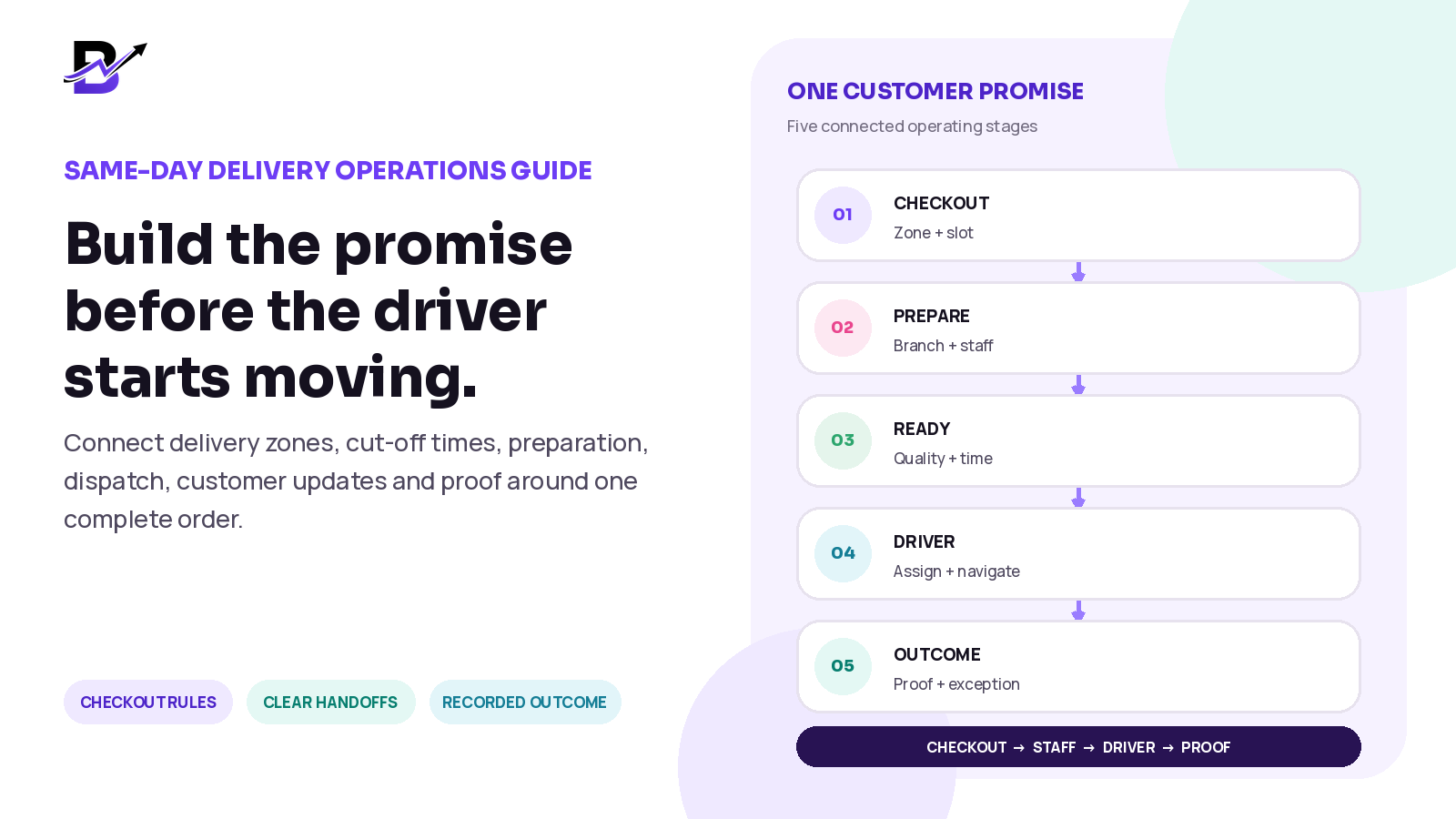
Direct Answer: Build same-day delivery as one operating workflow. Start with clear zones, charges, minimum-order rules, cut-off times, dates and time slots. Capture a complete order and validate stock, payment, branch capacity and the delivery promise before accepting it. Let staff prepare against the same record, dispatch only when the order is ready, give the driver the approved context, then record delivered, failed, returned or rescheduled outcomes with the proof or notes your business requires.
This guide is for florists, gifting brands, bakeries, cake shops, perfume stores, jewellery stores and other specialty retailers that fulfil local orders quickly. The exact timings, charges, proof requirements and delivery rules will vary by business and country.
In this guide
Why same-day delivery is an operating promise, not only a driver task
How to define delivery zones, charges, minimum orders, cut-off times and slots
How to calculate the real time available before showing a delivery promise
What information the order, staff and driver need
A complete workflow from checkout to proof of delivery
How to manage failed, returned and rescheduled deliveries
How to separate dispatch management from advanced route optimisation
How Bloomlytix can connect delivery with orders, staff, branches and reports
Same-day delivery is an operating promise
Many delivery problems are created before the driver receives the order. The customer may be offered an impossible slot. The wrong branch may accept the work. Preparation may start too late. An address may be incomplete. A driver may be assigned before the product is ready. Customer service may not know whether the order is still in the shop or already on the road.
A strong workflow makes each promise visible and gives every stage a clear owner. It also keeps the same order context connected from checkout to the final result.
STAGE | QUESTION THE BUSINESS MUST ANSWER |
|---|---|
Customer promise | Where can we deliver, on which dates, in which time windows and at what charge? |
Eligibility | Can the selected product, branch, address and order value use this delivery option? |
Payment | Is the order paid, awaiting payment, cash-on-delivery where permitted, or approved through another method? |
Acceptance | Do we have the stock, staff, preparation time, branch capacity and delivery capacity to keep the promise? |
Preparation | Who is preparing the order, what is the deadline and what must be checked before it is ready? |
Dispatch | Which ready order should go with which driver, and what delivery context must travel with it? |
Doorstep | What counts as a successful handoff, and what should happen if the recipient or location is unavailable? |
Closure | How will the result, proof, cash, exception reason and customer follow-up be recorded? |
Key Principle: The customer sees one delivery promise. The business must manage all the hidden steps required to keep it.
Define the service rules before accepting orders
Do not begin with a large map and the words “same-day delivery everywhere.” Begin with the areas and order types your team can serve consistently. Make the customer-facing rule match the branch, stock, preparation and driver reality behind it.
RULE | DECISION TO MAKE | EXAMPLE OF A CLEAR SETTING |
|---|---|---|
Delivery area | Which zones, postcodes, cities, radius bands or named communities can each branch serve? | Zone A: nearby area. Zone B: extended area. Outside zone: quote or unavailable. |
Delivery charge | Is the fee fixed, different by zone, or reduced above an order value? | Zone A has one charge; Zone B has a higher charge; free delivery starts above a chosen value. |
Minimum order | Does the delivery cost require a minimum basket value for a zone or product type? | Local delivery is available only when the order reaches the configured minimum. |
Cut-off time | What is the latest safe time to accept a same-day order for each product, branch and slot? | Standard items until 3:00 PM; complex custom items close earlier. |
Date availability | Which days are open, closed, full or limited? | The calendar hides closed dates and can close a date when capacity is full. |
Time slots | How wide should the window be, and how many orders can the operation support? | 12-3 PM, 3-6 PM and 6-9 PM, with limits based on real capacity. |
Product eligibility | Which products can be prepared and transported safely within the promise? | Ready products are eligible; complex custom products require a later date or manual approval. |
Branch eligibility | Which location has stock, staff and permission to fulfil the order? | The assigned branch must be able to prepare the complete order. |
Peak-day rule | What changes on Valentine’s Day, Mother’s Day, Eid, Christmas or other high-volume periods? | Fewer products, earlier cut-offs, wider slots and capped capacity. |
Common ecommerce systems use location-level delivery areas, distance or postcode eligibility, minimum-order values and delivery prices. That is useful only when the operations behind those settings are also ready.
Operational reference: Shopify local-delivery setup · Shopify fulfilment setup
Calculate the real time available
A cut-off time should not be chosen because it looks competitive. Work backward from the start of the promised delivery window and subtract every step the order needs.
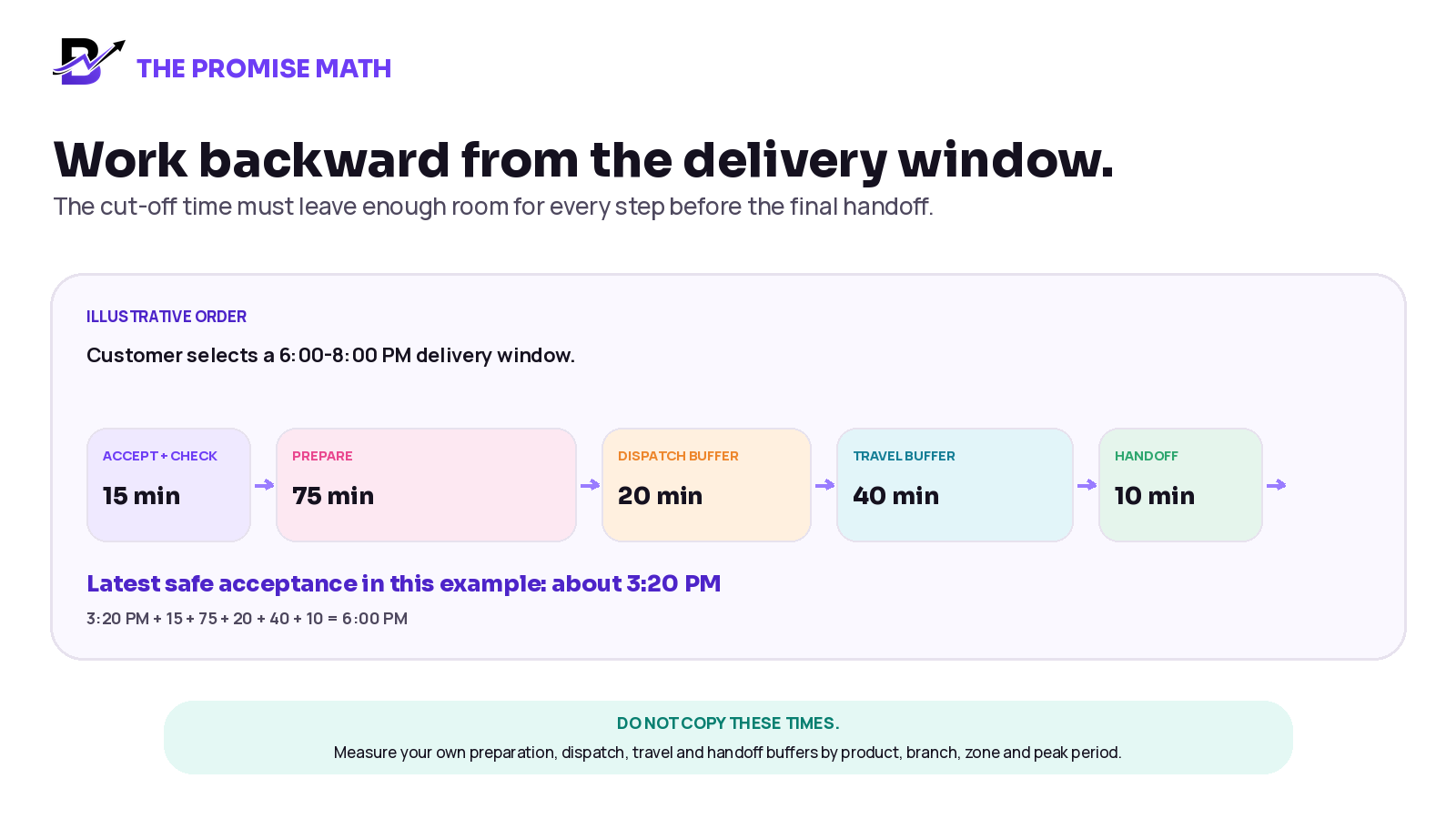
Figure 1. A cut-off time should be based on measured operating time. The example is illustrative and should not be copied without local data.
TIME COMPONENT | WHAT TO MEASURE |
|---|---|
Order validation | Time to confirm payment, stock, product details, address, branch and capacity. |
Preparation | Typical and peak preparation time by product type, including custom work and packaging. |
Quality check | Time to review product, add-ons, message, presentation and delivery label. |
Dispatch buffer | Time between “ready” and the driver actually leaving the branch. |
Travel buffer | Expected travel plus a realistic allowance for traffic, parking, building access and handoff. |
Doorstep time | Time for reception, recipient contact, signature, photo, note or other configured proof. |
Exception reserve | Extra time or capacity for address correction, product issue, driver delay or recipient change. |
Practical Rule: Use your own historical timings. Separate normal days from peak days, and separate simple ready products from complex custom orders.
Capture one complete delivery order
The driver should not receive a location pin with no order context. The branch should not receive a product request with no delivery deadline. The order record should carry the information each role needs, with access limited to the right people.
INFORMATION GROUP | WHAT TO CAPTURE | WHY IT MATTERS |
|---|---|---|
Order identity | Order number, source, date, branch, owner and current status. | Makes the work searchable and shows responsibility. |
Product + preparation | Items, size, colour, flavour, add-ons, message, packaging and approved notes. | Defines exactly what must be ready before dispatch. |
Payment | Amount, delivery charge, discount, payment method and paid, pending or refunded state. | Prevents fulfilment and collection assumptions. |
Customer / sender | Name and permitted contact details for confirmation or support. | Supports payment, change requests and customer service. |
Recipient | Name, permitted contact details and handoff instruction. | Helps the driver complete the delivery respectfully. |
Address | Area, building or villa, unit or floor, landmark, location link and access note where applicable. | Turns an address into a usable driver brief. |
Delivery promise | Date, time slot, zone, charge, minimum-order result and special handling. | Keeps the customer-facing promise visible to staff and drivers. |
Operational ownership | Assigned branch, preparation owner, ready deadline and driver assignment. | Shows who owns the next action. |
Outcome | Delivered, failed, returned or rescheduled state, time, reason, notes and configured proof. | Closes the order with a clear result. |
Privacy Note: Capture the operational details the team needs. Do not copy unnecessary private conversations into the order, and configure access and proof requirements according to your business policy and local obligations.
Build the end-to-end workflow
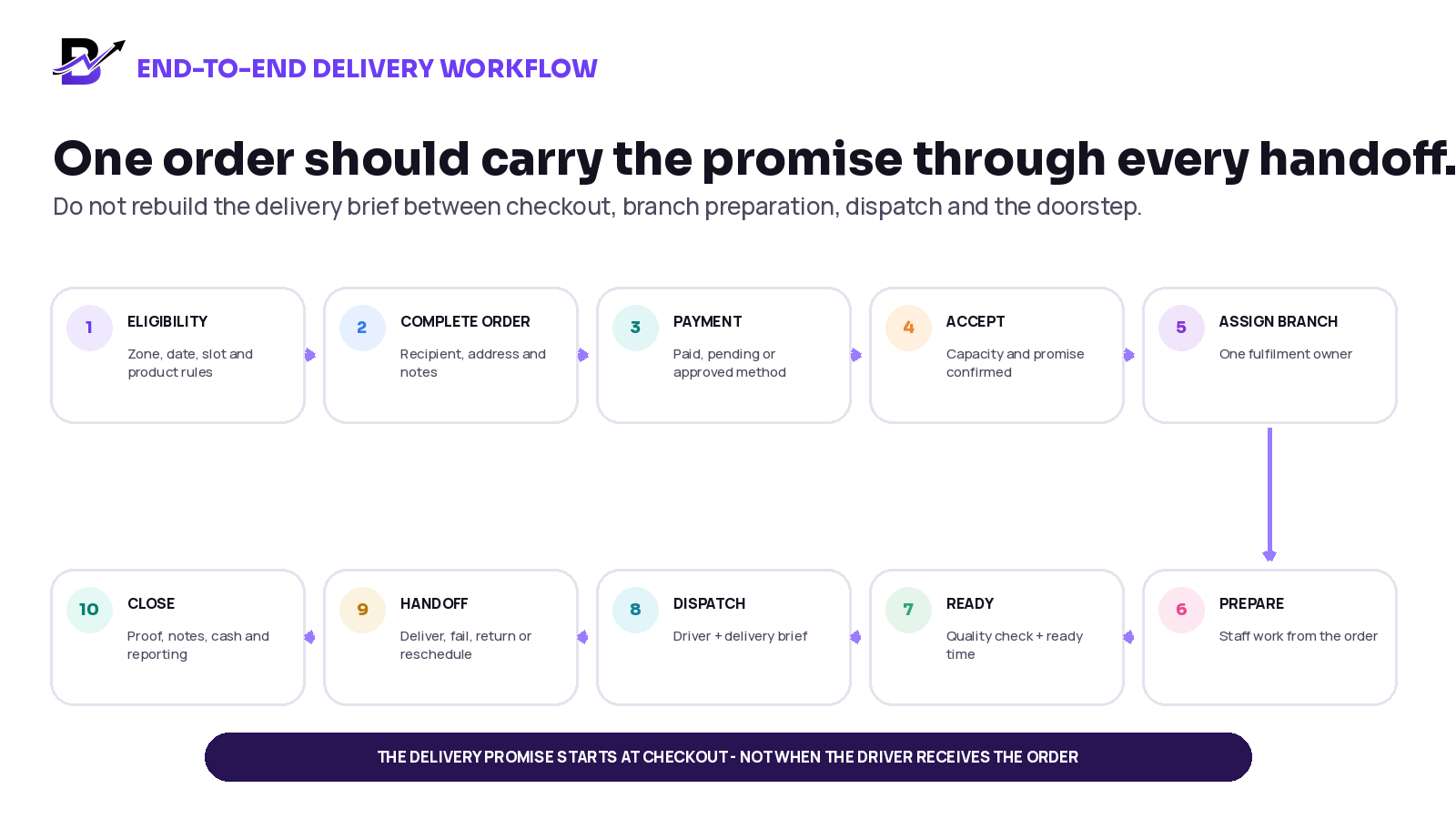
Figure 2. One order should carry the delivery promise through every operational handoff.
1. Check eligibility
Confirm the address is inside a supported area and the selected product, branch, date and time slot can use same-day delivery.
2. Capture a complete order
Store the product, options, payment, sender, recipient, address, timing, notes and source in one record.
3. Validate payment
Mark the approved payment state clearly. Keep payment status separate from preparation and delivery status.
4. Accept the promise
Only accept when stock, branch capacity, preparation time and delivery capacity are valid.
5. Assign the fulfilment point
Give one branch or location ownership. Avoid changing the branch without updating stock, timing and responsibility.
6. Prepare against the deadline
Staff should see the delivery window while completing the product, add-ons, message, packaging and quality checks.
7. Mark the order ready
Record the ready time only after the product and delivery brief are complete. This creates a clear dispatch handoff.
8. Assign and dispatch
Give the driver the approved address, recipient, time window, notes, navigation and enabled cash-collection requirement.
9. Record the doorstep result
Mark delivered, failed, returned or rescheduled and add the configured photo, name, signature or note where required.
10. Close the loop
Update the customer where needed, record cash or refund actions, review exceptions and keep the result in reporting.
Give each role one clear responsibility
ROLE | MAIN RESPONSIBILITY | WHAT THE ROLE SHOULD SEE |
|---|---|---|
Customer service / sales | Capture the final order, confirm important details and communicate meaningful updates. | Product, customer, recipient, payment, promise, branch, status and exceptions. |
Branch manager | Accept the promise, assign preparation and protect the ready deadline. | Order queue, stock context, staff ownership, deadline and delivery timing. |
Shop / production staff | Prepare and check the complete order before marking it ready. | Product, options, add-ons, message, notes, packaging and ready deadline. |
Dispatcher / permitted manager | Assign only ready orders and manage the pending, assigned and exception queues. | Ready time, branch, zone, slot, recipient, address, driver and priority. |
Driver | Follow the delivery brief, update progress and record the outcome. | Assigned orders, permitted recipient details, address, navigation, time window, notes and proof actions. |
Owner / operations lead | Review service quality, capacity, costs, zone performance and repeated problems. | Orders, branches, drivers, failed reasons, delivery timing, cash and wider reports. |
One role can perform more than one job in a small business. The responsibility should still be clear. The same person may accept, prepare and dispatch, but the status and timeline should show what has happened.
Use visible milestones, not constant phone calls
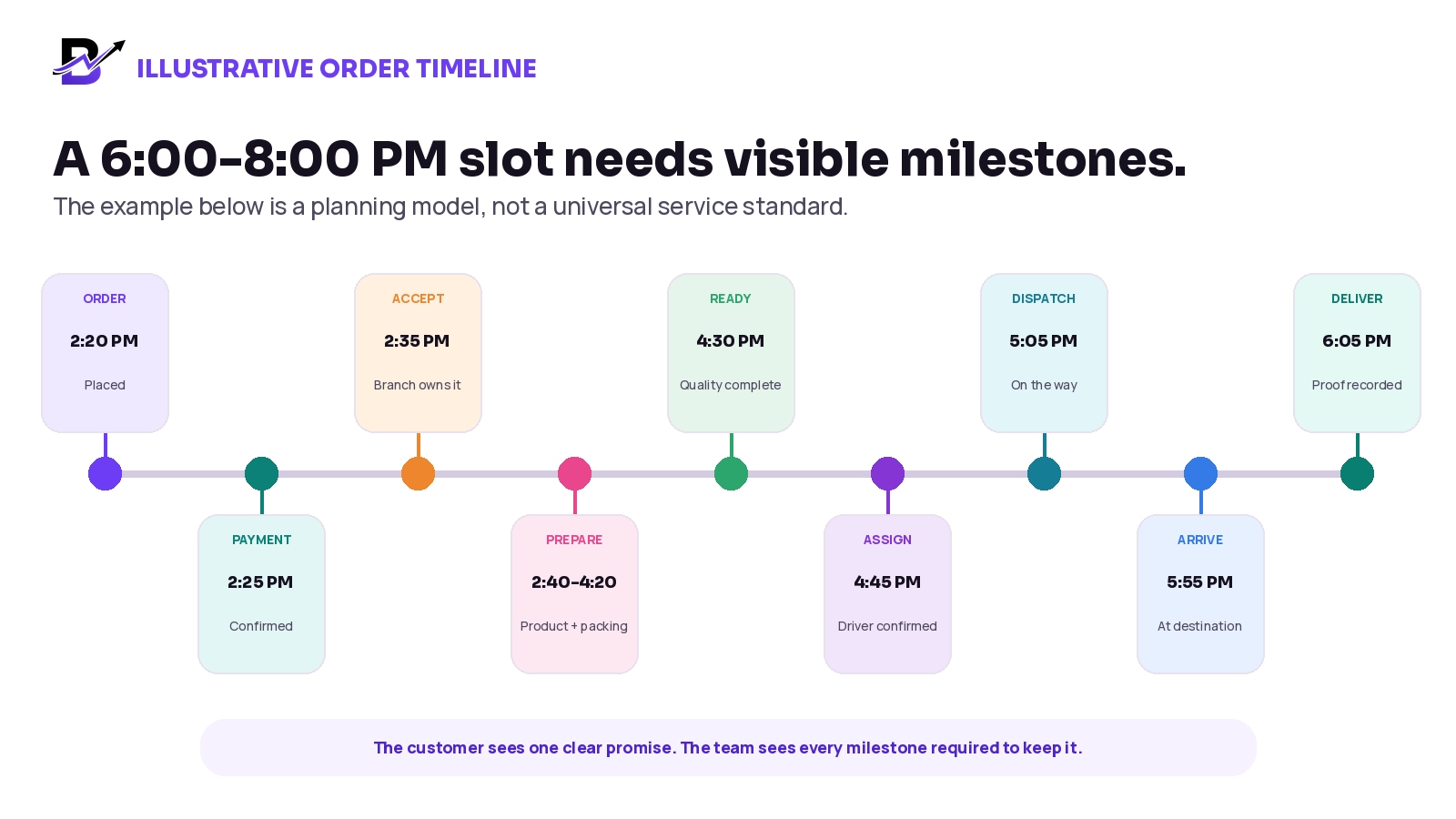
Figure 3. A customer may see only a few updates, while the internal team needs clear milestones across the full workflow.
The example above is not a promise template. Its value is the visibility. Customer service should not need to call the branch to learn whether preparation has started. Dispatch should not need to ask whether the order is ready. The owner should not need to count messages to understand what is pending.
Dispatch management is not the same as route optimisation
These terms are often mixed together, but they describe different levels of delivery operation. A business should understand what it needs before buying software or promising automated routing.
CAPABILITY | WHAT IT DOES | TYPICAL SCOPE |
|---|---|---|
Delivery management | Keeps delivery orders in a queue, assigns drivers, passes the delivery brief, supports navigation, records status and captures proof or exceptions. | Core operational workflow for many small and mid-sized specialty retailers. |
Manual route planning | A dispatcher reviews destinations, time windows, branch locations and driver availability, then chooses the stop order. | Useful when delivery volume is manageable and local knowledge is strong. |
Directions / navigation | Calculates a route between locations and helps the driver reach the destination. | A driver-level journey; it does not automatically allocate all business deliveries. |
Automated route optimisation | Uses objectives and constraints to assign tasks and create routes for one or more vehicles. | A more advanced fleet-planning requirement that normally needs dedicated configuration or integration. |
Fleet telematics | Tracks vehicle location, driving behaviour, sensors, fuel or other fleet data. | A separate fleet-management category, not the same as order dispatch. |
Google Maps, for example, documents directions and route calculation separately from its Route Optimisation API, which assigns tasks and routes to a vehicle fleet under supplied objectives and constraints.
Technical distinction: Google Maps Routes API · Google Route Optimization API
Scope Clarity: Do not describe driver assignment, a map link or turn-by-turn navigation as automatic multi-stop route optimisation. Confirm advanced routing, courier integrations and fleet requirements separately.
Send meaningful customer updates
Customers need confidence, not every internal status. Choose a small number of updates that explain what matters and do not create a promise the team cannot keep.
CUSTOMER UPDATE | WHEN TO SEND | WHAT IT SHOULD CLARIFY |
|---|---|---|
Order confirmed | After payment and operational acceptance. | Order number, product summary, recipient or pickup, delivery date and time window. |
Important change | When a confirmed product, address, date, slot or payment condition changes. | The approved new detail and any effect on price or timing. |
Out for delivery | After the ready order has been dispatched. | That the order is on the way and any safe, realistic contact expectation. |
Delivered | After the configured successful handoff is recorded. | That the order was delivered and how to contact support if needed. |
Delivery exception | When the attempt cannot be completed or the promise is at risk. | What happened, what information is needed and the next agreed action. |
Avoid sending “out for delivery” while the product is still being prepared. Avoid precise arrival claims unless the system and driver operation can support them.
Choose proof of delivery that fits the order
Proof of delivery is not one universal field. A low-value local order, a high-value gift, a reception handoff and an unattended drop may require different evidence. Configure the minimum proof that gives the business a useful record without collecting unnecessary data.
PROOF OPTION | USEFUL WHEN | IMPLEMENTATION NOTE |
|---|---|---|
Delivery status + time | The business needs a basic completion record. | Make sure only permitted roles can close the order. |
Recipient or receiver name | A third party accepts the order, such as reception or security. | Record only what the business needs and is allowed to collect. |
Photo | The workflow allows a visual record of the completed handoff or safe location. | Avoid sensitive or unnecessary images; follow privacy and customer policies. |
Signature | The product or customer policy needs stronger acknowledgement. | Use only where appropriate and supported by the workflow. |
Delivery note | The driver needs to explain a completed or exceptional handoff. | Use short factual notes, not personal opinions. |
Cash record | Cash collection is enabled for the delivery. | Connect the amount and collection to cash-in-hand and closing controls. |
Important: Proof should support the order outcome. It should not become a reason to collect more personal information than the business needs.
Handle delivery exceptions without losing the order
A failed delivery should not disappear into a driver phone call. Record the reason, the immediate action and the next owner. This protects the customer experience and gives the business useful information for improvement.
EXCEPTION | IMMEDIATE ACTION | WHAT TO RECORD |
|---|---|---|
Recipient unavailable | Follow the approved contact and waiting process; decide whether to retry, leave with an approved person or return. | Attempt time, contact result, approved handoff or next action. |
Wrong or incomplete address | Pause safely, confirm the correct location and assess the effect on the time promise or charge. | Original detail, corrected detail, delay and who approved the change. |
No building access | Contact the permitted person or customer service and follow the property handoff rule. | Access issue, waiting time, handoff location and outcome. |
Preparation delay | Update dispatch and customer service before the original departure time is missed. | Cause, revised ready time and customer communication. |
Product damaged in transit | Protect the customer, stop the handoff if needed and follow replacement, return or refund policy. | Photo or note where allowed, item condition, decision and owner. |
Recipient rejects the order | Do not mark delivered. Contact customer service and follow the return or dispute process. | Reason given, condition, return status and next action. |
Driver delay or breakdown | Reassign where possible and update the delivery risk immediately. | Driver issue, reassignment, revised timing and customer update. |
Cash mismatch | Do not hide the difference in a delivery note. Follow cash-control and manager review procedures. | Expected amount, received amount, proof and responsible reviewer. |
Use a controlled list of exception reasons where possible, with a short note for context. This makes reports useful and reduces vague labels such as “delivery problem.”
Before promising same-day delivery: operational checklist
CHECK | PASS CONDITION |
|---|---|
Service area is defined by branch. | Each address is checked against a supported zone or manual approval rule. |
Delivery charges and minimum-order rules are clear. | The customer sees the correct price before payment. |
Cut-off times are based on measured operating time. | Simple, custom and peak-day orders can have different limits. |
Dates and slots reflect real capacity. | Closed or full periods are not offered. |
Product eligibility is controlled. | Fragile, custom or long-preparation items do not receive an impossible promise. |
Stock and branch capacity can be checked. | The accepting location can fulfil the full order. |
The order stores complete recipient and address details. | The driver brief is not reconstructed from chat. |
Payment and order status are separate. | Paid, preparing, ready and delivered remain clear. |
A ready status exists before dispatch. | Drivers are not assigned to unfinished orders without a deliberate policy. |
The driver has a focused queue. | Only assigned work and permitted details are visible. |
Meaningful customer updates are defined. | Confirmation, dispatch, delivery and exception messages are accurate. |
Proof requirements are configured. | The business knows what closes a successful handoff. |
Failed, returned and rescheduled outcomes exist. | Exceptions remain visible and actionable. |
Peak-day rules are prepared. | Capacity, assortment, cut-offs, staffing and slots can be tightened. |
Metrics are reviewed after launch. | Repeated delays and exception reasons lead to operational changes. |
Prepare separately for peak days
A normal Tuesday workflow may fail on Valentine’s Day, Mother’s Day, Eid, Christmas, a major local event or a promotion. Peak-day planning should change the promise before volume arrives.
Offer a smaller, delivery-safe product range instead of every custom option.
Use earlier cut-off times and wider delivery windows.
Cap orders by slot, branch, product type or delivery zone.
Prepare common packaging, cards, labels and add-ons in advance.
Separate customer-service, preparation, quality-check and dispatch ownership.
Create staging areas for ready orders by driver, slot or zone.
Use a clear policy for substitutions, address changes, reattempts and refunds.
Review driver and branch capacity during the day and close options before the promise becomes unsafe.
Peak-Day Principle: It is better to show fewer honest delivery options than to accept more orders than the operation can complete.
Measure the workflow with useful metrics
Do not begin with a generic “on-time” target copied from another company. Record a baseline, define what on-time means for your delivery windows, then improve the causes you can control.
METRIC | WHAT IT REVEALS |
|---|---|
Order-to-accept time | How quickly payment, stock, address, branch and capacity are validated. |
Accept-to-ready time | How long the branch takes to prepare and quality-check each product type. |
Ready-to-dispatch time | Whether prepared orders wait too long for assignment or driver departure. |
Delivery within promised window | Whether the final handoff matches the visible customer promise. |
First-attempt completion | How often the order is completed without a second trip or reschedule. |
Failed / returned / rescheduled reasons | Which address, recipient, preparation, driver or policy problems repeat. |
Proof completion | Whether the configured outcome record is being completed correctly. |
Zone and slot performance | Which areas or windows repeatedly create delays or high operating cost. |
Delivery cost per completed order | Whether fees, minimum orders and operational choices remain sustainable. |
Customer-service contacts per delivery | Where unclear promises or missing updates create avoidable support work. |
Review metrics by product, branch, zone, time slot, driver and peak period. A combined average can hide the exact part of the workflow that needs attention.
Questions to ask before choosing delivery software
# | QUESTION | WHY ASK |
|---|---|---|
1 | Can the checkout use configured delivery zones, charges, minimum orders, dates and time slots? | The customer promise should begin before payment. |
2 | Can different branches have different delivery and fulfilment rules? | Capacity, stock and service areas may vary by location. |
3 | Can website, app, POS, manual and payment-link orders use one delivery workflow? | Separate order queues create repeated entry and unclear reporting. |
4 | Can staff see the delivery deadline while preparing the product? | The branch must work against the promise, not only the order date. |
5 | Is “ready” separate from “assigned” and “out for delivery”? | Each status should show a real operational handoff. |
6 | Can managers assign drivers from pending and ready queues? | Dispatch needs a current view of actionable work. |
7 | What information does the driver see, and is access role-based? | The driver needs enough context without unnecessary customer data. |
8 | Can the workflow record delivered, failed, returned and rescheduled outcomes? | Every attempt should end with a clear result and next action. |
9 | Which proof options and cash-collection controls are supported? | Evidence and collection requirements vary by business. |
10 | What reporting exists for zones, slots, branches, drivers and exception reasons? | The owner needs to improve the operation, not only view a list of orders. |
11 | Does “routing” mean map navigation, stop ordering or automated fleet optimisation? | These are different capabilities with different implementation scope. |
12 | Which courier, map, messaging or third-party integrations are standard, optional or custom? | The contract and launch plan should match the real requirement. |
How Bloomlytix supports the delivery workflow
Bloomlytix is designed to connect the delivery promise with the order and the shop operation that created it. Delivery does not begin as a separate task after checkout. The configured zone, charge, date, time slot, recipient, address, payment and preparation context can remain attached to the same order.
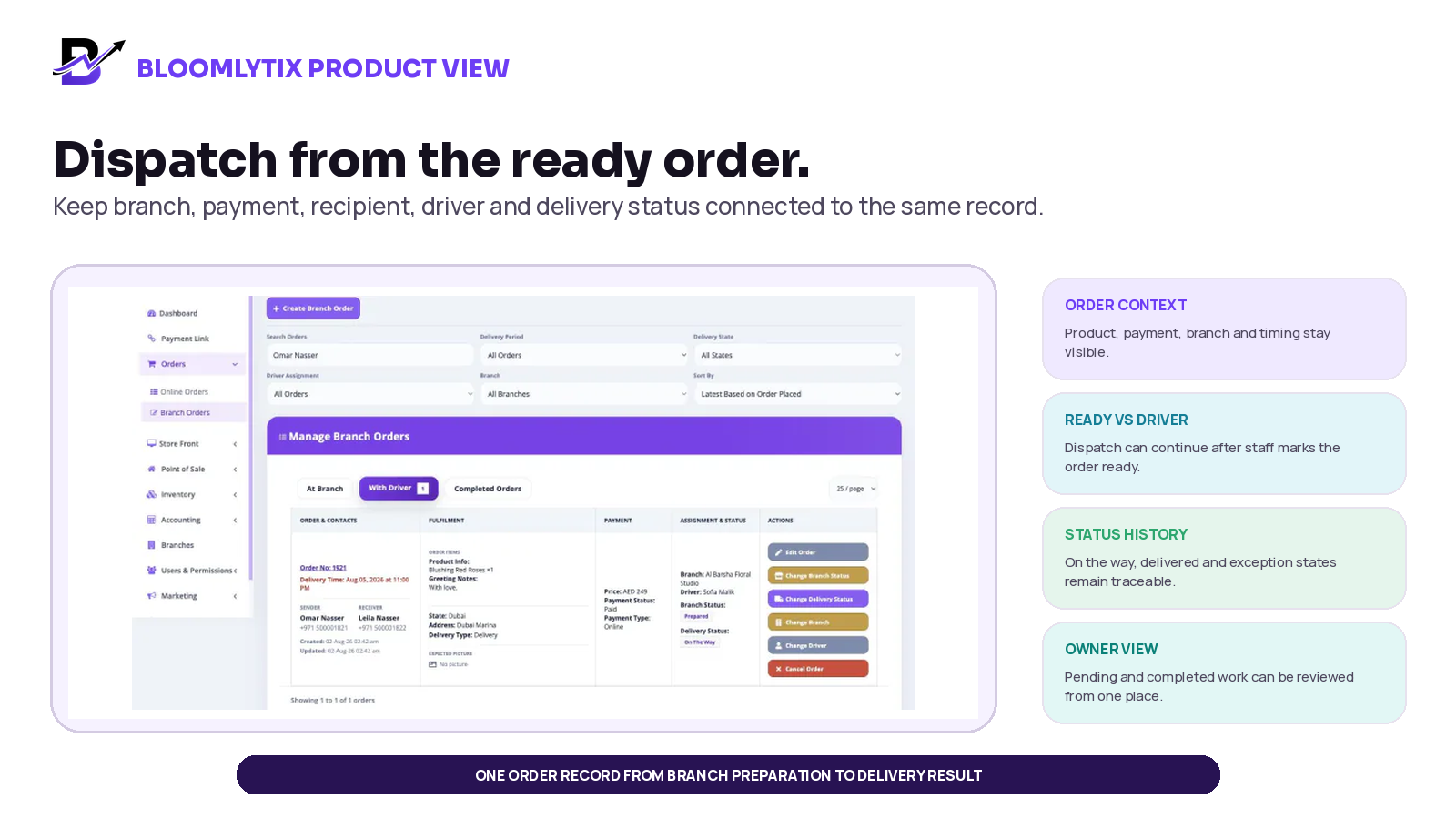
Figure 4. Example Bloomlytix delivery view. Product screens may evolve; confirm the current workflow during the demo.
BLOOMLYTIX CAPABILITY | HOW IT SUPPORTS THE WORKFLOW |
|---|---|
Zones + checkout rules | Configure delivery zones, charges, minimum-order rules, dates and time slots for supported customer channels. |
Shared order context | Keep product, add-ons, greeting or custom notes, recipient, address, timing, payment and branch context together. |
Staff fulfilment | Let permitted staff receive, accept, prepare, update and mark orders ready through a visible status timeline. |
Branch ownership | Assign work to the relevant branch and keep branch-aware order, staff, stock, purchase, cash and reporting context. |
Driver assignment | Move ready orders into assigned delivery queues with permitted recipient details, address, notes and map navigation. |
Status + proof | Record on-the-way, delivered, failed, returned or rescheduled outcomes with configured photo, recipient name, signature or notes. |
Cash visibility | Where cash collection is enabled, connect the received amount to staff or driver cash-in-hand and closing views. |
Owner reporting | Review pending, completed and failed deliveries with branch, driver, zone and wider sales or operations context. |
Scope Note: Standard Bloomlytix delivery capability includes configured zones, charges, dates, slots, queues, assignment, recipient and address context, map navigation, statuses, proof and reporting. Confirm automated multi-stop route optimisation, third-party courier integrations, live vehicle tracking, capacity automation or other advanced fleet requirements separately.
Frequently asked questions
What is a same-day delivery workflow?
It is the full operating process that moves an order from delivery eligibility and checkout through payment, branch acceptance, preparation, ready status, driver assignment, handoff, proof and exception handling on the same day.
How should a business calculate its same-day delivery cut-off time?
Work backward from the start of the delivery window. Subtract the time required for order validation, preparation, quality checks, dispatch, travel, building access, handoff and a realistic exception buffer. Use measured data by product, branch, zone and peak period.
What information should a same-day delivery order contain?
Keep the order number, product and options, payment state, sender, recipient, address, delivery date and time, zone, charge, branch, preparation owner, driver assignment, notes and final outcome together.
Should a driver be assigned before an order is ready?
The safest default is to dispatch from a clear ready status. Some businesses may pre-plan drivers earlier, but the workflow should show that preparation is not complete and should avoid treating the order as dispatchable until the quality check is finished.
What is the difference between delivery management and route optimisation?
Delivery management covers order queues, assignment, driver context, navigation, status, proof and exceptions. Automated route optimisation uses objectives and constraints to assign tasks and create efficient routes for one or more vehicles. It is a more advanced requirement.
What counts as proof of delivery?
Proof may include a delivery status and time, recipient or receiver name, photo, signature, note or cash record. Choose the minimum evidence that fits the order, customer policy, privacy requirements and local practice.
How should failed deliveries be handled?
Record the exact reason, attempt time, customer or recipient contact, product condition, return or reschedule decision, financial effect and the person responsible for the next action. Do not mark an incomplete attempt as delivered.
Can multi-branch retailers use one same-day delivery workflow?
Yes, but each order needs a clear fulfilment branch, stock and preparation responsibility, delivery area, driver or courier handoff and combined owner reporting. Rules may differ by branch.
Does Bloomlytix automatically optimise multi-stop routes?
Bloomlytix supports delivery queues, assignment, map navigation, statuses, proof and reporting. Automated multi-stop optimisation, specialist courier integrations and fleet requirements should be discussed and confirmed separately.
Final checklist
Define exactly where, when and for which products same-day delivery is available.
Base cut-off times on measured preparation, dispatch, travel and handoff time.
Keep delivery rules, product details, payment, recipient and address in one order.
Accept only when stock, branch capacity and delivery capacity are valid.
Give staff a ready deadline and dispatch from a visible ready status.
Give the driver one approved delivery brief with role-based access.
Send a small number of accurate customer updates.
Record delivered, failed, returned and rescheduled outcomes with configured proof.
Separate map navigation and driver assignment from automated route optimisation.
Review exceptions, timing, zones, slots, branches and costs to improve the promise.
Sources and further reading
This article combines Bloomlytix product documentation with official operational and search-engine guidance. The workflow recommendations are practical editorial guidance, not legal, privacy, tax, transport or safety advice. Confirm local obligations and business-specific rules before implementation.
Related Bloomlytix guides
What is a retail operating system? · Ecommerce website vs retail operating system · Connect ecommerce and POS · Manage florist orders · Move beyond WhatsApp-only order management