Gift Shop delivery management

Carry the customer promise from checkout to the final handoff.

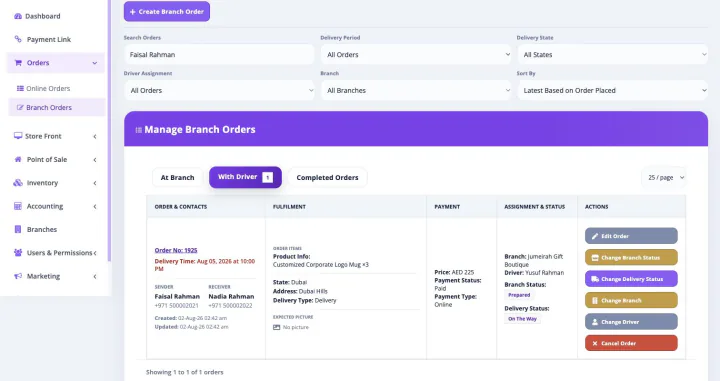
Connect configured delivery zones, charges, dates, and slots to branch preparation, driver assignment, permitted recipient details, navigation, delivery status, and proof.

Zones + charges Dates + slots Driver app Status updates Delivery proof
Bloomlytix gift shops delivery assignment and driver status workflow
One platform, one subscription

Delivery Management Software works inside the complete Bloomlytix platform.

This is not a separately purchased delivery management software product. When a paid Bloomlytix subscription is active, the core ecommerce and operating modules work together around the same catalog, customers, orders, branches, staff, payments, stock, fulfilment, delivery, cash, and reporting data for your gift shop.

Plans differ by included users, branches, drivers, support, and customer-app entitlement. Starter includes the branded website without a customer app, Growth adds Android, and Pro includes Android and iOS customer apps.

The delivery promise starts earlier

Keep gift shops delivery connected to the order that created it

Delivery works best when staff and drivers do not need to reconstruct the order. Bloomlytix carries permitted timing, address, recipient, payment, and preparation context into dispatch.

Set customer expectations

  • Configure delivery zones, charges, and minimum-order rules
  • Offer permitted delivery dates and time slots
  • Keep address, recipient, and recipient, greeting message, occasion, presentation, address, and timing details with the order
  • Use the same rules across configured web and app checkout

Create a clear dispatch handoff

  • Dispatch only after the branch marks the order ready
  • Assign the order to a driver from admin or staff workflow
  • Show permitted recipient, address, time, navigation, and notes
  • Keep delivery work tied to the original product and payment record

Record the outcome

  • Update on-the-way, delivered, failed, returned, or rescheduled status
  • Capture configured proof such as photo, name, signature, or note
  • Give customer service and managers a current reference
  • Review pending, completed, failed, driver, and zone reporting
Designed around gift shop buying journeys

Protect the occasion promise through the final delivery

The recipient, greeting, occasion, presentation, address, timing, charge, branch status, and permitted notes remain tied to the original gift order. Dispatch and driver progress can be managed without losing the emotional context of the handoff.

What this workflow keeps clear

  • Apply supported zones, dates, slots, and charges
  • Pass permitted recipient context into dispatch
  • Record delivery status and configured proof

Keep personalization connected to preparation and delivery

The gift is only successful when the correct product, presentation, recipient, message, payment, and timing reach the team. Bloomlytix keeps those details on one order record.

See the complete gift shop platform
Connected by design

Use one business record across the wider gift shop operation

The detailed workflow on this page remains connected to the other core Bloomlytix capabilities.

Sales channels

Website, apps, POS, manual orders + payment links

Use shared product, price, customer, order, branch, payment, and offer data across configured direct channels.

Staff operations

Branch assignment, preparation + status

Keep selected gift, options, add-ons, recipient, greeting message, payment, occasion, and delivery timing visible to permitted staff through one fulfilment timeline.

Stock + purchasing

Inventory movement with supplier evidence

Track configured gift products, boxes, baskets, packaging, cards, chocolates, balloons, and configured add-ons with sales, adjustments, purchases, invoice attachments, and branch context.

Completion + reporting

Pickup, delivery, cash + owner visibility

Connect the finished order to payment, cash, customer handoff, delivery outcome, staff, branch, product, and business reports.

A traceable workflow

Move the work forward without re-entering the order

  1. Checkout creates the promise. The customer chooses an eligible zone, charge, date, slot, address, and recipient context.
  2. Preparation works toward it. The branch receives the order and keeps status, selected gift, options, add-ons, recipient, greeting message, payment, occasion, and delivery timing, and timing visible.
  3. Dispatch assigns responsibility. A manager or permitted staff member assigns a ready order to a driver.
  4. The driver records progress. Navigation, status, permitted notes, and configured proof stay connected to the delivery.
  5. The result closes the loop. Customer service and owners see the outcome alongside the original sale and operational reports.
The connected difference

Compare a standalone tool with Bloomlytix delivery management software

Need Standalone approach Bloomlytix
Checkout promise Date and address copied after the sale Configured zone, charge, date, slot, and recipient context start with the order
Preparation link Dispatch does not know whether the order is ready Staff status and dispatch handoff share the operating record
Driver context Address and notes resent in chat Assigned driver receives permitted order and navigation details
Outcome Delivery marked complete without evidence Configured status and proof stay with the order
Owner reporting Courier activity separated from sales Pending, completed, failed, zone, driver, branch, and sales context connect
Implementation fit

Map this capability to the way your gift shop works

Share your products, branches, users, order sources, payment methods, stock behavior, preparation steps, pickup, delivery, devices, and reporting needs during discovery.

  • Confirm standard features and required configuration
  • Identify data migration and integration dependencies
  • Set roles and permissions for owners, managers, staff, and drivers
  • Keep customer-app eligibility tied to the selected plan
Scope clarity

Confirm bulk and wholesale gifting requirements

Bloomlytix supports custom, manual, corporate, and payment-link orders with staff fulfilment and delivery. Confirm automated multi-recipient imports, approval chains, contract pricing, wholesale distribution, marketplace synchronization, and complex warehouse workflows before subscribing.
Continue exploring

See the other connected gift shop capabilities

Gift Shop Delivery Management Software FAQs

Questions about this capability and the complete platform

Is Bloomlytix Gift Shop Delivery Management Software sold separately?

No. This page explains one capability in detail for searchers evaluating that workflow. In the product, it remains connected to the complete Bloomlytix platform. Core ecommerce and operating modules open together with a paid subscription.

Can the Delivery Management Software connect with other Gift Shop sales channels?

Yes. Bloomlytix is designed around shared product, customer, order, branch, staff, payment, inventory, delivery, and reporting data across configured ecommerce, app, POS, manual, and payment-link workflows.

Can multi-branch gift shops use this workflow?

Yes. Bloomlytix supports branch-aware users, orders, sales, configured stock, purchases, cash, fulfilment, delivery, and reporting. Included users, branches, and drivers depend on the selected plan and add-ons.

Which Bloomlytix plan includes customer mobile apps?

Starter includes the website without a customer app. Growth includes a white-label Android customer app, while Pro includes Android and iOS customer apps. Growth and Pro include a separate app launch and onboarding fee as listed on the pricing page.

Are there Gift Shop workflows that need confirmation?

Bloomlytix supports custom, manual, corporate, and payment-link orders with staff fulfilment and delivery. Confirm automated multi-recipient imports, approval chains, contract pricing, wholesale distribution, marketplace synchronization, and complex warehouse workflows before subscribing.

See delivery management software inside the complete gift shop workflow

We will demonstrate the relevant sales, branch, staff, stock, payment, fulfilment, pickup, delivery, customer, and reporting connections around your business requirements.