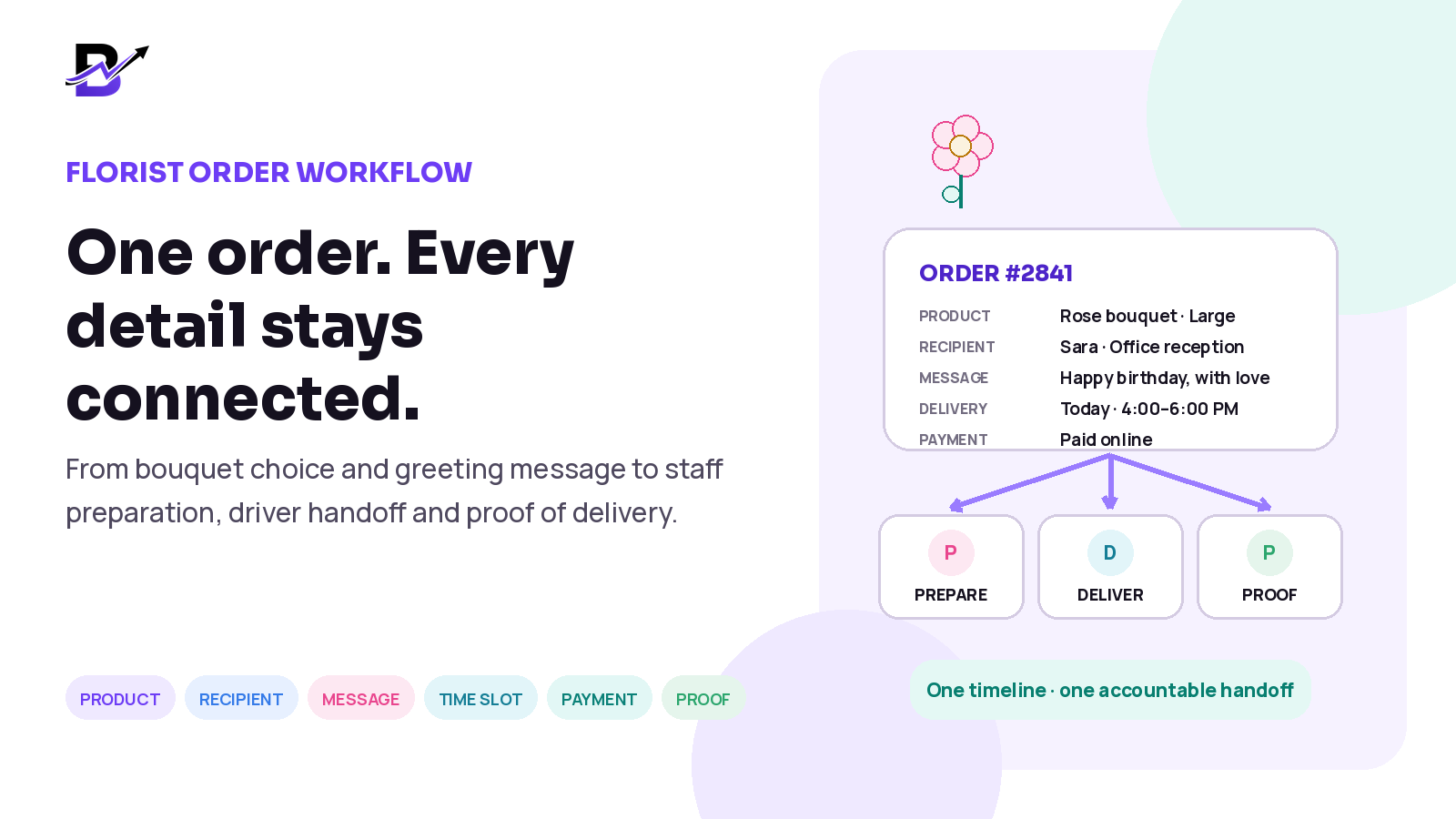
A flower order is more than a product and a payment. The team may need to protect a personal message, prepare the right size and colour, include add-ons, meet a delivery time, reach a third-party recipient and record what happened at the door. When those details are spread across a website, chat messages, paper notes and driver calls, even a beautiful arrangement can become the wrong customer experience.
A reliable florist order workflow keeps the full story attached to one traceable order. The customer-facing promise, shop preparation, greeting card, payment state, delivery handoff and final outcome should move together instead of being copied from one tool to another.
Direct Answer: Manage florist orders through one clear workflow from intake to closure. Capture the product, options, add-ons, sender, recipient, greeting message, payment state, address, date and time slot once. Validate the order before accepting it, assign a branch and owner, prepare and check against the same brief, pass the complete delivery context to the driver, and record delivered, failed, returned or rescheduled outcomes with the required proof or notes.
This guide is for flower shops handling online, app, POS, telephone, WhatsApp, custom or payment-link orders. It focuses on the operational rules that keep a florist order clear, not on one specific software screen.
In this guide
Why florist orders need more context than a normal retail sale
The information every complete florist order should contain
A ten-stage workflow from intake to proof of delivery
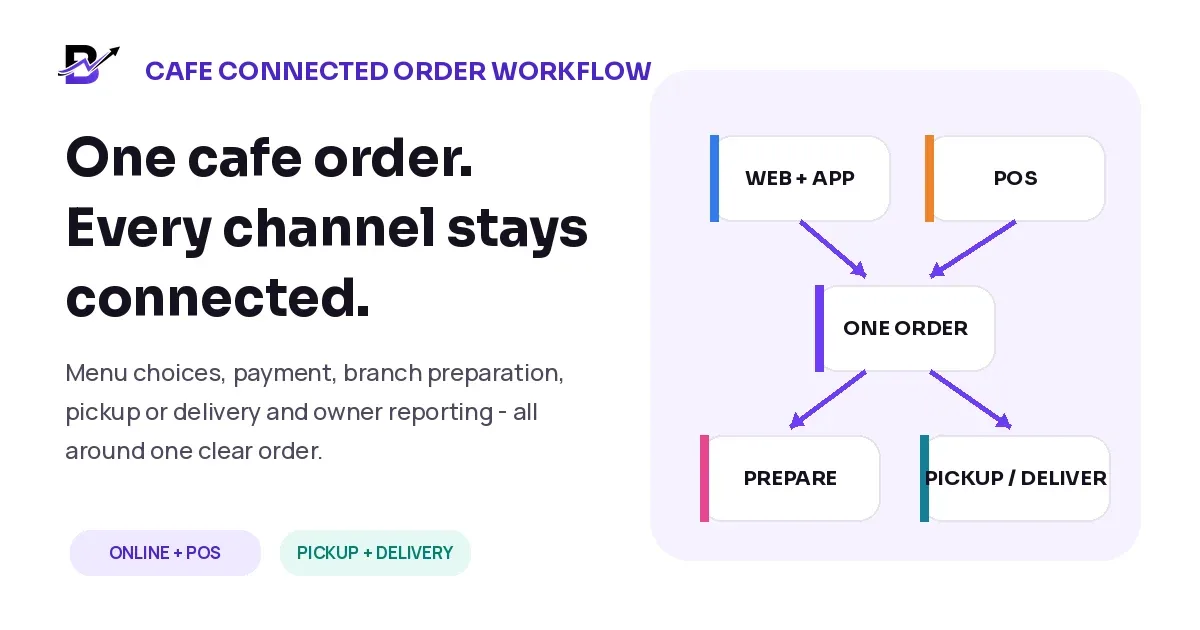
How to manage website, app, POS, manual and payment-link orders together
How to handle greeting cards, preparation, quality checks and driver handoff
How to record substitutions, late preparation, failed delivery and other exceptions
Which statuses, responsibilities and measurements make the workflow easier to manage
Why florist orders are different from a normal retail sale
A normal counter sale can end when the customer pays and leaves with the product. A florist delivery order usually continues through several people and several hours. It may also carry emotional or private details that must be accurate.
NORMAL RETAIL SALE | FLORIST DELIVERY ORDER |
|---|---|
The buyer often receives the product immediately. | The buyer and recipient may be different people, and delivery may happen later. |
A product name and quantity may be enough. | The order can include size, colour, style, add-ons, occasion, message and special preparation notes. |
The transaction may close at payment. | Payment is only one stage; preparation, dispatch, delivery result and exceptions still need to be recorded. |
The same staff member may complete the sale. | Customer service, florist, branch manager, dispatcher and driver may all need different parts of the order. |
A receipt proves the sale. | The business may also need a preparation history, greeting-card record, status timeline and configured proof of delivery. |
Core Principle: Do not pass a shortened summary to the next team. Pass the same order record, with access limited to what each role needs.
Start with one complete florist order record
The quality of fulfilment depends on the quality of the order intake. If information is missing at the start, staff normally have to stop, call the customer, search a chat thread or guess. A complete order brief should make the next action obvious.
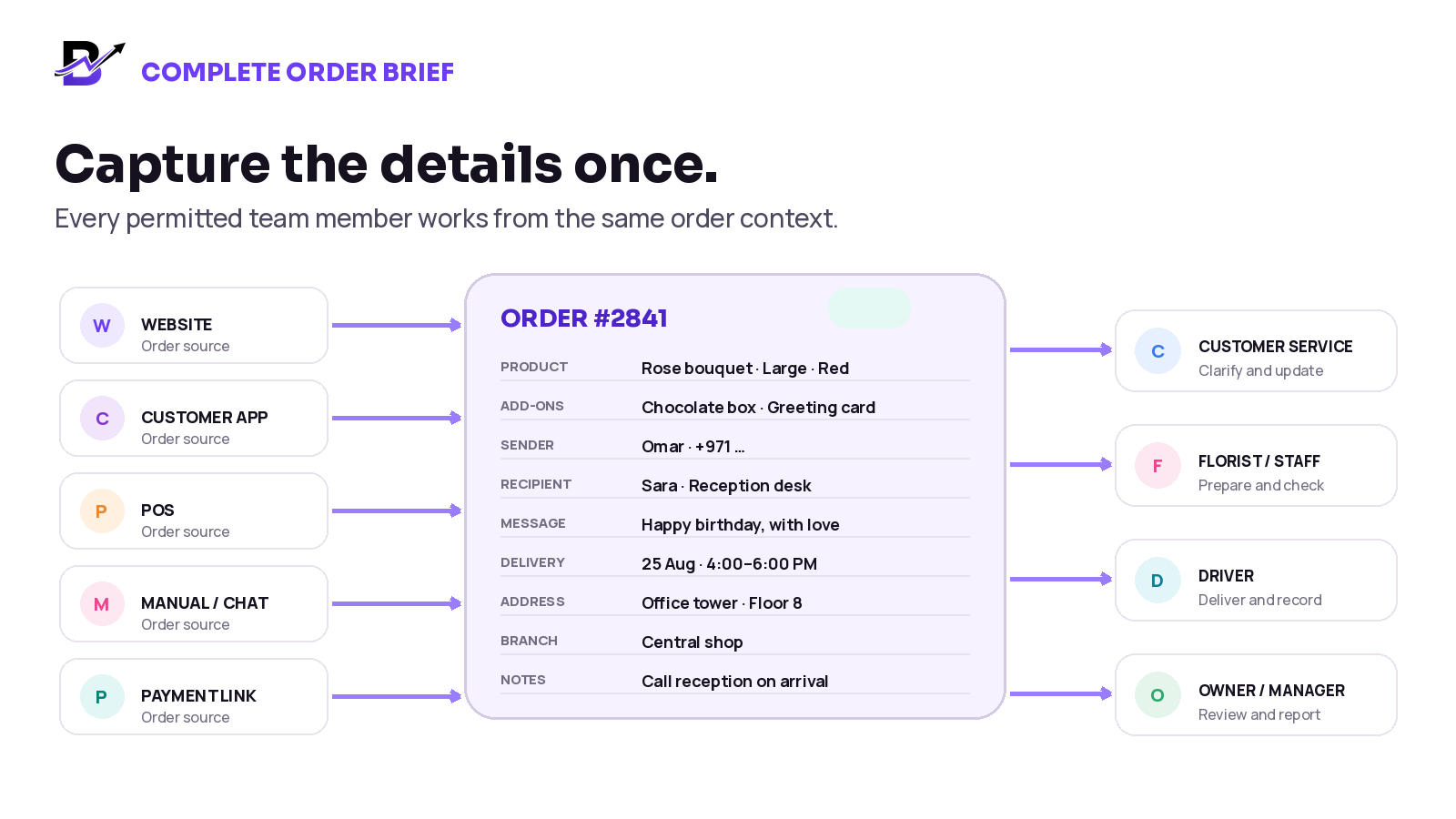
Figure 1. Different order sources can still produce one consistent preparation and delivery brief.
INFORMATION GROUP | WHAT TO CAPTURE | WHY IT MATTERS |
|---|---|---|
Order identity | Order number, source, date, branch, status and assigned owner. | Lets the team find the record and understand who is responsible. |
Product | Arrangement, size, colour, style, quantity and approved substitutions. | Defines what the florist must prepare. |
Add-ons | Vase, chocolates, balloons, card, gift item or other selected extras. | Prevents paid extras from being forgotten. |
Sender / customer | Name, contact details, billing context and communication preference where collected. | Allows clarification, payment follow-up and service updates. |
Recipient | Name, contact details, building or reception instructions and relationship context where appropriate. | Supports a correct and respectful handoff. |
Greeting message | The exact customer-entered text and selected occasion template. | Protects the personal meaning and reduces copying errors. |
Delivery promise | Zone, charge, address, date, time slot, notes and any customer-approved flexibility. | Guides preparation priority and dispatch. |
Payment | Amount, method, paid, unpaid, pending, refunded or other approved state. | Stops work from moving forward under the wrong payment assumption. |
Internal workflow | Assigned staff, tasks, photos, notes, changes and timeline. | Creates accountability without changing the customer-facing order. |
Not every employee needs every field. Use role-based access so the florist sees the preparation brief, the driver sees the delivery information, and the owner retains wider payment, cash, reporting and configuration visibility.
The ten-stage florist order workflow
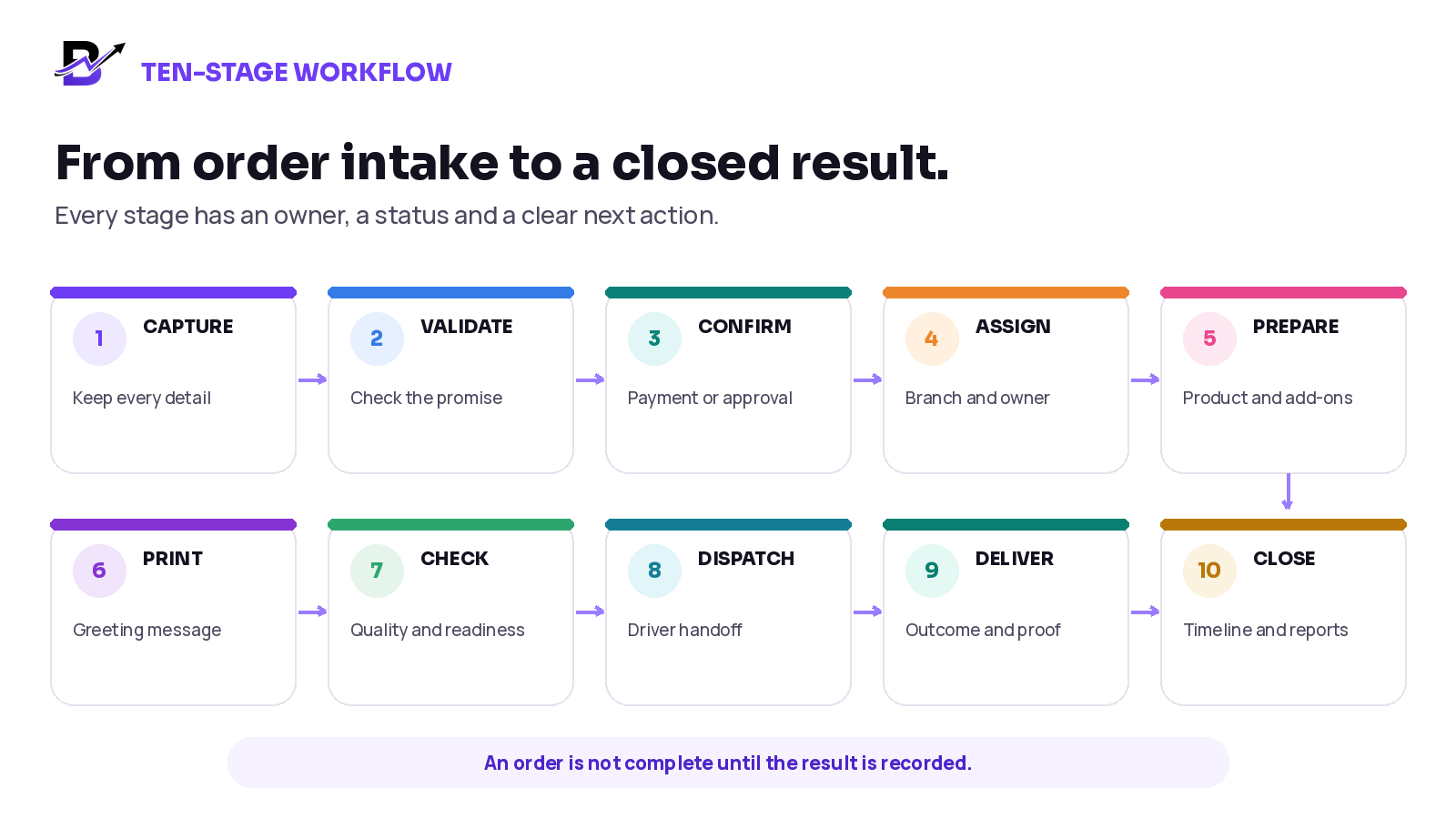
Figure 2. The exact labels can change, but each stage should have an owner and a next action.
Step 1: Capture the order
Bring the complete customer request into the official order queue, regardless of whether it came from the website, app, POS, telephone, WhatsApp or a payment link.
Step 2: Validate the promise
Check product and add-on availability, address, delivery zone, date, time slot, branch capacity and any special instructions before accepting.
Step 3: Confirm payment or approval
Make the payment state clear. For a custom, corporate or manual order, record the approved price, deposit or payment-link result before work proceeds according to policy.
Step 4: Accept and assign
Move the order into an accepted state and assign the correct branch, preparation owner or team. “Accepted” should mean the business has taken responsibility for the promise.
Step 5: Prepare the product
Use the original product, options, add-ons, notes and timing. Add internal notes or a preparation photo when the workflow requires them.
Step 6: Print and verify the greeting card
Preview the exact customer-entered message, use the correct template and reprint only when needed. Avoid retyping the message from memory.
Step 7: Complete the quality check
Confirm the arrangement, add-ons, card, packaging, address label, payment state and delivery timing before marking the order ready.
Step 8: Dispatch from the ready order
Assign the driver from the same record. Give the address, recipient, time window, navigation and permitted delivery notes without rebuilding the brief.
Step 9: Record the delivery outcome
Mark delivered, failed, returned or rescheduled and add the configured proof, recipient confirmation or notes required by the business.
Step 10: Close the order and keep the history
A completed order should retain its channel, payment, preparation, staff, delivery, exception and reporting context for customer service and owner review.
Bring every order source into the same workflow
Customers may buy in different ways, but staff should not have to manage separate operational standards. Each source can keep its own customer experience while producing a consistent internal order record.
ORDER SOURCE | COMMON RISK | WORKFLOW RULE |
|---|---|---|
Website or customer app | Staff assume the checkout captured everything, even when an address or note is unclear. | Review the full order and delivery promise before acceptance. |
POS or walk-in order | A custom delivery order is treated like a simple counter sale and loses recipient details. | Use the delivery-order fields whenever the product will be prepared or delivered later. |
Telephone or WhatsApp | Product, message, price and address remain spread across a chat or call notes. | Create the official order while speaking with the customer and attach the agreed details. |
Custom or corporate request | Work begins before scope, amount or approval is clear. | Record the approved items, price, quantity, delivery plan and payment terms before preparation. |
Payment-link order | Payment is received but not matched to the correct order. | Generate or send the link from the related record where supported and verify the payment state. |
Important: WhatsApp can remain a useful conversation channel. It should not remain the only place where the final product, price, message, payment and delivery commitment are stored.
Use an acceptance gate before preparation
The “new order” stage is where the business checks whether it can keep the promise. Accepting an order too early can create a preventable substitution, late delivery or refund. Waiting too long can also reduce preparation time. The solution is a fast, visible acceptance checklist.
CHECK BEFORE ACCEPTING | QUESTION TO ANSWER |
|---|---|
Product and options | Can the requested arrangement, size, colour and add-ons be prepared as ordered? |
Substitution rule | If an item is unavailable, what substitute has the customer already approved, or who must contact them? |
Payment state | Is the order paid, approved for cash or transfer, awaiting a deposit, or blocked according to policy? |
Delivery address | Is the address complete enough for the driver, including building, unit, landmark or reception instructions? |
Zone and timing | Is the address inside the service area, and can the branch meet the selected date and time slot? |
Recipient context | Are the recipient name, reachable contact details and handoff notes present where required? |
Branch and capacity | Which branch will fulfil the order, and does it have the staff and stock needed? |
Special instructions | Are allergy, fragrance, colour, discretion, surprise or other relevant notes clear and permitted? |
If something is unclear, keep the order in a visible review or exception state. Do not let it disappear into a private chat while other staff assume it is ready to prepare.
Prepare from the order brief, not from memory
During preparation, the team needs a focused view of what to make and when. The screen or printout should show the product, options, add-ons, message, deadline, branch, payment state and special instructions without forcing staff to search through unrelated information.
ROLE | PRIMARY RESPONSIBILITY | WHAT SHOULD BE VISIBLE |
|---|---|---|
Customer service | Clarify missing details, record approved changes and keep the customer informed. | Full order context, timeline, payment state and exceptions according to permission. |
Florist / preparation staff | Prepare the correct product and add-ons and report a problem early. | Product, options, message, timing, tasks, notes and preparation status. |
Manager / dispatcher | Prioritise the queue, assign responsibility and move ready orders into delivery. | Branch workload, timing, status, exceptions, assigned staff and pending delivery. |
Driver | Complete the assigned delivery and record the outcome. | Recipient, address, time window, navigation, permitted notes and proof requirements. |
Owner | Review performance and control the wider business. | Orders, sales, branches, staff, stock, cash, delivery and reports according to the platform. |
Use one assigned owner for the next action, even when several people can view the order.
Record approved changes on the order. Do not rely on a verbal update that the next shift may not hear.
Use preparation or dispatch photos only when they serve a clear quality or customer-service purpose.
Mark the order ready only after the product, add-ons, card, packaging and delivery brief have been checked.
Protect the greeting message
The greeting card is small, but it can carry the most personal part of the order. A spelling change, missing name or wrong occasion can damage trust even when the flowers are correct.
GOOD PRACTICE | WHY IT HELPS |
|---|---|
Keep the exact customer-entered message attached to the order. | Removes the need to copy from a chat, receipt or handwritten note. |
Preview the message before printing. | Catches layout, line-break or template problems without changing the words. |
Use approved occasion templates. | Keeps the card presentation consistent while preserving the message. |
Record reprints or corrections when relevant. | Helps the team understand what changed and prevents multiple different versions. |
Limit access to personal details. | The message and recipient context should be visible only to staff who need them for fulfilment. |
Simple Rule: Staff may fix an obvious formatting problem, but they should not rewrite the customer’s meaning without approval.
Use a ready-for-delivery quality check
A clear “ready” status protects the handoff between preparation and delivery. It should mean that the shop has completed the agreed checks, not simply that someone has stopped working on the order.
READY CHECK | CONFIRM |
|---|---|
Arrangement | Correct product, size, colour, style and quantity. |
Add-ons | Every paid vase, chocolate, balloon, card or gift item is included. |
Greeting card | Correct message, template and recipient context. |
Packaging | Suitable presentation and protection for the delivery method. |
Address label / brief | Recipient, address, time window and permitted notes are clear. |
Payment | The order can be dispatched under the approved payment policy. |
Status and ownership | The order is marked ready and available for the assigned dispatch team. |
Photo or note | Any required preparation or dispatch evidence has been attached. |
Hand the same order to the driver
Delivery should continue from the ready order. Rebuilding the address and instructions in a new message creates another chance to omit the time slot, building detail, recipient name or surprise note.
DRIVER NEEDS | DRIVER USUALLY DOES NOT NEED |
|---|---|
Assigned order and branch or pickup point | Full owner reports or business-wide financial data |
Recipient name and permitted contact details | Unrelated customer history |
Complete address, landmark and navigation | Internal supplier or purchase records |
Delivery date, time window and priority | Private staff notes that do not affect the handoff |
Relevant product handling or discretion notes | More personal data than the delivery requires |
Enabled cash-collection amount and method, where used | Configuration or admin permissions |
Required proof or exception options | The ability to rewrite the customer order |
Use role-based access and follow the privacy rules that apply to your business and market. A driver should receive enough information to complete the delivery, but not unnecessary personal or financial data.
Record proof of delivery and the real outcome
“Out for delivery” is not the final result. The order should close with a recorded outcome: delivered, failed, returned or rescheduled. The available proof may include a photo, recipient name, signature or delivery note, depending on the business workflow, customer context and local requirements.
OUTCOME | WHAT TO RECORD | NEXT ACTION |
|---|---|---|
Delivered | Time, configured proof, recipient confirmation or relevant note. | Close the delivery and update the order timeline. |
Failed | Reason, attempted contact, location or access issue and available evidence. | Assign customer service or dispatch to decide the next step. |
Returned | Reason, returned items, condition and receiving branch or staff member. | Review payment, stock, redelivery and customer communication separately. |
Rescheduled | New date or time, customer approval, payment impact and updated owner. | Keep the order active under the new promise. |
Operational Meaning: Proof of delivery closes the handoff record. It does not remove the need to handle a complaint, damage report, refund, redelivery or privacy concern through the correct process.
Give exceptions their own workflow
Exceptions are normal in a delivery-first flower business. The risk comes when the issue is managed privately and the official order still looks normal. Every exception should show what happened, who owns the next action, what the customer approved and how the order was closed.
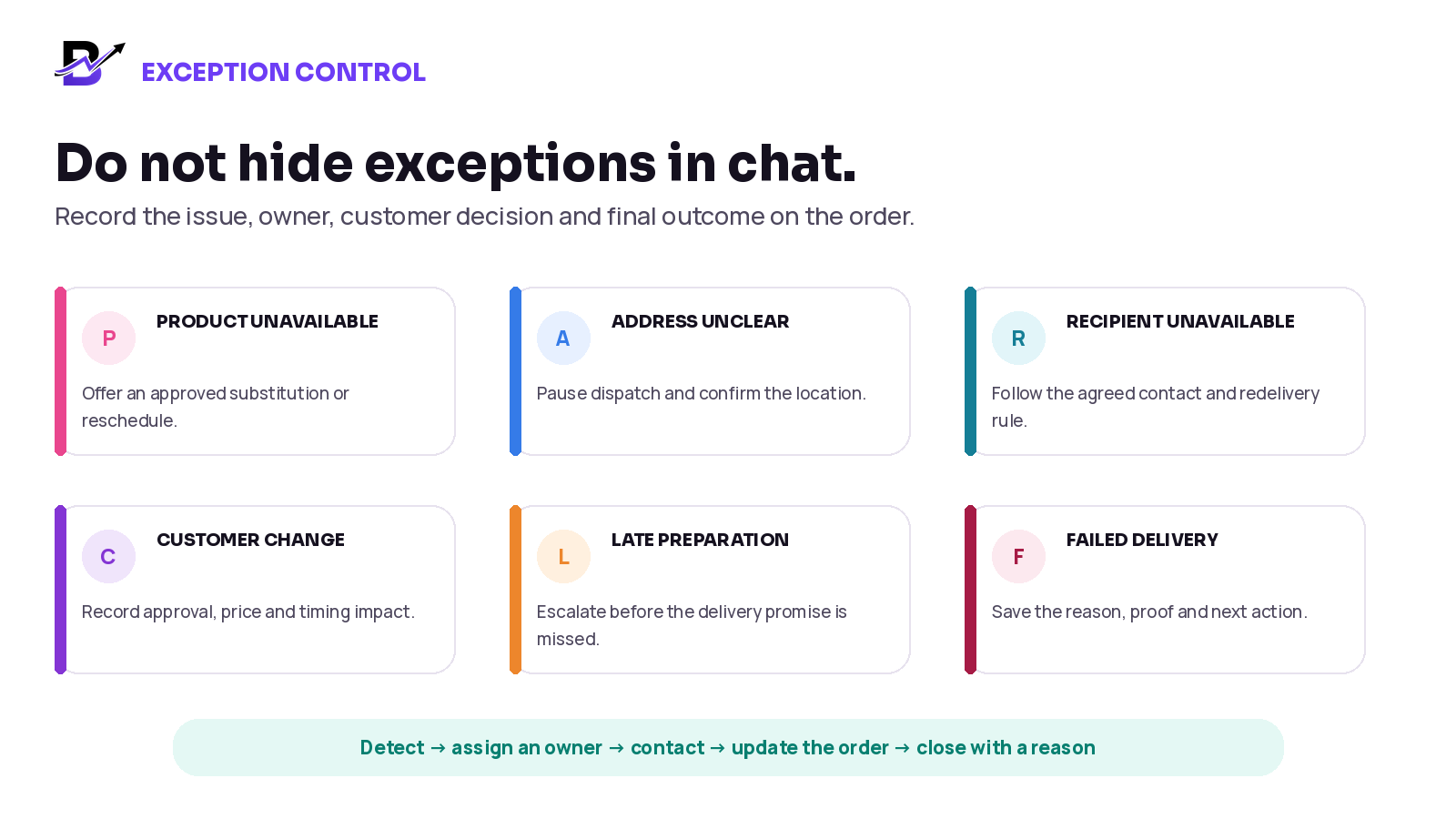
Figure 3. An exception needs an owner and a recorded result, not only another message thread.
EXCEPTION | IMMEDIATE ACTION | ORDER RECORD |
|---|---|---|
Product or add-on unavailable | Pause preparation, check an approved substitute and contact the customer when needed. | Original request, proposed substitution, customer decision, price difference and revised timing. |
Address incomplete or outside the zone | Confirm the correct location before dispatch and explain any charge or timing change. | Updated address, contact attempt, approval and delivery-plan change. |
Recipient unavailable | Follow the agreed contact, reception, safe-handoff, return or redelivery rule. | Attempt, person contacted, outcome, proof and next action. |
Customer changes the order | Check whether preparation has started and confirm price, availability and timing impact. | Old value, approved change, payment adjustment, approver and updated promise. |
Preparation running late | Escalate early, reprioritise the queue and contact the customer before the slot is missed. | Reason, responsible team, revised ready time and communication history. |
Delivery fails | Record the reason and assign dispatch or customer service immediately. | Driver note, proof, attempted contact, return status and redelivery or refund decision. |
Cancellation or refund | Separate the payment action from the physical preparation, delivery and stock outcome. | Reason, approval, amount, item condition and whether work or delivery had already begun. |
Choose statuses that make the next action clear
Too few statuses hide important handoffs. Too many make the queue difficult to use. Start with the stages the team genuinely acts on, define who owns each one and add exception states only when they change the next action.
STATUS | EASY MEANING | PRIMARY OWNER |
|---|---|---|
New / review | The order has arrived and still needs validation. | Customer service or manager |
Awaiting payment / approval | Work is blocked until the payment or customer decision is clear. | Customer service or sales |
Accepted | The business has confirmed it can fulfil the order. | Manager or assigned branch |
Preparing | The florist or shop team is actively working on the order. | Preparation staff |
Ready | The order passed the preparation and delivery-brief check. | Shop staff or manager |
Assigned to driver | A driver owns the delivery but has not started it. | Dispatcher / driver |
Out for delivery | The order has left the shop and is in progress. | Driver |
Delivered | The delivery result and required proof are recorded. | Driver / system |
Exception | A problem is visible and a named owner must resolve it. | Assigned resolver |
Cancelled / refunded | The order or payment has been closed under an approved decision. | Manager / customer service |
The order timeline should show who changed the status and when. This helps managers answer customer questions without calling every staff member for an update.
Prepare for multiple branches and peak days
Valentine’s Day, Mother’s Day, Eid, Christmas, weddings and local occasions can increase order volume quickly. A busy day does not change the workflow; it makes clear ownership, cut-off rules and queue visibility more important.
CONTROL | NORMAL DAY | PEAK-DAY VERSION |
|---|---|---|
Order acceptance | Review each order as it arrives. | Use a dedicated review queue and visible ageing so new orders do not wait unnoticed. |
Branch assignment | Assign based on normal location and stock rules. | Confirm capacity, stock and driver coverage before moving work between branches. |
Delivery promise | Offer standard zones and time slots. | Tighten cut-offs, capacity or unavailable slots instead of accepting promises the team cannot meet. |
Preparation priority | Work mainly by delivery time. | Add exception and VIP rules carefully, while keeping the promised time visible. |
Customer changes | Handle case by case. | Set a clear change cut-off and approval rule once preparation has started. |
Dispatch | Assign drivers as orders become ready. | Use ready, assigned and exception views so drivers do not wait for incomplete orders. |
Management view | Review daily orders and outcomes. | Monitor late acceptance, late-ready orders, failed deliveries and unresolved exceptions throughout the day. |
Peak-Day Rule: Do not solve overload by hiding detail. Reduce available choices, tighten the promise or add capacity while keeping the same complete order record.
Measure the workflow, not only the sales total
Revenue shows what the business sold. Operational measures show whether the team can fulfil the promise consistently. Start with a baseline, review the reasons behind exceptions and improve the workflow before setting aggressive targets.
MEASURE | WHAT IT CAN REVEAL |
|---|---|
Time from order arrival to acceptance | Orders waiting unnoticed, unclear ownership or slow payment review. |
Orders marked ready after the planned time | Preparation capacity, stock, communication or prioritisation problems. |
Preparation corrections or rework | Unclear product options, missing notes or weak quality checks. |
Greeting-card reprints | Input, template, printer or review problems. |
Failed, returned and rescheduled deliveries | Address quality, recipient contact, dispatch timing or delivery-rule issues. |
Age of unresolved exceptions | Problems that have no owner or are being handled outside the order record. |
Order volume by source and branch | Where work is entering and whether staffing or branch allocation matches demand. |
Customer-service contacts after dispatch | Missing updates, unclear status or delivery surprises. |
A practical daily florist order checklist
Every new order appears in the official queue with a source and order number.
Product, size, colour, add-ons and approved substitutions are clear.
Sender, recipient, greeting message, address, delivery date and time slot are complete.
Payment or approval status is visible before the order moves forward.
A branch and a named owner are responsible for the next action.
Staff prepare, print the card and add notes against the same order record.
The ready status is used only after product, add-ons, card, packaging and delivery details are checked.
The driver receives the full permitted delivery brief from the order.
Delivered, failed, returned or rescheduled outcomes are recorded with the required proof or notes.
Open exceptions are reviewed before the shift or delivery window ends.
Managers review late orders, failed deliveries, rework and unresolved issues, not only revenue.
How Bloomlytix supports the florist order journey
Bloomlytix is designed as a connected ecommerce and operations platform for florists and other delivery-first specialty retailers. Its customer channels, staff workflow, POS, payments, inventory, delivery and reporting work around the same order context rather than separate handwritten handoffs.
BLOOMLYTIX CAPABILITY | ROLE IN THE WORKFLOW |
|---|---|
Branded website and customer apps | Capture products, options, add-ons, recipient details, greeting messages, delivery dates, time slots, notes and payment context. |
Online, POS, manual and payment-link orders | Bring different sales channels into a wider operational order flow. |
Staff app and order statuses | Show the preparation brief, assigned tasks, instructions, photos, notes and timeline from new order to ready. |
Greeting-card printing | Preview and print the customer-entered message using configured templates and reprint when needed. |
Branch and role context | Give owners, managers, shop staff and drivers access aligned to their responsibilities. |
Delivery management and driver app | Carry zones, slots, address, recipient, navigation, status, configured proof and exceptions into the handoff. |
Connected reporting | Review sales, product, branch, staff, stock, cash and delivery performance around the same operation. |
The exact workflow should be mapped during onboarding. Bring your real order sources, product options, greeting-card process, branches, staff roles, payment methods, delivery rules, proof requirements and exception cases so the configuration reflects how your shop actually works.
Product Scope: Bloomlytix supports assignment, queues, recipient and address context, map navigation, delivery statuses, configured proof and reporting. Confirm automated multi-stop route optimisation, third-party courier integrations, advanced floral production planning or other specialist requirements before subscribing.
Frequently asked questions
How do florists keep track of orders?
Use one official order queue for website, app, POS, telephone, WhatsApp, custom and payment-link orders. Each order should have a unique number, complete details, a status, an assigned owner and a visible timeline from intake to delivery outcome.
What information should a florist order include?
At minimum, include the product and options, add-ons, sender, recipient, greeting message, address, delivery date and time slot, payment state, branch, special instructions and the current owner of the next action.
What are the main florist order statuses?
A practical workflow can use new or review, awaiting payment, accepted, preparing, ready, assigned to driver, out for delivery, delivered, exception, cancelled and refunded. Use only the statuses that change responsibility or the next action.
How should a flower shop manage WhatsApp orders?
Keep WhatsApp for the customer conversation, but create the final product, price, message, payment and delivery commitment in the official order system. Update the order when the customer approves a change.
When should a florist accept an order?
Accept it after confirming the business can meet the product, payment, branch, delivery-zone and timing requirements. If something is unclear, keep it in a visible review or exception state until an owner resolves it.
What is proof of delivery for a flower order?
It is the recorded evidence or confirmation that closes the delivery handoff. Depending on the workflow, it may include a delivery photo, recipient name, signature, time or notes. Use only the proof appropriate for the order and local rules.
What should happen when the recipient is unavailable?
Follow the business’s agreed contact, reception, safe-handoff, return or redelivery rule. Record the attempt, person contacted, reason, proof and next action on the order instead of closing it as delivered.
Can online, POS and manual florist orders use one workflow?
Yes. The customer-facing steps can differ, but the internal record can use the same core fields, statuses, preparation rules, driver handoff and reporting process.
Should a refund automatically close the operational order?
Not always. A refund changes the payment record, while the product may be unprepared, prepared, delivered, returned or damaged. Record the financial and physical outcomes separately so the history remains accurate.
The order is complete when the result is clear
Good florist order management is not about adding more admin. It is about removing repeated entry and uncertainty. Capture the promise once, make each handoff visible, keep personal details accurate, give exceptions an owner and record the real outcome at the door.
When every permitted person can see the right next action, the team spends less time searching for information and more time preparing the order the customer actually requested. The same clear record also gives customer service and owners a reliable history after the delivery is finished.
Quick workflow summary
DO THIS | AVOID THIS |
|---|---|
Capture product, recipient, message, payment and delivery details once. | Rebuilding the order in chats, paper notes and driver messages. |
Validate the promise before accepting the order. | Moving unclear or unpaid orders into preparation without a visible rule. |
Assign one owner for the next action and keep status history. | Assuming “everyone can see it” means someone is responsible. |
Prepare, print the card and quality-check against the same brief. | Relying on memory or a shortened summary. |
Record delivered, failed, returned or rescheduled outcomes with the required proof or notes. | Closing every dispatched order as delivered. |
Keep exceptions visible with a reason, owner and customer decision. | Resolving problems only in private chat threads. |
Related Bloomlytix pages: What is a retail operating system? · Connect ecommerce and POS · Complete florist software · Florist order management · Florist delivery management · Florist software buyer’s guide