Delivery zones
- Define configured service areas
- Set delivery charges by zone
- Apply minimum-order rules where required
- Keep zone context attached to the order
Choose your plan and share a few details before secure checkout.
Cancel anytime
Connect checkout zones and time slots to shop preparation, driver assignment, navigation, delivery status, configured proof, cash collection, and owner reporting.
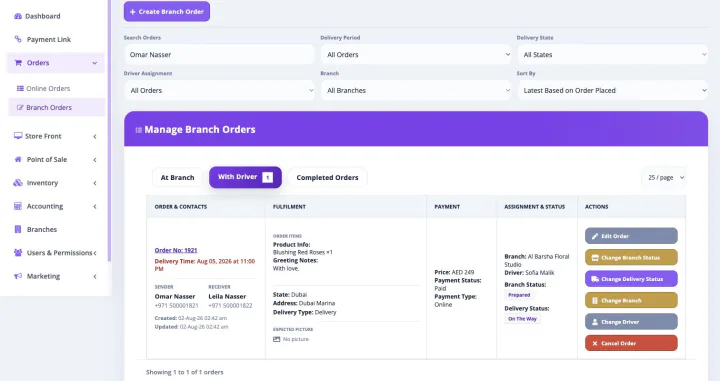
This is not a separately purchased florist delivery management product. When a paid Bloomlytix subscription is active, the core ecommerce and operating modules work together around the same catalog, customers, orders, branches, staff, payments, stock, fulfilment, delivery, cash, and reporting data for your florist.
Every plan includes full support and a dedicated relationship manager. Plans differ only by included users, branches, and customer-app entitlement. Drivers count as users. Starter includes the branded website without a customer app, Growth adds Android, and Pro includes Android and iOS customer apps.
Configure the service rules customers see, then carry the selected delivery context into preparation and dispatch.
When the shop marks an order ready, managers or permitted staff can continue dispatch from the same record the preparation team used.
Drivers can move assigned deliveries into an on-the-way state so permitted teams can see current progress.
Mark the order delivered and add the configured proof or notes needed to close the operational loop.
Record failed, returned, or rescheduled outcomes rather than treating every dispatched order as a successful delivery.
Proof requirements can vary by florist, order type, customer, and local practice. Configure the appropriate combination during onboarding.
Attach a delivery photo where the business workflow and privacy requirements allow it.
Record the recipient name or signature when that form of confirmation is configured.
Add relevant notes to explain a completed, failed, returned, or rescheduled handoff.
| Need | Standalone delivery tool | Bloomlytix delivery management |
|---|---|---|
| Checkout rules | Delivery request imported after sale | Zones, charges, dates, and slots begin in customer checkout |
| Order context | Address and reference number | Recipient, product, greeting, notes, payment, branch, and timing context |
| Preparation handoff | Dispatch waits for a separate ready update | Staff preparation status continues into driver assignment |
| Driver workflow | Generic task list | Assigned florist orders with permitted details and map navigation |
| Delivery result | Status in a separate system | Outcome and configured proof update the shared order timeline |
| Business reporting | Delivery-only metrics | Delivery connected to sales, branches, staff, cash, stock, and customers |
When cash collection is part of the configured driver workflow, Bloomlytix can record the collection and include it in staff cash-in-hand, cash received, expense, proof, and closing views.
Standard Bloomlytix delivery capabilities include assignment, queues, recipient and address context, map navigation, status, proof, and reporting. Discuss automated multi-stop optimization, third-party courier integrations, or other specialized routing before subscribing.
Yes. Bloomlytix supports configured delivery zones, charges, minimum-order rules, delivery dates, and time slots that can be used in the customer checkout and operational workflow.
The driver app can show assigned deliveries, permitted customer and recipient details, delivery address, map navigation, time context, order notes, and the available delivery status actions.
Configured workflows can include assigned, on the way, delivered, failed, returned, and rescheduled statuses, with the result connected to the order timeline.
Yes. Depending on configuration, proof can include a photo, recipient name, signature, or delivery notes.
Bloomlytix provides driver assignment, delivery queues, address context, and map navigation. Automated multi-stop route optimization is not represented as a standard feature; confirm any advanced routing requirement with the team before subscribing.
We will map your zones, charges, slots, branches, preparation handoff, drivers, status rules, proof requirements, exceptions, cash collection, and reports.
Each workflow uses the same Bloomlytix catalog, order, customer, stock, staff, delivery, payment, and reporting data.
Part of the same Bloomlytix subscription and connected florist operating platform.
Explore florist ecommercePart of the same Bloomlytix subscription and connected florist operating platform.
Explore florist posPart of the same Bloomlytix subscription and connected florist operating platform.
Explore florist inventoryPart of the same Bloomlytix subscription and connected florist operating platform.
Explore florist order managementPart of the same Bloomlytix subscription and connected florist operating platform.
Explore florist mobile apps