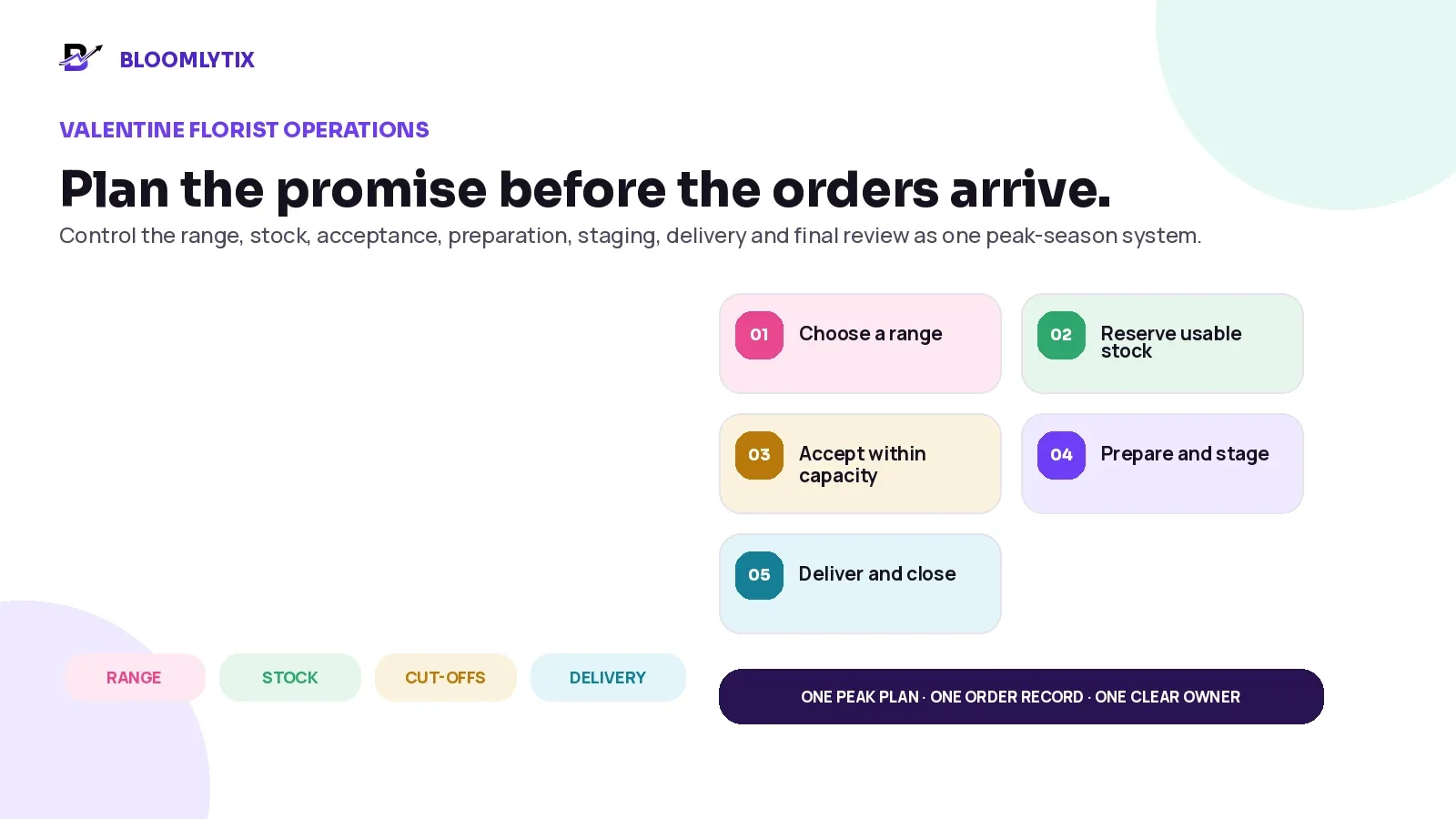
Plan the Valentine promise before the orders arrive.
Valentine’s Day can make a strong flower shop feel like a completely different business. Demand arrives faster. Customers want specific colours and flowers. Suppliers work under pressure. Staff handle more messages, cards, add-ons and address changes. Delivery windows fill before the day itself begins.
The mistake is treating the holiday as a normal day with more orders. A safer approach is to redesign the operation around the narrowest limits: usable stock, design capacity, packing space, customer-service speed, pickup flow and delivery capacity.
DIRECT ANSWER. Prepare Valentine’s Day as one controlled operating model. Use previous orders and current limits to set a safe capacity. Sell a smaller, tested and delivery-safe range. Reserve flowers, vases, cards, chocolates and packaging against accepted demand. Define substitution rules before stock runs short. Set cut-offs by product, branch and handoff method. Separate order validation, preparation, quality check, staging, dispatch and exception ownership. After the rush, reconcile sales, purchases, waste, labour, delivery and customer-service outcomes.
This guide is for independent and multi-branch florists that sell through a website, customer app, POS, telephone, WhatsApp, payment links, pickup and local delivery. The examples are operational starting points, not universal volume targets. Use your own supplier deadlines, staffing, storage, transport and order history.
In this guide
Why Valentine’s Day needs a separate operating model
How to turn previous orders into a practical capacity plan
How to choose a smaller range the team can reproduce reliably
How to plan flowers, add-ons, packaging and supplier contingencies
How to approve substitutions without changing the customer promise silently
How to set order acceptance, cut-offs, slots and branch limits
How to organise staff, preparation, quality checks, staging and delivery
How to close exceptions and review the true result after the holiday
Valentine’s Day is a capacity problem before it is a sales problem
On a normal day, a florist may be able to solve one difficult order through a phone call, a branch transfer or a late delivery. On Valentine’s Day, the same workaround may be needed for dozens of orders at once. A small weakness becomes a queue. A queue becomes a missed promise.
The useful question is not only, “How many orders can we sell?” It is, “How many complete promises can we accept, prepare, check, stage, hand off and close with the people and stock available?”
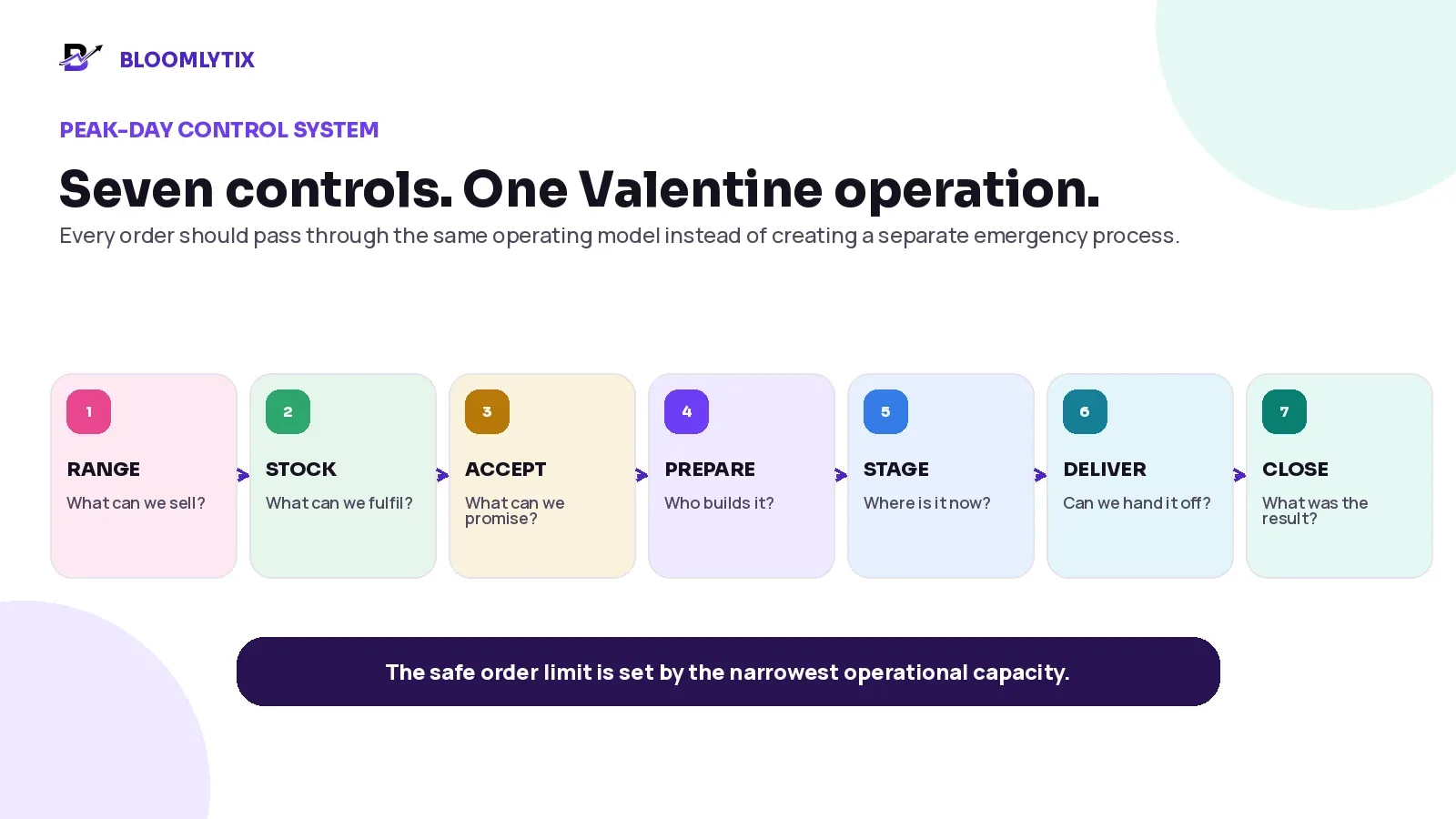
Figure 1. A Valentine operation needs seven connected controls from range to final closure.
CONTROL | QUESTION TO ANSWER | WHAT GOES WRONG WHEN IT IS UNCLEAR |
|---|---|---|
Range | Which designs, sizes, add-ons and custom options are genuinely supported? | The team accepts work that is slow, inconsistent or difficult to source. |
Stock | Which quantities are usable, reserved, incoming, flexible or unavailable? | The same flowers or vases appear available to several orders. |
Accept | Which product, branch, slot, payment and address conditions must pass? | A customer receives a promise the operation cannot keep. |
Prepare | Who owns the order, recipe, message and deadline? | Staff rebuild the brief from chat, memory or several screens. |
Stage | Where is every ready order, and what still blocks release? | Drivers and pickup staff search for orders while production continues. |
Deliver | Which recipient, address, window, driver and proof apply? | The final handoff uses incomplete or outdated information. |
Close | Was the result delivered, failed, returned, rescheduled, cancelled or refunded? | Exceptions disappear without follow-up or useful reporting. |
OPERATIONAL OBSERVATION. The safe order limit is normally set by the narrowest capacity, not by the largest number on the sales forecast. A shop may have enough roses for 300 orders but only enough design, staging or delivery capacity for 180.
1. Start with last Valentine’s facts and this Valentine’s limits
If the business has previous Valentine data, use it as a starting point rather than copying another florist’s volume. Separate the information by product, size, branch, channel, pickup or delivery, delivery window, order time and final outcome. A combined total hides the parts of the operation that became difficult.
REVIEW AREA | USEFUL QUESTIONS | PLANNING DECISION |
|---|---|---|
Demand | How many orders arrived by day and hour? Which products, sizes and add-ons sold? | Set the initial product and capacity forecast. |
Order timing | How much demand arrived early, during the final week and on the day? | Decide preorder incentives, cut-offs and last-minute limits. |
Preparation | Which designs were fast, slow or repeatedly reworked? | Keep, simplify, reprice or remove products. |
Stock | Which flowers, vases, cards, chocolates or packaging ran short? | Change supplier orders, buffers and substitute rules. |
Delivery | Which zones, windows, buildings or routes created delays? | Adjust slots, fees, capacity and driver handoff. |
Service | Why did customers contact the shop? | Improve confirmation, product copy and status updates. |
Financial outcome | Which sales produced acceptable contribution after holiday purchases, labour, refunds and delivery? | Protect margin rather than celebrating revenue alone. |
A new florist can still plan without history. Start with a conservative pilot forecast, confirm supplier and staffing limits, and close capacity earlier rather than using a competitor’s order count as a target.
Calculate the narrowest capacity
Estimate the number of orders each important part of the operation can complete during the planned period. Use the same period for every estimate, such as Friday to Sunday or one delivery window. The safe accepted-order ceiling is the lowest practical capacity after the business applies its chosen reserve for exceptions.
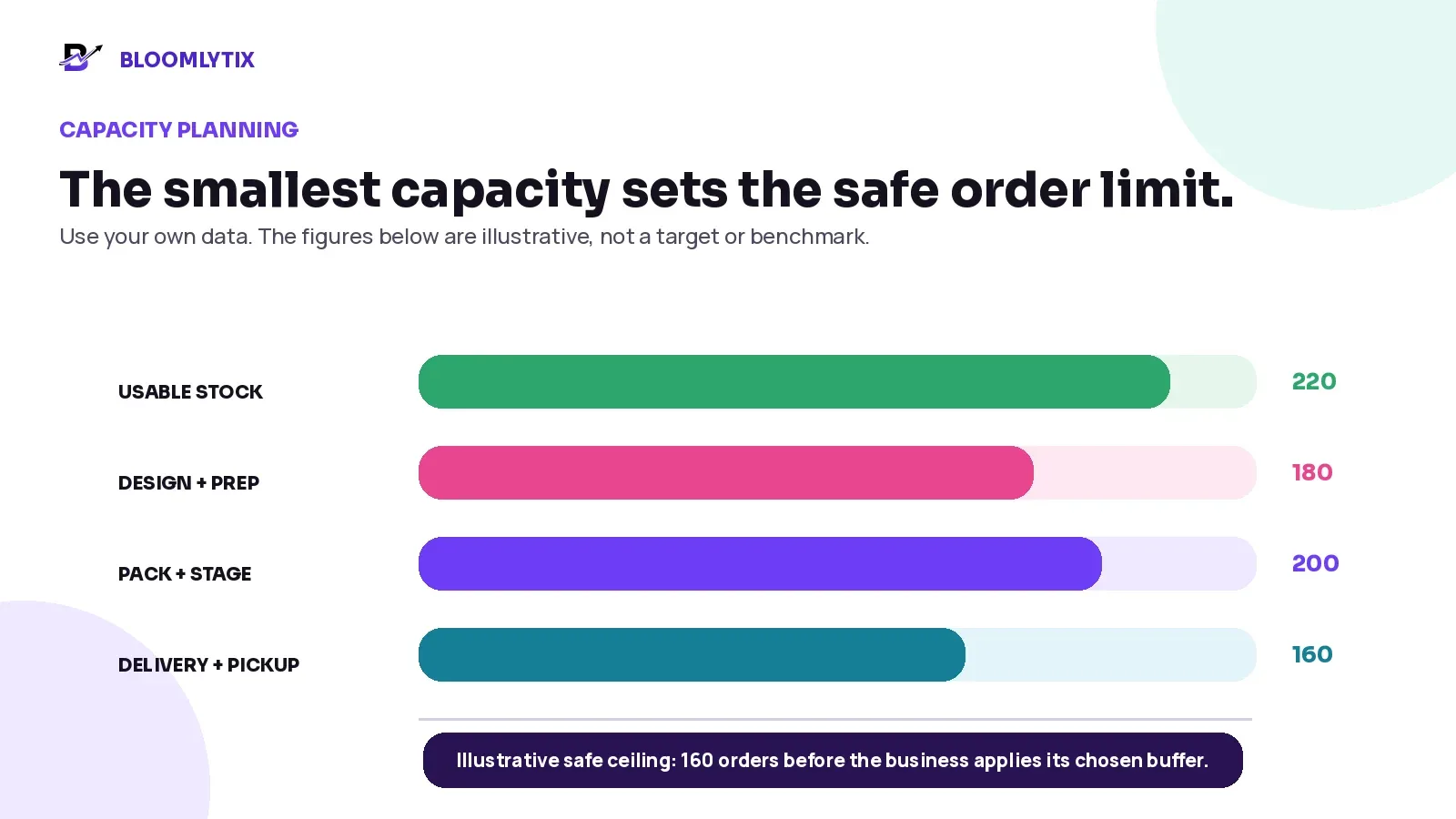
Figure 2. The narrowest capacity sets the safe accepted-order ceiling.
SIMPLE PLANNING RULE. Safe accepted-order ceiling = the lowest usable capacity across stock, preparation, packing/staging and handoff, minus the business’s chosen reserve for exceptions. The illustration is not a benchmark; replace every number with measured local data.
Because Valentine’s Day 2027 falls on Sunday, 14 February, many florists may need to plan the full weekend rather than only one date. Review Friday and Saturday gifting, Sunday deliveries, corporate orders, pickup traffic and local working patterns separately.
2. Choose a range the team can reproduce under pressure
A broad everyday catalogue can create hidden complexity during a compressed holiday. Every extra design may require another recipe, image, price, vase, wrapping method, training note and substitution decision. A smaller range is not automatically less attractive. It can make the customer choice clearer and the operation more reliable.
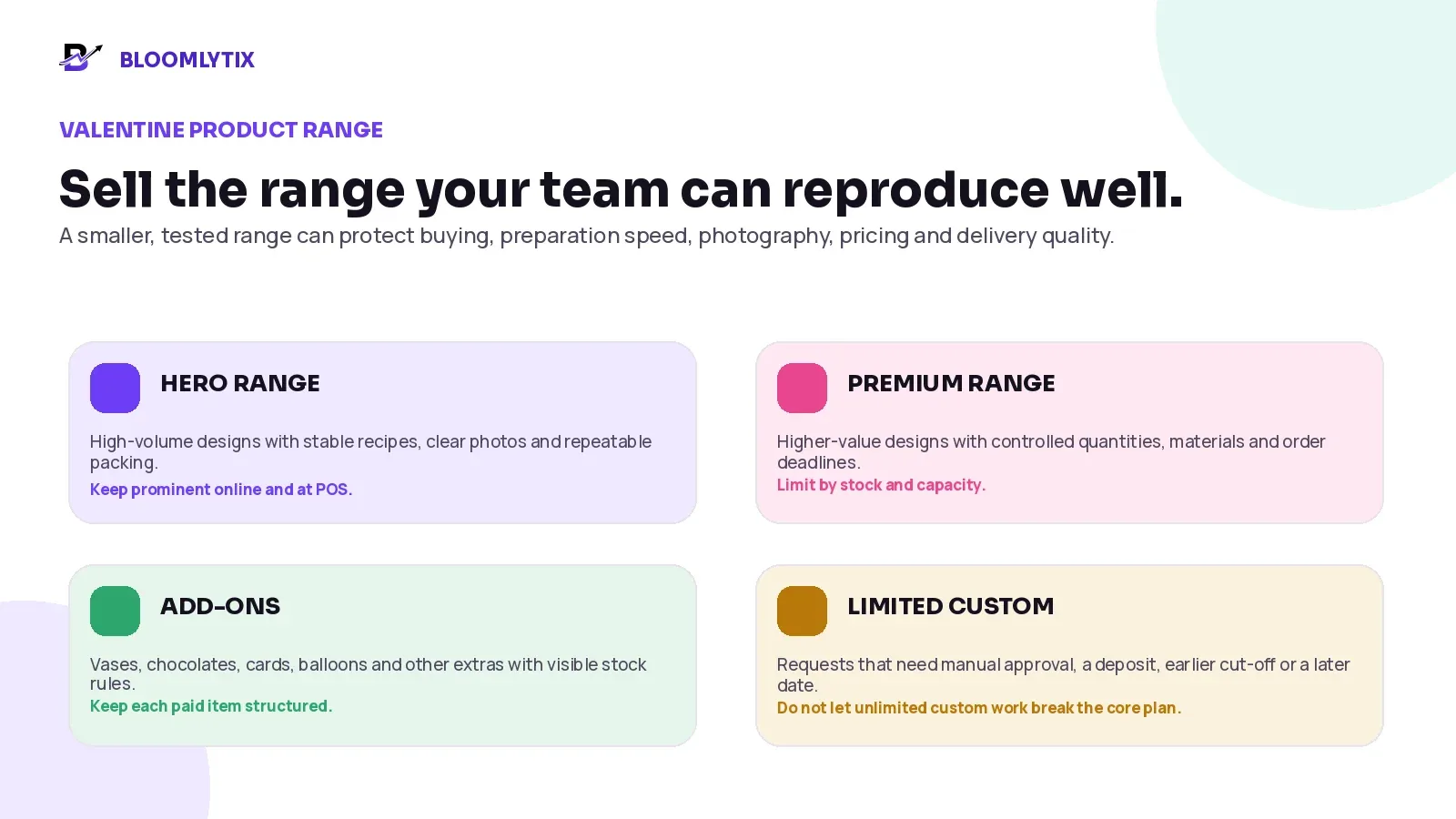
Figure 3. Divide the Valentine range into hero, premium, add-on and limited-custom groups.
RANGE GROUP | GOOD USE | CONTROL RULE |
|---|---|---|
Hero designs | High-volume products with tested recipes, clear images and repeatable packing. | Keep quantities, sizes and substitute logic simple. |
Premium designs | Higher-value arrangements with controlled materials or presentation. | Limit quantity and close earlier when the recipe or vase is scarce. |
Add-ons | Vases, chocolates, cards, balloons, candles or gifts. | Track each paid item clearly and protect stock by branch. |
Limited custom | Requests that need a consultation, manual price, deposit or unique sourcing. | Require approval, earlier deadlines and a clear capacity limit. |
Unsupported requests | Work the team cannot source, reproduce or deliver safely. | Decline or offer a supported alternative before payment. |
Use five tests before keeping a product in the Valentine range
The design can be reproduced consistently by the planned team.
The core materials have a confirmed supply plan and clear alternatives.
The price covers the real holiday purchase, labour, packing and delivery cost.
The product can be packed, staged and transported without creating avoidable damage.
The website image, description, size and substitution rule match what staff can actually prepare.
MARGIN-AWARE DOES NOT MEAN EXPENSIVE. The purpose is to understand the contribution of each design after relevant holiday costs. A popular product can still be operationally weak if it consumes scarce stems, excessive design time or difficult delivery capacity.
3. Plan flowers, add-ons and packaging from usable quantities
A supplier order is not the same as usable Valentine stock. Flowers may arrive short, damaged, immature, over-open, in the wrong colour or below the agreed quality. Pack sizes may also create rounding. Plan the usable requirement first, then convert it into the purchase quantity and receiving checks.
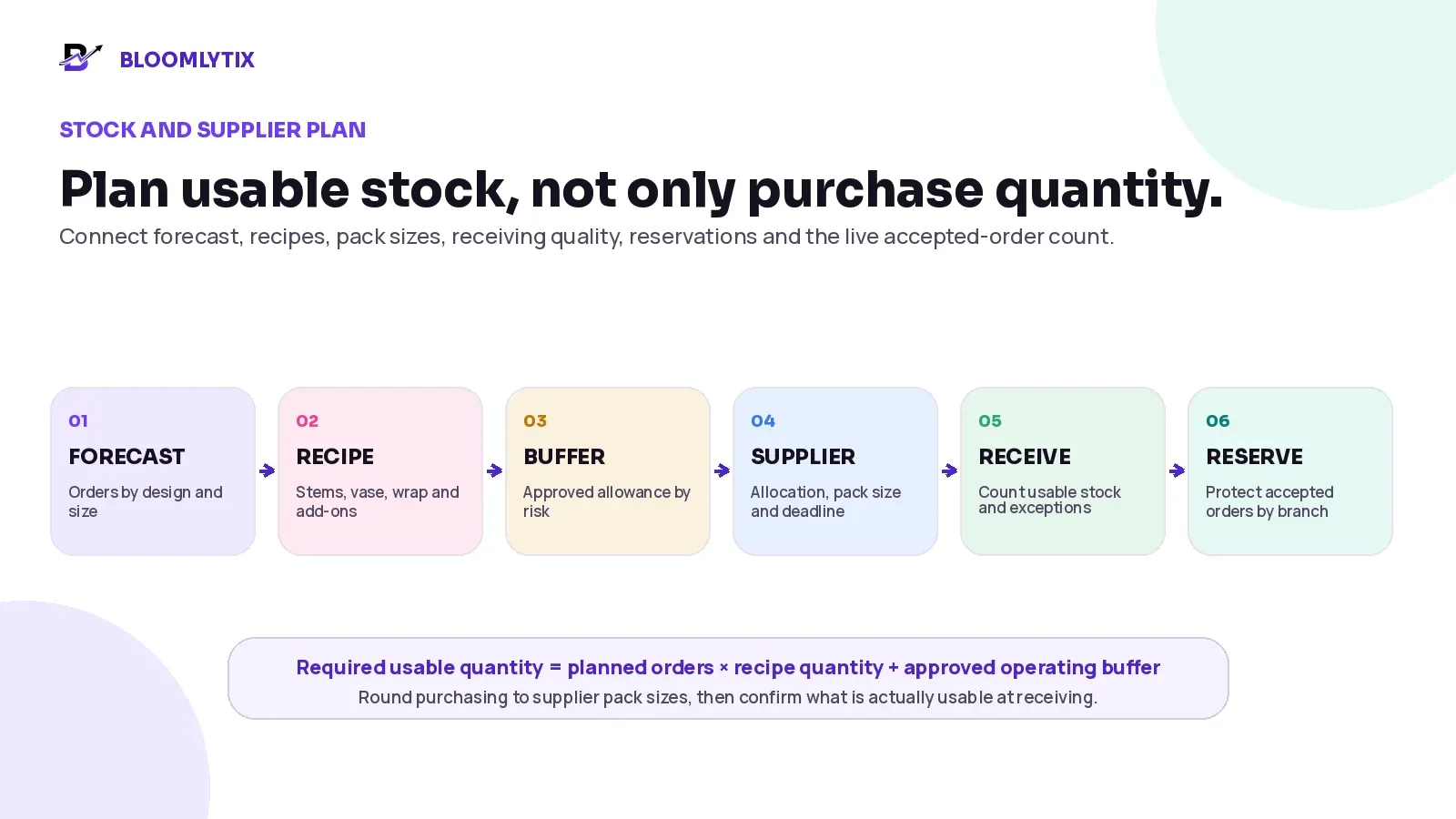
Figure 4. Connect forecast, recipes, buffers, supplier orders, receiving and reservations.
STARTING FORMULA. Required usable quantity = planned accepted orders × approved recipe quantity + the chosen operating buffer. Purchase quantity then considers supplier bunch or pack sizes and the shop’s expected unusable quantity. Do not add several buffers for the same risk without understanding the duplication.
STOCK GROUP | EXAMPLES | VALENTINE CONTROL |
|---|---|---|
Fresh flowers and greenery | Roses, tulips, lilies, seasonal flowers, foliage and fillers. | Plan by recipe and size; confirm colour, grade, pack and usable receiving standards. |
Containers | Vases, hat boxes, baskets, trays and premium presentation pieces. | Reserve by product and branch; identify substitute containers before selling. |
Sellable add-ons | Chocolates, cards, balloons, candles and gifts. | Keep quantity and price visible; do not hide paid items in a note. |
Packaging | Wrap, ribbon, bags, water packs, boxes, tissue, labels and delivery protection. | Treat critical packaging as stock because running out can stop fulfilment. |
Operational supplies | Card paper, printer materials, tape, markers, cleaning and staging supplies. | Use a simple minimum level and replenish before the production rush. |
Create a supplier and receiving control sheet
SUPPLIER FIELD | WHAT TO RECORD | WHY IT MATTERS |
|---|---|---|
Allocation status | Confirmed, provisional, substitute offered or unavailable. | A quotation is not always a guaranteed allocation. |
Order and change deadline | Last date to place, increase, reduce or cancel the order. | Prevents late changes from being assumed possible. |
Product detail | Variety, colour, grade, length, bunch or pack size and expected arrival. | Protects the recipe and buying calculation. |
Backup plan | Alternative flower, supplier, colour or design that is already approved. | Makes shortages easier to manage without improvising. |
Receiving check | Actual quantity, usable quantity, quality issue, photo and action. | Turns delivery problems into a visible purchasing exception. |
Owner | Person responsible for supplier follow-up and the next decision. | Stops everyone from assuming someone else is handling it. |
The Society of American Florists groups Valentine preparation around forecasting, staffing, supply chain, design-room efficiency, changing the offer as inventory sells out and customer-service communication. Those areas should be connected in the same operating plan rather than assigned to separate teams with no shared status.
4. Define substitution rules before stock becomes urgent
A substitution is not only a design decision. It can change the product image, colour story, perceived value, size, delivery time or price. Decide which changes are pre-approved and which require the customer or authorised buyer to approve a new promise.
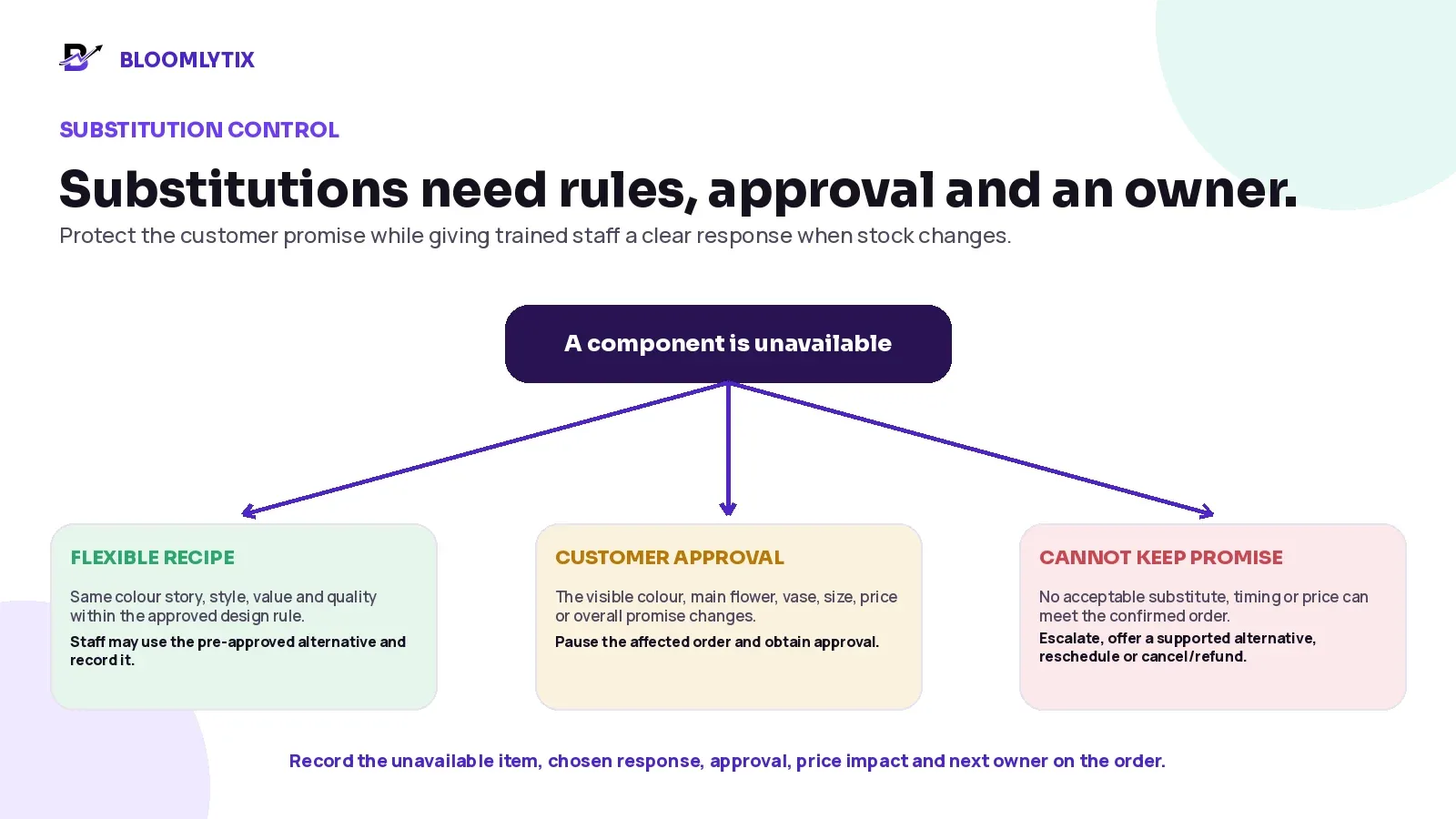
Figure 5. Use a clear substitution decision tree with three levels of approval.
SUBSTITUTION LEVEL | EXAMPLE | REQUIRED ACTION |
|---|---|---|
Pre-approved flexibility | A supporting flower changes while the colour story, style, size and value remain within the published rule. | Trained staff may follow the approved recipe and record the change. |
Customer approval required | The main flower, visible colour, container, design, size, delivery date or price changes. | Pause the affected order, offer realistic options and record approval. |
Cannot keep the promise | No suitable material, timing or alternative can meet the confirmed order. | Escalate quickly, offer another supported product or date, or apply the cancellation/refund process. |
A substitution message should explain the decision, not hide it
EXAMPLE CUSTOMER MESSAGE. “The exact red roses shown are no longer available in the quality required for your order. We can keep the same red-and-pink colour story and value using premium pink roses, or offer a mixed rose-and-lily design. Please confirm your preferred choice by 4:00 PM so we can protect your delivery window.”
Keep the unavailable item, offered options, price or timing impact, customer decision, approval time and responsible staff member on the order. Do not delete the original promise and silently replace it.
5. Use one acceptance gate for website, app, POS and WhatsApp orders
Customers can order through several channels, but the florist should not operate several definitions of an accepted order. A confirmed Valentine order needs one number, one product promise, one payment state, one fulfilment owner and one final outcome.
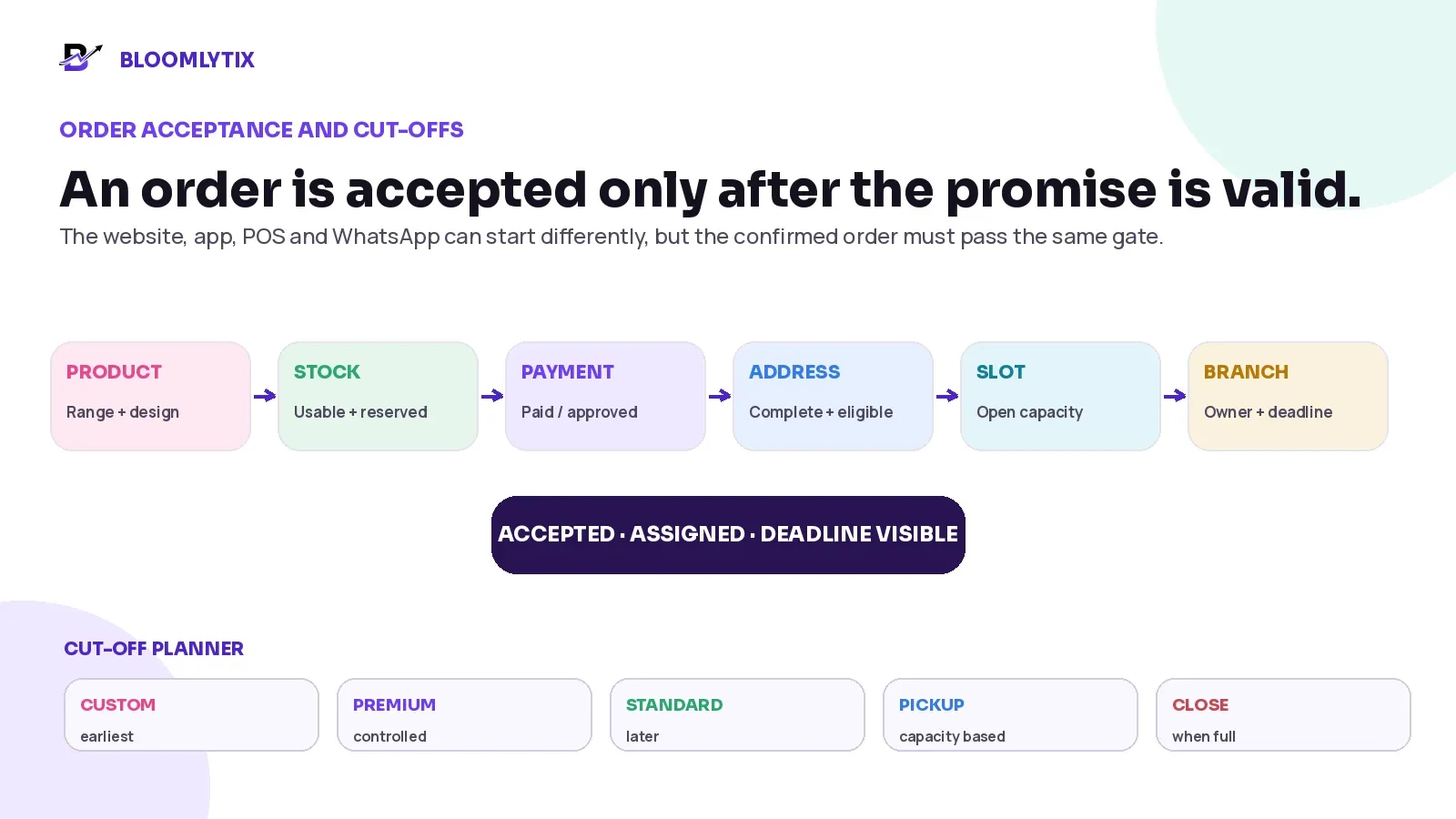
Figure 6. Every Valentine order should pass the same acceptance gate and cut-off rules.
ACCEPTANCE CHECK | QUESTION BEFORE ACCEPTANCE | POSSIBLE RESPONSE |
|---|---|---|
Product | Is the design, size, colour and add-on set still supported? | Accept, offer an approved alternative or close the item. |
Usable stock | Is the required stock available after existing reservations and holds? | Reserve, transfer, substitute or stop accepting. |
Payment / approval | Is the order paid, deposit-confirmed or approved under the business policy? | Proceed, follow up or hold the order. |
Address / pickup | Is the recipient, address, building access or pickup point complete? | Clarify before the delivery promise becomes final. |
Date and slot | Is the selected pickup or delivery window still within capacity? | Accept, offer another window or close the slot. |
Branch and owner | Which location will fulfil, and who owns the ready deadline? | Assign one branch and one visible next owner. |
Set cut-offs by product and handoff method
One universal cut-off is rarely enough. A custom arrangement, standard rose bouquet, branch pickup and extended-zone delivery may need different deadlines. Close each option when the remaining operational capacity is no longer safe, even if the planned marketing campaign has not finished.
ORDER TYPE | CUT-OFF LOGIC | CUSTOMER-FACING ACTION |
|---|---|---|
Custom / bespoke | Close earliest because approval, sourcing and preparation are less predictable. | Show a clear final order date or move to a later fulfilment date. |
Premium / scarce | Close when the confirmed allocation or production quantity is reserved. | Mark unavailable or show another supported product. |
Standard range | Accept later only while stock, branch and preparation capacity remain valid. | Keep current availability and delivery options accurate. |
Pickup | Cap by counter, staging and handoff capacity, not only by production. | Offer defined windows and ready-for-pickup confirmation. |
Delivery | Cap by branch, zone, window, driver and doorstep capacity. | Close full slots and show the remaining supported promise. |
Same-day | Treat as a separate capacity decision, not a default banner. | Offer only when the complete order can still be prepared and delivered. |
CHANNEL RULE. WhatsApp may remain the conversation channel, but the confirmed product, message, amount, payment, recipient, address, slot, branch and status should move into the same official order workflow used by online and POS sales.
6. Assign roles around the peak workflow, not only job titles
A small shop may have one person performing several roles. The roles should still be visible, because a busy team needs to know who owns the next action and who can approve an exception.
ROLE | PEAK RESPONSIBILITY | WHAT THE ROLE NEEDS |
|---|---|---|
Order intake / customer service | Validate the product, message, recipient, address, payment and promise. | One official order, live availability and a clear escalation path. |
Purchasing / receiving | Confirm allocations, receive stock, record usable quantity and resolve shortages. | Supplier deadlines, recipe forecast and receiving evidence. |
Preparation lead | Balance the queue, assign designers and protect ready deadlines. | Orders grouped by design, branch, window and priority. |
Designer / florist | Build against the approved recipe and order brief. | Product, size, substitutions, message, add-ons and deadline. |
Card / label / packing | Print the correct message and complete packaging without changing the order. | Exact customer text, recipient, order number and handoff method. |
Quality check | Verify the finished product and complete order before release. | Order summary, approved changes, packaging and readiness checks. |
Staging / dispatcher | Organise ready orders by pickup, window, route or driver. | Ready status, location, recipient, slot and next owner. |
Exception manager | Own shortages, late preparation, address problems, failed delivery and refunds. | A live exception queue with decision authority. |
Use short peak briefings at the beginning and end of each shift: current stock restrictions, closed products, open slots, supplier issues, delivery risks and unresolved exceptions. Staff should not learn about a sold-out flower from a customer screenshot.
7. Prepare, check and stage every order from the same record
Batch preparation can improve speed, but each final arrangement must return to its own order. A tray of cards, a pile of labels or several similar red bouquets creates a mix-up risk unless the order number and recipient stay visible through every handoff.
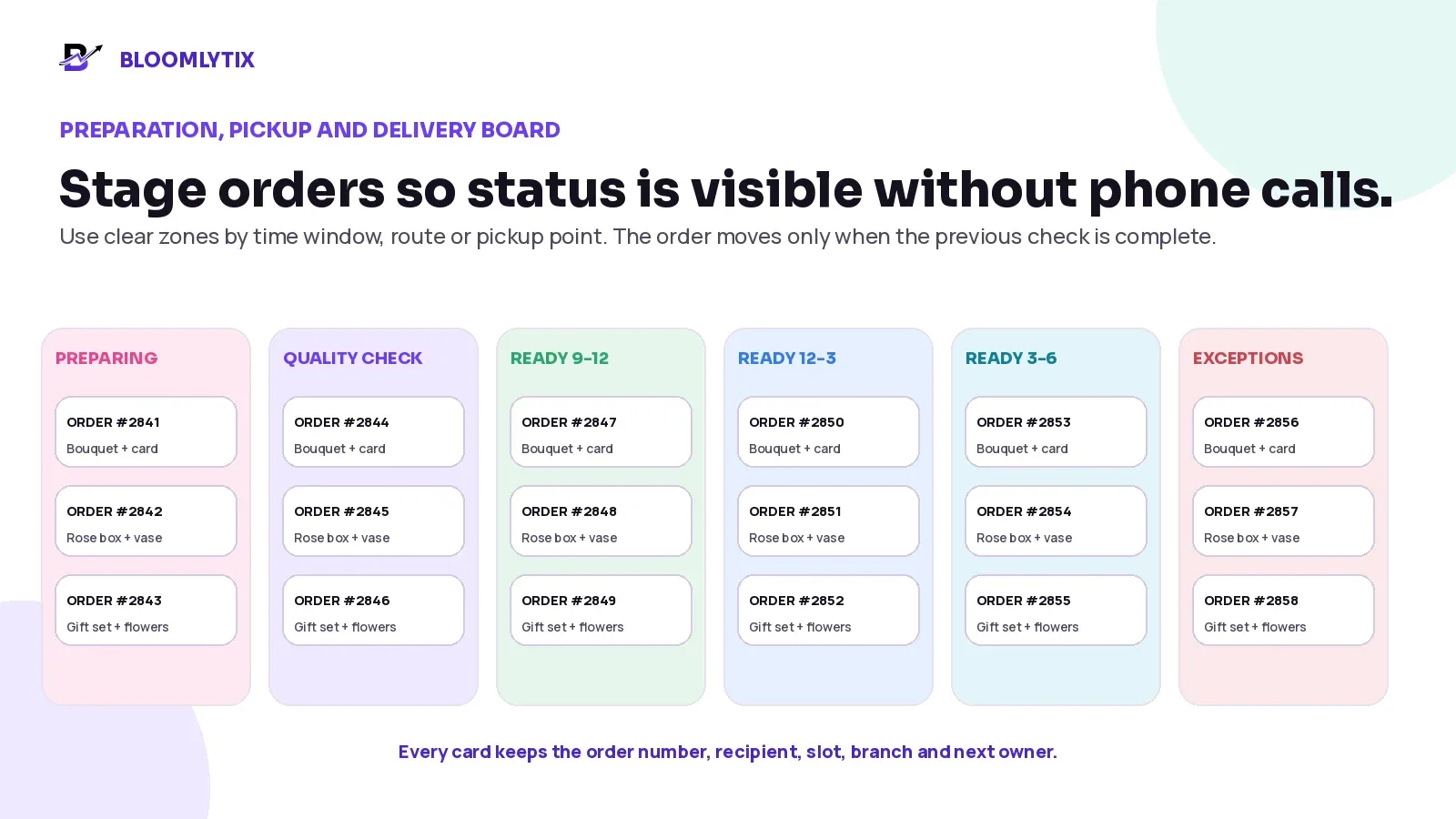
Figure 7. Stage Valentine orders by status and fulfilment window so the next owner is visible.
Final order check before pickup or loading
CHECK | CONFIRM |
|---|---|
Product | Correct design, size, colour story, quantity and approved substitution. |
Add-ons | Every paid vase, chocolate, card, balloon or gift item is present. |
Message | Exact customer-approved text, language, names and template. |
Recipient / pickup | Correct recipient, pickup person, address, access note and phone details. |
Handoff | Correct date, window, route, driver or pickup location. |
Status | Order is genuinely ready, not only printed or partially packed. |
Evidence | Required preparation photo, note, label or proof rule is ready. |
READY MUST MEAN READY. Do not mark an order ready because the flowers are arranged while the card, add-on, label or delivery brief is still missing. “Ready” should be a controlled release point for pickup or dispatch.
8. Protect pickup and delivery capacity separately
Pickup can be as operationally demanding as delivery. Customers arrive early, several people collect at once, staff search for similar orders and last-minute questions interrupt preparation. Plan a pickup counter, ready-order sequence, collection proof and escalation owner instead of treating pickup as “no delivery work.”
For delivery, keep the branch, recipient, address, window, access notes, driver assignment, status and proof on the same order. Official ecommerce guidance for local delivery also treats location inventory, delivery area and fulfilment eligibility as connected requirements; the customer should not see an option that the selected location cannot fulfil.
DELIVERY CONTROL | PEAK-DAY RULE |
|---|---|
Zones | Serve only areas the planned branch and driver capacity can support. |
Windows | Use realistic windows and close them when the safe order count is reached. |
Addresses | Confirm building, villa, unit, floor, landmark, location link and access notes where relevant. |
Dispatch | Assign ready orders only, unless the business has an explicit controlled exception. |
Customer updates | Send confirmation, meaningful change, out-for-delivery, delivered and exception updates at accurate moments. |
Proof | Use the minimum configured proof that supports the handoff without collecting unnecessary data. |
Failed delivery | Record the reason, contact attempt, next action, new owner and any payment or refund consequence. |
9. Run one live exception queue
The exception queue is the part of the operation that cannot follow the normal path. It should be visible throughout the day, with one owner and one next action for every item. A problem is not controlled because someone wrote a message in a private chat.
EXCEPTION | IMMEDIATE RESPONSE | RECORD AND OWNER |
|---|---|---|
Flower or container shortage | Stop affected orders, apply the approved substitution rule and protect remaining reservations. | Unavailable item, affected orders, options, approval and purchasing/manager owner. |
Incomplete or wrong address | Contact the permitted person and re-check zone, charge, slot and route. | Original detail, corrected detail, timing impact and customer-service owner. |
Recipient unavailable | Follow the approved contact, wait, retry, return or reschedule rule. | Attempt time, contact outcome, proof and dispatch/customer-service owner. |
Preparation delay | Update staging and delivery before the departure deadline is missed. | Cause, revised ready time, affected promise and preparation lead. |
Damage before handoff | Hold the order, assess remake or replacement and protect the customer. | Condition, photo where allowed, decision and manager owner. |
Payment mismatch | Do not treat a screenshot or terminal slip as automatic settlement. | Expected amount, recorded payment, exception and finance/manager owner. |
Duplicate or changed order | Pause fulfilment and confirm the current approved version. | Original order, change request, customer approval and order owner. |
Cancellation or refund | Separate the financial result from stock, preparation and delivery actions. | Refund status, physical outcome, waste or restock decision and owner. |
10. Communicate only promises the operation can support
Customer communication should reduce uncertainty without creating a new guarantee. Avoid exact delivery times unless the operation can genuinely support them. Keep the visible product, substitution statement, cut-off, delivery window and availability consistent across the website, apps, POS, social posts and customer-service replies.
CUSTOMER MESSAGE | WHEN TO SEND | WHAT IT SHOULD CONFIRM |
|---|---|---|
Order received | After the request or checkout is created. | Order number and that operational acceptance or payment may still be pending. |
Order confirmed | After payment and capacity are valid. | Product, recipient or pickup, date, window and supported substitution rule. |
Important change | When product, price, address, date or window must change. | The exact change, customer options and approval deadline. |
Ready for pickup | Only after the complete order passes the final check. | Pickup point, window, reference and any permitted collection rule. |
Out for delivery | After the ready order is dispatched. | The order is on the way and how to contact support if necessary. |
Delivered or exception | After the outcome is recorded. | Completion or the next agreed action without exposing private details. |
11. Use a Valentine countdown instead of one final-week checklist
The exact dates depend on the country, supplier and business model. For Valentine’s Day on Sunday, 14 February 2027, the following sequence is a practical starting point.
TIMING | MAIN DECISIONS | EVIDENCE OF READINESS |
|---|---|---|
10-12 weeks before | Review last year, set capacity, contact suppliers, decide the core range and identify the narrowest constraints. | Demand/capacity sheet, supplier questions, draft range. |
8-10 weeks before | Confirm main allocations, recipes, prices, photography, landing page and order rules. | Supplier status, recipe list, approved prices and product content. |
6 weeks before | Open controlled preorders, train customer service and test website/app/POS/manual order paths. | Test orders, payment results, branch assignment and reports. |
4 weeks before | Confirm staff, drivers, pickup plan, packaging, cards, labels and substitution rules. | Role plan, cut-off planner, exception owners and delivery capacity. |
2 weeks before | Reconcile accepted orders, reserved stock, supplier changes and open delivery windows. | Reservation report, shortage list and current available capacity. |
1 week before | Tighten the range, close unsafe options, confirm staging zones and run peak-day briefings. | Live closed/open product list, slot board and staff schedule. |
48 hours before | Receive and count usable stock, protect reservations, pre-stage supplies and test printers/devices. | Receiving exceptions, ready production areas and backup equipment. |
Event weekend | Operate the acceptance gate, live queues, staging board, dispatch and exception desk. | Current order/stock/status visibility and regular control reviews. |
Within 3-7 days after | Reconcile sales, purchases, stock, waste, labour, delivery, refunds and customer contacts. | Written lessons and named changes for the next season. |
12. Measure the operation, not only the sales total
Revenue alone cannot show whether the peak plan worked. Use a small set of measures that lead to an operational decision. Define each measure consistently and compare the same period, product and branch where possible.
METRIC | SIMPLE DEFINITION | WHAT IT CAN REVEAL |
|---|---|---|
Accepted orders vs capacity | Orders accepted compared with the approved limit by branch/window. | Whether sales kept the promise or exceeded the plan. |
Order completeness | Orders with all required product, message, recipient, payment and handoff fields before acceptance. | Quality of order intake. |
Substitution rate | Orders that needed a substitute, separated by pre-approved and customer-approved. | Range or supplier weaknesses. |
Stockout and emergency purchase | Items that ran out or required urgent buying. | Forecast, allocation or reservation problems. |
Usable stock variance | Received or counted usable quantity compared with the plan. | Supplier and receiving accuracy. |
Waste and leftover value | Unsellable or unused quantity and value by reason. | Overbuying, quality loss or product-range issues. |
Ready within deadline | Orders that passed final check before the dispatch or pickup deadline. | Preparation and staging performance. |
Delivery result | Delivered within promise, failed, returned or rescheduled by reason. | Zone, address, route and handoff problems. |
Refund / complaint reason | Financial or service outcome linked to the original order. | Where customer expectations and operations separated. |
Relevant labour hours | Hours by intake, design, packing, dispatch and support. | The real workload and bottleneck. |
13. Complete a post-Valentine reconciliation while the details are fresh
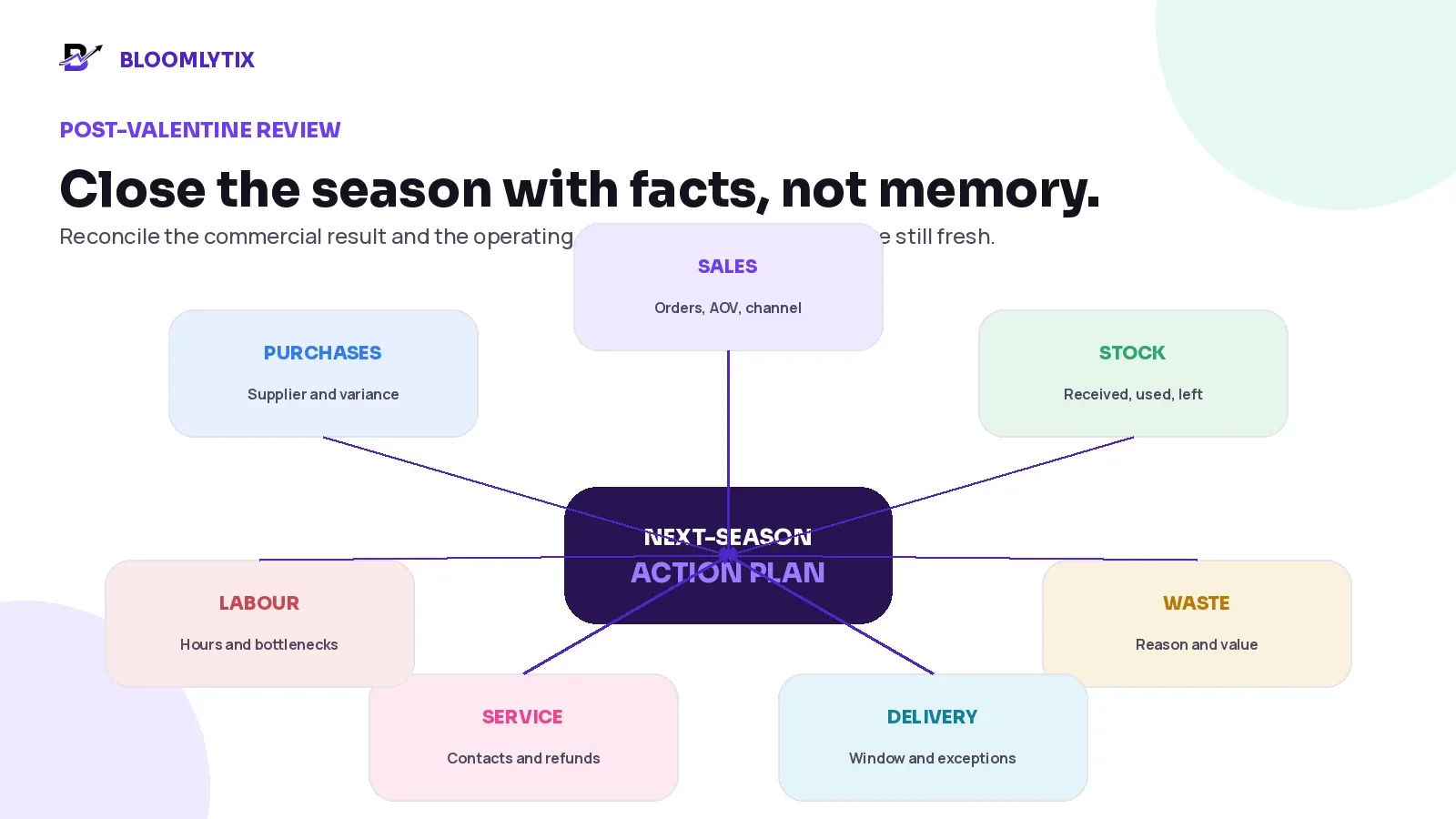
Figure 8. Review sales, stock, waste, purchases, labour, delivery and service together.
REVIEW AREA | COMPARE | NEXT-SEASON OUTPUT |
|---|---|---|
Sales and demand | Forecast vs accepted vs completed orders by product, branch, channel and window. | Revised capacity and product mix. |
Purchases and stock | Ordered, received, usable, reserved, consumed, leftover and returned quantities. | Supplier and buying changes. |
Waste | Reason, item, branch, value and whether the stock was preventable or deliberate. | Recipe, buffer and receiving changes. |
Labour | Planned vs actual hours, overtime, queue and rework. | Role and shift design changes. |
Delivery and pickup | Volume, window, zone, failed reasons, waiting and customer contacts. | Slot, route, pickup and address changes. |
Customer service | Questions, changes, substitutions, complaints, refunds and positive feedback. | Product copy, message and policy changes. |
Contribution | Sales less relevant product, labour, packaging, delivery, refund and waste costs. | Pricing and range decisions. |
CLOSE WITH NAMED ACTIONS. A post-event meeting is useful only when every lesson becomes an owner, a deadline and a visible change to the next product, supplier, staffing, checkout or delivery plan.
How Bloomlytix can support the Valentine florist workflow
Bloomlytix is designed as a connected ecommerce and operations ecosystem for florists, gifting brands and delivery-first businesses. The approved product scope connects customer sales channels, POS, orders, staff fulfilment, inventory, purchases, payments, cash, delivery and reports around shared business data.
BLOOMLYTIX AREA | VALENTINE ROLE |
|---|---|
Website and customer apps | Present the approved range, options, add-ons, delivery dates, slots, customer details and order history. |
POS and assisted orders | Create counter, telephone, WhatsApp or custom orders inside the same operating context. |
Order fulfilment | Show the product, size, add-ons, sender, recipient, message, payment and current status to permitted staff. |
Greeting-card printing | Keep the exact customer-entered message attached to the order and available for preview or reprint. |
Inventory and purchases | Track product/add-on/packaging stock, branch quantities, adjustments, transfers, supplier invoices and low-stock visibility. |
Delivery | Configure zones, charges, dates and slots; assign prepared orders; record delivered, failed, returned or rescheduled outcomes and configured proof. |
Reports | Review sales, products, branches, stock, purchases, cash and delivery performance from connected operational records. |
The live Bloomlytix customer story explains that Aroma Flowers uses the complete platform across ecommerce, customer apps, POS, inventory, order management, staff fulfilment, payments, reporting and delivery. The story does not publish confidential figures; it demonstrates the connected operating model behind a real florist business.
PRODUCT SCOPE. Bloomlytix supports practical florist ecommerce, order, POS, stock, purchase, staff, delivery and reporting workflows. Automated demand forecasting, exact recipe-level stem depletion, workforce scheduling, advanced warehouse management, multi-stop route optimisation and specialist supplier integrations should be confirmed separately during discovery.
Questions to ask during a Valentine workflow demonstration
Can the Valentine range have clear channel, date, branch and quantity rules?
Can website, app, POS and manual orders enter one official order workflow?
Can every order carry the exact greeting message, sender, recipient, address and slot?
Can staff see product availability, branch context and approved substitutions before accepting?
Can sold-out products or full slots be closed without deleting the catalogue record?
Can purchases, receiving differences, stock adjustments, transfers and reservations remain traceable?
Can the team separate payment, preparation, ready, assigned, delivered and refund statuses?
Can ready orders be grouped by pickup, delivery window, branch or driver?
Can failed, returned and rescheduled deliveries stay visible with a reason and next owner?
Can managers review sales, products, branches, stock, purchases, staff, cash and delivery after the event?
Which peak requirements are standard, configurable, integration-based or custom?
Can the provider demonstrate one real Valentine order and one exception from beginning to end?
BOOK A FLORIST PEAK-SEASON WORKFLOW REVIEW. Bring last Valentine’s order export, best sellers, supplier deadlines, staff plan, delivery zones and one difficult exception. Bloomlytix can map the sales, stock, fulfilment, message and delivery flow around your actual operation.
Book a tailored florist workflow demo
Frequently asked questions
When should a florist start Valentine’s Day planning?
Start when supplier, staffing, product, photography and delivery decisions still have time to change. For many businesses that means eight to twelve weeks before the holiday, but the correct date depends on supplier deadlines, local demand and the complexity of the range.
Should a florist reduce its product range for Valentine’s Day?
Often, yes. A smaller tested range can simplify buying, training, quality control, pricing, packing and delivery. Keep enough choice for customers, but remove products the team cannot reproduce reliably under peak conditions.
How should flower substitutions be approved?
Define three levels: pre-approved flexibility within the published design rule, customer approval when the visible promise changes, and escalation when no supported alternative can meet the order. Record the change and approval on the order.
How can delivery slots be controlled?
Set a safe capacity by branch, zone and window. Count preparation, staging, driver and doorstep time. Close the slot when the remaining capacity is no longer safe, even if stock is still available.
Can WhatsApp Valentine orders stay in chat?
WhatsApp can remain useful for questions and custom requests, but the confirmed product, message, amount, payment, recipient, address, slot and status should move into the official order record.
What should the website show when a product or slot is full?
Show the current supported option: unavailable, another size, another design, pickup, another delivery window or a later date. Product pages, checkout, social posts and customer-service replies should use the same current promise.
What should florists review after Valentine’s Day?
Review forecast versus actual orders, purchases, usable stock, leftover stock, waste, labour, substitutions, ready times, delivery results, refunds and customer contacts. Turn each lesson into a named change for the next season.
Does Bloomlytix automatically forecast Valentine demand?
The confirmed Bloomlytix scope includes connected sales, orders, inventory, purchases, delivery and reporting. Advanced automated forecasting or recipe-level production planning should be confirmed separately.
Valentine’s Day florist operations checklist
Previous orders are reviewed by product, branch, channel, pickup/delivery window and final outcome.
The safe accepted-order ceiling is based on the narrowest capacity, not only the sales target.
The product range is tested, priced, photographed and limited to designs the team can reproduce.
Flowers, containers, add-ons and packaging are planned from usable quantities and supplier pack sizes.
Supplier allocations, change deadlines, backups and receiving checks have named owners.
Substitution rules separate pre-approved flexibility, customer approval and cancellation/refund decisions.
Every channel uses one acceptance gate for product, stock, payment, address, slot, branch and owner.
Cut-offs differ by custom work, premium stock, standard range, pickup, delivery and same-day capacity.
Staff roles cover intake, receiving, preparation, card/label, quality, staging, dispatch and exceptions.
Ready means the complete product, add-ons, message, label and handoff brief have passed the final check.
Pickup and delivery capacity are planned separately and full windows close visibly.
A live exception queue shows the problem, order, owner, customer decision and next action.
Customer messages reflect the actual product, substitution, cut-off, window and current status.
The post-event review covers sales, purchases, stock, waste, labour, delivery, refunds and service contacts.
Sources and further reading
This guide combines the approved Bloomlytix product scope, earlier Bloomlytix florist workflow articles, live product pages, the public Aroma Flowers customer story and current operational guidance. Adapt the process to local laws, suppliers, product handling requirements, staffing, delivery policies and customer promises.
Society of American Florists - Valentine’s Day Planning - Forecasting, staffing, supply chain, design-room and customer-service resources.
Society of American Florists - Holidays and Occasions FAQs - Holiday ordering, cut-offs and delivery expectations.
Society of American Florists - Supply Chain Idea Exchange - Advance planning, communication, inventory and alternatives.
Shopify Help Center - Local delivery for online orders - Location inventory, eligibility, delivery areas and operational fulfilment context.
Bloomlytix florist software - Current florist-platform scope and buyer resources.
Aroma Flowers customer story - Public example of a connected florist operation using Bloomlytix.