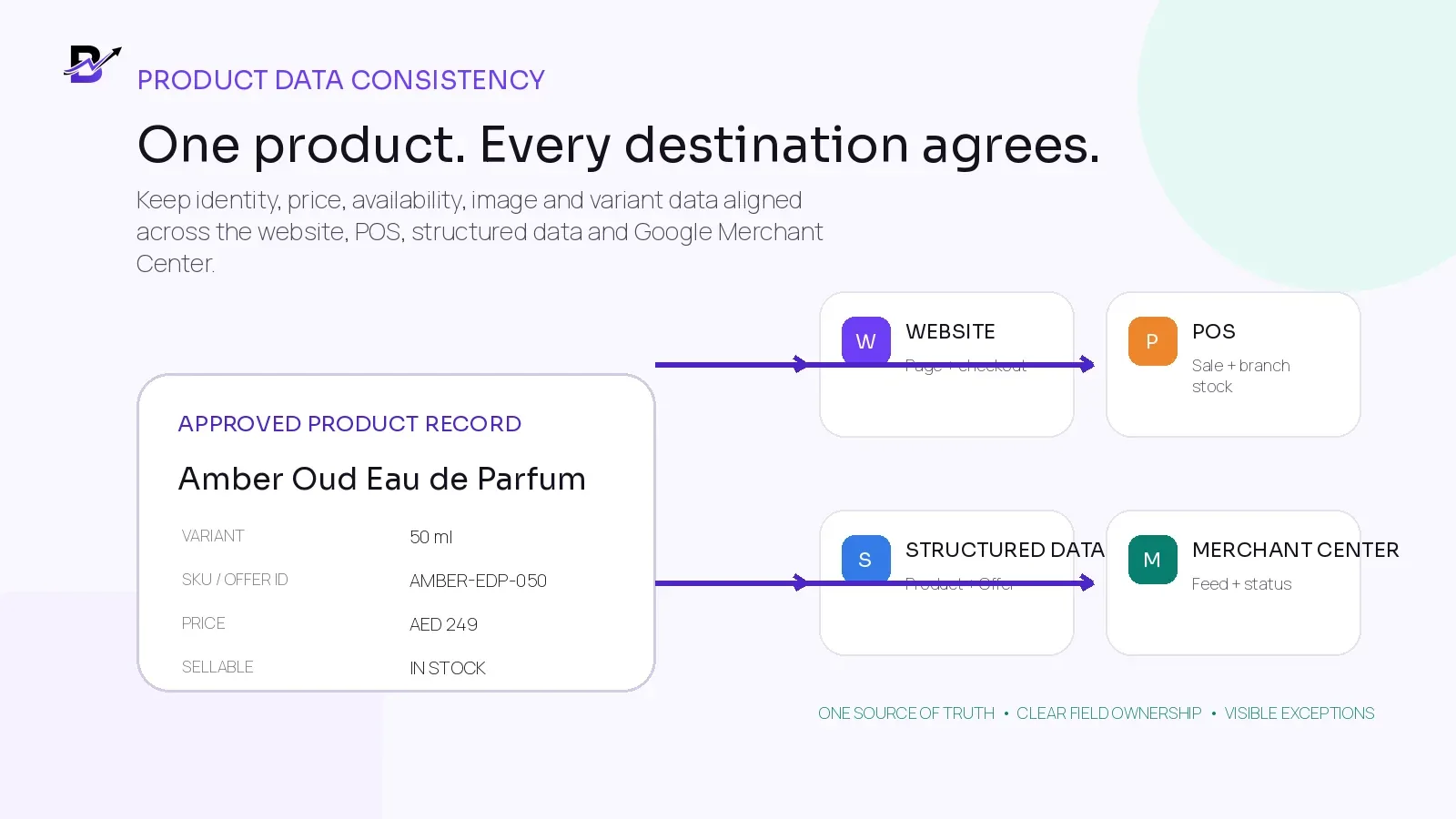
One approved product record can feed several customer and operational destinations while keeping the important facts aligned.
A customer sees one product page. Your team may see the same item in the POS, inventory screen, pricing table, image library and Google Merchant Center. If those records drift apart, the customer can see the wrong price, an unavailable item, an old image or the wrong variant before your team notices.
Product data consistency does not mean copying every internal field everywhere. It means keeping one approved product identity and one clear owner for each important field, then publishing the right facts to each destination.
DIRECT ANSWER. Keep one approved product and variant record, then define which system owns the ID, SKU, title, description, image, price, sale period, availability and branch stock. The website, checkout, Product structured data and Merchant Center data should agree on customer-facing facts. Use stable identifiers, refresh changing values often, monitor issues and fix the source record instead of editing several copies.
This guide is for retailers that sell through ecommerce and POS, use Google Merchant Center or plan to use it, and need product data to remain reliable across marketing and daily operations.
In this guide
Why product data becomes inconsistent across channels
The different jobs of the catalogue, website, POS, structured data, Merchant Center and local inventory
How to choose a source of truth for every important field
How products, variants, SKUs, offer IDs, GTINs and item groups fit together
How to prevent price and availability mismatches
How online availability differs from branch-level inventory
How to choose between website extraction, files and the Merchant API
How to diagnose feed issues and fix the real source
How Bloomlytix can support the connected product-data workflow
Why product data becomes inconsistent
Most inconsistencies start with a reasonable shortcut. A product is created in the website, imported into the POS, copied into a spreadsheet and uploaded to Google. Later, one person changes the website title, another updates the POS price, a promotion starts in the ecommerce system and the branch sells the last unit. Each system still works, but they no longer describe the same sellable item.
SYMPTOM | COMMON CAUSE | CUSTOMER OR BUSINESS RESULT |
|---|---|---|
Google shows an older price | The promotion changed on the website but the data source did not refresh at the same time. | Price mismatch, disapproval or a customer reaching a different checkout total. |
The website says in stock; the branch has none | Online availability uses a company total instead of the fulfilment location or sellable quantity. | Overselling, substitutions or cancelled orders. |
The same product appears twice | An import created a new item because the title was used as the match key instead of a stable ID. | Split reporting, duplicate listings and staff choosing the wrong line. |
The wrong size appears in Google | Variants share an unclear ID or the landing page does not preselect the submitted variant. | The customer lands on a different size, price or image. |
Feed title describes details not on the product page | AI or a marketing edit introduced claims that were not added to the approved catalogue record. | Lower trust, policy issues or inaccurate product expectations. |
Local inventory is stale | Branch stock is uploaded manually and not refreshed after sales, transfers or adjustments. | Nearby customers see store availability that is no longer reliable. |
CORE PRINCIPLE. A product-data problem is usually not one bad field. It is an unclear owner, an unstable identifier, an update delay or a rule that was never written down.
Understand the six data layers
The catalogue, website, POS and Google data do not have identical jobs. A clean setup keeps them connected without forcing every internal field into every destination.
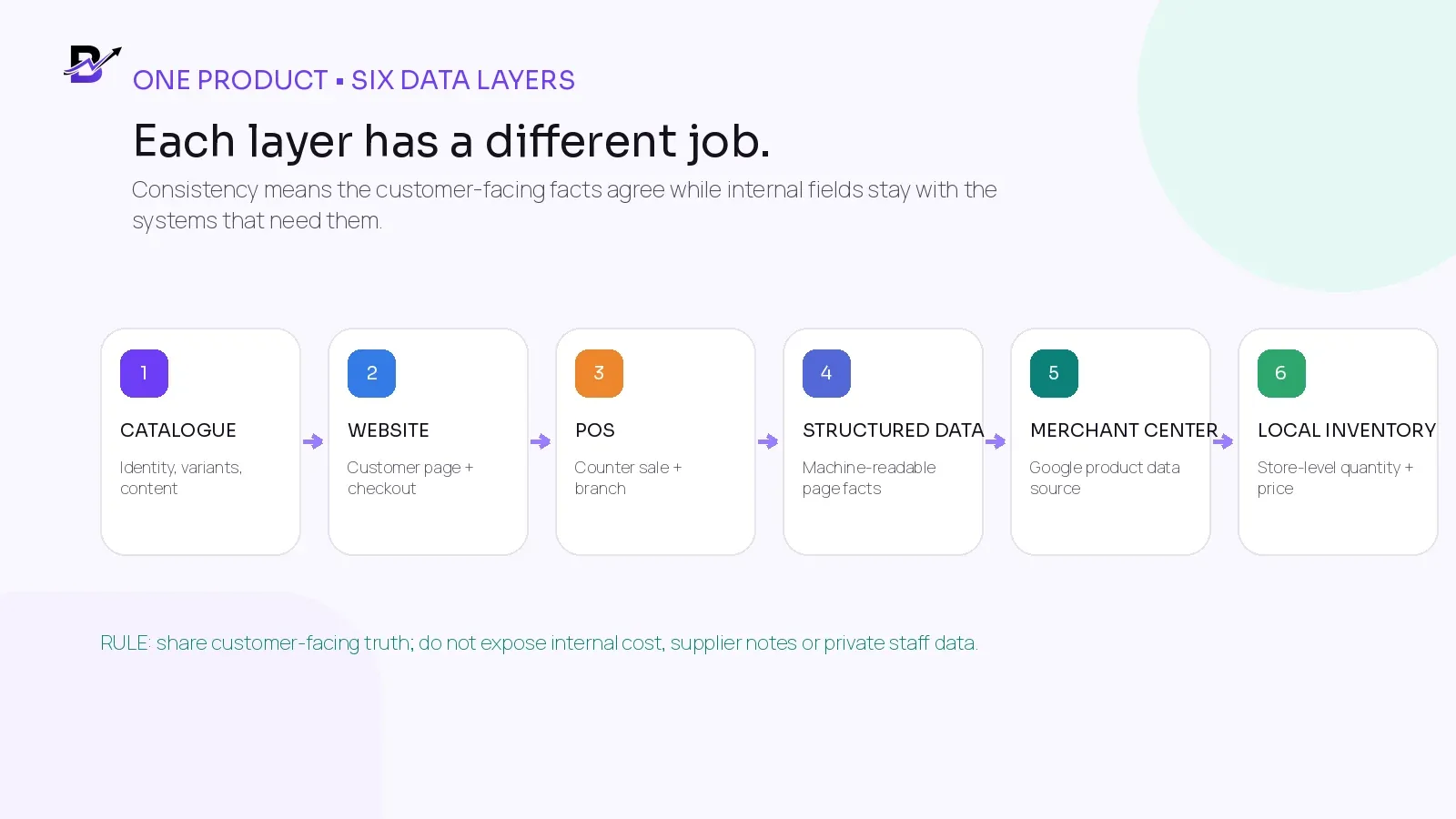
Figure 1. Each product-data layer has a different purpose. Consistency means the shared facts agree.
LAYER | MAIN JOB | WHAT IT SHOULD RECEIVE | WHAT NORMALLY STAYS PRIVATE |
|---|---|---|---|
Operational catalogue | Own the product, variant and approved business record. | Identity, content, options, price rules, images, tax settings and product status. | Supplier notes, buying cost, staff-only notes and internal workflow fields. |
Website + checkout | Explain and sell the exact product to the customer. | Visible title, description, images, selected variant, price, availability, delivery and return information. | Internal cost, unreleased products and private adjustment reasons. |
POS + inventory | Support counter sales and location-level stock. | Short staff label, SKU or barcode, price, branch, quantity and transaction rules. | SEO copy that does not help the counter workflow. |
Product structured data | Describe the visible product page to search engines. | Product identity, image, brand and Offer facts such as price, currency and availability when supported. | Fields that do not exist visibly or are not backed by the page. |
Merchant Center data source | Submit products for eligible Google shopping experiences. | Offer ID, title, link, image, price, availability, identifiers and required market attributes. | Unverified claims or stale values that disagree with the landing page. |
Local inventory data | Describe store-level product availability where eligible. | Store code, matching product ID, quantity, local price, availability and pickup information where used. | A combined company total that hides the store a shopper will visit. |
Google explains that Product structured data and a Merchant Center data source can both be used. Providing both can improve eligibility for different product experiences and helps Google understand and verify the data. The two methods complement each other; one does not remove the need for the other.
Official Google reference: Share your product data with Google.
Build a field-ownership map before you build the feed
The most useful implementation document is not the feed file. It is a field-ownership map. For every important value, name the system that is allowed to change it, the people who approve it and the destinations that receive it.
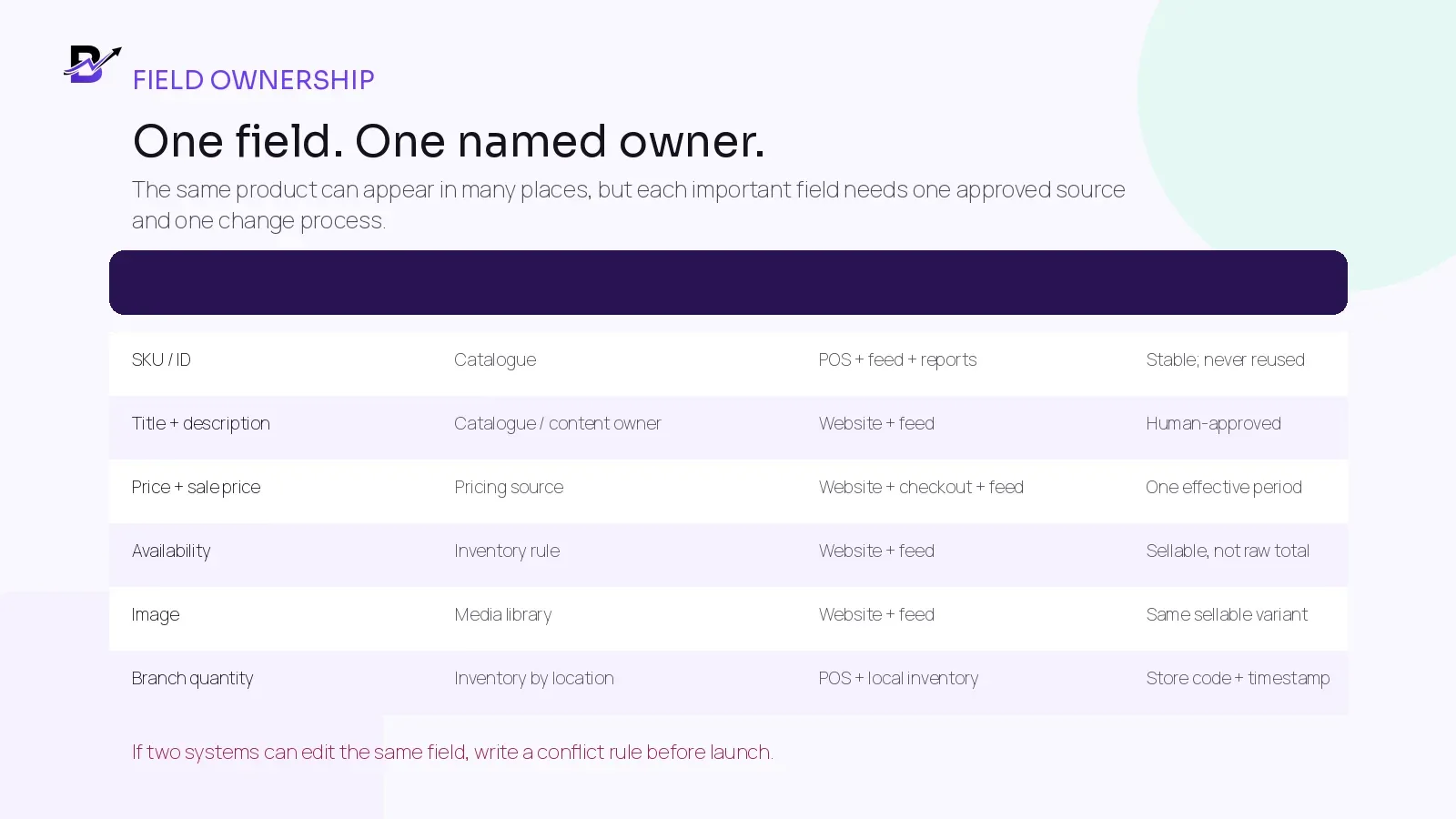
Figure 2. Each field should have one approved source and a clear change process.
FIELD | RECOMMENDED SOURCE OF TRUTH | DESTINATIONS | CONTROL QUESTION |
|---|---|---|---|
Product ID / variant ID | Core catalogue or commerce database | POS, feed, reports, integrations | Will the identifier stay stable when the title, image or price changes? |
SKU / offer ID | Catalogue owner | POS, imports, Merchant Center, local inventory | Is it unique for every sellable variant and protected from reuse? |
Title + description | Approved catalogue content | Website, feed, customer apps | Who approves accuracy, market language and prohibited claims? |
Price + sale price | Commerce pricing rules | Website, checkout, POS, structured data, feed | Which system starts and ends promotions, and how quickly do all destinations update? |
Availability | Inventory and sellable-quantity rule | Website, structured data, Merchant Center | Does the value represent what the customer can actually buy now? |
Image | Approved media library | Website, app, feed | Does the image show the same sellable variant without promotional overlays? |
Brand / GTIN / MPN | Manufacturer or supplier record | Catalogue, structured data, feed | Is the identifier verified rather than invented or copied from a different product? |
Branch quantity | Inventory by location | POS, owner reports, local inventory | Which sales, reservations, transfers and adjustments change the quantity? |
OWNERSHIP RULE. Two systems can display the same field. Only one should be the normal editor. If two systems can change it, write down which value wins and how conflicts are reviewed.
Use stable identifiers for products and variants
A title is written for people and may change. A stable identifier is written for systems and should not change because the marketing wording improves. Product data remains much easier to manage when every sellable variant has a stable internal identity.
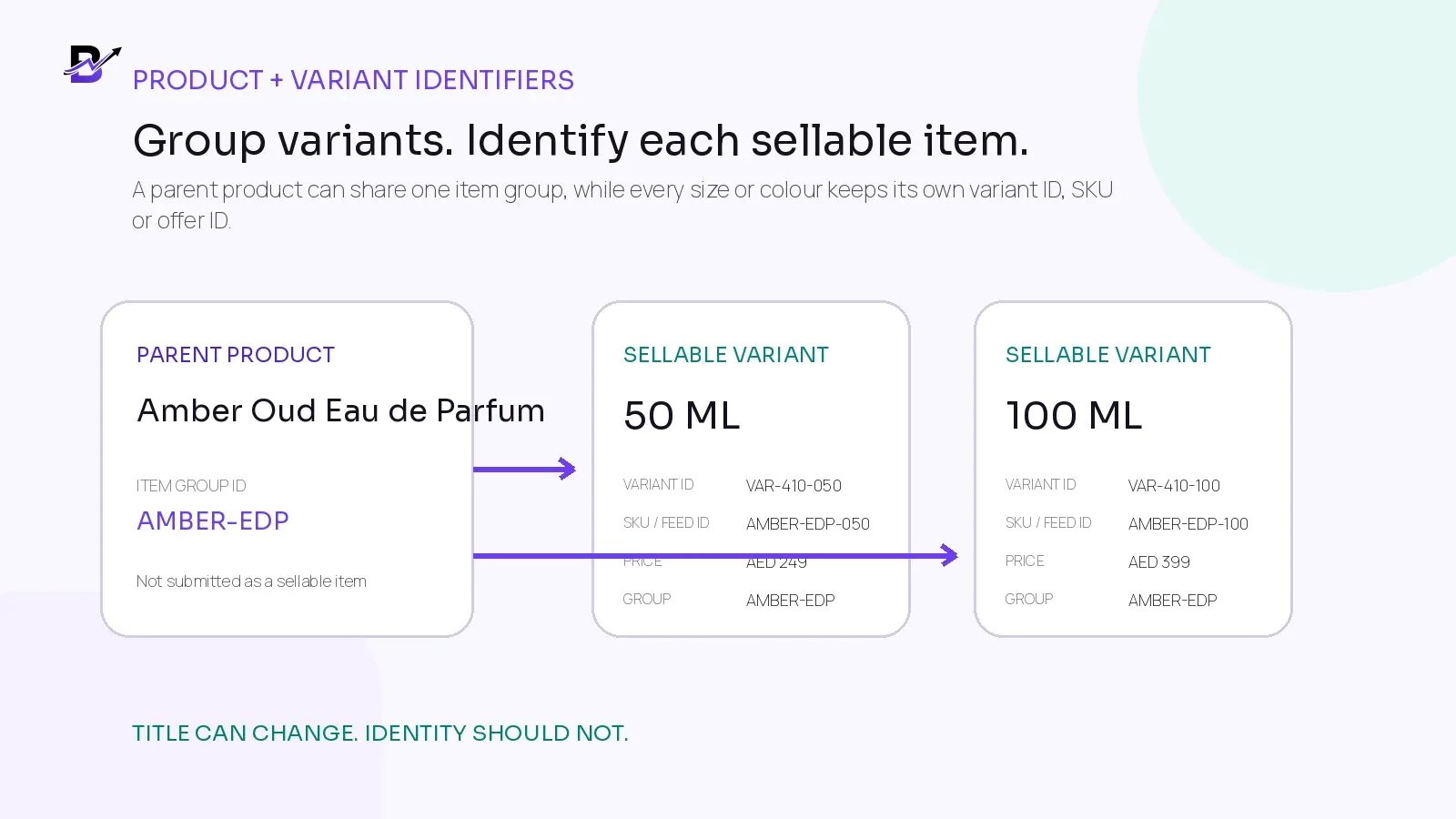
Figure 3. Group related variants, but identify every sellable version separately.
TERM | EASY MEANING | PRACTICAL RULE |
|---|---|---|
Product | The main product family or customer concept. | Use it to group shared content, such as one fragrance offered in more than one size. |
Variant | One sellable version of the product. | A 50 ml and a 100 ml bottle should have separate sellable records when price or stock differs. |
Internal product / variant ID | The system identity behind the visible product. | Keep it stable and use it in mappings, imports and integrations. |
SKU | A retailer-controlled code for a sellable item. | Keep it unique, readable and never reuse it for another product. |
Merchant Center ID / offer ID | The unique identifier submitted for one product offer. | A SKU can be used when it is stable and unique, but document the mapping. |
Item group ID | The value used to group product variants. | Give every variant its own ID and use the same item group ID for the related group. |
GTIN | A globally assigned trade item number when the product has one. | Submit the verified GTIN for manufactured products; do not guess or create one unless you are authorised through GS1. |
Brand + MPN | Other manufacturer identifiers. | Use verified supplier or manufacturer records where applicable, especially when no GTIN exists. |
Google recommends submitting verified unique product identifiers when they exist. Products that have a GTIN but are submitted without it can have limited visibility. Products without an assigned GTIN should not be given an invented number.
Official references: Google unique product identifiers and GS1 guidance for product variations.
Decide which facts must match exactly
Not every label must be word-for-word identical. A POS can use a shorter staff-facing name while the website uses a clearer customer title. The records must still map to the same variant, and the facts that affect the buying decision must agree.
FIELD | CONSISTENCY REQUIREMENT | ACCEPTABLE DIFFERENCE | DANGER SIGN |
|---|---|---|---|
Product identity | The page, selected variant, image and feed must describe the same sellable item. | A shorter POS display name that maps to the same variant ID. | The feed describes 100 ml while the landing page opens 50 ml. |
Price + currency | The submitted price should match the landing page, selected variant, structured data and checkout. | Intentional market or channel pricing when each destination and URL is configured correctly. | The feed shows a sale price that ended, or checkout adds an unexpected amount. |
Availability | The customer-facing availability should match what can be purchased and fulfilled. | The POS may show exact quantity while the website shows only in stock or out of stock. | The feed says in stock when the item cannot be ordered. |
Image | The main image should represent the submitted variant and product. | Additional lifestyle images on the website. | A colour, size or bundle shown in Google is not the item sold on the page. |
Title + description | The wording must accurately describe the same product and important variant. | Different length or emphasis for POS, page and feed. | One destination introduces an unsupported brand, material, size or included item. |
Link | The URL should open the correct purchasable product or selected variant. | Stable tracking parameters where permitted and properly canonicalised. | The link opens a category, wrong currency, wrong language or unavailable variant. |
Keep price and sale-price changes synchronized
Price mismatches are often timing problems. A promotion begins on the website at midnight, but the scheduled data source runs later. A manual POS change never reaches the ecommerce system. A sale ends, but the old sale price remains in the feed. The safest process changes the approved pricing source once and publishes the same effective value to every customer-facing destination.
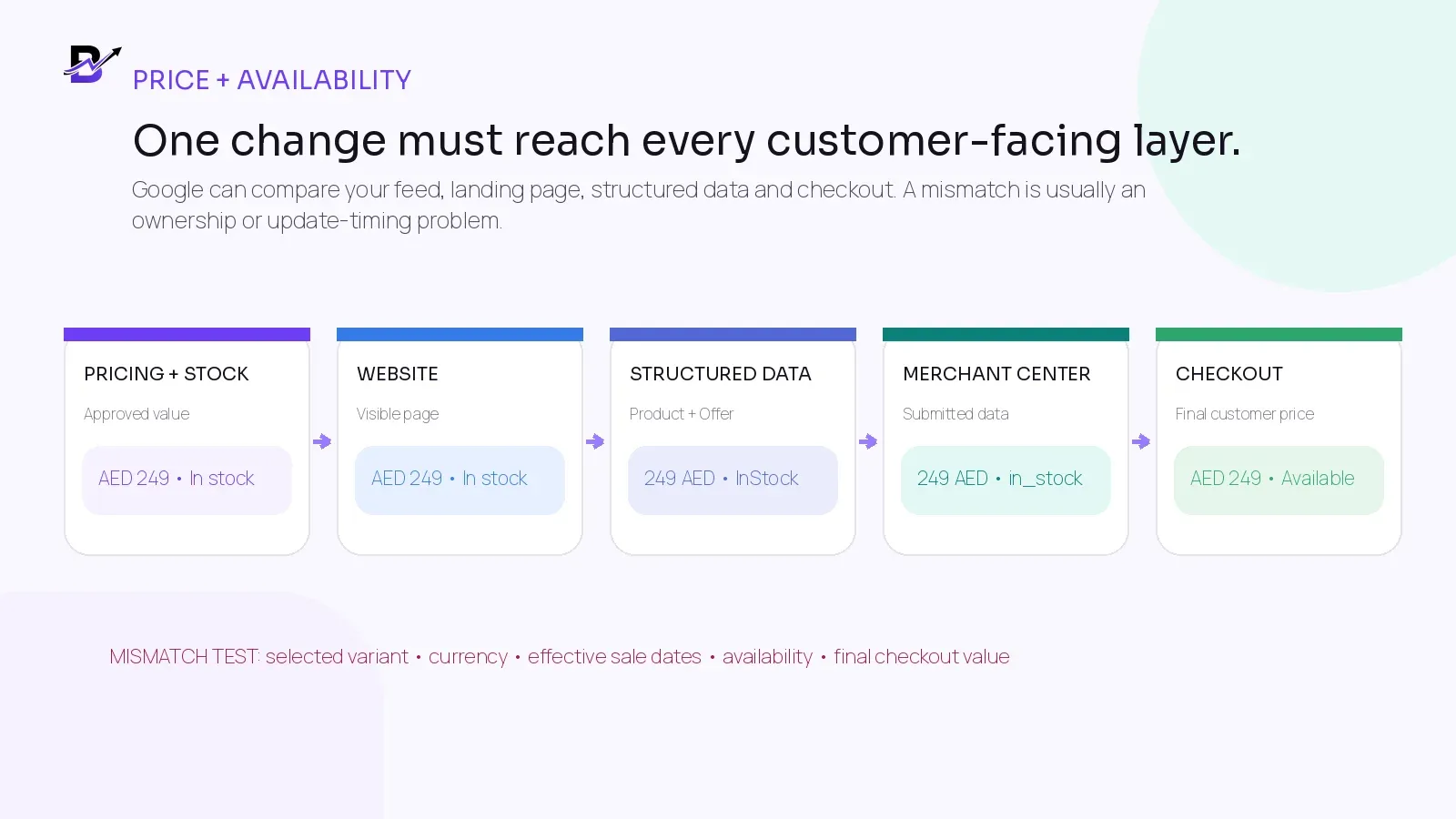
Figure 4. Price and availability should agree at the exact variant and currency level.
PRICE CONTROL | WHAT TO DEFINE | TEST BEFORE LAUNCH |
|---|---|---|
Base price | Variant, currency, tax presentation and target market. | Open the submitted variant and confirm the visible price and final checkout value. |
Sale price | Reduced amount, start time, end time and any eligibility rule. | Check the page, structured data and Merchant Center before and after the exact sale boundary. |
Multi-currency | Separate URLs or approved market setup where required. | Confirm that the target-country currency is visible and matches the submitted data. |
Discount codes | Whether the submitted price is generally available or depends on a private code. | Do not submit a price that most shoppers cannot receive without an undisclosed condition. |
POS-only price | Whether a deliberate store price differs from the online offer. | Keep local/store data separate from the online price instead of silently overwriting it. |
Fees and checkout | Delivery, service or required product fees. | Make sure the product price and the final payable amount follow current Google and local requirements. |
Google’s product data specification requires the submitted price and currency to match the landing page, structured data and checkout for the selected product. Exact requirements can vary by product, market and program, so the current specification should be checked before launch.
Use sellable availability, not a raw stock total
A branch can physically hold eight units while only five are safe to sell online. Two may already be reserved and one may be held for quality review or a safety buffer. Feeding the raw physical total to every channel can create overselling.
WORKING AVAILABILITY FORMULA. Sellable quantity = on hand - reserved - unavailable - approved safety buffer. The exact labels can differ by platform, but the business should define what “in stock” means before publishing it.
INVENTORY STATE | MEANING | MERCHANT/WEBSITE IMPLICATION |
|---|---|---|
On hand | The quantity believed to be physically present at a location. | Useful internally, but not always the quantity customers may buy. |
Reserved / committed | Quantity already linked to orders or tasks. | Remove from sellable availability until released or fulfilled. |
Unavailable | Damaged, under inspection, expired, display-only or otherwise not sellable. | Do not publish as available. |
Incoming | Expected from a supplier or transfer but not yet received. | Do not treat as normal in-stock inventory unless an approved preorder or backorder workflow applies. |
Sellable / available to sell | Quantity the channel may promise after controls. | Use this logic to determine in-stock or out-of-stock status. |
Google supports values such as in stock, out of stock, preorder and backorder. The selected value should match the landing page, checkout and structured data. If the product changes often, the data source needs a refresh method that can keep pace.
AUTOMATION IS A SAFETY NET. Merchant Center can use landing-page data to automatically update some price, sale price, availability and condition values. Google states that these automations are not a replacement for regular, accurate product-data updates.
Official Google reference: Allow Merchant Center to update product information automatically.
Separate online availability from store-level inventory
Online availability answers, “Can the customer buy this through this online offer?” Local inventory answers, “Is this product available at this specific store, and under what local price or pickup promise?” Those are related questions, but they are not the same record.
SCENARIO | ONLINE PRODUCT DATA | LOCAL INVENTORY DATA |
|---|---|---|
One central fulfilment location | Submit the online offer based on central sellable stock. | Local data may not be needed unless stores also sell or offer pickup. |
Several branches fulfil ecommerce orders | Use the approved order-routing and sellable-stock logic. | Send store-level quantities only for participating locations and supported programs. |
Product is sold in store but not online | Do not mark the online offer in stock if it cannot be purchased online. | The store product may still be eligible for local listings when account and country requirements are met. |
Pickup is available | Show the correct online product and fulfilment promise. | Local data can include store code, matching product ID, quantity, price, availability and pickup details where supported. |
Branch price differs | Keep the online price tied to the online offer. | Submit the approved local price for the specific store where the program supports it. |
Google’s current local inventory guidance requires key fields such as store code, product ID, quantity, price and availability for file-based local inventory data, and recommends refreshing local inventory daily. Country, account and program eligibility should always be checked before implementation.
Official Google reference: Upload local inventory data to Merchant Center.
Choose a product-data delivery method that matches change frequency
There is no single best feed method for every retailer. A small catalogue with occasional changes can use a simpler setup. A large or fast-changing catalogue needs tighter control and faster updates. Choose the method after you understand who owns the data and how often price or availability changes.
METHOD | GOOD FIT | STRENGTHS | MAIN CONTROL |
|---|---|---|---|
Website extraction / automated feed | Small sites with crawlable, accurate product pages and moderate change frequency. | Lower setup effort; structured data can improve extraction accuracy. | Crawling time is not fully controlled, so verify discovery and freshness. |
Scheduled file or hosted data source | Retailers that can export a clean product file on a predictable schedule. | Clear reviewable dataset; useful for daily or planned updates. | Formatting, upload results and update timing need monitoring. |
Merchant API | Larger or frequently changing catalogues, especially when price and availability need fast updates. | Programmatic inserts, patches, deletes and issue/status retrieval. | Requires technical ownership, authentication, retries, monitoring and source mapping. |
Supplemental data source | Extra fields or controlled overrides that should not change the primary source. | Adds labels, promotion data or approved supplements without rewriting the base data. | Offer ID, language and feed label must match the product being supplemented. |
Local inventory source | Store-level quantity, price, availability and pickup data. | Separates branch facts from the online offer. | Store codes, matching IDs and daily freshness must remain reliable. |
Google’s Merchant API separates the product data you submit from the final processed product used by Merchant Center. That distinction is useful operationally: a successful submission does not automatically mean the product is approved or showing.
Official Google reference: Merchant API product management overview.
Worked example: one perfume variant across four destinations
The example below is illustrative. It shows the same 50 ml fragrance variant in the website, POS, Merchant Center and store-level inventory. The visible wording can be adapted for each user, but the underlying identity and customer-facing facts remain aligned.
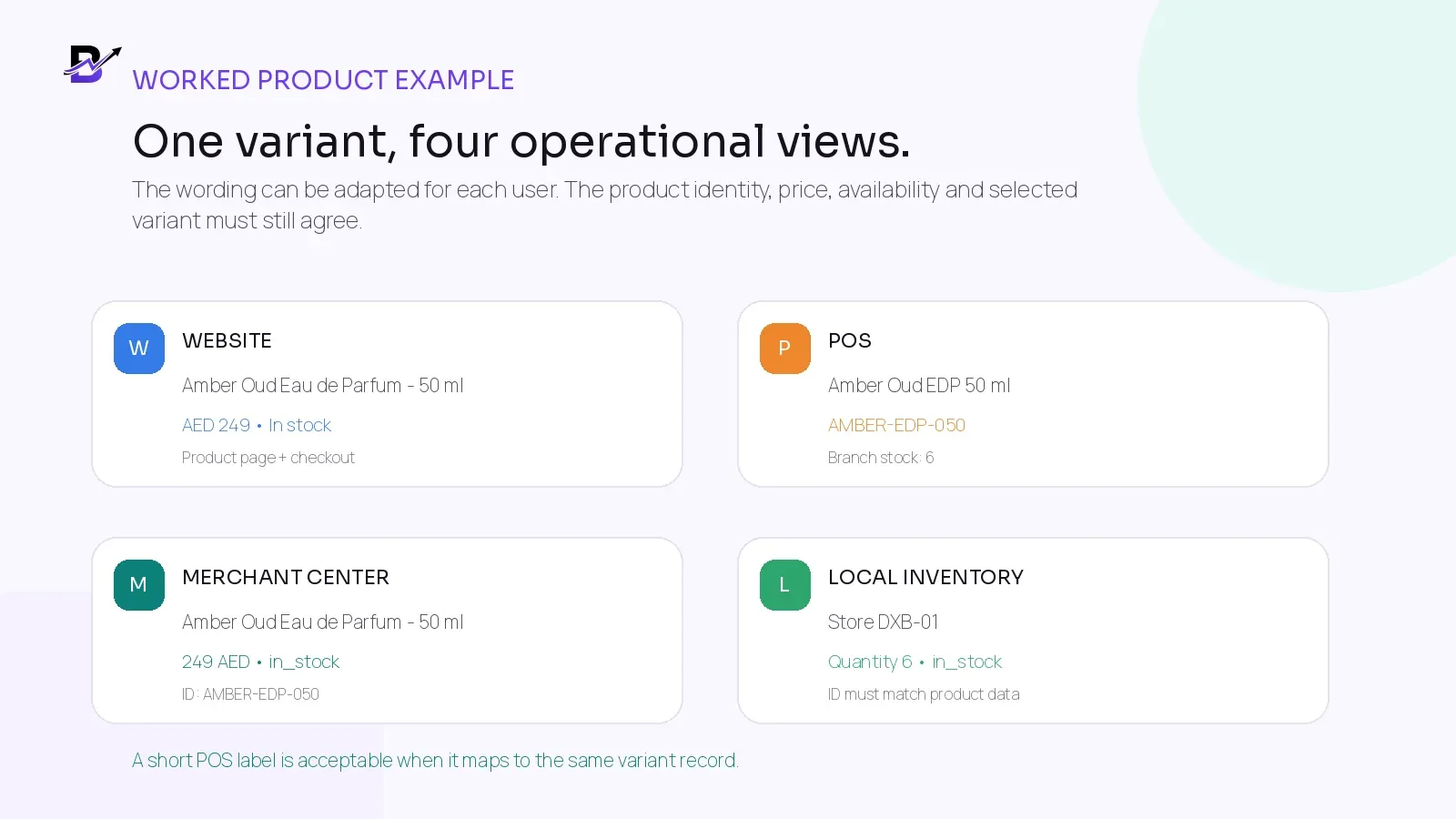
Figure 5. Shorter operational labels are fine when every destination maps to the same sellable variant.
FIELD | APPROVED SOURCE RECORD | WEBSITE + CHECKOUT | POS | MERCHANT CENTER / LOCAL |
|---|---|---|---|---|
Variant identity | Variant ID VAR-410-050 | Preselected 50 ml option | Mapped to the same variant | Offer ID AMBER-EDP-050; local ID matches |
Title | Amber Oud Eau de Parfum - 50 ml | Full customer-facing title | Amber Oud EDP 50 ml | Accurate title for the same variant |
Item group | AMBER-EDP | Variant selector groups 50 ml and 100 ml | Parent visible for search/reporting | Same item group ID for both variants |
Price | AED 249 | AED 249 at page and checkout | AED 249 for online-equivalent sale | 249 AED for the target market |
Availability | Sellable quantity 5 | In stock | Downtown branch on hand 6 | Online in_stock; local store quantity 6 |
Identifiers | SKU AMBER-EDP-050; verified brand/GTIN if assigned | Not all internal fields need to be visible | SKU or barcode for staff | Submit verified brand, GTIN or MPN where applicable |
Image | Approved 50 ml bottle image | Same 50 ml variant | Optional thumbnail | Main image represents the same variant |
WHAT BREAKS THE EXAMPLE. If the POS price changes to AED 229 but the ecommerce pricing source stays at AED 249, do not manually change only the feed. Decide whether the lower price is store-only or global, update the approved pricing rule and publish the correct value to each intended destination.
Use AI for product copy, not for operational facts
AI can help draft product titles, descriptions, tags and SEO fields. It should not invent or independently approve price, stock, GTIN, brand, branch quantity, delivery conditions or authenticity claims. Those fields belong to verified business records.
AI CAN HELP PREPARE | A HUMAN OR SYSTEM MUST VERIFY |
|---|---|
A clearer product title based on the approved name and visible image. | The exact product identity, variant, brand, SKU and manufacturer identifiers. |
A readable description that organises approved facts. | Materials, ingredients, dimensions, volume, included items, regulated claims and authenticity. |
Category and tag suggestions. | The approved catalogue path, reporting structure and variant logic. |
SEO title, meta description, URL text and image alt text. | The customer page, canonical URL, image, price, availability and Merchant Center mapping. |
Translated first drafts for supported languages. | Natural market language, local units, delivery terms and legal or policy wording. |
The safest workflow is the same one used in the earlier Bloomlytix AI product-listing guide: the tool prepares an editable draft, a person adds verified facts, and an authorised user decides what is ready to publish.
Diagnose feed issues by tracing the field back to its source
Merchant Center’s current “Needs attention” area highlights product and account issues. The interface can show warnings, disapprovals and affected products, but the fix still depends on finding which source created the bad value.
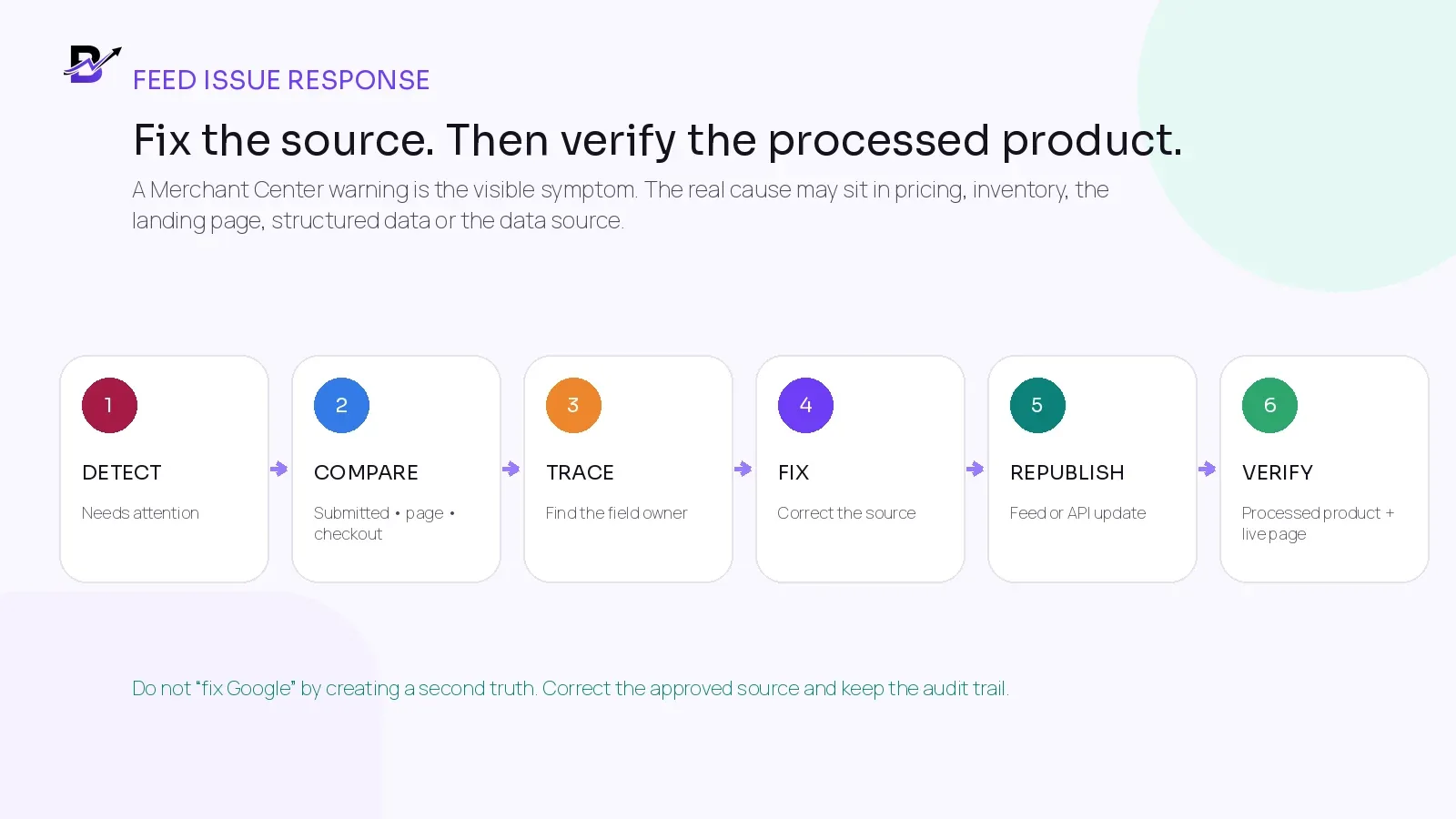
Figure 6. Fix the approved source, republish and then verify the processed product.
1. Identify the exact issue and affected products
Download or review the affected product list. Separate one product-level problem from a wider account or policy issue.
2. Compare every visible value
Check the submitted product data, processed Merchant Center product, landing page, selected variant, structured data and checkout.
3. Trace the field owner
Find the system or person allowed to change the title, price, availability, image, identifier or link.
4. Correct the source record
Fix the approved catalogue, pricing, inventory, media or website value. Avoid creating a special Google-only value unless the difference is intentional and supported.
5. Republish through the chosen method
Refresh the file, scheduled source or API input. Confirm that processing completed and did not introduce new formatting errors.
6. Verify the final processed product
Recheck the live page and Merchant Center status. Record the root cause, owner and prevention step before closing the issue.
ISSUE | LIKELY ROOT CAUSE | FIRST CHECK |
|---|---|---|
Price mismatch | Promotion timing, wrong currency, stale data source or wrong variant URL. | Visible price, structured data, checkout total and latest submitted value. |
Availability mismatch | Raw stock used instead of sellable stock, stale feed or reservation rule. | Selected variant, fulfilment location and inventory event history. |
Missing or invalid GTIN | Identifier omitted, mistyped or copied from another product. | Manufacturer packaging or supplier record; do not invent a value. |
Duplicate offer IDs | Different products or variants use the same ID, or an old ID was recycled. | Catalogue mapping and data-source primary key. |
Variant mismatch | Item group, URL, title, price or image describes a different variant. | Parent/variant mapping and landing-page preselection. |
Image issue | Image inaccessible, too small, promotional or showing another variant. | Crawlable image URL, approved media and current product-data requirements. |
Local inventory issue | Store code or product ID does not match, or branch data is stale. | Location mapping, matching ID and last successful refresh. |
Official Google references: Issues in Merchant Center and the product data specification.
Create a simple monitoring routine
Product data should be monitored like inventory or payments: with a small routine, named owners and measurable closure. Do not wait for a customer complaint to discover that one destination is stale.
RHYTHM | REVIEW | OWNER ACTION |
|---|---|---|
Daily | Failed source processing, price/availability issues, high-impact disapprovals, out-of-stock products still advertised and local-inventory freshness. | Resolve urgent customer-facing mismatches and assign root causes. |
Weekly | Duplicate IDs, missing identifiers, variant grouping, image issues, stale promotions, unmatched branch records and repeated warnings. | Fix patterns, not only individual rows; update rules or staff training. |
Monthly | Field-ownership map, data-source method, update timing, catalogue cleanup, issue-resolution time and coverage by market. | Remove obsolete records, improve automation and document changes. |
Before campaigns | Sale dates, landing pages, images, stock buffers, feed refresh timing and checkout tests. | Run one product from approved price to live Google status before scaling the campaign. |
USEFUL METRIC | SIMPLE DEFINITION | WHAT IT REVEALS |
|---|---|---|
Eligible product rate | Share of intended products eligible for the required Google destination. | Overall data and policy health. |
Price mismatch count | Products where Google, page or checkout prices disagree. | Pricing ownership or update-timing failures. |
Availability mismatch count | Products where submitted and purchasable availability differ. | Inventory logic or stale data. |
Identifier coverage | Products with the correct verified brand, GTIN or MPN where applicable. | Catalogue completeness and matching quality. |
Issue resolution time | Time from detection to verified closure. | Whether ownership and troubleshooting are clear. |
Repeat issue rate | Issues that return after being marked fixed. | Root cause was not removed. |
Local inventory freshness | Participating store records updated within the required operating window. | Branch feed reliability. |
How Bloomlytix can support the product-data workflow
Bloomlytix connects ecommerce, POS, inventory and reporting around a shared catalogue. The same approved products can support a branded website, customer apps where included, counter sales, staff fulfilment, branch stock and owner reporting. This reduces the need to rebuild the same product in separate operational tools. Confirm any Google Merchant Center feed or API implementation as part of the agreed launch scope.
BLOOMLYTIX AREA | ROLE IN THE WORKFLOW |
|---|---|
Shared product catalogue | Store products, categories, prices, sizes, colours, add-ons, images and customer-facing content in one platform context. |
Website, apps and POS | Use the approved catalogue across configured customer channels and counter sales instead of maintaining unrelated product copies. |
Branch inventory | Track product and add-on quantities by branch, with adjustments, transfers, low-stock visibility and movement history. |
AI-assisted product content | Prepare editable titles, descriptions, categories, tags and SEO suggestions, with human review before publishing. |
SEO-ready pages | Support product, category, blog, occasion and landing pages with editable SEO fields and crawlable customer content. |
Reports and owner visibility | Review product, branch, inventory, sales and operational activity from connected records. |
Audit one real product from source to Google. Bring the product record, variant or SKU, landing page and Merchant Center row. We will map which system owns each field and where the current data can drift. Book a Bloomlytix data-quality review.
Questions to ask during a product-data demonstration
# | QUESTION | WHAT A STRONG ANSWER SHOULD SHOW |
|---|---|---|
1 | Which record is the master product and variant? | A stable product/variant identity shared by the website, POS, stock and reports. |
2 | Can each sellable variant have its own SKU, barcode and stock rule? | Clear variant mapping without using the visible title as the primary key. |
3 | Which system owns title, image, price and availability? | A written field-ownership model, not “everything syncs.” |
4 | How do promotions start and end? | One approved sale period reaching the page, checkout and product data. |
5 | How is sellable availability calculated? | Reservations, unavailable stock, branch ownership and safety rules are visible. |
6 | Can online and local/store inventory be separated? | Online fulfilment and store-level quantity use the correct source and location. |
7 | How are GTIN, brand and MPN stored? | Verified manufacturer data with no invented identifiers. |
8 | How are Product structured data and canonical URLs generated? | The markup matches the visible product page and selected variant. |
9 | Which Merchant Center methods are supported? | The provider separates standard export, file, API or custom integration scope clearly. |
10 | How are feed errors and failed updates monitored? | Visible issue ownership, logs, retries and a process for correcting source data. |
11 | Can staff see what changed and who changed it? | Product, price, stock and content changes have useful history or controlled roles. |
12 | What is standard, configured or custom? | The proposal states what Bloomlytix provides and what needs a separate Merchant Center implementation. |
Frequently asked questions
Why does Google show a different price from my website?
The data source may be stale, the sale period may not match, the wrong variant or currency may be submitted, or the landing page and checkout may show different values. Compare the exact offer ID, selected variant, visible page, structured data, checkout and latest processed Merchant Center product.
Should POS and Merchant Center use the same SKU?
They can use the same stable SKU as the Merchant Center offer ID when it is unique and never reused. The important requirement is a documented one-to-one mapping between the POS variant and the submitted product ID.
How often should product data update?
Update as often as the important fields change. Price and availability may need daily, hourly or API-driven updates for fast-moving businesses. Local inventory guidance commonly expects daily freshness. The chosen cadence must match the actual sales and stock process.
What is the difference between Product structured data and a Merchant Center data source?
Structured data is machine-readable information on the product page. A Merchant Center data source is the product information submitted to Google for eligible shopping experiences. Using both can improve coverage and helps Google compare the page with submitted data.
How is branch inventory sent to Google?
Eligible retailers can provide local inventory data using store codes and a product ID that matches the main product data, together with quantity, price and availability. Exact country, account and program requirements must be checked.
Does every product need a GTIN?
No. Submit a verified GTIN when the product has one. If no GTIN has been assigned, use accurate brand and MPN information where applicable and follow Google’s current identifier rules. Never invent a GTIN.
Can AI write Merchant Center product data?
AI can help draft titles and descriptions, but a person must verify the product identity, specifications, identifiers, price, availability, variant, image, claims and landing-page consistency before submission.
Does Bloomlytix automatically sync with Google Merchant Center?
Not by default. Bloomlytix provides the connected catalogue, website, POS, inventory and AI-assisted content foundation described in this guide. The exact Merchant Center data-source or API method must be confirmed during implementation.
Product Data Quality and Feed Audit Checklist
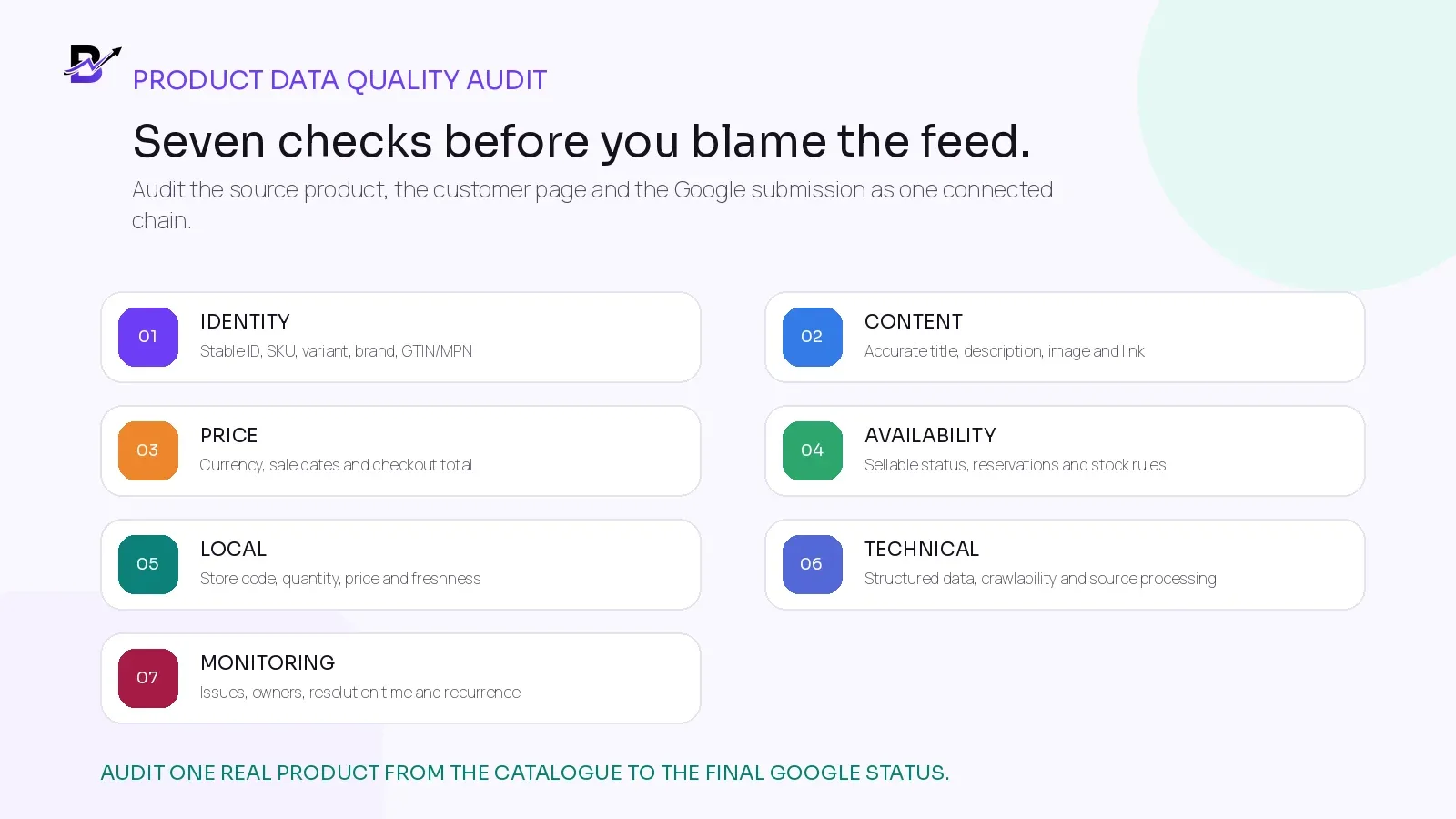
Figure 7. Audit the product record, the customer page and the Google submission as one chain.
AREA | PASS CONDITION |
|---|---|
Identity | [ ] Product and every sellable variant have stable IDs. |
Identity | [ ] SKU or offer ID is unique, documented and never reused. |
Variants | [ ] Related variants use the correct item group and each variant opens the correct page state. |
Identifiers | [ ] Brand, GTIN and MPN are verified from authorised records where applicable. |
Content | [ ] Title, description and image describe the exact sellable variant. |
Content | [ ] AI-assisted copy has been reviewed for unsupported claims or missing facts. |
Link | [ ] Product link is crawlable, canonical and opens the right language, currency and variant. |
Price | [ ] Base price and currency match the landing page, structured data and checkout. |
Sale price | [ ] Sale amount, start time and end time are consistent across all customer-facing layers. |
Availability | [ ] Submitted availability uses sellable quantity, not an unfiltered physical total. |
Availability | [ ] Reservations, unavailable stock, cancellations and returns follow written rules. |
Structured data | [ ] Product and Offer markup matches the visible page and is available in crawlable HTML. |
Merchant Center | [ ] The latest data source processed successfully and the processed product is reviewed. |
Local inventory | [ ] Store code, ID, quantity, price and availability match the correct participating branch. |
Local inventory | [ ] Store data is refreshed within the approved operating window. |
Images | [ ] Image URLs are crawlable and show the submitted product without misleading overlays. |
Monitoring | [ ] Needs attention issues have an owner, priority and resolution date. |
Monitoring | [ ] Repeated issues are traced to a root cause rather than fixed one row at a time. |
Campaigns | [ ] One test product is checked before a large promotion or seasonal launch. |
Scope | [ ] Standard platform functions and custom Merchant Center work are written separately. |
Reliable product data is not created by one perfect feed upload. It comes from stable identifiers, clear ownership, accurate customer pages, timely updates and a routine that closes the loop when something changes.