The best permission model gives each role a fast path for normal work and a visible approval path for exceptions.
Retail staff need speed. A cashier should be able to complete a normal sale without waiting for the owner. A fulfilment team should see the orders and stock tasks it owns. A driver should receive the delivery details needed for assigned orders. At the same time, not every person should be able to refund any sale, change product costs, export customer data, adjust cash, create users or edit payment settings.
Two extreme setups usually fail. Giving everyone admin access feels convenient until a sensitive action has no clear owner. Restricting almost everything feels safe until staff share a manager login, send screenshots or wait for approval on ordinary work. Good role design creates a fast lane for routine tasks and a controlled lane for exceptions.
Direct answer — Start with real responsibilities, not job titles alone. Give each role the minimum access needed to complete normal work. Limit access by branch, order, customer record and time where practical. Separate sensitive actions such as refunds, cash adjustments, stock write-offs, data exports and user management. Use named approvals for exceptions, unique staff accounts and regular access reviews.
This guide is for retailers that use a POS, ecommerce, branch inventory, staff fulfilment, customer service, delivery or owner reporting. It explains the operating method in easy English. The exact permission names and capabilities will vary by software.
In this guide
Why useful permissions protect both speed and accountability
How to build roles from responsibilities rather than titles
The difference between view, work, approve and admin access
How to limit access by function, data, branch and time
A practical role model for owners, managers, staff, drivers and support
Which actions usually need stronger control or approval
How to manage joiners, role changes, temporary staff and leavers
An editable Retail Role and Permission Matrix
How Bloomlytix supports role-based, branch-aware access
Important — This is practical retail-operations guidance, not a complete cybersecurity, employment, privacy or legal policy. Confirm sensitive-data, payment, retention and access requirements with qualified advisers and the software provider.
Why roles and permissions matter in retail
Retail systems connect money, products, customer details, staff work and branch activity. A single action can change more than one record. A refund can change payment totals. A stock correction can change availability. A discount can affect margin. A branch transfer can affect two locations. A user-role change can expose reports or settings far beyond one sale.
A role is a reusable set of access rules for a type of work. A permission controls whether that role can see or perform a particular action. A scope limits where the access applies - for example, one branch, assigned orders, selected reports or a temporary support window.
RULE | WHY IT MATTERS |
|---|---|
Build roles from work | Map the normal tasks a person completes before selecting permissions. |
Use unique accounts | Actions should belong to the person who performed or approved them. |
Limit the scope | A manager may need broad control in one branch without receiving owner access everywhere. |
Separate routine from sensitive | Normal work should be quick; exceptions should follow a named approval path. |
Review access | Permissions should change when responsibilities, branches or employment change. |
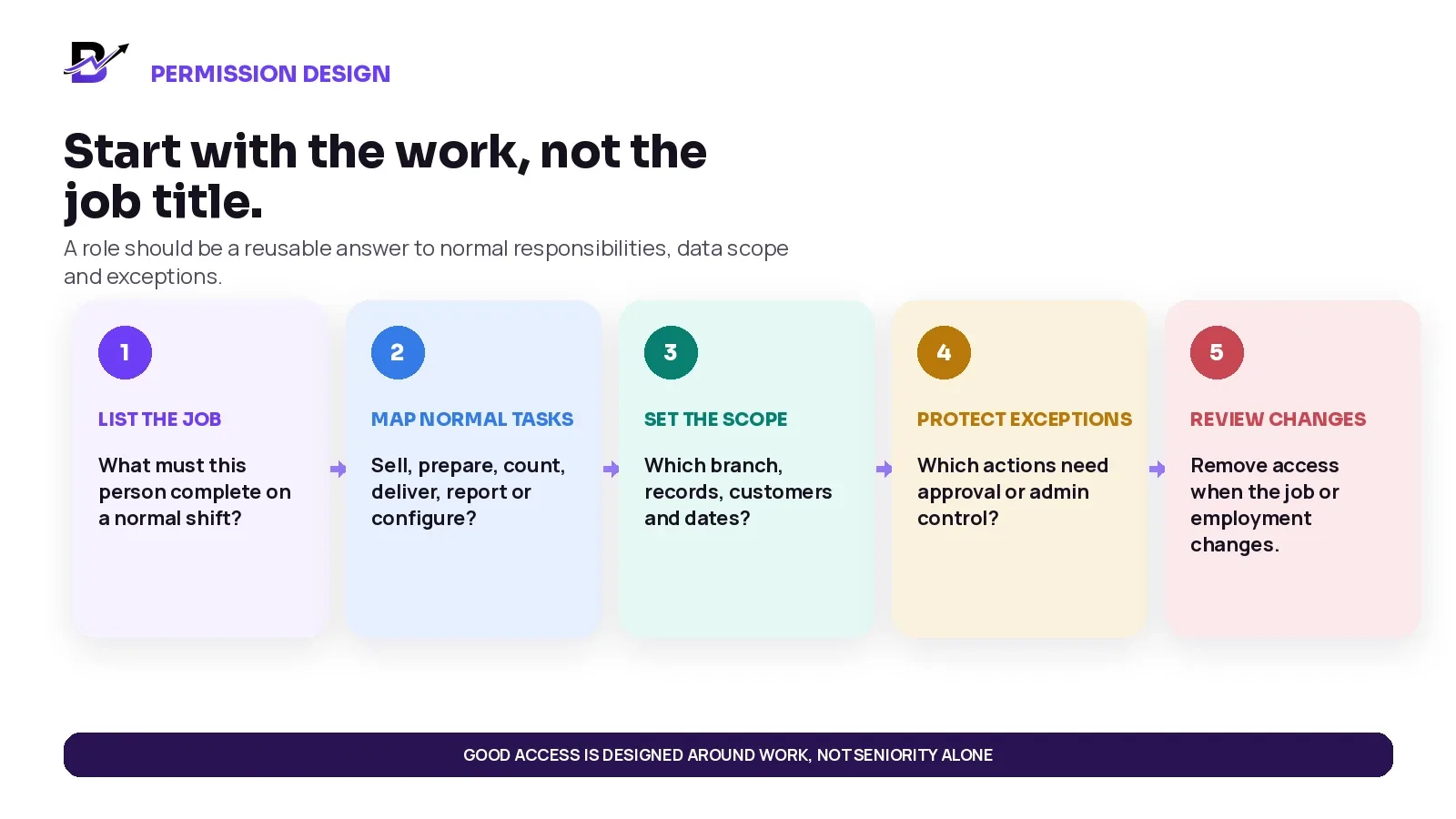
Figure 1. Permission design should begin with the work the person must complete, not with status or seniority alone.
Start with responsibilities, not job titles
The title “manager” can mean very different things. One manager may supervise a branch and close the register. Another may manage ecommerce content without touching cash. A senior salesperson may be trusted to approve a small customer-service discount but should not edit user accounts. Start with the work, then name the role.
RESPONSIBILITY | NORMAL WORK | HIGHER-RISK ACTION |
|---|---|---|
Sell and serve | Create normal sales, search products, attach customers, take approved payment methods, print receipts. | Large manual discounts, voids, unverified returns, tax edits or unusual payment actions. |
Fulfil orders | Accept assigned orders, view approved instructions, prepare items, update normal statuses, attach permitted evidence. | Changing price, payment state, customer-facing promise or another branch’s order. |
Manage stock | Count assigned items, receive authorised purchases, move approved transfers, record standard reasons. | Large write-offs, negative adjustments, cost changes or correcting another branch. |
Manage cash | Open or close an assigned register, record permitted expenses or collections. | Backdated cash changes, unexplained variances, deleting evidence or changing another user’s cash. |
Support customers | View relevant order history, update permitted contact or fulfilment details, record service notes. | Bulk exports, sensitive fields, unrelated customer records or marketing without permission. |
Configure the system | Maintain users, roles, branches, payments, taxes, integrations and global settings. | Normally owner or tightly controlled administrator access only. |
Least privilege in plain English — Give a person enough access to do the job properly, but do not add unrelated access “just in case.” OWASP describes least privilege as limiting access to the minimum needed for the assigned operation.
Official security reference: OWASP Authorization Cheat Sheet, including least-privilege and periodic access-review guidance.
Separate view, work, approve and admin access
A useful permission model is not only “yes” or “no.” The same business area can have different authority levels. A cashier may view the current order and complete the sale. A manager may approve a refund. An owner or administrator may change the refund policy or create roles.
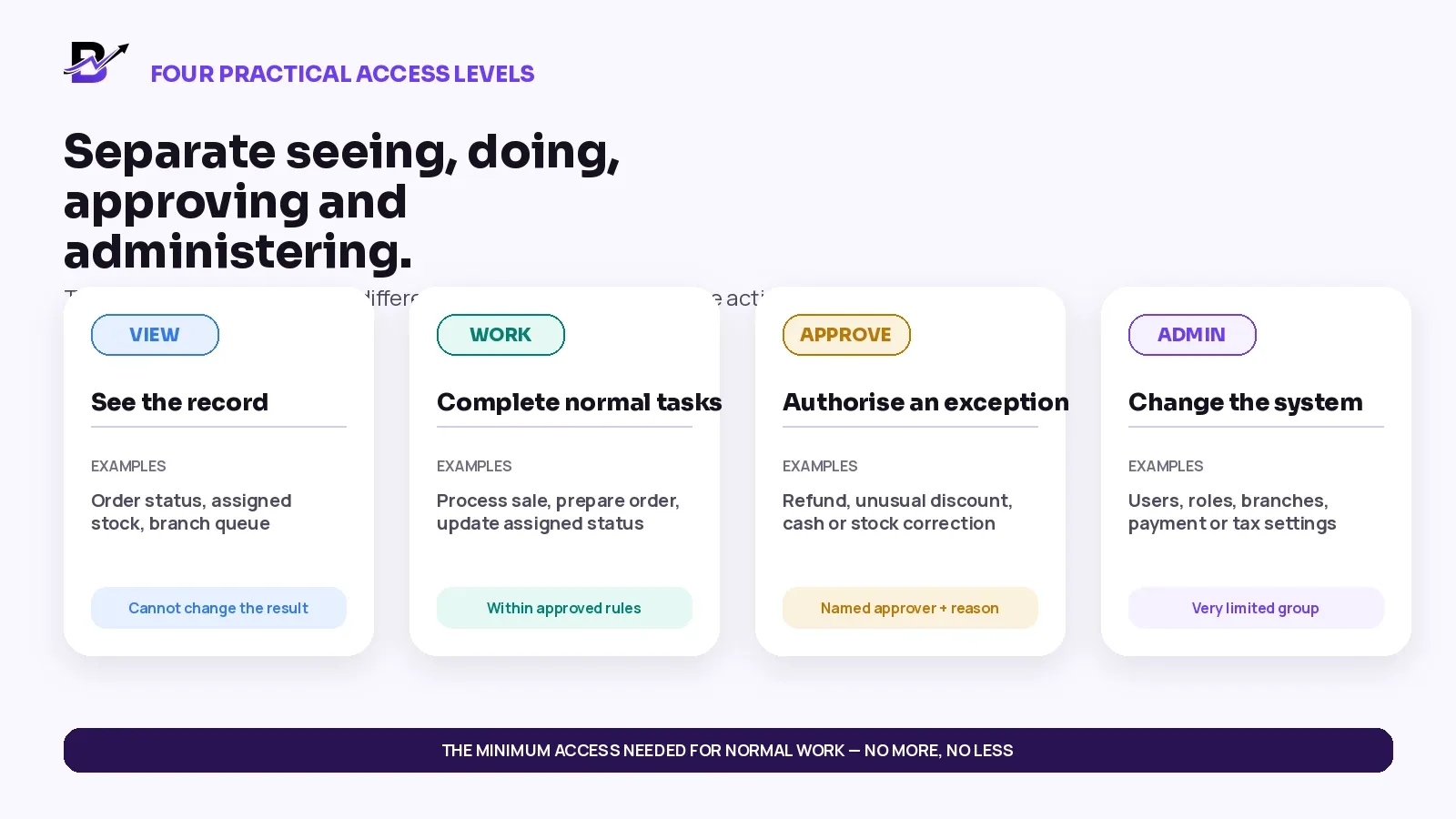
Figure 2. Separate seeing, doing, approving and administering so ordinary work stays fast without giving everyone full control.
LEVEL | MEANING | RETAIL EXAMPLE |
|---|---|---|
View | See the records needed for the role. | Assigned order status, branch queue, current stock or permitted reports. |
Work | Complete normal actions inside policy. | Process a sale, prepare an order, update an assigned status or perform an approved count. |
Approve | Authorise an exception requested by another user. | Refund, unusual discount, void, cash correction or large stock write-off. |
Admin | Change the access model or core configuration. | Users, roles, branches, payment settings, tax settings, integrations and global policies. |
Accountability rule — Every staff member and approver should use a unique account or PIN. Shared manager credentials may feel faster, but they remove the ability to tell who requested, approved or completed a sensitive action.
Define the scope: function, data, location and time
A permission becomes safer and more useful when its scope is clear. “Can view orders” is too broad by itself. Which orders? For which branch? Can the user edit them? Does the access continue after a temporary project ends?
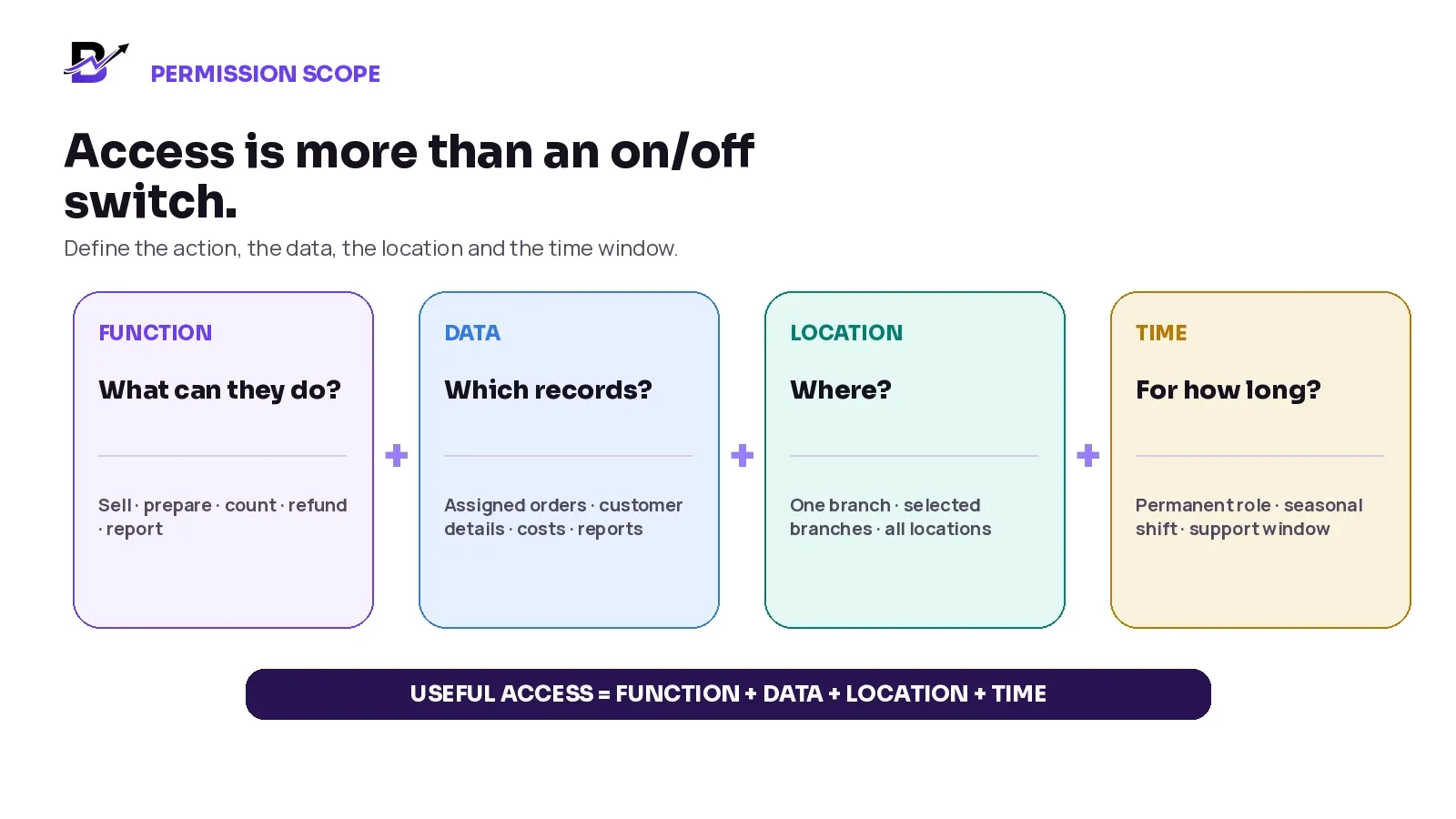
Figure 3. Useful access combines the permitted action with the permitted records, locations and duration.
SCOPE | QUESTION | EXAMPLES |
|---|---|---|
Function | What can this role do? | Sell, fulfil, count, refund, approve, report or configure. |
Data | Which records can it see or change? | Assigned orders, customer details, product costs, staff activity or business-wide reports. |
Location | Where does it apply? | One register, one branch, selected branches, a warehouse or all locations. |
Time | How long should it remain active? | Permanent role, seasonal shift, temporary support window or project access. |
A front-line employee may be allowed to see stock at another branch to answer a customer question without being allowed to adjust that stock. A driver may see only assigned deliveries and permitted recipient details. An external implementation specialist may receive temporary configuration access without receiving full customer or cash-report access.
A practical retail role model
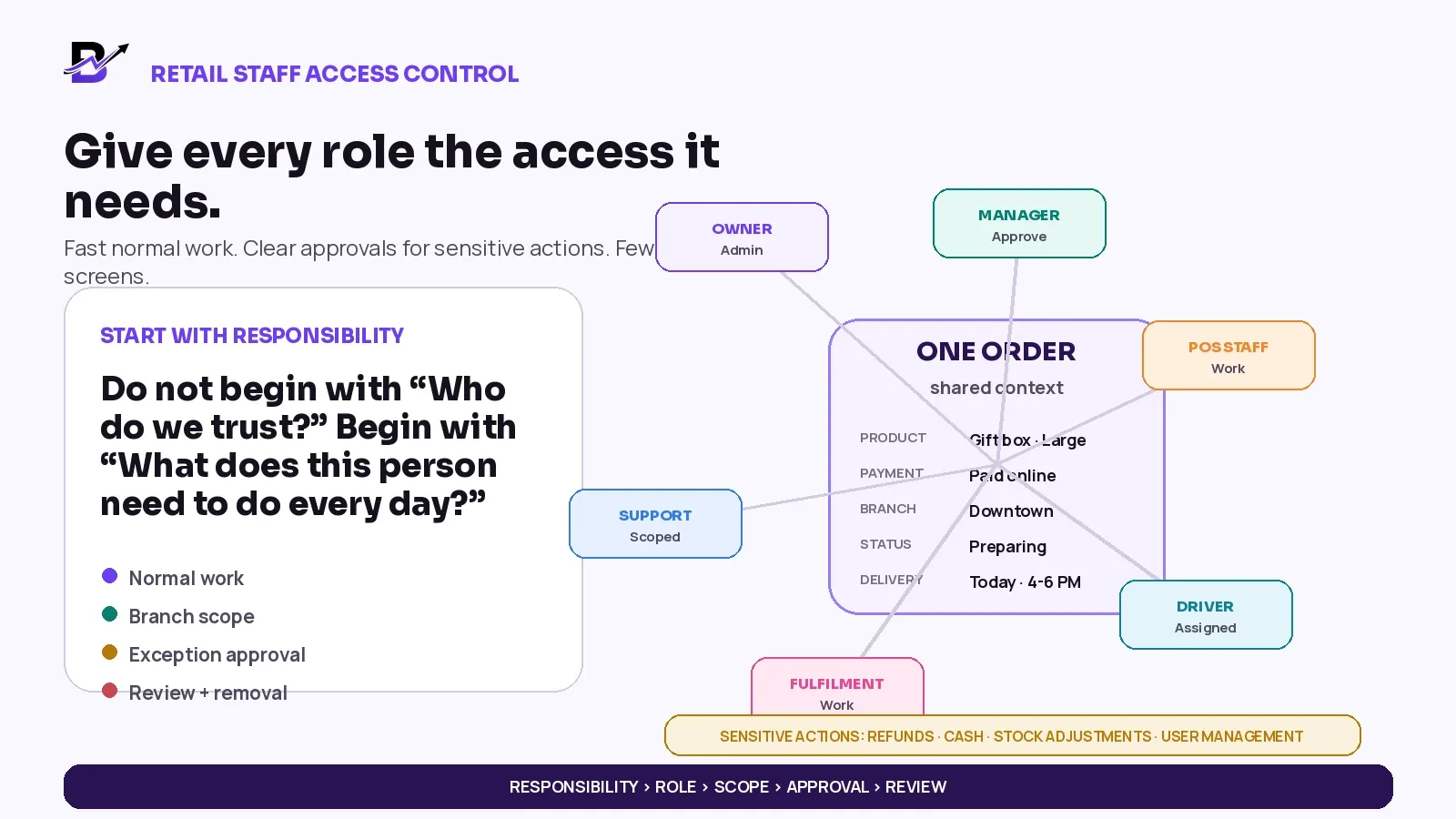
There is no universal role list. A small shop may combine several responsibilities in one person. A larger business may separate ecommerce, customer service, fulfilment, purchasing and finance. The model below is a practical starting point, not a fixed organisation chart.
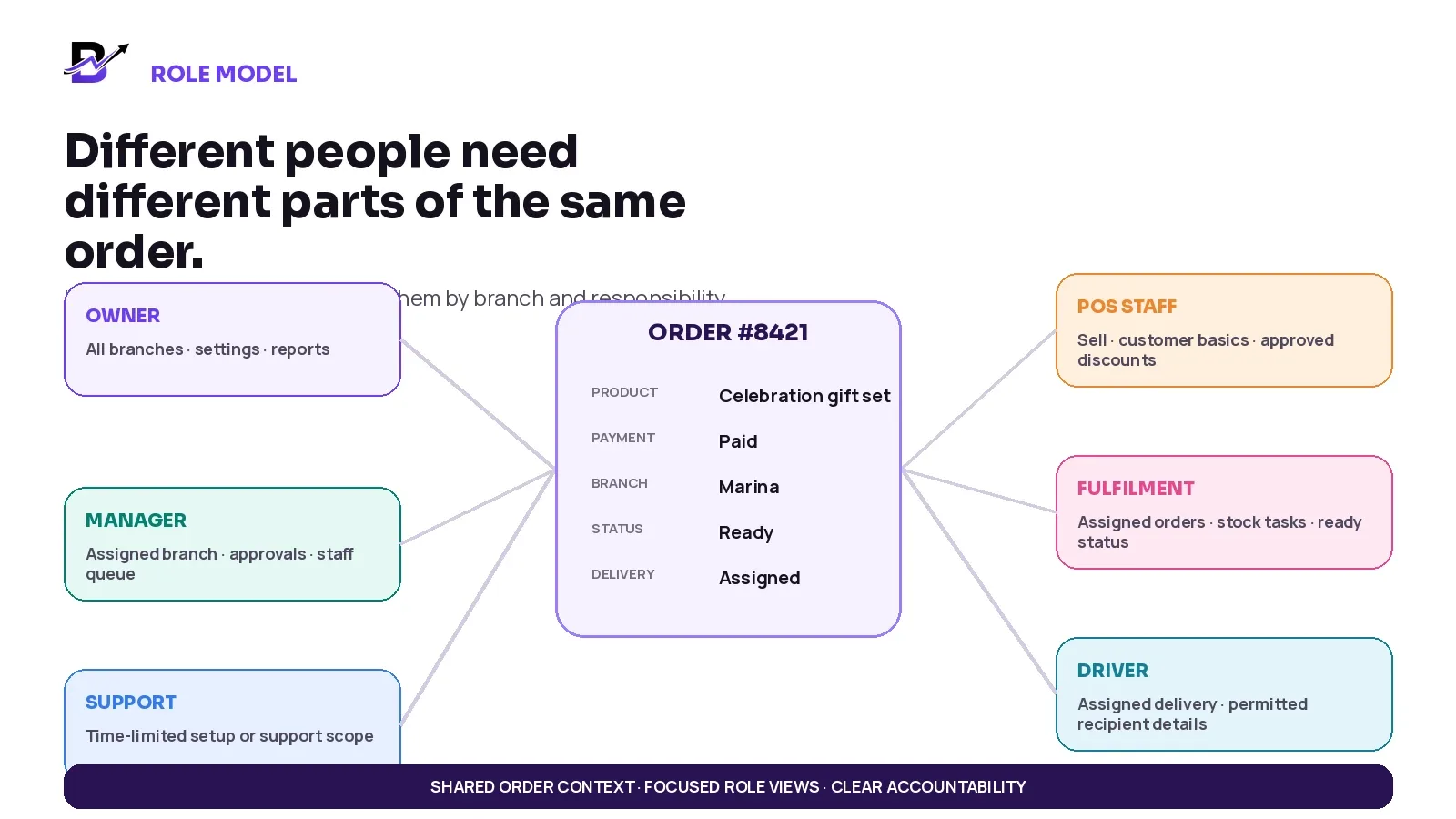
Figure 4. Different people can work from the same order context while receiving only the access required for their responsibility.
ROLE | NORMAL ACCESS | PROTECT BY DEFAULT |
|---|---|---|
Owner / system administrator | All-branch oversight, reports, policies, users, roles and core settings. | Routine POS use should still happen through the normal workflow instead of bypassing controls. |
Operations or branch manager | Assigned branch orders, staff queue, local reports, exceptions and approvals. | Global billing, ownership transfer, unrelated branches or high-risk configuration unless specifically required. |
POS / counter staff | Normal sales, customer lookup, approved discounts, receipts and assigned register tasks. | User management, global reports, product cost, unrestricted refunds or cash changes. |
Fulfilment / stock staff | Assigned orders, preparation, normal status updates, counts, authorised transfers and permitted adjustments. | Changing payment, price, customer exports or another branch’s records without a defined task. |
Customer service / marketing | Relevant customer and order history, service updates, campaigns or approved content. | Payment settings, full customer export, unrelated sensitive notes or unrestricted branch operations. |
Driver | Assigned deliveries, permitted recipient and address details, status, proof and enabled cash collection. | Product cost, reports, other drivers’ work, refunds or customer-list access. |
Support / implementation | Defined setup, troubleshooting or onboarding tasks for a limited period. | Permanent broad access, unrelated customer data or owner-only settings without written scope. |
Small-team note — One person can hold more than one responsibility, but the access should still be intentional. Do not use “small business” as a reason to give every login the same unlimited role.
Put stronger controls around sensitive actions
Sensitive actions are not limited to security settings. Retail risk often appears inside normal-looking operations: a refund, a manual discount, a cash adjustment, a stock write-off or a customer export. Protect the action that changes money, availability, customer data or access.
SENSITIVE ACTION | WHY IT MATTERS | PRACTICAL CONTROL |
|---|---|---|
Refund or unverified return | Money can leave the business; stock may also change. | Manager permission or approval, original order reference, reason and outcome. |
Manual discount or price override | Margin and campaign reporting can become unreliable. | Role limit, amount or percentage policy, reason and approver where needed. |
Void or edit completed sale | The original financial history can be changed. | Restricted role, named approval and preserved activity history. |
Cash adjustment or drawer action | Cash responsibility can become unclear. | Assigned register, reason, evidence and manager review. |
Stock correction or write-off | Sellable availability and value can change. | Assigned branch, controlled reasons, evidence and approval for unusual values. |
Product cost or base price change | Margin, valuation and customer price can change widely. | Purchasing, pricing or admin role; separate from ordinary sales access. |
Customer export or merge | Personal data can leave the normal workflow or records can be combined. | Owner/admin or specifically authorised role; review business purpose. |
User, role or branch change | A person can gain access beyond their job. | Very limited administrators, unique accounts and a review trail. |
Payment, tax or integration settings | Checkout, settlement or legal records may be affected. | Owner/admin plus specialist review where required. |
Shopify documents POS permissions that can be allowed, denied or set to require manager approval for many actions, and it attributes high-risk register actions to the staff member who performed them. Lightspeed similarly separates roles and lets retailers control access to discounts, returns, products, stock, reports and register operations. The exact features differ by product, but the operating principle is consistent: routine access and exception authority should not be the same thing.
Official retail references: Shopify POS permissions · Shopify POS staff management · Lightspeed employee roles and access.
Use approvals without slowing normal work
An approval should be an exception path, not the normal path for every sale. If a cashier needs the manager for a standard discount code, a normal return inside policy and every small correction, the team will either create a queue or find a shortcut. Approvals work best when the normal rule is clear and only the risk-changing action is gated.
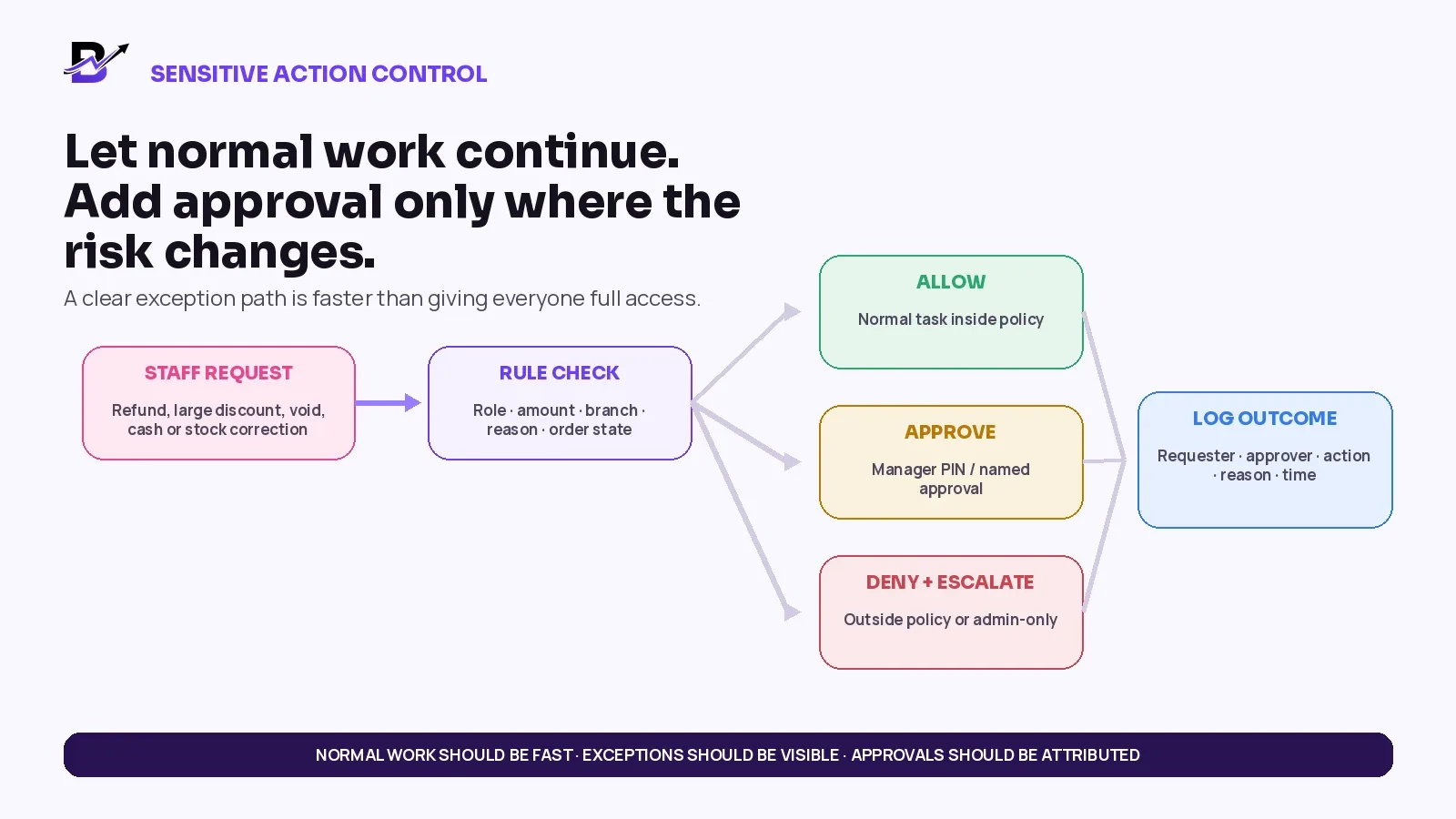
Figure 5. A useful approval flow checks the role, amount, branch, reason and order state, then records the requester and approver.
SITUATION | ACCESS RESULT | EXAMPLE |
|---|---|---|
Normal action inside policy | Let the assigned role complete it. | A standard sale, approved discount code or normal status update. |
Exception inside a controlled boundary | Request named manager approval. | Unusual discount, refund, void, cash correction or stock write-off. |
Outside policy or admin-only | Deny and escalate to the correct owner. | Changing payment settings, exporting all customers or creating an administrator. |
After the decision | Record the outcome. | Requester, approver, action, reason, time, branch and related order or record. |
Approval design checklist — Define who may request, who may approve, what evidence or reason is required, whether a threshold applies, what happens when the approver is unavailable and how the action appears in reports. Use the approver’s personal account or PIN - never a shared override code.
Restrict access by branch and order responsibility
Multi-branch access needs two separate decisions: where a person can work and what information they can see or change. A person may need visibility across locations without permission to edit every location. Another person may manage one branch fully but have no reason to access customer exports or owner reports.
USER CONTEXT | USEFUL ACCESS | DEFAULT BOUNDARY |
|---|---|---|
Branch POS staff | Process sales and normal register work at the assigned branch. | View other-branch availability only if the service model needs it; no remote adjustments by default. |
Branch manager | Manage local orders, staff queues, counts, cash and exceptions. | Cross-branch reports or transfers only when the role genuinely owns them. |
Central customer service | Search permitted orders across branches and update approved service details. | No unrestricted cash, cost, user or branch-setting access. |
Fulfilment team | See and update assigned orders and stock tasks. | No unrelated customer records or other branches’ work. |
Driver | See assigned delivery details and update the result. | No broad order list, costs, customer export or admin settings. |
Head office owner | Review all branches, users, policies and consolidated reports. | Use normal workflows for transactions instead of bypassing controls. |
External support | Access only the branch, module and period needed for the support task. | Remove or expire access when the work ends. |
Cross-branch stock transfers deserve special care because they affect two locations. The source should record what left, the destination should confirm what arrived, and permission to request a transfer does not automatically need to include permission to approve or receive it.
Manage the full access lifecycle
Permission problems do not only happen during setup. Access can become too broad when an employee changes role, moves branches, joins for peak season or leaves. The safest habit is to treat access as a lifecycle with named owners and evidence at each stage.
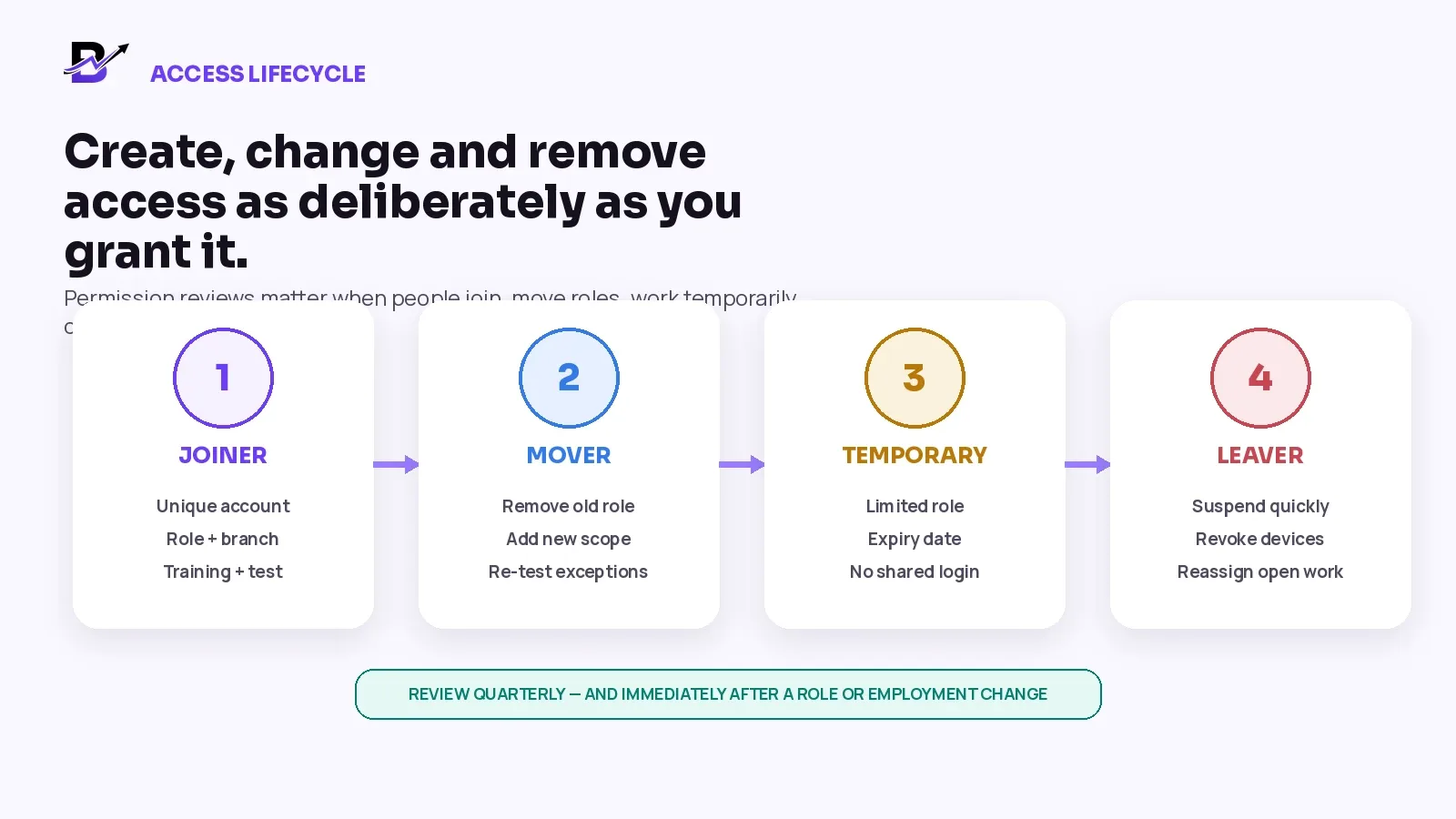
Figure 6. Access should be created, changed, limited and removed as deliberately as it is granted.
STAGE | REQUIRED ACTION | EVIDENCE / OWNER |
|---|---|---|
Joiner | Create a unique account, assign the smallest suitable role and branch scope, explain sensitive-action rules, and test the login. | Manager or authorised admin confirms the person can complete normal work. |
Mover | Remove the old role or branch before adding the new one; review accumulated access and open responsibilities. | Role-change checklist and manager sign-off. |
Temporary / seasonal | Use a limited role, selected branch, clear start and end dates, and no shared credentials. | Expiry date and peak-season owner. |
Leaver | Suspend access promptly, revoke device sessions where supported, reassign open orders or approvals, and retain necessary records according to policy. | Offboarding owner and completion record. |
Periodic review | Compare active accounts with current staff and responsibilities; investigate unused or unusually broad access. | Quarterly or business-defined review plus immediate review after major changes. |
Review activity without turning access control into surveillance
The goal of activity history is accountability and process improvement. It should help the business answer who changed a sensitive record, why the action happened and whether the policy worked. It should not become a substitute for training, clear procedures or respectful management.
REVIEW SIGNAL | WHAT IT CAN REVEAL | GOOD RESPONSE |
|---|---|---|
Refunds, voids and manual discounts by user | Find unusual patterns, repeated exceptions or training needs. | Check context before assuming misconduct. |
Cash adjustments and unexplained variances | Connect corrections to the responsible register, branch and reviewer. | Require reasons and evidence where appropriate. |
Stock adjustments and write-offs | Identify repeated item, supplier, branch or process problems. | Investigate causes before correcting only the number. |
Permission and role changes | Confirm who granted broader access and why. | Review administrator actions and temporary access. |
Dormant or inactive accounts | Remove access that no longer supports current work. | Compare system users with the actual team. |
Approval wait time | See whether the control is creating an avoidable queue. | Adjust staffing or policy without weakening high-risk controls. |
Cross-branch activity | Check whether remote actions match assigned responsibilities. | Separate legitimate central work from unnecessary access. |
Privacy note — Customer data, staff monitoring, activity retention and access reviews can have legal and employment implications. Collect and retain only what the business needs, limit who can view staff activity, and confirm local requirements.
Signs the setup is too broad or too restrictive
PATTERN | WHAT IT LOOKS LIKE |
|---|---|
Too broad | Most users are administrators; everyone can refund, change stock or view all reports; former staff remain active; shared manager PINs are common. |
Too restrictive | Staff cannot complete normal tasks; the owner becomes a permanent bottleneck; employees share logins; important work moves to chat, paper or spreadsheets. |
Balanced | Routine work is allowed; sensitive actions have a clear approval path; each person has a unique account; branch and record scope are visible; access changes with the job. |
Good permissions should make the normal workflow simpler because irrelevant screens and risky actions are removed. Security and usability are not opposites when the role is designed around the actual job.
An eight-step implementation plan
Map the real team List every person or job type that touches sales, orders, products, stock, cash, customer data, delivery, reports or configuration.
Write normal responsibilities Document what each role must complete on an ordinary shift before discussing exceptions.
List sensitive actions Mark refunds, voids, manual discounts, cash changes, stock write-offs, exports, user management and configuration.
Define scope Choose the branch, records, reports and time window attached to each permission.
Create reusable role templates Use a small number of understandable roles instead of a unique permission set for every person.
Add approval paths Decide which exceptions require a manager or owner, what reason is needed and who is the backup approver.
Test real scenarios Run a normal sale, refund, failed payment, cash close, stock correction, branch transfer, delivery and staff-role change.
Train and review Explain the reason for the controls, remove shared accounts, schedule access reviews and update roles when the business changes.
Worked example: a two-branch gifting retailer
Imagine a gifting business with two branches, ecommerce, POS, custom WhatsApp-assisted orders and local delivery. The team includes one owner, two branch managers, POS staff, fulfilment staff, drivers and an external implementation partner.
Editable Retail Role and Permission Matrix
Copy this table and replace the example roles, approval rules and scope with your own operating policy.
ACTION OR RECORD | NORMAL PERFORMER | APPROVAL / ADMIN RULE | SCOPE |
|---|---|---|---|
Normal POS sale | POS staff | No approval when price and payment follow policy. | Assigned register and branch. |
Manual discount above policy | POS staff requests; branch manager approves. | Named manager approval and reason. | Related sale and assigned branch. |
Refund to original payment method | Branch manager or approved senior role. | Owner review for unusual or high-risk cases. | Original order; branch and payment context. |
Stock count | Fulfilment staff. | Manager reviews material variance. | Assigned location and item group. |
Damaged-stock write-off | Staff records request and evidence. | Manager approves; owner reviews repeated patterns. | Assigned branch and item. |
Purchase invoice | Purchaser or manager. | Owner or finance review where business policy requires it. | Supplier and receiving branch. |
Driver status update | Assigned driver. | No refund or order-price authority. | Assigned delivery only. |
Customer export | Owner or specifically authorised admin. | Business purpose and data-handling control. | Approved dataset only. |
Create or change user role | Owner or limited user administrator. | Separate review for broad admin access where practical. | All locations affected by the role. |
Implementation support | External support user. | Owner grants and later removes time-limited scope. | Only required modules and period. |
Use the matrix during a live demo — Ask the software provider to configure or explain each row. A feature list is not enough. Test which user can see the action, which user can complete it, when approval appears and what history remains.
How Bloomlytix supports role-based retail access
Bloomlytix uses tenant-scoped staff roles, role templates, direct permissions and branch-aware operational rules across the admin portal and Staff App. Access can be shaped around the work a person performs while existing action, branch, order and record boundaries continue to apply.
BLOOMLYTIX ACCESS AREA | CURRENT PRODUCT DIRECTION |
|---|---|
Tenant roles | Built-in role templates provide reusable starting points for common staff responsibilities. |
Custom roles | A tenant can create a custom role and grant the permissions needed for that responsibility. |
Direct permissions | User-level permissions can be adjusted where a saved role template is not sufficient. |
Branch and record boundaries | Existing branch, action, order and record-scope rules continue to apply alongside section permissions. |
Staff App | App access and the modules shown depend on the staff designation and the current role configuration. |
Product scope — Exact permissions, approval paths, audit detail, branch visibility and support access depend on the tenant configuration and current Bloomlytix release. Confirm the final access model during discovery. This guide does not promise a generic manager-approval engine, automatic temporary-access expiry or a complete security-information system.
Explore the current platform: Bloomlytix Business Manager and Staff App downloads · role-aware florist order workflows.
Bring your current staff structure — List your owners, managers, POS users, fulfilment staff, drivers, branches and sensitive actions. Bring the list to a Bloomlytix role-design demo and test one normal order plus one refund, cash, stock or delivery exception.
Book a tailored role-design demo
Questions to ask during a retail-permissions demo
NO. | QUESTION | WHY ASK |
|---|---|---|
1 | Can roles be created around job responsibilities rather than individual users? | Reusable roles reduce inconsistent access. |
2 | Can one user have different access by branch or location? | Multi-branch work should not automatically mean all-branch control. |
3 | Can staff see only assigned orders, deliveries or registers where needed? | Record scope matters as much as feature access. |
4 | Can sensitive actions be allowed, denied or routed for approval? | Refunds, discounts, cash and stock need stronger controls. |
5 | Does the approval record both the requester and approver? | Shared override credentials weaken accountability. |
6 | Can product cost, selling price and discounts be controlled separately? | These actions affect margin in different ways. |
7 | Can reports be limited by branch, type or role? | Not every user needs all financial or staff information. |
8 | Can customer exports and sensitive fields be restricted? | Customer-service access should not automatically include bulk data access. |
9 | Can temporary users expire or be suspended without deleting history? | Seasonal and support access should be easy to remove. |
10 | Can active sessions or device access be revoked? | Offboarding should not depend only on changing a password. |
11 | Which actions appear in activity history or exception reports? | The business needs enough evidence to investigate important changes. |
12 | What is standard, plan-dependent, configurable or custom? | The written proposal should match the demonstrated access model. |
Frequently asked questions
What is the difference between a role and a permission?
A role is a reusable set of access rules for a type of work, such as branch manager or POS staff. A permission is one specific ability inside that role, such as processing a return, viewing a report or adjusting stock.
Should every manager have administrator access?
No. A manager may need strong operational control for assigned branches without needing billing, ownership, user-role, payment, tax or global integration settings.
Should front-line staff be allowed to process refunds?
That depends on the policy and software. Some businesses allow standard refunds inside clear rules, while unusual or unverified returns require manager approval. Separate the normal case from the exception.
Can several employees share one POS login?
A shared login may be technically possible in some setups, but it weakens accountability and makes offboarding difficult. Unique accounts or PINs are a better operating control.
How often should permissions be reviewed?
Review them immediately after role, branch or employment changes. Also schedule a regular review based on business risk and staff turnover, such as quarterly or before peak seasons.
What should temporary staff be able to access?
Only the tasks, branch, records and time period needed for their assignment. Use unique accounts, a limited role and an expiry or suspension process.
Does Bloomlytix support staff roles and permissions?
Bloomlytix documents owner, manager, shop staff, driver and support access with branch and responsibility context. The exact current permission configuration should be confirmed during the role-design and onboarding process.
Final retail access checklist
Every active staff member has a unique account or PIN.
Each role is based on normal responsibilities, not title or seniority alone.
POS, fulfilment, driver, report and administrator access are separated.
Branch and record scope are defined for every role.
Refunds, voids, manual discounts, cash changes and stock write-offs have clear rules.
Approvals record the requester, approver, reason, related record and time.
Product costs, customer exports, payment settings and user management are tightly limited.
Temporary and external support access has an owner and end date.
Role changes remove old access before new access accumulates.
Leaver access is suspended promptly and open responsibilities are reassigned.
Activity and exception reports are reviewed for process improvement.
Permissions are tested with normal work and real exceptions before launch.
The access matrix is reviewed when branches, systems or responsibilities change.
The final principle — Good access control should make the team feel clearer, not slower. Give people a direct path to complete normal work. Put sensitive actions behind visible rules. Keep the order, branch and responsibility connected. Then review access as the business changes.