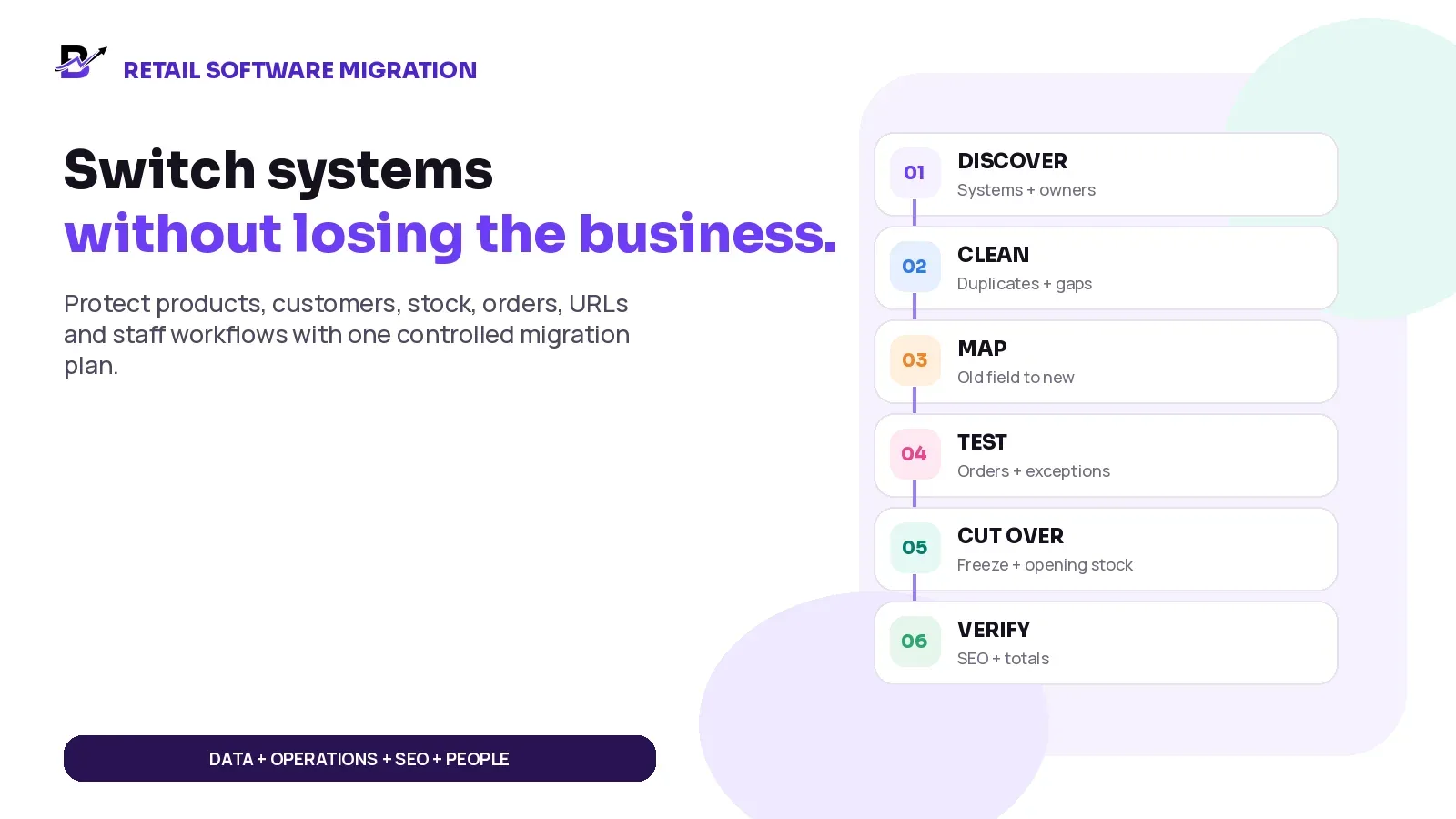
A safe migration protects more than the database. It protects the customer promise and the team that must keep operating.
Switching retail software can solve real problems: duplicate products, unclear stock, disconnected POS, manual staff work, weak delivery visibility or limited reporting. But a rushed migration can create a new set of problems before the old ones have been removed.
The risk is not only whether the new website opens. The business must still know which products are live, which customer records are valid, how much stock each branch owns, what happens to open orders, whether payments are working, whether old URLs reach the right pages and whether staff can complete a normal day without returning to spreadsheets.
DIRECT ANSWER — A safe retail software migration starts with a complete map of the current systems, data and owners. Clean and map the records before importing them. Test normal orders and difficult exceptions in a staging environment. Protect valuable URLs with planned permanent redirects. Use a controlled freeze and cutover, reconcile opening stock and money, train each role, then monitor the first weeks before the old system is switched off.
This guide is for retailers moving an ecommerce website, POS, inventory system, order-management tool or a wider retail operating platform. It focuses on the practical decisions that protect daily operations and search visibility. The exact migration scope depends on the source system, target platform, data quality, integrations, contracts and country requirements.
In this guide
Why one software switch contains several different migrations
How to inventory the current platforms, data, domains, devices and owners
Which records should move at launch, later or remain in a read-only archive
How to clean duplicates and map fields without inventing missing facts
How to protect important URLs, redirects, canonicals, sitemaps and internal links
How to test normal sales, refunds, returns, stock transfers and delivery exceptions
How to plan the freeze window, cutover, opening stock and rollback decision
How to train staff and run hypercare before retiring the old system
How Bloomlytix scopes data migration and connected operational setup
1. A software switch is five migrations, not one
A project can look like one task in a contract and still contain several different kinds of change. Each workstream has its own owner, evidence and failure risk. Treating all of them as “data migration” hides the work that normally causes disruption.
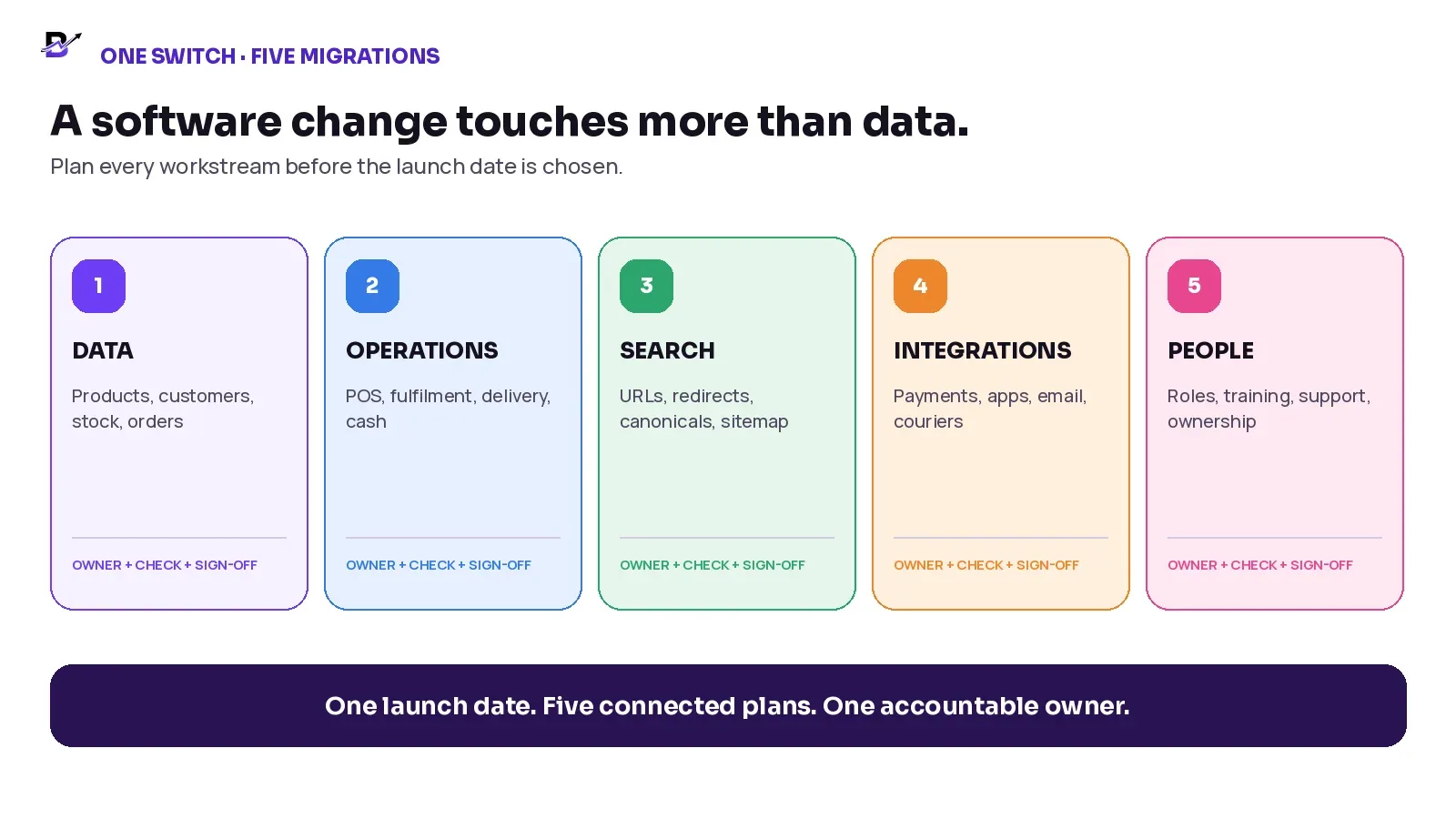
Figure 1. The business is changing data, operations, search, integrations and people at the same time.
WORKSTREAM | WHAT CHANGES | MAIN RISK |
|---|---|---|
Data migration | Products, variants, customers, stock, orders, suppliers, images and selected history. | Wrong values, duplicates, missing relationships or unusable records. |
Operational migration | POS, order statuses, fulfilment, branch ownership, purchases, cash, delivery and reports. | The data arrives but the team cannot complete real work. |
Search migration | URLs, redirects, canonicals, metadata, internal links, sitemap and crawlability. | Customers and search engines reach errors, duplicates or irrelevant pages. |
Integration migration | Payments, apps, email, messaging, couriers, analytics and accounting connections. | A sale enters the new system but an important external service does not respond. |
People migration | Roles, permissions, training, support, sign-off and new habits. | Staff continue using the old process or create unofficial workarounds. |
CORE PRINCIPLE — A migration is successful only when the new system holds the right information and the team can use that information to complete the real business workflow.
2. Start with discovery, not an import file
Before exporting anything, create a current-state system map. Most retailers use more tools than the project team first remembers. The website may hold products and customers. The POS may own walk-in sales. Stock may be corrected in a spreadsheet. Payment information may live in a gateway. Delivery updates may sit inside a driver app or WhatsApp group. Analytics, email, app stores and domain settings can have different account owners.
A useful discovery register should answer six questions for every system: what is it used for, who owns the account, which data it holds, which other systems depend on it, how the data can be exported and what should happen to the system at cutover.
SYSTEM | PURPOSE | OWNER | IMPORTANT RECORDS | CUTOVER DECISION |
|---|---|---|---|---|
Ecommerce storefront | Online products, pages, customers and orders | Ecommerce manager | Catalogue, URLs, content, order history | Replace or reconnect |
POS | Counter sales, receipts and branch activity | Operations manager | Products, prices, staff, payments | Replace, integrate or keep |
Inventory spreadsheet | Opening stock and manual corrections | Branch manager | SKU, branch, quantity, notes | Clean and retire |
Payment gateway | Online payment status and settlements | Finance owner | Transaction references, refunds | Reconnect; do not copy card data |
Delivery tool | Assignments, status and proof | Delivery manager | Drivers, addresses, outcomes | Replace, integrate or archive |
Domain + analytics | Traffic, DNS, Search Console and measurement | Developer / marketing | URLs, tags, properties, access | Retain and reconfigure |
Also list physical dependencies: POS computers or tablets, receipt printers, scanners, cash drawers, greeting-card printers, payment terminals, branch internet connections and staff phones. A cloud migration can still fail at the counter because one device or printer was never tested.
3. Decide what should move - and what should not
Moving every historical record is not automatically safer. It can make the project slower, import old mistakes and create a larger validation burden. The better decision is to separate launch-critical data from useful history, legal or accounting archives and records that need a different technical method.
DECISION | EXAMPLES | REASON |
|---|---|---|
Move at launch | Active products and variants; current prices; live categories; customers needed for service; open orders; opening stock by branch; active coupons or balances when supported. | Required for the first normal day. |
Move in a later phase | Selected historical orders; inactive customers; supplier history; old blog content; closed purchases; old delivery proof. | Useful for service or analysis but not required to take the first new order. |
Keep in a read-only archive | Full accounting history; old audit evidence; unsupported custom logs; records that must remain available but do not need to run the new workflow. | Preserves reference without forcing unsuitable data into the new model. |
Rebuild or reconnect | Payment provider, tax settings, email, messaging, analytics, app-store accounts, courier and accounting integrations. | These are configurations and relationships, not only rows in a file. |
Scope separately | Passwords, saved payment credentials, app sessions, custom code, proprietary loyalty rules and complex historical relationships. | Portability varies; never promise these without written technical discovery. |
DO NOT MIGRATE BY ASSUMPTION — A field that exists in the old system may not have the same meaning in the new one. A missing value should stay missing or return for review. It should not be filled with a confident guess.
Import order can matter when records depend on one another. For example, products and customers may need to exist before historical orders can be linked correctly. The target platform should provide the required sequence and validation rules rather than leaving the team to discover them during the final import.
4. Clean the data before mapping it
Migration is a good time to remove avoidable confusion, but cleanup should be controlled. Do not silently merge records because two names look similar. Use stable identifiers, evidence and an owner who can approve the decision.
DATA PROBLEM | WHAT IT LOOKS LIKE | SAFE ACTION |
|---|---|---|
Duplicate products | Same item appears under slightly different names or SKUs. | Choose the approved product and variant identity; preserve references needed for old orders. |
Inconsistent variants | Large, L and 12-inch all mean the same option. | Define one new variant structure and a written conversion rule. |
Missing branch stock | One company total exists but no location ownership. | Perform or reconstruct a branch-level opening count before cutover. |
Customer duplicates | Same person has several email or phone formats. | Define matching rules; do not merge different people only because names match. |
Broken images | Files are missing, low quality or linked from temporary locations. | Create a reusable image inventory and test every imported URL or file. |
Old content | Expired campaigns, duplicate pages and unsupported promises remain live. | Choose keep, update, redirect or archive with an SEO/content owner. |
Use a cleanup log. Record the source record, the issue, the chosen action, the approver and the date. This gives the team an audit trail when a customer, branch or manager later asks why a record changed.
5. Map business meaning, not only columns
A data map explains how every important source field becomes a target field. It should include the source, destination, transformation, fallback rule, required format, relationship and validation test. The mapping document is the contract between business meaning and technical import.
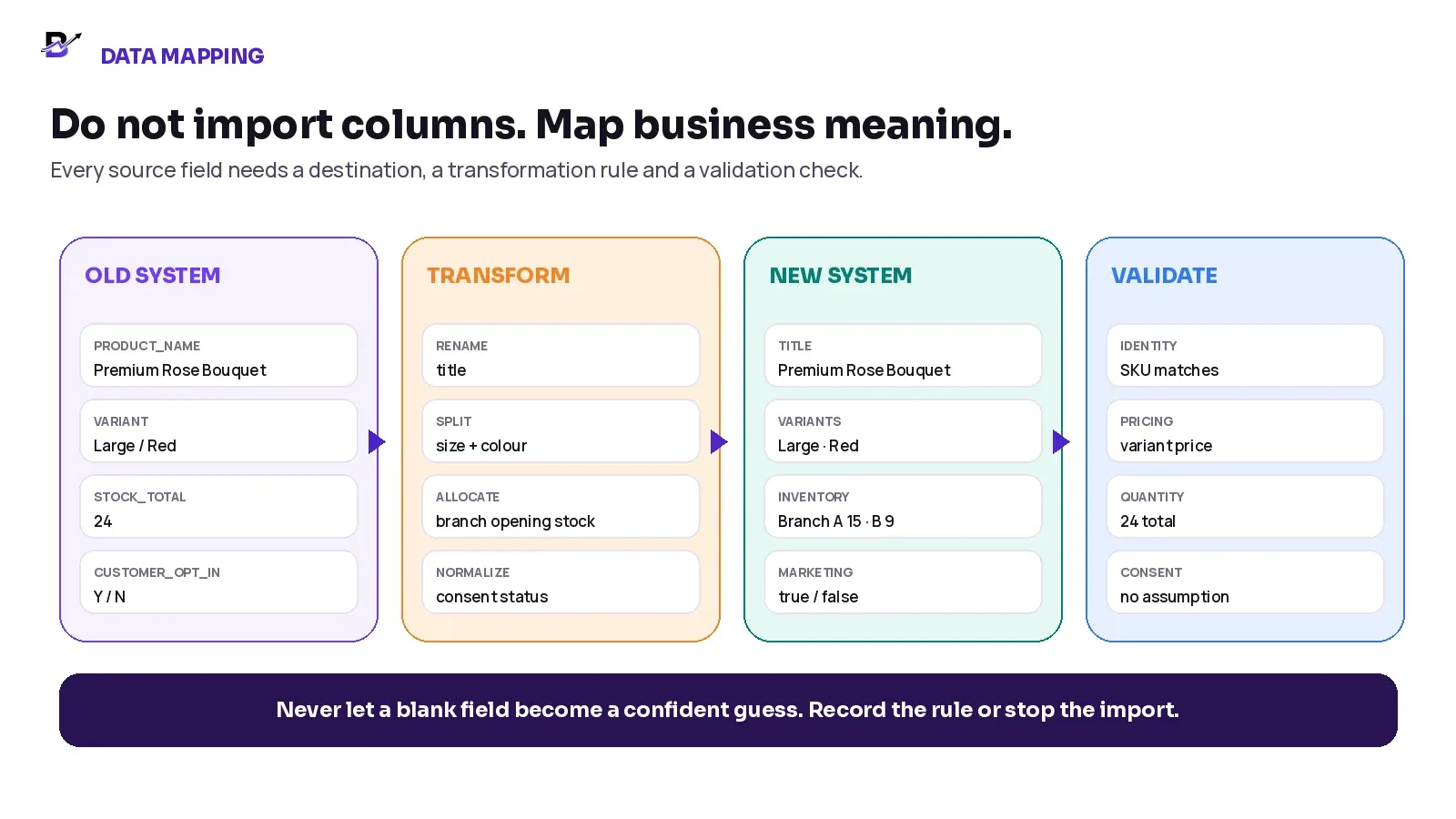
Figure 2. A field map needs a transformation and a validation rule, not only an old and new column name.
SOURCE | DESTINATION | TRANSFORMATION | VALIDATION |
|---|---|---|---|
Old SKU | Variant SKU | Trim spaces; uppercase; preserve stable code | Must be unique among sellable variants |
Product name | Product title | Keep approved customer-facing name | Matches catalogue sample and product ID |
Size + colour text | Variant options | Split using approved lookup table | Every old option maps once; no orphan variants |
Company stock total | Opening stock by branch | Allocate only from approved physical count | Branch totals add to the approved opening quantity |
Customer marketing Y/N | Consent status | Map only explicit values; blank remains unknown | No customer is opted in by default |
Old URL | Redirect source | Normalize path; preserve query logic only when required | Each important old URL has one tested target |
STABLE IDENTITY — Names can change. Product IDs, variant IDs, SKUs, order numbers and customer keys should have clear ownership and should not be reused for a different record.
6. Protect search visibility before the URLs change
A platform migration can change the page templates, domain, URL paths, navigation, internal links, structured data and rendering method at the same time. Search visibility cannot be guaranteed, but careful preparation can reduce avoidable loss and make the move easier for customers and search engines to understand.
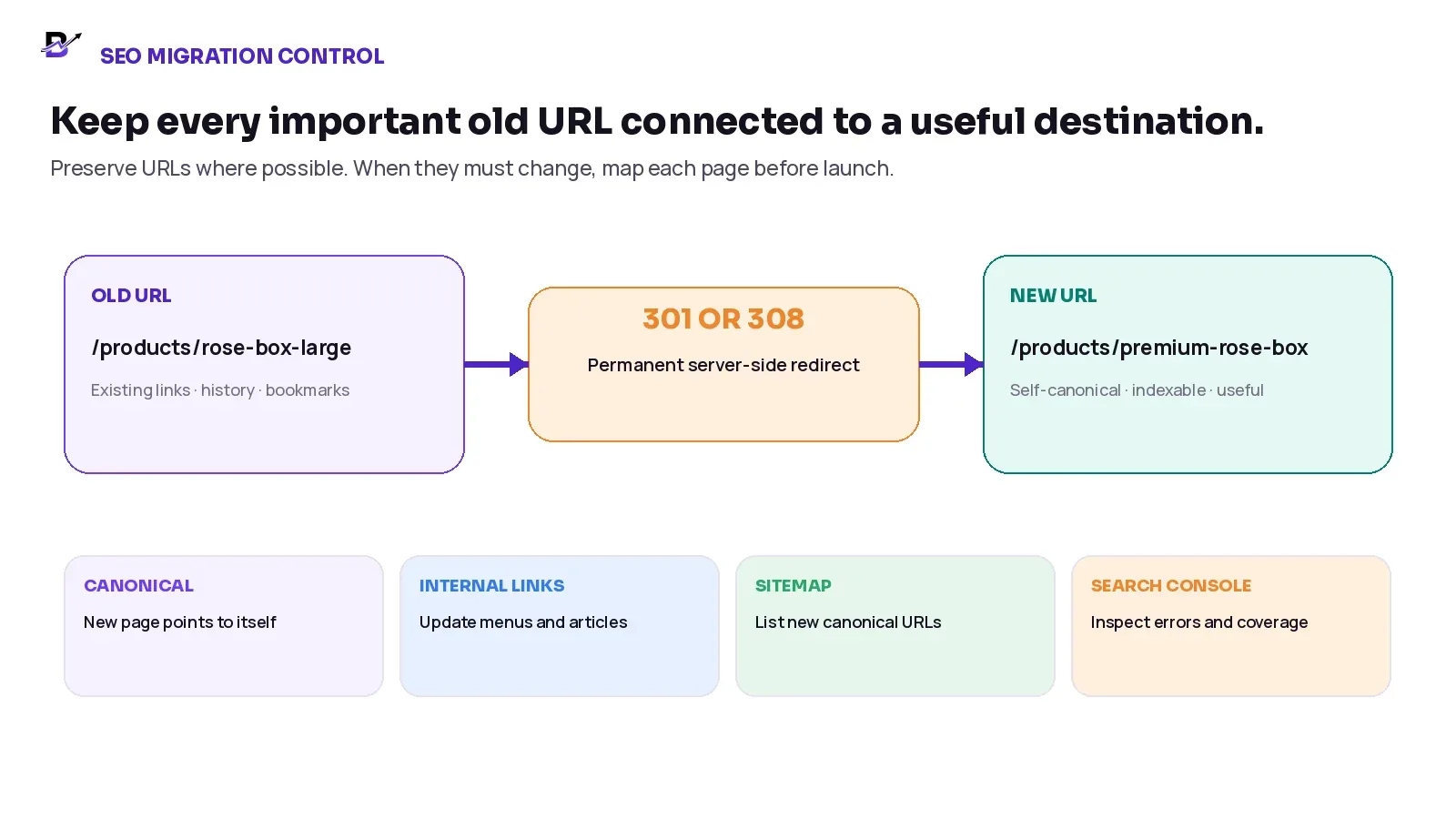
Figure 3. Preserve a useful page at the same URL when possible; otherwise map the old URL to the closest relevant new page with a permanent redirect.
Build a complete URL inventory before cutover. Combine the existing sitemap, website crawl, analytics landing pages, Search Console queries and important external links. Mark each URL as keep, move, merge, remove or redirect.
SEO CONTROL | WHAT TO DO |
|---|---|
Keep important URLs unchanged where practical | The simplest migration is often the one that preserves a page and its purpose at the same address. |
Map one old URL to one relevant new URL | Use the closest useful destination. Do not send every discontinued page to the homepage. |
Use permanent server-side redirects for permanent moves | Google recommends permanent 301 or 308 redirects when a page has permanently moved. |
Use a self-referencing canonical on the new page | The new page should normally identify its own canonical URL unless a deliberate duplicate structure exists. |
Update internal links and navigation | Menus, blog links, category links, hreflang annotations and structured data should point directly to the new canonical URLs. |
Publish the new sitemap and monitor Search Console | Use a sitemap for many URLs and inspect important pages, errors, redirects, canonicals and indexing after launch. |
Keep the new pages crawlable and indexable | Remove staging restrictions, accidental noindex tags, robots blocks and login requirements from public pages at launch. |
SEARCH VISIBILITY RULE — Do not redesign every page, change the domain, rewrite all content and replace the URL structure without a reason. Reduce simultaneous changes where possible, and keep a tested URL map for every high-value page.
Official SEO references checked 16 September 2026: Google site-move guidance · Google redirect guidance.
Official crawl reference: Ask Google to recrawl your URLs.
7. Build a staging environment and test real workflows
A successful product import does not prove that the business is ready. Staging should let the team use realistic data and complete the full order journey before the public cutover. Keep staging private or noindexed according to the technical setup, then confirm that those restrictions do not remain on the live site.
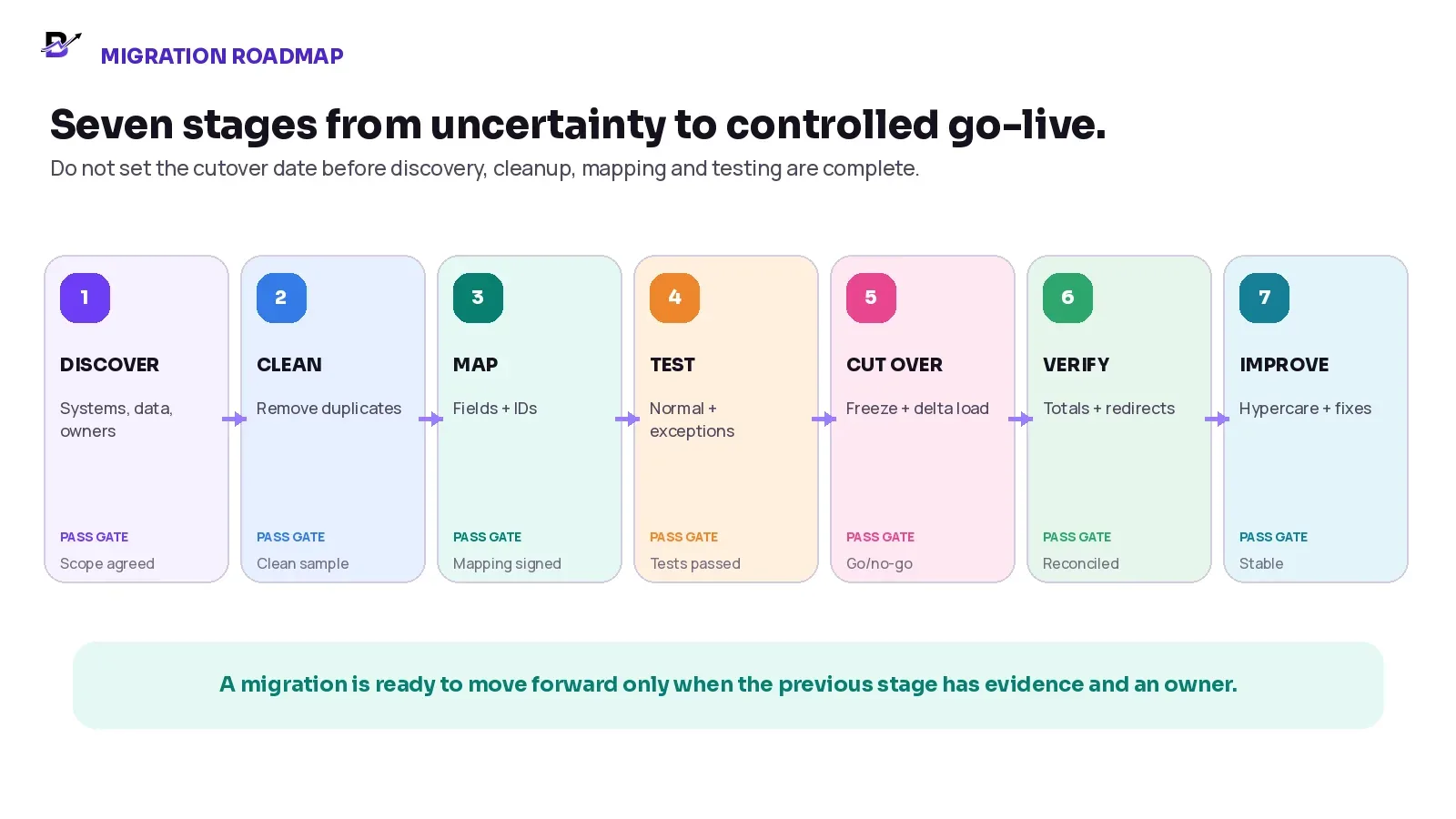
Figure 4. Each migration stage should have evidence and a pass gate before the project moves forward.
TEST SCENARIO | EXPECTED EVIDENCE |
|---|---|
Successful website order | Correct product, customer, payment, branch, stock action, fulfilment and confirmation. |
Failed or abandoned payment | Order and payment states remain clear; temporary reservations release according to policy. |
POS sale for the last unit | The correct branch quantity changes once and online availability reacts according to the setup. |
Custom or WhatsApp-assisted order | Manual product lines, payment link, notes, staff owner and delivery promise stay connected. |
Cancellation before preparation | Payment, order status and reserved stock follow the approved rules. |
Refund without returned stock | Money changes without falsely increasing physical inventory. |
Return in sellable and damaged condition | The team inspects the item and chooses restock, hold or write-off. |
Branch transfer with partial receipt | Source, in-transit and destination quantities remain traceable. |
Failed delivery and reschedule | Driver result, customer contact and next action stay attached to the order. |
Day-end cash and reports | POS, online, manual payments, expenses and branch totals reconcile. |
Old URL and high-traffic page | Redirect, status code, canonical, content and analytics work as planned. |
Test with the actual roles and devices. An owner seeing a perfect admin dashboard does not prove that a cashier can issue a receipt, a staff member can print the correct message or a driver can close an exception from the device they will use.
8. Plan a controlled cutover and rollback decision
The cutover plan should state exactly when data changes stop in the old system, which final records are exported, when the new system becomes the source of truth, who performs each check and what condition would trigger a rollback or temporary hold.
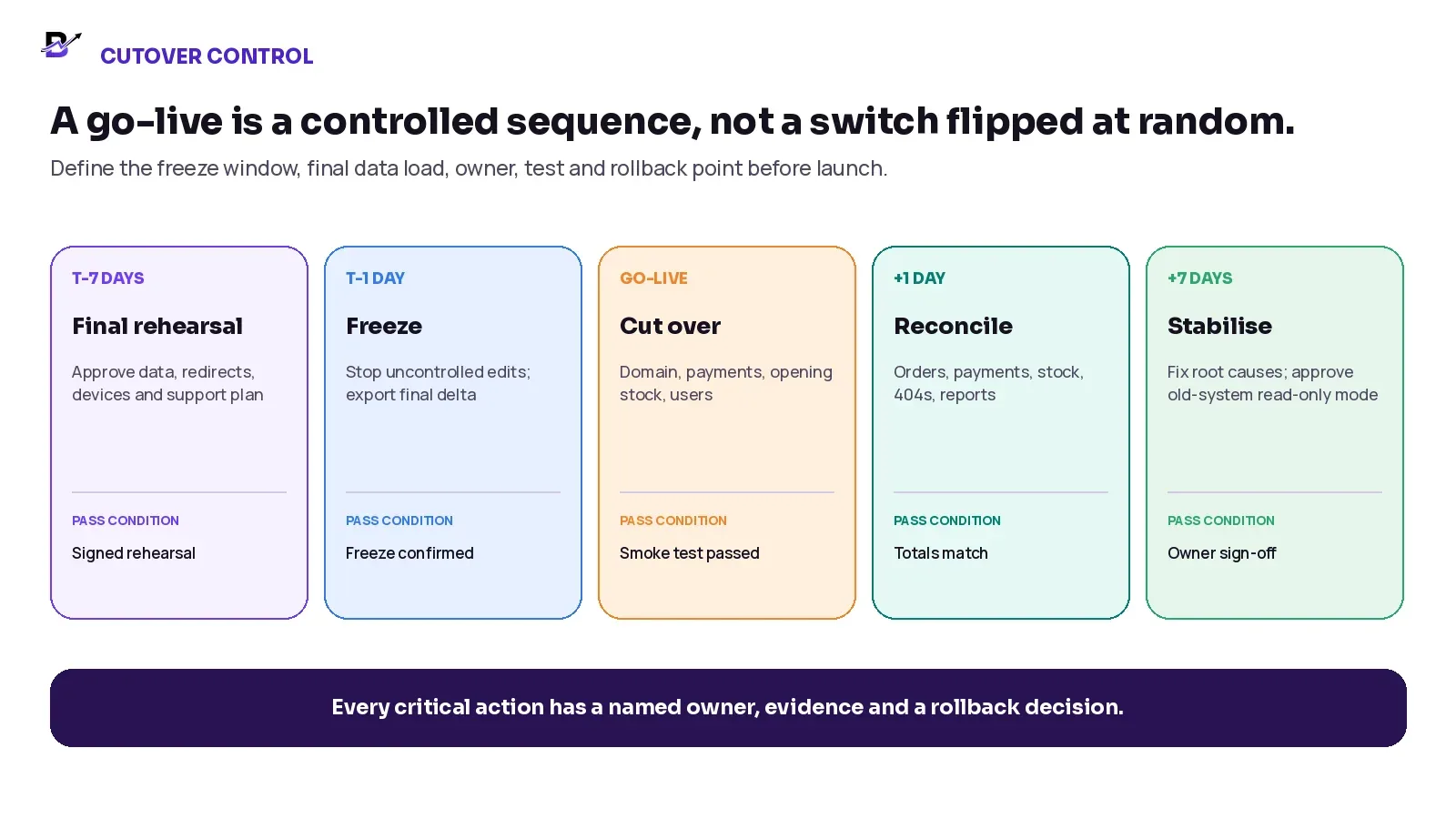
Figure 5. Cutover starts before launch day and continues through reconciliation and owner sign-off.
CUTOVER CONTROL | WHAT MUST BE WRITTEN |
|---|---|
Freeze window | Which records can still change, which are read-only and how urgent edits are logged during the final export. |
Final delta load | New or changed products, customers, orders and stock since the last test migration. |
Opening stock | Approved quantity by SKU or item, branch and status at one named cutover time. |
Open orders | Every pending, paid, preparing, ready, dispatched, failed or refunded order and its next owner. |
Payments | Gateway configuration, webhooks or callbacks, payment links, refunds, settlement references and test transactions. |
Domain and search | DNS or platform switch, redirects, canonicals, sitemap, robots, analytics and Search Console access. |
Devices and users | POS hardware, printers, scanners, staff roles, passwords or activation method and branch access. |
Rollback / hold point | The exact failure condition, decision owner and recovery action. A rollback may be technical, operational or limited to one channel. |
GO / NO-GO RULE — Do not launch because the calendar says it is launch day. Launch when the agreed critical tests pass, owners are available, opening values are approved and the support path is ready.
9. Reconcile opening stock and the first transactions
Inventory is one of the easiest places for a migration difference to become a customer problem. A company total is not enough for a multi-location retailer. The opening file should identify the item or variant, branch, counting unit, on-hand quantity, reserved or unavailable quantity where used, timestamp and approver.
RECONCILIATION CHECK | PASS CONDITION |
|---|---|
Opening quantity by branch | Compare imported quantity with the approved count or source extract at the cutover timestamp. |
Total business quantity | Confirm branch totals add to the expected company quantity without double-counting in-transit stock. |
First online sale | Check the chosen fulfilment branch and the exact stock event once. |
First POS sale | Check the POS branch, product/variant, receipt, payment method and stock movement. |
First cancellation or return | Confirm money, order and physical stock do not become one automatic event. |
First transfer | Check source, in-transit and receiving location with no duplicate receipt. |
Negative or unexpected stock | Stop and investigate the event history before simply correcting the number. |
Use a short high-risk count during the first days. Count fast-moving, high-value and fulfilment-critical items more often than low-risk stock. The purpose is to find mapping, timing or staff-process problems before they repeat across the full catalogue.
10. Train each role with real work
Training should be role-based. A driver does not need the full admin panel. A cashier should not learn the system through an owner-level feature tour. Give each person the screens, permissions, normal steps and exception rules they will use.
ROLE | TRAINING CONTENT | OUTCOME |
|---|---|---|
Owner / manager | Dashboard, reports, approvals, users, branches, payments, stock, cash and escalation. | Approve setup and make go/no-go decisions. |
Ecommerce / customer service | Products, customers, manual orders, payment status, changes, refunds and communication. | Protect the customer promise and complete order information. |
POS / counter staff | Product search, prices, discounts, payment methods, receipts, returns and closing. | Complete counter sales without creating duplicate or unofficial records. |
Fulfilment staff | Order queue, options, notes, status, photos, printing, stock actions and quality check. | Prepare from the official order instead of chat or memory. |
Driver / delivery team | Assigned orders, address, timing, navigation, cash collection, proof and exceptions. | Complete the handoff and record the outcome. |
Developer / support | Integrations, logs, access, monitoring, backups, redirects and incident ownership. | Resolve failures without guessing which system owns the record. |
TRAINING EVIDENCE — Every role should complete at least one normal scenario and one exception using the actual device before launch. Attendance is not the same as readiness.
11. Run hypercare before retiring the old system
Hypercare is the short period after go-live when the team checks the new workflow more frequently, records issues in one place and resolves root causes quickly. Keep the old platform available in read-only mode where contracts and security allow until critical records, reports and support needs are verified.
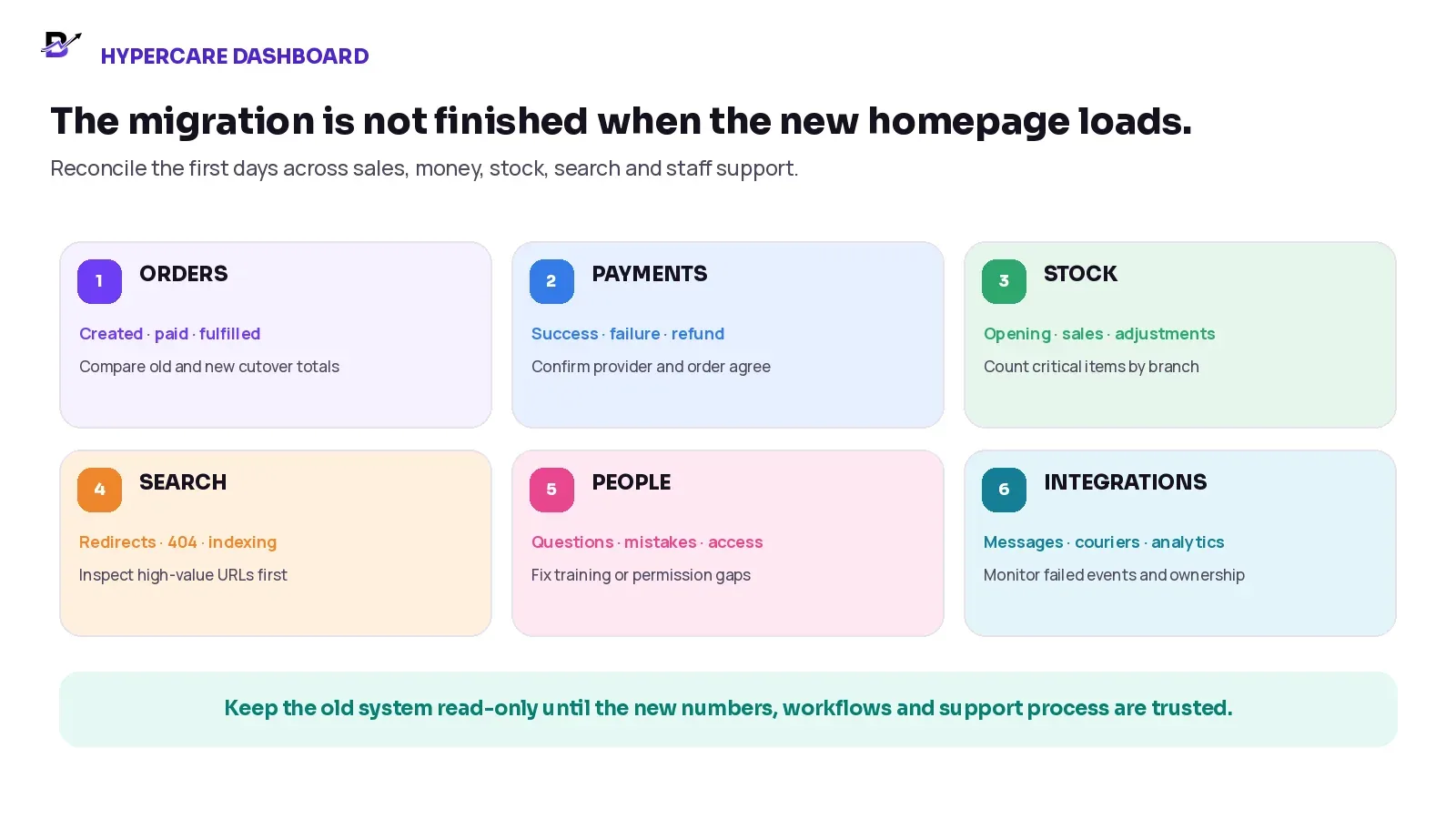
Figure 6. The first weeks should reconcile orders, payments, stock, search, people and integrations together.
REVIEW RHYTHM | WHAT TO INSPECT |
|---|---|
Daily for first week | Orders created, paid, fulfilled, cancelled and refunded; payment failures; opening and closing cash; critical stock; failed integrations; 404s and redirect errors. |
Weekly during stabilisation | Branch and product totals; duplicate records; manual adjustments; support questions; staff permission changes; indexing and traffic patterns. |
Before old-system retirement | Open orders closed or transferred; accounting and audit exports stored; data export tested; access removed safely; contracts and integrations cancelled only after sign-off. |
Do not judge the migration only by the absence of a major outage. Look for repeated manual fixes, duplicate entries, staff workarounds, unexplained stock adjustments, payment mismatches, missing customer history and URLs that return 404 or redirect to an unrelated page.
12. Illustrative migration example: two branches and several sales channels
Consider a specialty retailer with two branches, an ecommerce website, a separate POS, manual WhatsApp orders, branch stock spreadsheets and local delivery. The business wants one connected retail platform. The example below is illustrative; it is not a promise that every system exposes or imports the same data.
STAGE | ILLUSTRATIVE DECISION |
|---|---|
Discovery | The team finds six systems, three account owners, two different SKU lists and no single branch stock file. |
Scope | Active products, customers needed for service, open orders and opening stock move at launch. Older orders remain in a searchable archive for phase one. |
Cleanup | Duplicate variants are merged only after the product owner approves the mapping. Blank consent fields remain unknown. |
SEO | Most product URLs stay unchanged. Changed category and blog URLs receive tested permanent redirects to relevant new pages. |
Testing | The team completes online, POS, WhatsApp, failed-payment, refund, branch-transfer and failed-delivery scenarios. |
Cutover | Products are frozen first. The final open-order and stock delta is loaded after branches close. The new system becomes the source of truth at a named time. |
Hypercare | Managers reconcile orders, payments and critical stock daily. The old POS stays read-only until the owner signs off the first reporting cycle. |
The important result is not “all rows imported.” The important result is that the first customer can order, staff can fulfil, the correct branch stock changes, money and refunds stay traceable, delivery can close and the owner can understand the result.
13. How Bloomlytix approaches migration and onboarding
Bloomlytix is designed as one connected ecommerce and retail operating system for specialty retail and delivery-first businesses. The platform can connect the branded website, customer apps where included, POS, orders, staff fulfilment, inventory, purchases, payments, cash tracking, delivery and reporting around shared business data.
Data migration or bulk product upload is treated as scoped implementation work. The source files, record quality, product structure, branch stock, historical data, images, customer fields, URLs and required integrations must be reviewed before a price, method or completion promise is confirmed.
BLOOMLYTIX AREA | PRACTICAL ROLE |
|---|---|
Workflow discovery | Map current sales channels, branches, team roles, stock, payment and delivery processes before configuration. |
Data scope | Confirm which products, customers, orders or stock records can be imported and which need cleanup, archive or separate work. |
Platform setup | Configure branding, catalogue, branches, payments, delivery, users and operational rules around the agreed launch scope. |
Testing and training | Use real normal and exception scenarios with owners, staff and drivers before go-live. |
Launch support | Complete the cutover checklist, verify opening values and monitor early operational issues. |
PRODUCT SCOPE — Bloomlytix does not promise automatic migration of passwords, saved payment credentials, app users, every historical order, custom integrations or every old URL. These items require written discovery, technical feasibility and an agreed implementation scope.
Bloomlytix product and migration scope checked 16 September 2026: Complete platform · Plans and migration services.
Plan the move around your real systems. — Bring your current website, POS, stock files, branches, integrations and one real order journey. We will map the migration risks, launch scope and next steps.
14. Questions to ask any retail software provider before migration
Which data types can be imported through the standard process, and which require custom work?
Who cleans and maps the files, and who approves the final values?
Can the provider run a test import and give an error report before the final cutover?
How are products, variants, SKUs, branches, customers and historical orders linked?
How are customer consent, passwords, loyalty balances and saved payment methods handled?
Can the old URL map be imported, and who tests each permanent redirect?
Which payment, email, messaging, courier, app-store and analytics accounts must the business own?
What normal and exception workflows are included in testing?
How are opening stock and open orders frozen, loaded and reconciled?
What is the rollback or pause plan if a critical test fails?
What training, launch support and hypercare are included?
When can the old system become read-only and when can it be fully decommissioned?
How can the business export its data later, and in which formats?
Retail Software Migration Checklist
AREA | PASS CONDITION |
|---|---|
Discovery | Every system, account owner, integration, domain, device and data source is listed. |
Scope | Launch-critical, phase-two, archive and non-portable records are clearly separated. |
Cleanup | Duplicates, inactive records, broken images and inconsistent variants have written decisions. |
Mapping | Every critical field has a destination, transformation, fallback and validation rule. |
Identifiers | Product IDs, variants, SKUs, order numbers and customer keys have clear ownership. |
SEO | Important URLs are kept or mapped; redirects, canonicals, sitemap and internal links are ready. |
Staging | Normal sales and difficult exceptions pass on real devices and roles. |
Cutover | Freeze, delta load, opening stock, open orders, payments, domain and rollback are scheduled. |
Training | Each role completes a normal scenario and an exception before launch. |
Hypercare | Daily and weekly reconciliation owners, issue log and response path are defined. |
Retirement | Old-system archive, export, access removal and cancellation happen only after sign-off. |
Frequently asked questions
What data should be migrated to new retail software?
Move the records needed to sell and operate safely on day one: active products and variants, relevant customers, open orders, branch opening stock and other current balances that the target system supports. Historical orders, old content and supplier history can move later or remain in a controlled archive when they are not required for launch.
How do I protect Google rankings during a platform change?
Preserve important URLs where possible. When a URL must change, map it to the closest relevant new page with a permanent server-side redirect, update internal links and canonicals, publish the new sitemap, keep pages crawlable and monitor Search Console. Rankings cannot be guaranteed, but these steps reduce avoidable migration errors.
Should I move every historical order?
Not always. Move historical orders when customer service, legal, accounting, loyalty or reporting needs justify the cost and the target model can represent them accurately. Otherwise, keep older records in a secure read-only archive and import a useful period or summary.
Can customer passwords be migrated?
Sometimes, but not universally. Password formats, authentication models and platform rules differ. Do not promise password migration unless both systems support a secure method. Prepare an account activation, password reset or passwordless sign-in process when needed.
How should opening stock be reconciled?
Choose one cutover timestamp. Load quantity by item or variant and branch, then compare the imported values with the approved source or physical count. Check company totals, in-transit stock, reservations and the first online, POS, return and transfer events.
How long should the old system remain available?
Keep it read-only until open work is closed or transferred, critical reports and records are accessible, the new system has passed the agreed reconciliation period and owners have signed off. The exact period depends on contracts, accounting, support and legal requirements.
Can a migration happen with no downtime?
Some projects can keep customer-facing downtime very small, but “zero disruption” should not be promised without technical discovery. The aim is a planned cutover, clear freeze window, tested redirects and payments, and a fallback path if a critical dependency fails.
Does Bloomlytix include data migration?
Bloomlytix lists data migration and bulk product upload as a custom one-time service. The exact data, cleanup, images, historical records, stock, URLs and integrations must be reviewed and agreed before implementation.
A safe migration protects the next business day
The best migration plan is not the one with the largest import file. It is the one that makes the new system understandable, testable and safe for real work. Start by mapping the business, not the software menus. Move only data that has a clear purpose. Protect important URLs. Test the exceptions. Give every cutover action an owner. Reconcile the first transactions and keep the old system available until the new process is trusted.
When the migration is treated as a connected business change, the team can move forward without rebuilding products, customer promises, stock, search visibility and daily controls from zero.
Related Bloomlytix guides: Connect ecommerce and POS · Retail software cost · Choosing retail software in the UAE · Ecommerce website vs retail operating system.