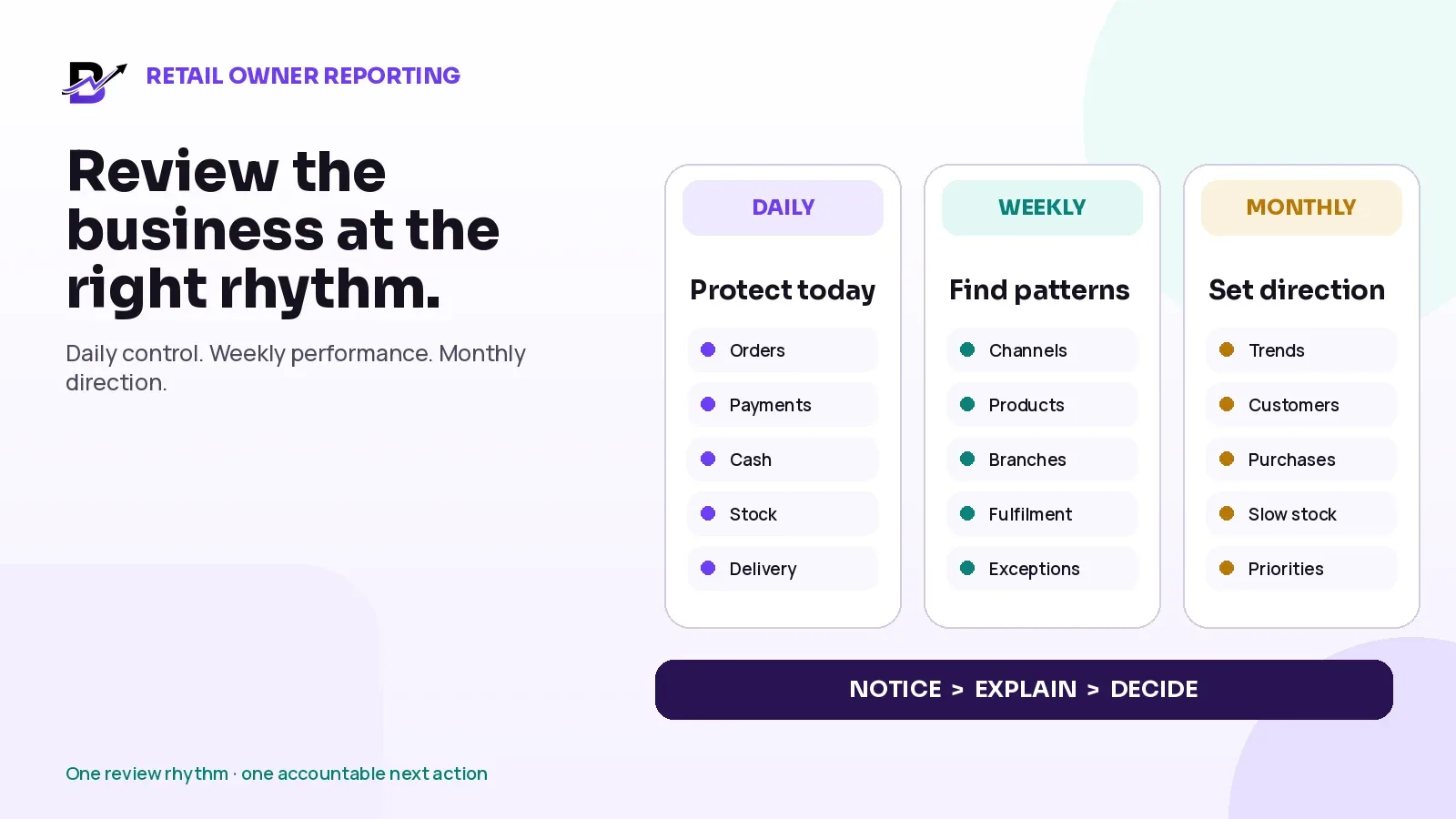
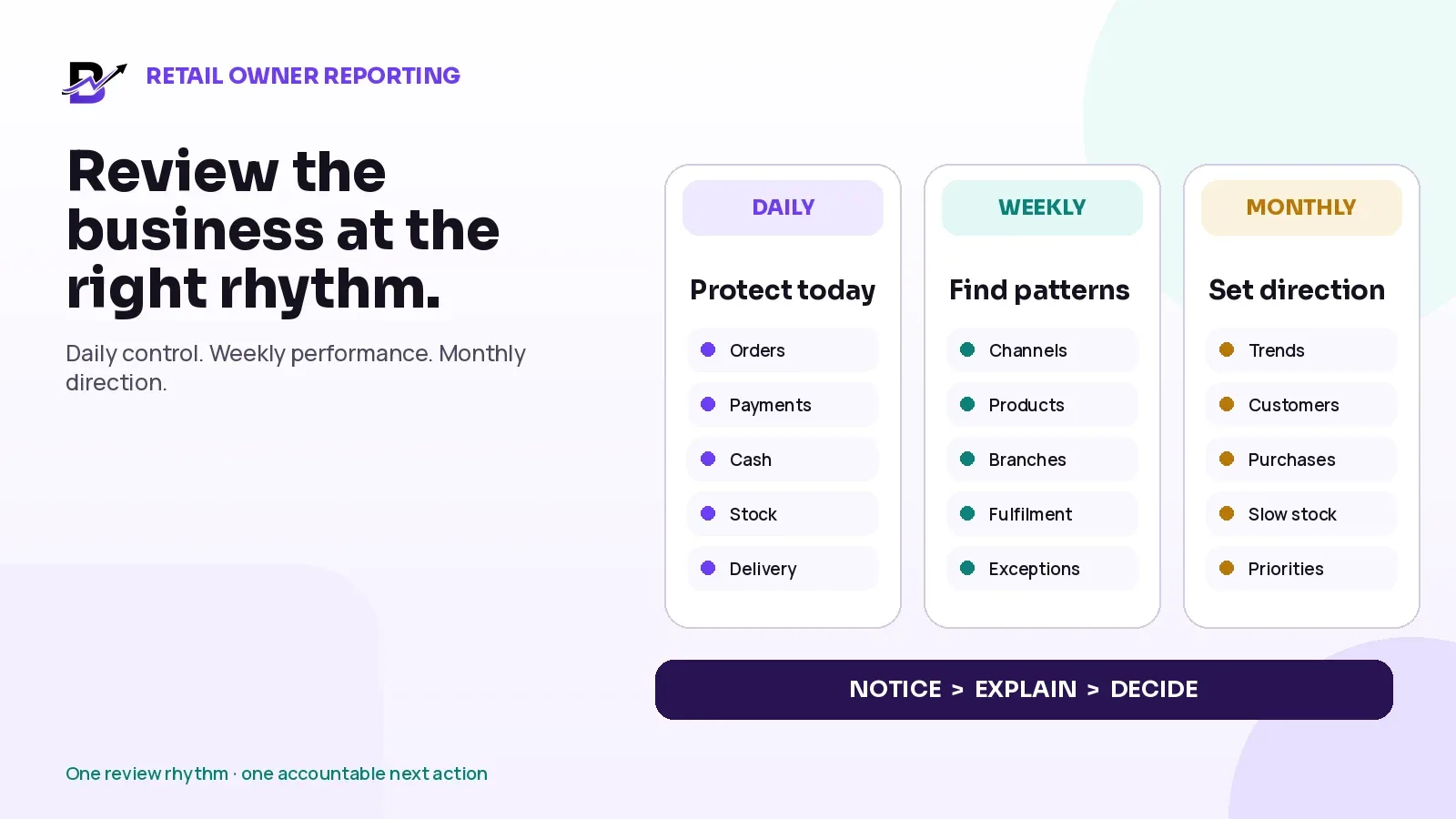
Daily control, weekly performance and monthly direction form one practical owner reporting rhythm.
Retail owners do not need more charts. They need a short review routine that shows what requires action now, what pattern is changing and what decision should be made next.
A dashboard can show many numbers and still leave the team unsure what to do. One branch may have higher sales but more stock-outs. Revenue may look strong while cash is still with staff, card settlements are pending and refunds remain open. Delivery totals may look normal while one repeated exception is creating avoidable customer complaints.
Direct answer — A useful retail reporting routine works at three speeds. Review urgent orders, payments, cash, stock, delivery and unresolved refunds every day. Review sales channels, products, branches, fulfilment, purchases and repeated exceptions every week. Review trends, customers, campaigns, slow stock, supplier buying and business priorities every month. Give every important metric an owner, threshold and next action.
This guide is for owners, founders, managing directors, operations managers and multi-branch leaders in specialty retail. It explains an operating method that can be used with Bloomlytix or another connected retail system. It does not replace bookkeeping, tax advice, statutory accounts or audited financial statements.
In this guide
How an operational report differs from a dashboard and an accounting statement
What an owner should review every day to protect current orders and cash
Which weekly reports reveal sales, product, branch and fulfilment patterns
Which monthly reports support purchasing, customer retention and growth decisions
How to give every metric an owner, threshold and next action
A worked example for a two-branch specialty retailer
A practical meeting agenda and Retail Owner Review Sheet
How Bloomlytix can connect owner reporting across the wider operation
1. Start with the decision, not the dashboard
A report is useful only when the owner knows which question it answers. The same number can be urgent today, useful for comparison next week and part of a longer trend next month. Reviewing everything at the same frequency creates noise and makes real exceptions easier to miss.
Begin by separating three different reporting jobs:
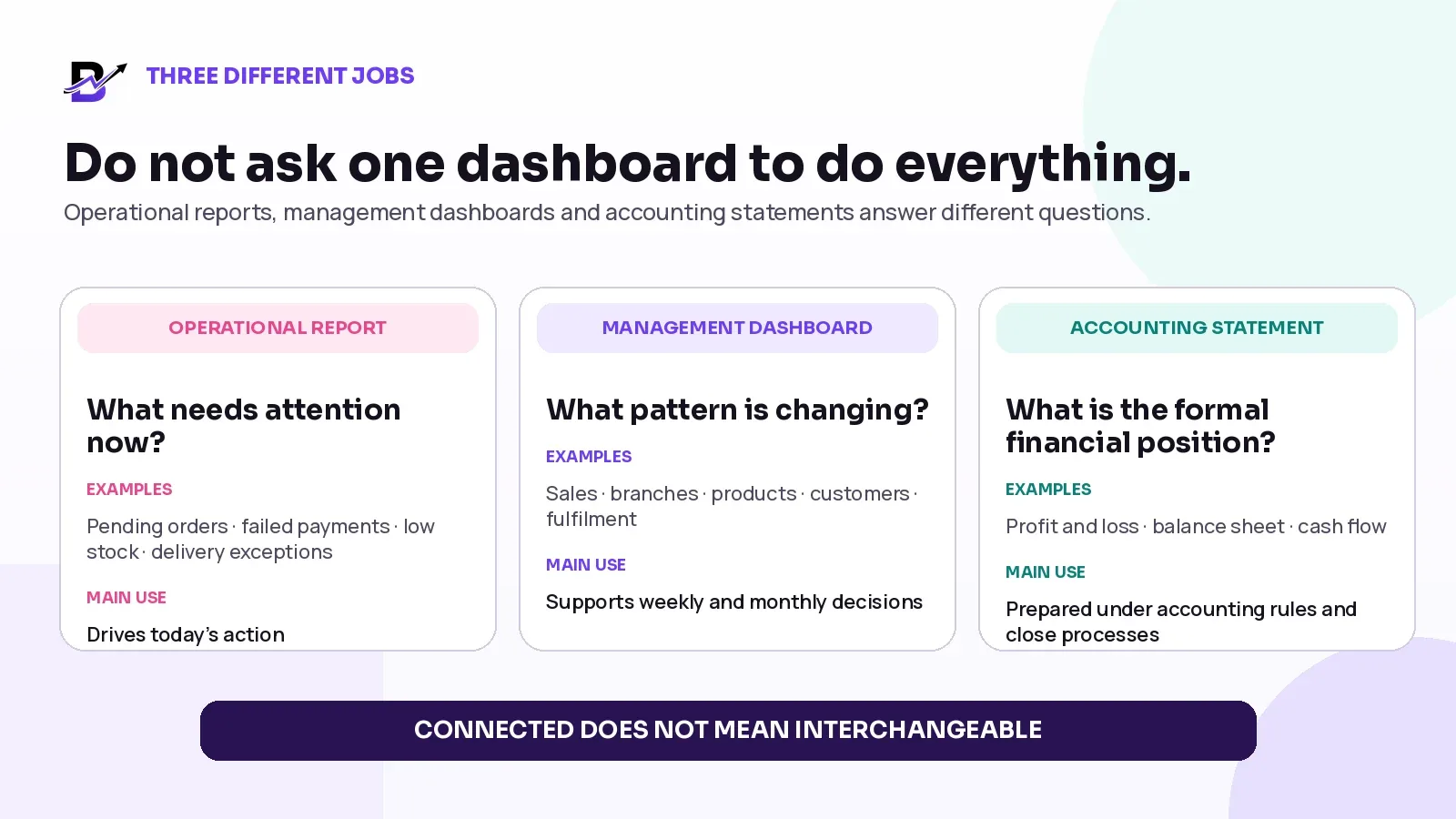
Figure 2. Operational reports, management dashboards and accounting statements are connected, but they are not interchangeable.
Important distinction — Revenue, cash collected, card settlement and profit are different ideas. An operational sales report can support management, but it should not be treated as a bank reconciliation, statutory account or audited profit statement.
REPORTING LAYER | MAIN QUESTION | TYPICAL EXAMPLES | WHAT IT SHOULD LEAD TO |
|---|---|---|---|
Operational report | What needs attention now? | Pending orders, failed payments, cash differences, low stock, late delivery and open refunds. | A named person takes a clear action before the issue grows. |
Management dashboard | What pattern is changing? | Sales by channel, product, branch, staff activity, fulfilment, delivery reasons and repeat customers. | Management compares periods, explains the change and chooses a response. |
Accounting statement | What is the formal financial position or result? | Profit and loss, balance sheet, cash flow and other records prepared under the business’s accounting requirements. | Qualified finance and accounting processes support statutory, tax and financial decisions. |
Current retail platforms commonly use this layered approach. Shopify describes a dashboard made of summary metric cards that open into deeper reports. Square lists separate reports for sales, payments, items, categories, transactions and cash drawers. The exact names vary by platform, but the management principle is stable: use the summary to notice the issue, then open the detailed report to explain it.
Official reporting references checked 29 October 2026: Shopify Analytics · Square analytics and reporting.
2. Daily review: protect today’s orders, payments, cash, stock and delivery
The daily review should answer one question: What can still damage the customer promise, money or stock before the day closes? It is not a full performance meeting. It is an exception check.
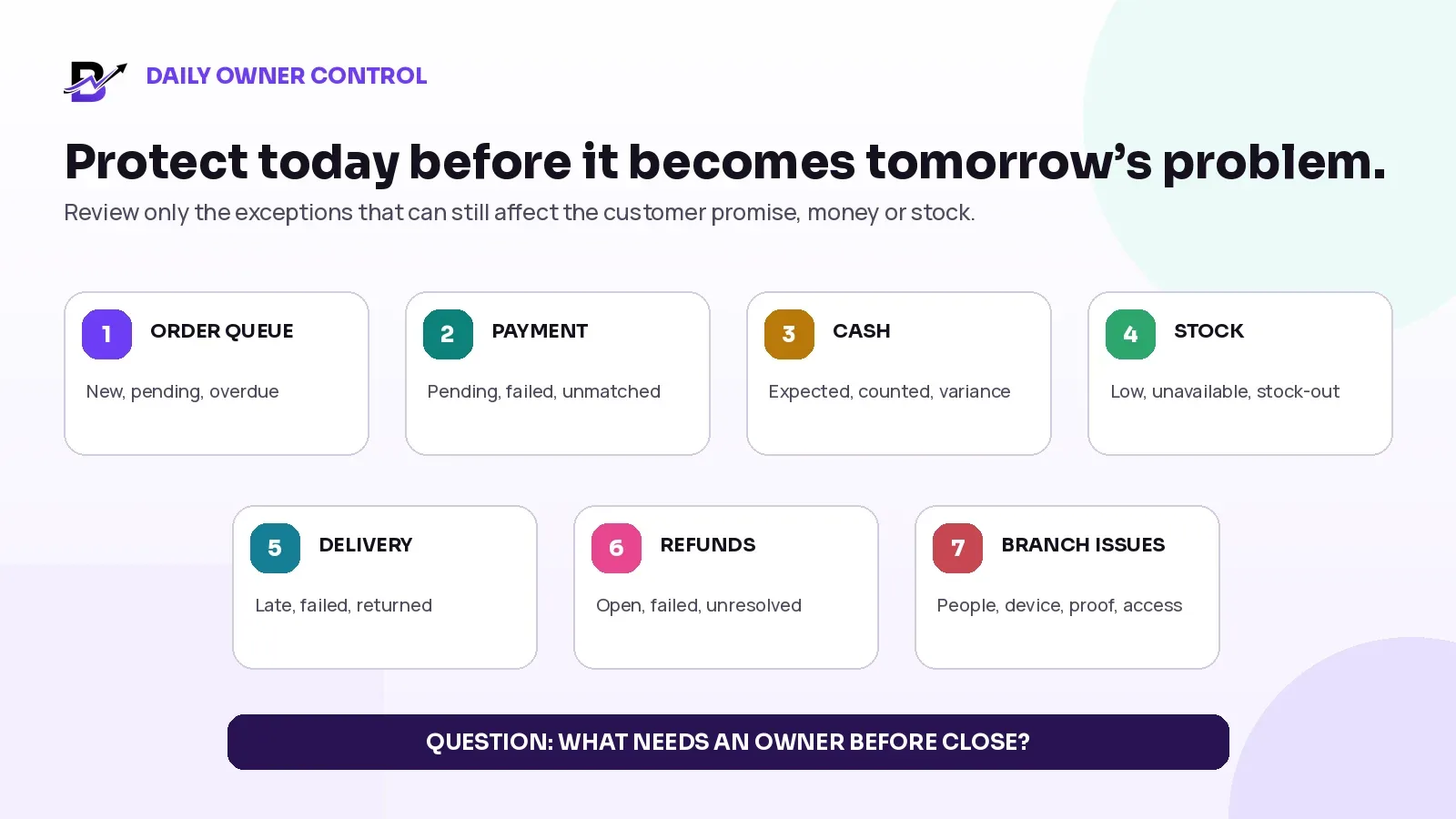
Figure 3. A daily owner review should focus on unresolved exceptions, not every available metric.
DAILY AREA | WHAT THE OWNER SHOULD CHECK | OWNER QUESTION | TYPICAL NEXT ACTION |
|---|---|---|---|
New and pending orders | New, unaccepted, preparing, ready and overdue orders by branch. | Is any order waiting beyond the business’s accepted time or ready deadline? | Assign an owner, confirm the promise, update the customer or escalate capacity. |
Revenue and payment exceptions | Order count, operational sales total, pending, failed, unmatched or manually confirmed payments. | Did a sale enter fulfilment without the required payment or approval? | Hold, follow up, correct the payment status or release the order according to policy. |
Cash in hand | Expected and counted cash by till, branch, driver or staff holder; open variances and missing proof. | Does the physical cash story match the recorded cash movements? | Recount, review refunds and expenses, attach proof and assign unresolved variance. |
Critical stock | Low-stock, unavailable and stock-out items that affect accepted orders or tomorrow’s selling. | Can the branch keep the current promise and sell tomorrow safely? | Transfer, reorder, substitute with approval, close availability or update the branch. |
Delivery exceptions | Pending, late, failed, returned and rescheduled deliveries, with reason and current owner. | Which customer needs an update or decision now? | Contact, correct the address, reassign, reschedule, return or start the refund process. |
Refunds and cancellations | Approved but incomplete refunds, cancelled orders with stock holds, and unresolved return decisions. | Do payment, order and stock records tell the same story? | Complete the financial step, release or inspect stock, and close the order outcome. |
Branch and staff issues | Device, access, missing evidence, queue, staffing or handoff problems affecting current work. | What is blocking the team from completing orders correctly? | Assign support, change ownership, document the incident and confirm recovery. |
Keep the daily view short and exception-led
A daily owner view should not become a second full-time job. Show normal activity in summary and bring the exceptions forward. A branch with 80 completed orders and one failed payment needs the failed payment to be visible. A branch with strong revenue but a cash shortage needs the shortage to remain visible instead of being hidden inside the sales total.
Use business-defined thresholds. A florist, café and jewellery retailer may have very different order values, preparation times and tolerance for stock risk. Do not copy a red-alert threshold from another company without testing it against your own operation.
Daily closure rule — Every red item should have one owner and one next action before the review ends. If the issue cannot be solved today, record who will follow it, when it will be checked again and what evidence will close it.
3. Weekly review: find patterns, not fires
The weekly review should answer a different question: What repeated this week, and where should management intervene? Use the same definitions and comparable periods. A weekend-heavy week should not be judged against a partial weekday period without context.
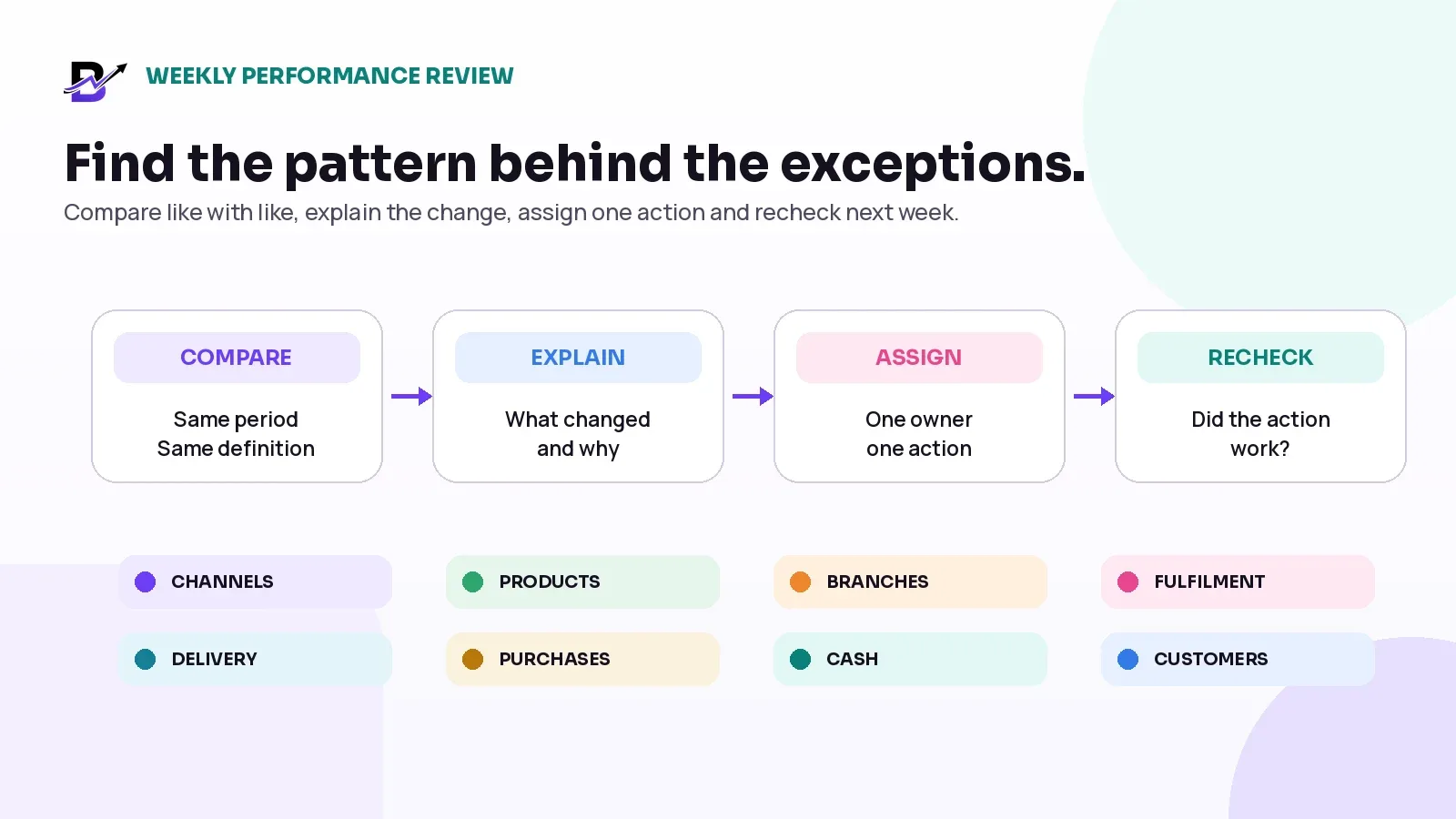
Figure 4. Weekly reporting should move from comparison to explanation, action and recheck.
WEEKLY AREA | USEFUL MEASURES | QUESTION TO DISCUSS | POSSIBLE MANAGEMENT ACTION |
|---|---|---|---|
Sales channels | Operational sales and order count from website, apps, POS, payment links and manual orders. | Which channel grew or weakened, and was the change caused by demand, availability or process? | Adjust promotion, product availability, staffing or channel follow-up. |
Average order value | Net or configured sales measure divided by eligible orders, using one consistent definition. | Did basket value change because of products, add-ons, discounts or channel mix? | Improve add-on visibility, review offers or check unusual manual discounts. |
Products and add-ons | Best-selling, slow-moving, category and add-on performance. | Which items create demand, stock pressure or fulfilment work? | Reorder, transfer, promote, simplify or review product setup. |
Branches | Revenue, order volume, POS sales, stock usage, cash and staff activity by location. | Is the branch result driven by demand, stock, team capacity or local delivery conditions? | Move stock, change staffing, review local assortment or investigate process differences. |
Fulfilment | Order acceptance, preparation, ready time and repeated late or incomplete handoffs where timestamps exist. | Where does an accepted order wait longest? | Clarify responsibility, improve readiness checks or change capacity rules. |
Delivery | Completed, failed, returned and rescheduled deliveries grouped by reason, zone or branch. | Which exception reason is repeating? | Fix address capture, slot rules, packaging, dispatch or customer communication. |
Purchases and stock adjustments | Purchases, transfers, wastage, damage, corrections and low-stock events. | Are stock problems coming from demand, purchasing, counting or uncontrolled adjustments? | Reorder, investigate the movement history or change the count routine. |
Refunds, returns and cash | Refund reasons, unresolved cases, cash variances and missing evidence. | Which process is creating repeated financial exceptions? | Change approval, training, proof or closure steps. |
Customers and offers | New versus returning activity, coupon use, loyalty or campaign response where available. | Are offers creating useful repeat behaviour or only discounting existing demand? | Retain, change, limit or stop the campaign. |
Compare the cause, not only the result
A lower branch total does not automatically mean poor performance. The branch may have fewer opening hours, a smaller delivery area, lower stock availability or a different product mix. A higher average order value may come from one large corporate order rather than a stronger normal week. Use the report to ask a better question, then open the source orders, products or exceptions that explain the number.
Weekly discipline — End the weekly review with no more than three operational actions. Record the owner, due date and the report or event that will show whether the action worked next week.
4. Monthly review: choose what to change
The monthly review should answer: What direction should the business take next month? This is where the owner connects sales, customers, products, stock, purchasing and operating quality. The purpose is not to read every report aloud. It is to decide what to grow, protect, stop and prepare.
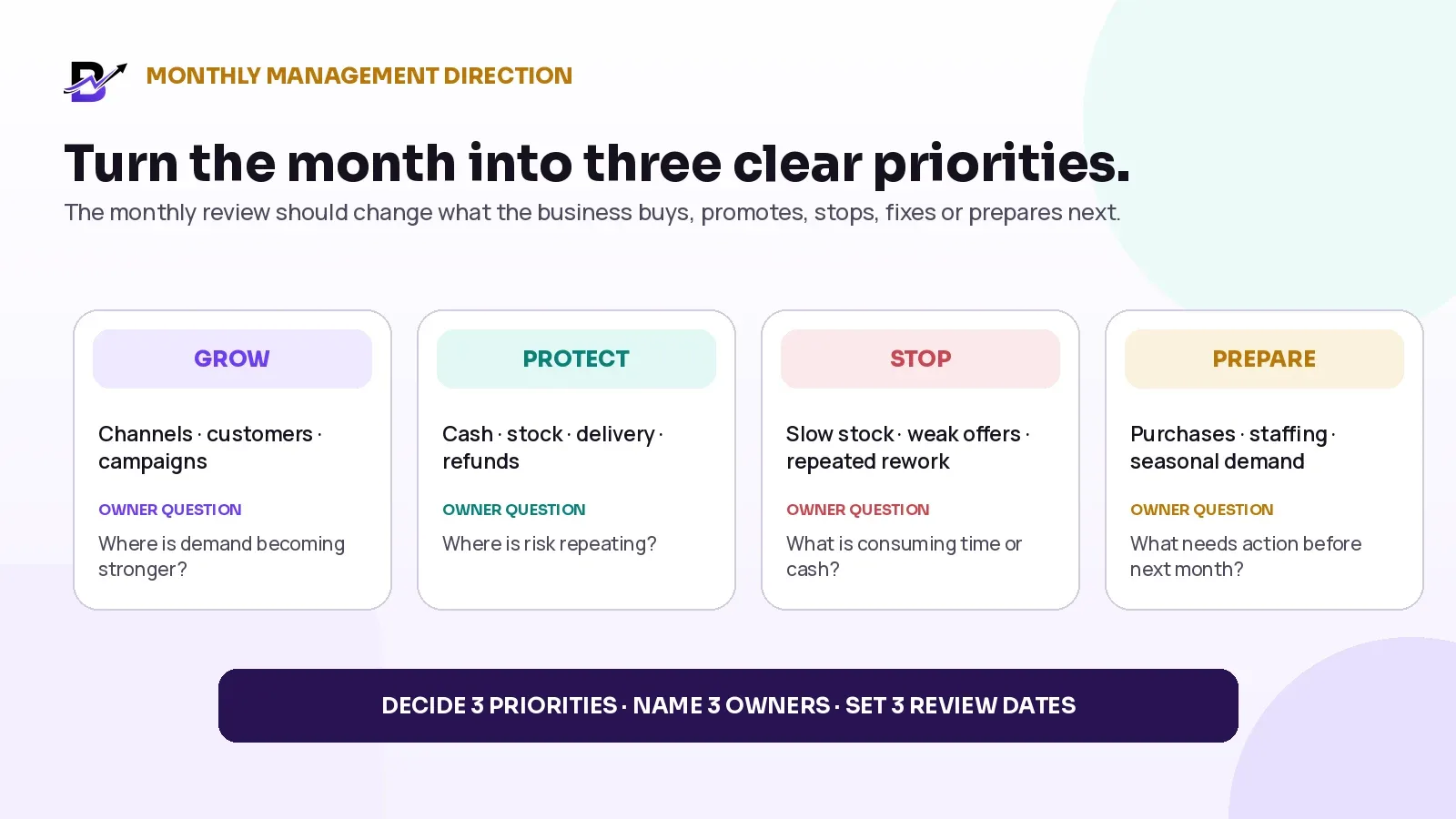
Figure 5. A monthly management review should end with a small number of business priorities, owners and review dates.
MONTHLY DECISION AREA | WHAT TO REVIEW | MANAGEMENT QUESTION | DECISION EXAMPLES |
|---|---|---|---|
Sales direction | Month, prior period and relevant seasonal comparison by channel and branch. | Where is demand changing, and is the change healthy or temporary? | Protect a strong channel, correct a weak branch or test a focused campaign. |
Customer activity | New and returning customers, repeat purchase, customer order value and service issues where available. | Are customers returning, and which experience is helping or hurting that behaviour? | Improve reorder journeys, service recovery, loyalty or customer communication. |
Product portfolio | Top products, add-ons, slow movers, unavailable items and repeated substitutions. | Which products deserve more visibility, less stock or a simpler workflow? | Reorder, bundle, retire, re-price, re-photograph or revise the product record. |
Stock and purchasing | Low stock, slow movement or ageing where available, purchase value, supplier history, wastage and transfers. | Is cash being tied up in the wrong items or locations? | Reduce buying, change supplier timing, transfer stock or improve counting. |
Campaigns and coupons | Coupon use, campaign orders, average basket and repeat behaviour where available. | Did the campaign create profitable demand or only move existing orders to a discount? | Continue, narrow, change the offer or stop it. |
Operational quality | Late fulfilment, delivery exceptions, refunds, returns, cash variances and repeated manual corrections. | Which failure is becoming a system problem? | Change the workflow, permission, training, capacity or customer promise. |
Next-month readiness | Seasonal demand, planned promotions, purchase lead times, staff capacity and delivery rules. | What must be ready before volume arrives? | Place purchases, limit product range, train staff or change slots and cut-offs. |
Operational reports can show sales and activity, but they do not automatically show audited profit or statutory financial position. Gross sales, net sales, refunds, tax, gateway fees, supplier costs and accounting treatment can be defined differently. Use qualified accounting records for formal financial reporting and use the operational review to explain what the team should do next.
5. Give every metric an owner, threshold and next action
A dashboard without responsibility becomes decoration. The owner should be able to point to every important metric and answer four questions: Who reviews it? When does it require action? What happens next? What proves that the issue is closed?
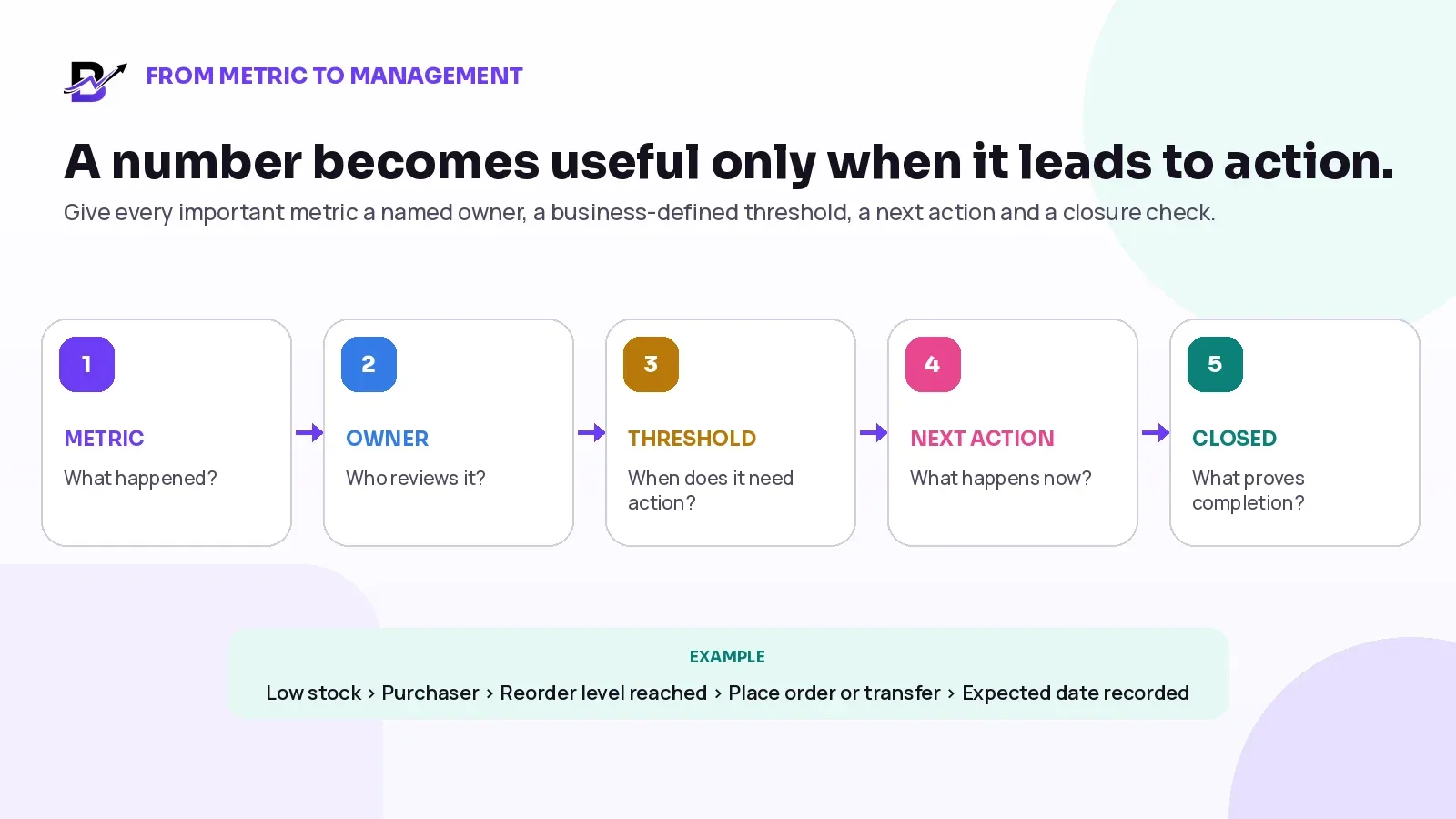
Figure 6. A metric becomes operationally useful when responsibility and closure are defined.
METRIC OR EXCEPTION | NAMED OWNER | BUSINESS-DEFINED TRIGGER | NEXT ACTION | CLOSURE EVIDENCE |
|---|---|---|---|---|
Pending order beyond acceptance time | Branch manager or fulfilment lead | Order passes the agreed acceptance or ready-time limit. | Assign, validate, update the customer or escalate capacity. | Status, owner and revised promise are recorded. |
Cash variance | Branch manager or finance/operations reviewer | Difference exceeds the company’s review rule or remains unexplained. | Recount, review sales, refunds, expenses, collections and proof. | Reviewed close with reason and follow-up outcome. |
Critical low stock | Purchaser or inventory owner | Available quantity reaches the configured reorder or transfer level. | Place purchase, transfer stock, limit selling or approve substitution. | Expected receipt or transfer date is visible. |
Failed or returned delivery | Delivery lead or customer service | Any failed handoff without a recorded next action. | Contact, reschedule, return, replace or start refund according to policy. | Final outcome and customer communication are recorded. |
Refund still unresolved | Customer service or finance owner | Refund exceeds the internal follow-up time or provider response window. | Check provider status, customer record, order and stock outcome. | Completed, failed or escalated status is visible. |
Repeated stock adjustment reason | Inventory or operations manager | The same reason appears more than the business’s accepted pattern. | Investigate the item, branch, user, receiving or count process. | Root cause and corrective action are documented. |
Threshold rule — A threshold should reflect customer risk, money, product value, stock scarcity and operating capacity. It should be reviewed when the business changes—not copied permanently from a template.
6. Worked example: a two-branch specialty retailer
The example below shows how the same business can use daily, weekly and monthly reporting. The figures are illustrative. They are not industry benchmarks and should not be copied as targets.
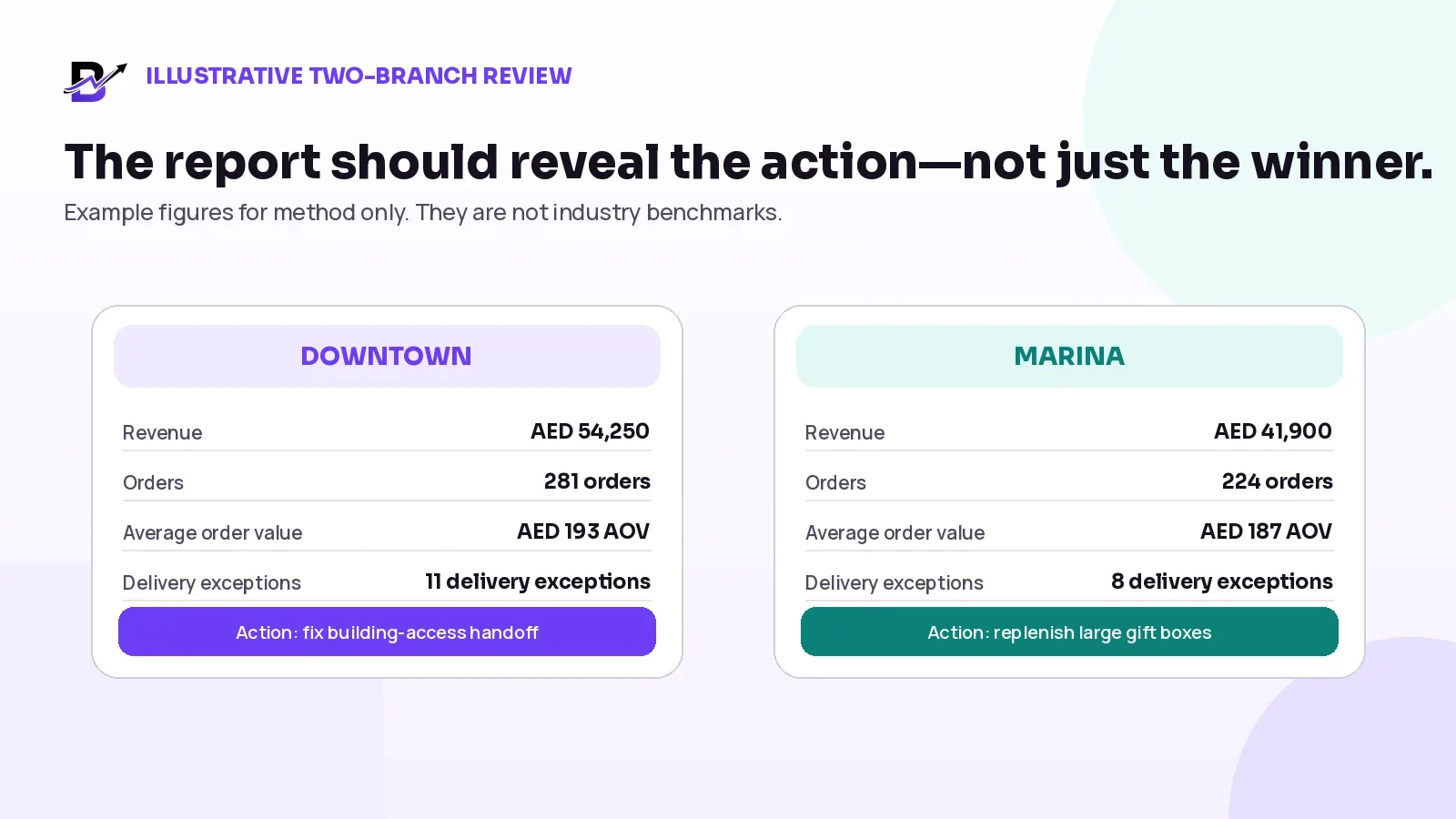
Figure 7. The report should reveal the action for each branch, not simply rank the branches by revenue.
Daily view: close the urgent exceptions
BRANCH | ORDERS | SALES | PAYMENT ISSUES | CASH ISSUE | CRITICAL STOCK | DELIVERY ISSUES | ACTION |
|---|---|---|---|---|---|---|---|
Downtown | 46 | AED 8,920 | 1 pending | None | 2 low-stock items | 2 exceptions | Confirm payment and update two delivery customers. |
Marina | 31 | AED 5,860 | 3 pending/failed | AED 50 short | 5 low-stock items | 4 exceptions | Review cash, transfer packaging and assign payment follow-up. |
The daily review does not conclude that Downtown is “better.” It concludes that Marina has four urgent controls: payment follow-up, an AED 50 cash variance, critical packaging stock and four delivery exceptions that need named owners.
Weekly view: explain the pattern
BRANCH | REVENUE | ORDERS | AOV | DELIVERY ISSUES | STOCK-OUTS | FINDING |
|---|---|---|---|---|---|---|
Downtown | AED 54,250 | 281 | AED 193 | 11 | 3 | Six delivery exceptions relate to building access. Improve address and reception instructions. |
Marina | AED 41,900 | 224 | AED 187 | 8 | 6 | Stock-outs are concentrated in large gift boxes and premium cards. Replenish and review reorder levels. |
The weekly meeting creates two actions, not two pages of commentary. Downtown’s operations lead updates the delivery intake checklist. Marina’s purchaser raises or transfers the critical packaging stock and reviews the supplier lead time.
Monthly view: choose the direction
Website orders produced 48% of operational sales, POS 32% and manual or payment-link orders 20%. The owner keeps the assisted-order process because it remains commercially important.
Returning-customer activity improved from the previous month, but the owner checks whether the change is broad or driven by one campaign before increasing spend.
Purchase value rose faster than sales while a large gold gift box became slow-moving at Marina. The next purchase is reduced and existing stock is promoted or transferred.
Building-access exceptions repeated across both branches. The business adds clearer address fields, reception notes and a customer confirmation step before dispatch.
Example outcome — The month ends with three priorities: fix building-access data, correct packaging replenishment at Marina and review assisted-order follow-up. Each priority has an owner and a review date.
7. Use a simple owner review meeting agenda
A report should support a meeting, not become the meeting. Keep the agenda stable so managers arrive prepared and the same unresolved actions do not return every week without ownership.
REVIEW | SUGGESTED AGENDA | OUTPUT |
|---|---|---|
Daily control | 1. Urgent order and payment exceptions 2. Cash and proof 3. Critical stock 4. Delivery and refunds 5. Owners for unresolved items | A short exception list with owner, next action and follow-up time. |
Weekly performance | 1. Close last week’s actions 2. Sales by channel and branch 3. Products, stock and purchases 4. Fulfilment and delivery reasons 5. Refund, return and cash patterns 6. Choose up to three actions | A small action plan with owners, due dates and the measure that will be rechecked. |
Monthly direction | 1. Sales and customer trends 2. Branch and channel direction 3. Product and stock decisions 4. Supplier and purchase review 5. Operational quality 6. Seasonal readiness 7. Set three priorities | Three management priorities, resources, owners and review dates. |
Meeting rules that keep reports useful
Use the same definitions each period. Do not change the meaning of revenue, orders or average order value without documenting it.
Compare similar periods and explain unusual events such as closures, promotions, weather or one large corporate order.
Drill from the metric into the source orders, payments, stock movements or delivery reasons before deciding the cause.
Do not use one number to punish staff. Review role, branch, demand, stock, capacity and process context.
Close old actions before creating a longer list. An unresolved action is part of the next report.
8. Retail Owner Review Sheet
Use the sheet below as a saveable management tool. Copy it into a document, spreadsheet or task system, then complete the “result” and “next action” fields during each review.
FREQUENCY | CHECK | RESULT | THRESHOLD / EXCEPTION | OWNER | NEXT ACTION | DUE / CLOSED |
|---|---|---|---|---|---|---|
Daily | Order queue | |||||
Daily | Payment exceptions | |||||
Daily | Cash and variance | |||||
Daily | Critical stock | |||||
Daily | Delivery exceptions | |||||
Daily | Refunds / cancellations | |||||
Weekly | Channels and branches | |||||
Weekly | Products and add-ons | |||||
Weekly | Fulfilment and delivery reasons | |||||
Weekly | Purchases / adjustments / cash | |||||
Monthly | Sales and customer direction | |||||
Monthly | Slow stock and purchase plan | |||||
Monthly | Campaigns and priorities |
9. How Bloomlytix supports the owner reporting rhythm
Bloomlytix is designed as a connected ecommerce and retail operating system. Its reporting value comes from using the same operational data across ecommerce, POS, orders, inventory, purchases, cash, staff fulfilment and delivery instead of rebuilding the business story in separate spreadsheets.
BLOOMLYTIX REPORTING AREA | PRACTICAL OWNER USE |
|---|---|
Dashboard overview | Review current order, revenue, product-availability and inventory summaries according to the user’s permissions. |
Sales reports | Review sales summaries and transactions by available periods, branches, staff, payment methods, items and customer groups. |
Branch and staff comparison | Compare sales activity by branch or responsible staff member, then open the underlying records for context. |
Product and customer analysis | Review item performance and identified customer groups, including repeat sales within the selected period where records support it. |
Inventory reports | Review stock health, valuation and movement history, with branch and item filters where configured. |
Purchase and stock controls | Review purchase receiving, transfers, adjustments, wastage and their supporting history within the enabled workflow. |
Exports and drill-down | Use the filters, report exports and source records available to the user’s role and tenant configuration. |
Product scope — Bloomlytix reporting is operational. Exact reports, definitions, filters, exports and refresh behaviour depend on the current tenant configuration and user permissions. Advanced BI, statutory accounts, audited profit and tax reporting remain separate requirements.
A useful reporting demonstration should not open every menu. Bring one real management meeting. Ask the team to show how a daily cash issue, a weekly branch pattern and a monthly stock decision move from summary to source record and then to action.
Primary action — Use the Retail Owner Review Sheet in this guide. For a platform review, bring one real daily, weekly or monthly management meeting to a tailored Bloomlytix reporting demonstration.
10. Questions to ask during a retail reporting demo
Can online, POS, payment-link and manual orders appear in one sales and order view without duplicate counting?
How does the platform define revenue, net sales, orders, average order value, discounts, refunds and taxes?
Can owners filter by date, branch, channel, product, category, staff member, payment method and delivery status where relevant?
Can a summary metric open the source orders, transactions or stock movements that explain it?
Can pending payments, failed payments, refunds and cash activity remain separate from normal completed sales?
Can branch reports show sales, POS activity, stock usage, staff activity and delivery context without exposing unnecessary data?
Can inventory reports show low stock, movement history, purchases, wastage, transfers and corrections by reason?
Can delivery reports group failed, returned or rescheduled outcomes by reason, zone, branch or driver?
Can customer and campaign reports distinguish new, returning, coupon and loyalty activity where available?
Can managers save, export or schedule the reports they are authorised to use?
How fresh is each report, and how are delayed, incomplete or changed records shown?
Which reports are standard, which require configuration and which need custom analytics or another system?
Frequently asked questions
What should a retail owner check every day?
Check urgent order and payment exceptions, cash in hand, critical low stock, delivery failures, unresolved refunds and any branch or staff issue blocking current work. The purpose is to protect today’s customer promise and money, not to analyse every trend.
Which retail reports should be reviewed weekly?
Review sales by channel and branch, order count, average order value, product and add-on performance, fulfilment timing, delivery reasons, purchases, stock adjustments, refunds and cash variances. Compare similar periods and finish with a small number of owned actions.
What is the difference between revenue and cash collected?
Revenue is the value of sales recorded under the business or platform’s reporting definition. Cash collected is money physically received or paid through a payment method. They can differ because of unpaid orders, card settlement timing, cash on delivery, refunds, discounts, taxes, fees and the accounting treatment used by the business.
How many KPIs should a small retailer track?
There is no universal number. Start with a focused set that covers sales, orders, cash, stock, fulfilment, delivery and customers. Many small retailers can begin with roughly 8 to 12 primary indicators, then add a metric only when someone can explain its owner, threshold and decision.
Can one dashboard replace accounting reports?
No. An operational dashboard helps owners manage sales and daily work. Accounting reports use formal financial records, classifications and close processes. The two should support each other, but one should not be presented as a replacement for the other.
Should every staff member see the same reports?
No. Owners may need broad business visibility, while managers, purchasers, cashiers, fulfilment staff and drivers should see the reports required for their responsibilities. Role-based access protects sensitive data and keeps screens easier to use.
Review the business at the right speed
Do not review every number every day. Daily reporting should protect the current promise. Weekly reporting should explain repeated patterns. Monthly reporting should change direction.
Start with the questions that matter to your business. Keep definitions stable. Open the source record before deciding the cause. Give every exception an owner. Give every priority a review date. A smaller reporting routine that changes behaviour is more valuable than a larger dashboard no one acts on.
RHYTHM | MAIN PURPOSE | OWNER OUTCOME |
|---|---|---|
Daily | Protect current orders, payments, cash, stock and delivery. | Every urgent exception has an owner and next action. |
Weekly | Find repeated channel, product, branch and workflow patterns. | Management chooses up to three improvements and rechecks them. |
Monthly | Set purchasing, customer, campaign and operational direction. | The business commits to a small number of priorities and resources. |
Next step — Use the Retail Owner Review Sheet above or book a tailored Bloomlytix reporting demo around one real management meeting.
Related Bloomlytix guides: What is a retail operating system? · Daily retail cash reconciliation · Retail purchase management · Multi-location inventory management · Retail refunds, returns and cancellations · Holiday retail operations.
Explore Bloomlytix: Complete platform · Aroma Flowers customer story · Pricing · Book a demo.