Find or build the sale
- Search catalog products or SKUs quickly
- Add sizes, options, and add-on items
- Record a custom bouquet or manual-priced order
- Apply configured discounts and price adjustments
Choose your plan and share a few details before secure checkout.
Cancel anytime
Sell bouquets, arrangements and add-ons from mobile, tablet or desktop. Each counter sale stays connected to online orders, stock, preparation, delivery and reporting.
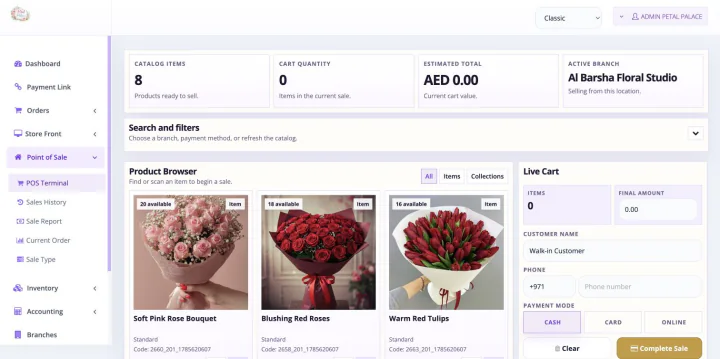
This is not a separately purchased florist pos software product. When a paid Bloomlytix subscription is active, the core ecommerce and operating modules work together around the same catalog, customers, orders, branches, staff, payments, stock, fulfilment, delivery, cash, and reporting data for your florist.
Every plan includes full support and a dedicated relationship manager. Plans differ only by included users, branches, and customer-app entitlement. Drivers count as users. Starter includes the branded website without a customer app, Growth adds Android, and Pro includes Android and iOS customer apps.
Give staff a simple sales flow on the device that suits the branch. Each transaction appears in the owner’s connected admin view in real time.
Bloomlytix POS is one part of the full platform, so counter sales do not have to live in a separate product list, spreadsheet, or reporting silo.
Use shared product, price, add-on, and business data across direct customer channels and in-store sales.
Connect eligible sales to practical stock control for products, add-ons, packaging, and branch inventory.
Custom and delivery orders can continue into the same staff preparation and delivery operating layer.
See new staff sales in real time and review counter and online activity alongside branch, product, stock, cash, and delivery information.
| Need | Counter-only POS | Bloomlytix florist POS |
|---|---|---|
| Product data | Separate in-store catalog | Shared with the ecommerce operating platform |
| Device access | Fixed counter terminal | Point of Sale on mobile, tablet, and desktop |
| Custom flower orders | Free-text note or separate form | Products, add-ons, pricing, instructions, and order record together |
| Stock impact | Updated later or in another tool | Optional POS deduction with branch stock history |
| Order preparation | Passed verbally or on paper | Connected staff workflow, status, timeline, and greeting-card tools |
| Delivery handoff | Address copied into dispatch software | Order can continue into driver assignment and delivery status |
| Owner reporting | Counter totals reviewed later | New sales visible in real time with products, branches, staff, stock, cash, and delivery context |
Every paid plan includes the complete core platform, including Point of Sale on mobile, tablet, and desktop, staff fulfilment, inventory, delivery, purchases, cash tracking, and reporting. Choose by users, branches, drivers, support, and customer-app requirements.
Share your branches, staff roles, products, pricing rules, payment methods, receipts, stock behavior, and any device or peripheral requirements. We will map the right configuration before launch.
Staff can sell catalog products, arrangements, add-ons, and custom bouquet orders, apply configured discounts or manual price adjustments, and generate a receipt or invoice.
Yes. POS and ecommerce sales use the same Bloomlytix catalog and business data, while online, app, POS, manual, and payment-link orders connect to the wider order and reporting workflow.
Yes. Staff can access Point of Sale from mobile or tablet and through the admin portal on desktop. When a staff member adds a sale, the owner can see the transaction in real time from the connected admin view.
Yes. Stock deduction after a POS sale can be enabled. Bloomlytix also supports branch stock visibility, adjustments, low-stock alerts, transfers, and movement history.
The POS can support cash, card, payment links, and other configured methods. Gateway and payment-method availability depends on country, provider eligibility, and business configuration.
Yes. Sales are recorded by branch and can be reviewed with product, branch, staff, stock, purchase, cash, and delivery reporting from the owner dashboard.
We will demonstrate counter sales, custom orders, payment collection, stock behavior, staff fulfilment, delivery, and owner reporting around your shop setup.
Each workflow uses the same Bloomlytix catalog, order, customer, stock, staff, delivery, payment, and reporting data.
Part of the same Bloomlytix subscription and connected florist operating platform.
Explore florist ecommercePart of the same Bloomlytix subscription and connected florist operating platform.
Explore florist inventoryPart of the same Bloomlytix subscription and connected florist operating platform.
Explore florist order managementPart of the same Bloomlytix subscription and connected florist operating platform.
Explore florist deliveryPart of the same Bloomlytix subscription and connected florist operating platform.
Explore florist mobile apps