Direct customer orders
Receive orders from the branded ecommerce website and configured Android or iOS customer apps.
- Product, option, and add-on details
- Customer, sender, and recipient context
- Delivery date, time slot, and payment status
Choose your plan and share a few details before secure checkout.
Cancel anytime
Give florist staff one connected workflow for online, app, POS, manual, and payment-link orders—with the product, recipient, greeting, payment, preparation, branch, and delivery context intact.
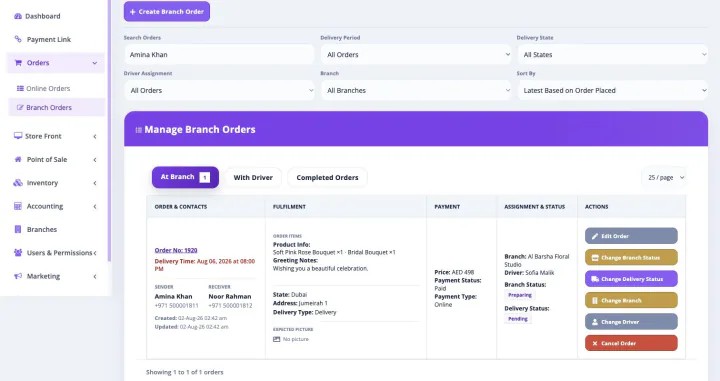
This is not a separately purchased florist order management product. When a paid Bloomlytix subscription is active, the core ecommerce and operating modules work together around the same catalog, customers, orders, branches, staff, payments, stock, fulfilment, delivery, cash, and reporting data for your florist.
Every plan includes full support and a dedicated relationship manager. Plans differ only by included users, branches, and customer-app entitlement. Drivers count as users. Starter includes the branded website without a customer app, Growth adds Android, and Pro includes Android and iOS customer apps.
Bloomlytix carries orders into the internal workflow from the channels your business uses, giving the team a consistent place to see what must be prepared and when.
Receive orders from the branded ecommerce website and configured Android or iOS customer apps.
Keep Point of Sale, telephone, WhatsApp, corporate, and custom florist orders in the wider operating flow, with new staff sales visible to owners in real time.
Collect payment for remote or custom orders and connect successful payment to the related record where supported.
Florist orders are easy to get wrong when the meaningful details are split across receipts, chat messages, and handwritten notes. Bloomlytix keeps those details attached to the order.
Preview and print the exact customer-entered message from the order instead of copying it by hand.
Create an operational record that owners, managers, and customer service can review.
Keep staff screens focused while protecting sensitive owner, cash, and configuration data.
| Need | Scattered workflow | Bloomlytix order management |
|---|---|---|
| Order intake | Separate website, chat, POS, and paper queues | Connected online, app, POS, manual, and payment-link orders |
| Personal details | Copied into a note or chat | Sender, recipient, greeting, and delivery context stay with the order |
| Preparation | Verbal assignment and status chasing | Clear tasks, instructions, statuses, photos, and timeline |
| Greeting cards | Message rewritten by hand | Customer-entered message previewed and printed |
| Branch control | Managers ask each shop for updates | Branch-aware order and staff visibility |
| Delivery handoff | Address and timing sent again | Driver assignment continues from the same order context |
Bloomlytix connects the order workflow to sales, product, branch, staff, delivery, stock, purchase, and cash reporting so owners can see where operational work is happening.
During onboarding, define your order sources, branches, staff roles, preparation steps, greeting workflow, exception states, photos, and delivery handoff so the app reflects how your team operates.
Bloomlytix can bring together orders from the ecommerce website, customer apps, Point of Sale on mobile, tablet, and desktop, manual entry, and payment-link workflows so staff can work from a consistent order record.
Permitted staff can see product and option details, add-ons, delivery timing, sender and recipient information, greeting message, payment status, notes, and special preparation instructions.
The workflow can include new, accepted, preparing, ready, assigned to driver, out for delivery, delivered, cancelled, refunded, and relevant exception states.
Yes. Staff can preview and print the exact customer-entered message, use configured occasion templates, and reprint cards or message slips when required.
Yes. Bloomlytix uses role-based access for owners, managers, shop staff, and drivers, with branch and responsibility context configured around the business workflow.
We will map your channels, order details, branches, preparation steps, greeting cards, statuses, staff roles, and delivery handoff in a tailored walkthrough.
Each workflow uses the same Bloomlytix catalog, order, customer, stock, staff, delivery, payment, and reporting data.
Part of the same Bloomlytix subscription and connected florist operating platform.
Explore florist ecommercePart of the same Bloomlytix subscription and connected florist operating platform.
Explore florist posPart of the same Bloomlytix subscription and connected florist operating platform.
Explore florist inventoryPart of the same Bloomlytix subscription and connected florist operating platform.
Explore florist deliveryPart of the same Bloomlytix subscription and connected florist operating platform.
Explore florist mobile apps