Products + add-ons
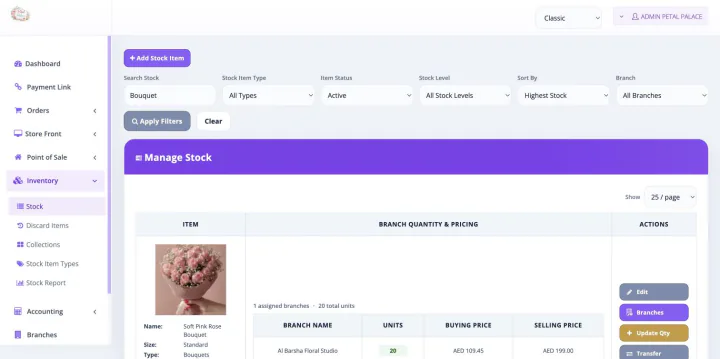
Track configured ready products and extras such as vases, chocolates, cards, plants, and other sellable add-ons.
- Product-level stock visibility
- Low-stock alerts for key items
- Movement records linked to the item
Choose your plan and share a few details before secure checkout.
Cancel anytime
Bloomlytix connects florist stock, branch movements, wastage, supplier purchases, ecommerce, POS, staff activity, cash, and reporting in one practical operations platform.
This is not a separately purchased florist inventory software product. When a paid Bloomlytix subscription is active, the core ecommerce and operating modules work together around the same catalog, customers, orders, branches, staff, payments, stock, fulfilment, delivery, cash, and reporting data for your florist.
Every plan includes full support and a dedicated relationship manager. Plans differ only by included users, branches, and customer-app entitlement. Drivers count as users. Starter includes the branded website without a customer app, Growth adds Android, and Pro includes Android and iOS customer apps.
Focus the team on the stock that matters to daily selling and fulfilment, with a clear movement history for managers and owners.
Track configured ready products and extras such as vases, chocolates, cards, plants, and other sellable add-ons.
Monitor boxes, ribbons, wrapping, containers, and other configured shop materials that support preparation.
Give multi-location florists a clearer view of where stock is held and how it moves between shops or kiosks.
Sales are only one source of movement. Bloomlytix helps teams record operational changes that would otherwise disappear into chat messages, paper notes, or an overwritten spreadsheet cell.
Record what the business bought, who supplied it, which branch received it, and the financial details needed for cleaner operational review.
| Need | Inventory spreadsheet | Bloomlytix inventory |
|---|---|---|
| Current quantity | One manually edited number | Item and branch-level stock visibility |
| Why stock changed | Separate note or no explanation | Sale, fulfilment, damage, wastage, transfer, or correction context |
| Low-stock attention | Manual checking | Configured low-stock alerts |
| Supplier evidence | Invoices stored elsewhere | Purchase record with supplier, totals, VAT, and attachments |
| Multiple branches | Separate tabs and manual transfers | Branch visibility with transfer history |
| Owner reporting | Reconciled after the fact | Stock and purchases connected to wider sales and operations data |
During onboarding, define the products, add-ons, materials, branches, stock rules, adjustment reasons, supplier records, and user permissions that matter to your operation.
Bloomlytix is designed for daily ecommerce, retail, fulfilment, purchase, and branch inventory control. If you require complex manufacturing, warehouse, or bill-of-materials workflows, confirm the scope with our team before subscribing.
Bloomlytix supports practical stock tracking for ready products, add-ons, packaging items, and other configured materials, with branch-level visibility where required.
Yes. Staff with the right access can record stock adjustments for damage, wastage, transfers, corrections, and other configured movement reasons, creating a history for owner review.
Automatic or workflow-based stock deduction can be configured for online orders, POS sales, and fulfilment updates. The right setup depends on how your florist defines and prepares its products.
Yes. Purchase records can include the supplier, branch, purchase category, subtotal, VAT, total, and invoice or receipt attachments, with supplier history and monthly purchase totals.
Yes. Bloomlytix can show branch-level stock and supports movement records such as transfers and corrections. Included branch capacity and add-on options depend on the selected plan.
We will map products, add-ons, packaging, branches, purchases, adjustments, POS, online orders, and owner reporting around your real workflow.
Each workflow uses the same Bloomlytix catalog, order, customer, stock, staff, delivery, payment, and reporting data.
Part of the same Bloomlytix subscription and connected florist operating platform.
Explore florist ecommercePart of the same Bloomlytix subscription and connected florist operating platform.
Explore florist posPart of the same Bloomlytix subscription and connected florist operating platform.
Explore florist order managementPart of the same Bloomlytix subscription and connected florist operating platform.
Explore florist deliveryPart of the same Bloomlytix subscription and connected florist operating platform.
Explore florist mobile apps