For many UAE specialty retailers, WhatsApp is where a sale begins. A florist receives a bouquet request. A gift shop gets a photo and a list of add-ons. A bakery receives a cake design, message and delivery time. The customer may ask questions in English or Arabic, send a location, request same-day delivery and expect a quick reply.
WhatsApp is useful because it is familiar and personal. The problem starts when the same chat is also expected to be the order book, payment tracker, staff task list, branch queue, driver sheet and owner report. Once the business grows, important details can remain inside messages instead of moving into a clear operating workflow.
DIRECT ANSWER
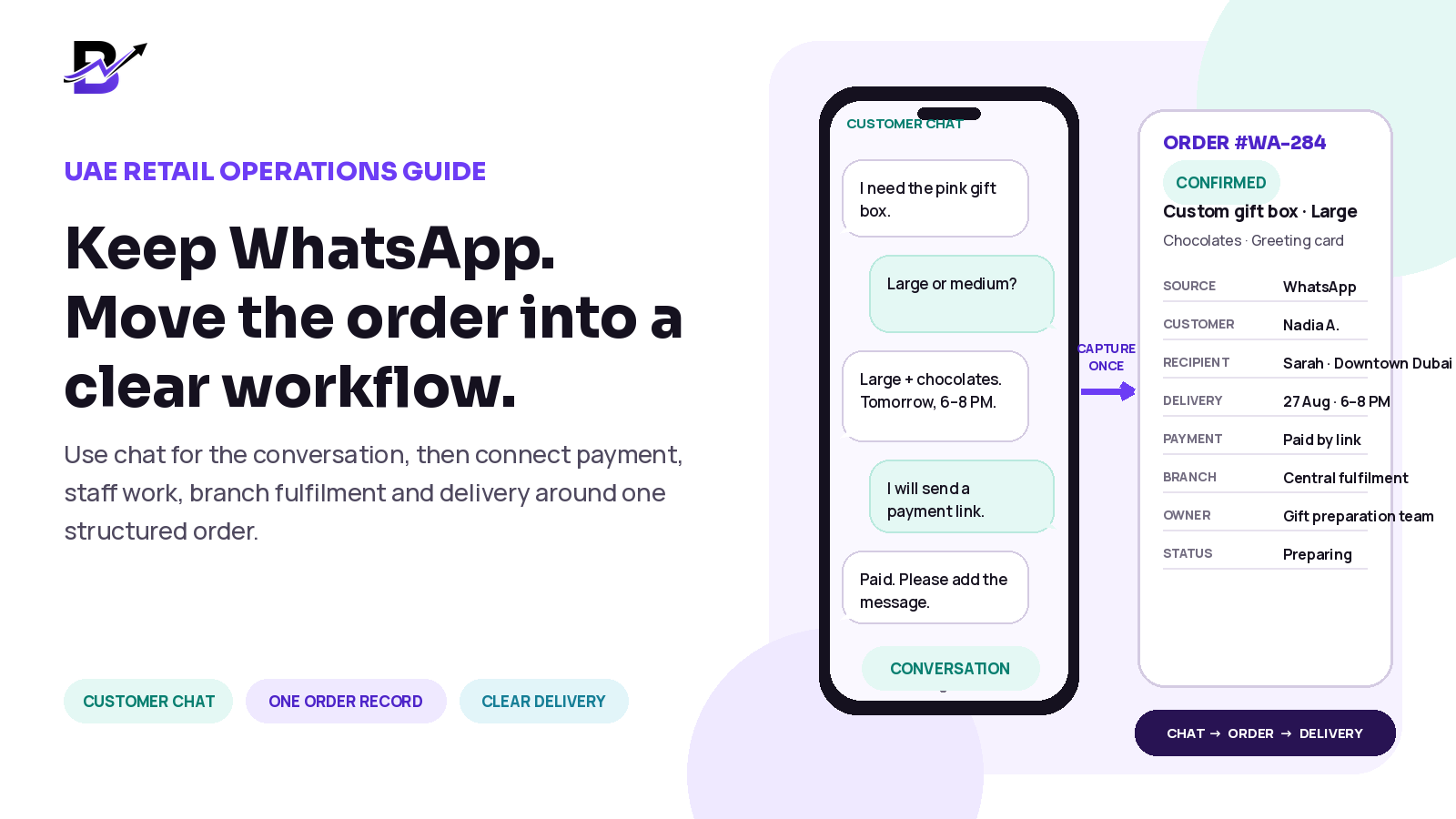
Do not remove WhatsApp. Change its job. Keep it for product questions, custom requests, clarification and customer updates. As soon as the customer is ready to buy, create one structured order record. Capture the product, options, agreed amount, payment state, sender, recipient, address, delivery date and time, branch, owner and status. Then use that same record for preparation, delivery, exceptions and reporting.
This guide is for UAE florists, gifting brands, bakeries, cake shops and other delivery-first retailers. The workflow also applies in other countries, but the examples reflect common UAE needs such as tower and villa addresses, multilingual conversations, remote payments and scheduled local delivery.
In this guide
What WhatsApp Business already does well
Why chat-only order handling becomes difficult as a retailer grows
The exact point where a conversation should become an official order
The information a complete WhatsApp-assisted order should contain
A practical hybrid workflow from chat to payment, staff and delivery
A 30-day migration plan that does not disrupt the customer experience
How Bloomlytix can support manual, payment-link, staff and delivery workflows
WhatsApp is useful — the role of the channel is the real issue
WhatsApp Business is not only a basic chat app. Its official business tools include catalogs, carts, quick replies, away messages and labels. These features can help a small retailer show products, answer common questions and organize conversations.
Official WhatsApp references: Business App features · Catalog help · Cart help
The operational risk is not that WhatsApp exists. It is that the inbox may become the only place where the business commitment lives. A customer conversation and an order record serve different purposes.
WHATSAPP IS STRONG FOR | A STRUCTURED BUSINESS SYSTEM SHOULD HANDLE |
|---|---|
Starting a conversation and answering questions. | Creating one order number and a complete record. |
Sharing product photos, catalogs and custom ideas. | Storing the final product, options, price and approved changes. |
Clarifying a message, occasion, colour or delivery preference. | Assigning the correct branch, staff owner and status. |
Sending a payment link or directing the customer to checkout. | Keeping the payment state tied to the related order where supported. |
Providing helpful customer updates and support. | Moving the order through preparation, dispatch, delivery and exceptions. |
Maintaining a personal customer relationship. | Giving the owner reports across orders, channels, branches, staff and delivery. |
CORE PRINCIPLE
Keep the conversation in WhatsApp. Keep the operational truth in the order record.
The conversation should become an order when the business makes a commitment
A chat may begin with a general question: “Can you make this in pink?” That is still an enquiry. The operational handoff should happen when the business and customer agree on the product, price, important details and delivery or pickup promise.
At that point, create a draft or confirmed order. Give it an order number. Read the key details back to the customer. Then collect payment or record the approved payment method according to the business process. The chat remains useful as communication history, but the team should no longer depend on scrolling through it to understand the job.
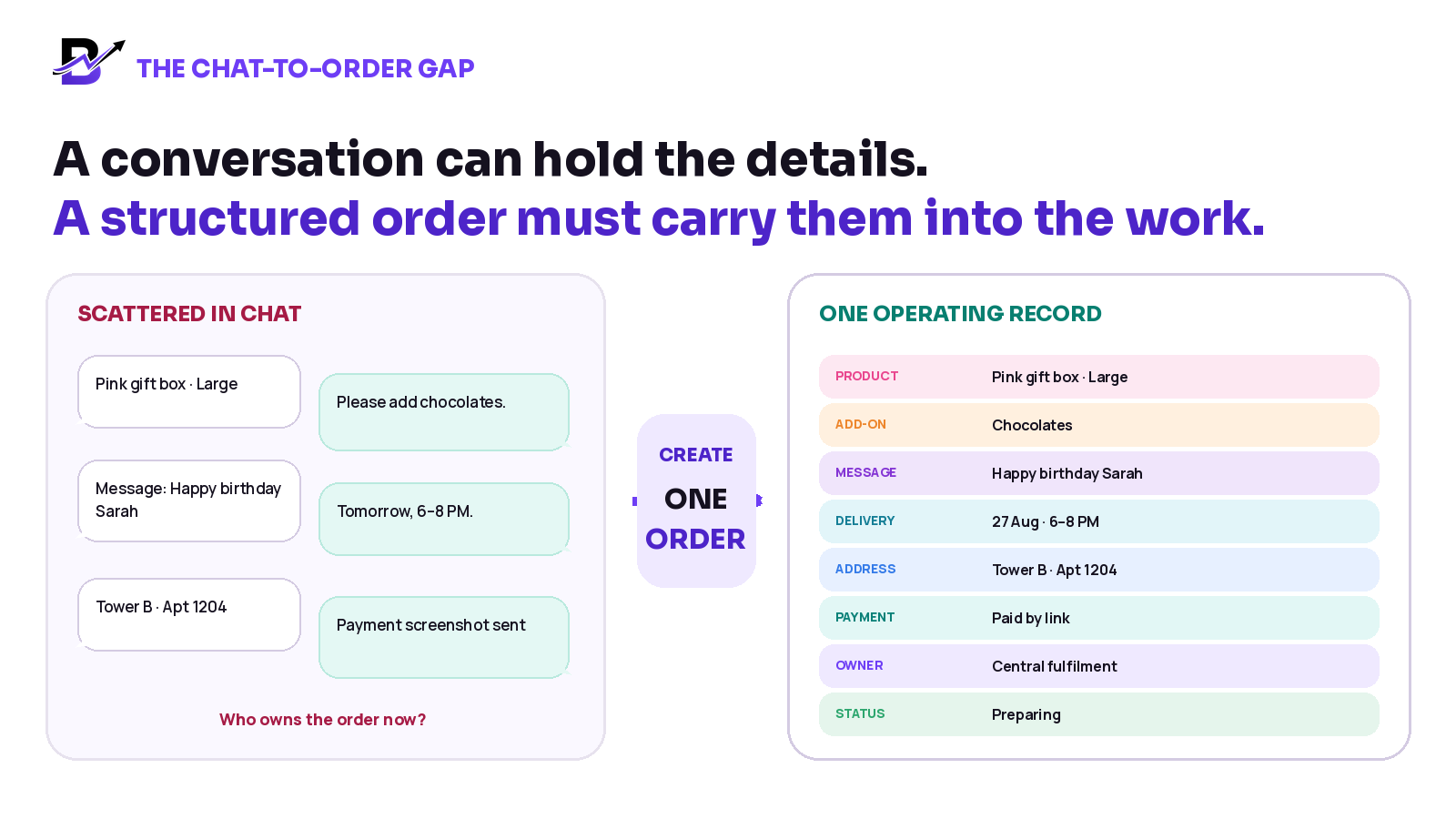
Figure 1. The team should not rebuild the order from separate messages after the customer has confirmed the purchase.
Ten signs the business has outgrown WhatsApp-only order management
SIGN | WHAT IT USUALLY CAUSES |
|---|---|
Staff search through long chats before preparing an order. | Slower fulfilment and a greater chance of using an old detail. |
The product, message, address and payment proof are in different messages. | The team may miss one part of the customer promise. |
A payment screenshot has no clear order number. | Money is difficult to match with the correct job or customer. |
The customer changes a detail in chat after the order is confirmed. | The preparation team may continue with the earlier version. |
Several staff members reply, but no one owns the order. | Questions are repeated and follow-up becomes unclear. |
The branch or fulfilment point is decided informally. | The wrong team may prepare the order or stock may be checked in the wrong place. |
The driver receives a copied message instead of the final order. | Address, recipient, time slot or access instructions can be incomplete. |
The owner asks how many orders are pending and staff count chats manually. | Daily control depends on memory and private inboxes. |
Cancellations, reschedules and refunds are handled only in chat. | The financial and operational history becomes difficult to review. |
The business cannot compare WhatsApp, website, POS and app sales. | The owner cannot clearly see which channels are producing confirmed revenue. |
A small retailer may manage a light volume with labels and disciplined routines. The need for a structured system becomes stronger when order volume, staff count, branch count, customization or delivery complexity increases.
Create one complete order record
The order record should contain the final information the team needs to deliver the promise. Do not paste the entire private conversation into the system. Capture only the operational details that are necessary, and limit access according to each staff role.
INFORMATION GROUP | WHAT TO CAPTURE | WHY IT MATTERS |
|---|---|---|
Order identity | Order number, source, date, branch, owner and status. | Makes the order searchable and shows responsibility. |
Customer / sender | Name, contact details and preferred communication language where collected. | Supports confirmation, payment follow-up and customer service. |
Recipient | Name, permitted contact details and handoff notes. | Helps the team complete a third-party delivery respectfully. |
Product | Final item, size, colour, flavour, style, quantity and approved custom lines. | Defines exactly what the customer purchased. |
Add-ons | Cards, chocolates, balloons, toppers, candles, packaging or other extras. | Prevents paid additions from being forgotten. |
Personalization | Greeting, inscription, occasion note or approved design instruction. | Protects the personal or custom part of the order. |
Delivery / pickup | Emirate, area, building or villa, unit or floor, landmark, date, slot and access notes. | Turns a location message into a usable fulfilment and driver brief. |
Payment | Agreed amount, discount, method, payment-link reference and paid, pending or refunded state. | Separates payment facts from assumptions or screenshots. |
Operations | Preparation owner, notes, photos, changes, ready time and timeline. | Creates accountability as the order moves through staff. |
Delivery outcome | Assigned driver, on-the-way state, delivered, failed, returned or rescheduled result and configured proof. | Closes the order with a clear outcome. |
UAE ADDRESS TIP
A shared location pin is helpful, but the order should still capture the recipient, area, building or villa, unit or floor, delivery time and any reception or access instruction the driver is permitted to use.
Use a hybrid workflow: chat first, structured operations next
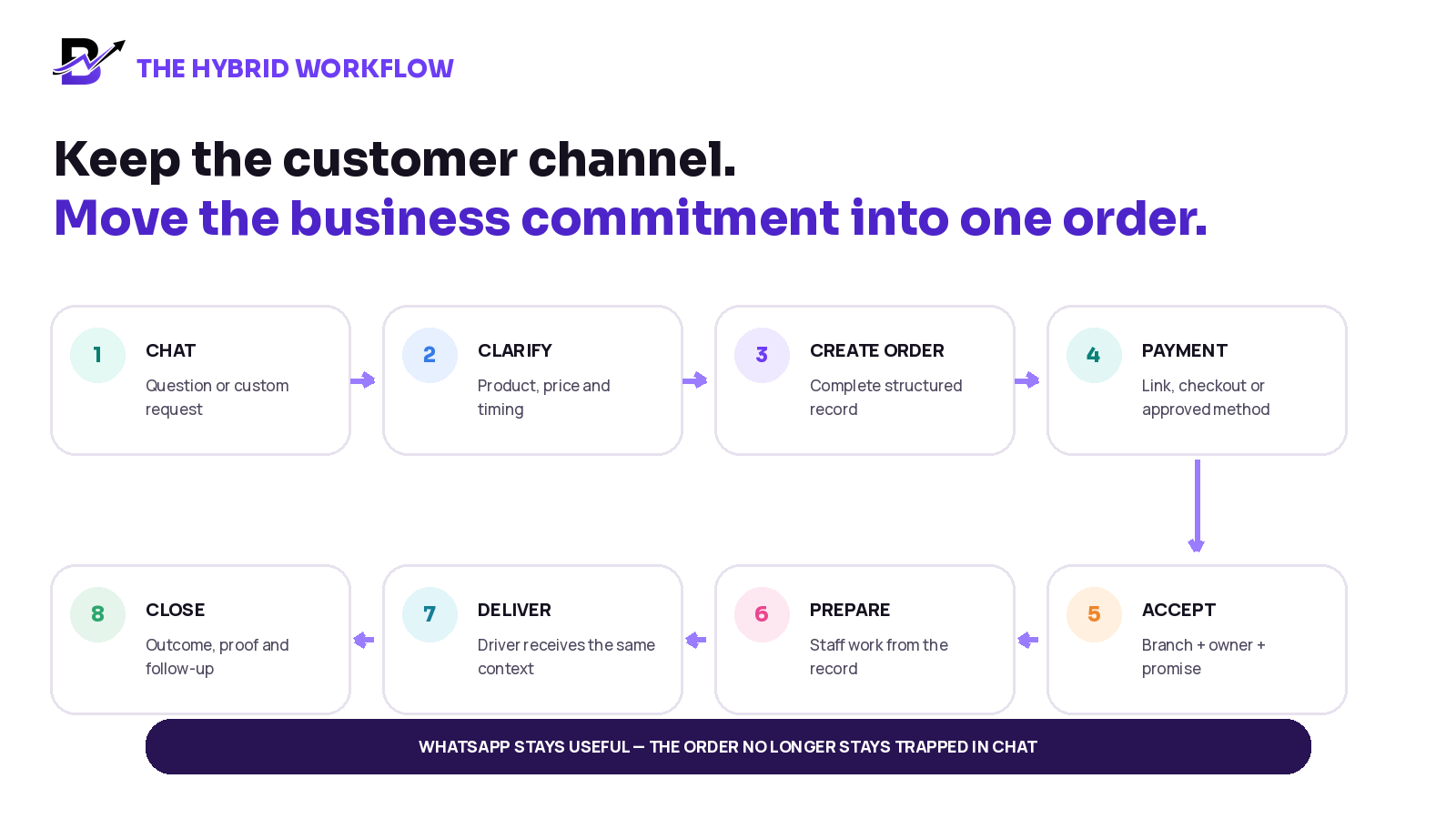
Figure 2. WhatsApp remains part of the customer experience while the confirmed order moves through a traceable operating workflow.
Step 1: Start the conversation
Let the customer ask questions, share a reference image, explain the occasion or request a custom item in WhatsApp.
Step 2: Clarify the final request
Confirm the product, options, add-ons, price, recipient or pickup details, delivery date, time and any important limitation.
Step 3: Create a draft order
Move the agreed information into one structured order record and give it a unique order number.
Step 4: Read back the important details
Send a short order summary so the customer can confirm the item, amount, message, address and timing before payment or final acceptance.
Step 5: Collect or record payment
Send a configured payment link, direct the customer to checkout or record the approved payment method. Keep the payment state connected to the order where supported.
Step 6: Accept and assign
Once the promise is valid, assign the correct branch or fulfilment point and make one staff member or team responsible.
Step 7: Prepare from the order record
Staff should use the final product, notes, personalization and delivery timing from the order—not a screenshot of the chat.
Step 8: Dispatch the ready order
Pass the same approved address, recipient, time slot and permitted notes to the assigned driver or pickup team.
Step 9: Record the outcome
Mark delivered, collected, failed, returned or rescheduled and add the configured notes or proof required by the business.
Step 10: Use WhatsApp for the human follow-up
Share useful confirmation or support messages, but keep any operational change synchronized with the official order record.
IMPORTANT
A direct WhatsApp API integration is not required to improve the workflow. Manually creating a structured order after the customer confirms is already a major operational step. Automation can be evaluated later based on volume and scope.
Keep payment status separate from order status
“Paid” does not mean “prepared,” and “preparing” does not always mean “paid.” The team needs both views. This is especially important for custom orders, deposits, corporate approvals, refunds and payment links.
STATUS | MAIN OWNER | NEXT ACTION |
|---|---|---|
Enquiry | Customer service or sales | Clarify the request; do not promise fulfilment yet. |
Draft / missing details | Customer service or sales | Complete the product, price, customer, recipient and timing information. |
Awaiting payment | Sales or customer service | Send the approved payment method and follow up according to policy. |
Paid / confirmed | Manager or authorized staff | Validate stock, capacity, branch and delivery promise; then accept. |
Accepted | Branch or fulfilment manager | Assign the preparation owner and deadline. |
Preparing | Shop or production staff | Prepare from the order and record relevant notes or photos. |
Ready | Branch or dispatch | Complete the quality check and assign pickup or delivery. |
Assigned / out for delivery | Driver or delivery coordinator | Complete the handoff and update the outcome. |
Delivered / collected | Delivery or customer service | Close the order with the required confirmation or proof. |
Failed / returned / rescheduled | Delivery coordinator and customer service | Record the reason, contact the customer and set the next action. |
Cancelled / refunded | Authorized manager or finance role | Record the reason, amount, stock effect and customer communication. |
Use status names that are easy for the team to understand. The exact labels can vary, but every status should answer one question: what happens next, and who owns it?
Make the workflow fit UAE specialty retail
COMMON UAE REQUIREMENT | PRACTICAL WORKFLOW RESPONSE |
|---|---|
Multilingual customer conversations | Record the final operational details clearly even if the conversation happened in another language. Preserve the exact customer-entered greeting or inscription where appropriate. |
Tower, villa, community, hotel, hospital or office delivery | Capture the area, building or villa, unit or floor, landmark, reception or access note, recipient contact and location link when available. |
Same-day or scheduled delivery | Use delivery zones, charges, cut-off rules, dates and time slots that the team can actually fulfil. |
Custom and occasion-led orders | Keep reference images, approved notes, personalization, add-ons and price attached to the order. |
Branches, kiosks or different fulfilment points | Assign the order to the correct location and give the owner a combined view of activity. |
Remote payment | Tie the configured payment link or payment result to the related order where supported; do not rely on an unlabelled screenshot. |
Seasonal peaks | Use one queue, clear statuses, branch ownership and exception reasons so the team can see what is still pending. |
Three examples of the hybrid workflow
BUSINESS | WHATSAPP CONVERSATION | STRUCTURED ORDER |
|---|---|---|
The customer shares a bouquet reference, colour preference, chocolates, recipient, message and same-day request. | Create the final arrangement, add-ons, exact greeting, address, slot, payment state, preparation owner and driver handoff in one record. | |
The customer selects a box, asks to replace one item and wants delivery to a friend tomorrow. | Record the approved box, custom line, agreed price, greeting, recipient, delivery promise, payment and branch workflow. | |
The customer sends a cake photo and discusses size, flavour, inscription, design note and delivery time. | Record the accepted design instruction, size, flavour, message, amount, preparation date, pickup or delivery, payment and responsible team. |
The customer should experience a helpful conversation. The staff should receive a complete job. Those two goals support each other when the handoff is designed properly.
Move beyond chat-only operations in 30 days
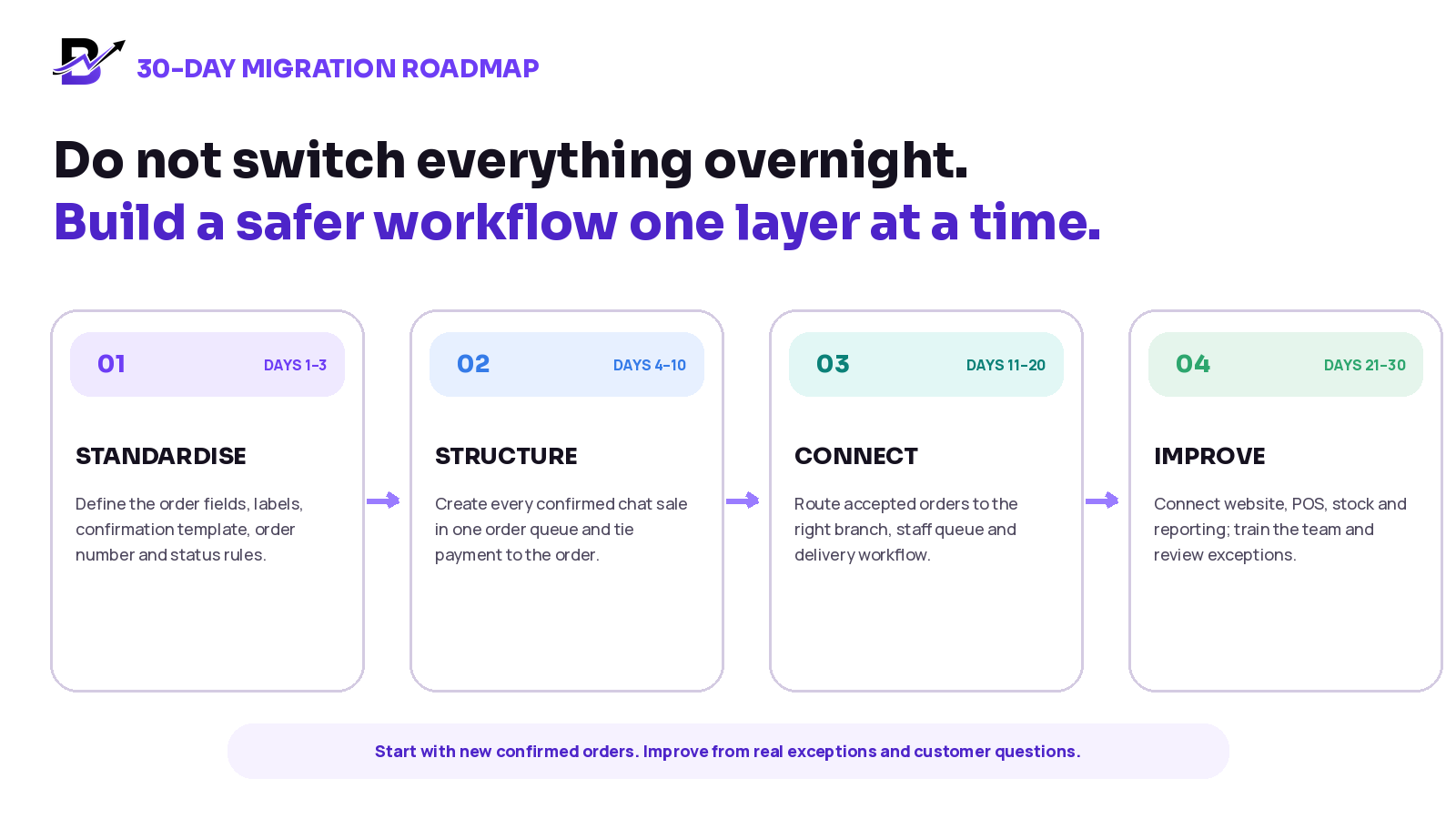
Figure 3. Start with new confirmed orders. Do not wait for a perfect transformation or try to migrate every historical chat before the team can improve.
Phase 1 — Days 1 to 3: standardize the handoff
List the fields every confirmed order must contain.
Define enquiry, draft, awaiting payment, confirmed, preparing, ready and completed states.
Create a short confirmation message that reads the final details back to the customer.
Decide who may confirm, change, cancel, refund or reschedule an order.
Phase 2 — Days 4 to 10: structure every new confirmed chat sale
Create an official order as soon as the product, amount and delivery or pickup promise are agreed.
Give the customer an order number and connect payment to that order where supported.
Stop sending screenshots as the preparation brief.
Review missing details at the end of each day and improve the order template.
Phase 3 — Days 11 to 20: connect branch, staff and delivery
Assign each confirmed order to the correct branch or fulfilment point.
Give staff a clear queue and make status changes part of daily work.
Pass the final delivery context from the order to the driver.
Record failed, returned and rescheduled outcomes instead of leaving them in chat.
Phase 4 — Days 21 to 30: connect the wider business
Bring website, app, POS, manual and payment-link orders into the same operating model.
Connect stock, purchase, cash and reporting where the business needs them.
Train each role only on the screens and actions they need.
Review real exceptions and customer questions before adding more automation.
Set simple rules for staff
WORKING RULE | WHY IT MATTERS |
|---|---|
A confirmed WhatsApp sale must also exist as an official order. | The business can see, assign and report the work. |
The order number must appear in payment and customer follow-up. | Payment, messages and operational actions can be matched. |
Any change after confirmation must update the order, not only the chat. | Staff use the latest approved information. |
One branch and one owner are responsible at a time. | The next action is clear. |
Staff prepare from the order record. | The workflow does not depend on screenshots or personal devices. |
Drivers receive the final delivery brief from the order. | The address, recipient, time and permitted notes stay consistent. |
Exceptions need a reason and a next action. | Failed delivery, rescheduling and refunds do not disappear inside chat. |
Do not copy unnecessary private conversation into the order. | The system holds the operational detail the team needs, not every message. |
Keep the customer experience simple and human
Moving the operations into a structured system should not make the customer journey feel colder or more complicated. In fact, it should reduce repeated questions and give the customer clearer confirmation.
Use quick replies for common questions, but personalize the important parts.
Send a short summary with the product, amount, recipient or pickup, date and time before payment.
Give the customer one order number to mention in follow-up.
Send one clear payment link or checkout instruction instead of several mixed options.
Update the customer at meaningful stages, not every internal step.
Do not ask again for information that has already been captured correctly.
Keep operational changes in the order and reflect the confirmed result back to the customer.
CUSTOMER PROMISE
The customer can keep using the familiar channel. The business gains a clearer workflow behind the conversation.
Measure whether the workflow is improving
Do not judge the change only by how many messages the team sends. Measure whether confirmed orders are clearer, faster to hand off and easier to close.
METRIC | WHAT IT REVEALS |
|---|---|
Confirmed WhatsApp-assisted orders created | Whether chat sales are entering the official workflow. |
Orders missing required details | Which fields or staff habits still need improvement. |
Time from final agreement to confirmed order | How quickly the conversation becomes actionable work. |
Orders awaiting payment | Where sales are waiting and whether follow-up is clear. |
Changes after confirmation | Whether product, address, message or timing frequently changes and how well updates are controlled. |
Preparation exceptions | Common problems such as unavailable items, unclear notes or missed add-ons. |
Failed or rescheduled delivery reasons | Where address, recipient, timing or capacity needs attention. |
Sales by source and branch | How WhatsApp-assisted sales compare with website, app and POS orders. |
Set your own baseline before choosing targets. The goal is not a generic percentage. The goal is a more complete order record, clearer ownership and fewer preventable handoff problems.
Questions to ask before choosing an order management system
# | QUESTION | WHY ASK |
|---|---|---|
1 | Can staff create a manual order from a WhatsApp, telephone or in-person conversation? | The system must support assisted sales, not only website checkout. |
2 | Can the order store sender, recipient, personalization, options, add-ons and delivery details? | Specialty retail needs more than a product name and total. |
3 | Can a payment link be created and tied to the related order where supported? | This reduces disconnected payment references. |
4 | Are payment status and fulfilment status separate? | Paid, preparing and delivered answer different questions. |
5 | Can the order be assigned to a branch, staff owner and delivery driver? | Responsibility must remain visible as the order moves. |
6 | Can staff use clear statuses, notes, photos and a timeline? | The team needs a shared history instead of private updates. |
7 | Can the same catalog support website, apps, POS and manual orders? | Repeated product records create extra work and inconsistency. |
8 | Can stock, purchases, cash and reporting connect to the order flow? | The owner needs more than a list of messages and sales totals. |
9 | Can delivery zones, charges, slots, driver status and configured proof be managed? | Same-day and scheduled delivery require operational control. |
10 | Does it support role-based access for owners, managers, staff and drivers? | Each person should see the information and actions they need. |
11 | Which payment gateways and customer channels are available in the UAE and for our business account? | Availability can depend on country, eligibility and configuration. |
12 | What is the exact WhatsApp integration scope? | Do not assume inbox sync, chatbot automation or historical chat import unless it is included and confirmed. |
How Bloomlytix supports the hybrid model
Bloomlytix is designed to connect customer sales channels with the work that follows. A custom request can begin in WhatsApp, but the confirmed sale can continue as a manual order or payment-link order inside the wider retail operations workflow.
BLOOMLYTIX CAPABILITY | HOW IT SUPPORTS THE WORKFLOW |
|---|---|
Manual and assisted orders | Staff can create orders for WhatsApp, telephone, custom, corporate and other assisted sales. |
Payment links | A configured payment link can be generated from admin, staff workflows or POS and shared with the customer. Successful payment can connect to the related order where the gateway supports it. |
Staff fulfilment | The order can carry products, options, add-ons, recipient details, payment state, delivery timing, instructions, notes, photos and status history. |
POS and customer channels | Website, configured customer apps, POS and manual orders can work around the same catalog and business data. |
Branch and role control | Owners, managers, staff and drivers can use focused access based on their responsibilities. |
Delivery workflow | Zones, charges, dates, time slots, driver assignment, navigation, delivery statuses and configured proof can remain connected to the order. |
Owner reporting | Sales, orders, products, branches, staff, stock, cash and delivery can be reviewed from one platform. |
SCOPE NOTE
This article does not promise direct WhatsApp inbox synchronization, chatbot automation, message broadcasting or historical chat import. Confirm any WhatsApp Business Platform or third-party messaging integration separately during implementation.
Frequently asked questions
Should a UAE retailer stop taking orders on WhatsApp?
No. WhatsApp can remain a valuable channel for customer questions, custom requests and updates. The recommendation is to create a structured order once the customer and business agree on the purchase.
Can WhatsApp Business manage orders by itself?
WhatsApp Business includes useful tools such as catalogs, carts, labels, quick replies and away messages. Those may be enough for a light, simple workflow. As order volume, staff, branches, custom detail or delivery complexity grows, a separate structured operating record becomes more important.
When should a WhatsApp conversation become an order?
Create the order when the product, options, price, customer or recipient information and pickup or delivery promise are agreed. A draft order can be created earlier when important details are still missing.
What details should be copied from WhatsApp into the order?
Capture the final operational information: product, options, add-ons, amount, payment state, sender, recipient, personalization, address, date, time, branch, owner and status. Do not copy unnecessary private conversation.
Is a payment screenshot enough?
A screenshot can support a check, but it should not be the only payment record. Match the payment to a unique order number and use a connected payment state or reference where the gateway and workflow support it.
What happens when the customer changes the order in chat?
The authorized team member should update the official order, record the change and confirm the final version with the customer. Staff should prepare only from the updated order record.
How should multiple branches handle WhatsApp orders?
Use one order queue or shared system, assign each order to the correct branch and keep the source, owner, payment, status and delivery promise visible to management.
Does Bloomlytix connect directly to WhatsApp?
Bloomlytix supports manual and payment-link workflows for WhatsApp-assisted sales. Direct inbox, API, chatbot or historical-chat integration is not implied and should be confirmed separately for the required scope.
Is this workflow only for the UAE?
No. The core approach works globally. The UAE examples focus on multilingual conversations, remote payments, local delivery zones, towers, villas, branches and scheduled delivery.
Final checklist
Keep WhatsApp for conversation, not as the only order database.
Create one official order when the business accepts the customer promise.
Capture the final product, amount, payment, recipient, address, timing and owner once.
Use separate payment and fulfilment statuses.
Prepare and deliver from the structured record, not a rewritten chat summary.
Update the order whenever the customer changes an agreed detail.
Record failed, returned, rescheduled, cancelled and refunded outcomes with a clear reason.
Measure missing details, handoff time, pending payment and exception reasons.
The goal is not to make customer service less personal. It is to protect the personal customer promise with a clearer business workflow behind it.
Sources and further reading
The explanation of WhatsApp Business features is based on official WhatsApp materials. The operating recommendations are Bloomlytix editorial guidance for specialty retailers; they are not statements that WhatsApp is unsafe, prohibited or unsuitable for every business.
Related Bloomlytix pages: Retail operating system guide · Ecommerce website vs operating system · Connect ecommerce and POS · Manage florist orders · Bloomlytix platform · Gift shop software · Bakery software