A practical florist inventory system should connect purchases, branch stock, sales, fulfilment, adjustments, transfers, counts and reporting.
DIRECT ANSWER. To manage flower shop inventory, separate stock into ready products, sellable add-ons, packaging and supplies, and fresh flowers or other materials. Decide the counting unit and branch for every tracked item. Record each purchase, sale, fulfilment use, transfer, damage, wastage and correction with a reason. Use low-stock levels and regular physical counts to keep the recorded quantity close to reality.
The main idea
A flower shop does not hold only flowers. It may also hold ready bouquets, vases, chocolates, greeting cards, plants, boxes, ribbon, wrapping, containers, tools and many small materials used during fulfilment. Some items are perishable. Some are sold directly. Some are used inside another product. Some move between branches. Treating all of them as one inventory list usually creates confusion.
Good florist inventory management gives the team a practical answer to five questions:
What exactly are we tracking?
How is that item counted?
Which branch or location owns the quantity?
What event should increase or reduce it?
Why does the recorded quantity differ from the physical quantity?
The goal is not to record every tiny material at any cost. The goal is to control the stock that affects sales, fulfilment, customer promises, purchasing and waste—and to make the process simple enough that staff will maintain it.
Key takeaways
RULE | WHY IT MATTERS |
|---|---|
Separate stock into practical groups | A ready bouquet, a vase, a roll of ribbon and a bunch of roses do not need the same counting rule. |
Define one counting unit | “One” must mean the same thing to the purchaser, staff member and manager. |
Track stock by branch | A company total does not show which shop can fulfil the next order. |
Record movement reasons | A quantity change should explain whether it came from a purchase, sale, use, damage, wastage, transfer or correction. |
Count the physical stock | Software remains useful only when recorded quantities are checked against reality. |
Measure patterns, not only totals | Wastage reasons, repeated variances and slow-moving packaging reveal where the process needs attention. |
Contents
Why florist inventory is different
The four stock groups
Item names, units and branches
When stock should move
A bouquet order example
Purchases and supplier evidence
Wastage and damage
Transfers and multi-branch stock
Low-stock levels and reordering
Physical counts and corrections
Useful florist inventory metrics
Daily, weekly and monthly routine
Peak-season preparation
How Bloomlytix supports the workflow
1. Why florist inventory is different
Florist stock combines products with very different behaviour. A vase can remain usable for months. A chocolate add-on has its own expiry and storage conditions. A prepared bouquet may be available for immediate sale. Fresh flowers and greenery can lose quality at different speeds depending on variety, handling and storage. Packaging may be inexpensive per piece but operationally important when a branch suddenly runs out during a busy period.
Custom work adds another difficulty. A customer may buy one bouquet, but the shop may use several items while preparing it: flowers, foliage, wrapping, ribbon, a card, a vase, a chocolate box and a delivery container. The business must decide which of those items need automatic or workflow-based deduction and which are controlled through periodic counts or adjustments.
PRACTICAL RULE. Track at the level your team can maintain reliably. A complicated stock model that staff avoid is less useful than a smaller model that explains the important movements every day.
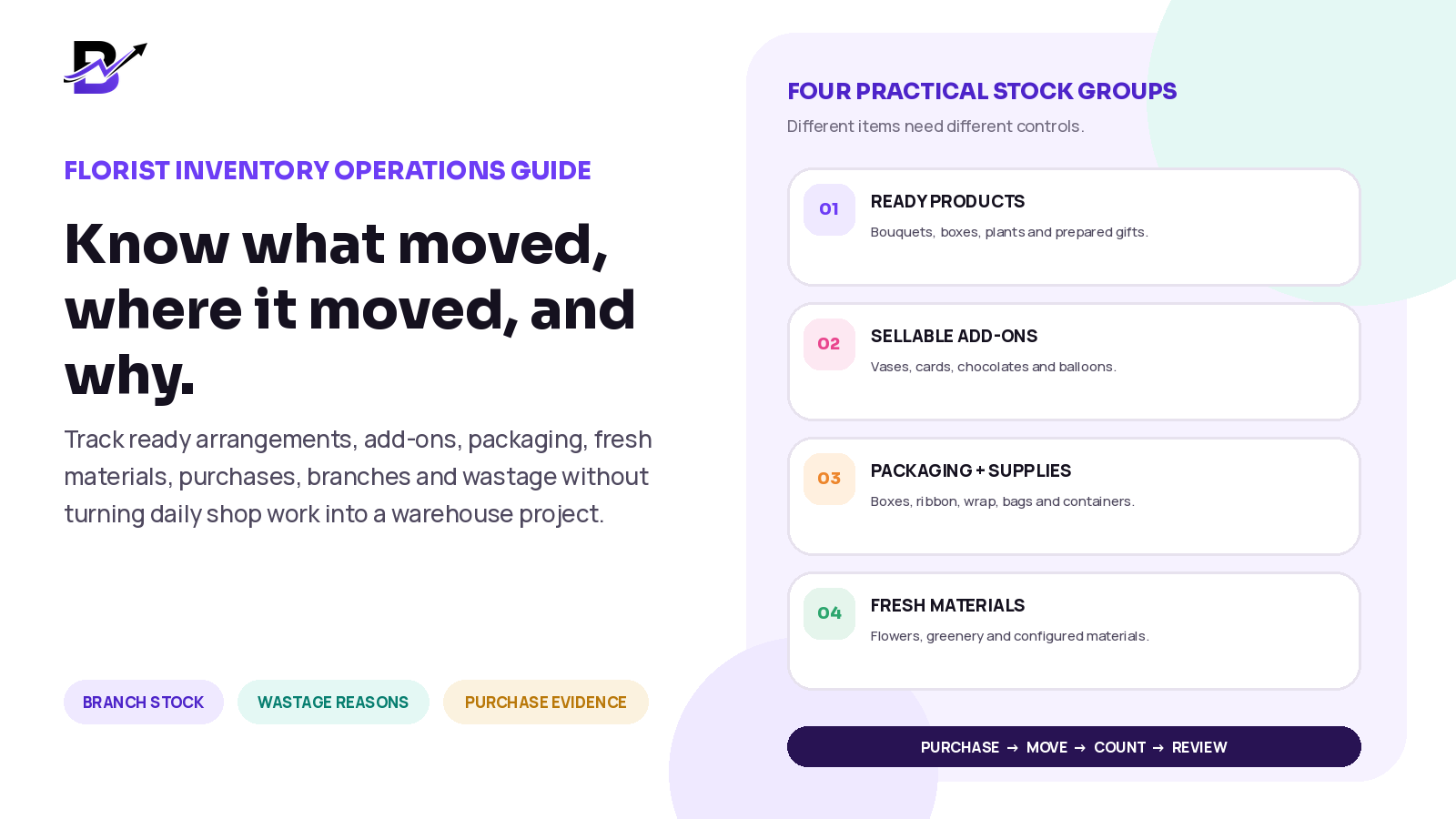
2. Start with four practical stock groups
Begin by sorting inventory into groups before choosing software settings. The groups below are not accounting categories. They are practical operating categories that help the team decide how an item should be counted and when it should move.
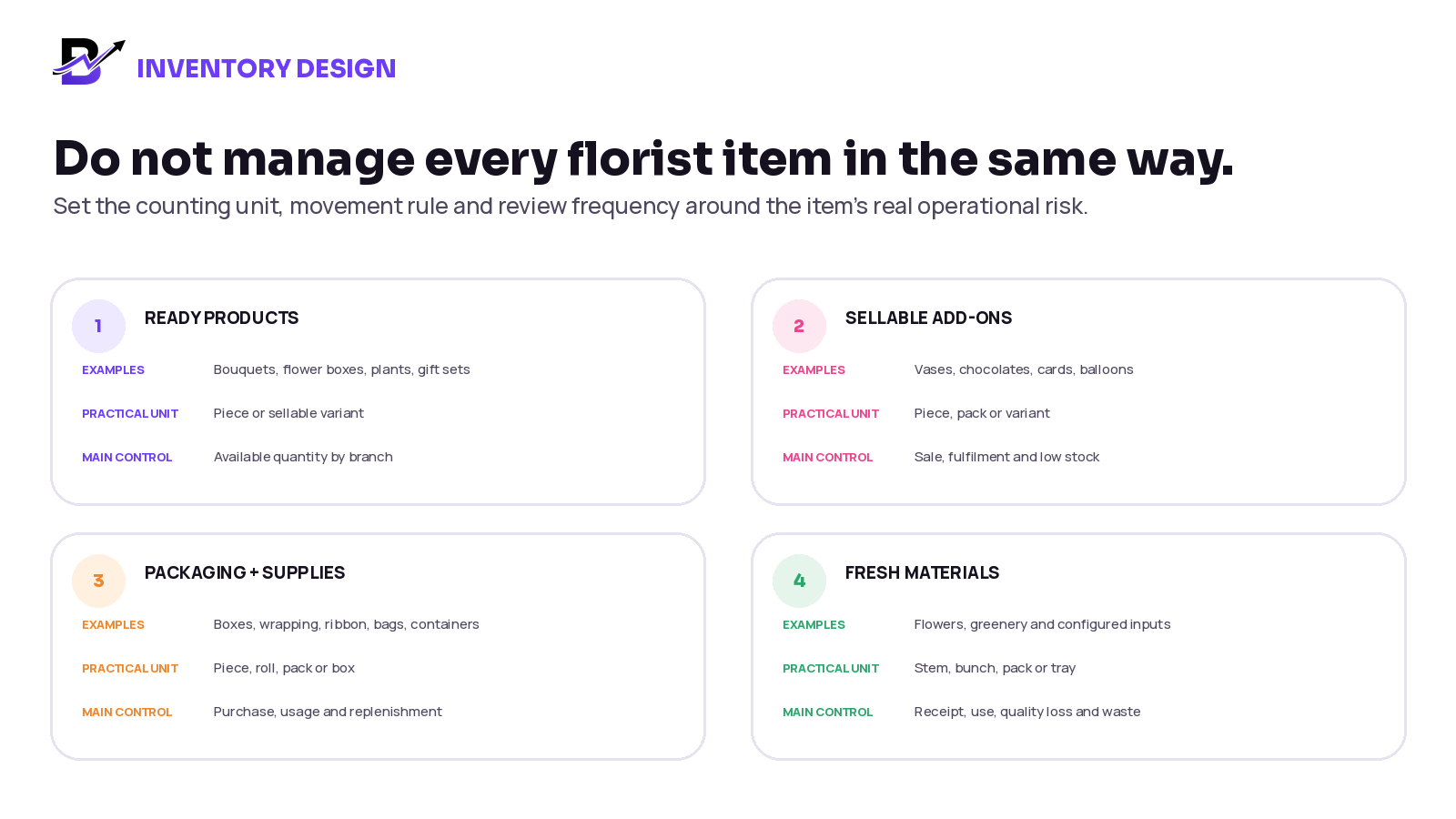
Figure 1. Different inventory groups should have different counting units, movement rules and review frequencies.
STOCK GROUP | EXAMPLES | GOOD STARTING CONTROL |
|---|---|---|
Ready products | Standard bouquets, flower boxes, prepared arrangements, plants and gift sets | Track the sellable item or variant by branch. Decide whether quantity reduces at sale, order acceptance or fulfilment. |
Sellable add-ons | Vases, chocolates, greeting cards, balloons, candles and soft toys | Track by piece, pack or variant. Connect to online, POS and custom-order sales where practical. |
Packaging and supplies | Boxes, wrapping sheets, ribbon, bags, containers, floral foam and delivery packaging | Track critical or costly materials by piece, roll, pack or box. Use counts for low-value consumables that are difficult to deduct accurately. |
Fresh flowers and materials | Roses, lilies, greenery and other configured inputs | Choose stem, bunch, pack or tray only when the receiving and fulfilment process can maintain the quantity consistently. |
Use control levels to avoid unnecessary work
Not every item needs the same attention. A simple ABC-style control model can help:
CONTROL LEVEL | TYPICAL ITEMS | REVIEW RHYTHM |
|---|---|---|
A — Critical | High-value items, fast-moving add-ons, key flowers, premium containers and items that can stop fulfilment | Daily visibility and frequent counts |
B — Important | Common vases, cards, chocolates, standard boxes and regular wrapping | Weekly review and scheduled counts |
C — Basic | Low-value consumables that do not justify transaction-by-transaction deduction | Monthly count, purchase review or simple minimum level |
The exact classification is a business decision. It should reflect value, sales frequency, supplier lead time, perishability and the operational impact of running out.
3. Give every tracked item a clear identity
An inventory record is only useful when everyone understands what it represents. Before entering quantities, define the item clearly.
FIELD | QUESTION TO ANSWER | EXAMPLE |
|---|---|---|
Item name | What will staff recognise immediately? | Clear glass vase — medium |
Item type | Is it a ready product, add-on, packaging item or material? | Sellable add-on |
Variant | Does size, colour or style change the stock record? | Medium / clear |
Counting unit | What does quantity 1 mean? | One vase |
Branch | Where is the item physically held? | Downtown branch |
Supplier | Who normally supplies it? | Approved vase supplier |
Buying value | What operational cost is stored for review? | Configured unit cost |
Low-stock level | At what quantity should the team check or reorder? | Business-defined threshold |
Movement rule | Which event increases or reduces the quantity? | Purchase receipt, sale, transfer or adjustment |
Use a consistent internal SKU or item code when similar products could be confused. A globally standard product identifier such as a GTIN can help when a packaged trade item already carries one, but many custom florist products will still need clear internal names and codes.
UNIT WARNING. Do not mix units inside one item. If staff receive ribbon by roll but count it by metre, define a conversion process or choose the unit that the team can measure consistently. “Three ribbon” is not a useful quantity.
4. Decide exactly when stock should move
The same sale can affect stock at different moments. Some florists reduce a ready product when an online order is accepted. Others wait until preparation or fulfilment. A florist POS add-on may reduce immediately when the counter sale is completed. A custom bouquet may require a manual or workflow-based adjustment because the exact materials are decided during preparation.
Choose one rule for each item type and apply it consistently. The most common stock movements are:
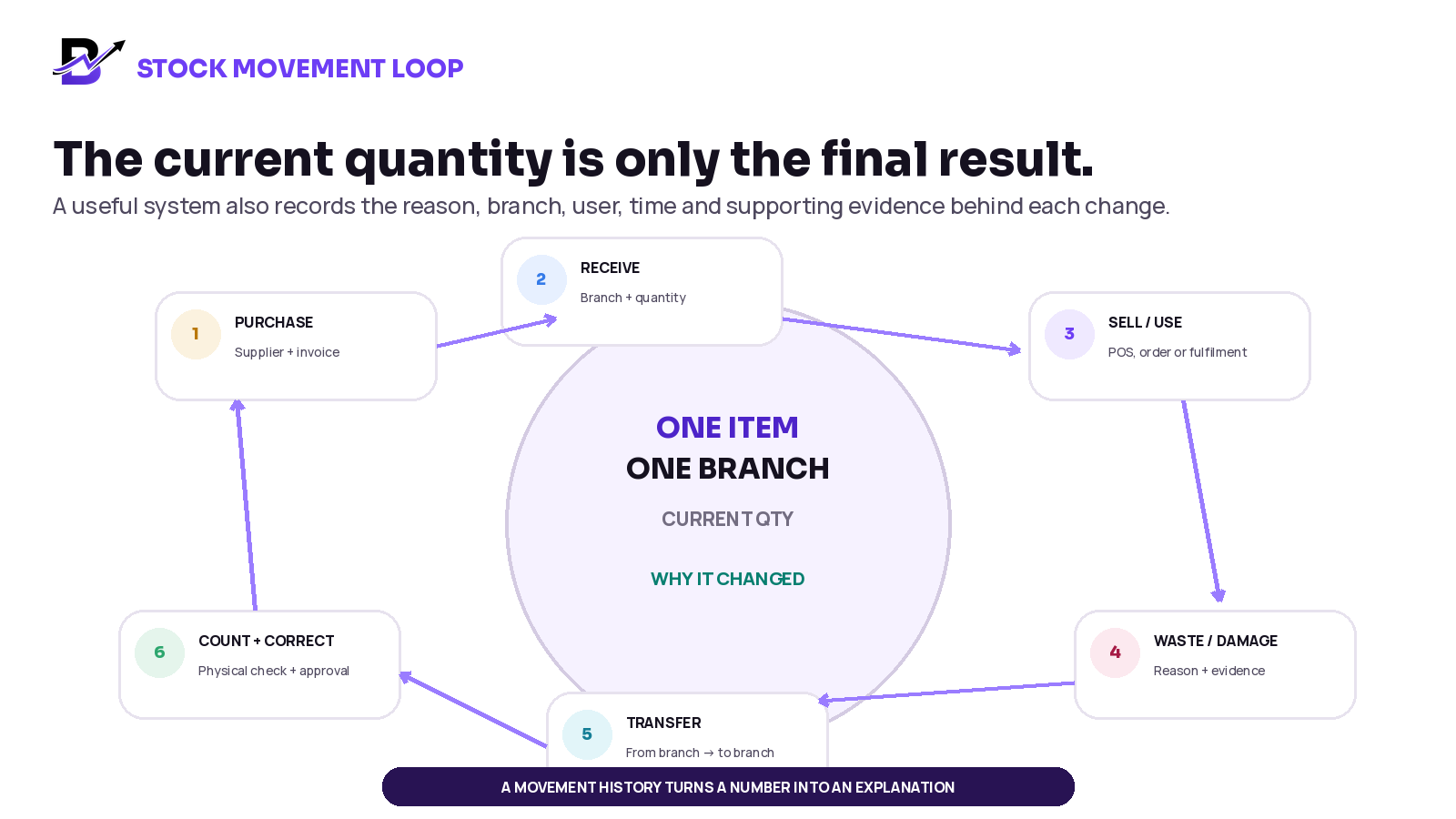
Figure 2. The current quantity should be supported by a movement history that explains every important increase and decrease.
MOVEMENT | WHAT TO RECORD | TYPICAL EFFECT |
|---|---|---|
Purchase received | Supplier, branch, item, quantity, unit value, invoice date and evidence | Increase the receiving branch quantity |
Online or app order | Order, product or add-on, branch and configured deduction stage | Reduce eligible stock at the chosen point |
POS sale | Transaction, item, quantity, staff member and branch | Reduce eligible stock after the sale |
Fulfilment use | Order, materials used, branch and staff member | Reduce configured materials or ready products |
Damage | Item, quantity, reason, photo or note and approver if required | Reduce available quantity and keep the cause visible |
Wastage | Item, quantity or value, reason, date and branch | Reduce quantity and create a pattern for review |
Transfer | From branch, to branch, item, sent quantity, received quantity and status | Reduce one location and increase the other when received |
Count correction | System quantity, physical quantity, difference, reason and approval | Reset or adjust the record to the verified count |
Supplier return | Supplier, item, quantity, reason and supporting document | Reduce stock and keep the supplier context |
Do not let every person change quantities freely
Use role-based access. Counter staff may need to sell items. Fulfilment staff may need to record wastage or materials used. A manager may approve count corrections or branch transfers. The owner should be able to review the history. Permissions should match the risk of the action.
5. Worked example: one bouquet order
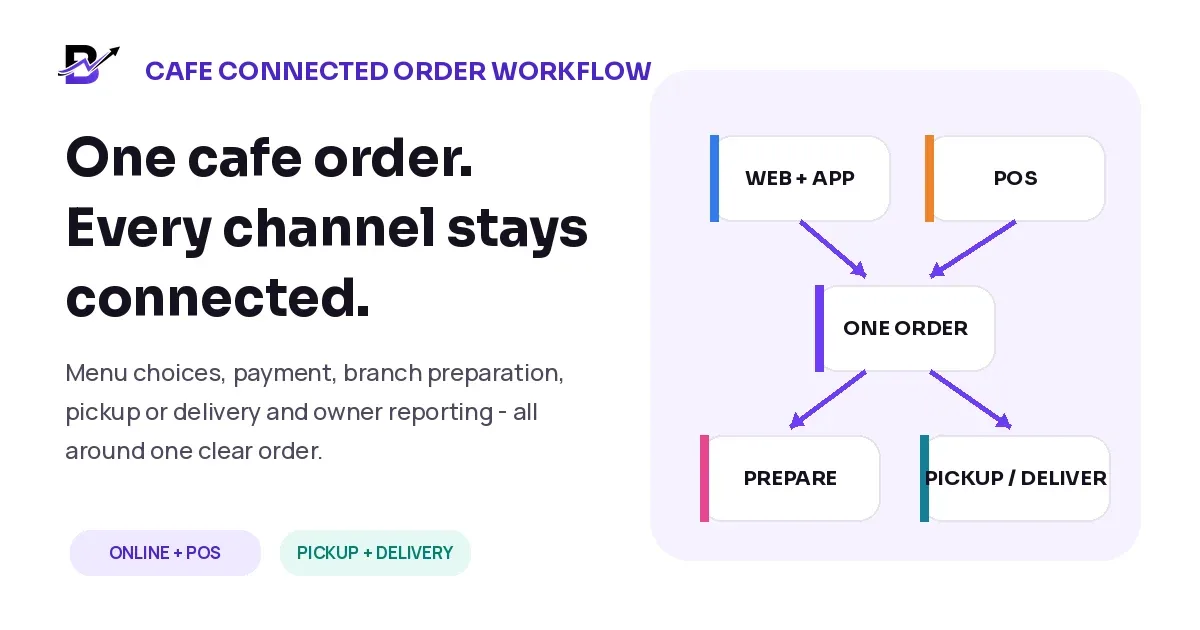
Consider an online order for a pink rose bouquet with a medium vase, a chocolate box and a greeting card. The customer sees one order. The shop may need several stock actions behind it.
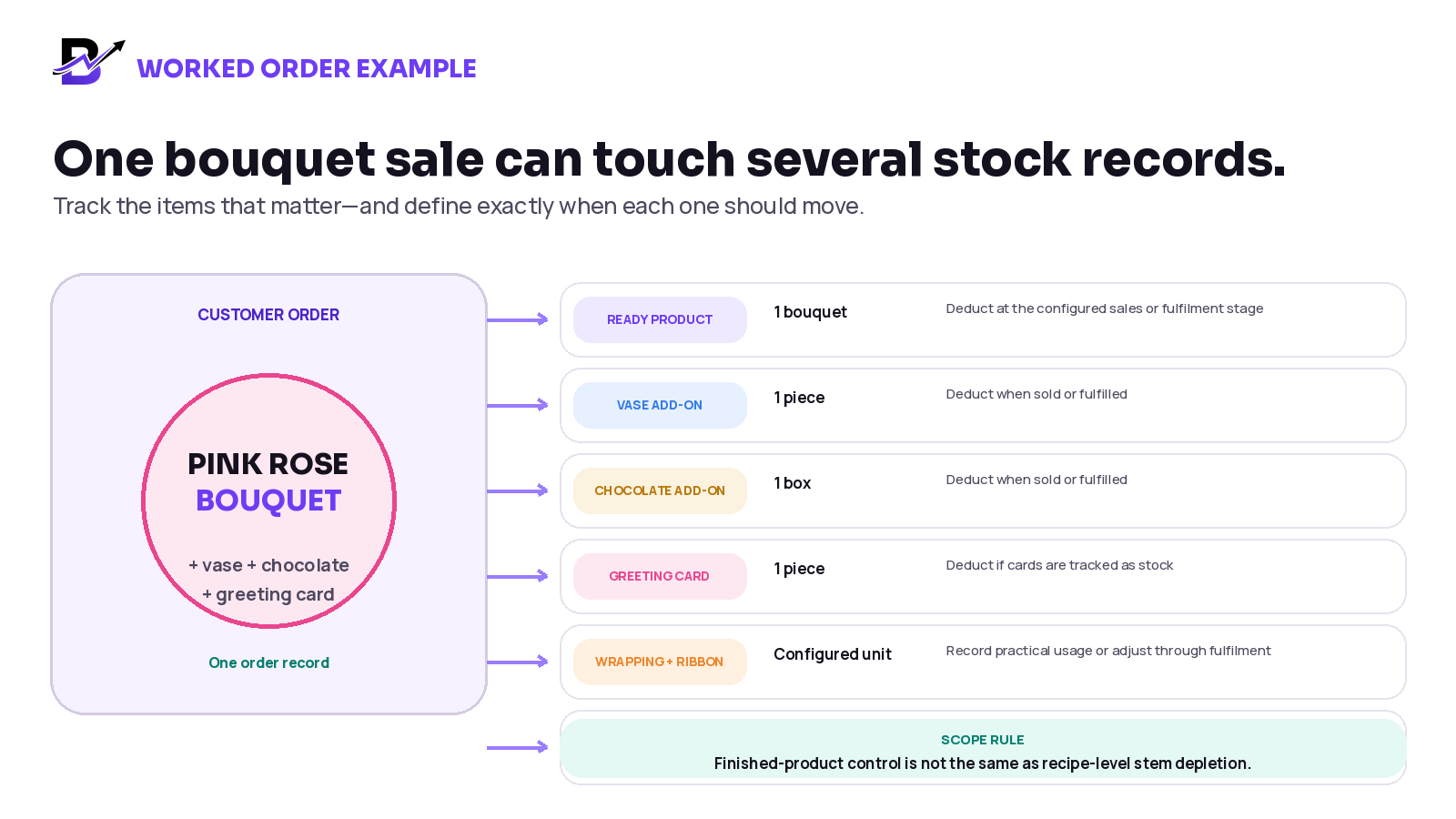
Figure 3. The business should define which components are tracked as separate items and when each one moves.
There are two common ways to control the bouquet itself:
MODEL | HOW IT WORKS | BEST FIT |
|---|---|---|
Finished-product control | The bouquet is one sellable item. Stock reduces as a ready product or through a fulfilment update. Add-ons can reduce separately. | Shops that sell standard arrangements and need practical product-level control. |
Recipe or component control | The system reduces exact stems, foliage, wrapping and other materials from a defined recipe. | Businesses with reliable recipes, disciplined receiving and a manufacturing or bill-of-materials requirement. |
SCOPE CLARITY. A product-level inventory system is not automatically a recipe, production-planning or bill-of-materials system. Confirm advanced stem-level depletion, substitutions, yield, production batches and complex manufacturing requirements separately.
6. Record purchases and supplier evidence
A stock record should not begin with someone typing a new quantity without context. Incoming stock should connect to a purchase or receiving record whenever practical. This helps the owner understand what was bought, from whom, for which branch and at what operational value.
PURCHASE FIELD | WHY IT HELPS |
|---|---|
Supplier | Supports supplier history, follow-up and comparison. |
Receiving branch | Prevents the quantity from appearing in the wrong location. |
Purchase category | Separates flowers, packaging, add-ons and other shop purchases. |
Item and quantity | Connects the purchase to the stock that was received. |
Subtotal, tax and total | Keeps the financial evidence close to the operational record. |
Invoice or receipt attachment | Gives the owner or manager proof without searching chats or paper files. |
Received by and date | Creates accountability and supports supplier issue follow-up. |
Quality or shortage note | Records missing, damaged or unacceptable items at receipt. |
The receiving step matters. A supplier invoice may show 100 items, but the branch may physically receive 96 usable items. Record the actual received quantity and document shortages or damage instead of quietly accepting a wrong starting number.
7. Track wastage and damage with reasons
Wastage is not one problem. It can come from over-ordering, poor quality at receipt, unsuitable storage, preparation damage, incorrect handling, ageing, failed custom work, a cancelled order or a counting mistake. If every loss is recorded only as “waste,” the business cannot learn from it.
REASON | EXAMPLE | POSSIBLE OWNER ACTION |
|---|---|---|
Quality issue at receipt | Flowers arrive bruised or a box is damaged | Review supplier, receiving checks and credit process |
Ageing / quality decline | Fresh material is no longer suitable for the promised product | Review purchase quantity, rotation and demand pattern |
Preparation damage | Stems, containers or packaging are damaged during fulfilment | Review handling, training or workstation setup |
Wrong order preparation | Team prepares the wrong product, size or colour | Review order clarity and status workflow |
Cancellation after preparation | Custom item cannot be returned to normal stock | Review deposit, cut-off and cancellation rules |
Unexplained shortage | Physical count is lower than the system quantity | Investigate process gaps, permissions and missing movements |
Supplier return | Unacceptable goods are returned | Record return and supplier evidence separately from internal waste |
Reusable or repurposed | Materials are moved into another sellable product | Record the approved movement instead of treating all surplus as waste |
Record wastage in quantity and, where reliable unit values are available, in value. Add a note or photo for important adjustments. Review patterns by item, supplier, branch, staff role, season and reason. The purpose is improvement and accountability—not blaming staff for every natural quality loss.
SUSTAINABILITY NOTE. Packaging and floral waste also have environmental effects. Review whether packaging is necessary, whether simpler options can be offered, and whether local rules or approved partners allow reuse, recycling, composting or safe disposal. Do not make environmental claims without evidence.
8. Manage branch transfers as a two-sided movement
For a multi-branch florist, moving ten vases from Branch A to Branch B should not be handled by editing two numbers independently. Use a transfer record so the movement has a sender, receiver, item, quantity and status.
Step 1: Create the transfer
Select the source branch, destination branch, items and expected quantities.
Step 2: Confirm what left
The source branch checks the quantity and marks the transfer as sent.
Step 3: Keep stock in transit visible
Do not treat the destination quantity as received before the physical handoff is confirmed.
Step 4: Confirm what arrived
The receiving branch records the actual quantity and any damage or shortage.
Step 5: Review exceptions
A manager follows up on differences instead of correcting both branches without explanation.
A transfer history is especially useful before peak days. It shows whether the business is balancing stock between branches or repeatedly moving the same items because purchasing and allocation rules are weak.
9. Set low-stock levels that reflect real use
A low-stock level is not a universal number. It should reflect how quickly the item is used, how long the supplier takes, how reliable the supplier is, how much the business can store and how serious it is to run out.
SIMPLE REORDER-POINT FORMULA. Expected use during supplier lead time + a practical safety buffer = starting low-stock level. Example: 6 medium vases used per day × 4 supplier days + 10 extra vases = a starting level of 34. Replace the example with your own measured data.
ITEM TYPE | WHAT TO CONSIDER |
|---|---|
Fresh flowers and greenery | Demand by day and occasion, supplier schedule, quality on arrival, storage capacity and expected loss. |
Sellable add-ons | Sales rate, supplier lead time, margin, expiry where relevant and substitution options. |
Packaging | Usage per order, minimum supplier quantity, branch storage and whether running out stops fulfilment. |
Premium containers | Value, sales frequency, seasonal demand, storage space and transfer options. |
Greeting cards and small supplies | Usage pattern, pack size and whether a simple minimum quantity is enough. |
Review thresholds after busy periods and supplier changes. A low-stock alert is a prompt for a human decision. It should not create blind purchasing without checking current orders, incoming stock, substitute items and branch availability.
10. Count physical stock and explain the difference
Inventory software cannot see an unrecorded broken vase, an extra roll of ribbon used during preparation or a transfer that arrived short. Physical counts confirm whether the recorded stock still matches reality.
COUNT METHOD | WHEN TO USE IT | PRACTICAL EXAMPLE |
|---|---|---|
Daily spot count | Critical or fast-moving items | Count premium vases, chocolates or key fresh materials at opening or closing. |
Cycle count | A rotating group of items each week | Count one category or one shelf without closing the whole shop. |
Full branch count | Month-end, quarter-end, system launch or major investigation | Count all tracked items in one branch with a controlled cut-off. |
Event count | Before and after Valentine’s Day, Mother’s Day, Eid, Christmas or a large contract | Confirm starting stock, received quantity, remaining stock and recorded waste. |
During a controlled count, decide whether sales and transfers must pause or be recorded separately. Use one approved count sheet or device. Record the physical quantity first, compare it with the system quantity, investigate important differences and then approve the correction.
VARIANCE FORMULA. Physical quantity − system quantity = stock variance. Example: the system shows 18 vases and the physical count finds 15. The variance is −3. The correction should also record the reason or investigation result.
11. Useful florist inventory metrics
Do not measure everything in the first month. Start with a small set of metrics that can lead to action. Use consistent definitions and reporting periods so the numbers remain comparable.
METRIC | SIMPLE CALCULATION | WHAT IT CAN REVEAL |
|---|---|---|
Stock variance | Physical quantity − system quantity | Missing movements, counting errors or control problems |
Variance value | Absolute variance × reliable unit cost | Which differences deserve urgent investigation |
Wastage quantity | Total units recorded as waste by item and reason | Which materials or products are repeatedly lost |
Wastage value | Wasted quantity × unit cost | The operational cost of recorded loss |
Sell-through rate | Units sold ÷ units received for a defined period or batch × 100 | Whether purchased stock is moving as expected |
Days of stock | On-hand quantity ÷ average daily use | How long current stock may last at the recent usage rate |
Out-of-stock incidents | Number of times a required item was unavailable | Where low-stock levels or purchasing need review |
Slow-moving stock | Items with no sale or use for a business-defined number of days | Cash or space tied up in packaging, add-ons or containers |
Purchase-to-sales context | Purchase value ÷ sales revenue for the same review period | A broad trend that needs category, timing and accounting context |
METRIC WARNING. These are operational indicators, not a complete accounting or profit analysis. Purchases may support future periods, sales include margin, and fresh materials may be used in products rather than sold directly. Review figures with your accountant or finance adviser where financial reporting is required.
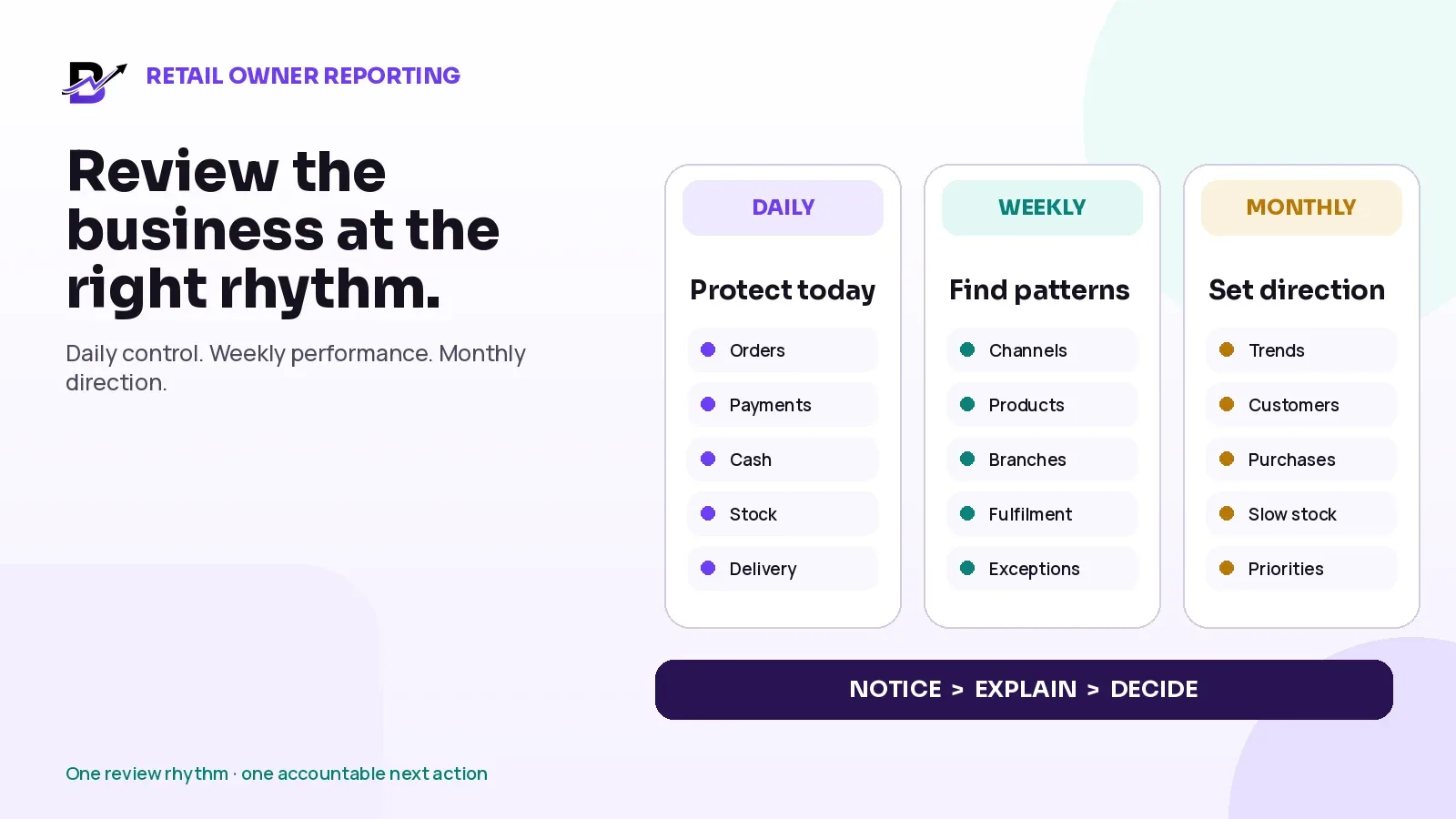
12. Use a simple daily, weekly and monthly routine
RHYTHM | TEAM ACTIONS | OWNER OR MANAGER REVIEW |
|---|---|---|
Daily | Receive purchases; record major damage or waste; complete transfers; check critical low-stock items; review unfulfilled orders against available stock. | Check exceptions, urgent shortages and unusual adjustments. |
Weekly | Cycle-count one or more categories; review supplier deliveries; check slow-moving add-ons and packaging; confirm branch transfer differences. | Review wastage by reason, repeated variances and purchase requirements. |
Monthly | Complete a wider count; close open transfers; archive purchase evidence; review thresholds and item records. | Compare purchases, sales, stock, wastage and branch patterns; agree corrective actions. |
Seasonal | Prepare special item lists, temporary thresholds, supplier schedules and count plans. | Approve peak budget, transfer plan, substitution rules and post-event review. |
Assign ownership. A task that belongs to “everyone” often belongs to no one. Define who receives purchases, who records wastage, who approves transfers, who performs counts and who reviews the report.
13. Prepare inventory for peak flower occasions
Peak days create unusual demand, temporary staff, faster preparation and more stock movement. The business may need different controls for Valentine’s Day, Mother’s Day, Eid, Christmas, graduations, weddings or a large corporate order.
BEFORE THE EVENT | DURING THE EVENT | AFTER THE EVENT |
|---|---|---|
Freeze or confirm the peak product list; define substitute items; agree supplier delivery dates; set temporary thresholds; allocate branch stock; prepare count sheets. | Record each receipt; keep urgent adjustments simple; transfer through approved records; separate waste reasons; protect critical add-ons and packaging. | Count remaining stock; close transfers; review supplier shortages; analyse wastage and stock-outs; document what to buy differently next time. |
Do not copy last year’s purchase quantity without checking this year’s product range, prices, pre-orders, branch mix, marketing campaign and delivery capacity. Historical sales are an input—not a guarantee.
14. Spreadsheet stock versus a connected inventory workflow
NEED | SPREADSHEET-ONLY APPROACH | CONNECTED INVENTORY WORKFLOW |
|---|---|---|
Current quantity | One manually edited number | Item and branch quantity connected to recorded movements |
Why stock changed | Separate note or no explanation | Purchase, sale, fulfilment, damage, waste, transfer or correction context |
Multiple branches | Separate tabs and manual updates | Branch visibility and transfer history |
Supplier evidence | Invoice files stored elsewhere | Purchase record with supplier, totals and attachments |
Online + POS sales | Manual reconciliation | Configured stock behaviour connected to the shared catalog and transactions |
Owner review | Prepared after the fact | Stock, purchases, branch, staff and sales context available for review |
A spreadsheet can still support a very small and simple shop. It becomes harder to control when several people edit it, online and counter sales happen at the same time, branches transfer stock, supplier evidence is separate, or the owner needs a reliable movement history.
How Bloomlytix supports florist inventory
Bloomlytix florist inventory software is designed for practical inventory inside a connected florist ecommerce and shop-operations platform. It can keep configured products, add-ons, packaging, materials, branches, purchases, stock actions, POS, online orders, staff activity, cash and reporting in related operational context.
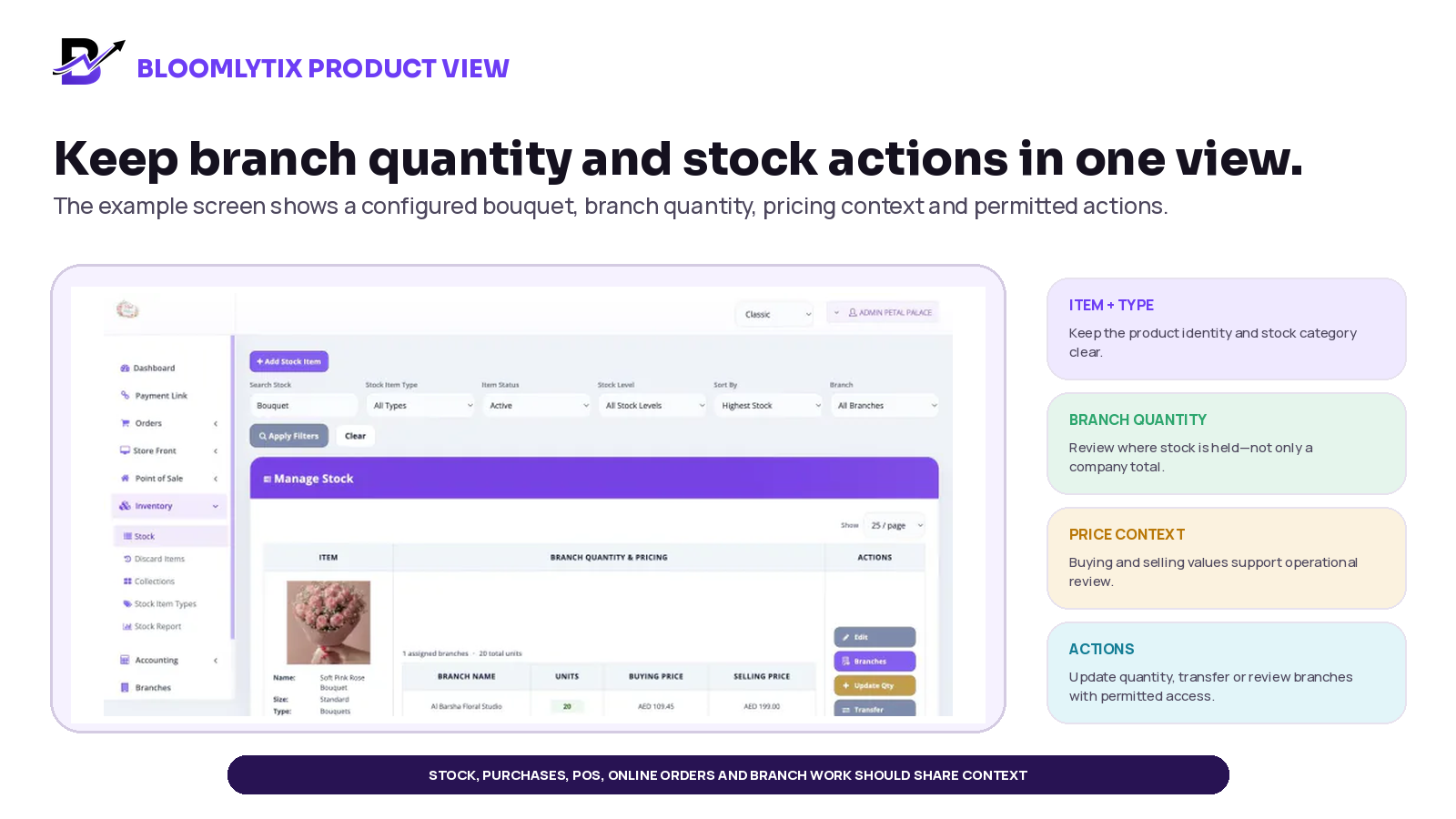
Figure 4. Example Bloomlytix inventory screen. Product screens may evolve; confirm the current workflow during the demo. The example uses a configured currency and branch setup.
BLOOMLYTIX CAPABILITY | HOW IT SUPPORTS THE WORKFLOW |
|---|---|
Products and add-ons | Track configured ready products and sellable extras such as vases, chocolates, cards and plants. |
Packaging and materials | Maintain practical records for configured boxes, ribbons, wrapping, containers and other shop materials. |
Branch-level stock | See quantities by branch and record transfers or corrections between locations. |
Optional deduction rules | Configure stock behaviour after eligible ecommerce orders, POS sales or fulfilment updates according to the florist workflow. |
Wastage and damage | Record permitted adjustments with reasons and keep a movement history for review. |
Purchase records | Capture supplier, branch, category, subtotal, tax, total and invoice or receipt attachments. |
Low-stock visibility | Highlight configured items that need staff or manager attention. |
Connected reporting | Review stock and purchases alongside products, branches, staff, cash, sales and wider operations. |
SCOPE NOTE. Bloomlytix is designed for practical ecommerce, retail, fulfilment, purchase and branch inventory control. Confirm complex manufacturing, advanced warehouse management, bill-of-materials recipes, exact stem-level depletion, batch or lot tracking, automated forecasting, supplier EDI and other specialist requirements separately.
Frequently asked questions
What inventory should a flower shop track?
Start with ready arrangements, sellable add-ons, critical packaging and supplies, and fresh flowers or other materials that affect availability, purchasing or waste. Do not track low-value items in detail unless the team can maintain the records.
Should a florist track every flower stem?
Only when the business has reliable receiving units, recipes, substitutions and fulfilment discipline. Many florists begin with finished-product, add-on, packaging and practical material control. Exact stem depletion is a more advanced recipe or bill-of-materials requirement.
When should stock reduce after an online flower order?
The business should choose a consistent stage such as order acceptance, payment confirmation or fulfilment. The right point depends on cancellation risk, preparation method and whether stock must be reserved or can be substituted.
How should flower shop wastage be recorded?
Record the item, quantity or value, branch, date, staff member, reason and supporting note or photo where useful. Separate supplier quality issues, ageing, preparation damage, cancellation, unexplained shortage and other causes.
How often should a florist count inventory?
Count critical and fast-moving items frequently, use weekly cycle counts for important categories, and complete wider counts monthly, seasonally or when a major difference appears. The schedule should match item risk and order volume.
What is a good low-stock level for florist supplies?
There is no universal number. Estimate expected use during supplier lead time and add a safety buffer based on reliability, storage, season and the impact of running out. Review the threshold with actual usage data.
How should branch transfers be recorded?
Use one transfer record with source, destination, item, sent quantity, received quantity, dates and exception notes. Do not edit two branch quantities independently without a movement history.
Can a spreadsheet manage florist inventory?
A spreadsheet may work for a small, single-user process. It becomes less reliable when several people sell and fulfil orders, online and POS channels share stock, branches transfer items, and the owner needs purchase evidence and movement history.
Does Bloomlytix support flower shop wastage and purchases?
Bloomlytix supports permitted stock adjustments for wastage, damage, transfers and corrections, plus purchase records with supplier, branch, category, values and attachments. Confirm the exact setup during onboarding.
Is Bloomlytix a manufacturing or recipe system?
Bloomlytix focuses on practical florist ecommerce, retail, fulfilment, purchasing and branch stock. Complex manufacturing, bill-of-materials and exact recipe depletion should be scoped separately.
Final inventory checklist
Separate ready products, add-ons, packaging and fresh materials.
Give every tracked item a clear name, type, unit and branch.
Choose the exact sales or fulfilment event that changes stock.
Receive stock against a supplier and purchase record where practical.
Use clear reasons for damage, wastage, transfer and correction.
Set low-stock levels from usage, lead time and a practical buffer.
Count critical items frequently and rotate through other categories.
Investigate important variances before correcting the quantity.
Review wastage by reason, item, supplier, branch and season.
Confirm advanced recipe, manufacturing or warehouse requirements separately.
Sources and further reading
This article combines Bloomlytix product documentation with current inventory-control and search-quality guidance. The operational formulas and examples are educational starting points, not accounting, tax, legal, environmental or financial advice. Adapt them to your country, suppliers, reporting policies and product process.
Related Bloomlytix guides
What is a retail operating system? · Connect ecommerce and POS · Manage florist orders · Build a same-day delivery workflow · Florist software buyer’s guide