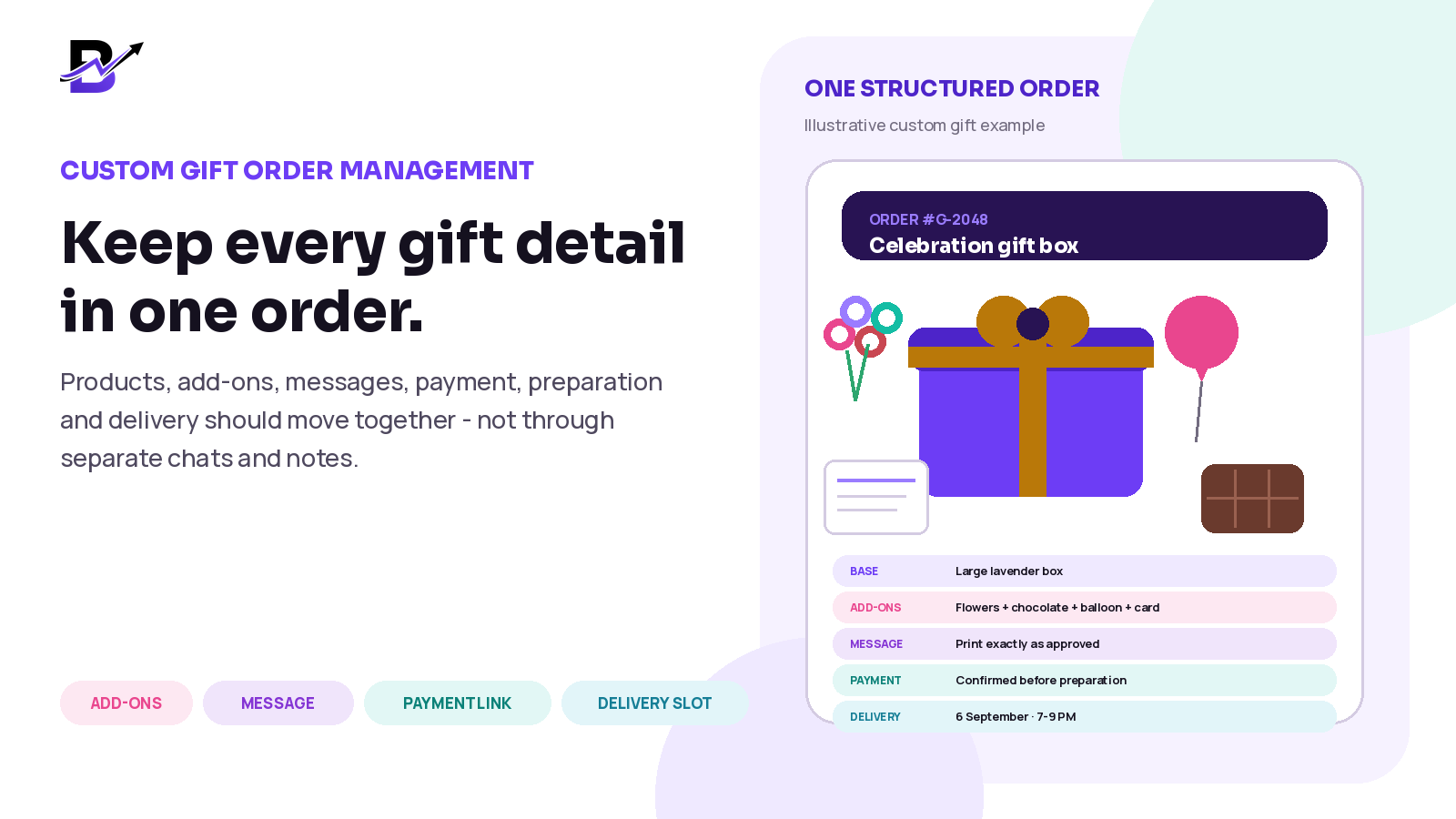
A detailed gift can feel personal to the customer and still be organised clearly for the team.
A custom gift order often begins with a simple question: “Can you change this box?” Then the customer adds a different colour, chocolates, flowers, a balloon, a greeting card, a special message and a delivery time. What looked like one product becomes a small project.
The problem is not customisation itself. The problem is allowing the details to remain scattered across WhatsApp messages, phone calls, screenshots, paper notes and a separate payment reference. That makes it easy for staff to prepare the wrong gift, miss an add-on, print the wrong message or deliver at the wrong time.
DIRECT ANSWEROrganise every confirmed custom gift order as one structured record. Keep the base product, options, add-ons, sender and recipient details, greeting message, approved price, payment status, branch, preparation instructions, delivery or pickup promise, order status and exception notes together. Use separate payment and fulfilment statuses, and move standard online, assisted custom and simple corporate orders into the same traceable operating workflow. |
|---|
This guide is for gift boxes, baskets, plants, chocolates, balloons, celebration sets, personalised items and other delivery-first gifting businesses. It explains the process in easy English and separates practical custom-order management from complex wholesale or enterprise gifting requirements.
In this guide
Why custom gift orders become difficult to manage
The difference between standard, assisted custom and corporate orders
Which information every confirmed gift order should contain
How to organise products, options, add-ons and truly custom lines
How to protect greeting messages and personalisation details
How to record manual pricing, payment links and payment status
How to hand the order to preparation and delivery without re-entering it
How to manage common changes, shortages and failed deliveries
Which metrics help owners improve the custom-order process
How Bloomlytix connects gift sales, staff work, stock, payment and delivery
Why custom gift orders become difficult
A normal product order already needs a product, quantity, customer, payment and delivery method. A custom gift order adds emotional and operational detail. The customer may care about the occasion, colour theme, recipient relationship, surprise timing and exact wording of the message. The shop must translate that promise into products, packaging, preparation work and a delivery handoff.
CUSTOMER DECISION | WHAT THE TEAM MUST KNOW | WHAT CAN GO WRONG |
|---|---|---|
Base gift | Which box, basket, plant, chocolate set or other product is being used. | Staff prepare a similar item but not the approved one. |
Size or style | The selected size, colour, theme, wrapping or presentation. | A general note is missed or interpreted differently. |
Add-ons | Every paid or approved extra, with quantity where relevant. | One add-on is forgotten or charged but not prepared. |
Greeting message | The exact customer-approved wording and language. | Spelling, names, line breaks or message meaning change. |
Sender and recipient | Who ordered, who receives and who may be contacted. | Customer service contacts the wrong person or spoils a surprise. |
Approved price | Base price, add-ons, manual lines, discount and delivery. | The customer and staff work from different totals. |
Payment status | Whether payment is pending, confirmed, failed or refunded. | Preparation starts too early or a paid order waits unnecessarily. |
Delivery promise | Date, slot, address, access notes and special timing. | The gift is ready but cannot be delivered as promised. |
CORE PRINCIPLEA custom order should become more structured as it moves toward confirmation. Conversation is flexible. Fulfilment needs clarity. |
|---|
First decide which type of order you are handling
Not every customer needs the same sales flow. A fixed gift box should be easy to order online. A one-off customised box may need staff help. A corporate order may need buyer approval and a delivery plan. Define the order type early so staff know which information and controls are required.
ORDER TYPE | BEST FIT | HOW IT SHOULD ENTER THE WORKFLOW | SCOPE NOTE |
|---|---|---|---|
Standard online order | A configured product with known sizes, themes, add-ons, price and delivery choices. | Customer selects the available choices, pays through checkout and the complete order enters fulfilment. | Keep the product page clear enough that staff do not need to re-confirm normal choices. |
Assisted custom order | A customer asks through WhatsApp, phone, social media, email or the counter for a detailed variation. | Staff agree the details, create a manual or POS order, record the approved price and use a configured payment method or payment link. | Do not fulfil directly from the chat thread. |
Simple corporate order | One buyer orders a manageable quantity for one occasion, location or short delivery list. | Record the buyer, approved items, quantity, price, payment terms, preparation plan and delivery or pickup arrangement. | Useful when the order can still be controlled without complex automation. |
Complex corporate / wholesale | Large recipient files, multi-level approvals, contract pricing, repeated campaigns, warehouse picking or distribution rules. | Run a discovery and implementation review before promising the workflow. | Automated recipient imports, approval chains, contract pricing and complex warehouse requirements need explicit confirmation. |
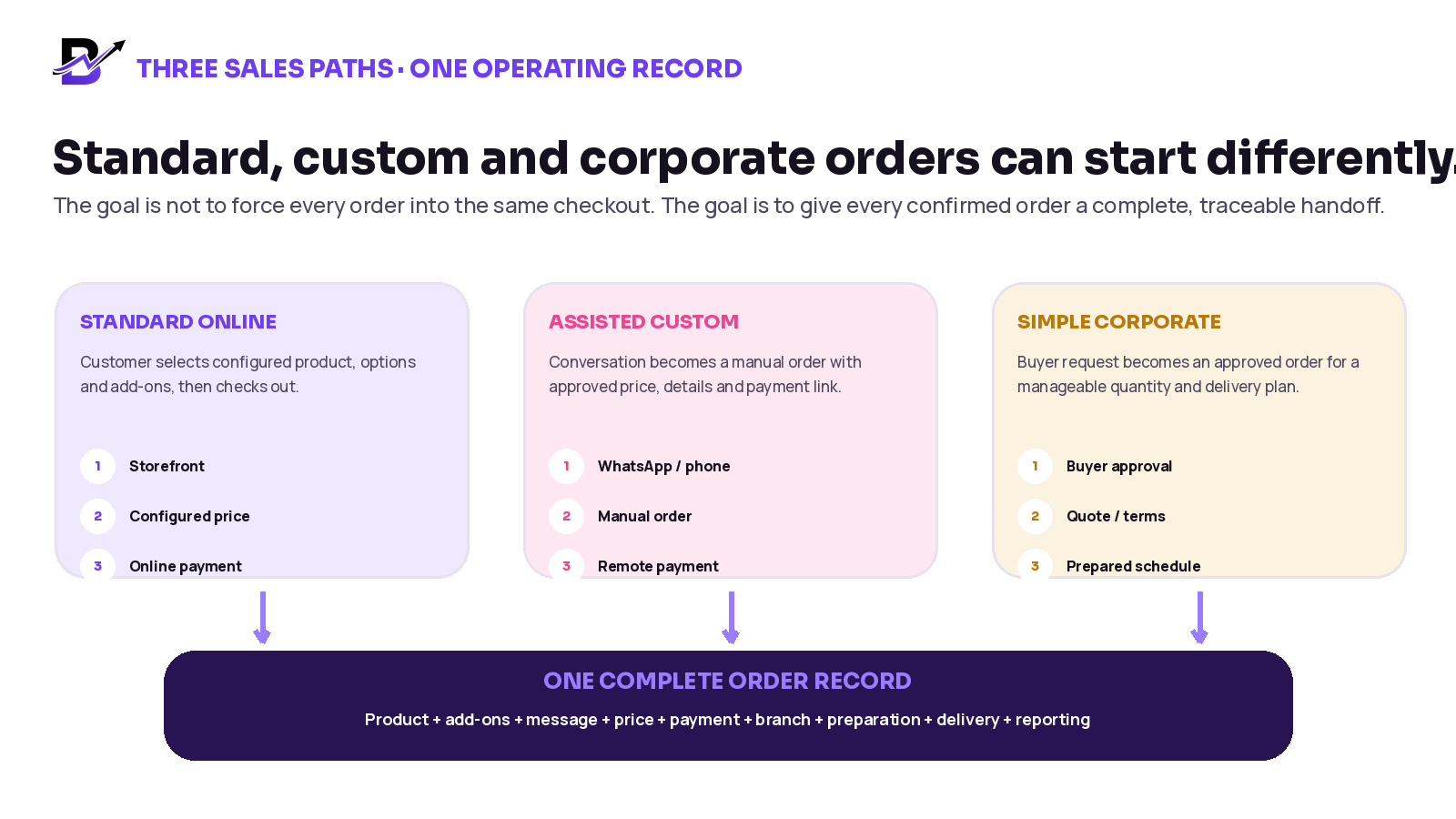
Figure 1. Different sales conversations can still create one consistent operating record.
What every confirmed gift order should contain
A complete order record should answer the questions that customer service, shop staff, managers, drivers and the owner will ask later. The exact fields can vary by business, but the following structure covers most detailed gifting orders.
ORDER SECTION | REQUIRED INFORMATION | WHY IT MATTERS |
|---|---|---|
Order identity | Order number, source, date, branch and responsible staff member. | Creates one reference for every conversation, payment and status update. |
Customer / sender | Name, contact details, account or customer history where permitted. | Keeps the buyer separate from the person receiving the gift. |
Recipient | Name, permitted contact details, address and delivery instructions. | Supports preparation, customer service and delivery without copying information again. |
Occasion | Birthday, anniversary, congratulations, sympathy, corporate event or another relevant purpose. | Helps staff understand presentation and timing without guessing. |
Base product | Product or custom base line, quantity, size, style, colour or theme. | Defines what the team is building. |
Add-ons | Each extra item, quantity and price where applicable. | Prevents paid extras from disappearing inside a note. |
Personalisation | Greeting message, name, printed text, wrapping note or approved design instruction. | Protects the exact customer promise. |
Pricing | Base price, custom lines, add-ons, discount, delivery and applicable tax handling. | Keeps the agreed total visible and reviewable. |
Payment | Method, link or transaction reference, status and refund information where relevant. | Separates sales confirmation from payment follow-up. |
Preparation | Assigned branch, due time, staff owner, internal notes and quality-check requirements. | Turns the order into clear shop work. |
Delivery / pickup | Method, date, slot, address, access details, driver or pickup contact and delivery proof requirements. | Protects the final handoff. |
Timeline | Created, confirmed, paid, accepted, preparing, ready, assigned, delivered, cancelled or refunded events. | Gives customer service and owners one traceable history. |
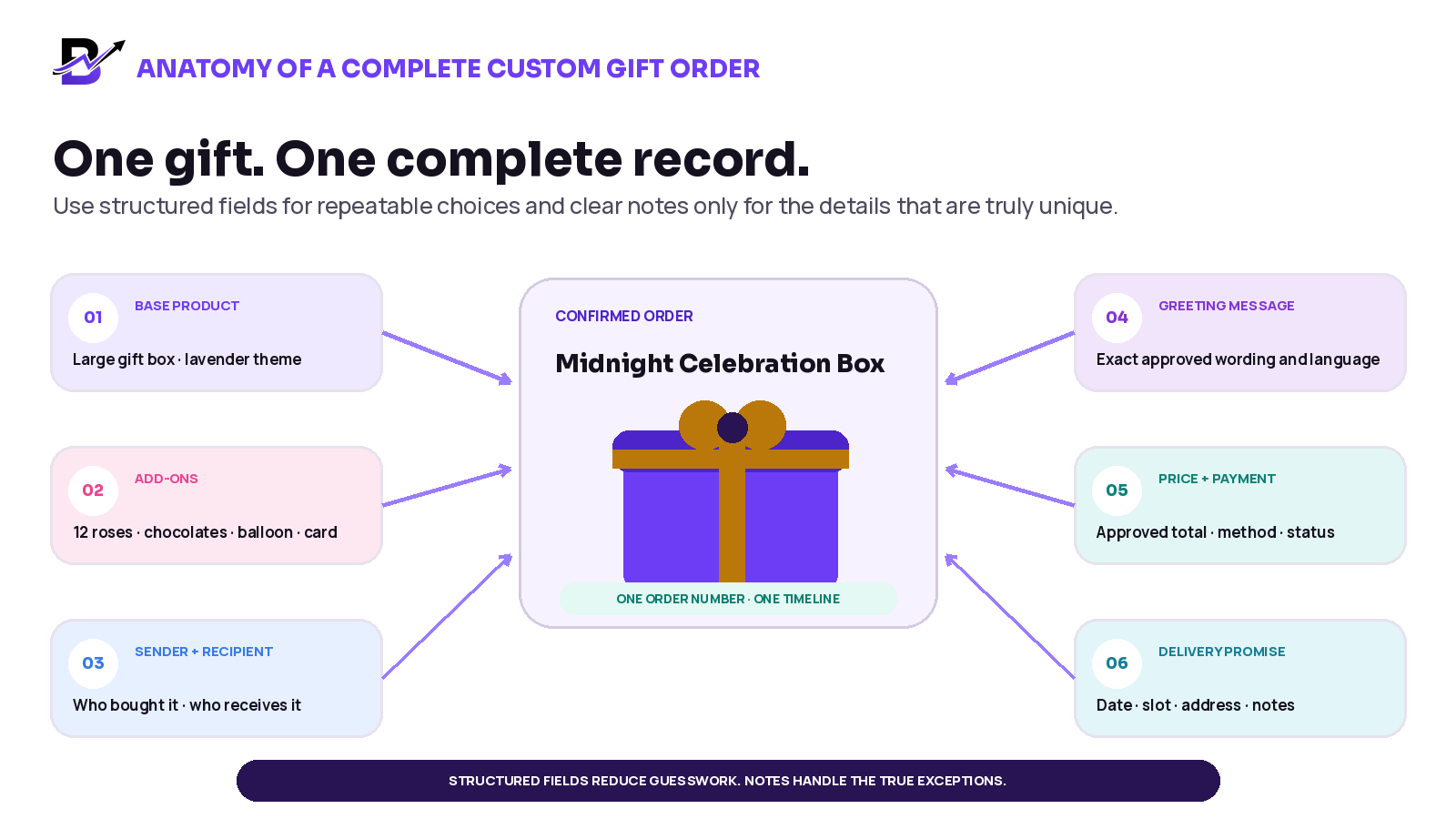
Figure 2. Structured fields should carry the repeatable details. Free-text notes should carry the genuine exceptions.
Use products, options, add-ons and custom lines correctly
One common mistake is placing every detail in one large note. Another is creating a new product record for every small variation. A better approach gives each type of detail the right place.
TYPE | USE IT FOR | EXAMPLE | RULE |
|---|---|---|---|
Base product | The main item the customer is buying. | Celebration gift box. | Use a stable product name and product record when it is sold repeatedly. |
Option / variant | A defined version of the same product. | Small, medium or large; black or lavender theme. | Use when the choice changes price, appearance, stock or preparation in a repeatable way. |
Add-on | A separate extra added to the main gift. | Chocolate box, balloon, flowers, candle or premium card. | Keep quantity and price visible instead of hiding the extra in a note. |
Custom line | A one-off item or service agreed for this order. | Special imported item, custom engraving fee or bespoke packaging. | Require clear description, price and approval; do not turn every manual line into a permanent catalogue item. |
Order note | An instruction that does not need its own sellable line. | Place the card inside the lid; call the sender before dispatch. | Keep it short, specific and visible to the right role. |
Internal note | Operational information not intended for the customer. | Manager approved substitute; use stock from Branch B. | Keep separate from the customer message and customer-facing invoice. |
Ecommerce reference: Shopify order notes and product-level custom information · Shopify draft orders and custom prices
PRACTICAL RULEIf customers choose the same extra often, make it a structured option or add-on. If it is truly unique, keep it as an approved custom line or note. |
|---|
Protect the greeting message and personalisation
A greeting message is not an internal comment. It is part of the product the customer paid for. Keep the exact customer-approved wording attached to the order and show it clearly to the staff member who prints or writes the card.
CONTROL | GOOD PRACTICE | WHY |
|---|---|---|
Exact text | Store the approved message without rewriting it in a different tone. | Names, language and emotional meaning must remain accurate. |
Clear separation | Keep the greeting message separate from staff notes and delivery instructions. | The wrong text should never be printed on the card. |
Preview | Show the message back to the customer or staff before confirmation when the workflow supports it. | Helps catch spelling, line-break and character-limit issues. |
Language and characters | Confirm the message displays and prints correctly in the customer’s language. | Special characters and right-to-left text may need testing. |
Template choice | Use the correct card or occasion template where configured. | Keeps presentation consistent without changing the message. |
Reprint history | Allow a controlled reprint if the card is damaged or the first print is incorrect. | Reduces manual rewriting and keeps the source text visible. |
For surprise deliveries, make it clear which person may be contacted and what may be said. The recipient may need a delivery call, but should not always receive the sender’s full order or pricing information.
Price the custom order before the team starts work
The confirmed price should be as clear as the confirmed product. Staff should not work from a chat message that says “around 250” while the payment link, invoice and preparation team use different totals.
PRICE PART | WHAT TO RECORD | CONTROL |
|---|---|---|
Base product | Approved product, size or style and base price. | Use the configured catalogue price where possible. |
Add-ons | Each extra item, quantity and price. | Do not combine several paid add-ons into one unclear note. |
Custom lines | Description and agreed price for one-off work or items. | Restrict manual pricing to permitted staff and require a reason when needed. |
Discount | Type, amount or approved code. | Record who approved an unusual manual discount. |
Delivery | Zone, service or agreed delivery charge. | Keep the charge tied to the delivery promise. |
Tax / invoice treatment | Use the business’s configured legal and accounting rules. | Do not improvise tax handling inside an operational blog workflow. |
Final total | The amount the customer approved. | Use the same total for payment, receipt or invoice and owner reporting. |
APPROVAL CHECKPOINTBefore payment or preparation, confirm the selected gift, add-ons, personalisation, delivery promise and final total in one summary the customer or authorised buyer can approve. |
|---|
Treat payment as its own status
A payment link is a way to collect money. It is not the complete order. The link should relate to the confirmed order so the team can see what was paid for and whether the payment succeeded.
Depending on the payment provider and integration, a business may create and share a hosted payment link through email, messaging or another channel. The operational requirement is to connect the result back to the correct order and keep sensitive card details out of shop notes.
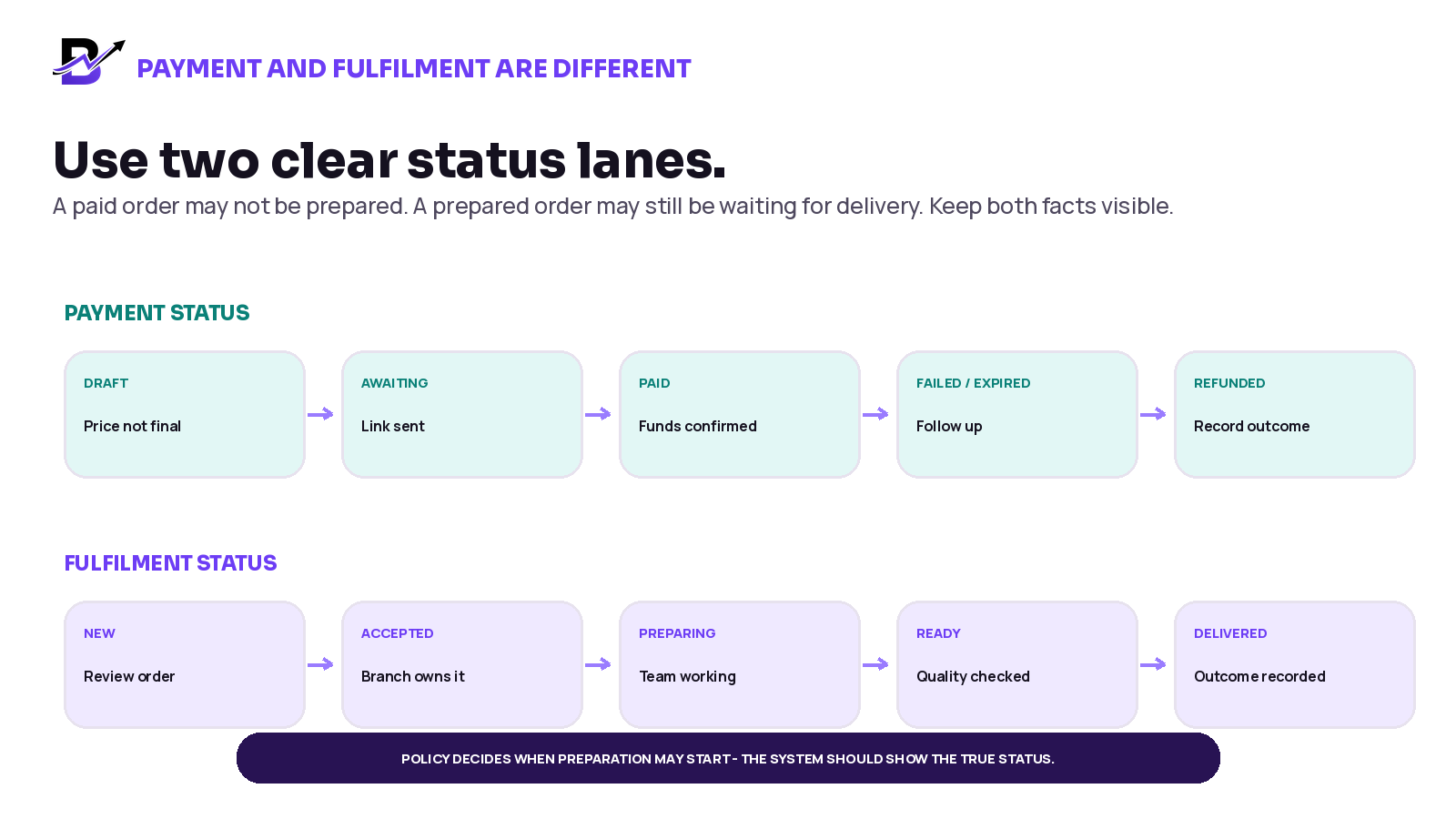
Figure 3. “Paid” and “prepared” answer different questions. Keep both visible.
PAYMENT MOMENT | TEAM ACTION | IMPORTANT CHECK |
|---|---|---|
Price approved | Create the confirmed order or quotation with the correct total. | Does the record include every add-on, delivery charge and custom line? |
Payment link sent | Mark payment as awaiting and keep the link or reference tied to the order. | Was the link sent to the authorised buyer, and is the amount correct? |
Payment successful | Update the order according to the confirmed gateway result where supported. | Does the business policy allow preparation to start now, or is manager acceptance also required? |
Payment failed or expired | Keep the order visible for follow-up without treating it as paid. | Should the reserved slot or stock be released after a defined time? |
Customer changes the order | Recalculate the approved total and follow the business’s process for additional payment or refund. | Do not edit the product promise without updating price and approval. |
Refund or cancellation | Record the financial outcome and the fulfilment outcome separately. | A refund does not automatically explain whether preparation had already started. |
Payment-link reference: Stripe Payment Links overview · Stripe post-payment guidance
SECURITY RULENever ask staff to copy full card details into an order note, chat, spreadsheet or internal task. Use the configured payment provider and the approved payment workflow. |
|---|
A practical workflow for three common order paths
1. Standard online order
Customer chooses the configured product, size, style, add-ons, message, recipient, delivery date and slot.
Checkout calculates the available price, discounts, payment and delivery rules.
The confirmed order enters the correct branch and staff workflow without re-entry.
Staff prepare the order, print or create the approved message, perform a quality check and update status.
Pickup or delivery closes the order and keeps the outcome connected to the original sale.
2. Assisted custom order from WhatsApp, phone or the counter
Use the conversation to understand the request, but do not leave the confirmed order inside the conversation.
Create a manual or POS order with the agreed product, add-ons, custom lines, message, recipient, timing and price.
Send a configured payment link or record the approved payment method, then track the result against the order.
Assign the order to the correct branch and continue through the same preparation, quality and delivery statuses used for online orders.
Keep any later customer change in the order timeline, including price or payment consequences.
3. Simple corporate gifting order
Identify the authorised buyer, company, occasion, quantity, products, branding or message needs and delivery plan.
Prepare one approved summary or quote with clear validity, quantities, price, payment terms and scope.
Create the confirmed order or manageable set of orders only after buyer approval.
Plan preparation ownership, stock, packaging, quality checks and delivery or pickup around the agreed schedule.
Keep invoice, payment, fulfilment and delivery outcomes connected to the buyer and campaign for reporting.
SCOPE BOUNDARYAutomated recipient spreadsheets, multiple approval levels, contract pricing, wholesale distribution, marketplace synchronisation and complex warehouse picking should be confirmed during discovery. Do not assume a simple custom-order workflow covers them automatically. |
|---|
Hand the order to preparation without rebuilding it
Once the order is confirmed, customer service should not send a screenshot to the shop and ask staff to “check the chat.” The preparation team should receive a complete, readable order with a clear owner and due time.
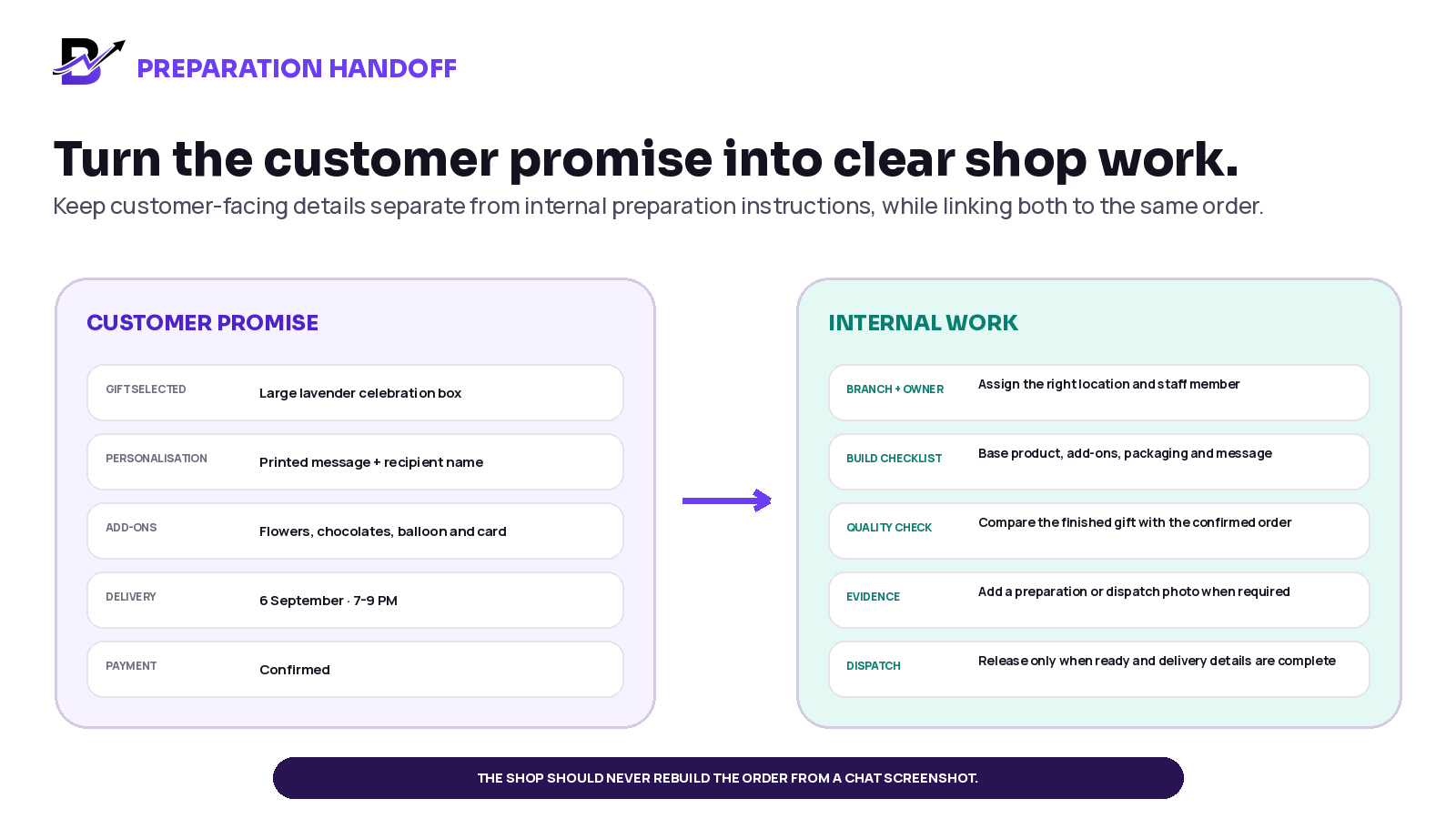
Figure 4. The confirmed customer promise should become a practical preparation checklist.
PREPARATION STEP | WHAT STAFF SHOULD SEE | STATUS OR EVIDENCE |
|---|---|---|
Accept the order | Order type, payment status, due time, branch and priority. | Accepted by the responsible branch or manager. |
Gather items | Base gift, every add-on, custom line, packaging and stock notes. | Items reserved, collected or shortage escalated. |
Prepare personalisation | Exact greeting message, printed name, wrapping and presentation instructions. | Message preview, card print or personalised item check. |
Build the gift | The approved visual or written instruction and any substitution approval. | Preparing, with staff owner visible. |
Quality check | Compare the finished gift with the complete order summary. | Ready only after product, add-ons, message and presentation match. |
Attach evidence | Preparation or dispatch photo when required by business policy. | Photo, note or manager approval added to the timeline. |
Release to pickup or delivery | Correct address, recipient, timing, contact rules and handoff notes. | Assigned, out for delivery or ready for pickup. |
Keep delivery connected to the gift promise
A custom gift is not complete when the box is ready. It is complete when the correct gift reaches the correct recipient at the agreed place and time, or when the business records a clear exception and next action.
DELIVERY DETAIL | WHAT TO CONFIRM | COMMON RISK |
|---|---|---|
Delivery method | Pickup, own driver, configured courier or another approved method. | The team prepares for delivery while the customer expects pickup. |
Zone and charge | Address eligibility, minimum order and approved delivery fee. | A custom quote is accepted before checking whether the address can be served. |
Date and slot | Promised date, time window and any cut-off or preparation dependency. | A highly customised gift is accepted too close to the requested slot. |
Recipient contact | Who may be called and what information may be shared. | A surprise is spoiled or pricing is disclosed to the recipient. |
Access notes | Building, gate, reception, parking, landmark or call-before-arrival instructions. | The driver reaches the area but cannot complete the handoff. |
Proof and outcome | Delivered, failed, returned or rescheduled status and configured proof. | Customer service cannot explain what happened after dispatch. |
For a detailed same-day delivery setup, connect this article to the Bloomlytix guide on building a same-day delivery workflow. The important point here is that delivery must use the same recipient, timing and order context that the customer approved.
Manage changes and exceptions without losing the history
Custom orders change. A customer may add an item after payment. A balloon may be unavailable. The recipient may not answer. The process should make the change visible instead of quietly replacing the original promise.
EXCEPTION | SAFE OPERATING RESPONSE | RECORD IN THE ORDER |
|---|---|---|
Add-on unavailable | Pause the affected part, offer approved alternatives and get customer or authorised buyer confirmation before substitution. | Unavailable item, offered substitute, price difference, approval and staff member. |
Customer adds something after payment | Update the order, recalculate the total and follow the approved additional-payment process. | New line, new total, payment status and approval time. |
Customer removes an item | Confirm whether preparation has started and apply the business cancellation or refund policy. | Removed line, fulfilment impact, refund or credit outcome. |
Greeting message changes | Update the approved text before printing or reprint under a controlled process. | Old and new approval context, print or reprint status. |
Wrong or incomplete address | Contact the permitted person, update the address and re-check zone, charge and timing. | Corrected address, contact attempt, new promise and any fee. |
Recipient unavailable | Follow the configured retry, return or reschedule policy. | Driver status, contact attempts, evidence and next action. |
Order cannot meet the slot | Escalate before dispatch, offer a realistic alternative and record the customer decision. | Reason, revised date or cancellation, approval and financial outcome. |
Corporate recipient list changes | Stop uncontrolled spreadsheet edits and confirm which version is approved. | File version, buyer approval, affected orders and delivery impact. |
CHANGE-CONTROL RULEDo not delete the original promise and silently replace it. Record what changed, who approved it, whether price or payment changed, and which team member owns the next action. |
|---|
Use customer history carefully for repeat gifting
Repeat customers can make gifting easier because the business may already know their saved addresses, past orders, preferred products or previous occasions. That history should help the customer, not create careless assumptions.
USEFUL HISTORY | HOW TO USE IT | CAUTION |
|---|---|---|
Previous products | Offer quick reorder or a similar product as a starting point. | Check current availability, price, message and recipient before confirmation. |
Saved addresses | Let the customer select a previously used address where permitted. | Ask the customer to confirm the address is still correct. |
Past recipients | Reduce repeated entry for returning customers where the system and privacy settings allow. | Do not contact or market to a recipient without an appropriate basis and permission. |
Occasion patterns | Suggest relevant collections or reminders through approved marketing journeys. | Avoid making sensitive or incorrect assumptions from order history. |
Customer-service notes | Keep useful preferences or issue history visible to authorised staff. | Do not place unnecessary sensitive information in general notes. |
Privacy, marketing consent, tax and invoice rules differ by country. Use this workflow as operational guidance and confirm legal requirements with qualified local advisers and the software provider.
Metrics that help improve custom gift orders
Do not measure only revenue. A custom-order process should also show whether the team is receiving complete information, collecting payment on time and delivering without avoidable rework.
METRIC | SIMPLE DEFINITION | WHAT IT CAN REVEAL |
|---|---|---|
Order completeness before acceptance | Percentage of custom orders with all required fields before staff accept them. | Whether customer service is handing incomplete orders to the shop. |
Payment-pending age | Time from price approval or link sent to confirmed payment. | Whether follow-up is slow or customers abandon complicated payment steps. |
Preparation lead time | Time from accepted order to ready status. | Which product types or customisations need more planning. |
Add-on attachment rate | Orders with one or more add-ons divided by eligible orders. | How often customers choose extras; use as context, not a pressure target. |
Rework / correction rate | Orders that require a remake, message reprint or major correction. | Where unclear order capture or quality checks are failing. |
Failed or rescheduled delivery rate | Failed or rescheduled deliveries divided by dispatched custom orders. | Address, timing, recipient and dispatch problems. |
Repeat customer custom orders | Returning customers placing another detailed order. | Whether the business is building useful direct relationships. |
Exception reasons | Count and value of shortages, substitutions, late changes and cancellations. | Which products, policies or workflows need improvement. |
MEASUREMENT NOTEThese are management measures, not universal benchmarks. Set targets only after Bloomlytix has enough real business data to establish a reliable baseline. |
|---|
A practical 30-day implementation plan
PERIOD | MAIN WORK | OUTPUT |
|---|---|---|
Days 1-5 | Collect recent standard, custom and corporate examples. List every field staff needed and every repeated mistake. | A real order map based on the business, not a generic template. |
Days 6-10 | Define order types, required fields, options, add-ons, custom lines, approval rules and payment states. | One approved custom-order policy and data structure. |
Days 11-15 | Clean the product and add-on catalogue. Decide which frequent requests should become structured choices. | A simpler catalogue with fewer duplicate or hidden choices. |
Days 16-20 | Configure manual orders, payment links, branch assignment, staff statuses, message printing and delivery fields. | A complete test environment for the real workflow. |
Days 21-24 | Test standard online, WhatsApp custom, counter custom and simple corporate examples, including changes and failed payments. | A documented test result and corrected process. |
Days 25-27 | Train customer service, shop staff, managers and drivers using the same example orders. | Role-specific operating steps and clear escalation rules. |
Days 28-30 | Launch with close review, measure incomplete orders and exceptions, then improve the fields or policy. | A controlled first month and an evidence-based improvement list. |
How Bloomlytix supports the connected gifting workflow
Bloomlytix is designed as one ecommerce and operations ecosystem for gifting brands. The customer-facing website and configured customer apps can share the catalogue, products, options, add-ons, accounts, payment and delivery logic. POS, manual orders and payment-link workflows can bring assisted sales into the same wider operating system.
BLOOMLYTIX AREA | ROLE IN CUSTOM GIFT ORDERS |
|---|---|
Website and customer apps | Present gift boxes, baskets, plants, chocolates, celebration sets, options, add-ons, recipient details, greeting messages and configured delivery choices. |
POS and manual orders | Create walk-in, phone, WhatsApp, corporate or other assisted orders with relevant products, custom lines, notes and pricing. |
Payment links | Collect remote payment for an approved custom order and keep the status tied to the related order where the configured gateway supports it. |
Staff fulfilment | Show permitted product, add-on, recipient, greeting, payment, occasion and delivery timing context; assign work and update statuses. |
Greeting-card printing | Preview and print the customer-entered greeting message from the order where configured. |
Inventory and purchasing | Track configured gift products, boxes, baskets, packaging, cards, chocolates, balloons and add-ons by branch, with purchases and adjustments. |
Delivery management | Use configured zones, charges, dates, slots, driver assignment, status updates and proof while keeping the delivery tied to the original order. |
Customer and reporting view | Keep customer history, orders, products, branches, staff, payment, stock, cash and delivery outcomes connected for permitted users. |
PRODUCT SCOPEBloomlytix supports standard, custom, manual, corporate and payment-link order workflows. Automated multi-recipient imports, approval chains, contract pricing, wholesale distribution, marketplace synchronisation and complex warehouse workflows must be confirmed before subscribing. |
|---|
Questions to ask during a gifting software demo
Can one order keep the base product, options, add-ons, custom lines, message, recipient, payment and delivery details together?
Can customers choose repeatable options online instead of placing everything in one note?
Can staff create a manual or POS order from a WhatsApp, phone or counter conversation?
Can manual prices and discounts be controlled by role and recorded clearly?
Can a payment link remain connected to the correct order and payment status?
Can payment status and fulfilment status be shown separately?
Can staff print the exact greeting message and keep internal notes separate?
Can the order be assigned to a branch and preparation owner with a clear timeline?
Can preparation or dispatch photos be attached where the business needs them?
Can configured stock for gift products, boxes, cards, chocolates, balloons and add-ons connect to the order?
Can delivery date, slot, recipient, address, driver status and proof remain on the same order?
Which corporate-gifting requirements are standard, configurable or custom?
Frequently asked questions
What is custom gift order management?
Custom gift order management is the process of turning a detailed customer request into one complete, traceable order. It keeps the chosen gift, options, add-ons, greeting message, sender and recipient, approved price, payment, preparation work, delivery promise and status history together.
Should a gift shop stop taking WhatsApp orders?
No. WhatsApp can remain a useful conversation and customer-service channel. The important step is to move the confirmed details into a structured order before payment, preparation and delivery continue.
What is the difference between an option and an add-on?
An option is a version of the main product, such as size, colour or theme. An add-on is a separate extra, such as chocolates, a balloon or a premium card. Keeping them separate makes pricing, stock and preparation clearer.
Should the shop start preparing before payment?
That depends on the business policy, order type, customer relationship and product risk. The system should show the true payment status, and the business should define when staff may accept or start an order. Do not use a vague status that hides whether payment is confirmed.
How should greeting messages be handled?
Keep the exact approved message separate from internal notes. Show it clearly to the person printing or writing the card, support preview and reprint where configured, and test the required languages and special characters.
Can one system manage online and custom gift orders?
Yes, when the platform supports ecommerce, POS or manual orders, payment, staff fulfilment and delivery around the same order data. The sales path can differ, while the confirmed operating record remains consistent.
Can Bloomlytix handle corporate gifting?
Bloomlytix supports corporate, custom, manual and payment-link orders with staff fulfilment and delivery. Requirements such as automated recipient-file imports, multiple approval levels, contract pricing, wholesale distribution and complex warehouse operations should be confirmed during discovery.
How can customer history help repeat gifting?
Past products, saved addresses, account history and quick reorder can reduce repeated work where permitted. Always ask the customer to confirm current product, message, recipient, address and delivery details before creating a new order.
Final checklist for every confirmed custom gift order
One order number and one responsible branch or owner
Correct base product, size, style, colour or theme
Every add-on and custom line with quantity and price
Exact approved greeting message and personalisation
Sender, recipient and contact permissions kept clear
Final approved total and visible payment status
Preparation due time, instructions and quality check
Delivery or pickup date, slot, address and notes
Changes, substitutions, refunds and exceptions recorded in the timeline
Order outcome connected to customer, product, stock, branch, staff and delivery reporting
Bloomlytix helps gifting brands sell through a branded website, customer apps, POS and assisted order channels, then keep the order connected to staff, stock, payment, delivery and reporting. The purpose is not to remove personal service. It is to give personal service a reliable operating system.