A promotion can create demand in minutes. The operation still has to keep every promise after the click.
A Black Friday campaign can be published quickly. The difficult work happens behind it. The business must know which products are safe to promote, whether the prices and discount rules are correct, how much each branch can fulfil, who owns every queue, when delivery choices should close and what happens when a payment, product or handoff fails.
For 2026 planning, Black Friday falls on Friday, 27 November, followed by Cyber Monday on Monday, 30 November. Many retailers run a longer holiday period, so the exact campaign dates may differ. Use the countdown in this guide from your own launch date, not only from the US calendar.
Calendar references checked 17 September 2026: Black Friday 2026 · Cyber Monday 2026.
Direct Answer — Start peak-season preparation about six weeks before the promotion. Choose an operationally safe product range and clear offer rules. Confirm suppliers, stock, packaging, branch allocation, order limits, pickup and delivery capacity. Train the team and test normal orders plus failures, cancellations, refunds and returns. On the event day, monitor a small set of queues and close or change an option before the customer promise becomes unsafe.
This guide is for specialty retailers that combine ecommerce, POS, custom or assisted orders, physical branches, preparation and local pickup or delivery. The examples cover florists, gifting brands, bakeries, cafes, perfume shops, jewellery stores and similar businesses. Local consumer, discount, tax and return rules vary, so confirm legal requirements in every market where the campaign will run.
In this guide
Why peak demand usually exposes an existing operating weakness
The six control areas that should be ready before promotion traffic arrives
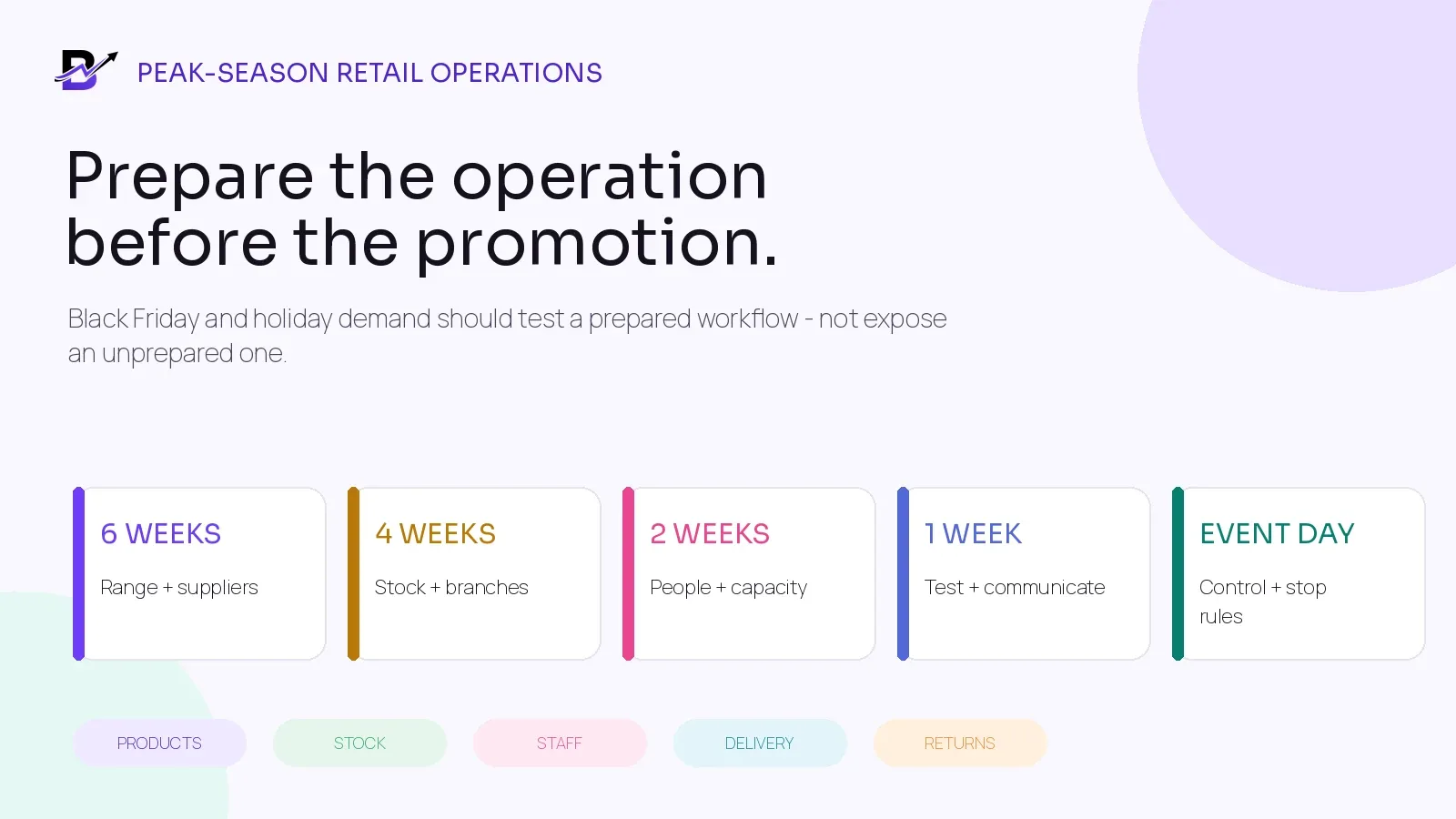
A six-week, four-week, two-week, one-week, event-day and post-event countdown
How to control the product range, offer rules, stock, suppliers and branch quantities
How to set order caps, pickup windows, delivery slots, roles and stop rules
Which normal and failure scenarios to test before launch
What managers should watch during the event and what to review afterward
How Bloomlytix can connect the sale to fulfilment, stock, delivery, cash and reporting
Peak demand does not create every problem - it makes weak handoffs visible
A normal day may hide an inefficient process. One employee remembers the offer. A manager checks a spreadsheet for stock. Customer service asks the branch whether an order is ready. A driver receives an address through chat. The owner fixes the cash and refund records later.
During a peak event, the same manual handoffs happen at the same time across more orders. Small gaps become queues. Queues become late promises. The campaign may appear successful in the sales dashboard while the staff, stock and delivery workflow is already under pressure.
WEAK HANDOFF | WHAT PEAK DEMAND CAN EXPOSE | CONTROL NEEDED BEFORE LAUNCH |
|---|---|---|
Offer setup | Wrong products receive the discount, two offers stack unexpectedly, or the end time uses the wrong time zone. | One approved offer sheet and a complete checkout test. |
Product availability | A product is visible online but the assigned branch cannot fulfil it. | Location stock, safety levels and clear branch ownership. |
Custom work | Every colour, message, size or design remains available even when staff capacity is limited. | A smaller peak range, earlier cut-offs and order caps. |
Preparation | Paid orders enter the queue but no one owns acceptance, preparation or quality checks. | Named roles, statuses, ageing rules and escalation. |
Pickup and delivery | Customers choose more slots than staff or drivers can complete. | Capacity by window, ready status, dispatch limits and stop rules. |
Aftersales | Cancellations, refunds and returns are handled in chat without updating payment, stock or reporting. | A documented exception workflow with authority limits. |
Core Principle — The promotion should never create a customer promise that the operation has not agreed how to keep.
Prepare six connected control areas
Peak readiness becomes easier when the team separates the work into six connected areas. Each area needs an owner, a pass condition and a stop rule.
CONTROL AREA | MAIN DECISIONS | PASS CONDITION |
|---|---|---|
1. Range + offer | Eligible products, variants, price, discount, start/end time, channels, combinations, exclusions and returns. | A real cart shows the expected price and terms for eligible and ineligible products. |
2. Stock + purchasing | Supplier lead times, received quantities, branch allocation, packaging, safety stock and transfer rules. | The available quantity is supported by branch stock and incoming purchases that are confirmed. |
3. Staff + capacity | Order limits, staff schedule, temporary users, devices, printers, cash duties and escalation. | Every queue has an owner and the team can complete the planned volume safely. |
4. Checkout + payment | Website, apps, POS, payment methods, failed payments, duplicate attempts and confirmation messages. | Normal and failed payment tests create the correct order and payment records once. |
5. Fulfilment + handoff | Acceptance, preparation, quality check, pickup, delivery, driver capacity, proof and exceptions. | The same order context reaches the right branch, staff member and handoff queue. |
6. Service + aftersales | Customer updates, changes, cancellations, refunds, returns, complaint ownership and reporting. | Staff can resolve the main exceptions without rebuilding the order from chat or spreadsheets. |
The peak-season countdown
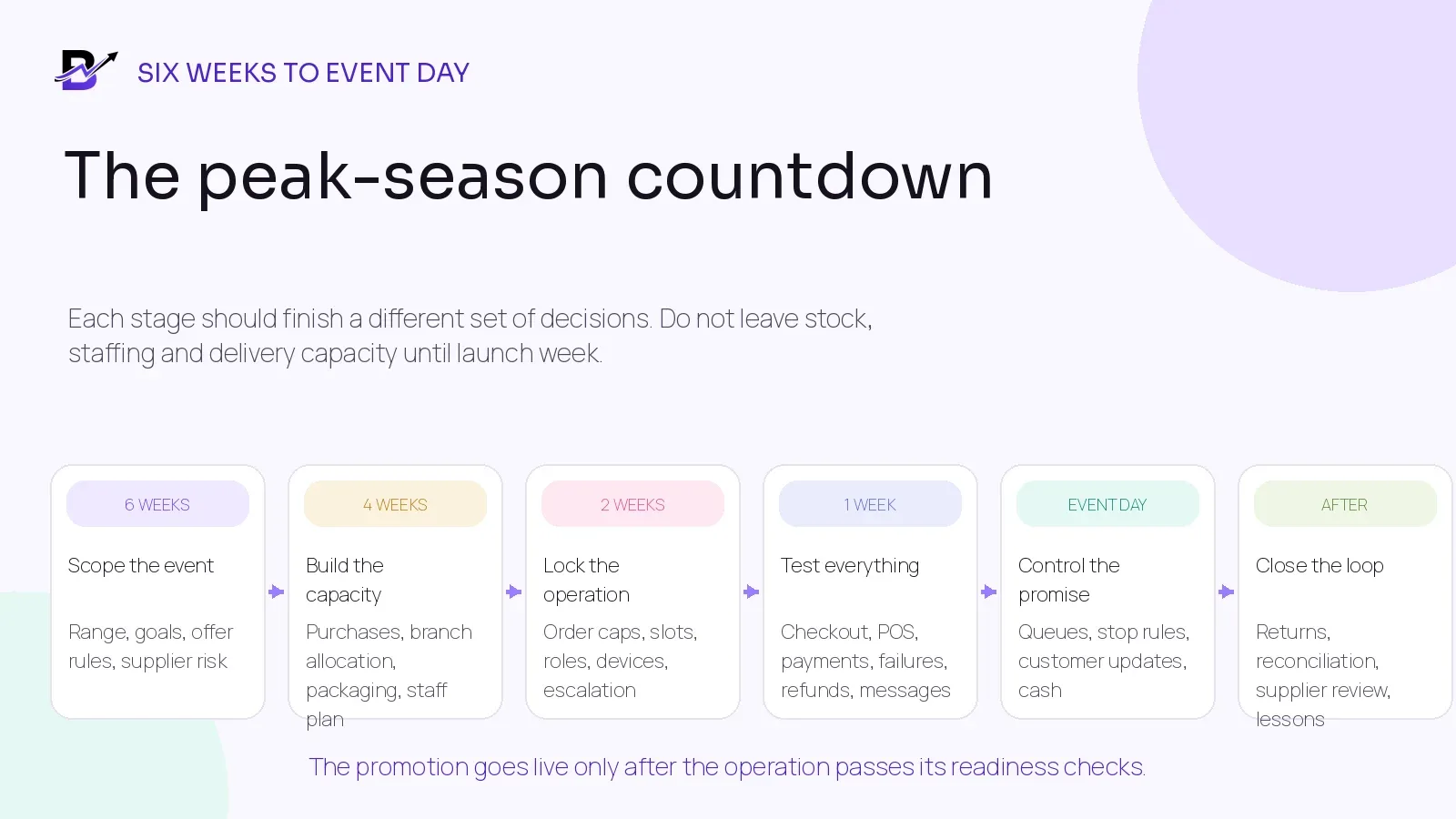
Figure 1. Each stage should close a different set of decisions. Do not leave stock, staffing and delivery capacity until launch week.
Six weeks before: define the campaign the operation can support
Begin with the operating promise, not the advertising creative. Decide which dates, channels, branches and customer journeys are included. A Black Friday code used online only is different from a weekend offer that also runs through POS, apps, manual orders, pickup and local delivery.
Step 1: Set the campaign boundaries — Write the start and end time, time zone, channels, branches, eligible customers and whether the offer extends into Cyber Monday or another holiday period.
Step 2: Choose the safe product range — Separate products that are repeatable and available from products that need special sourcing, long preparation, uncertain stock or complex delivery.
Step 3: Write one offer rule sheet — Record the normal price, promotional price or discount, eligible variants, minimum spend, quantity limits, combinations, delivery treatment, cancellation and return conditions.
Step 4: Name the decision owners — Assign one owner for commercial approval, catalogue and offer setup, stock and purchasing, operations, customer service, payments, delivery and final go-live.
Step 5: Set measurable stop rules — Decide in advance when a product, slot, branch, delivery zone or entire campaign option must close.
Use a smaller operationally safe assortment
The widest catalogue is not always the best peak catalogue. Every extra variant, add-on, custom line and delivery promise creates another decision for stock, staff and customer service. Keep the normal catalogue available only where the operation can fulfil it accurately.
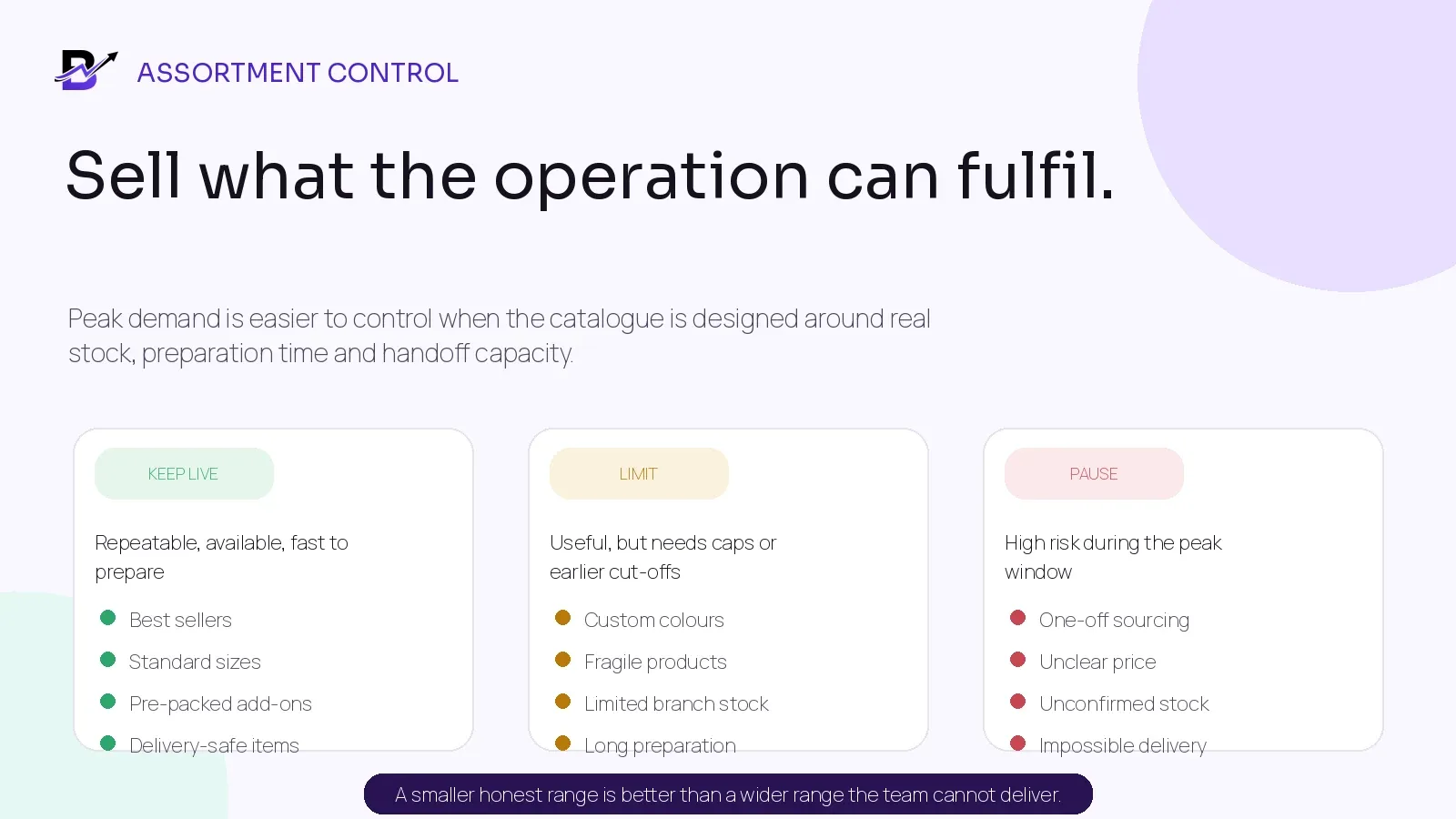
Figure 2. A smaller honest range can protect the customer promise better than a wider range the team cannot fulfil.
RANGE GROUP | GOOD FIT | PEAK CONTROL |
|---|---|---|
Keep live | Best sellers, standard sizes, confirmed branch stock, ready or repeatable preparation, delivery-safe packaging. | Promote confidently, but still use quantity and slot limits. |
Limit | Custom colours, fragile items, long preparation, low branch stock or special packaging. | Earlier cut-off, selected branches, daily cap or manual approval. |
Pause | One-off supplier sourcing, unclear cost, uncertain stock, untested presentation or impossible handoff. | Remove from the event range until the risk is resolved. |
Build one offer rule sheet
RULE | QUESTION TO ANSWER | EXAMPLE CONTROL |
|---|---|---|
Dates + time zone | Exactly when does the offer start and stop in each channel? | Use the store or market time zone and verify the displayed end time. |
Eligibility | Which products, variants, branches, customers or order sources qualify? | Use a named collection or approved SKU list. |
Discount method | Product discount, order discount, fixed amount, free delivery or another offer? | Use one method that staff and customers can explain. |
Combinations | Can the peak offer combine with loyalty, staff, first-order or shipping discounts? | Set the rule explicitly and test both allowed and blocked carts. |
Limits | Is there a minimum spend, maximum saving, quantity limit or one-use rule? | Show the limit before payment and make it work in POS where required. |
Stock treatment | Does the offer stop when available stock reaches the safety level? | Close or hide the product before physical stock is exhausted. |
Delivery | Is free or reduced delivery available for every zone and slot? | Tie the offer to the correct zone, minimum order and service window. |
Changes + refunds | How is a partial cancellation, refund, return or exchange calculated? | Keep the original offer and final financial outcome visible on the order. |
Implementation references checked 17 September 2026: Shopify discount codes · Shopify discount combinations · Google Merchant promotions.
Offer Test — A promotion is not ready because it exists in the admin panel. It is ready when a real eligible cart, an ineligible cart and every permitted combination produce the correct customer total and order record.
Four weeks before: secure stock, suppliers, packaging and branch allocation
Advertising demand before the purchasing and branch plan is confirmed can create false confidence. Review what is physically on hand, what is already reserved, what is unavailable, what has been ordered and what the supplier has actually confirmed.
Working Stock View — Available to promise = on hand - reserved - unavailable - safety buffer. The labels and exact calculation can differ by platform. The important point is that campaign stock must not include units already committed, damaged, under review or intentionally protected.
STOCK DECISION | WHAT TO CONFIRM | OWNER ACTION |
|---|---|---|
Opening quantity | Physical count by branch for every promoted product, variant and critical add-on. | Investigate important differences before correcting the number. |
Incoming purchases | Supplier, expected date, ordered quantity, confirmed quantity, receiving branch and evidence. | Do not treat unconfirmed or late stock as sellable campaign stock. |
Branch allocation | Which branch owns each quantity and can fulfil online, POS, pickup or delivery orders? | Move stock through a traceable transfer rather than editing two branches manually. |
Packaging | Boxes, bags, ribbons, labels, cards, containers, delivery materials and printer supplies. | Protect items that can stop fulfilment even when their unit cost is low. |
Add-ons | Chocolates, balloons, toppers, candles, gift wrap, testers or other campaign extras. | Cap or remove the add-on when it becomes the limiting item. |
Safety level | Quantity protected for damage, POS timing, custom orders, replacements or delayed updates. | Close the option before the protected quantity is consumed. |
Substitution | Which equivalent product, colour, package or add-on may replace an unavailable item? | Use only pre-approved substitutions and customer approval where required. |
For branch networks, total company stock is not enough. The quantity must be available at the branch that will accept and fulfil the order. If stock must move, use a sent, in-transit and received process so the same units are not offered from both locations.
Inventory reference: Shopify inventory transfers.
Two weeks before: lock capacity, roles, devices and escalation
Peak capacity is not one number. It is the lowest safe limit across the branch, product and handoff. A shop may have enough stock but not enough preparation space. A bakery may have enough staff but no pickup capacity in one 30-minute window. A florist may finish the bouquet but have no driver capacity for the promised slot.
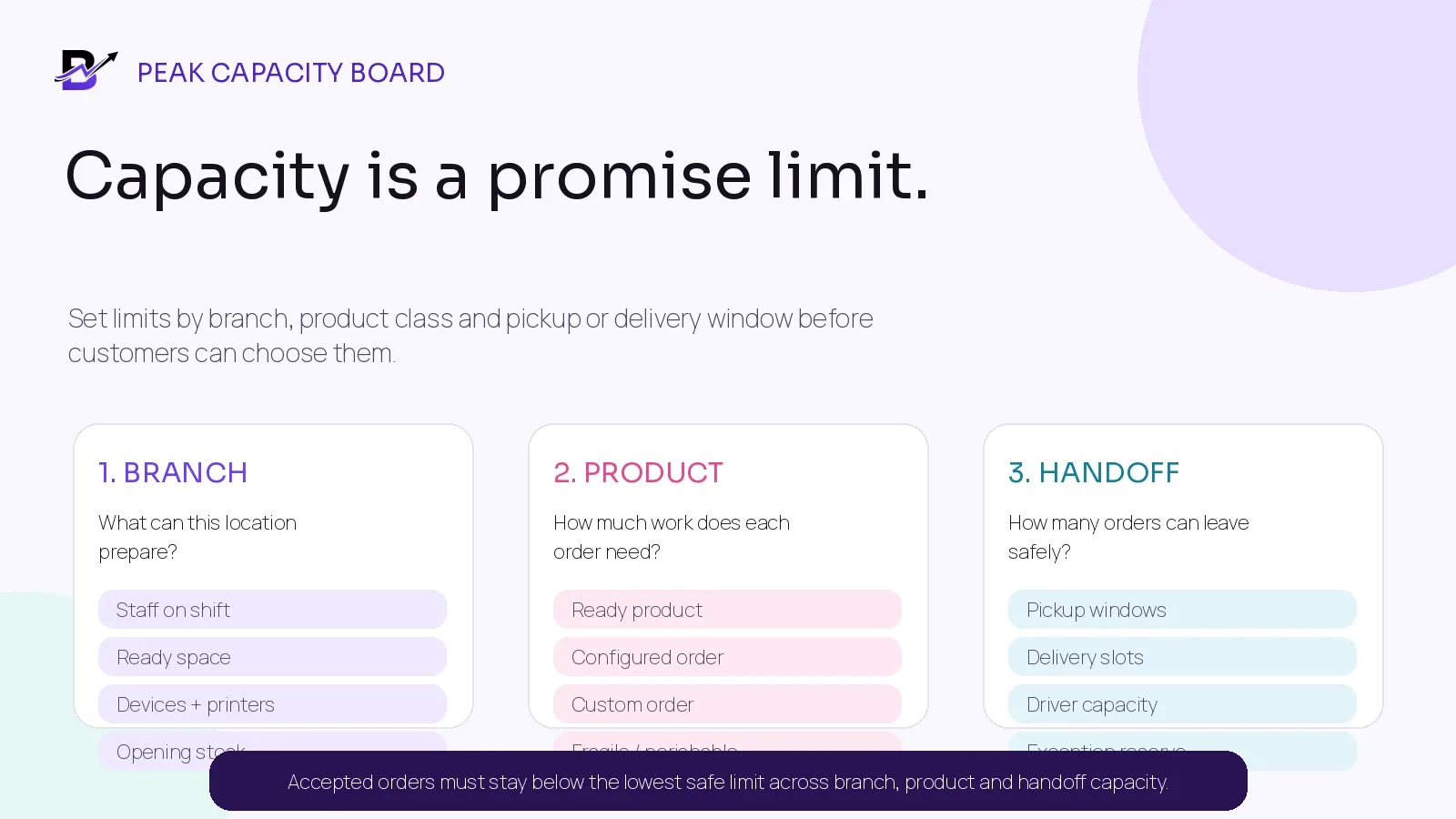
Figure 3. Accepted orders must stay below the lowest safe limit across branch, product and handoff capacity.
Set order caps by the real bottleneck
CAPACITY LAYER | QUESTIONS | POSSIBLE CONTROL |
|---|---|---|
Branch | How many staff, devices, printers, preparation stations and ready-order spaces are available? | Daily branch cap; queue-age trigger; temporary role or device plan. |
Product | How long does a ready, configured, custom, fragile or perishable item take? | Separate caps and cut-offs by product class. |
Pickup | How many customers can arrive in one window without blocking the counter? | Pickup windows, order-ready rule and named collection point. |
Delivery | How many ready orders can drivers complete by zone and slot? | Slot cap, zone closure, wider window or earlier cut-off. |
Customer service | How many payment, address, substitution and exception cases can be resolved? | Dedicated escalation queue and prepared response templates. |
After-sales | Who can approve cancellations, refunds, returns, credits and compensation? | Authority limits, named reviewer and clear record requirements. |
Give every role one clear peak responsibility
ROLE | MAIN RESPONSIBILITY DURING THE EVENT | WHAT THE ROLE SHOULD SEE |
|---|---|---|
Commercial owner | Approves offer, price, range, limits and stop decisions. | Campaign rule sheet, margin context, sales and risk view. |
Catalogue / ecommerce | Maintains eligible products, customer-facing terms, price, availability and channels. | Products, variants, offer status, checkout and content. |
Branch manager | Accepts safe work, assigns staff and protects the ready deadline. | Orders, stock, ageing, staff capacity and handoff windows. |
Preparation staff | Builds or picks against the complete approved order and performs the quality check. | Product, options, add-ons, message, notes, deadline and changes. |
POS / counter | Processes walk-ins and pickup without creating a second product, payment or stock record. | Shared catalogue, branch stock, discounts, payment and pickup state. |
Customer service | Resolves missing details, changes, failed payments, delays and customer updates. | Order timeline, payment, branch, promise and exception ownership. |
Dispatch / driver | Takes only ready orders and records the final handoff or failure. | Assigned order, address, recipient, slot, notes, navigation and proof action. |
Owner / operations lead | Reviews the live control board, closes unsafe options and coordinates escalation. | Payment, orders, stock, preparation, handoff, delivery, cash and exception reports. |
Temporary Staff Rule — Create named users with the minimum access they need. Do not share one manager login across temporary counter, fulfilment and delivery staff. Confirm device, printer, charger, network and password recovery before the event.
One week before: test normal orders and the failures
A polished product page and one successful checkout are not enough. Peak failures usually happen at the edges: the last unit, an excluded product, a second discount, a failed payment, an order changed after payment, a branch transfer not received, a refund without a return or a delivery that cannot be completed.
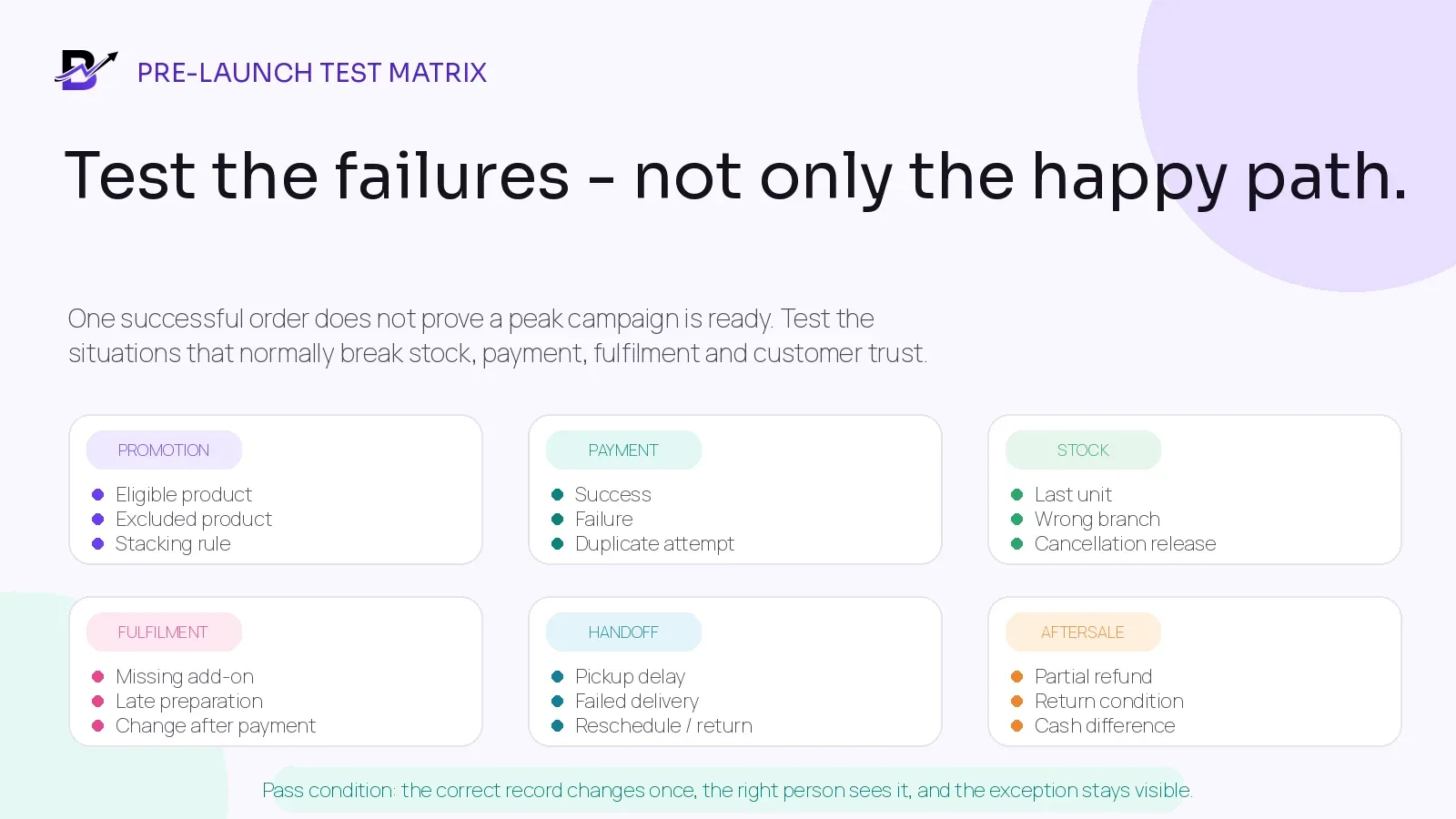
Figure 4. The correct record should change once, the right person should see it, and the exception should remain visible.
TEST SCENARIO | EXPECTED RESULT | RISK CAUGHT |
|---|---|---|
Eligible product + code | Correct product, saving, tax, delivery and final total appear before payment. | Wrong price or unclear terms. |
Excluded product + code | The offer is rejected or only eligible lines receive the saving. | Accidental site-wide discount. |
Discount combination | Allowed combinations work; blocked combinations show a clear result. | Unexpected stacking or customer dispute. |
Start/end time | Offer activates and expires in the intended time zone across web, app and POS where included. | Early activation or late continuation. |
Failed payment | Order stays unpaid or follows the approved pending flow; stock hold is released at the right time. | False paid order or blocked stock. |
Duplicate payment attempt | Only the intended payment and order outcome remain active. | Double charge or duplicate order. |
Last available unit | The correct branch accepts or rejects the sale once and other channels update according to policy. | Overselling. |
Wrong fulfilment branch | Order is rerouted only with stock, responsibility and timing updated. | Invisible stock or missed ownership. |
Missing add-on | Staff cannot close the quality check until the paid extra is resolved. | Incomplete order. |
Customer change after payment | Price, payment and preparation instructions update through a controlled change. | Old version prepared. |
Cancellation before preparation | Reservation releases once; financial outcome and history remain visible. | Stock not released or released twice. |
Refund without return | Money changes; physical stock does not increase automatically. | False restocking. |
Returned item | Condition and location decide whether it is restocked, held, reworked or written off. | Unsellable product offered again. |
Failed delivery / missed pickup | Status, reason, customer update, next action and any return remain connected. | Order disappears into calls or chat. |
Cash difference | Expected amount, actual cash, expense/refund evidence and reviewer are recorded. | Hidden closing variance. |
Network or device issue | The fallback process protects order sequence, payment evidence and later reconciliation. | Duplicate entry or lost sale. |
Testing reference: Shopify test orders.
Pass Condition — Do not record only “test passed.” Save the scenario, test order, user, device, expected result, actual result, evidence, issue owner and retest date.
Prepare customer communication before demand arrives
Peak communication should reduce avoidable questions and prevent staff from making new promises in private messages. Use the same approved information across product pages, campaign pages, checkout, order confirmation, pickup or delivery updates, customer service and POS.
CUSTOMER MOMENT | MESSAGE SHOULD CLARIFY | AVOID |
|---|---|---|
Before purchase | Eligible products, price, code, dates, minimum spend, quantity limit, delivery or pickup choices and important exclusions. | “Everything on sale” when only a selected range is eligible. |
Order confirmation | Order number, product summary, payment state, branch or fulfilment context, pickup or delivery promise. | A confirmation that implies acceptance before stock or capacity validation if the workflow still needs review. |
Important change | Unavailable item, approved substitute, revised price, address, time or cancellation effect. | Silently changing the order or asking staff to rely on an old chat. |
Ready for pickup | Where and when to collect, permitted pickup person, evidence needed and how long the order will be held. | Sending ready status before quality check. |
Out for delivery | That the order has left, the promised window and safe contact expectations. | An exact arrival minute the operation cannot support. |
Exception | What happened, what information is needed and the next agreed action. | Vague “delivery issue” messages with no owner or next step. |
Refund / return | Approved amount, method, expected processing path, return condition and order reference. | Promising an instant settlement when the payment provider controls timing. |
If products are promoted through Google Merchant Center, keep the product feed, landing page, checkout price and active promotion details consistent. Effective dates and review timing matter, so submit and verify campaign data before the public launch rather than on the event morning.
Merchant promotion references: Google promotion setup · promotion status and troubleshooting · sale price effective dates.
Event day: use one simple operating view and clear stop rules
Managers do not need fifty charts while queues are moving. They need a small view that shows whether payment, order acceptance, stock, preparation, handoff and delivery are still inside the safe limits agreed before launch.
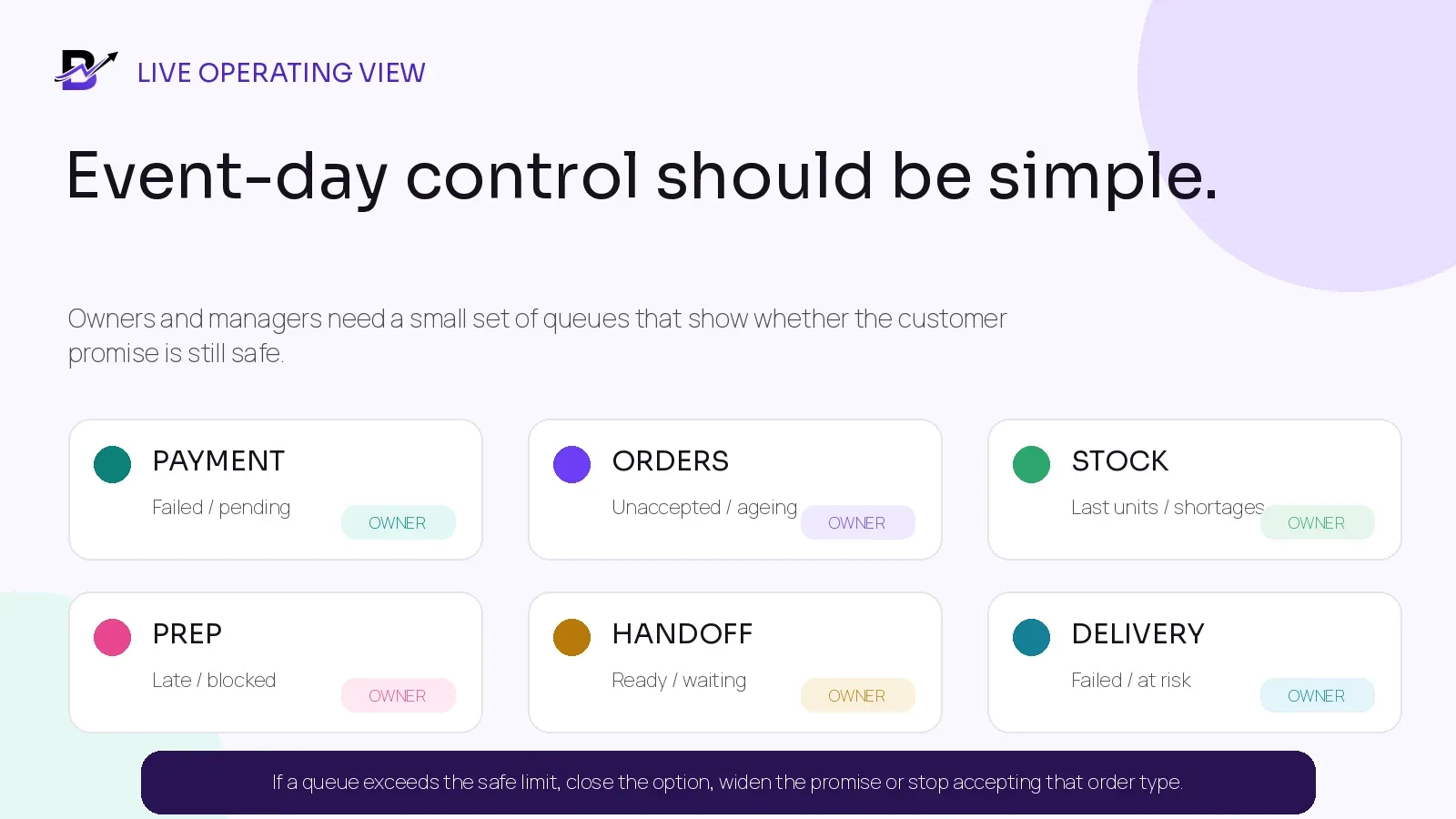
Figure 5. If a queue crosses the safe limit, close the option, widen the promise or stop accepting that order type.
LIVE QUEUE | WHAT TO WATCH | ACTION WHEN THE LIMIT IS CROSSED |
|---|---|---|
Payment | Failed, pending, duplicate or unmatched payments. | Pause the affected method or route; protect unpaid orders from fulfilment. |
New orders | Unaccepted orders and age since creation. | Add acceptance ownership or close the relevant channel, branch or product class. |
Stock | Last units, negative availability, missing add-ons and transfer differences. | Hide, cap, substitute with approval or stop selling the item. |
Preparation | Late, blocked or rework orders by product and branch. | Move capacity, widen the promise or close complex options. |
Ready / pickup | Ready orders waiting, customer arrivals and uncollected orders. | Open another collection point, adjust windows or send the correct update. |
Delivery | Orders at risk, ready-to-dispatch delay, failed attempts and driver capacity. | Close the slot or zone, reassign, reschedule or contact the customer before the promise fails. |
Cash | Cash in hand, refunds, expenses, driver collections and unexplained differences. | Escalate the variance immediately; do not hide it inside a note. |
Customer service | Open changes, address corrections, substitutions, cancellations and complaints. | Assign one owner, response deadline and operational next action. |
Event-day opening checklist
Confirm the campaign price, code, eligibility, combination and end time with one live test cart.
Count critical stock, packaging and high-risk add-ons at every participating branch.
Confirm branch, staff, POS, fulfilment, customer-service and driver users can sign in.
Test printers, scanners, payment terminals, devices, chargers, network and fallback contacts.
Open the correct pickup windows, delivery zones and slots; close any unstaffed or unsafe option.
Review the first supplier receipt, transfer, stock adjustment and cash opening where relevant.
Publish one escalation list: payment, catalogue, branch, customer service, delivery and owner decision maker.
Agree the exact times for live reviews during the day and who can activate each stop rule.
Peak guidance by specialty-retail model
BUSINESS MODEL | PEAK RISK | USEFUL SIMPLIFICATION |
|---|---|---|
Messages, add-ons, substitution, packaging, branch preparation and same-day delivery compete for attention. | Promote proven designs, cap add-ons, prepare common cards and packaging, use earlier custom cut-offs and wider delivery windows. | |
Preparation time, design approvals, chilled storage, pickup timing and delivery condition can become the bottleneck. | Separate standard from custom products, cap each ready time, lock design changes and use pickup windows. | |
Short preparation windows, modifiers, counter queue, online pickup and delivery arrive together. | Use a peak menu, hide slow modifiers, separate pickup from walk-in collection and protect kitchen capacity. | |
Variants, gift sets, premium wrapping, branch stock and assisted recommendations may create slow counter decisions. | Promote confirmed variants and gift sets, pre-build packaging, cap custom bundles and protect high-value stock. | |
Detailed product identity, high value, size or customisation, secure pickup and delivery need stronger control. | Promote verified products, limit unconfirmed custom work, use named approval and secure handoff rules. | |
Multi-branch specialty retail | One branch accepts demand that another branch owns or cannot fulfil. | Use branch stock, branch capacity, traceable transfers and explicit order reassignment. |
Scope Note — Food production planning, recipe depletion, batch or expiry tracking, advanced demand forecasting, workforce scheduling, fraud prevention, automated route optimisation, secure logistics and regulated product controls may require specialist systems or explicit integration scope. Confirm them before the campaign.
Keep pickup and delivery promises honest
Holiday demand often moves the bottleneck from product availability to handoff capacity. A business can prepare an order and still disappoint the customer if the pickup queue, dispatch delay, delivery zone or failed-attempt process was not planned.
HANDOFF CONTROL | PEAK RULE |
|---|---|
Pickup windows | Set a capacity for each window and mark ready only after the final quality check. |
Collection point | Separate pickup from new POS sales where space allows; show the customer exactly where to go. |
Delivery zones | Serve only the areas that the branch and driver operation can cover consistently. |
Slot capacity | Close the slot before the queue becomes unsafe; do not wait until every driver is already late. |
Ready status | Assign only complete orders. The driver or customer should not wait for missing products, cards or labels. |
Proof + exceptions | Record delivered, failed, returned or rescheduled outcomes with the required note or proof. |
Customer updates | Send meaningful confirmation, ready, out-for-delivery and exception messages based on real status. |
Stop rule | Widen the window, limit the zone, close complex products or stop same-day orders when the remaining capacity cannot keep the promise. |
Local-delivery reference: Shopify local delivery setup.
After the event: reconcile the operation before celebrating the revenue
The campaign is not finished when the promotion expires. Open refunds, returns, failed deliveries, unpaid orders, uncollected pickups, supplier differences, stock variances and cash still need closure. The post-event review should compare what was promised, what was completed and where the workflow created avoidable work.
REVIEW AREA | QUESTIONS TO ANSWER | USEFUL BREAKDOWN |
|---|---|---|
Sales + offer | Which channels, products and discounts created completed orders rather than only carts or cancellations? | Channel, product, category, branch, offer, hour. |
Stock + purchases | Which products stocked out, remained slow, required transfers or produced supplier differences? | Product, variant, branch, supplier, adjustment reason. |
Preparation | Which order types aged, required rework or missed the ready deadline? | Product class, branch, staff role, time window. |
Pickup + delivery | Which windows, zones and branches produced waiting, failed or rescheduled handoffs? | Slot, zone, driver, failure reason, product. |
Payment + cash | Which methods failed, refunded slowly or created closing differences? | Payment method, branch, user, reason, evidence. |
Aftersales | Why were orders cancelled, refunded, returned, exchanged or compensated? | Reason, product, channel, fulfilment stage, financial outcome. |
Customer service | Which questions repeated because product, offer, status or policy information was unclear? | Topic, channel, response time, owner. |
Next event | Which range, cap, supplier, staffing, communication or stop rule should change? | Keep, improve, remove, test next time. |
Review Rule — Use completed outcomes, not only gross order value. An order that was cancelled, refunded, returned or delivered late carries a different operational lesson from one completed cleanly.
How Bloomlytix can support peak-season retail operations
Bloomlytix is designed as one ecommerce and retail operating system for specialty retailers. The peak-season value is not one Black Friday button. It is the connection between the customer offer and the daily work required to complete the order.
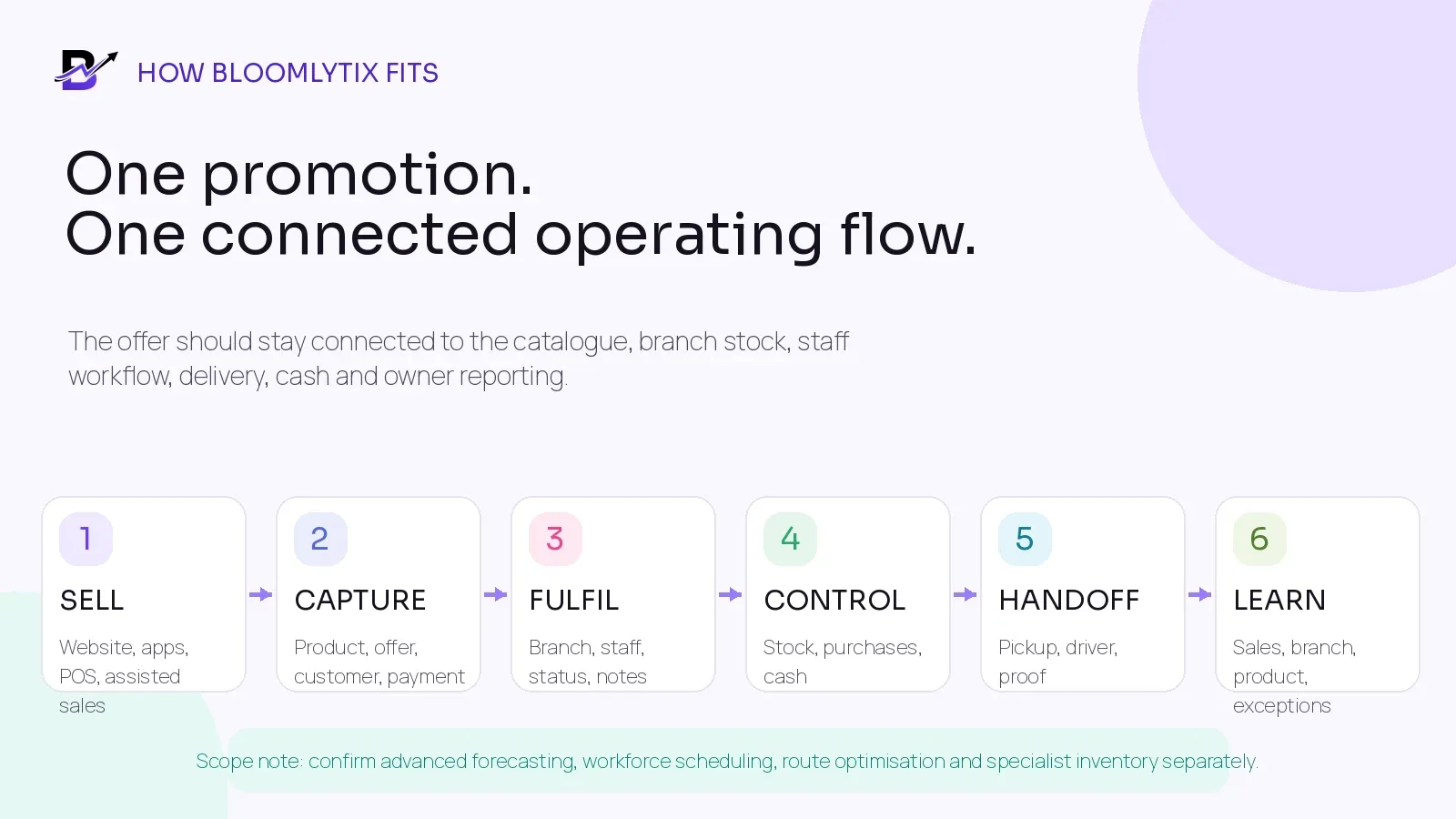
Figure 6. The exact configuration depends on the business, plan, branches, users, products, payments and delivery model.
BLOOMLYTIX AREA | ROLE IN THE PEAK WORKFLOW |
|---|---|
Shared catalogue + customer channels | Use configured products, variants, offers and add-ons across the website, eligible customer apps and POS without rebuilding the range for every channel. |
Orders + staff fulfilment | Bring online, app, POS, manual and payment-link orders into a connected queue with payment, branch, notes, statuses and timeline. |
Branch stock + purchasing | Review practical product and branch quantities, low-stock items, adjustments, transfers, suppliers and purchase invoice evidence. |
POS + payment context | Process counter or assisted sales with configured payment methods and keep the sale inside the wider operational and reporting context. |
Pickup + delivery | Use configured zones, charges, dates, slots, driver assignment, statuses and proof around the same order. |
Cash + staff control | Record cash received, expenses, staff cash in hand, driver collections and daily cash activity where configured. |
Owner reports | Review sales, products, branches, staff, stock, purchases, cash, delivery and campaign context from one platform. |
AI-assisted growth tools | Prepare product, SEO, blog and campaign content faster while keeping human review before publication. |
Product Scope — Bloomlytix supports connected ecommerce, POS, orders, staff fulfilment, branch stock, purchases, cash, delivery and reports. Confirm advanced demand forecasting, automatic replenishment, workforce scheduling, fraud tools, automated route optimisation, manufacturing or recipe planning, batch/expiry requirements and third-party marketplace connections separately.
Bloomlytix product scope checked 17 September 2026: complete platform · plans and implementation scope.
Questions to ask during a peak-season software review
Can the same approved product, variant, offer and stock context support ecommerce, apps and POS?
Can the business restrict the event by product, branch, channel, date, time and customer rule?
How do discount combinations, quantity limits, minimum spend and delivery offers behave?
Can each branch see its own order queue, stock, staff ownership and handoff deadlines?
Can normal, custom, manual and payment-link orders use one staff workflow?
When does a paid order reserve or reduce stock, and what releases it after failure or cancellation?
Can the team set or operationally enforce order, pickup and delivery capacity?
How are failed payments, substitutions, cancellations, partial refunds, returns and exchanges recorded?
Can temporary staff receive limited role-based access without sharing manager credentials?
Can customer service see the latest payment, preparation, pickup or delivery status from one order timeline?
Which live reports show branch, product, queue, delivery, cash and exception risk during the event?
What is standard, what needs configuration, and what requires an integration or custom project?
Frequently asked questions
When should Black Friday operations planning start?
A practical starting point is about six weeks before the campaign launch. Businesses with long supplier lead times, app-store changes, complex custom products, several branches or third-party integrations should begin earlier. Work backward from the public start date and leave time for correction after testing.
Should retailers reduce the product range for peak demand?
Often, yes. Keep products that are available, repeatable, profitable enough under the offer and safe to prepare or deliver. Limit or pause items that require uncertain sourcing, long consultation, fragile handling, heavy customisation or an untested process.
How should delivery slots change during peak demand?
Use capacity that reflects the branch, preparation time, ready-order queue and driver operation. Peak controls can include fewer zones, wider windows, earlier cut-offs, caps by slot and product eligibility. Close an option before the remaining capacity becomes unsafe.
What should be tested before the campaign?
Test eligible and excluded products, discount combinations, start and end time, successful and failed payments, last-unit stock, branch allocation, cancellations, partial refunds, returns, pickup, delivery failures, customer updates, cash and device or network fallback.
Which metrics should be reviewed after the event?
Review completed orders, revenue, margin context, offer usage, payment failures, stock-outs, transfer differences, preparation time, pickup wait, delivery completion, cancellation, refund, return, customer-service demand and cash variance. Break the results down by channel, product, branch, time slot and failure reason.
Does a retailer need special Black Friday software?
Not necessarily. The requirement is a reliable operating workflow. Existing systems may be sufficient when products, offers, stock, orders, staff, pickup, delivery, refunds and reporting can be controlled clearly. A connected platform becomes more valuable as channels, branches, staff and exceptions increase.
Peak Season Operations Checklist
Use this checklist for Black Friday, Cyber Monday, Christmas, Eid, Valentine’s Day, Mother’s Day or any other event that creates concentrated demand. Adjust the timing to match your supplier lead times and campaign date.
DONE | AREA | PASS CONDITION |
|---|---|---|
☐ | Campaign + range | Dates, time zone, channels, branches and owners are approved. |
☐ | Campaign + range | Eligible products and variants are listed; high-risk items are limited or paused. |
☐ | Campaign + range | Price, discount, code, combinations, minimum spend, limits and end time are tested. |
☐ | Campaign + range | Customer-facing terms match checkout, POS and staff instructions. |
☐ | Stock + purchases | Critical stock is physically counted by branch. |
☐ | Stock + purchases | Supplier quantities and receiving dates are confirmed, not assumed. |
☐ | Stock + purchases | Packaging, labels, cards, printer supplies and delivery materials are included. |
☐ | Stock + purchases | Safety stock and product stop levels are written. |
☐ | Stock + purchases | Branch transfers use sent, in-transit and received states. |
☐ | Capacity + people | Order caps exist by branch, product class and handoff window. |
☐ | Capacity + people | Every queue has an owner, backup and escalation contact. |
☐ | Capacity + people | Temporary users have named accounts and limited access. |
☐ | Capacity + people | Devices, printers, scanners, terminals, chargers and network are tested. |
☐ | Checkout + payment | Web, app and POS tests create the correct order, payment and stock result. |
☐ | Checkout + payment | Failed payment, duplicate attempt and expired order behaviour are tested. |
☐ | Fulfilment | Acceptance, preparation, quality-check and ready statuses have clear meaning. |
☐ | Fulfilment | Paid add-ons, messages, custom notes and substitutions remain visible. |
☐ | Pickup + delivery | Pickup windows, zones, charges, slots, driver capacity and stop rules are active. |
☐ | Pickup + delivery | Delivered, failed, returned and rescheduled outcomes are configured. |
☐ | Customer service | Confirmation, change, delay, ready, delivery and exception messages are approved. |
☐ | Aftersales | Cancellation, refund, return, exchange and cash authority limits are written. |
☐ | Control | The live board shows payment, orders, stock, preparation, handoff, delivery and cash risk. |
☐ | Control | Review times and the person allowed to close each option are agreed. |
☐ | After event | Open orders, refunds, returns, cash, stock and supplier differences will be reconciled. |
☐ | After event | Results will be reviewed by channel, product, branch, slot and failure reason. |
Run the promotion after the operation passes
A successful peak campaign is not only a strong headline and a busy checkout. It is a controlled customer promise. The product must exist. The offer must calculate correctly. The right branch must own the work. Staff must see the complete order. Pickup or delivery must stay inside capacity. Exceptions must remain traceable. Cash, stock and reports must close cleanly afterward.
Prepare the operation first. Then let the campaign create demand around a workflow the team can actually complete.
Peak-season workflow review. Bring your campaign dates, product range, branches, staff plan, pickup or delivery model and one real exception. Bloomlytix will map the sale through catalogue, payment, fulfilment, stock, handoff, cash and owner reporting before the promotion goes live.
Book a peak-season workflow demo
Related Bloomlytix guides: same-day delivery workflow · retail purchase management · multi-location inventory · cancellations, refunds and returns · retail operating system.