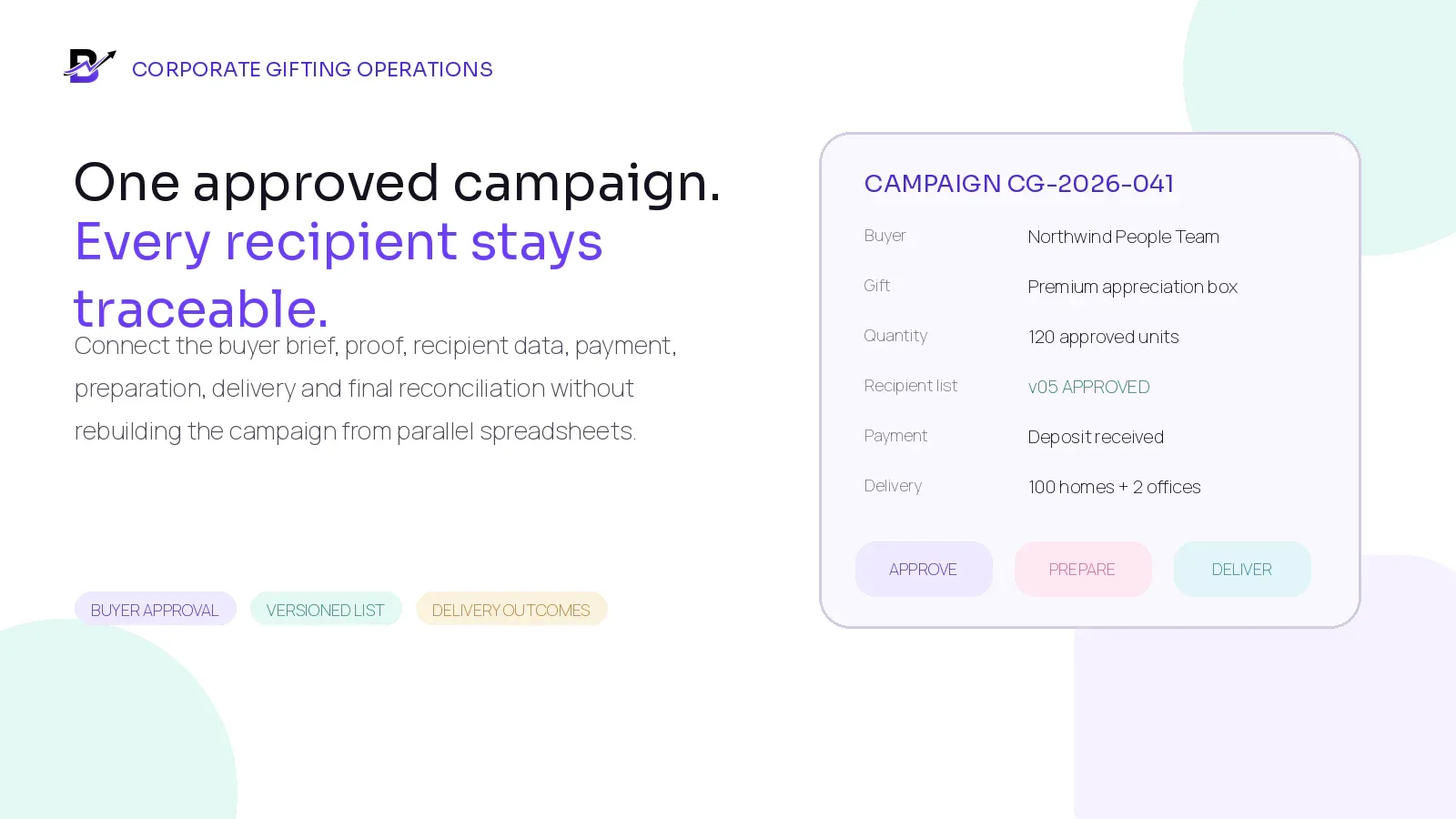
One corporate order should become one controlled campaign, not dozens of disconnected conversations and spreadsheets.
A corporate gift order can look like one sale. Operationally, it may contain 20, 100 or 1,000 separate promises.
A business buyer may need a quotation, product sample, branded sleeve, custom card, deposit, tax invoice, recipient spreadsheet, several delivery dates and proof that every gift reached the correct person. The gifting team must turn that approved commercial agreement into products, labels, packing work, delivery records and exceptions that can still be explained after the campaign ends.
When the brief lives in email, the proof lives in chat, the payment sits in another portal and the latest recipient list is called “final_v7”, small changes can create large errors. The reliable alternative is one campaign record with controlled approvals and recipient-level fulfilment records.
DIRECT ANSWER. Manage a corporate gifting order as one approved campaign. Keep the company, authorised buyer, scope, products, branding proof, price, payment terms, deadline and approved recipient-list version together. Validate every recipient row before production, then create the fulfilment or delivery records required by the chosen handoff model. Record every change, failed delivery, replacement and financial adjustment until units, outcomes and payments reconcile.
This guide is for gifting brands, florists, chocolate and hamper businesses, bakeries, perfume brands and other specialty retailers handling corporate appreciation gifts, event packs, employee gifts, client gifts or multi-address campaigns.
In this guide
Why corporate gifting needs a campaign workflow, not only a large order
What the buyer brief and quotation should confirm before approval
How campaign-level data differs from recipient-level fulfilment data
How to control samples, proofs, approvals, deposits and balances
How to build and validate a recipient list that staff and drivers can use
When one campaign should create one order, several batches or many recipient records
How to plan stock, purchasing, preparation, packing and delivery
How to handle late changes, missing addresses, failed delivery and damaged items
How to reconcile units, delivery outcomes, stock and payment at the end
Where Bloomlytix can support the workflow and what needs separate confirmation
Why corporate gifting is different from a normal retail order
A normal consumer order usually has one buyer, one basket and one handoff. A corporate campaign may have one buyer, several internal approvers, a negotiated product, custom branding, a recipient list, different delivery dates and a separate invoice or payment schedule. The quantity is larger, but the real complexity comes from coordination and change control.
AREA | NORMAL RETAIL ORDER | CORPORATE GIFTING CAMPAIGN |
|---|---|---|
Buyer | Usually the person receiving the product or paying for it. | An authorised company contact may buy for employees, clients or event guests. |
Approval | Checkout or counter confirmation may be enough. | Product, price, branding, message, sample, list and schedule may need separate approvals. |
Order structure | One order normally maps to one pickup or delivery. | One campaign may create one office drop, several batches or many recipient-level deliveries. |
Payment | Often paid before fulfilment. | May use deposit, balance, invoice or agreed terms, depending on the business and provider. |
Data | Customer and delivery details are entered once. | Recipient data may arrive in a spreadsheet and change several times before the freeze. |
Closure | Completed when the order is handed over. | Completed only after quantities, recipient outcomes, exceptions, stock and payment are reconciled. |
CORE PRINCIPLE. Treat the corporate order as one campaign with a master scope. Treat each address, pickup batch or delivery stop as a controlled fulfilment record. The campaign owns the commercial promise; the fulfilment records prove how that promise was completed.
1. Start with a complete corporate gifting brief
The brief is the first source of truth. It should be detailed enough to support a quotation and realistic enough for operations to plan stock, production and delivery. Do not begin with a vague request such as “100 premium gifts next month.” Turn the request into a written campaign definition.
BRIEF AREA | WHAT TO CONFIRM |
|---|---|
Company + buyer | Legal or trading name, authorised buyer, billing contact and preferred communication channel. |
Campaign purpose | Employee appreciation, client gifting, event, onboarding, Ramadan, year-end or another stated occasion. |
Products + quantity | Approved gift, size, options, add-ons, quantity, samples and any permitted alternatives. |
Branding + message | Logo file, colours, print area, sleeve, card, name personalisation, language and approved wording. |
Budget + commercial scope | Currency, unit price, setup or branding cost, delivery, tax treatment and quote validity. |
Dates + capacity | Proof deadline, list freeze, production window, dispatch date, delivery dates and latest acceptable completion. |
Delivery model | Single location, buyer pickup, batch delivery, multi-address delivery or mixed model. |
Substitution rule | What may change, who can approve it and how price or timing changes will be handled. |
Acceptance criteria | What the buyer must approve before production and what evidence closes the campaign. |
Privacy + access | Which recipient fields are necessary, who may access them and how the list will be retained or removed. |
SCOPE CHECK. The quote should describe the campaign you can actually fulfil. If automated recipient imports, multi-level approvals, contract pricing, warehouse picking or international distribution are required, identify them before the quotation is accepted.
2. Separate campaign-level data from recipient-level records
One campaign record should hold the commercial and creative agreement. Recipient or batch records should hold the information required to prepare and hand off each gift. Mixing both levels in one large note makes reporting and exception handling difficult.
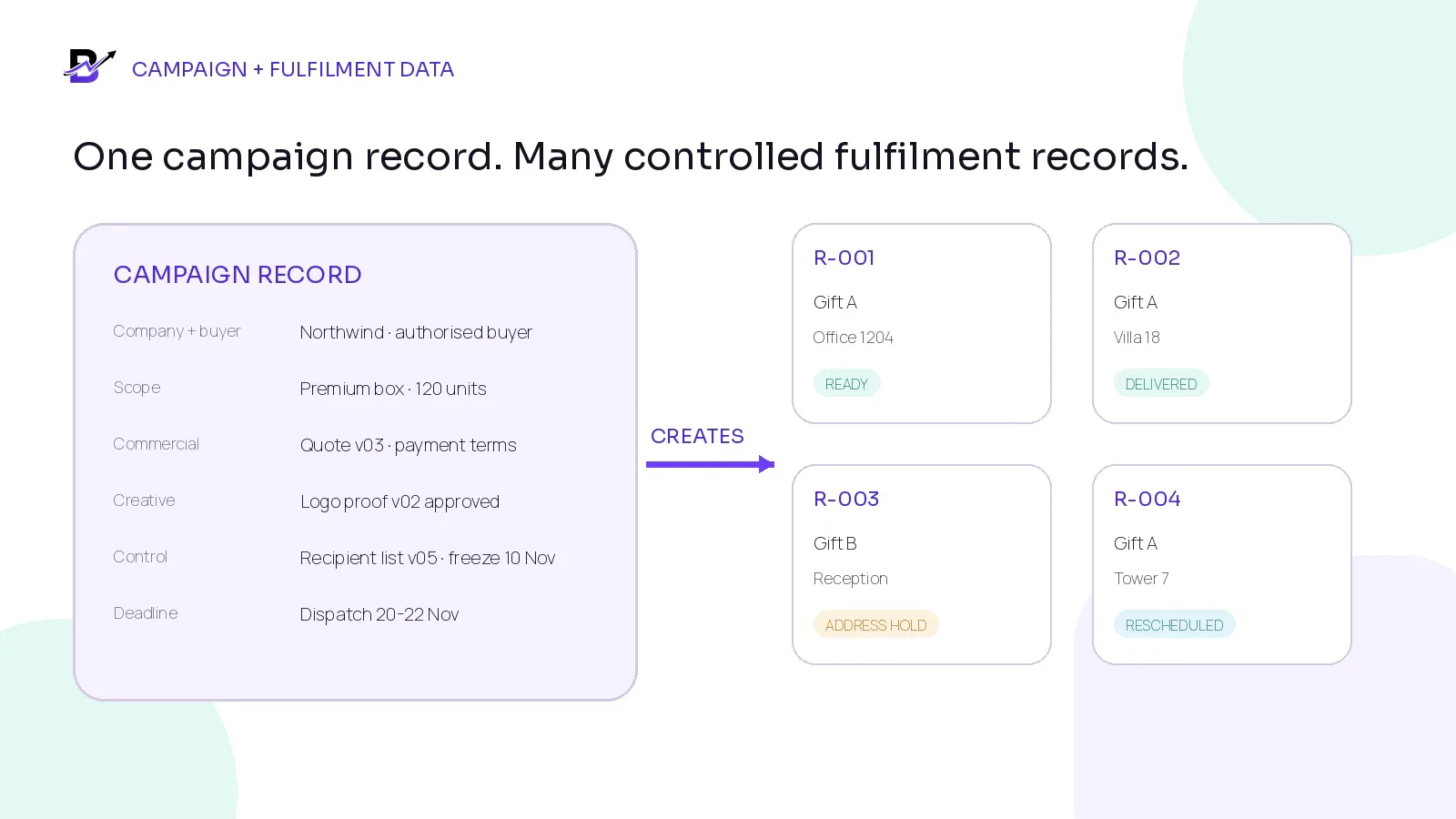
Figure 1. The campaign owns the approved scope; each recipient or batch record owns one fulfilment outcome.
RECORD | WHAT IT SHOULD CONTAIN |
|---|---|
Campaign level | Company, buyer, quotation, approved product, negotiated price, branding proof, payment terms, recipient-list version, production plan, overall deadline and reconciliation. |
Recipient level | Recipient ID, gift assignment, greeting text, permitted contact details, address, date or slot, special handling, delivery status, proof and exception notes. |
Batch level | Office drop, pickup batch, event table or route group containing several units under one handoff record. |
Change log | What changed, who requested it, who approved it, which records were affected and whether price, quantity or timing changed. |
RECORD DESIGN. A recipient row is not automatically a customer account. A recipient may only be the person or location needed to complete the buyer’s delivery request. Keep recipient service data separate from marketing permission.
3. Use clear approval stages before production begins
Corporate gifting often fails because “approved” means different things to different people. The buyer may have approved the product but not the printed sleeve. Sales may have accepted the quote while operations are still waiting for the recipient list. Create visible gates and name the person authorised to approve each one.
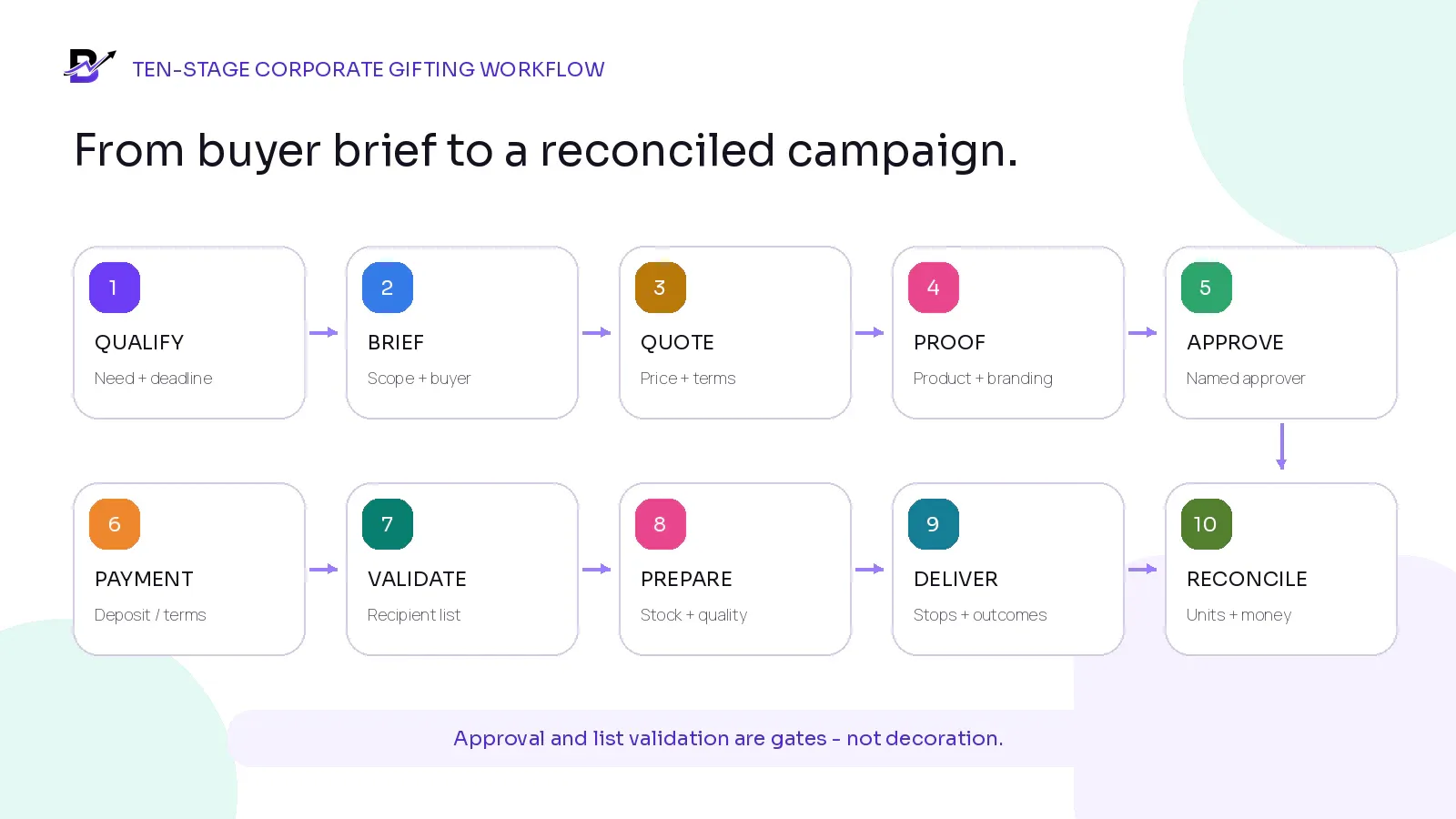
Figure 2. The exact status names can vary, but approval and list validation should remain visible gates.
1. Qualify the request
Confirm the buyer, campaign purpose, budget range, quantity, deadline, delivery model and decision process before promising a date.
2. Create the written brief
Turn the conversation into one campaign record with product, branding, message, quantity, timing, delivery and scope assumptions.
3. Prepare the quotation
Show products, custom work, delivery, taxes or configured fees, validity, payment terms and anything excluded from the standard scope.
4. Create the sample or proof
Prepare a physical sample or digital proof when needed. Give it a version number and show exactly what the approval covers.
5. Record buyer approval
Store the approver, approved version, date, comments and any conditions. Do not rely on a reaction emoji or an unclear verbal message.
6. Confirm payment or production authority
Apply the business policy for deposit, balance, invoice, credit terms or written purchase order before committing stock and staff.
7. Validate and freeze the recipient list
Check every required field, totals, duplicates, addresses and special instructions. Lock one approved version at the agreed time.
8. Plan and prepare the campaign
Reserve or purchase products, packaging and add-ons; assign branches or teams; produce labels; prepare gifts; and complete quality checks.
9. Complete pickup or delivery
Use the approved recipient, batch and timing data. Record delivered, collected, failed, returned or rescheduled outcomes.
10. Reconcile and close
Compare approved quantity, produced units, stock, delivery outcomes, replacements, invoices, payments and remaining exceptions before closing.
4. Make every approval specific and versioned
Approval should answer one question: exactly what can the team use now? Store the approved artefact or version with the name of the approver and time of approval. A later change should create a new version or change request instead of silently replacing the earlier decision.
APPROVAL | WHAT APPROVAL SHOULD COVER | TYPICAL APPROVER |
|---|---|---|
Product + quantity | Gift selection, variants, included items, packaging, quantities and approved alternatives. | Named buyer or authorised approver |
Price + terms | Unit price, setup or branding cost, delivery, discount, tax handling and payment timing. | Buyer / finance contact |
Branding proof | Logo placement, colours, print area, language, card or sleeve wording and version. | Brand or marketing approver |
Recipient list | Approved file version, row count, delivery model, validation result and freeze time. | Buyer / HR / operations contact |
Delivery plan | Dates, slots or batches, handoff rules, failed-delivery policy and proof expectations. | Buyer and operations owner |
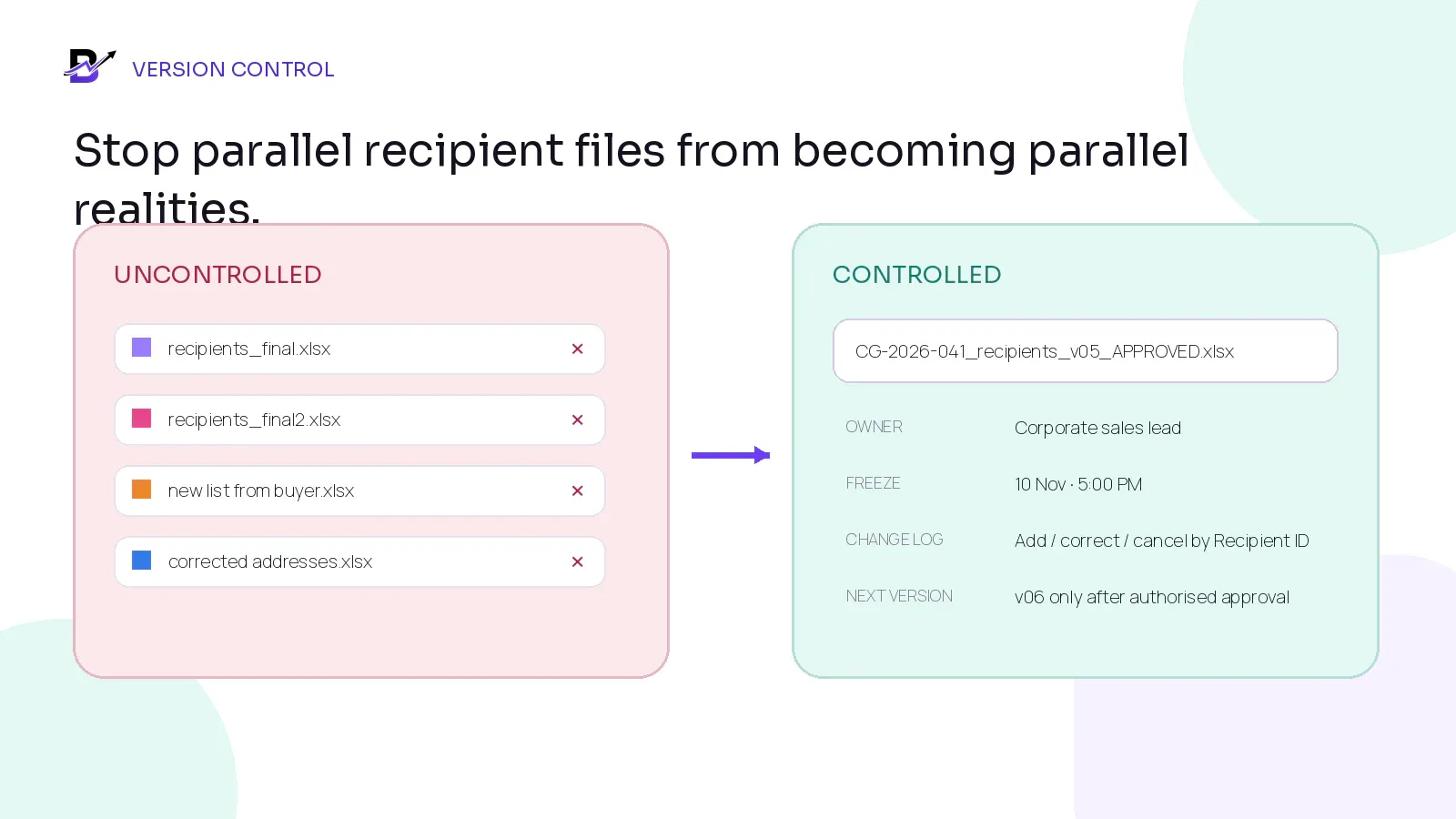
Figure 3. One approved file, one owner, one freeze time and one change log are easier to control than parallel “final” spreadsheets.
Use a practical file convention such as CG-2026-041_recipients_v05_APPROVED_2026-11-10.xlsx. The name alone does not create control, but it helps staff recognise the campaign, version and status. Keep the actual approval in the campaign history as well.
Assign one campaign ID and one owner for the recipient file.
Give every row a stable Recipient ID that does not change when the row moves.
Keep one approved working location rather than copies in personal inboxes and chats.
Define a list-freeze date and time before production labels are created.
Record additions, corrections and cancellations against the Recipient ID.
Create a new version only through an authorised change process.
Show which fulfilment records were updated after a list change.
Do not delete the previous approval history.
5. Build a recipient list that can become real fulfilment work
A recipient list is not complete because it contains names and addresses. It is complete when each row has enough validated information to create the correct product, label, timing and handoff without staff searching through separate emails.
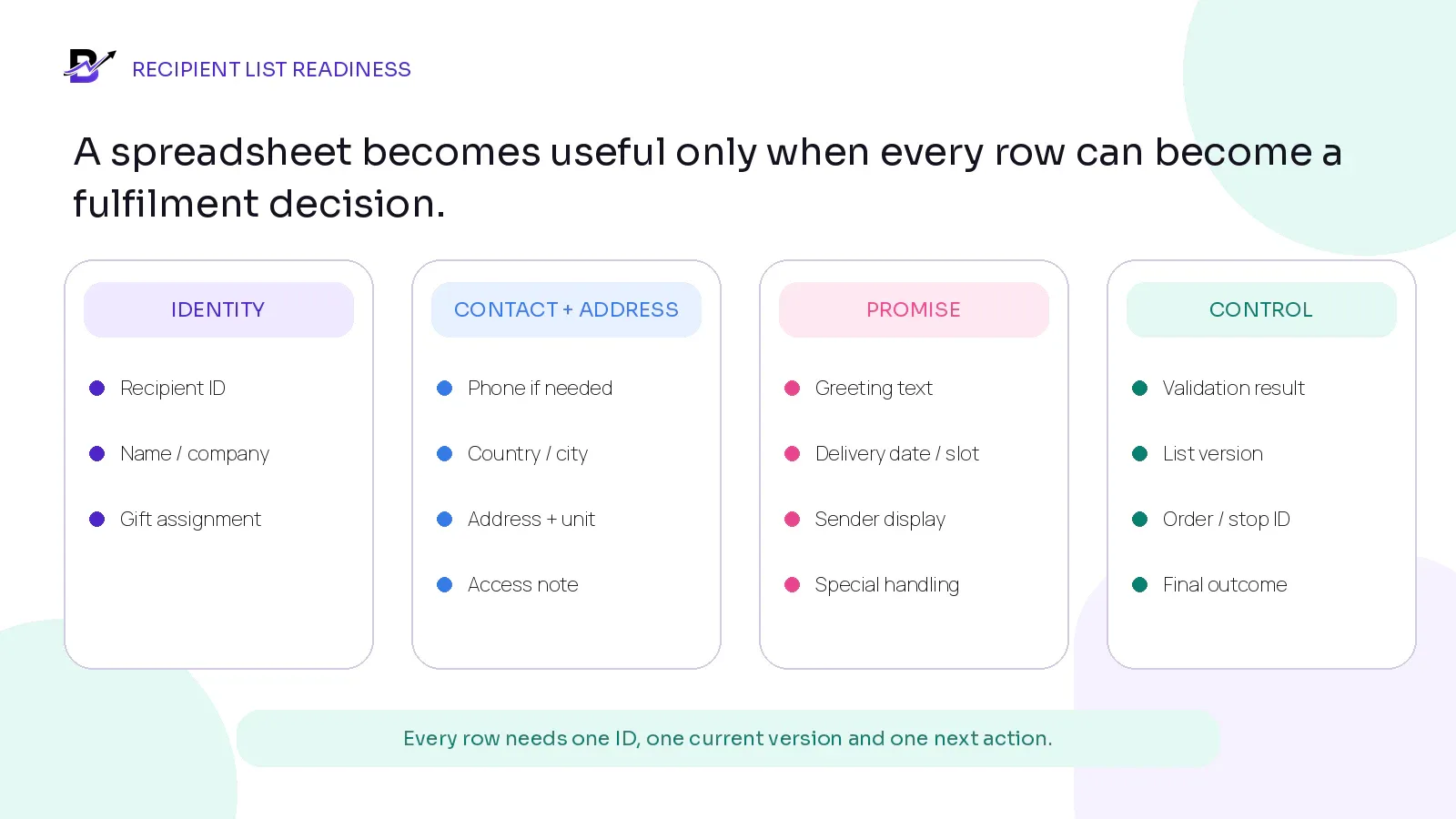
Figure 4. Keep the list focused on the fields needed to prepare, deliver and close the campaign.
FIELD GROUP | SUGGESTED FIELDS | USE |
|---|---|---|
Control | Recipient ID; campaign ID; list version; row status; validation result. | Required |
Identity | Recipient or contact name; company or department where needed. | Required for the handoff model |
Contact | Phone or email only when needed for the agreed delivery or support process. | Purpose-based |
Address | Country; region; city; postcode where used; address lines; building or villa; unit or floor; landmark or access note. | Required for multi-address delivery |
Gift assignment | Product or SKU; variant; quantity; add-ons; card or message; sender display. | Required |
Promise | Delivery or pickup method; date; slot or batch; special handling. | Required |
Outcome | Order or stop ID; assigned branch; delivered, collected, failed, returned, rescheduled or cancelled state; proof reference. | Added during fulfilment |
PRIVACY PRINCIPLE. Collect only the recipient information needed for the agreed gifting and delivery purpose. Limit access, avoid unnecessary private notes, define retention and do not add recipients to marketing lists unless the business has an appropriate basis and permission.
Official privacy reference: European Commission - principles of personal data processing
Recipient List Readiness Checklist
READY | CHECK |
|---|---|
[ ] | One campaign ID and one approved file version |
[ ] | Every row has a unique Recipient ID |
[ ] | Recipient count and gift quantity match the approved quotation or change order |
[ ] | Required names, address fields and delivery dates are complete |
[ ] | Duplicate recipients, addresses and phone numbers have been reviewed |
[ ] | Gift, variant, message and sender display are assigned correctly |
[ ] | Message length, language and special characters have been tested where relevant |
[ ] | Invalid or incomplete rows are held instead of entering production |
[ ] | The buyer approved the final version and freeze time |
[ ] | The team knows how post-freeze changes will be priced, approved and tracked |
6. Validate the list before creating labels or recipient orders
Validation should happen before production labels, printed cards and delivery records are created. A clean list reduces rework, but it also protects the buyer from sending the wrong gift or message to the wrong person.
VALIDATION | WHAT TO TEST | SAFE RESPONSE |
|---|---|---|
Required fields | Highlight blank Recipient ID, product, quantity, name, address, date or other mandatory fields. | Hold the row until corrected. |
Totals | Compare recipient rows, product quantities, office-drop units, samples and buffer with the approved scope. | Resolve any difference before purchasing or production. |
Duplicates | Check repeated Recipient IDs, names, phone numbers, email addresses and delivery addresses. | Investigate; do not automatically delete. |
Address quality | Check country, city, postcode where used, building, unit, access note and formatting. | Send exception list to the authorised buyer. |
Gift mapping | Confirm that the assigned SKU, variant, add-ons, message and packaging are allowed for the campaign. | Correct the campaign map or row. |
Date + capacity | Confirm the delivery date, slot or batch is still available for the assigned branch or delivery model. | Move only through approved re-planning. |
Data minimisation | Remove columns that do not support the agreed purpose. | Keep only necessary operational data. |
7. Decide whether the campaign creates one order, several batches or many recipient records
There is no universal answer. The record structure should follow the physical handoff. One office delivery of 200 gifts is not the same as 200 home deliveries. A mixed campaign may need both batch records and individual recipient records under one campaign.
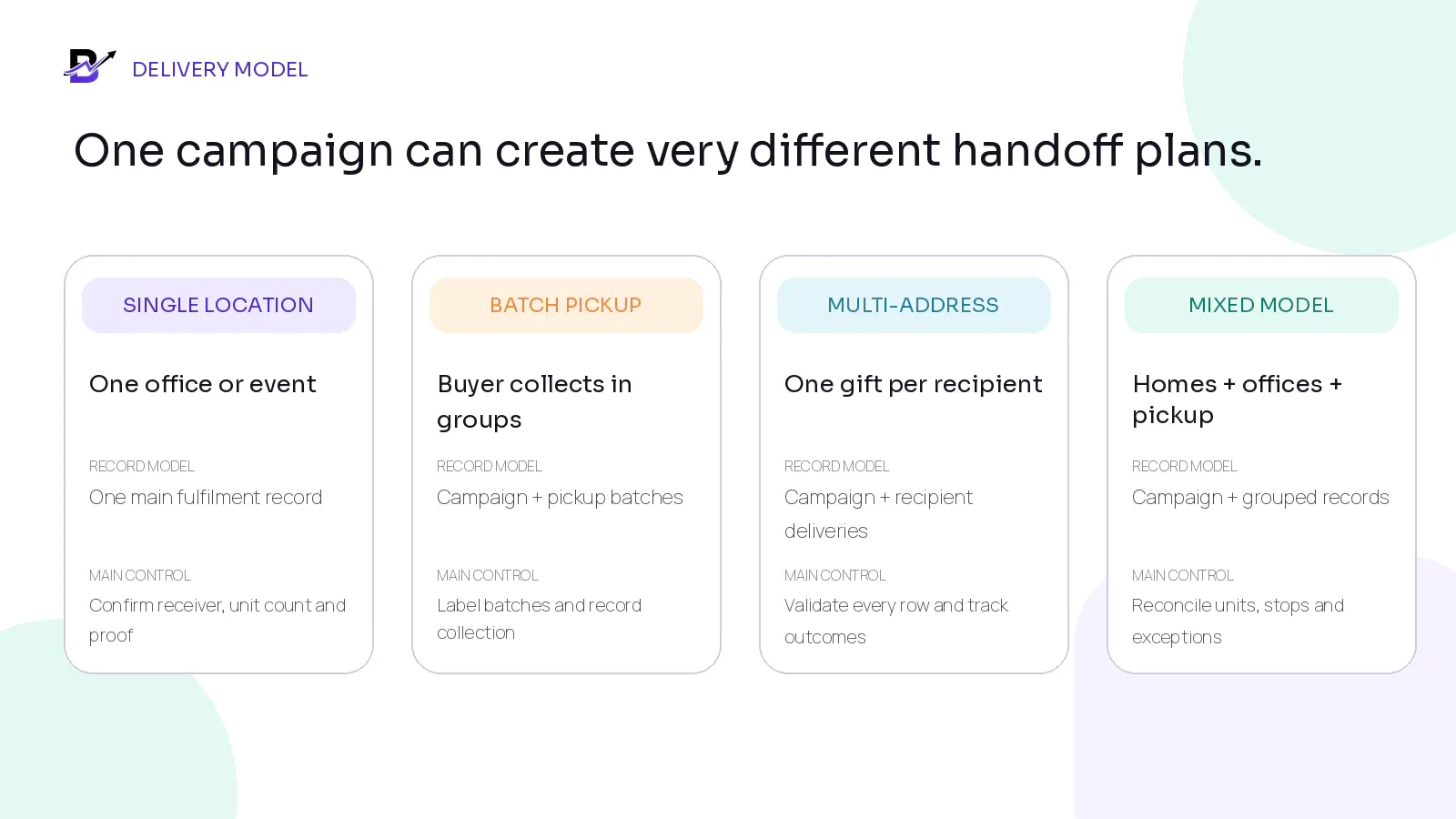
Figure 5. Choose the record structure around the actual handoff, not only the total gift quantity.
MODEL | BEST FIT | RECORD DESIGN |
|---|---|---|
Single-location delivery | All units go to one office, venue or buyer-controlled distribution point. | One campaign + one or a few fulfilment records. Record receiver, quantity and proof. |
Batch pickup | The buyer or courier collects groups of gifts over time. | One campaign + named pickup batches with counts and collection evidence. |
Multi-address delivery | Each recipient has a separate address or delivery outcome. | One campaign + recipient-level fulfilment or delivery records. |
Mixed model | Some gifts go to homes, some to offices and some are collected. | One campaign + grouped batch records and individual recipient records. |
DECISION RULE. Count three things separately: gift units, recipient rows and delivery stops. They are often different. A campaign with 120 gifts may have 120 recipients but only 102 delivery stops if some offices receive several units together.
Worked example: 120 gifts, 102 delivery stops
Northwind orders 120 appreciation boxes. One hundred recipients receive individual home deliveries. Two offices receive ten boxes each for internal distribution. The campaign therefore has 120 approved gift units, 120 recipient rows for the buyer’s allocation record and 102 physical delivery stops.
The campaign record holds the buyer, quotation, product, branding, payment terms and approved list version. The system or operations team creates 100 individual home-delivery records and two office-drop records with ten units each. The office records require a named receiver and proof of the quantity handed over; they do not need ten separate driver stops.
PLANNING EXAMPLE. If the buyer approves two samples and three replacement units, the physical production plan becomes 125 units: 120 campaign units + 2 approved samples + 3 controlled replacement units. Samples and replacement stock should not disappear inside an unexplained buffer.
8. Plan stock, purchasing, production and packing around the approved campaign
A large order should not bypass normal stock and purchase controls. It should make them more important. Convert the approved campaign into a material and capacity plan before the list freeze, then update the plan after the final recipient totals are approved.
AREA | PLAN | MAIN CONTROL |
|---|---|---|
Products | Approved sellable units, variants and permitted substitutions. | Reserve, purchase or produce against the campaign quantity. |
Packaging | Boxes, sleeves, ribbons, bags, labels, tissue and delivery protection. | Count per unit and include sample, damage and replacement needs. |
Personalisation | Cards, printed names, sleeves, logos and language versions. | Generate only from the approved proof and list version. |
Add-ons | Chocolates, flowers, candles, vouchers or other extras. | Map every add-on to the right recipient or batch. |
Staff + capacity | Preparation team, quality checker, label owner, pickup or dispatch team. | Plan volume per day, branch and workstation. |
Purchasing | Suppliers, lead times, invoice evidence, expected receipts and quality checks. | Connect the purchase to the campaign and receiving branch. |
STARTING QUANTITY FORMULA. Planned production quantity = approved campaign units + approved samples + controlled replacement buffer. Review the buffer by product risk, customisation and replacement lead time. Do not hide unexplained extra quantity inside the campaign.
9. Keep payment status separate from production and delivery status
Corporate gifting can involve a quotation, deposit, purchase order, invoice, balance or net terms. The exact legal, tax and accounting treatment depends on the business and country. Operationally, the important rule is to show what has been approved, what has been paid, what authorises production and what remains due.
STATUS TRACK | EXAMPLE STATES | QUESTION ANSWERED |
|---|---|---|
Commercial status | Enquiry, quoted, revised, approved, expired or cancelled. | Is the scope commercially approved? |
Payment status | Awaiting deposit, partially paid, paid, balance due, overdue, refunded or credited. | What money has moved and what is still due? |
Production status | Not authorised, planning, in production, quality check, packed or ready. | May staff commit products and labour? |
Fulfilment status | Awaiting list, list validated, scheduled, dispatched, delivered, failed, returned or collected. | What happened to each recipient or batch? |
Modern commerce platforms may support draft orders, custom prices, invoice links, review-before-finalisation and payment terms. Exact features and plan requirements vary. Use only the payment and approval methods supported by the selected platform, provider contract and qualified advisers.
CONTROL GATE. “Deposit paid” does not automatically mean the recipient list is approved. “List approved” does not automatically mean the balance is paid. Keep commercial, payment, production and fulfilment states separate.
10. Prepare, label and quality-check from the same approved data
The preparation team should not receive a screenshot of the buyer’s last email. It should receive a complete campaign brief and a recipient or batch work queue created from the approved data.
STEP | PASS CONDITION |
|---|---|
Release to preparation | Campaign approved, production authorised, final quantities known and required list rows valid. |
Pick or assemble | Product, variant, add-ons, packaging and approved branding are visible for the right recipient or batch. |
Personalise | Use the exact approved name, message, language and sender display. |
Label | Print from the approved recipient record; include the Recipient ID or order reference for tracing. |
Quality check | Compare product, branding, message, label, add-ons and packaging with the work record. |
Stage for handoff | Group by route, date, slot, office batch, pickup batch or other approved model. |
Record evidence | Add permitted preparation or dispatch evidence when the campaign policy requires it. |
11. Keep delivery tied to the approved recipient and campaign promise
Multi-address corporate gifting is a delivery operation, not only a spreadsheet export. Each handoff needs the approved recipient or batch, address, timing, permitted contact details, sender display, product context and result. The same campaign should show which deliveries are complete and which still need action.
For zones, dates, slots, driver assignment, proof and exception statuses, see the Bloomlytix same-day delivery workflow guide. Corporate campaigns may use scheduled days instead of same-day service, but the same control principle applies: the customer sees one promise while the business manages the required preparation and handoff steps.
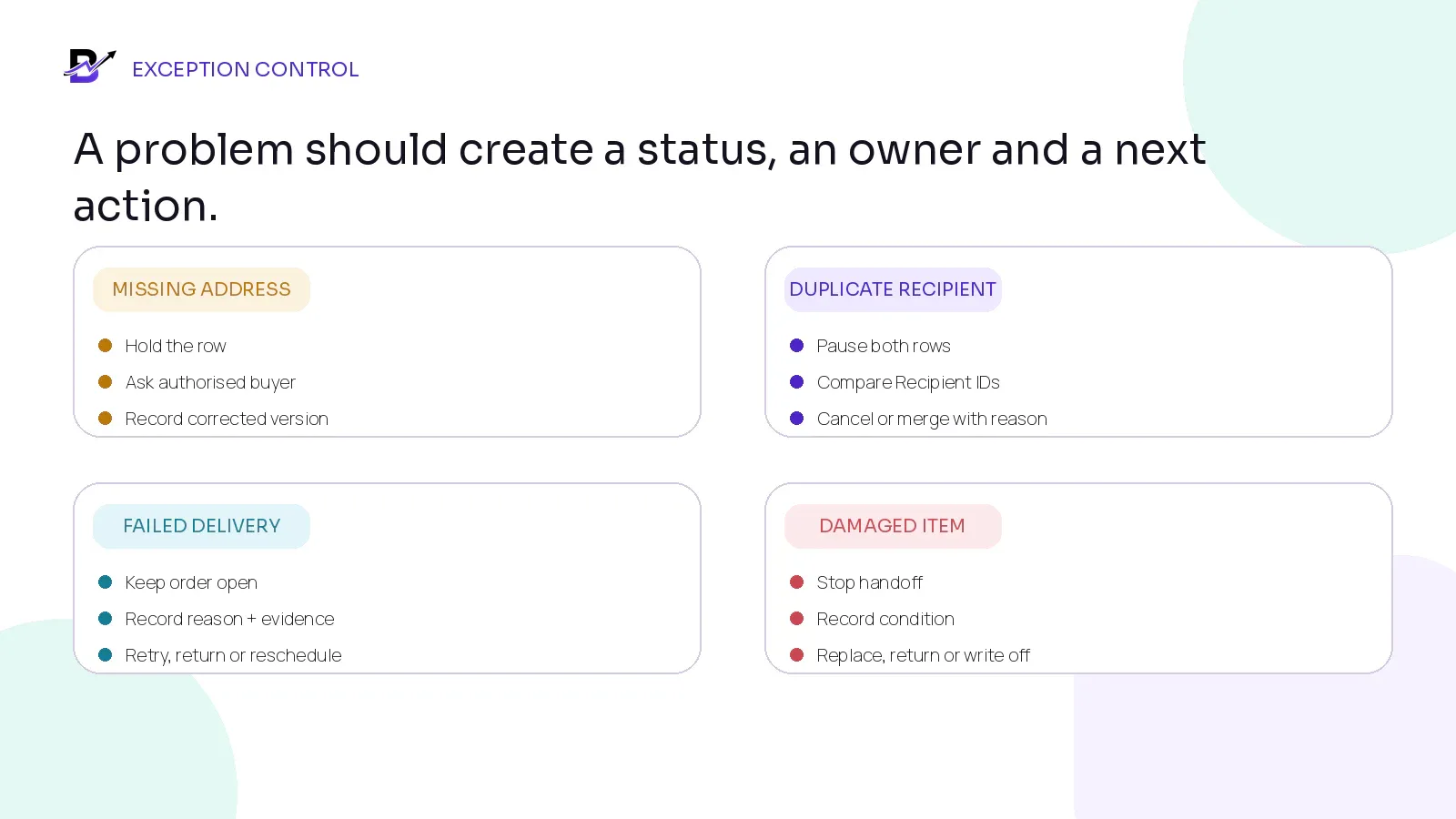
Figure 6. Every exception should create a visible hold or status, an owner and a recorded next action.
EXCEPTION | IMMEDIATE ACTION | RECORD |
|---|---|---|
Missing or incomplete address | Hold the row; do not print the final label. | Send an exception report to the authorised buyer; record the corrected version. |
Duplicate recipient | Pause the affected rows. | Compare Recipient IDs, gift assignment and buyer instruction before cancelling or merging. |
Post-freeze address change | Assess label, route, zone, timing and cost impact. | Create an approved change with old and new values. |
Recipient unavailable | Follow the campaign retry, reception, return or reschedule rule. | Record attempt, contact result, evidence and next owner. |
Damaged item | Stop the handoff and protect the recipient experience. | Record condition, replacement or refund decision, stock impact and owner. |
Wrong product or message | Do not mark delivered as successful. | Escalate, recover where possible, replace or refund according to policy. |
Buyer cancels a recipient | Confirm production stage and commercial consequence. | Cancel the record, release or reassign stock and record financial impact. |
Campaign balance overdue | Follow the agreed commercial process without hiding operational status. | Keep payment and fulfilment facts visible to authorised roles. |
12. Reconcile the campaign before closing it
A campaign is not finished when the last driver leaves. Reconciliation proves that the approved scope, physical units, recipient outcomes, stock and money can be explained. Keep unresolved rows open rather than forcing the campaign into a completed status.
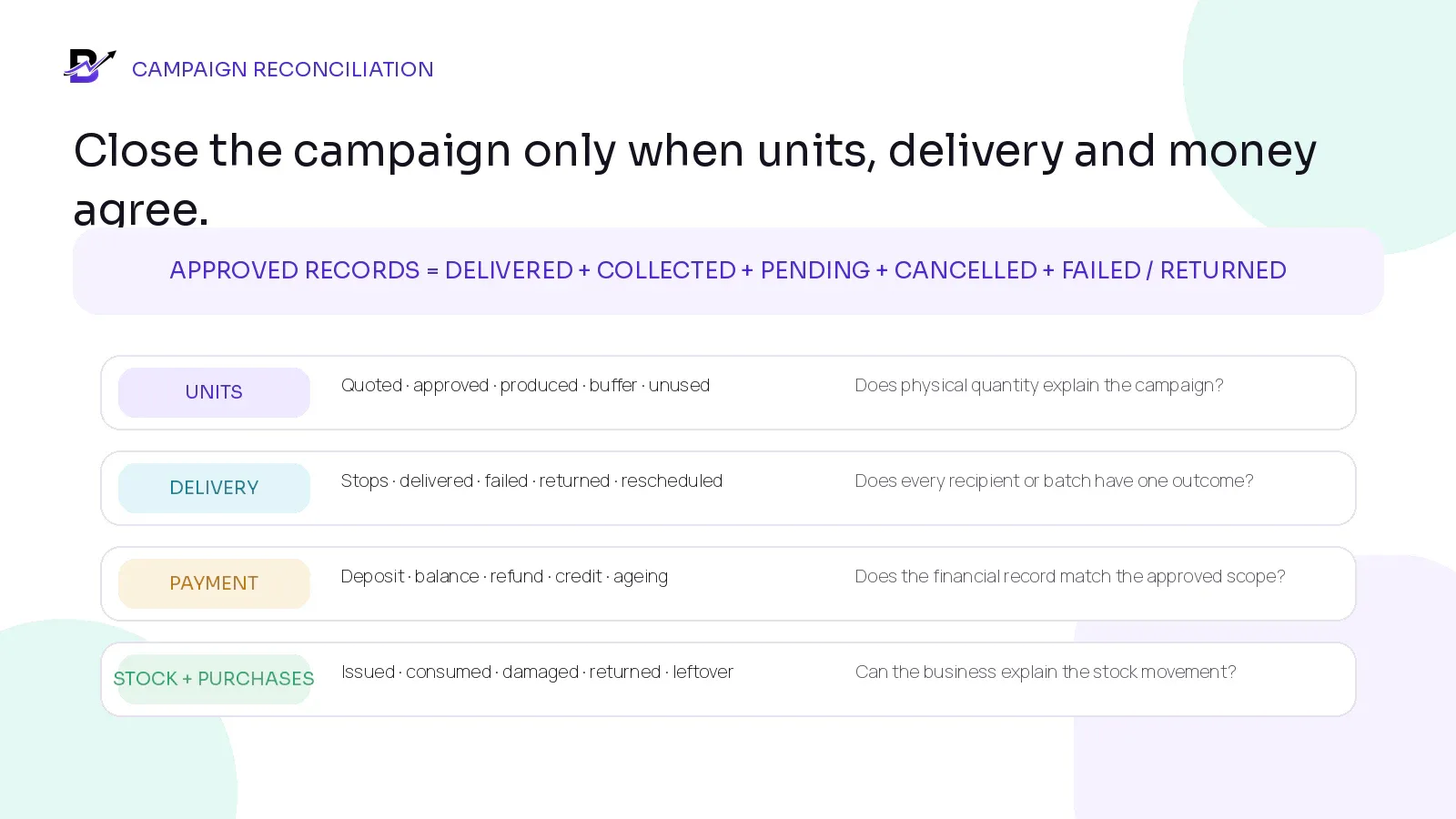
Figure 7. Close the campaign only when every approved record and every physical unit can be explained.
RECONCILIATION AREA | QUESTION TO ANSWER |
|---|---|
Recipient outcomes | Delivered + collected + pending + cancelled + failed or returned should explain every approved recipient or batch record. |
Physical units | Produced units should reconcile to delivered, collected, pending, damaged, returned and unused controlled buffer. |
Purchases + stock | Campaign purchases, stock issued, wastage, replacements and leftover branded items should have movement reasons. |
Payment | Deposit, invoices, balance, credit notes, refunds and overdue amounts should match the approved commercial record. |
Exceptions | Every failed address, damage, wrong gift, reschedule or buyer change should have an owner and final outcome. |
Reporting | Campaign revenue, products, branches, staff work, delivery results and exception reasons should remain reviewable. |
COMPLETION FORMULA. Approved fulfilment records = delivered + collected + pending + cancelled + failed / returned. Each record should appear once in one current outcome. Do not use the formula to hide unresolved records inside a generic “complete” total.
Metrics that improve corporate gifting operations
METRIC | SIMPLE DEFINITION | WHAT IT REVEALS |
|---|---|---|
Quote-to-approval time | Time from first complete brief to buyer approval. | Where decisions or proof cycles are slowing the sale. |
List readiness at freeze | Valid recipient rows ÷ total submitted rows. | Whether the buyer data is ready for production. |
Post-freeze change rate | Rows changed after freeze ÷ approved rows. | How much rework the campaign creates after approval. |
On-time production | Units ready by the internal dispatch deadline. | Whether purchasing, staffing and quality control are working. |
First-attempt completion | Recipient deliveries completed on the first attempt ÷ attempted deliveries. | Address, timing and recipient-contact quality. |
Exception rate | Rows with address, product, message, damage or delivery exceptions ÷ total rows. | Where the campaign needs a process change. |
Replacement usage | Replacement units used ÷ approved campaign units. | Whether the buffer is realistic and why replacements are needed. |
Payment ageing | Outstanding balance by due date and campaign stage. | Commercial follow-up risk. |
MEASUREMENT NOTE. Do not copy universal benchmark percentages. Establish a baseline by campaign type, product, buyer, branch, delivery model and season. Use the metric only when it leads to a named action.
How Bloomlytix can support the corporate gifting workflow
Bloomlytix connects ecommerce, customer apps, POS, manual orders, payment links, branch preparation, delivery, inventory and reporting in one operating platform. Those capabilities can support a corporate gifting workflow built around configured products, custom pricing, recipient context and tracked handoffs. Confirm the campaign structure, bulk recipient import, buyer approval chain, contract pricing, warehouse picking and campaign-level reconciliation reports during discovery; these should not be assumed to be standard features. Review the current gift shop order management and delivery management pages for the confirmed operational scope.
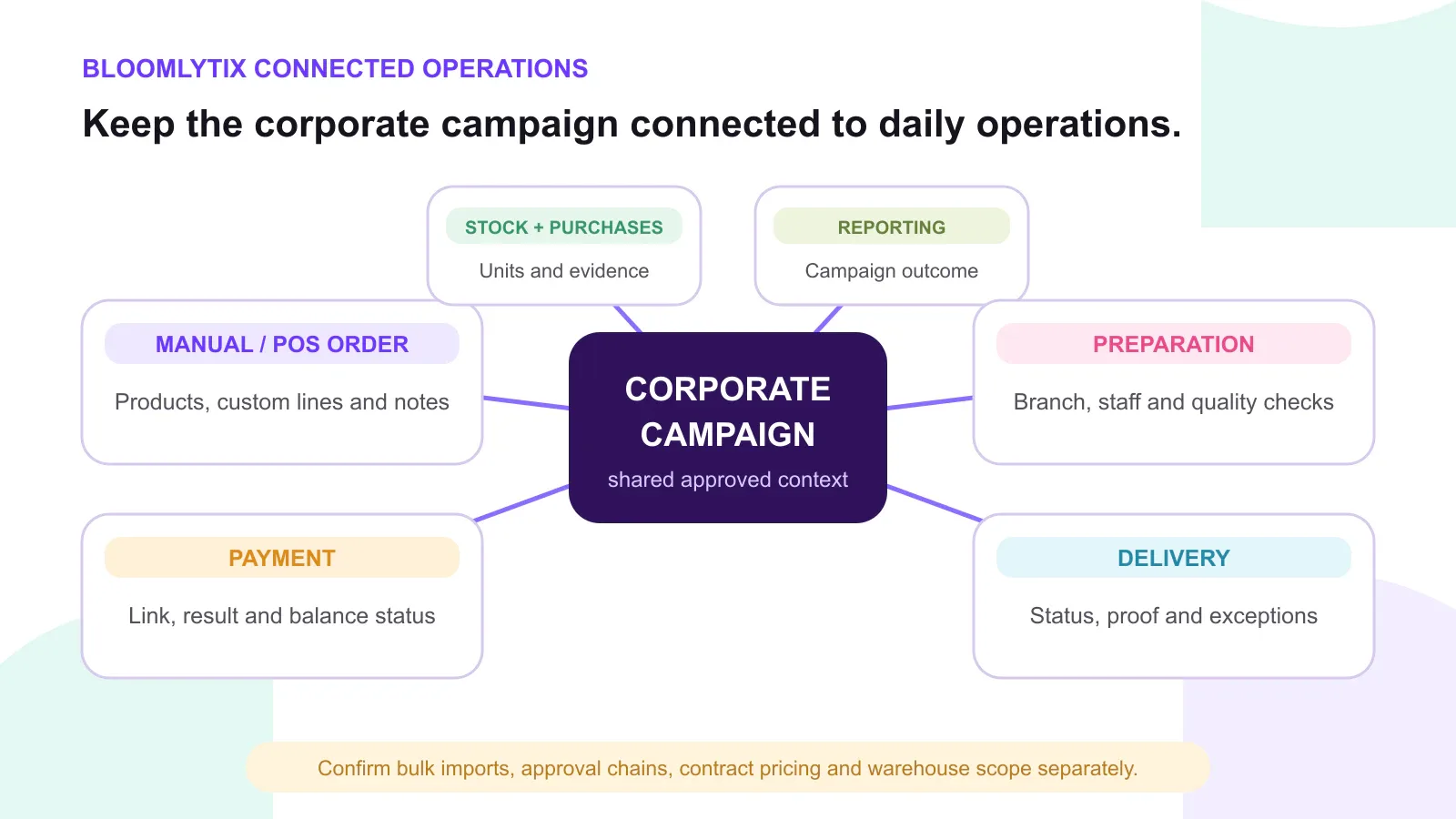
Figure 8. Bloomlytix can keep the approved corporate order connected to daily operations while advanced bulk and wholesale requirements remain explicit scope items.
BLOOMLYTIX AREA | PRACTICAL ROLE |
|---|---|
Manual / corporate order | Create an official record from an agreed corporate request instead of fulfilling from email or chat. |
Products + custom lines | Record configured products, add-ons, approved custom lines, notes and pricing. |
Payment link + status | Collect remote payment where configured and keep the successful result tied to the related order where supported. |
Branch + staff workflow | Assign the right location or team, show the approved details and move work through preparation statuses. |
Recipient + message context | Keep permitted recipient information, greeting text, date, timing and handoff notes attached to the order. |
Stock + purchases | Connect configured products, packaging, add-ons, purchase records and branch stock to the campaign plan. |
Delivery + proof | Assign drivers or completion workflows, update status and capture configured proof or exception notes. |
Reports | Review sales, products, branches, staff, stock, cash and delivery outcomes inside the wider platform context. |
Product scope. Bloomlytix currently confirms connected sales channels, manual and payment-link orders, recipient context, branch preparation, delivery status, inventory and reporting. Confirm automated recipient imports, multi-level approvals, contract pricing, wholesale distribution, marketplace synchronisation and complex warehouse picking in the written implementation scope before subscribing.
Bring one corporate gifting brief and recipient list to the demo
Use one real campaign, not a generic feature tour. Bring the product, quantity, branding request, quotation process, payment rule, sample recipient file, delivery model and one difficult exception. The useful demonstration should show how the approved campaign becomes practical work and how the final outcomes remain visible.
PRIMARY ACTION. Book a tailored corporate gifting workflow demonstration. We will map the campaign record, recipient or batch structure, payment, preparation, delivery and reporting - and separate confirmed platform scope from any bulk-import, approval or warehouse requirements that need additional work.
Questions to ask during a corporate gifting software demonstration
Can the system keep one corporate campaign or parent reference connected to its recipient or batch records?
Can staff create an assisted order with standard products, add-ons, custom lines, notes and negotiated pricing?
How are quotation, proof, buyer approval, deposit, balance, production and delivery statuses separated?
Can the business record which recipient-list version was approved and when?
Can the system validate or import recipient rows, and what happens when a row fails? Is this standard or custom scope?
Can one campaign use individual addresses, office drops, pickup batches and a mixed delivery model?
How are product, message, label, recipient and delivery changes recorded after the freeze?
Can staff prepare from the approved record without reopening buyer email or chat?
How are delivered, failed, returned, rescheduled and cancelled recipient outcomes reported?
Can stock, purchases, damaged items, replacement units and leftover campaign materials be reconciled?
Which users can view buyer, recipient, price and delivery information?
What is standard, what requires configuration, and what requires custom import, approval, contract-pricing or warehouse work?
Frequently asked questions
What information should a corporate gifting brief include?
At minimum, record the company and authorised buyer, campaign purpose, products, quantity, branding and message requirements, budget or quotation, payment terms, deadlines, delivery model, substitutions, approval owners and recipient-list process.
How should recipient lists be controlled?
Use one campaign owner, one approved file location, unique Recipient IDs, clear versions, a freeze time and a change log. Hold invalid rows instead of letting production staff guess.
Should one corporate campaign create one order or many?
Use one campaign-level record for the commercial agreement. Create one fulfilment record for a single-location drop, batch records for grouped pickup or delivery, and recipient-level records for individual addresses.
How do deposits and balances affect fulfilment?
Keep payment status separate from production and delivery status. Define the business rule for when production may start, what the deposit covers, when the balance is due and who may approve an exception.
What happens when a delivery address changes after approval?
Create an authorised change against the Recipient ID. Record the old and new address, timing or cost impact, label and route update, approver and latest list version.
Can recipients be added to marketing lists?
Not automatically. Recipient data may have been supplied only to fulfil the buyer’s gifting request. Marketing use requires a separate appropriate basis and permission under the applicable rules.
Does Bloomlytix support bulk recipient imports?
Bloomlytix supports connected ecommerce, customer-app, POS, manual and payment-link orders with recipient context, staff fulfilment and delivery. Confirm automated recipient-file imports, campaign parent-child records and complex bulk workflows in the written implementation scope before launch.
How should a campaign be closed?
Reconcile approved records, physical units, delivery outcomes, replacements, stock movements, invoices, payments, credits and unresolved exceptions. Keep the campaign open until every important difference has an owner and outcome.
Final corporate gifting checklist
One campaign ID, owner and authorised buyer are recorded.
The product, quantity, branding, message, price and deadline are written clearly.
The quotation, proof and named approvals are attached to the campaign history.
Payment terms, production authority and fulfilment statuses are separate.
One recipient template and one approved file version are in use.
Every recipient or batch has a stable ID and a clear next action.
Duplicate, incomplete and invalid rows are held before production.
Gift units, recipient rows and delivery stops are counted separately.
Stock, purchasing, packaging, samples and replacement units are planned.
Labels and messages are generated from the approved data.
Delivery records use the correct recipient, address, timing and proof rules.
Post-freeze changes create an authorised change record.
Failed, returned, damaged and rescheduled outcomes remain visible.
Recipient data is limited to the agreed purpose and access is restricted.
Units, delivery outcomes, stock and payment reconcile before closure.
Advanced import, approval, contract-pricing or warehouse needs are confirmed in writing.
Corporate Gifting Order Brief Template
Use this editable table during discovery. Replace the prompt text with the approved campaign details and name the person responsible for each decision.
FIELD | APPROVED CAMPAIGN DETAIL | OWNER / APPROVER |
|---|---|---|
Campaign ID + name | Complete before approval | Campaign owner |
Company + authorised buyer | Complete before approval | Buyer / sales |
Campaign purpose + audience | Complete before approval | Buyer |
Approved products + quantities | Complete before approval | Buyer + operations |
Branding, card + message proof | Complete before approval | Brand approver |
Quotation, currency + validity | Complete before approval | Sales / finance |
Deposit, balance + payment terms | Complete before approval | Finance |
Recipient-list owner + template | Complete before approval | Buyer + operations |
List freeze + change rule | Complete before approval | Campaign owner |
Production + quality dates | Complete before approval | Operations |
Delivery model + date plan | Complete before approval | Delivery owner |
Substitutions + exception policy | Complete before approval | Buyer + operations |
Completion evidence + reconciliation | Complete before approval | Owner / finance |
Sources and further reading
This article combines Bloomlytix product documentation with current operational and privacy references. It is practical workflow guidance, not legal, tax, accounting or data-protection advice. Confirm country-specific obligations and commercial terms with qualified advisers and the selected service providers.