A strong seasonal page keeps one useful URL and refreshes the parts that genuinely change.
A seasonal campaign may last a few days. The search demand, customer questions and links around the occasion can return every year.
Many ecommerce businesses lose that value by deleting the page after the event, changing the URL every season or publishing a thin sale page only a few days before demand peaks. The next year, the business starts again with a new page and no history.
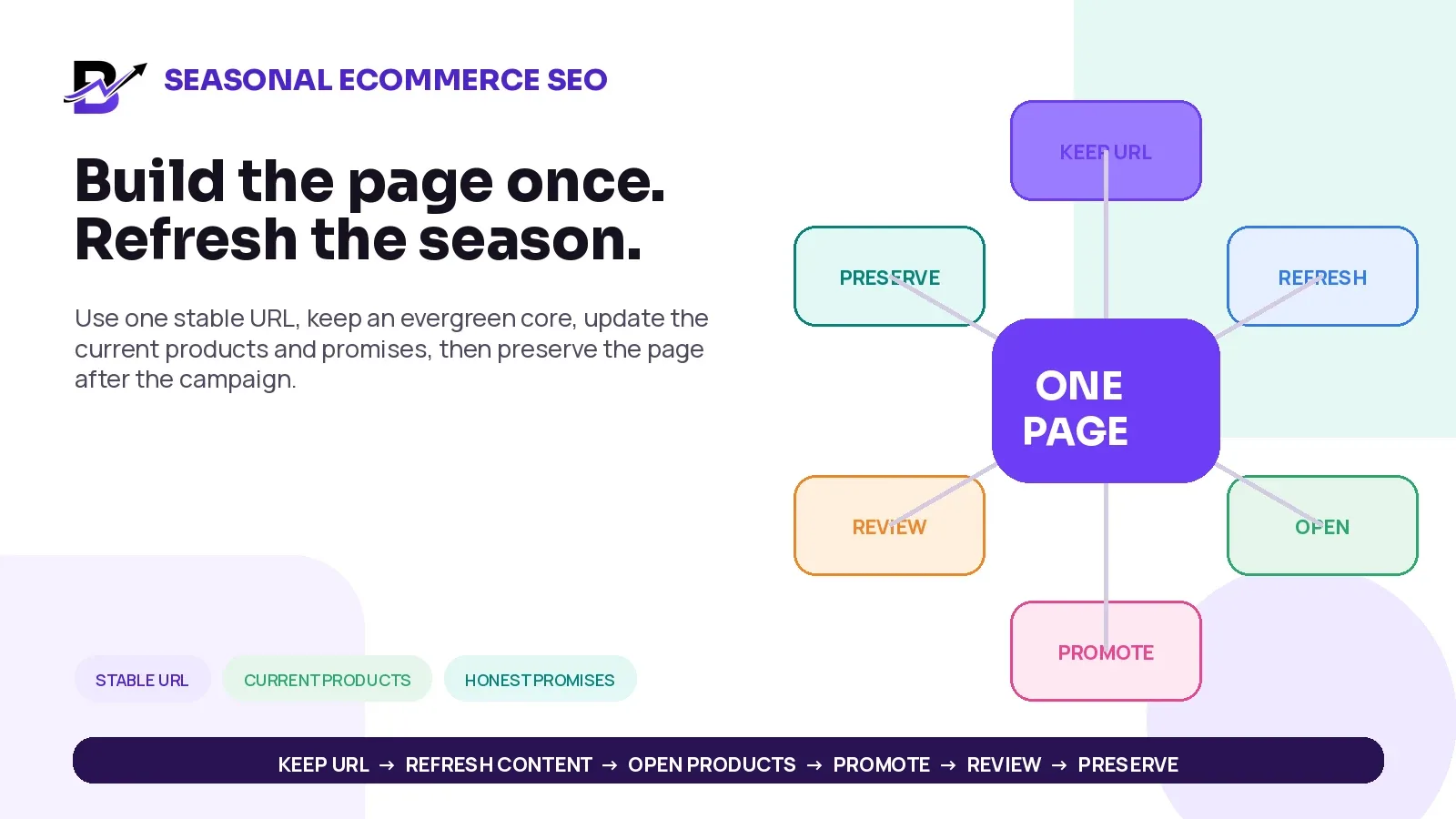
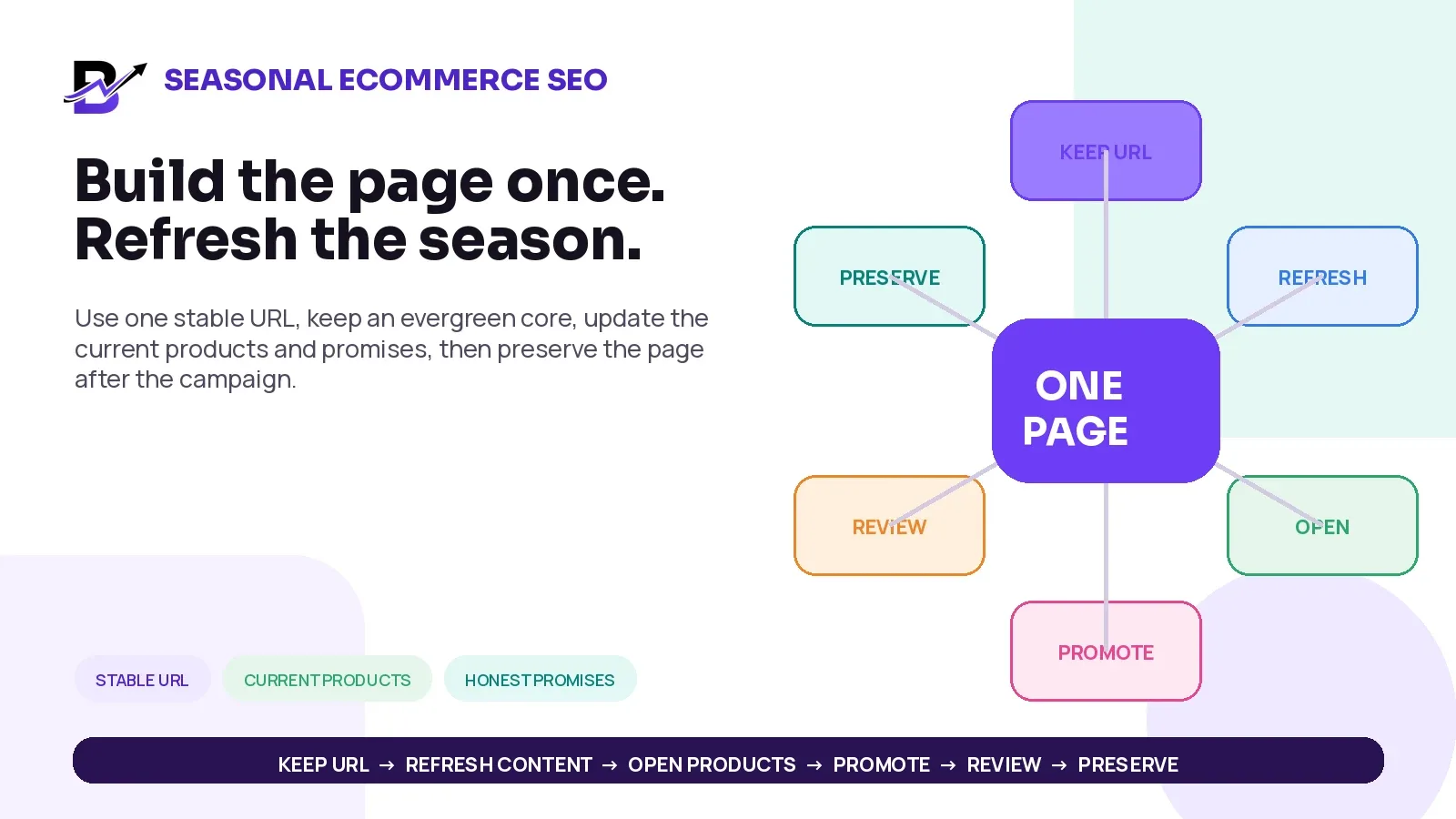
DIRECT ANSWER. Use one stable URL for a recurring occasion when the search intent stays the same. Keep an evergreen core that explains the occasion, product choices, delivery and common questions. Before each season, refresh the current products, dates, offers, stock and customer promises. After the event, remove expired claims but keep the useful page live. Create a new URL only when the audience, market or intent is genuinely different.
This guide is for ecommerce owners, marketers, catalogue teams, SEO managers and specialty retailers that publish pages for Valentine’s Day, Mother’s Day, Ramadan, Eid, Christmas, Black Friday, birthdays, anniversaries, weddings, graduations or other recurring demand.
In this guide
Why seasonal landing pages often lose authority between campaigns
When to keep one stable URL and when a new page is justified
How to combine an evergreen core with a current-season layer
What a useful seasonal ecommerce page should contain
A 90-day refresh timeline for content, products, links and testing
How to keep products, prices, delivery and Merchant Center data consistent
What to do with the page after the season ends
How Bloomlytix can support occasion-led ecommerce pages
Why seasonal pages often lose value
The most common problem is treating the page as temporary advertising instead of a reusable customer destination. A banner is temporary. A useful occasion page can become part of the site’s long-term structure.
COMMON APPROACH | WHY IT WEAKENS THE PAGE | BETTER OPERATING RULE |
|---|---|---|
A new year-based URL every season | Links, history and internal references are divided across several similar pages. | Keep one stable URL when the occasion and audience remain the same. |
The page launches only a few days before the event | Search engines, customers and campaign teams have little time to discover, review and use it. | Refresh and open the page early enough for discovery, merchandising and testing. |
The page contains only a discount banner | It does not answer product, delivery, timing, substitution or buying questions. | Combine commercial content with useful occasion guidance and clear promises. |
The page is deleted immediately after the event | The URL loses continuity and returning links or bookmarks lead nowhere. | Remove expired claims, keep the useful core and preserve the URL. |
Dozens of city, year or occasion copies are generated | Near-duplicate pages can confuse users and create weak, low-value content. | Create separate pages only when demand, inventory, language or delivery information is genuinely different. |
CORE PRINCIPLE. The campaign changes. The customer intent often returns. Preserve the page that serves the returning intent.
1. Decide whether the page should be evergreen
An evergreen seasonal page does not mean the content never changes. It means the same URL continues to serve the same recurring intent while the current details are refreshed.
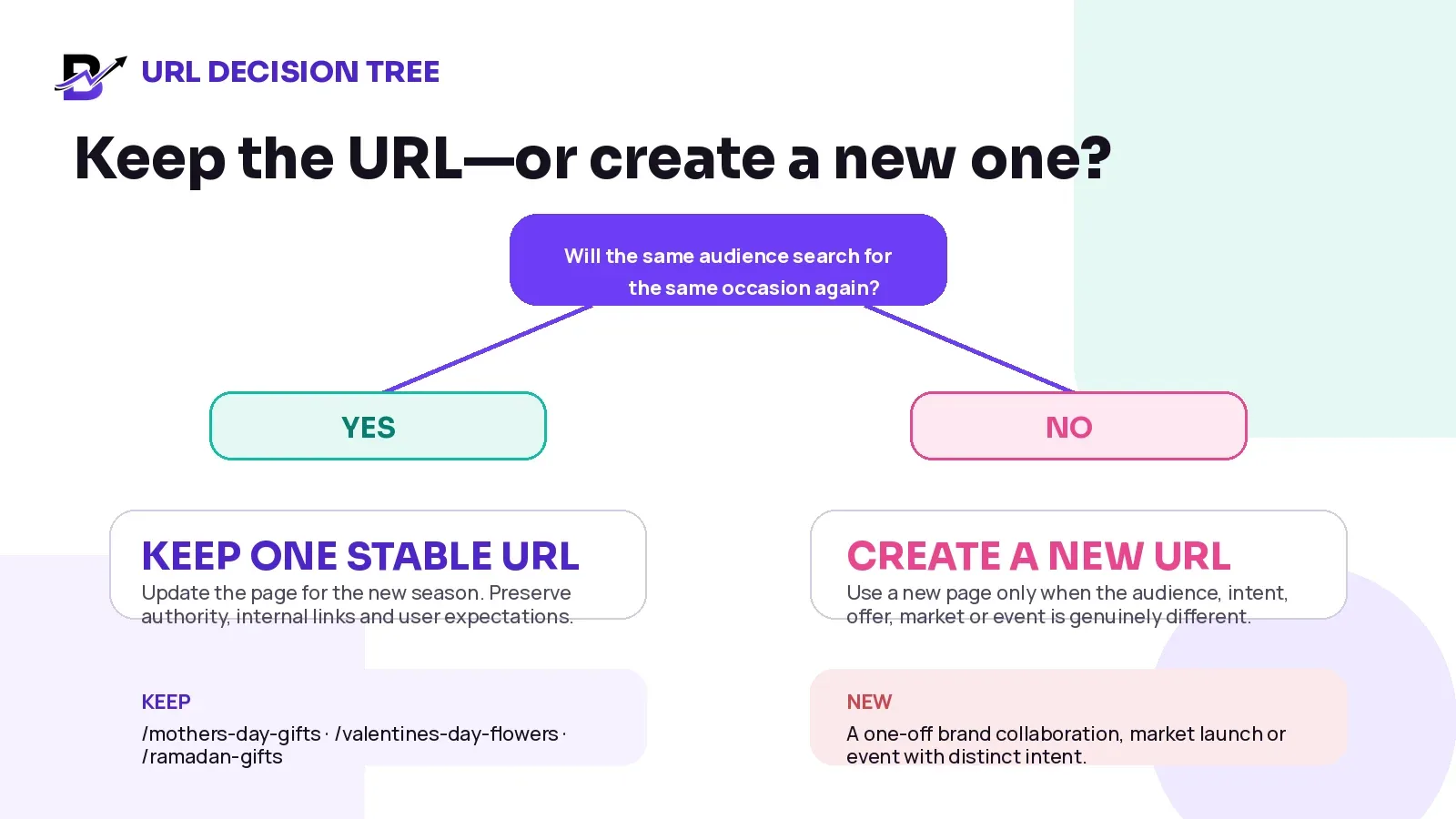
Figure 1. Keep one stable URL when the audience and search intent return. Create a new URL only for a genuinely different page purpose.
PAGE SITUATION | RECOMMENDED URL DECISION | EXAMPLE |
|---|---|---|
The same occasion returns every year | Keep one stable URL and refresh it. | /mothers-day-gifts |
The date changes, but the buying intent stays the same | Keep the URL; update the visible title, dates and current details together. | /black-friday-deals |
A country or language has materially different products, currency, delivery or copy | Use a dedicated market/language URL and connect equivalents with hreflang. | /ae/ramadan-gifts and /sa/ramadan-gifts when content is genuinely localised |
The campaign is a one-off collaboration or event | Create a new URL if it has standalone value and distinct intent. | /brand-x-bloomlytix-pop-up |
Several old yearly pages already exist | Consolidate into the strongest evergreen page when the intent is the same, using direct permanent redirects. | /mothers-day-gifts-2025 → /mothers-day-gifts |
The page will never return and has no close replacement | Return a proper 404/410 rather than redirecting users to an irrelevant home page. | A discontinued one-off campaign with no successor |
Google has advised against changing URLs repeatedly for the same page. If the page must move, use a direct redirect to the real replacement. A stable URL is easier for customers, internal links, external links and reporting.
Official Google reference: December 2022 SEO office hours: changing URLs and seasonal freshness.
2. Build one page with an evergreen core and a current-season layer
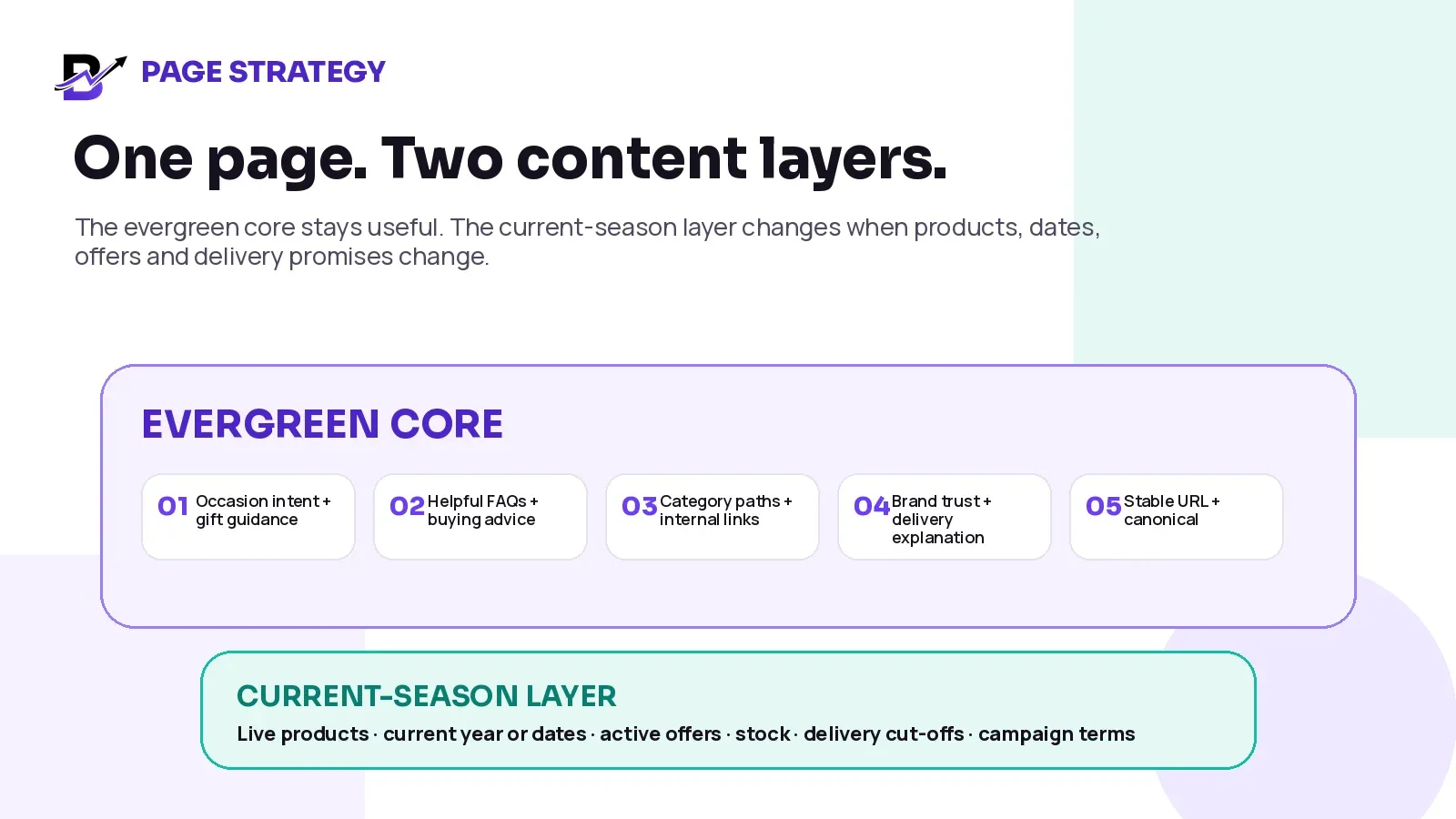
Figure 2. The evergreen core preserves usefulness. The current-season layer carries the live commercial promise.
EVERGREEN CORE | CURRENT-SEASON LAYER |
|---|---|
Occasion intent and product-selection guidance | This year’s date, timing and campaign status |
Gift ideas by recipient, budget, style or use | Live product range, variants, prices and stock |
Delivery, pickup, customisation and substitution explanation | Current delivery zones, cut-offs, slots and order caps |
Helpful FAQs and customer-service route | Active promotion, code, terms, start and end time |
Links to relevant categories, products and guides | Current hero, banners, trust proof and campaign messages |
Stable URL, canonical and page purpose | Current title, metadata, product data and meaningful modified date |
This two-layer model prevents the page from becoming useless between campaigns. It also reduces the temptation to rewrite every section simply to appear “fresh.” Update what changed. Keep what remains genuinely helpful.
FRESHNESS RULE. Do not change the visible date or dateModified merely to make a page look newer. Update those signals only after meaningful changes to the page itself.
Official Google reference: Creating helpful, reliable, people-first content.
3. Give the page a complete ecommerce purpose
A seasonal page should not behave like a poster. It should help the visitor understand the range, choose the right path and complete the next step with accurate information.
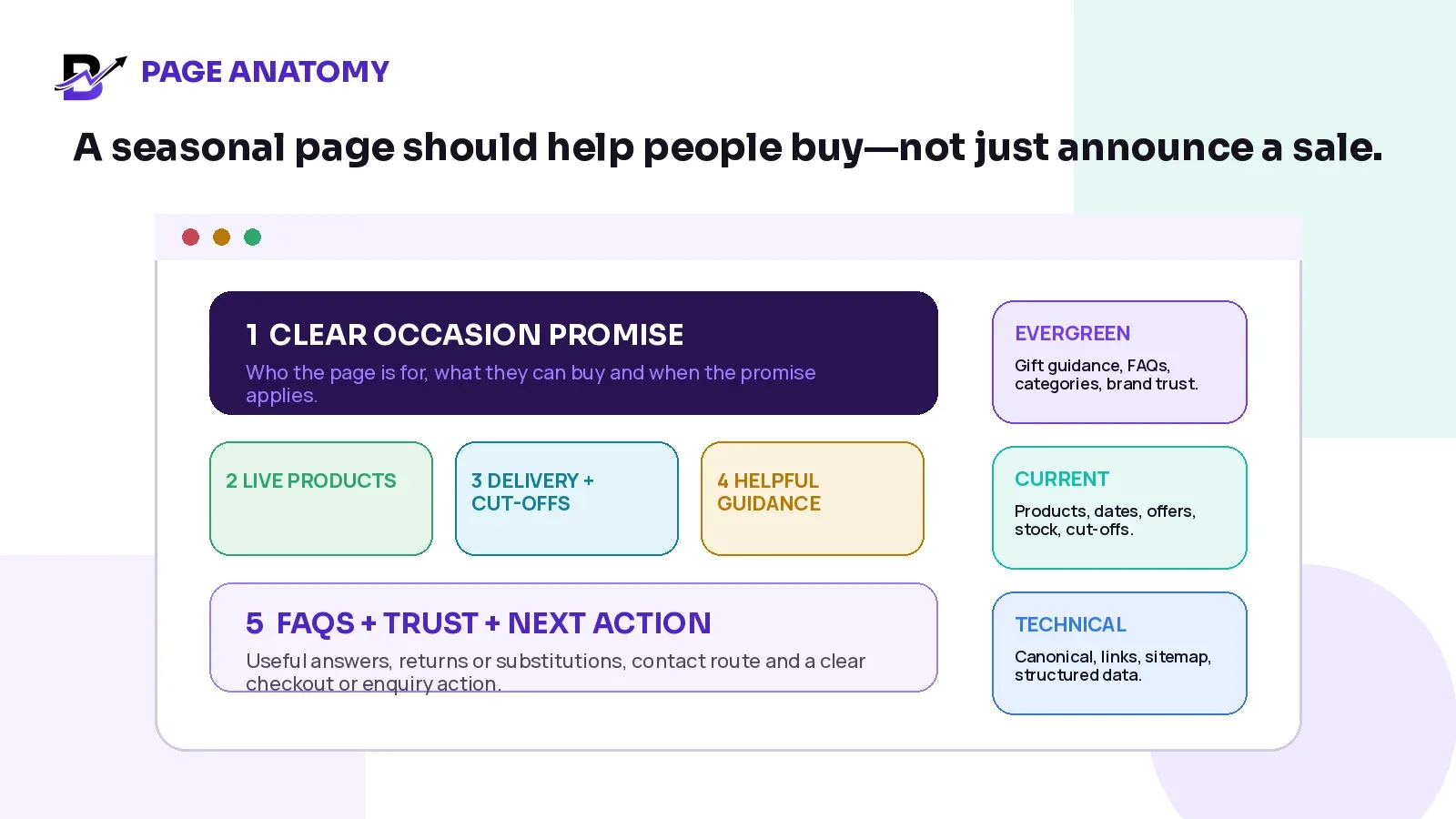
Figure 3. The page should support discovery, decision and purchase—not only announce a promotion.
PAGE AREA | WHAT IT SHOULD DO | COMMON FAILURE |
|---|---|---|
Clear occasion promise | Explain who the page is for, what can be bought and which current promise applies. | A vague headline such as “Celebrate the season” with no product or timing context. |
Live product collection | Show available products, useful filters, current prices and clear alternatives. | An attractive page where every product is unavailable or links to unrelated items. |
Delivery and pickup | Explain areas, dates, cut-offs, slots, collection points and important limitations. | Campaign copy promises same-day service while checkout offers something different. |
Helpful guidance | Answer recipient, budget, customisation, sizing, substitution or care questions. | Only generic SEO paragraphs that do not help a customer decide. |
Trust and service | Show returns, support, delivery expectations, reviews or proof where appropriate. | The page asks for payment before the customer understands the promise. |
Next action | Make checkout, category browsing, enquiry or reminder signup obvious. | Several competing calls to action with no primary route. |
Google’s ecommerce guidance specifically recognises special offers and seasonal content as useful shopping information. The page still needs to be accurate, easy to navigate and connected to the real product and checkout experience.
Official Google reference: Where ecommerce content can appear on Google.
4. Use titles, years and dates carefully
A recurring page may need the current year in the visible title when people search for the year or when the current details are important. The year does not normally need to become part of the permanent URL.
ELEMENT | PRACTICAL RULE | EXAMPLE |
|---|---|---|
URL | Keep it stable if the intent stays stable. | /valentines-day-flowers |
SEO title | Include the year only when it improves clarity or matches current demand; update it with the visible page. | Valentine’s Day Flowers 2027 | Brand |
H1 | Keep the page purpose clear; the year can appear when useful. | Valentine’s Day Flowers and Gifts 2027 |
Campaign dates | Show actual campaign, delivery or offer dates in the relevant section. | Order by 12 February for selected delivery slots. |
Publication / modified date | Use the real page publication date and a meaningful update date, not the occasion date. | Published 2026; meaningfully updated 2027. |
Structured data dates | Make visible dates and structured data agree. | dateModified matches the meaningful page update. |
If the visible heading says one year but the title element still shows an old year, Google may rewrite the title link. More importantly, customers may lose trust. Update the visible title, metadata, offer details and page copy as one controlled release.
Official Google reference: Influencing title links in Google Search.
Official Google reference: Help Google understand the best date for a page.
5. Start the refresh before demand peaks
A page can be technically published in minutes. A reliable seasonal launch needs time for product decisions, search discovery, internal links, stock, delivery rules, testing and correction.
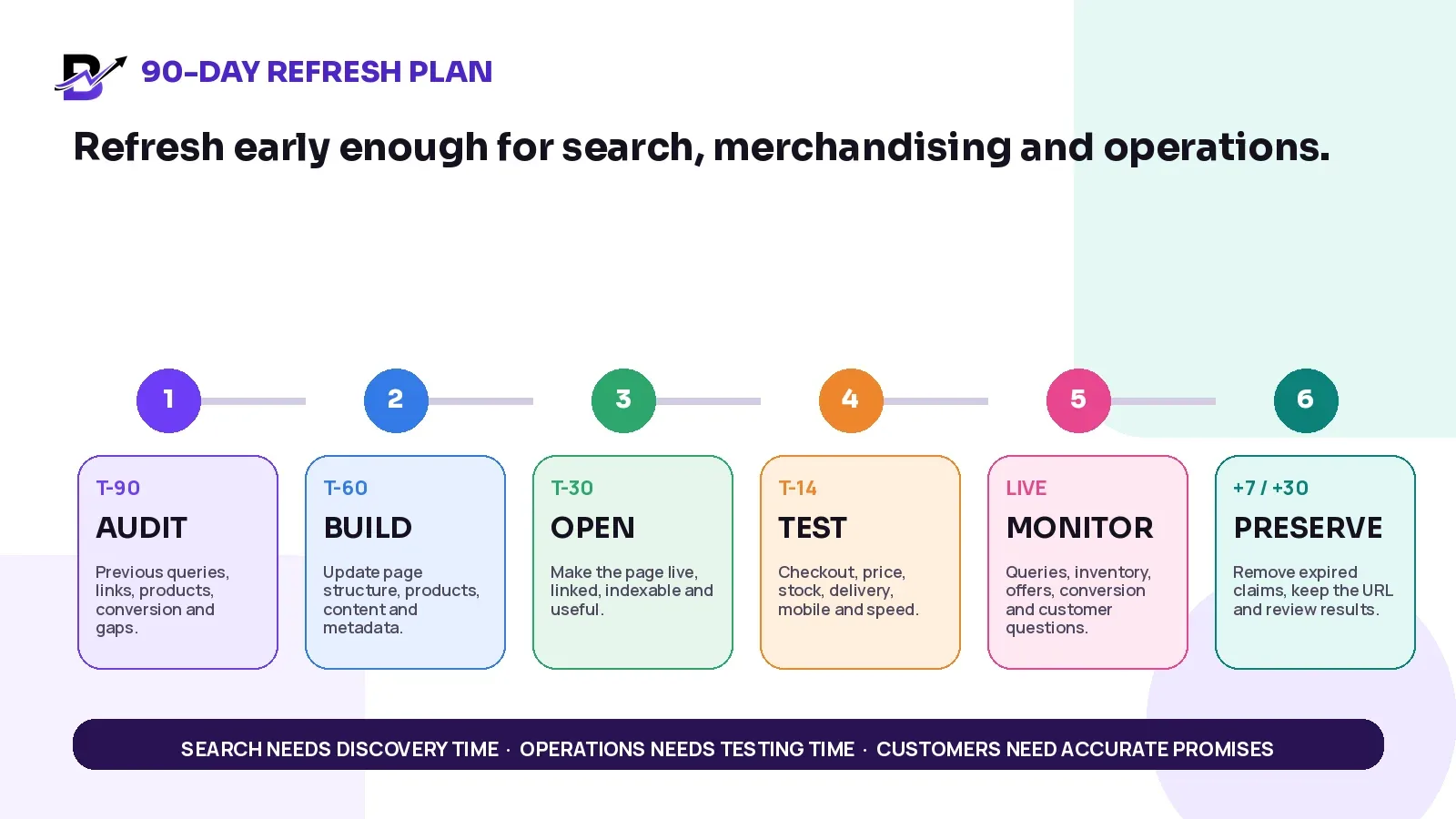
Figure 4. Search, merchandising and operations need different preparation time. Work backward from the event.
TIMING | CONTENT + SEO | PRODUCT + OPERATIONS | PASS CONDITION |
|---|---|---|---|
T-90 | Review last season’s queries, links, title, content gaps and conversion paths. | Confirm campaign owner, range, suppliers, delivery model and market scope. | The page purpose, URL and owners are agreed. |
T-60 | Update the evergreen core, headings, metadata, FAQs and planned internal links. | Prepare the product range, images, prices, stock rules, offers and campaign terms. | The draft is useful even before the offer is live. |
T-30 | Open the page, link it from relevant sections, update sitemap lastmod and inspect indexability. | Publish live products and current delivery or pickup options. | Customers and crawlers can reach a complete page. |
T-14 | Check title, canonical, mobile layout, images, page speed and structured data. | Run normal and failure tests for checkout, payment, stock, substitutions, pickup and delivery. | The customer promise matches the operating workflow. |
LIVE | Monitor queries, clicks, product engagement, availability, offer accuracy and customer questions. | Close unsafe products or slots before the promise fails. | The page remains accurate during demand changes. |
+7 / +30 | Remove expired claims, keep useful content, review links and record learnings. | Close refunds, returns, delivery exceptions, stock and supplier differences. | The URL remains useful and the next refresh has evidence. |
INDEXING REALITY. Google does not guarantee that every update will be recrawled immediately. Publish meaningful updates early and do not rely on an event-morning change being discovered in time.
6. Keep the page discoverable through internal links
A seasonal page can be live and still remain invisible if no important page links to it. Internal links tell customers and search engines where the page fits in the site.
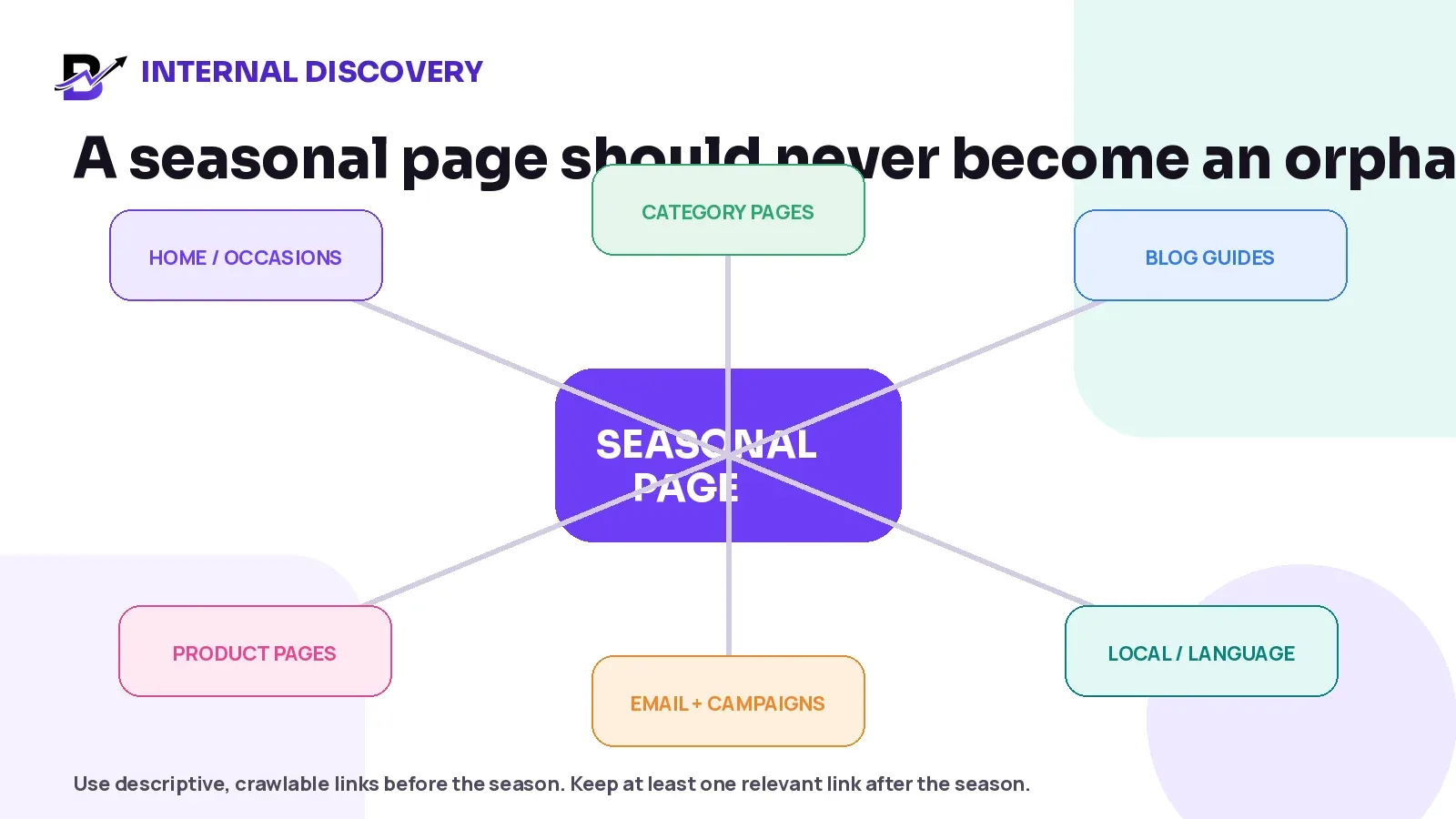
Figure 5. Use crawlable links before the season and keep at least one relevant route after it.
LINK SOURCE | BEFORE / DURING THE SEASON | AFTER THE SEASON |
|---|---|---|
Homepage or occasion hub | Feature the page when it becomes commercially important. | Remove temporary prominence, but keep a relevant occasion-hub or category link if the page will return. |
Category pages | Link from the most relevant product categories with descriptive anchor text. | Keep the relationship when the page remains useful. |
Product pages | Link selected products to the occasion guide where it genuinely helps. | Remove links from discontinued products; preserve links from evergreen items. |
Blog guides | Connect buying guides, delivery advice and seasonal operations content. | Keep useful editorial links throughout the year. |
Email, apps and campaigns | Send customers to the canonical page rather than campaign parameters becoming indexable alternatives. | Stop paid promotion, but preserve the canonical URL. |
Language / market pages | Link to the equivalent language or market version and use hreflang where appropriate. | Keep equivalents aligned when off-season content changes. |
Use normal crawlable links. Avoid placing every important route only inside a script, image or campaign widget. The seasonal page should be part of the site structure, not a temporary orphan.
7. Keep products, prices, offers and delivery promises consistent
Seasonal SEO cannot be separated from product data. The page may rank and still fail commercially if the visible product, landing page, checkout and fulfilment promise do not agree.
CUSTOMER-FACING FACT | SOURCE OF TRUTH | CHECK BEFORE LAUNCH |
|---|---|---|
Product and variant | Approved catalogue | Title, image, variant, included items and channel visibility agree. |
Price and sale price | Pricing or commerce system | Landing page, product page, cart and checkout show the same current value. |
Availability | Inventory and fulfilment rules | The page does not promote products or branches that cannot fulfil the promise. |
Offer terms | Approved campaign rule sheet | Eligibility, code, minimum spend, combinations, limits and end time are clear. |
Delivery and pickup | Configured service rules | Zones, dates, slots, cut-offs, charges and collection points match checkout. |
Product data sent to Google | Merchant Center or structured-data implementation | Submitted price, availability and landing-page facts remain consistent. |
If products are shared through Google Merchant Center, keep the product data, landing page and checkout aligned. A campaign page should not promise a sale price or availability that the product and checkout cannot support.
Related Bloomlytix guide: How to keep product data consistent across website, POS and Google Merchant Center.
8. Create separate market or language pages only when the experience is different
Country and language pages can be valuable when they genuinely change the customer experience. They become weak when a business creates dozens of copies and replaces only the place name.
SEPARATE PAGE IS JUSTIFIED WHEN | A THIN COPY IS NOT JUSTIFIED WHEN |
|---|---|
The page uses a different language and the complete buying journey is translated. | Only the city or country name changes. |
Products, currency, tax, delivery, cut-offs or store availability are materially different. | The same products and promise are repeated without local value. |
The market has distinct occasion language, timing, gifting customs or support information. | Generic paragraphs are rewritten with no operational difference. |
The local page can remain accurate and maintained every season. | No owner exists to update dates, terms, links and stock. |
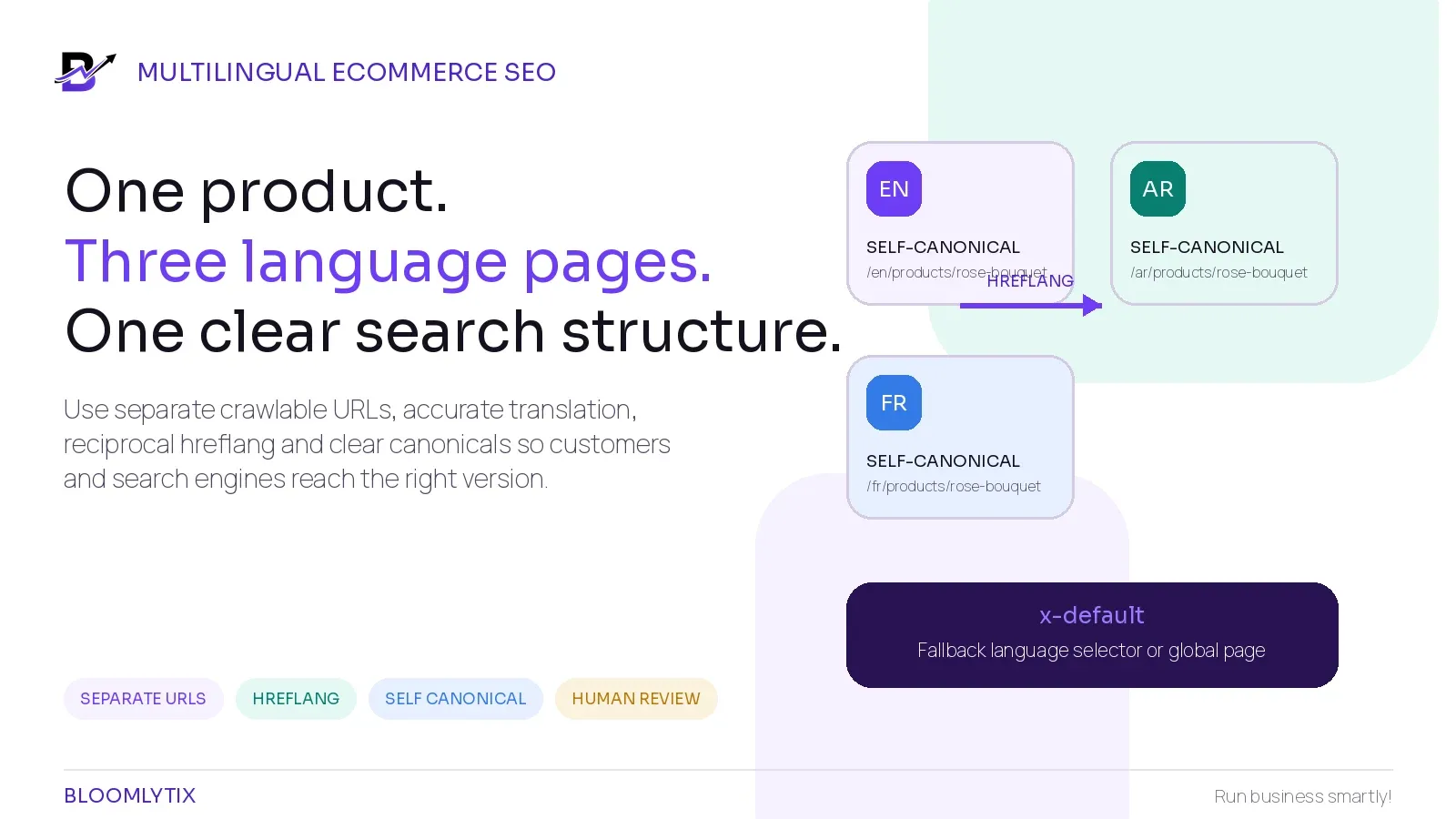
Use separate crawlable URLs for language or market versions, connect true equivalents with hreflang and let users choose their version. Do not create local pages only to repeat keywords.
Related Bloomlytix guide: How to build multilingual ecommerce pages without duplicate SEO problems.
9. Use structured data that matches the real page
Structured data can help search engines understand a page, but it cannot turn a thin or inaccurate campaign into a useful result.
PAGE / CONTENT | POSSIBLE MARKUP | IMPORTANT LIMIT |
|---|---|---|
Seasonal landing page | WebPage or CollectionPage plus BreadcrumbList where implemented correctly. | Markup must match the visible page and does not guarantee a rich result. |
Individual sellable product pages | Product and Offer where the visible product, price and availability support it. | Do not place one misleading Product object on a broad collection page. |
Actual public event | Event only when the page represents a real event with required details. | A short-term sale or shopping discount is not automatically an Event. |
Article explaining the occasion | BlogPosting or Article with accurate headline, author, publication and modified dates. | The article date is not the campaign date. |
Google’s Event documentation specifically warns against marking short-term discounts or purchase opportunities as events. Choose markup by page meaning, not by the presence of a date.
Official Google reference: Event structured data guidelines.
10. Make the page easy for AI search systems to understand
The same fundamentals that support normal search also support discovery and citation in AI search experiences. There is no special “seasonal AI schema” that guarantees inclusion.
Give a concise answer near the top: what the page offers, who it is for and which current promise applies.
Use descriptive headings for products, delivery, cut-offs, substitutions, FAQs and market differences.
Keep critical facts as crawlable text instead of hiding them only inside banners or images.
Add original tables, timelines, checklists and operational guidance that remain useful when quoted out of context.
Show a named author or reviewer and update the page date only after meaningful changes.
Keep product, price, stock and delivery facts consistent across the page, checkout and structured data.
Google states that normal SEO and people-first content guidance also applies to AI Overviews and AI Mode. The goal is not to write for a machine. The goal is to make the page accurate, clearly structured and useful enough to deserve discovery.
Official Google reference: AI features and your website.
11. Worked example: one Mother’s Day page that improves every year
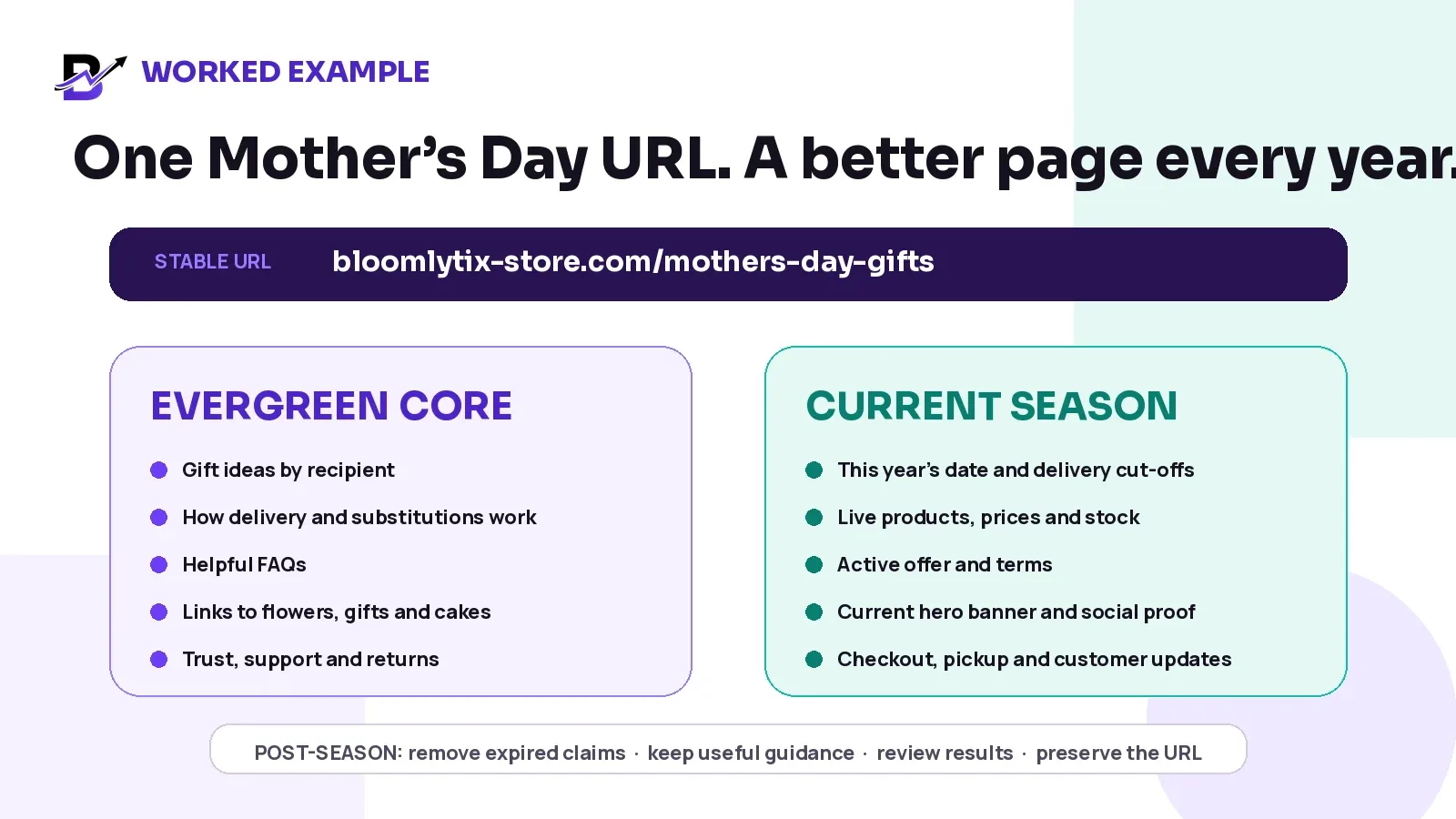
Figure 6. The URL remains stable. The useful core stays. The live commercial layer changes each season.
PAGE ELEMENT | OFF-SEASON STATE | LIVE-SEASON STATE |
|---|---|---|
H1 and introduction | Mother’s Day gift ideas and delivery guidance. | Mother’s Day Gifts 2027 with current service summary. |
Products | Evergreen categories or selected available gifts. | Current products, variants, prices, branch stock and campaign assortment. |
Delivery | General explanation of delivery and pickup. | Current date, zones, slots, cut-offs and capacity limits. |
Offer | No expired discount or countdown. | Current code, eligibility, terms, start/end time and combinations. |
Helpful content | Recipient ideas, budgets, personalisation and FAQs. | Same useful core plus current campaign questions. |
Next action | Browse available gifts or join a reminder list. | Shop now, choose a slot or contact customer service. |
The page should not pretend the campaign is live when it is not. Between seasons, it can still help customers browse relevant gifts, understand the service and find the next useful occasion.
12. What to do after the season ends
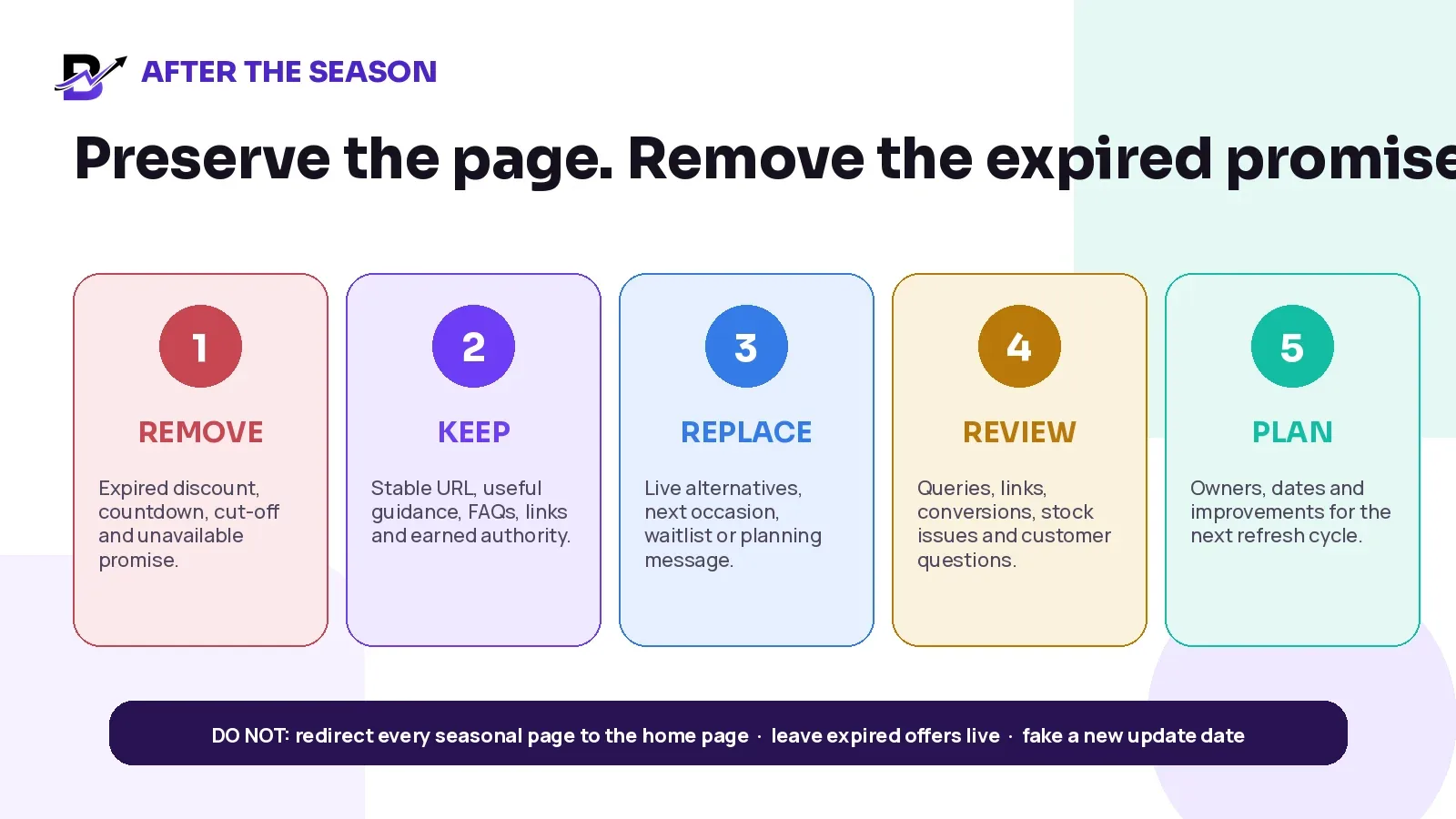
Figure 7. Preserve the page; remove the expired promise.
AFTER-SEASON ACTION | WHY IT MATTERS |
|---|---|
Remove expired discount, countdown, date-specific cut-off and unavailable promise. | Customers should never land on a campaign that looks active but cannot be honoured. |
Keep the stable URL, useful guidance, FAQs, relevant products and internal links. | The page can retain continuity and remain useful between seasons. |
Replace the main CTA with current alternatives, a reminder or the next relevant occasion. | The page still gives the visitor a helpful next step. |
Review Search Console, analytics, conversions, out-of-stock issues and customer questions. | The next refresh should be based on evidence, not a copied campaign. |
Update the sitemap lastmod only after a meaningful page change. | Google uses lastmod when it is accurate and verifiable. |
Record next season’s owner, first review date and unresolved improvements. | Seasonal work should become a repeatable process, not an annual emergency. |
Official Google reference: Build and submit a sitemap: meaningful lastmod dates.
13. Measure more than seasonal traffic
Traffic is useful, but a seasonal page should also improve product discovery, customer decisions and operational readiness.
METRIC | SIMPLE DEFINITION | WHAT IT CAN REVEAL |
|---|---|---|
Seasonal impressions | Search impressions for the page and its main occasion queries. | Whether the page is being discovered before and during demand. |
Non-brand clicks | Clicks from people not already searching for the business name. | Whether the page reaches new customers. |
Product click-through | Visitors who move from the landing page into products or categories. | Whether the page helps people choose. |
Conversion or enquiry rate | Completed orders, leads or qualified actions from the page. | Whether the current offer and promise are commercially useful. |
Availability failure | Promoted products or slots that become unavailable while still visible. | Whether merchandising and operations remain aligned. |
Customer-service questions | Questions about product, date, delivery, price, offer or substitutions. | Which page details are unclear. |
Internal-link contribution | Visits arriving from relevant categories, guides and campaigns. | Whether the page is connected to the site architecture. |
Year-over-year baseline | Comparable pre-season and live-season performance using consistent definitions. | Whether the page and operation are improving over time. |
MEASUREMENT RULE. Compare the page across the same preparation and live-season windows. A traffic drop outside the season may reflect normal demand, not an SEO failure.
How Bloomlytix can support occasion-led ecommerce pages
Bloomlytix is designed as a connected ecommerce and operations platform for specialty retail. The exact page setup depends on the business, theme, plan, content, market and implementation scope.
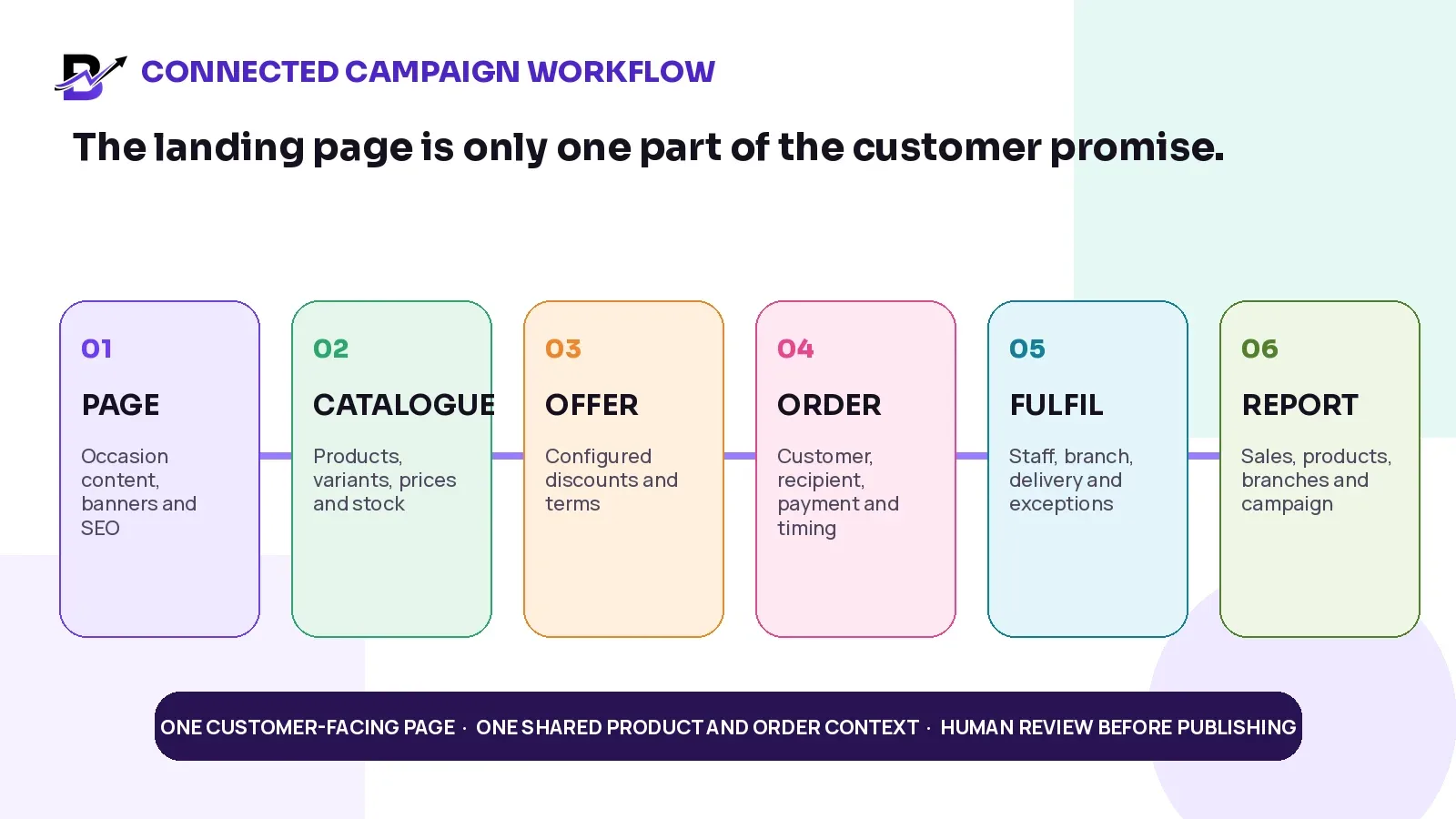
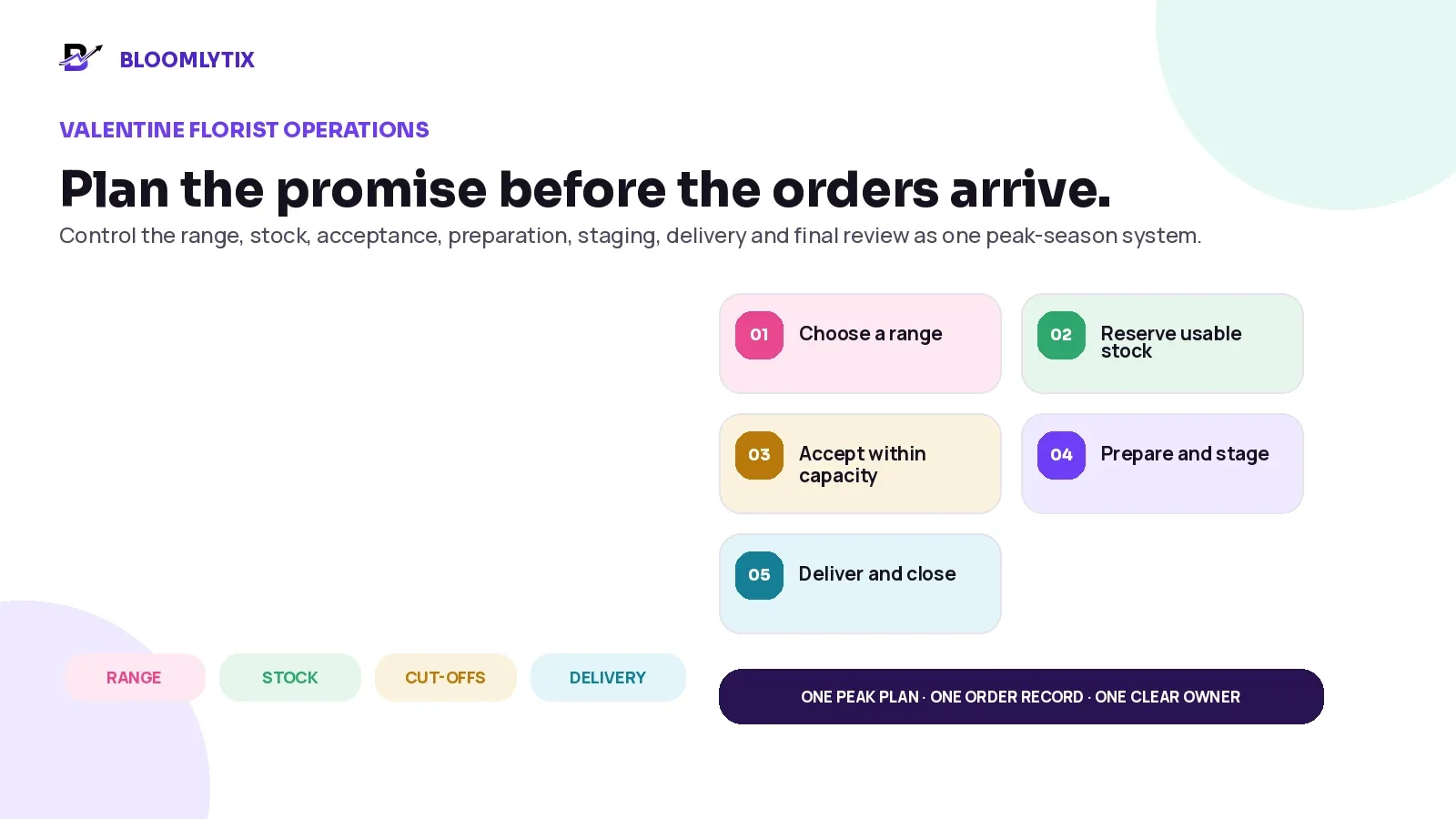
Figure 8. A seasonal page is stronger when the customer-facing promise stays connected to products, orders and daily operations.
BLOOMLYTIX AREA | ROLE IN THE WORKFLOW |
|---|---|
SEO-ready occasion and landing pages | Publish configured occasion, campaign and landing pages with titles, descriptions, content, links and brand presentation. |
Shared catalogue | Use approved products, variants, prices, images and configured availability across the storefront, apps where included and POS. |
Banners, product sections and offers | Build current campaign presentation around the live catalogue instead of creating a disconnected mini-site. |
Delivery and pickup context | Connect dates, slots, zones, charges and order details to the customer journey where configured. |
AI-assisted content tools | Prepare drafts for product, SEO, translation and blog content while keeping review and publication under human control. |
Orders, fulfilment and reporting | Carry the customer promise into staff work, stock, payment, delivery and owner reporting. |
PRODUCT SCOPE. Bloomlytix does not guarantee search rankings or automatic seasonal performance. Exact page templates, feed connections, localisation, offer rules, products, delivery settings and custom integrations must be confirmed during onboarding.
Bring one real occasion, product range and delivery promise to a Bloomlytix demonstration. The useful test is whether the page, products, order and fulfilment workflow stay connected.
Primary action: Plan one seasonal landing page with Bloomlytix.
Questions to ask during a seasonal ecommerce demonstration
Can one stable occasion URL be reused without rebuilding the page each year?
Which sections can stay evergreen, and which campaign fields can be updated safely?
Can the page use the same products, variants, prices, offers and stock as the main catalogue?
Can the team schedule or control banners, products, offers and campaign dates?
Can current delivery zones, cut-offs, dates, slots and pickup rules appear accurately?
Can different languages or markets have dedicated URLs and reviewed content?
Can the page use editable SEO title, meta description, canonical and crawlable content?
Can category, product, blog and campaign links point to the canonical page?
How are unavailable products, substitutions and sold-out slots handled?
Which structured data is generated, and does it match the visible page?
Can the owner review page traffic, product engagement, orders and campaign results?
What is standard, what requires configuration and what needs a custom integration?
Frequently asked questions
Should I create a new seasonal landing page every year?
Usually not when the same audience is searching for the same occasion. Keep one stable URL and refresh the current year, products, dates, offers and delivery promise. Create a new page only when the intent or audience is genuinely different.
Should the year appear in the seasonal page URL?
A stable URL normally works better for a recurring intent. The current year can appear in the title or visible content when useful. If the page is truly a one-year resource with standalone value, a year-specific URL may be justified.
What should a seasonal page show after the event?
Remove expired discounts, countdowns, cut-offs and unavailable promises. Keep useful gift guidance, FAQs, relevant products, internal links and a clear current next step.
How early should a seasonal page be refreshed?
A practical starting point is around 60 to 90 days before important demand, with the page opened and internally linked early enough for discovery, merchandising and testing. Businesses with long supplier or app timelines should begin earlier.
Can I redirect the seasonal page to the homepage after the campaign?
That is usually a poor experience when the seasonal URL will return. Keep the page useful. If content has permanently moved, redirect to the closest relevant replacement—not an unrelated homepage.
Do seasonal sale pages need Event structured data?
No. A short-term discount or shopping opportunity is not automatically an event. Use structured data that matches the page, such as WebPage, BreadcrumbList or Product/Offer on appropriate product pages.
How do multilingual seasonal pages avoid duplication?
Use separate crawlable URLs, translate the complete buying journey, connect equivalent pages with hreflang and keep each market’s products, currency, delivery and terms accurate.
Does updating a seasonal page guarantee higher rankings?
No. Rankings are not guaranteed. Performance depends on usefulness, technical quality, competition, internal links, authority, demand, product availability and the accuracy of the customer experience.
Seasonal Landing Page Brief
Complete this brief before the content, design and catalogue teams begin work. The purpose is to keep one page, one commercial promise and one owner.
BRIEF FIELD | DECISION TO RECORD |
|---|---|
Occasion + market | What occasion, language and market does the page serve? |
Primary customer intent | What is the visitor trying to find, compare or buy? |
Stable canonical URL | What permanent URL will represent the recurring intent? |
Evergreen core | Which guidance, categories, FAQs and trust content stay useful each year? |
Current-season layer | Which products, dates, offers, terms, stock and delivery rules must change? |
Product source of truth | Which catalogue owns products, variants, prices, images and availability? |
Delivery / pickup promise | Which zones, dates, slots, cut-offs, charges and limits are approved? |
Internal-link plan | Which home, category, product, blog, language and campaign pages will link here? |
Technical setup | Canonical, indexability, sitemap lastmod, metadata, structured data and crawlable images. |
Owners + approval | Who owns content, product, SEO, operations, legal/policy review and final publication? |
Measurement | Which query, engagement, conversion, stock and service metrics will be reviewed? |
90-Day Refresh Checklist
WHEN | CHECK |
|---|---|
T-90 | Audit previous traffic, queries, links, products, conversion, stockouts and customer questions. |
T-90 | Confirm the stable URL, market/language structure, owners and campaign scope. |
T-60 | Update evergreen content only where it genuinely needs improvement. |
T-60 | Prepare live products, prices, images, offers, stock, delivery and pickup rules. |
T-30 | Publish the complete page and add crawlable internal links from relevant sections. |
T-30 | Update sitemap lastmod after the meaningful change and inspect the canonical URL. |
T-14 | Test mobile layout, page speed, metadata, canonical, structured data and images. |
T-14 | Test product, price, offer, payment, stock, substitution, pickup and delivery scenarios. |
LIVE | Monitor search, product availability, offer accuracy, conversion and customer questions. |
LIVE | Close unsafe products, zones or slots before the customer promise fails. |
+7 | Remove expired campaign claims and replace them with a useful current next step. |
+30 | Review performance, record improvements and set the next refresh owner and date. |
Sources and further reading
Related Bloomlytix guides
Keep the page. Improve the promise.
Seasonal SEO works best when the business stops treating every campaign as a disposable file. Keep the URL that serves the returning customer intent. Improve the evergreen guidance, update the commercial facts that changed and connect the page to products, checkout and operations that can keep the promise.
The next season should not begin with an empty page and a blank plan. It should begin with last year’s URL, evidence, questions, links and lessons—then move forward with a clearer page and a more reliable customer experience.
NEXT STEP. Use the Seasonal Landing Page Brief to map one recurring occasion. Confirm the stable URL, evergreen core, current-season layer, product source, delivery promise, owners and 90-day refresh date before design work begins.
Book a workflow review: Plan one seasonal ecommerce page with Bloomlytix.