A stable identifier should follow the same sellable variant through ecommerce, POS, stock, purchasing and reports.
A customer sees a product name and a price. Your team sees much more: sizes, colours, scents, pack sizes, branch stock, supplier codes, barcode labels, imports, returns and reports. If those records do not have stable identifiers, the same item can slowly become several different products inside the business.
The problem usually appears during growth. A catalogue is copied into a new POS. Staff create a second version of an existing product. A spreadsheet removes a leading zero. A barcode is attached to the parent product instead of the exact size. Sales and stock reports then split one item across several records.
Direct answer — DIRECT ANSWER Create one stable, unique SKU for every sellable product or variant that needs its own price, stock, purchasing, scanning or reporting. Keep the pattern short and documented. Use the manufacturer’s existing GTIN when one has been assigned. Use an internal barcode only for your own scanning when your POS supports it. Never use product names as match keys, reuse old codes for new items or place an internal SKU in a GTIN field.
This guide is for specialty retailers that sell through ecommerce, customer apps, POS, assisted orders or multiple branches. It explains the identifier rules in easy English and includes examples for florists, gifting brands, bakeries, perfume shops, jewellery stores and cafés.
In this guide
The difference between a product, variant, SKU, barcode, GTIN and supplier code
How to decide which options need separate sellable variants
A simple SKU pattern that remains readable as the catalogue grows
When to use a manufacturer barcode, an internal barcode or a GS1 GTIN
Examples for flowers, cakes, perfume, jewellery, café retail and gift sets
How poor identifiers damage imports, POS scanning, stock and reporting
A step-by-step setup method and pre-import cleanup checklist
An editable SKU and Barcode Setup Template
How Bloomlytix connects identifiers with the wider retail workflow
Start with the product structure, not the barcode
A barcode cannot fix a weak product catalogue. First decide what the business is selling. Then identify the exact sellable level that needs a price, quantity, purchase record or scan.
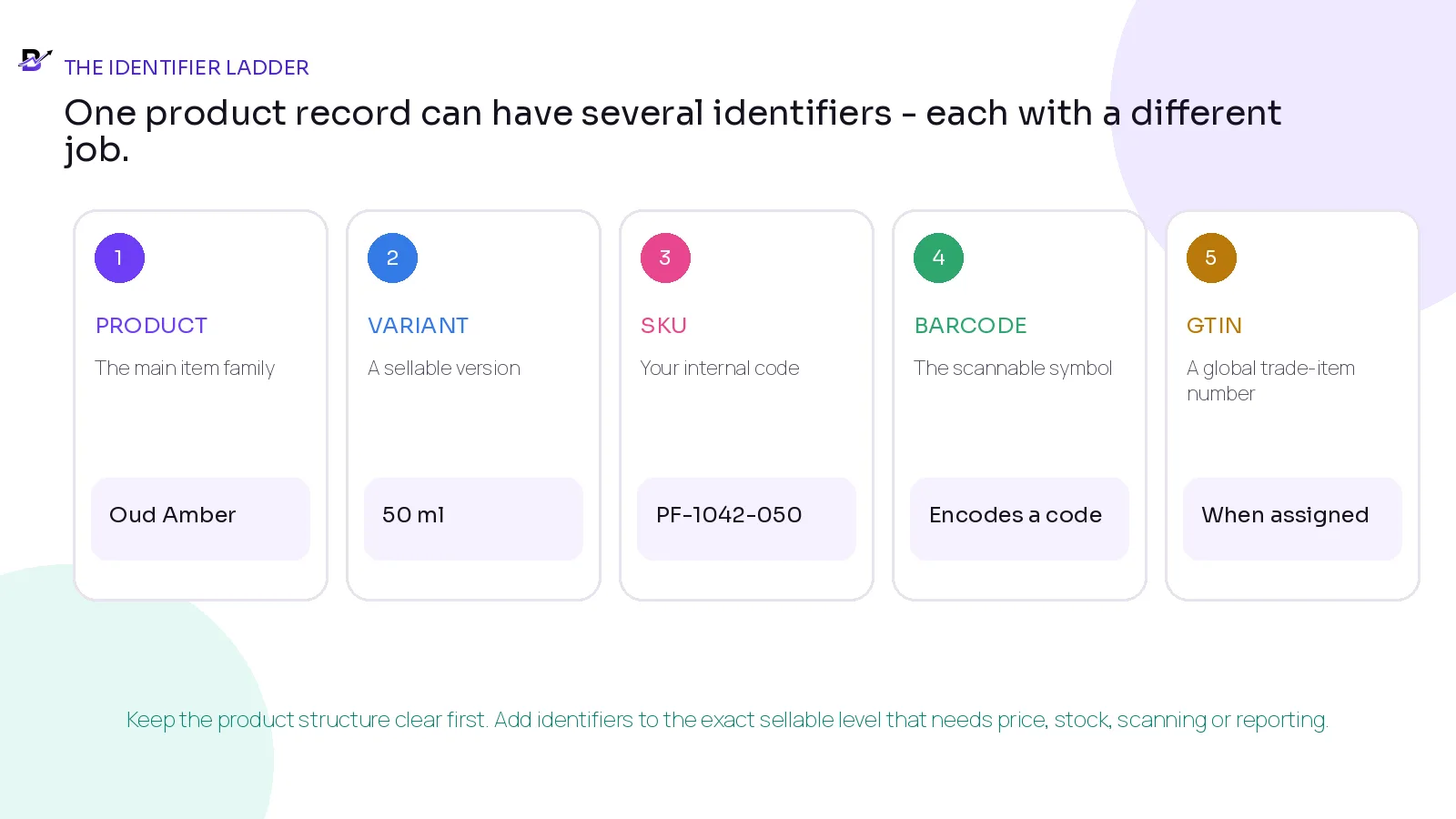
Figure 1. Product structure comes first. Identifiers are attached to the exact sellable level that needs control.
TERM | PLAIN-ENGLISH MEANING | WHO USUALLY CONTROLS IT | MAIN USE |
|---|---|---|---|
Product | The main item or product family shown to customers. | The retailer or brand owner. | Content, category, images and shared product information. |
Variant | A sellable version of the product, such as a size, colour, scent, flavour or pack. | The retailer or manufacturer. | Separate price, stock, barcode, availability or reporting. |
SKU | An internal code used to identify a product or variant inside the business. | The retailer. | Search, stock, purchasing, imports, returns and reports. |
Barcode | A machine-readable pattern that encodes an identifier for scanning. | The manufacturer, retailer or standards body, depending on the code. | Fast POS lookup, receiving, counting and fulfilment. |
GTIN | A global trade-item number used to identify a product in external trade. UPC and EAN are common GTIN formats. | The brand owner through GS1, or the manufacturer for resold goods. | Marketplaces, retailers, supply chains and product matching where required. |
Supplier / manufacturer code | The item number used by the supplier or manufacturer. | The supplier or manufacturer. | Purchase orders, invoices and supplier mapping. |
Core principle — CORE PRINCIPLE One product can have several identifiers, but each identifier needs one clear purpose. Your SKU does not replace the manufacturer’s GTIN, and a supplier code should not silently become your permanent internal identity.
SKU, barcode and GTIN are not the same thing
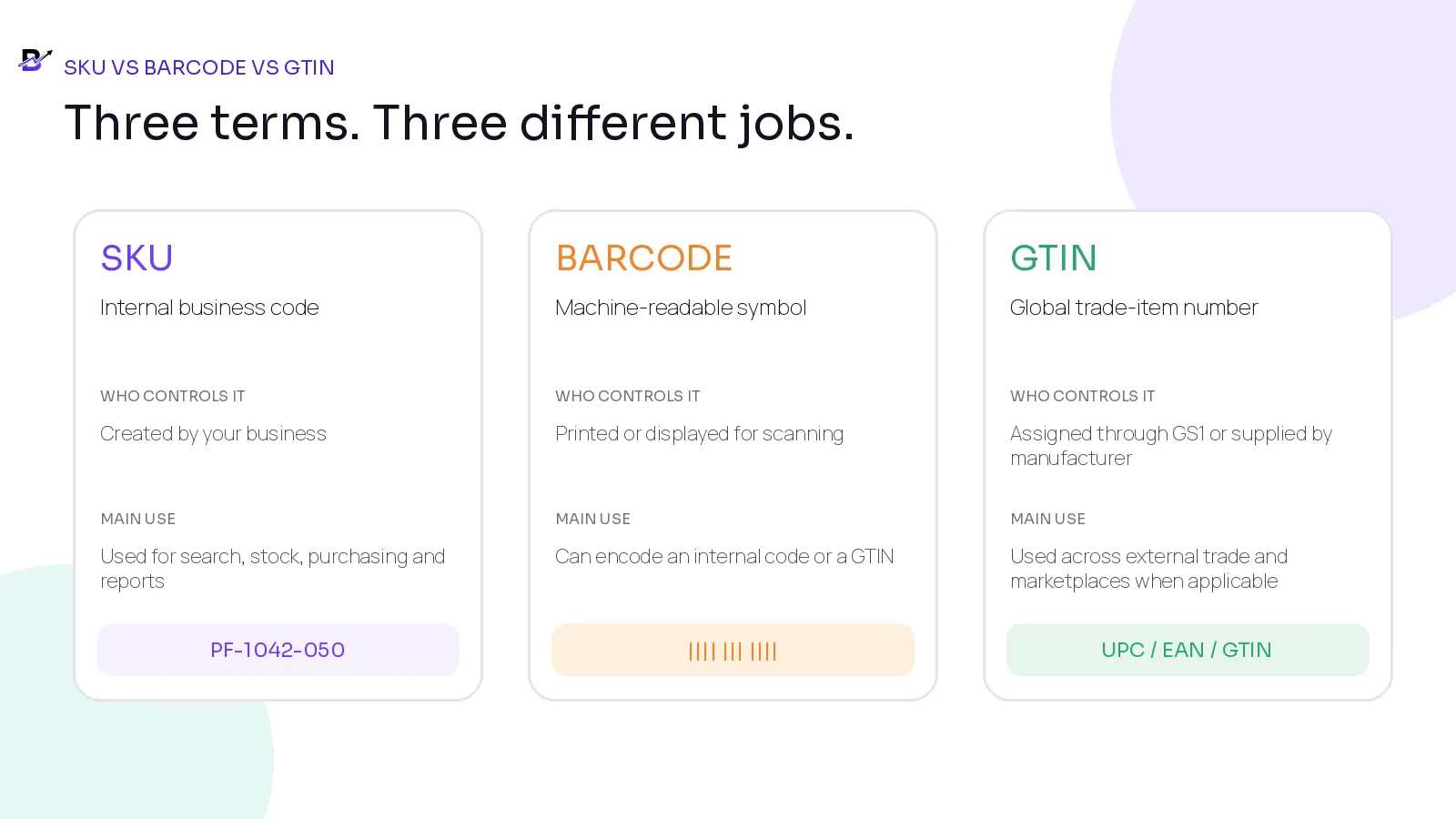
Figure 2. A SKU is an internal code, a barcode is a scannable symbol, and a GTIN is a standard trade-item number.
A SKU is normally readable by staff and meaningful only inside your business. A barcode is the visual or digital symbol a scanner reads. The value inside that barcode may be your internal code or a standard external identifier such as a GTIN.
A GTIN is the number under many retail barcodes. GS1 describes GTIN-12 as UPC, GTIN-13 as EAN or JAN, GTIN-8 for smaller items and GTIN-14 for cases or packaging. The important business rule is that the number identifies the trade item; the black-and-white bars are one way to carry that number.
Official references: GS1 GTIN guidance · Shopify SKU guidance.
Decide which choices are real variants
Not every customer choice needs its own stock record. A variant should normally be separate when the choice changes how the item is priced, stocked, purchased, scanned, fulfilled or reported.
CUSTOMER CHOICE | SEPARATE VARIANT? | REASON |
|---|---|---|
Perfume size: 50 ml or 100 ml | Yes | Each size has its own pack, price, stock and usually its own manufacturer GTIN. |
Ring size 6 or 7 held as separate stock | Usually yes | Each size may be counted, purchased and sold independently. |
Cake message typed by the customer | No permanent variant | The message belongs to the order, not to a reusable stock item. |
Bouquet ribbon colour with no separate stock or price | Maybe not | Use an order option when it does not need separate inventory or reporting. |
Coffee beans: 250 g or 1 kg pack | Yes | Different net content is a different sellable pack and should have separate identifiers. |
Gift note: call before delivery | No | This is an operational note, not a product identity. |
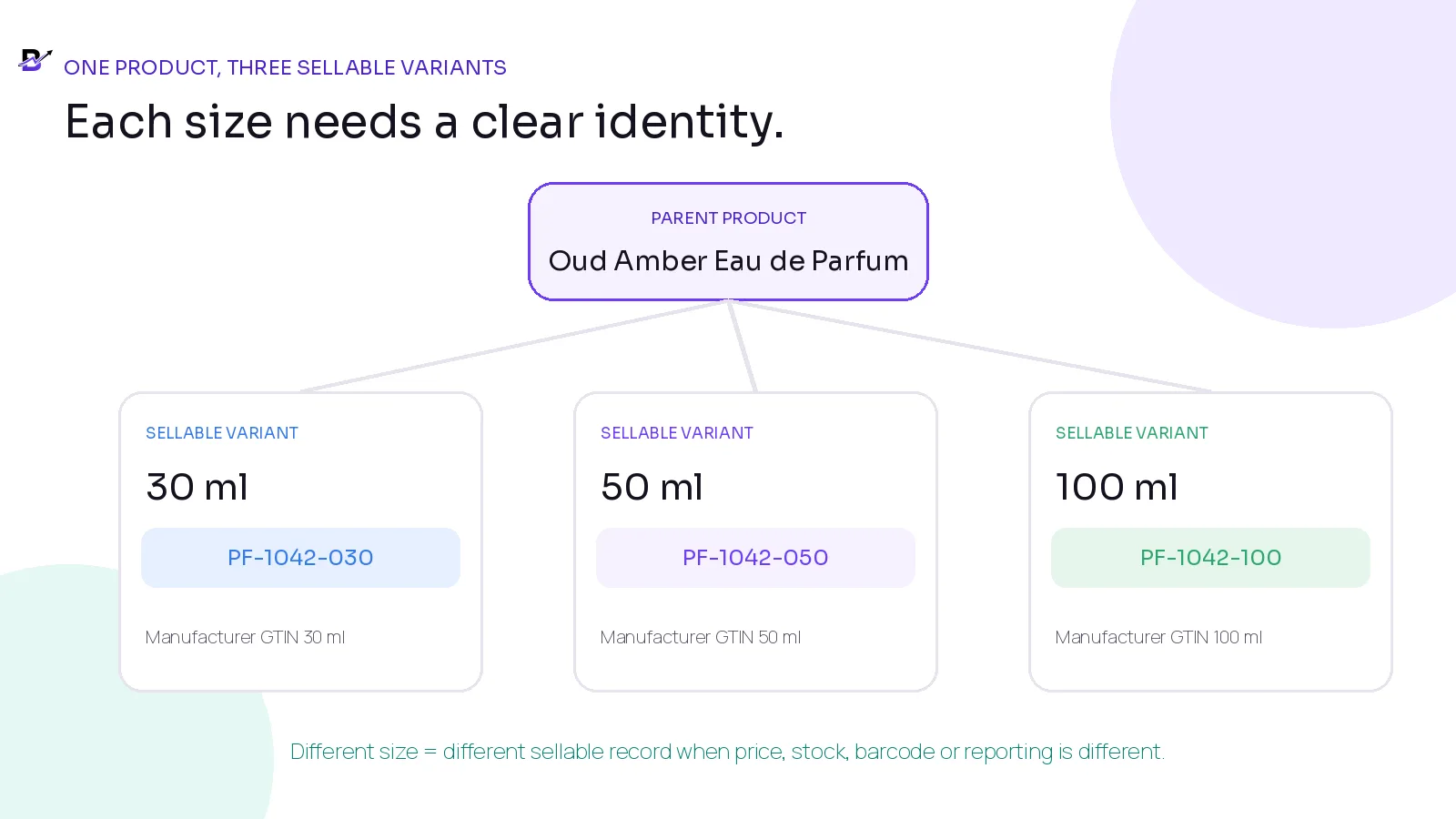
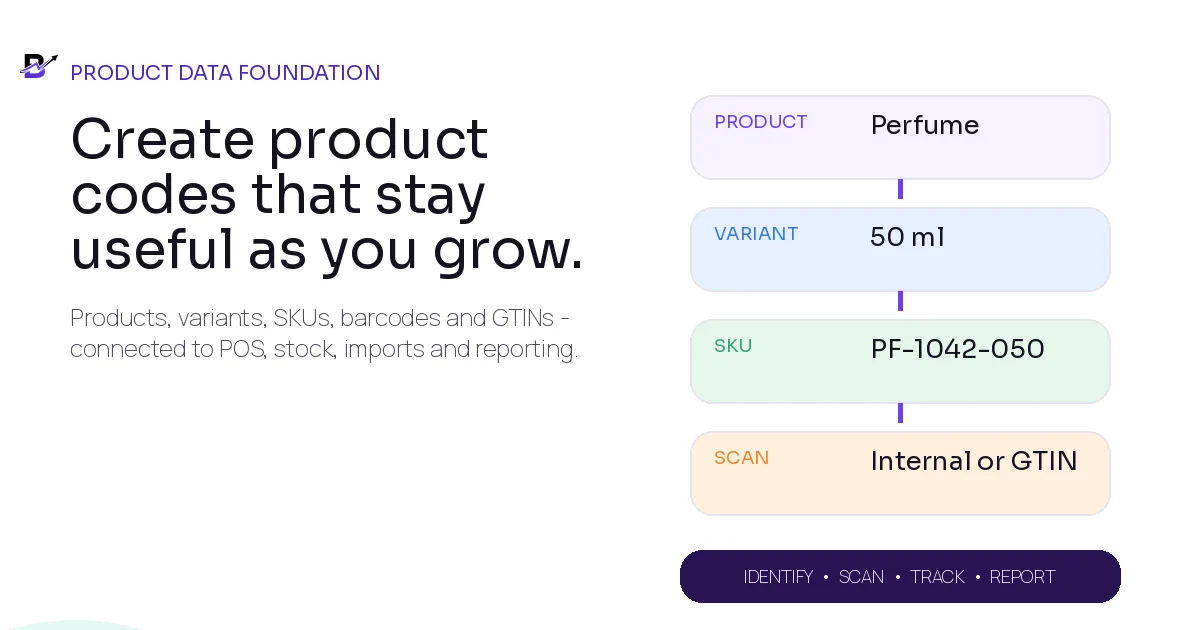
Figure 3. Each sellable perfume size has its own variant, SKU and manufacturer identifier.
Variant rule — VARIANT RULE Create a separate variant when the business needs to answer a different price, quantity, purchase, availability, barcode or reporting question. Do not create permanent variants for one-off notes that belong only to a customer order.
Give every sellable variant one stable SKU
There is no universal SKU format. Your business creates it. The best format is the one staff can read, software can import and the company can keep stable for years.
A practical SKU should be:
Unique: no two active or historical variants should use the same code.
Stable: do not change the SKU because the title, supplier, price or branch changed.
Short: long enough to be clear, but not a complete product description.
Consistent: the same pattern and separators are used across the catalogue.
Searchable: staff can type or scan it without confusing spaces or symbols.
Documented: the rule is written down, owned and reviewed before imports.
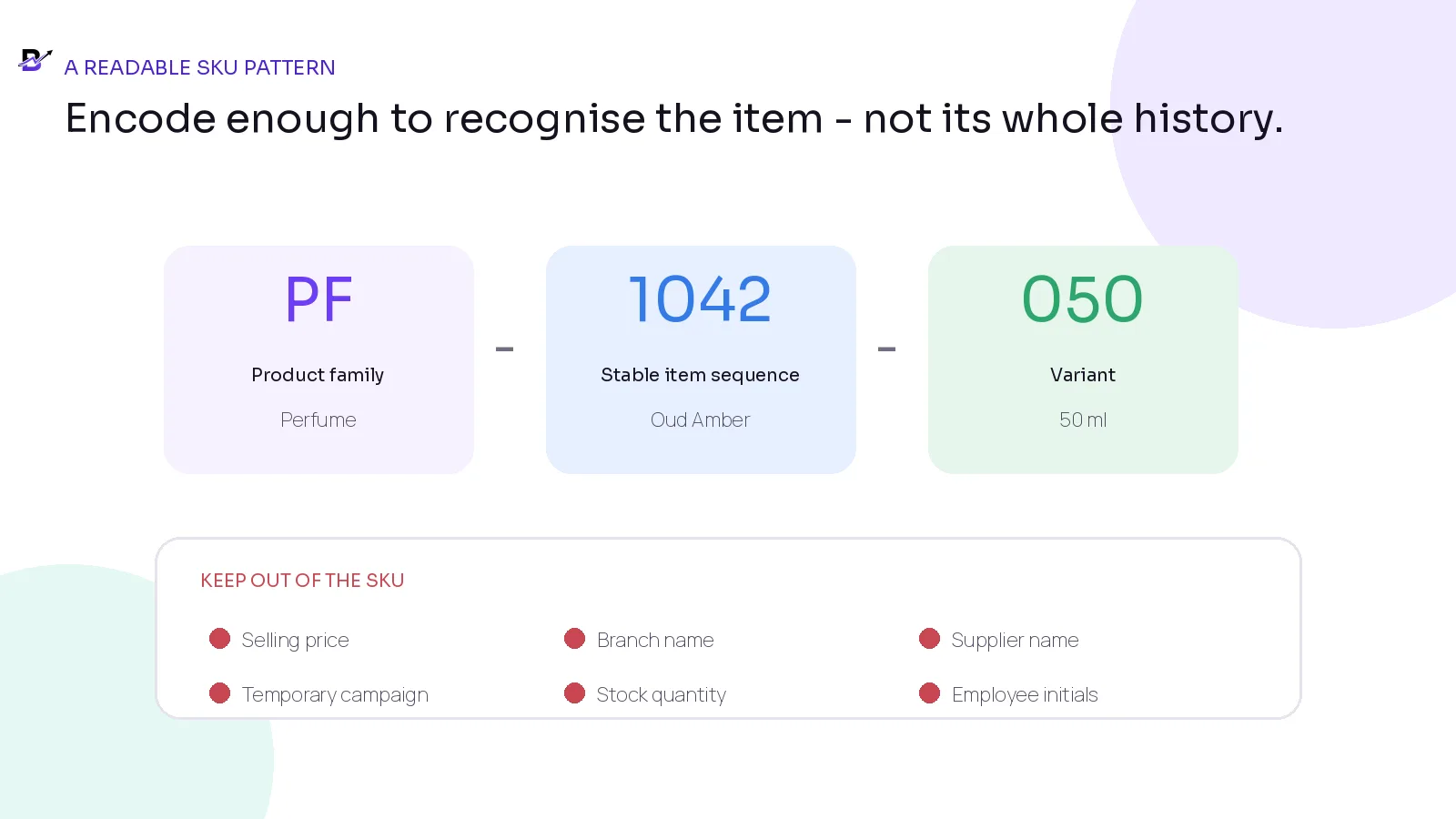
Figure 4. A readable SKU uses stable components and avoids information that changes frequently.
SKU COMPONENT | EXAMPLE | GOOD USE | RISK TO AVOID |
|---|---|---|---|
Family or category prefix | PF | Helps staff recognise a broad product family. | Do not use a category that changes often. |
Stable item sequence | 1042 | Provides a unique base identity that does not depend on the name. | Do not recycle the sequence for a new item. |
Variant code | 050 | Distinguishes the 50 ml sellable variant. | Use one documented unit and format. |
Separator | - | Makes parts readable and easier to type. | Avoid spaces and unusual symbols that break imports. |
Complete SKU | PF-1042-050 | Short, readable and stable. | Do not hide price, stock or supplier inside the code. |
Format note — Shopify recommends unique SKUs, short and consistent formats, and avoiding confusing characters such as O/0 and I/1. Treat this as practical platform guidance rather than a universal standard. See Shopify SKU guidance.
Do not put changing information inside the SKU
A SKU is a long-term identity. Information that changes should live in its own product, purchasing or stock field.
AVOID ENCODING | WHY IT BECOMES A PROBLEM | STORE IT HERE INSTEAD |
|---|---|---|
Selling price | Prices change, discounts differ and markets use different currencies. | Price and offer fields. |
Current supplier | A product can move to another supplier while remaining the same variant. | Supplier mapping and purchase records. |
Branch name | The same variant may be sold in several branches or transferred later. | Branch inventory records. |
Stock quantity | Quantity changes every day. | Inventory by location. |
Temporary campaign | Black Friday, Ramadan or Valentine labels expire. | Tags, collections and campaign fields. |
Employee initials | Staff change and ownership moves. | Activity history and assigned user. |
Product title | Titles are written for customers and may be improved for SEO. | Product title; keep a separate stable ID/SKU. |
Choose the right barcode approach
The barcode decision depends on where the product will be scanned and who else needs to recognise it.
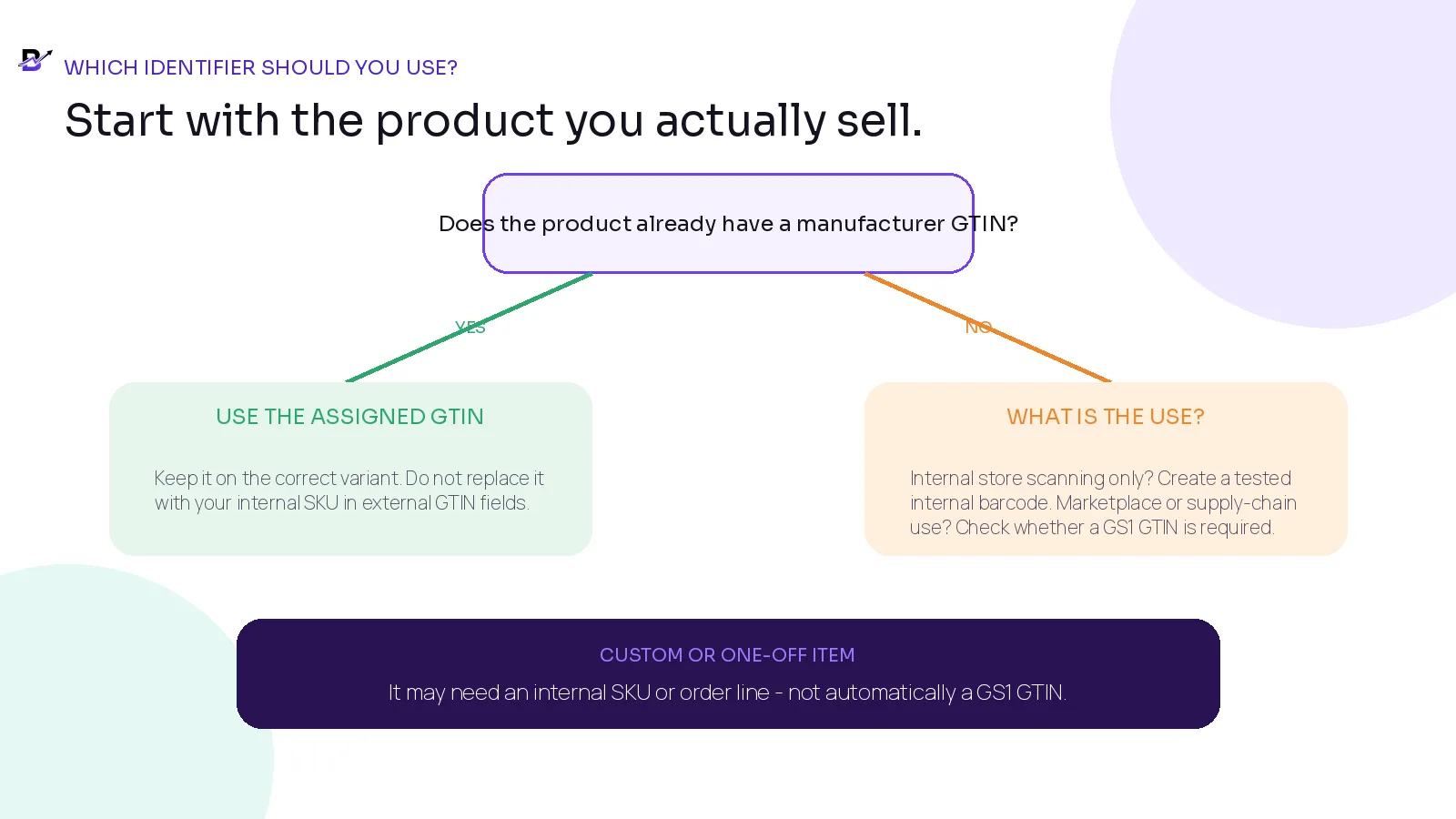
Figure 5. Use an assigned manufacturer GTIN when it exists; create internal codes only for internal use and test them with the real POS.
SITUATION | RECOMMENDED STARTING POINT | IMPORTANT CONTROL |
|---|---|---|
Reselling a packaged product with a manufacturer barcode | Use the manufacturer’s assigned GTIN/barcode on the correct variant. | Do not create a second GTIN or replace it with your store SKU in external fields. |
Private-label or manufactured product entering external trade | Check the marketplace, retailer and supply-chain requirement; obtain GS1 identifiers when required. | The brand owner is normally responsible for correct assignment. |
Only scanning inside your own stores | Create an internal barcode value supported by your POS and scanners. | Clearly label it as internal; do not present it as a GS1 GTIN. |
One-off custom order line | Use an order line, reference or internal code if needed. | Do not create permanent catalogue clutter for every unique request. |
Supplier code received on an invoice | Keep it as a supplier mapping. | Do not assume it is a GTIN or your internal SKU. |
Product already has several external identifiers | Store each in the correct field and type. | Map them to one variant; do not merge different variants. |
Official GS1 references: GTIN Management Standard · GTIN reuse guidance.
Use industry examples without copying the exact code
The examples below show the logic, not a mandatory format. Every business should check platform limits, scanner support, supplier data and staff needs before finalising its rule.
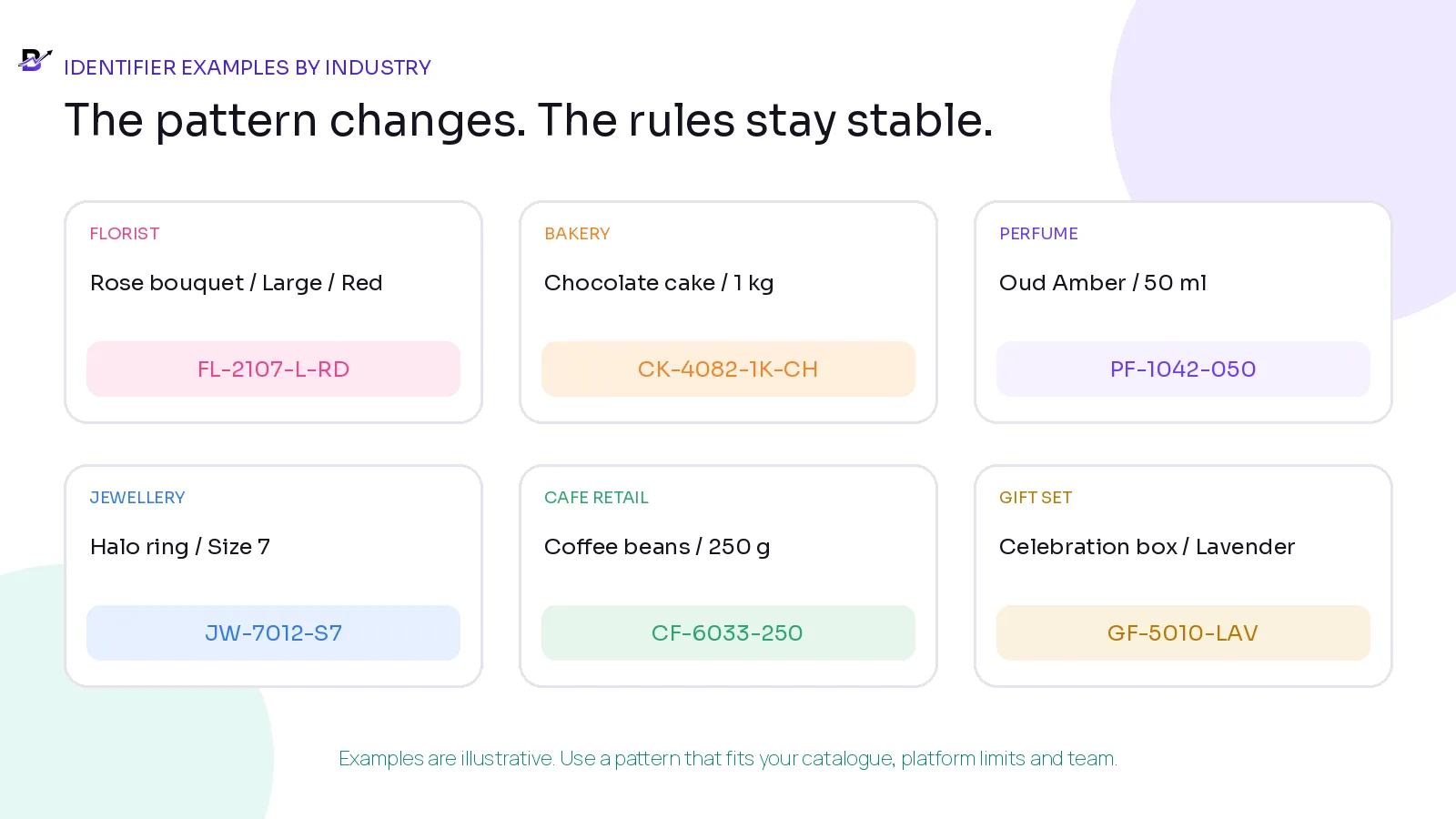
Figure 6. Different industries can use the same principles while choosing their own readable pattern.
INDUSTRY | PRODUCT STRUCTURE | IDENTIFIER GUIDANCE |
|---|---|---|
Florist | Premium Rose Bouquet > Small / Medium / Large > colour where separately controlled | Give each separately priced or stocked variant its own SKU. A made-to-order bouquet may use an internal barcode only if scanning adds value; a GTIN is not automatic. |
Bakery | Chocolate Celebration Cake > 1 kg / 2 kg > configured flavour | Use SKUs for repeatable sellable variants. Keep customer message and one-off decoration inside the order, not the permanent SKU. |
Perfume | Oud Amber > 30 ml / 50 ml / 100 ml | Use the manufacturer GTIN for each size when reselling branded goods, plus your own SKU for internal operations. |
Jewellery | Halo Ring > Size 6 / 7 / 8, or separately identified piece | Use a variant SKU when size is stocked separately. Serial numbers, certificates, purity and unique-piece custody are separate specialist requirements. |
Café retail | House Coffee Beans > 250 g / 1 kg | Each pack size should have a separate variant, SKU and manufacturer identifier where assigned. |
Gift set | Celebration Box > Lavender / Black theme | Use a separate SKU for each repeatable set. A predefined set sold as one trade item may also need its own GTIN when external trade requires it. |
Protect leading zeros and long numeric codes
Spreadsheet software often treats codes as numbers. That can remove leading zeros, display long values in scientific notation or change the cell during export. Product identifiers should be stored and imported as text unless the platform documentation says otherwise.
RISK | EXAMPLE | SAFE CONTROL |
|---|---|---|
Leading zero removed | 001245 becomes 1245 | Format the column as text before pasting or importing. |
Scientific notation | A long barcode becomes 6.29123E+12 | Use text format and inspect the exported CSV in a plain-text editor. |
Automatic date conversion | 03-11 becomes a date | Avoid ambiguous codes and keep the field as text. |
Trimmed spaces or symbols | A code changes during cleanup | Use a documented, platform-safe character set. |
Duplicate created | Blank or altered code causes a new import row | Test a small import and match by stable ID/SKU, not title alone. |
Import warning — IMPORT WARNING Never assume the file is safe because it looks correct on screen. Export a small sample, reopen the raw CSV, and verify every SKU, barcode and GTIN before the full import.
Poor identifiers create operational problems
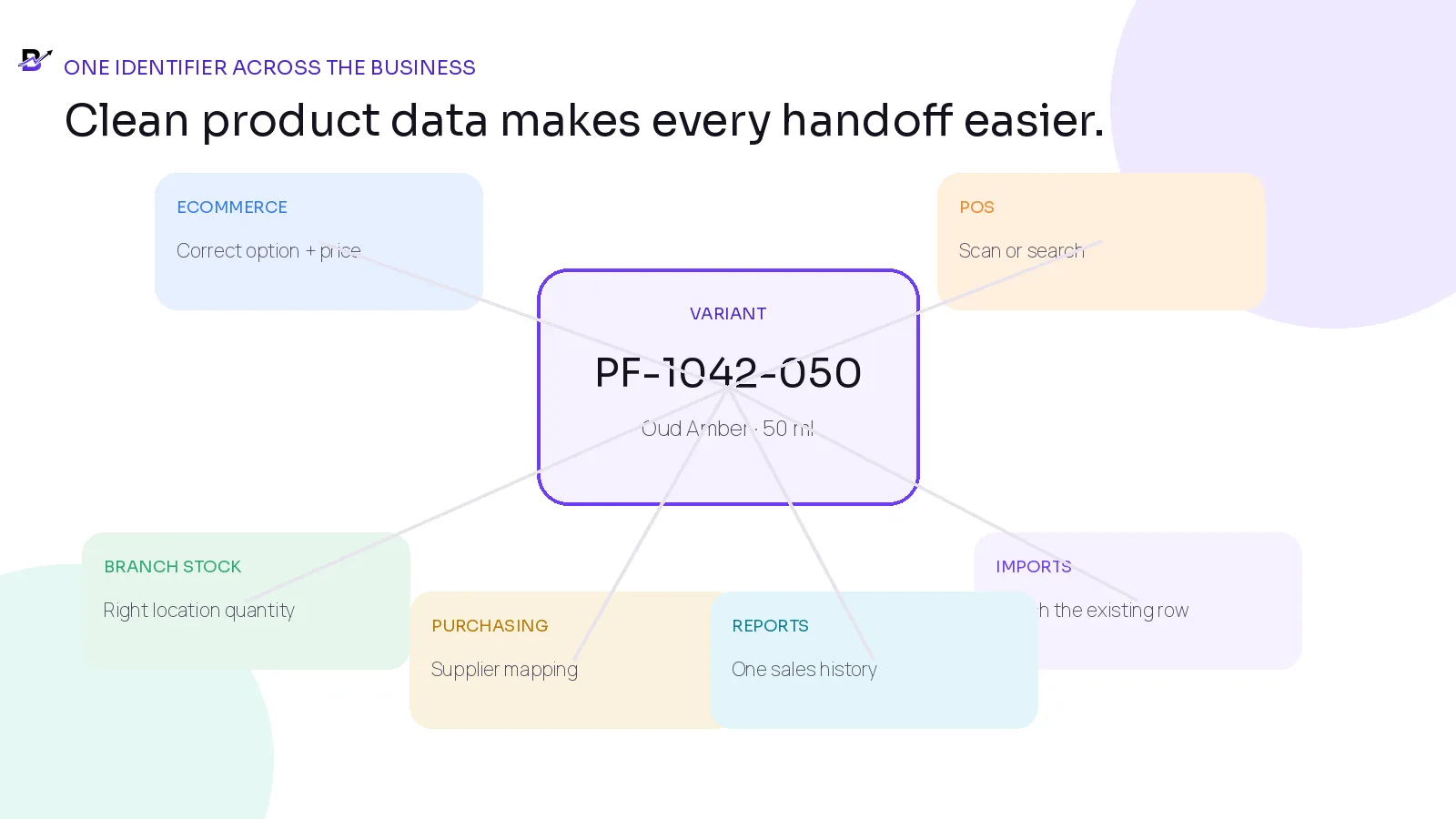
Figure 7. One stable variant identity supports ecommerce, POS, stock, purchasing, imports and reports.
PROBLEM | TYPICAL CAUSE | BUSINESS RESULT |
|---|---|---|
Duplicate product after import | The new system matched by title or created a row for a blank SKU. | Sales and stock split across two records. |
POS scans the wrong size | One barcode was attached to the parent product instead of the exact variant. | Staff sell or reduce the wrong item. |
Stock differs by channel | The website and POS use different product or variant IDs. | Overselling, hidden stock or manual reconciliation. |
Supplier invoice cannot be matched | Supplier code was not mapped to the internal SKU. | Receiving takes longer and purchase history is incomplete. |
Return goes to the wrong item | Several variants share a code or the label is unclear. | False stock increases and inaccurate reports. |
Best-seller report is split | The same variant has old and new SKUs with no mapping. | The owner cannot see the full product history. |
Merchant Center rejects the identifier | An internal SKU was submitted as a GTIN or a wrong GTIN was guessed. | Listings can lose visibility or be disapproved. |
Shopping-data note: Google Merchant Center guidance says to submit the correct assigned identifiers and not to guess a GTIN or place an internal SKU in the GTIN field.
A practical 10-step setup method
List every sales channel and product source Include ecommerce, apps, POS, marketplaces, supplier catalogues, spreadsheets, branches and legacy systems. —
Define the product and variant model Write which choices create separate price, stock, barcode or reporting records. —
Choose the SKU owner Name the person or team allowed to create, approve and retire codes. —
Select a simple pattern Use stable family, sequence and variant components that fit the platform and staff workflow. —
Reserve old codes Keep discontinued SKUs in history and prevent reuse for a different item. —
Map external identifiers Keep manufacturer GTIN, MPN and supplier code in their correct fields against the same variant. —
Choose the barcode rule Use existing manufacturer barcodes where assigned; create internal barcodes only for supported internal scanning. —
Clean and test a small sample Import a limited group, scan at POS, receive a purchase, transfer stock, sell, return and report. —
Document exceptions Define how custom items, bundles, gift sets, one-off orders and products without GTINs are handled. —
Lock the operating rule Train staff, restrict casual code changes and review duplicate or blank identifiers regularly. —
Pre-import SKU cleanup checklist
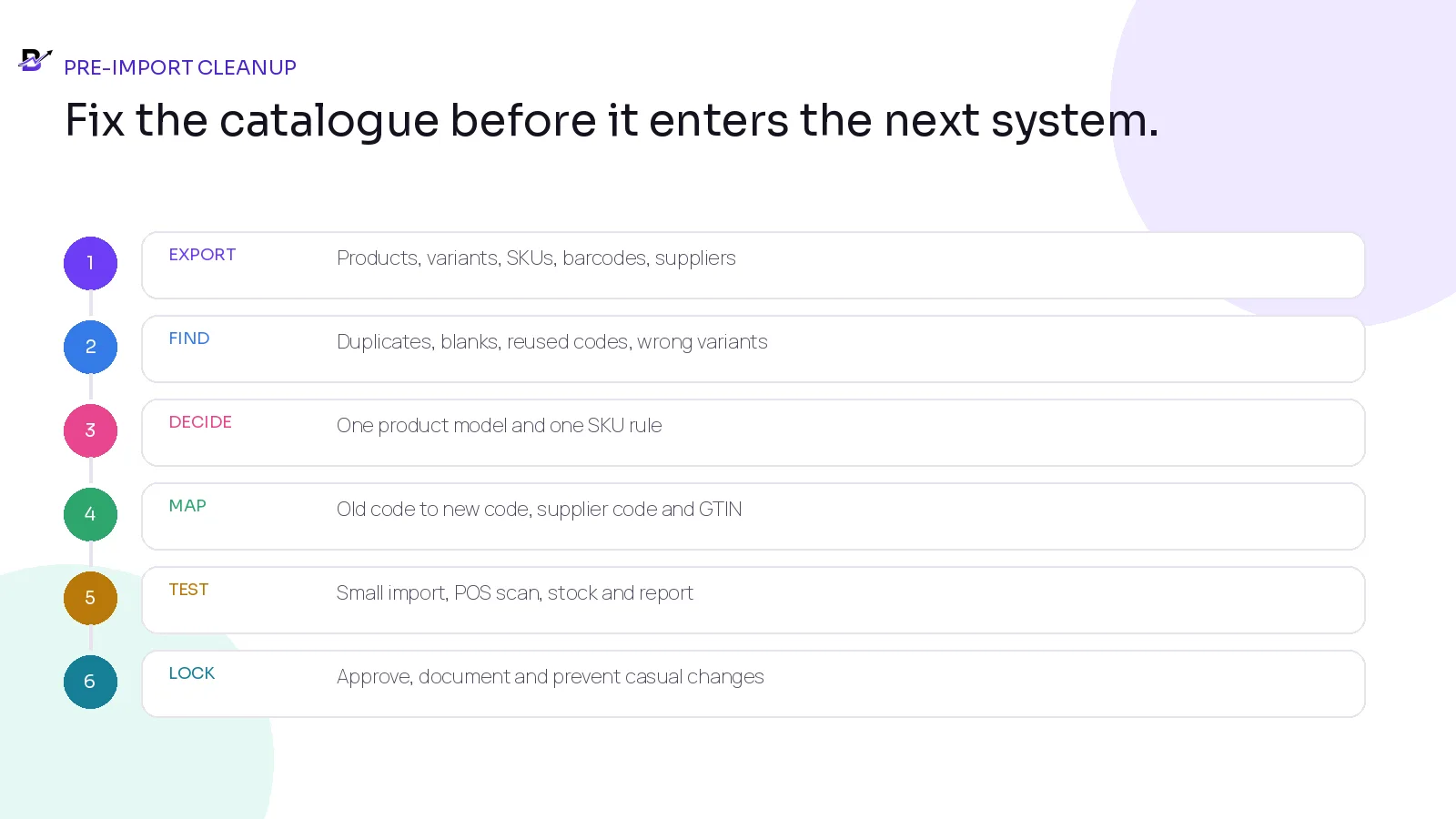
Figure 8. Clean, map and test product data before the complete import.
Every sellable product and variant is present once.
Parent products and variants are separated correctly.
Every tracked variant has one unique SKU.
Blank, duplicate, reused and temporary SKUs are resolved.
Leading zeros and long numeric identifiers are preserved as text.
Manufacturer GTINs remain attached to the exact correct variant.
Internal barcodes are labelled as internal and tested with the POS.
Supplier codes are mapped instead of replacing the internal SKU.
Discontinued items remain archived and their codes are not reassigned.
Old and new codes have a mapping table when a change is unavoidable.
Branch opening stock uses the approved variant, not a duplicate row.
A small import, sale, return, transfer and report have been tested before full migration.
SKU and Barcode Setup Template
Use one row for every sellable product or variant. The fields below can be copied into a spreadsheet or implementation workbook before import.
FIELD | EXAMPLE / INSTRUCTION |
|---|---|
Product ID | Stable internal parent ID, if the platform uses one. |
Product title | Customer-facing product name. |
Variant title | Size, colour, scent, flavour, pack or other sellable choice. |
Internal SKU | Unique, stable code for this exact sellable variant. |
Barcode value | The value scanned internally or supplied by the manufacturer. |
Barcode type | Internal/custom, GTIN-8, GTIN-12/UPC, GTIN-13/EAN, GTIN-14 or another supported type. |
Manufacturer GTIN | Use only the correct assigned number; leave blank when none exists. |
Manufacturer / MPN | Brand and manufacturer-assigned part number where applicable. |
Supplier code | Supplier’s item number used on purchase orders and invoices. |
Unit / pack | One piece, 50 ml, 250 g, 12-pack, gift set, etc. |
Stock tracked? | Yes / no; and whether the exact variant has its own quantity. |
Active branches | Locations allowed to stock or sell the variant. |
Sales channels | Website, app, POS, assisted orders, marketplace, etc. |
Legacy code | Old SKU or identifier needed for migration mapping. |
Status | Draft, active, discontinued or archived. |
Reviewer / date | Named approval before import or launch. |
Template rule — TEMPLATE RULE Do not force every field to contain a value. A blank GTIN is safer than a made-up GTIN. The required fields depend on the product, sales channel, marketplace and country.
How Bloomlytix supports the identifier workflow
Bloomlytix uses a connected catalogue across ecommerce, customer apps where included, POS, staff operations, branch inventory, purchasing, fulfilment and reporting. Product and variant records can carry internal SKU and barcode-related identifiers used by supported search and scanning workflows. Exact barcode formats, labels, scanner models, imports and advanced packaging features depend on the current tenant configuration and release.
BLOOMLYTIX AREA | ROLE IN THE WORKFLOW |
|---|---|
Connected catalogue | Keep the approved product and variant structure in the same operating platform used by ecommerce and POS. |
POS product search | Find products quickly by name, SKU or supported barcode workflow where configured. |
Branch stock | Attach stock movements and quantities to the correct product or variant and location. |
Purchasing | Map supplier purchases and invoice evidence to the approved internal item. |
Orders and fulfilment | Keep the sold variant attached to the same order used by staff and delivery. |
Reports | Review sales, products, branches, stock movement and purchase history from connected records. |
Implementation support | Use onboarding to confirm the catalogue pattern, import template, scanner compatibility and product-scope rules. |
Product scope — Bloomlytix does not issue GS1 GTINs. Supported barcode types, scanner models, label workflows, import formats and advanced packaging options depend on the current tenant configuration and release. Confirm these requirements during discovery and onboarding rather than assuming universal hardware or format support.
Questions to ask during a product-data demonstration
Can one parent product hold several sellable variants with different prices, stock and identifiers?
Can every variant have a unique SKU and the correct manufacturer barcode or GTIN?
Can staff search by product title, SKU and barcode at POS?
What happens when a duplicate SKU or barcode is imported?
Can products exist in the catalogue without being active on every channel?
How are supplier codes mapped to internal SKUs during purchasing?
Can stock be viewed and moved by exact variant and branch?
Can a discontinued SKU remain in historical orders and reports?
How are bundles, gift sets, custom lines and one-off orders represented?
Which barcode formats and scanner models are supported?
Can the business export product, variant, SKU, barcode and stock data?
How are Product structured data and Merchant Center identifiers kept consistent with the catalogue?
Frequently asked questions
What is the difference between a SKU and a barcode?
A SKU is the internal code your business uses to identify a product or variant. A barcode is the machine-readable symbol a scanner reads. A barcode can encode your internal SKU or another identifier such as a GTIN.
Does every product variant need its own SKU?
Give a variant its own SKU when it needs separate price, stock, purchasing, scanning, fulfilment or reporting. An option that exists only as a note and does not need separate control may not need a permanent SKU.
Can I create my own barcodes?
You can create internal barcodes for your own stores when the POS and scanner support the chosen format. An internal barcode is not automatically a GS1 GTIN and may not be accepted by marketplaces or external retailers.
Should I reuse a SKU after discontinuing a product?
As a business rule, avoid reusing old SKUs. Historical orders, returns, integrations and reports can still refer to the original code. GS1 also generally prohibits reassigning a GTIN to another trade item.
How long should a SKU be?
There is no universal length. Keep it as short as practical while remaining unique and readable. Shopify currently suggests short, consistent formats and notes that many businesses use roughly 4-16 characters.
Is UPC the same as a GTIN?
UPC is the common name for GTIN-12 and its retail barcode format. EAN normally refers to GTIN-13. They belong to the wider GTIN system.
Can I use my SKU as the GTIN in Google Merchant Center?
No. If the product has an assigned GTIN, submit that correct GTIN. Do not place an internal store SKU in the GTIN field. If no GTIN exists, follow the channel’s rules for products without standard identifiers.
Does every custom product need a GTIN?
No. Some custom, handmade or one-off items do not have assigned GTINs. The correct approach depends on the product, brand ownership, marketplace and supply-chain requirement.
Final SKU and barcode checklist
The product and variant structure is agreed before codes are created.
Every separately priced, stocked or reported variant has one unique SKU.
The SKU pattern is short, stable, readable and documented.
Price, supplier, branch, stock quantity and temporary campaigns are not encoded in the SKU.
Old SKUs remain reserved and are not reused for new products.
Manufacturer GTINs stay attached to the exact correct variant.
Internal barcodes are clearly separated from GS1 identifiers.
Supplier codes and MPNs are stored in their own fields or mapping table.
Leading zeros and long numeric codes are protected during CSV work.
The POS, scanner, ecommerce import and branch stock workflow have been tested.
Duplicate, blank and mismatched identifiers are reviewed regularly.
The product page, structured data and external feed use the same verified product facts.
Next action — Use the SKU and Barcode Setup Template in this guide for one real product and all its variants. Then test that product through ecommerce, POS, branch stock, purchasing and reporting before converting the full catalogue.
Book a product-data workflow demo
Related Bloomlytix guides: Connect ecommerce and POS · Multi-location inventory · Perfume inventory · Jewellery inventory · Cafe ordering and POS · Retail software migration.