A website removes the installation barrier. A branded app must give customers a clear reason to return.
A mobile app can feel like the obvious next step for a growing retail brand. Your logo sits on the customer’s home screen. You can offer quick reorder, saved addresses, order history, loyalty journeys and useful notifications. The idea sounds powerful.
But an app also asks more from the customer. They must find it, install it, sign in, allow permissions and keep it on their phone. If the experience is only a smaller copy of the website, many customers will not see enough value to return.
DIRECT ANSWER — Every retail business needs a strong mobile-friendly website. Not every retail business needs an app immediately. A branded app becomes more valuable when customers buy repeatedly and gain a real benefit from saved accounts, quick reorder, order tracking, loyalty, relevant notifications or app-only convenience. Decide from customer behaviour and operational readiness—not from the desire to “have an app.”
This guide is for florists, gifting brands, bakeries, cake shops, perfume brands, jewellery brands, cafés and other specialty retailers comparing a mobile-friendly ecommerce website with a branded Android or iOS customer app.
In this guide
The different jobs of a mobile website and a branded customer app
When a website-first approach is still the right decision
The signs that repeat customers may benefit from an app
A practical 20-point App Readiness Scorecard
How the website and app should share customer, product and order data
Push-notification permissions, store review and account ownership
The real launch costs and ongoing work beyond development
How Bloomlytix connects web, Android, iOS and daily operations
The right question is not “Can we build an app?”
Most retailers can build or buy a customer app. The harder question is whether customers will choose to install it, return to it and use it often enough to justify the launch and ongoing work.
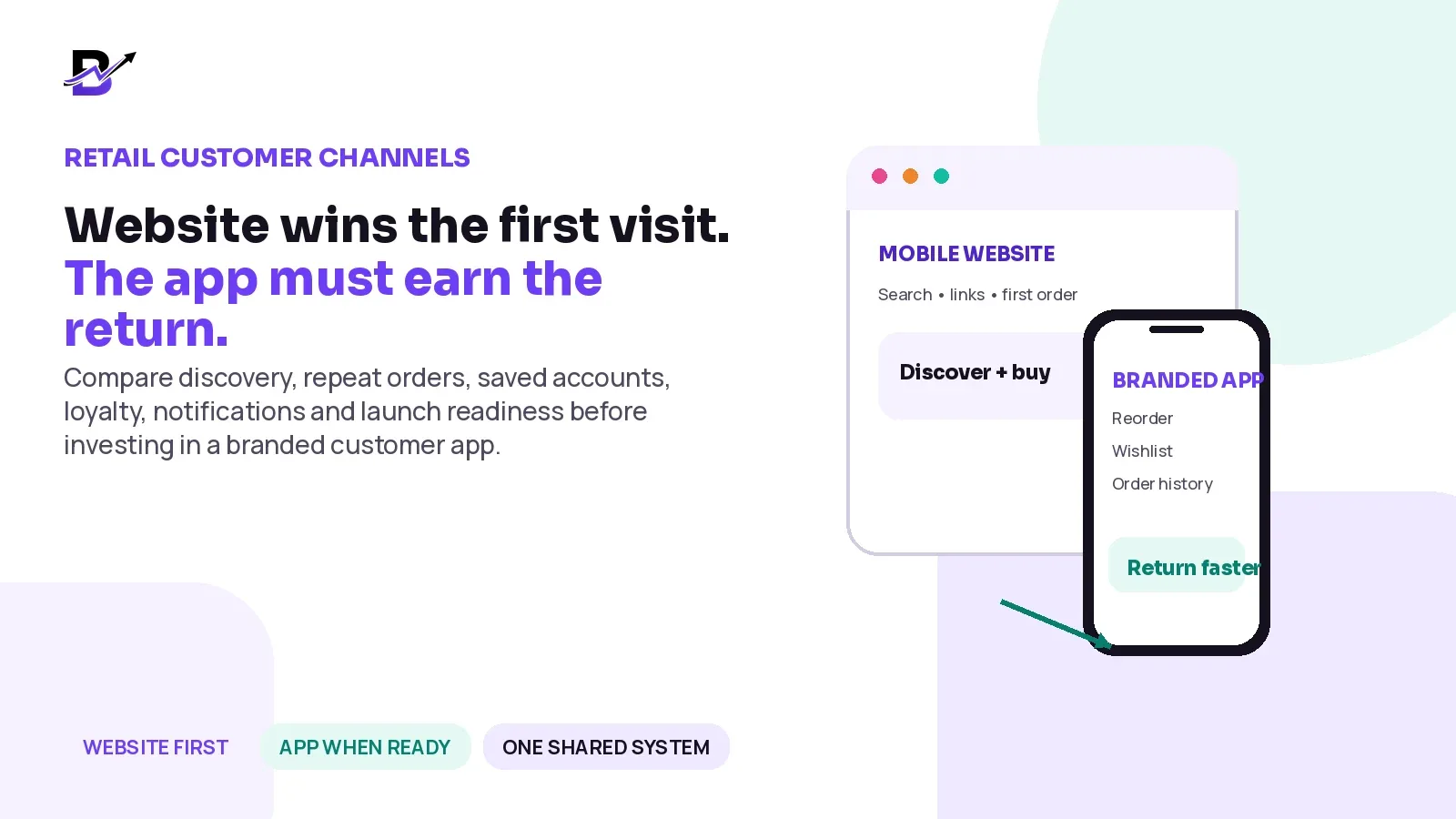
A website and an app are not two versions of the same marketing page. They are strongest at different moments:
The website is the open door. It can be reached from search, social media, ads, messages and shared links without asking for an installation.
The app is the return door. It can reduce repeated work for known customers who want order history, saved addresses, quick reorder, loyalty or useful updates.
CORE PRINCIPLE — The website should win the first visit. The app must earn the return.
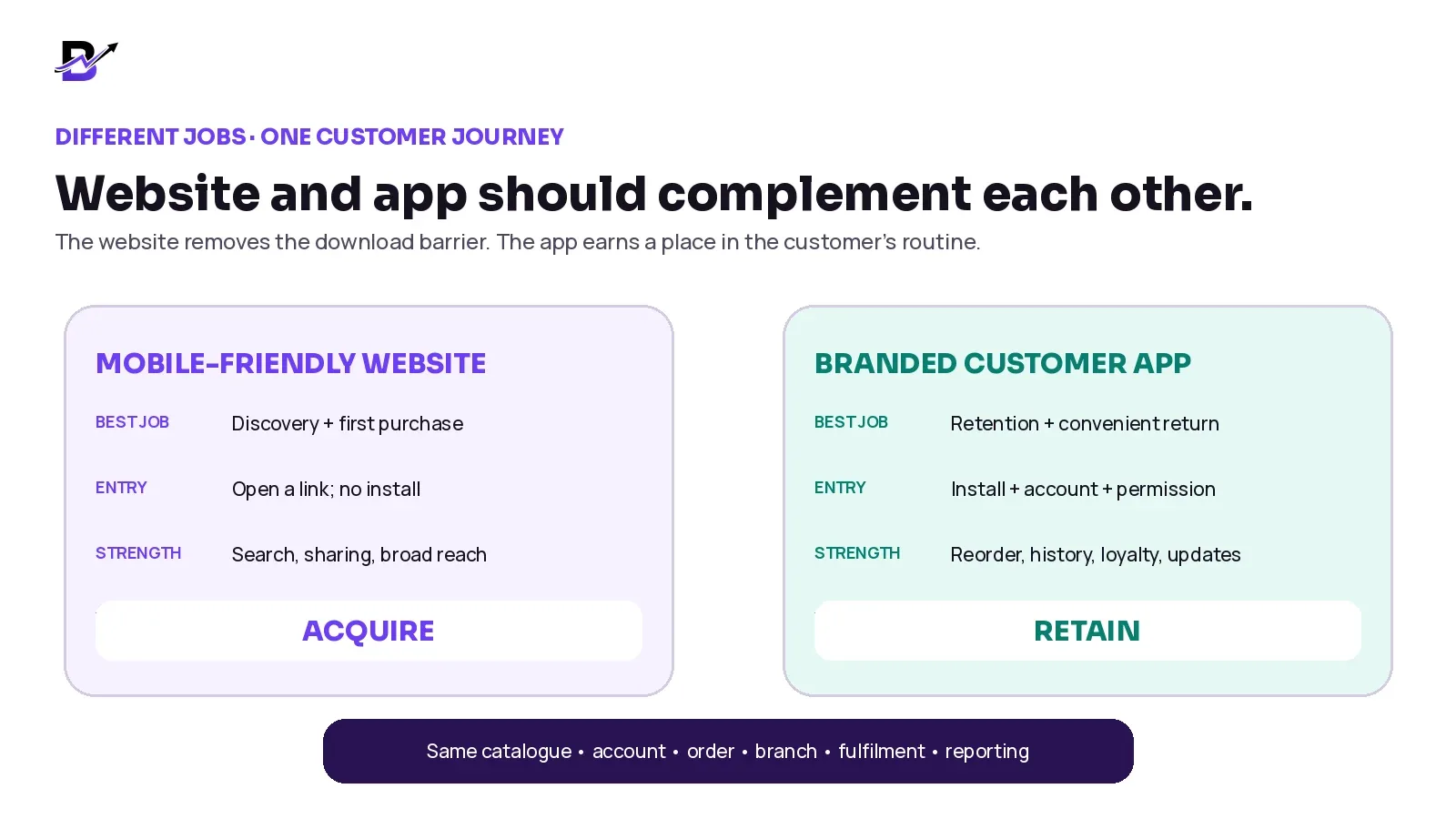
Figure 1. The two channels have different strengths, but both should connect to the same customer and order foundation.
Mobile-friendly website, installable web experience and native app
Before comparing “website versus app,” separate three possible customer experiences. The labels can overlap, and the exact features depend on the technology and device.
EXPERIENCE | SIMPLE MEANING | BEST FIT | MAIN ADVANTAGE | MAIN TRADE-OFF |
|---|---|---|---|---|
Mobile-friendly ecommerce website | A responsive site opened in the browser. | Search, shared links, product discovery, first orders and broad access. | No installation and one public URL. | The customer must return through the browser, link or search. |
Installable web experience / PWA | A web experience that may be added to the home screen and use selected device features. | A middle path when the web experience is strong and supported features are enough. | One web codebase and no traditional store listing in many cases. | Capability and notification support vary by browser, device and implementation. |
Branded native customer app | An Android or iOS app distributed through the relevant platform process. | Repeat customers, saved accounts, app-led loyalty, quick reorder and richer mobile engagement. | Home-screen presence and a more app-like return journey. | Requires install, platform accounts, review, updates and active promotion. |
BALANCED VIEW — A progressive web app can be useful, and a native app can be powerful. Neither one automatically creates repeat customers. The business still needs a clear reason to return, accurate operations and ongoing promotion.
When a strong website is enough for now
Choosing “website first” is not a small ambition. A fast, mobile-friendly website can be the best customer channel when the business is still building demand or when customers buy only occasionally.
WEBSITE-FIRST SIGN | WHAT IT MEANS |
|---|---|
Customers buy rarely | One-off or low-frequency purchases give people little reason to keep a separate app. |
The direct customer base is still small | An app needs an audience that can be invited, not only an empty store listing. |
The mobile website needs improvement | Fix slow pages, confusing product options or checkout problems before copying them into an app. |
Most traffic comes from search and shared links | The website remains easier to reach without installation. |
The catalogue or offer changes are not maintained well | An app will not fix weak product data, images, stock or pricing. |
Orders still move through disconnected operations | Adding an app can create another order source without fixing fulfilment, stock or delivery. |
There is no app promotion plan | Customers may never discover or install the app after launch. |
No one owns updates and support | Store policies, device changes, bugs, releases and customer questions continue after go-live. |
PRACTICAL RULE — Do not launch an app to escape a weak website. Improve the mobile buying journey, customer data and order workflow first.
When a branded app starts to make sense
An app becomes easier to justify when it removes repeated effort for customers and supports a direct relationship the business can maintain.
APP-READINESS SIGN | WHY IT MATTERS |
|---|---|
Repeat ordering is common | Customers buy weekly, monthly or around recurring occasions. |
Saved details reduce real effort | Addresses, recipients, preferences or previous orders are useful again. |
Quick reorder has practical value | A favourite drink, bouquet, gift, perfume or bakery item can be bought again with fewer steps. |
Order status matters | Customers benefit from meaningful preparation, pickup or delivery updates. |
A loyalty journey already exists | The business can explain how customers earn, redeem and understand rewards. |
Notifications can be useful | Messages are based on permission and relevance—not constant promotions. |
The brand has an owned audience | Email, SMS, WhatsApp, in-store staff and packaging can invite existing customers. |
Web and app share the same operation | Products, customers, orders, payments, branches and fulfilment do not need to be rebuilt. |
Use the 20-point App Readiness Scorecard
Score each statement from 0 to 2. Use 0 when the evidence is missing, 1 when the business is partly ready and 2 when the case is strong. This is a planning tool, not a prediction of revenue or store approval.
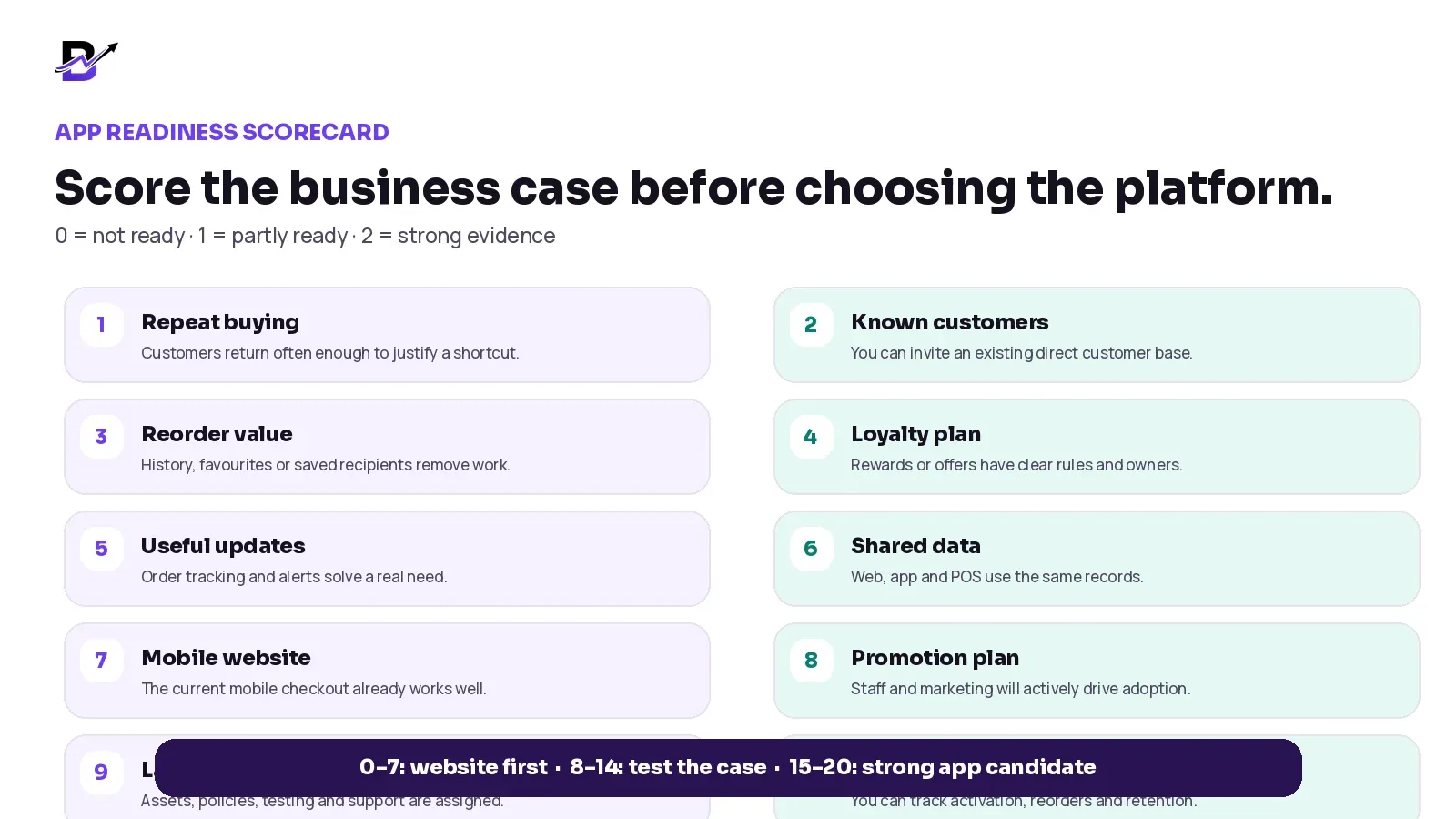
Figure 2. The score exposes missing work before the business commits to an app launch.
SCORECARD ITEM | QUESTION TO ANSWER | YOUR SCORE |
|---|---|---|
1. Repeat buying | Customers return often enough to benefit from an easier path. | 0 / 1 / 2 |
2. Known customer base | The business can invite existing direct customers. | 0 / 1 / 2 |
3. Reorder value | History, favourites, saved addresses or recipients remove repeated work. | 0 / 1 / 2 |
4. Loyalty plan | Rewards, coupons or app-only offers have clear rules and owners. | 0 / 1 / 2 |
5. Useful updates | Order, pickup or delivery alerts solve a real customer need. | 0 / 1 / 2 |
6. Shared data | Website, app and POS can use the same catalogue, account and order data. | 0 / 1 / 2 |
7. Mobile website | The existing mobile discovery and checkout journey is already strong. | 0 / 1 / 2 |
8. Promotion plan | Staff and marketing channels will actively explain why the app is useful. | 0 / 1 / 2 |
9. Launch capacity | Brand assets, policies, testing, releases and support have named owners. | 0 / 1 / 2 |
10. Measurement | The team can track install, activation, first order, reorder and retention. | 0 / 1 / 2 |
RESULT | RECOMMENDED NEXT STEP |
|---|---|
0–7: website first | Improve mobile ecommerce, customer capture, operations and repeat-purchase strategy before investing. |
8–14: test the case | Run customer interviews, a waitlist, Android-first launch or limited pilot before expanding. |
15–20: strong candidate | The business has a credible app use case. Confirm costs, store requirements, ownership and launch scope. |
The website and app should become one customer journey
A healthy app strategy does not hide the website or force every first-time visitor to install. It lets customers discover and buy through the easiest channel, then invites the app after the business has delivered value.
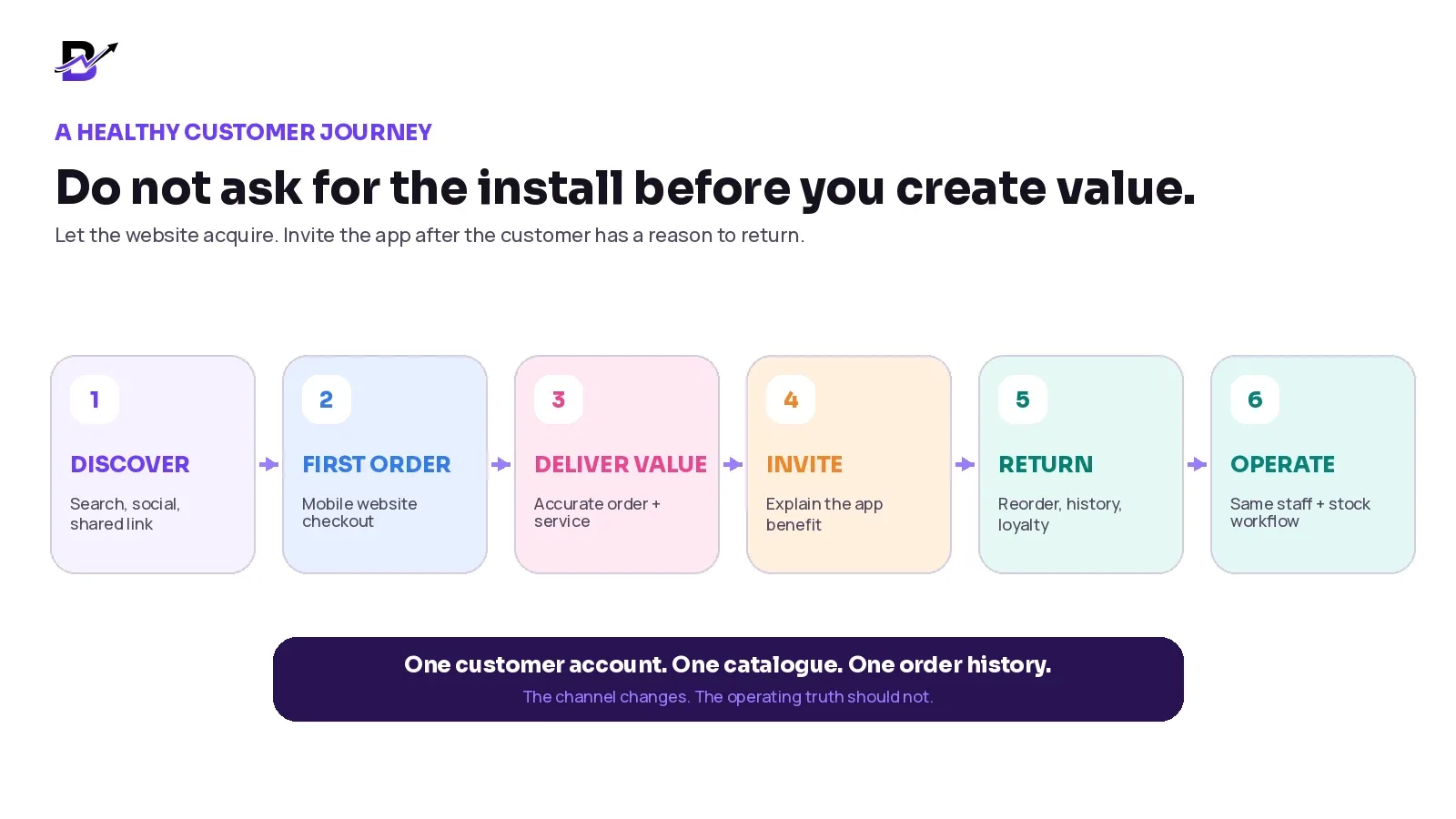
Figure 3. The app invitation is strongest after the customer understands the benefit—not before the first product page loads.
JOURNEY RULE | PRACTICAL MEANING |
|---|---|
Let first-time visitors browse freely | Do not block product discovery with an install wall. |
Ask after a useful moment | Examples include order confirmation, delivery completion, loyalty signup or the second visit. |
Explain one clear benefit | “Reorder your favourites faster” is stronger than “Download our app.” |
Keep one customer identity | Accounts, addresses, history and rewards should not split by channel. |
Keep one order operation | App orders should enter the same branch, staff, stock, payment and delivery process. |
Allow customer choice | Some loyal customers will still prefer the website. The experience should remain good. |
Which retail categories have the strongest app case?
Order frequency matters, but frequency is not the only factor. A lower-frequency brand can still create app value through wishlists, saved recipients, account history, high-value service or relevant collections. The table below shows the questions to test, not fixed conclusions.
INDUSTRY | POSSIBLE APP VALUE | DECISION CAUTION |
|---|---|---|
Café / routine food | Favourite items, repeat pickup, saved payment or address, time-sensitive status. | Strong when customers order frequently. Confirm hospitality-specific workflows separately. |
Florist | Saved recipients, occasion reminders, quick reorder, delivery tracking, seasonal collections. | Strong for repeat gifting; weaker when purchases are very rare. |
Gift shop | Saved recipients, wishlists, occasion-led collections, custom-order history and delivery updates. | Useful when customers return across birthdays, anniversaries and seasonal moments. |
Bakery / cake shop | Favourite bakery items, celebration history, pickup tracking, repeat family occasions. | Custom cakes still need a clear approval and production workflow. |
Perfume brand | Wishlists, collections, discovery sets, repeat fragrance purchases, offers and order history. | Useful when the brand has direct repeat customers—not only occasional gifting. |
Jewellery brand | Wishlists, saved items, client history, high-value order updates and private launches. | Purchase frequency may be lower; the app needs relationship value beyond checkout. |
Push notifications are permission, not guaranteed reach
Notifications can be useful when they explain something the customer cares about: an order is confirmed, a delivery is on the way, a favourite item is available or a reward is ready to use. They become harmful when every campaign becomes an interruption.
NOTIFICATION MOMENT | GOOD PRACTICE |
|---|---|
Order update | Send only when the status is meaningful and accurate. |
Delivery update | Do not announce “out for delivery” before the order has actually left. |
Loyalty update | Explain the balance, expiry or next useful action clearly. |
Offer or campaign | Use customer permission, sensible frequency and relevant segments. |
Permission request | Ask after the customer understands the value; allow the app to remain useful if permission is denied. |
Opt-out | Provide a practical way to change marketing-notification preferences. |
Apple’s current review guidelines say promotional push notifications require explicit opt-in and a method to opt out. Android 13 and later also use a runtime notification permission. Platform rules change, so the implementation team should check current official requirements before release.
Official sources checked 16 September 2026: Apple App Review Guidelines · Firebase notification-permission guidance
GOOD NOTIFICATION TEST — Would the customer still choose this message if it appeared at a busy moment? If the answer is no, do not send it.
A branded app should be more than a website inside an icon
A thin wrapper can create two problems. Customers may see no reason to keep it, and the app may struggle to demonstrate enough app-specific usefulness during platform review.
Apple’s current App Review Guidelines state that an app should offer features, content and interface value beyond a repackaged website. The same guidelines also require complete, tested submissions with accurate metadata and working services. Store approval is external to the software provider and can never be guaranteed.
APP VALUE | WHY IT MATTERS |
|---|---|
Saved account + addresses | Removes repeated entry for returning customers. |
Order history + tracking | Gives the customer a reason to open the app after checkout. |
Quick reorder + favourites | Turns previous interest or purchases into a faster return path. |
Loyalty + app offers | Creates a clear retention journey when rules and margins are controlled. |
Useful notifications | Supports order communication and relevant campaigns with permission. |
App-quality mobile experience | Uses mobile patterns, performance and navigation designed for the platform. |
Official sources checked 16 September 2026: Apple App Review Guidelines · Apple Developer Program · Android developer verification
Plan for account ownership, review and ongoing responsibility
The business should know who owns the developer accounts, store listings, signing access, analytics, privacy information and release decisions. Using accounts controlled only by an outside supplier can make future updates or provider changes harder.
OWNERSHIP AREA | QUESTION TO SETTLE BEFORE LAUNCH |
|---|---|
Developer account | Who is the legal account holder? Who can add or remove team members? |
App identity | Who owns the app name, package or bundle identifier, icon and store listing? |
Store assets | Who prepares screenshots, descriptions, support links and review notes? |
Privacy + data declarations | Who confirms what customer data, analytics and permissions the app uses? |
Release access | Who can approve production releases, emergency fixes and staged rollouts? |
Source + provider exit | What happens to the app, accounts and customer data if the provider changes? |
Support ownership | Who answers customer app issues after launch? |
STORE-REVIEW REALITY — A launch date should not be promised until the app, accounts, content, policies, testing and external review dependencies are understood.
The real cost is more than development
A business may buy a customer-app entitlement inside a wider retail platform or fund a separate app project. In both cases, compare the complete first-year cost and the ongoing operating cost.
COST LAYER | WHAT IT CAN INCLUDE |
|---|---|
Platform or development | App entitlement, custom work or separate development scope. |
Launch + onboarding | Brand configuration, catalogue, account setup, testing and submission support. |
Developer accounts | Platform membership or registration fees, verification and account administration. |
Store assets + policies | App icon, screenshots, descriptions, privacy policy, support page and data declarations. |
Third-party services | Messaging, analytics, maps, payments or external APIs where applicable. |
Maintenance + updates | Operating-system changes, store-policy changes, bug fixes and release testing. |
Promotion | In-store prompts, website banners, email, SMS, paid media and staff training. |
Internal time | Approvals, catalogue review, customer support, campaign planning and measurement. |
SIMPLE COST FORMULA — First-year app cost = app/platform scope + launch work + developer accounts + assets and policies + external services + internal time + adoption activity.
Apple currently lists the Apple Developer Program at US$99 per membership year. Google Play account, verification and policy requirements should be checked in the live registration flow. Fees and regional requirements can change; verify them again before publication and onboarding.
Account reference checked 16 September 2026: Apple Developer Program membership. Recheck fees and regional requirements before enrolment.
A practical eight-step app launch plan
Step 1 — Prove the customer case
Use order history, repeat purchase patterns and customer interviews. Define the specific reason customers would return to the app.
Step 2 — Choose the first platform scope
Decide whether Android only, Android plus iOS, or a stronger web/PWA approach fits the customer base and budget.
Step 3 — Confirm account ownership
Prepare the Apple and Google account structure, organization details, access roles and required verification early.
Step 4 — Prepare the brand and policy assets
Approve the app name, icon, screenshots, descriptions, privacy policy, support links and customer-facing terms.
Step 5 — Configure the full customer journey
Connect catalogue, account, addresses, favourites, checkout, payment, delivery, order history, loyalty and notifications.
Step 6 — Test normal orders and exceptions
Test sign-up, login, payment success and failure, cancellation, refund, stock issue, address change, delivery failure and notification permissions.
Step 7 — Submit and respond to review
Provide accurate metadata, demo access where required and complete review notes. Keep time for fixes or questions.
Step 8 — Launch adoption and measurement
Invite the right customers, train staff, promote one clear benefit and review activation, reorders, retention and support issues.
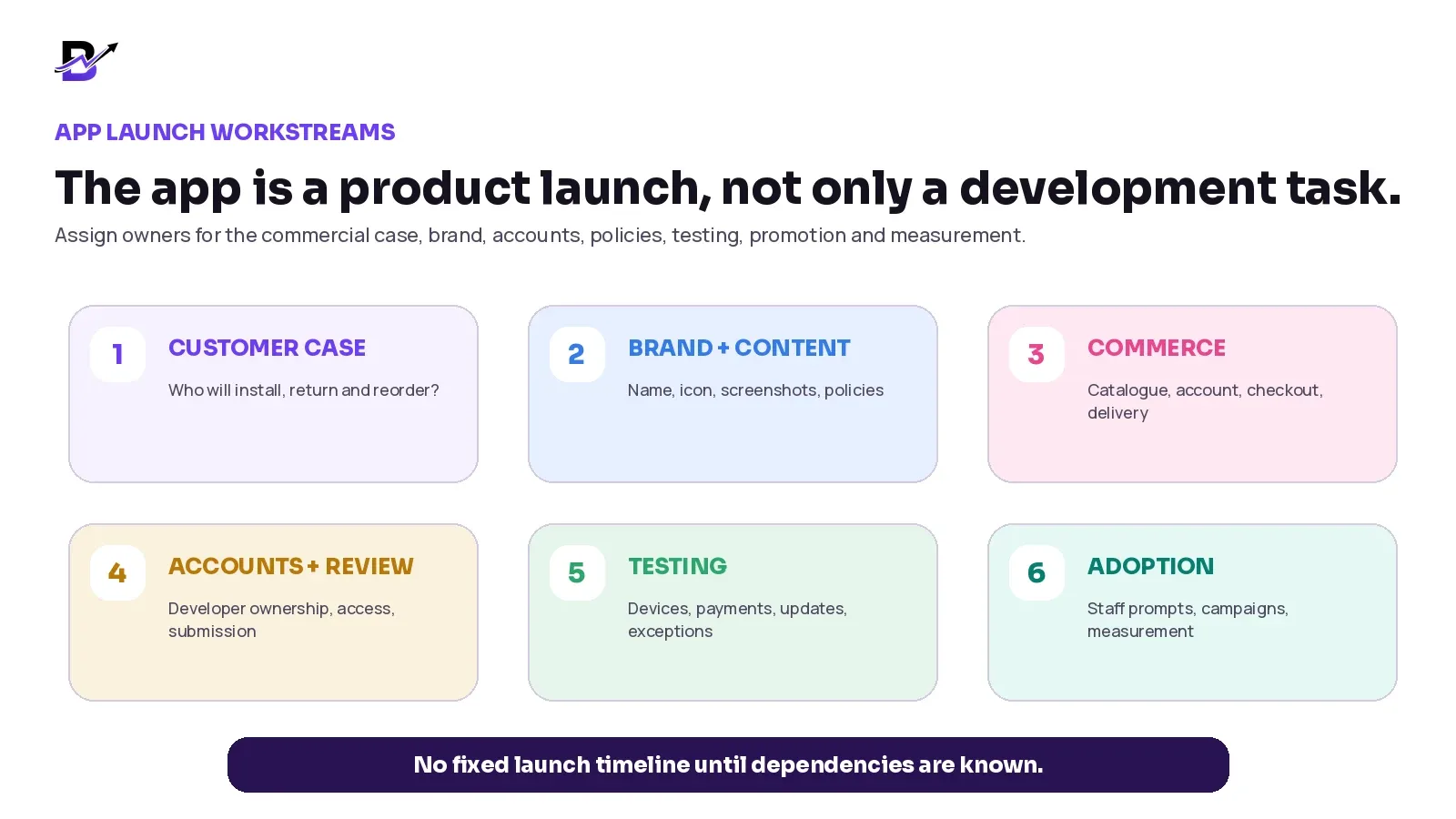
Figure 4. A customer app launch needs commercial, operational, policy and adoption work in addition to software development.
Measure behaviour, not only downloads
An install is not the business outcome. The useful question is whether the app makes it easier for the right customers to return, order and stay connected without creating extra operational problems.
METRIC | WHAT IT HELPS YOU UNDERSTAND |
|---|---|
Install-to-activation | Installed users who sign in, browse meaningfully or complete the first useful action. |
First app order | How many activated users place an order through the app. |
Repeat app order | Customers who return and order again after their first app purchase. |
Quick-reorder usage | How often customers use history or favourites instead of rebuilding the basket. |
Notification opt-in | Customers who permit notifications; review order and marketing permissions separately where possible. |
App order share | The share of direct orders entering through the app—without assuming every app order is incremental. |
Active customer retention | Customers who continue using the app over useful time periods for the category. |
Support + quality issues | Login, checkout, payment, crash, notification and account problems reported by customers. |
MEASUREMENT CAUTION — Do not claim that every app order was created by the app. Some customers would have ordered on the website anyway. Compare behaviour over time and use controlled campaigns where practical.
How Bloomlytix supports website, Android and iOS customer channels
Bloomlytix is designed as one ecommerce and retail operating platform. The customer website and eligible Android or iOS apps can use the same catalogue, pricing, offers, customer accounts, order history and delivery logic. App orders continue into the same staff fulfilment, branch, stock, payment, delivery and reporting workflow used by the website and POS.
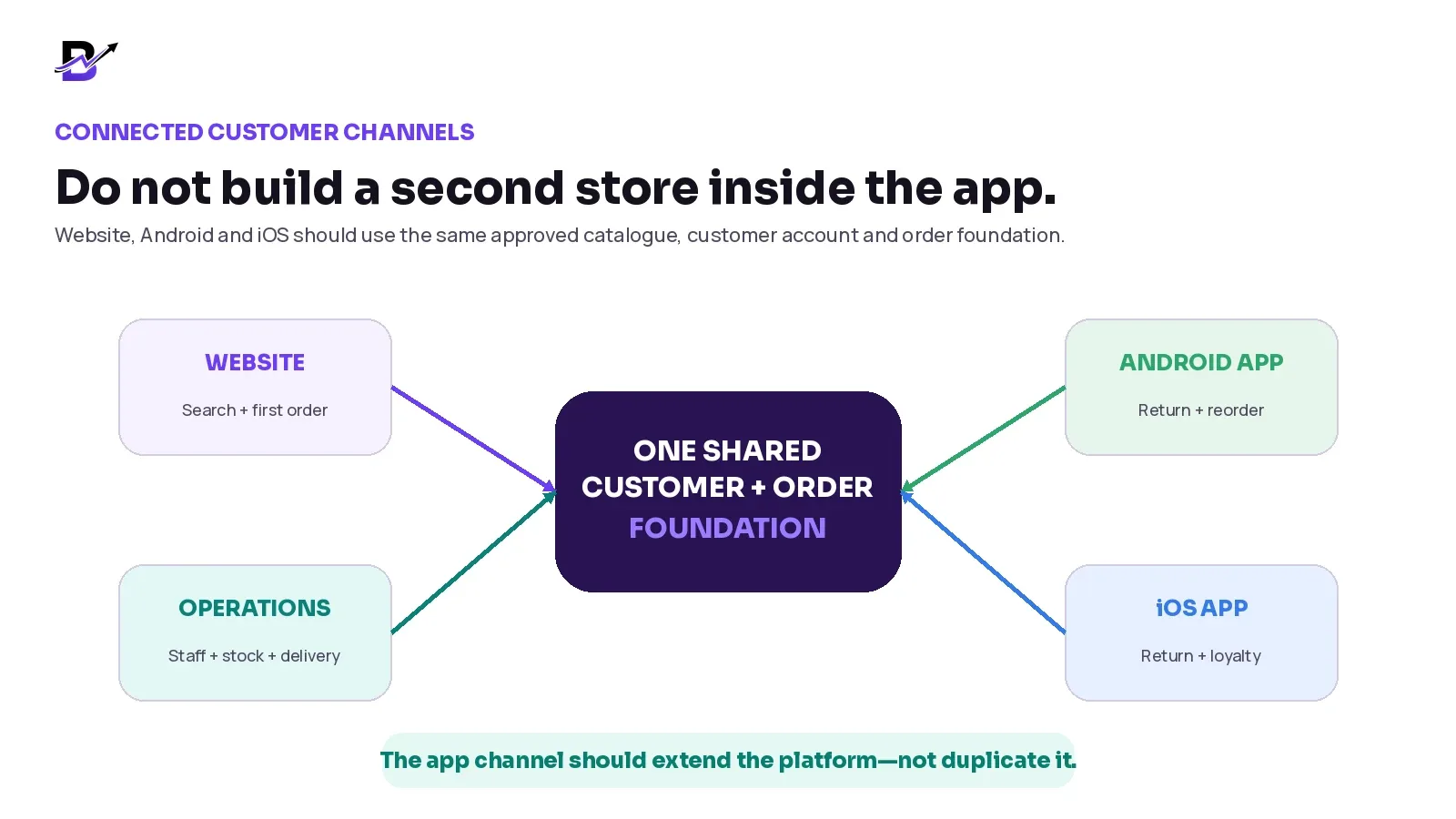
Figure 5. The customer channel can change without creating a second catalogue, order queue or reporting system.
BLOOMLYTIX AREA | PRACTICAL ROLE |
|---|---|
Shared catalogue | Products, prices, options, add-ons, images and offers can serve the configured website and customer apps. |
Customer account | Login, profile, saved addresses, wishlist, order history and quick reorder support repeat journeys. |
Checkout + delivery | Configured payment, delivery zones, charges, dates, time slots, messages and notes stay connected to the order. |
Order updates | Configured notifications can support order, offer, loyalty and campaign communication subject to permission and platform rules. |
Connected operations | App orders enter the same branch, staff, inventory, payment, pickup or delivery and owner-reporting context. |
Plan eligibility | Starter includes the website without a customer app; Growth adds Android; Pro includes Android and iOS. Check the live pricing page before publication. |
PRODUCT SCOPE — Bloomlytix can support branded customer-app journeys inside the complete platform. It does not guarantee app-store approval, a fixed launch time, higher conversion, unlimited push messaging or automatic migration. Exact features, plan, accounts, integrations and country requirements must be confirmed during onboarding.
Bloomlytix product and plan sources checked 16 September 2026.
Questions to ask during an app-fit review
Which customer behaviour proves that an app is useful now?
What will the app do better than the mobile website for a returning customer?
Will website, Android, iOS and POS share one catalogue and customer account?
Can customers see order history, tracking, saved addresses, wishlist and quick reorder?
How do loyalty, coupons, cashback or app-exclusive offers work, and what is standard?
Which notifications are supported, who can send them and how are permissions handled?
Who owns the Apple and Google developer accounts and store listings?
What brand assets, legal pages, privacy declarations and support links are required?
Which devices, payments, languages and order exceptions will be tested?
What is included in the launch fee, and which third-party costs remain separate?
How will customers discover the app after launch?
Which metrics will define activation, repeat use and a successful first 90 days?
Frequently asked questions
Does every ecommerce business need a mobile app?
No. Every ecommerce business needs a strong mobile experience, but an app is most useful when known customers have a clear reason to return, such as frequent reordering, saved details, loyalty, order tracking or relevant notifications.
Should a branded app replace the ecommerce website?
Usually no. The website remains the open, searchable and shareable destination for first-time visitors. The app is an additional direct channel for customers who choose to install it.
Should a retailer launch Android first or Android and iOS together?
Use customer-device data, budget, plan eligibility and operational capacity. Android-first can reduce initial scope, while both platforms may be justified when the customer base is clearly split and the business can support a wider launch.
Will a mobile app automatically improve conversion or loyalty?
No. Results depend on the customer need, app quality, promotion, operations, pricing, product-market fit and measurement. An app creates a channel; it does not guarantee customer behaviour.
Can push notifications reach every app user?
No. Customers control notification permission, devices and platforms apply their own rules, and delivery is not guaranteed. The app should remain useful even when notifications are disabled.
Can the app use the same products and orders as the website?
Yes, when the platform is designed around shared records or a reliable integration. The key is one approved catalogue, customer identity, order history and operating workflow.
How long does an app launch take?
There is no honest fixed answer before the scope is known. Timing depends on brand and catalogue readiness, developer accounts, policies, payments, testing, required fixes and external store review.
Which Bloomlytix plans include customer apps?
At the time of drafting, Starter includes the website without a customer app, Growth adds a white-label Android app and Pro includes Android and iOS apps. Verify the live pricing page before publishing or buying.
Build the app when the customer reason is stronger than the company desire
A branded app can become a valuable direct channel. It can make repeat ordering, account history, saved addresses, wishlists, loyalty and order updates easier for customers. It can also strengthen the brand relationship when the business actively supports it.
But the app should not be the first answer to weak ecommerce, disconnected operations or low repeat demand. Start with a strong mobile website. Study how customers return. Define the app benefit in one sentence. Then launch only when the customer case, operating system, accounts, budget and adoption plan are ready.
APP-FIT REVIEW — Bring one real customer journey to a Bloomlytix demonstration. We will compare the website path with Android and iOS app use, then map the catalogue, account, reorder, loyalty, notifications, staff, stock, delivery and reporting connections required for your business.
Book a tailored app-fit review
Quick decision summary
YOUR SITUATION | RECOMMENDED DIRECTION |
|---|---|
You still need discovery, search visibility and easy link sharing | Make the mobile-friendly website the priority. |
Customers buy rarely or the direct customer base is still small | Improve the website, customer capture and repeat-purchase strategy before funding an app. |
Known customers reorder, reuse saved details or check orders regularly | Test the app case with customer interviews and the App Readiness Scorecard. |
The app would only copy the website and add no useful return journey | Do not launch yet. Define a customer benefit that justifies installation. |
Website, apps, POS and operations can share one catalogue and customer journey | Scope a controlled app launch with clear account ownership, testing, adoption and measurement. |
The decision is not website or app forever. It is website first, then an app when the customer behaviour, shared operations and launch ownership support it.