A software plan may look simple until the quote starts growing.
The monthly subscription is easy to see. The less obvious costs are onboarding, product and customer migration, POS hardware, payment and messaging services, mobile-app accounts, integrations, training and extra capacity as the business grows.
DIRECT ANSWER
The total cost of an ecommerce, POS and retail operations system depends on eight main areas: subscription, launch, migration, hardware, third-party services, custom work, internal staff time and future capacity. Compare two numbers before buying: the complete first-year total and the normal annual cost after launch. A low monthly fee is not automatically the lower-cost choice.
This guide is for retailers that want a clear budget before they compare platforms, request proposals or start a software rollout. If you are still defining the category, start with what a retail operating system is and what happens after checkout.
In this guide
The eight cost layers behind a complete retail system
How to calculate first-year and ongoing annual cost
What to check inside the subscription price
How onboarding, migration, hardware and third-party fees affect the budget
When integrations and custom reports become separate work
How internal training and future branches change total cost
A transparent Bloomlytix example in USD and AED
Three practical launch scenarios and a reusable cost worksheet
Why the monthly price does not tell the full story
Two systems can show similar monthly prices and still have very different total costs. One may connect ecommerce and POS with inventory, orders, staff workflow and delivery in the same plan. Another may require separate subscriptions, plugins or implementation work for each part.
The useful question is not, “Which subscription is cheaper?” It is, “What will this complete workflow cost to launch, operate and grow?”
SIMPLE BUYING RULE
Compare like with like. A website-only plan should not be compared with a complete ecommerce, POS, inventory and delivery system unless the missing operational tools are added to the first quote.
The eight cost layers to include
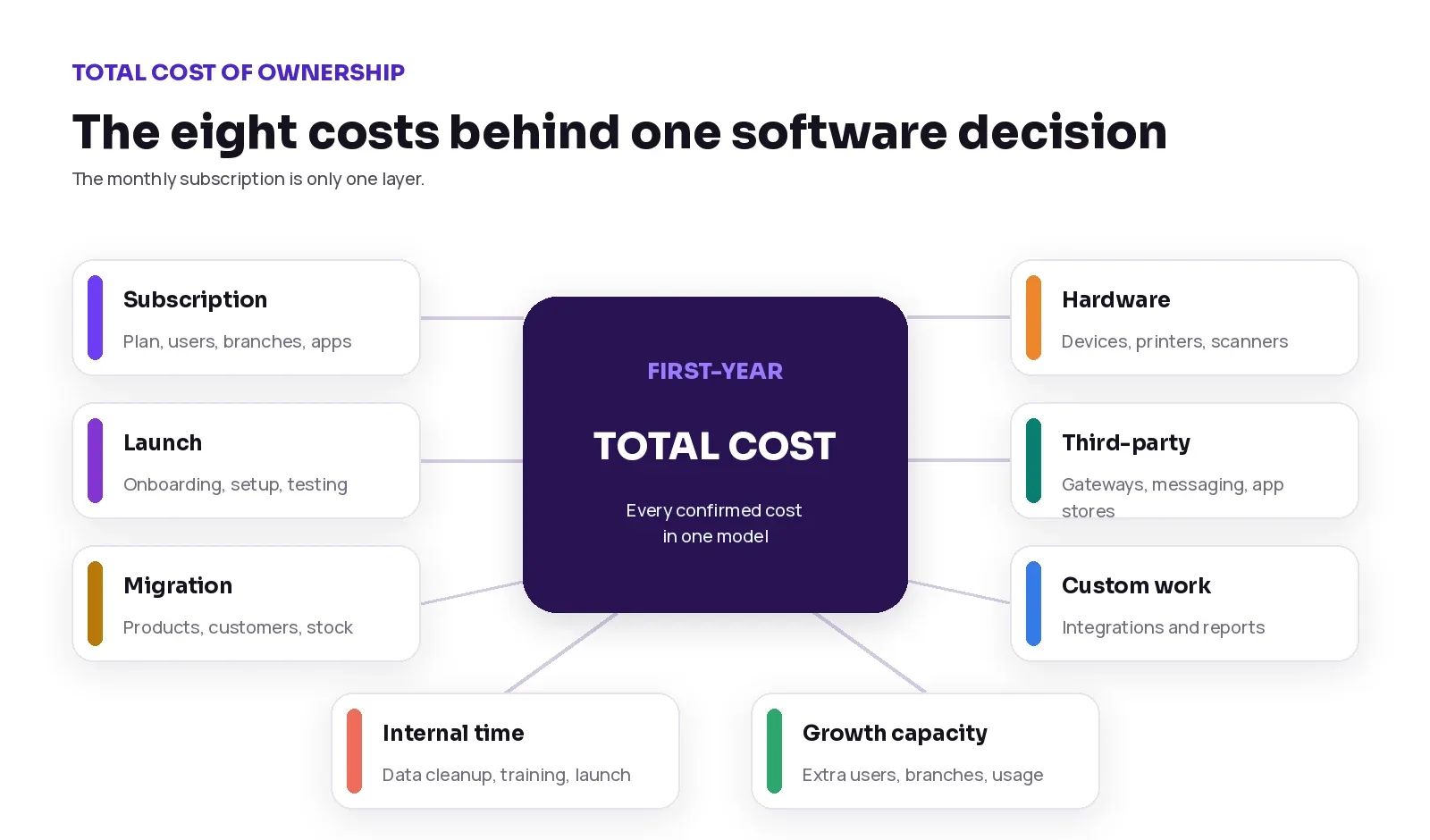
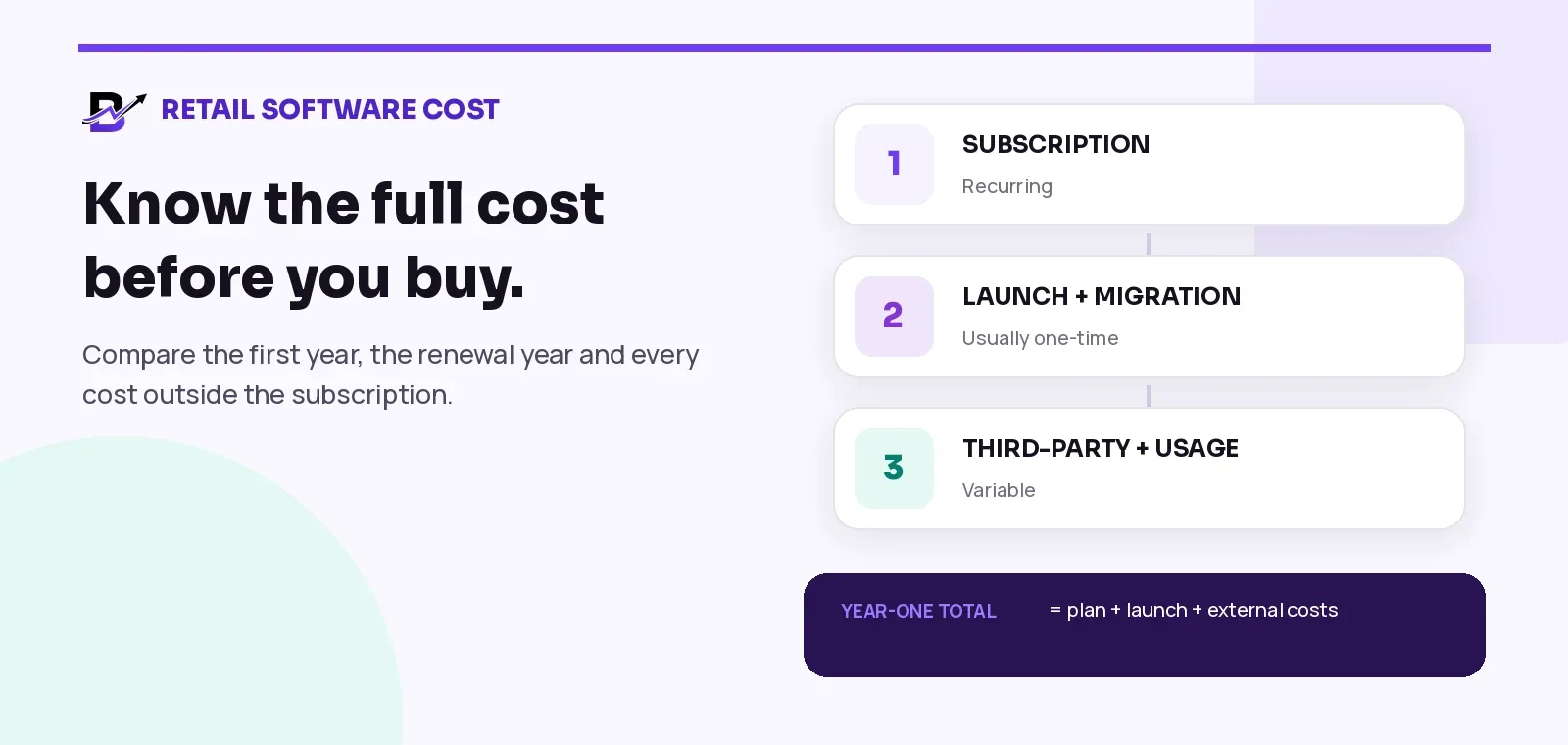
Figure 1. A complete cost model includes both visible subscription fees and less visible launch or usage costs.
COST LAYER | WHAT IT COVERS | TYPICAL PATTERN |
|---|---|---|
1. Subscription | The core software plan, users, branches and customer channels. | Recurring |
2. Launch and onboarding | Configuration, branding, testing, training and go-live support. | Usually one-time |
3. Data migration | Products, categories, customers, orders, stock and images. | One-time or phased |
4. Hardware | Computers, tablets, POS terminals, printers, scanners and cash drawers. | One-time + maintenance |
5. Third-party services | Payment gateways, messaging, email, app-store accounts and APIs. | Variable / recurring |
6. Integrations and custom work | Accounting links, custom reports, special workflows or external systems. | Quoted separately |
7. Internal staff time | Data cleanup, decision-making, testing, training and change management. | Internal cost |
8. Growth capacity | Extra users, branches, transaction usage, storage or support scope. | Ongoing as needed |
Use two numbers: first-year cost and ongoing annual cost
A first-year total includes everything required to launch. An ongoing annual cost shows what the business is likely to pay after one-time setup and migration work are finished.
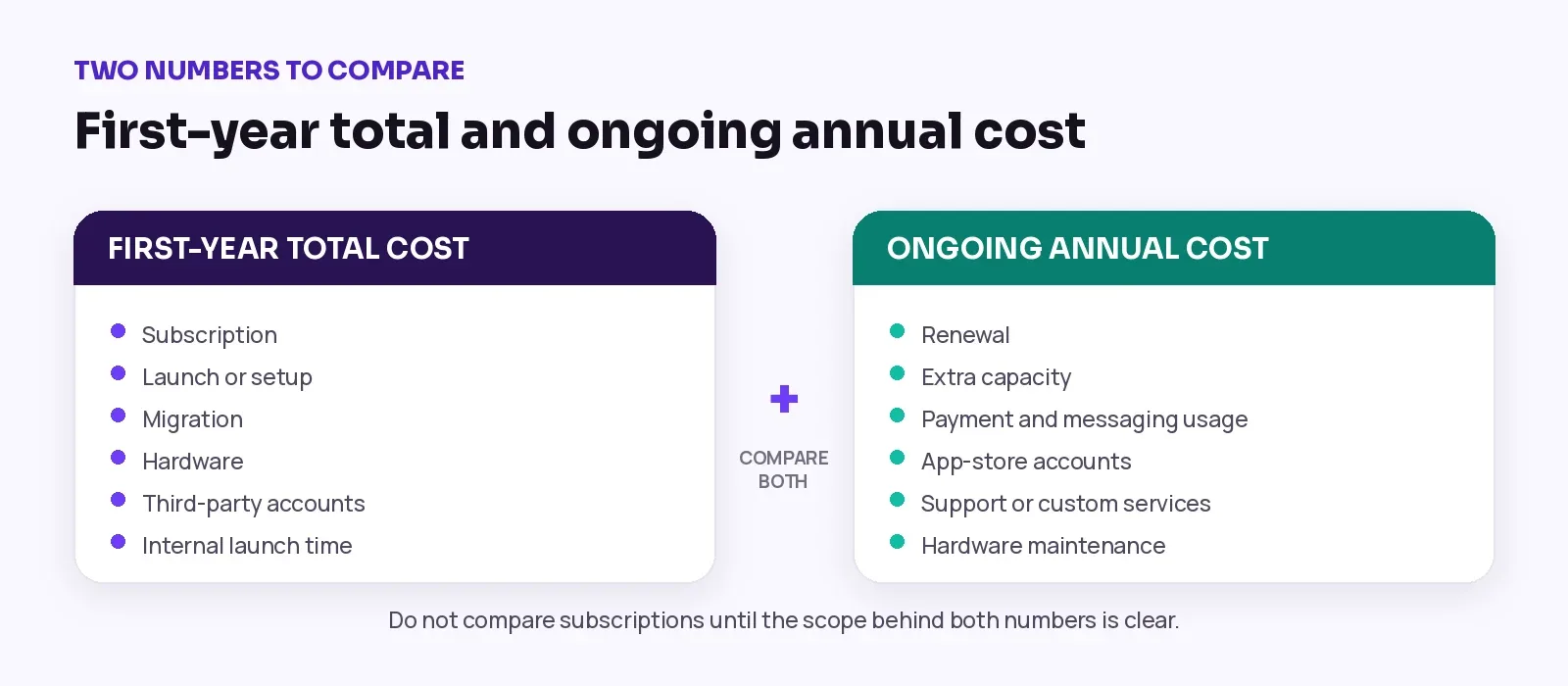
Figure 2. Separate launch costs from normal annual operating costs so the budget stays understandable.
FIRST-YEAR FORMULA
First-year total = subscription + onboarding + migration + hardware + third-party accounts + custom work + internal launch time.
ONGOING FORMULA
Ongoing annual cost = renewal + extra users or branches + usage fees + app-store accounts + support or custom services + hardware maintenance.
1. Subscription: check scope before price
The subscription is the amount paid monthly or yearly for access to the software. Before comparing prices, confirm what the plan actually includes.
CHECK | QUESTION TO ASK |
|---|---|
Core modules | Does one plan include ecommerce, POS, orders, inventory, staff operations, delivery, payments and reports? |
Users | Who counts as an internal user: owners, managers, staff, POS users, fulfilment users and drivers? |
Branches | How many operational locations are included? Is a kiosk or warehouse counted separately? |
Customer channels | Is the plan website-only, or does it include Android and iOS customer apps? |
Support | What onboarding, relationship management, training or service level is included? |
Billing cycle | What is the monthly total, yearly total, renewal rule and cancellation process? |
Usage limits | Are AI credits, messages, storage, transactions or API calls included or charged separately? |
A lower subscription can become expensive when essential modules require extra plugins or a second platform. A higher subscription can still be the better value when it replaces several systems and gives the team one connected workflow.
2. Launch and onboarding: ask what the fee delivers
A one-time setup or launch fee should pay for clear work. Ask the provider to list the tasks, owners and completion conditions instead of showing one unexplained amount.
ONBOARDING AREA | WHAT SHOULD BE CLEAR |
|---|---|
Business setup | Branches, roles, users, currencies, taxes, payment methods and basic operating rules. |
Brand configuration | Logo, colours, domain, storefront sections, app identity and listing assets. |
Operational setup | Products, delivery zones, time slots, statuses, staff workflow and payment settings. |
Testing | Checkout, payment, POS, fulfilment, cancellation, delivery and reporting scenarios. |
Training | Owner, manager, staff, POS, fulfilment and driver training. |
Go-live support | Launch checklist, final checks, issue ownership and early-stage monitoring. |
ASK FOR AN OUTCOME
“Onboarding included” is too vague. Ask what will be configured, who will approve it, what the business must provide and what “ready to launch” means.
3. Data migration: clean data costs less to move
Migration cost depends less on the number of spreadsheets and more on their quality. A clean product file with stable SKUs, categories and image links is easier to import than several files with duplicated names, missing prices and inconsistent branch stock.
DATA GROUP | MIGRATION DECISION |
|---|---|
Products and variants | Names, SKUs, categories, prices, options, add-ons, images and descriptions. |
Customers | Names, email, phone, addresses, consent records and duplicate handling. |
Orders | Whether historical orders are required, and how old statuses or refunds will be represented. |
Stock | Opening quantity by branch, unit rules, damaged stock and transfer records. |
Validation | Who checks totals, spot-tests records and signs off before launch. |
Ask whether the quote includes mapping, test imports, error correction and final validation. “Bulk upload” may only mean that a prepared template can be imported; it may not include cleaning years of inconsistent records.
4. Hardware: reuse what works, buy only what the workflow needs
A cloud system may work on existing computers or tablets, but the complete counter workflow can still need printers, scanners, cash drawers or payment terminals. Confirm compatibility before buying devices.
HARDWARE | WHAT TO CONFIRM |
|---|---|
Computer or tablet | POS, fulfilment, admin and reporting access. Check browser, screen size and network needs. |
Receipt or invoice printer | Paper width, connection type, driver support and test-print quality. |
Greeting-card or document printer | Paper size, weight, template alignment and reprint workflow. |
Barcode scanner | Supported barcode type, USB/Bluetooth connection and SKU rules. |
Cash drawer | Whether it connects through the receipt printer or works independently. |
Payment terminal | Provided by the gateway or bank; confirm whether it connects to POS or is recorded manually. |
Network and backup | Stable internet, Wi-Fi coverage, mobile backup and charging points. |
COMPATIBILITY FIRST
Do not buy a printer or terminal only because it is popular. Test the exact model, connection method and operating system with the planned workflow.
5. Payment, messaging and app-store costs
Some important services are provided by third parties and are normally billed outside the main software subscription. Their cost may depend on country, provider, account eligibility, message volume or transaction value.
EXTERNAL COST | WHAT TO CHECK |
|---|---|
Payment gateway | Setup, monthly fee, transaction rate, refund rules, chargebacks and settlement timing. |
Buy now, pay later | Provider eligibility, merchant agreement and transaction terms. |
SMS or WhatsApp | Number setup, template approval, conversation or message fees and provider charges. |
Email delivery | Sending volume, dedicated domain setup and transactional email provider. |
Apple developer account | Apple currently lists the Developer Program at US$99 per membership year; local pricing can vary. |
Google Play Console | Google currently lists a US$25 one-time registration fee for a developer account. |
Maps or external APIs | Usage-based fees, free tiers, billing account and country availability. |
These fees should be listed separately in the proposal so the business knows which supplier sets the price, who owns the account and what may change as usage grows.
6. Integrations and custom work
A standard platform becomes more expensive when the business needs systems or workflows outside the normal product scope. The cost is not only development; it also includes discovery, access, testing, error handling, documentation and future maintenance.
CUSTOM AREA | SCOPE QUESTION |
|---|---|
Accounting or ERP connection | Which records move, in which direction, how often and who resolves failed syncs? |
Courier connection | Which courier, countries, booking fields, labels, status updates and cancellation rules? |
Custom reports | Which decisions require the report, where does each field come from and how often is it refreshed? |
Legacy website or marketplace | Which products, orders, stock or customer fields must stay synchronized? |
Special approvals | Corporate quotations, manager approvals, deposits, custom pricing or legal documents. |
CONTROL THE CHANGE
Every custom item should have written scope, acceptance tests, ownership, price and a rule for future changes. An open-ended integration request is difficult to budget.
7. Internal time is a real implementation cost
The business team still has work to do. Product owners must approve the catalogue, managers must define the workflow, staff must test real orders and someone must make final launch decisions.
INTERNAL WORK | TYPICAL ACTIVITIES |
|---|---|
Decision-making | Choose branches, roles, payment rules, delivery promises and launch scope. |
Data preparation | Clean products, customers, stock, images, categories and duplicates. |
Content approval | Review storefront copy, policies, app listings, SEO and translated content. |
Testing | Run normal orders, edge cases, refunds, cancellations, delivery failures and cash checks. |
Training and change | Teach staff what to do, what not to do and who owns exceptions. |
A fast provider cannot compensate for a business that has not assigned a product owner, supplied data or agreed on the workflow. Include internal hours in the launch plan even when they do not appear on the supplier invoice.
8. Growth capacity: calculate the next stage before signing
The right plan should fit today without making growth unnecessarily expensive. Ask how extra users, branches, customer apps, transaction volume and support needs change the normal annual cost.
How many staff and drivers will need accounts during a peak season?
Will a new kiosk, warehouse or preparation location count as a branch?
Can the business add capacity without buying the core modules again?
What happens when Android or iOS customer apps are added later?
Are there usage-based fees for AI, messages, storage, payments or external APIs?
Does a larger plan improve only capacity, or does it also change support and launch scope?
One connected platform versus several separate tools
Separate tools can be a good choice when the business has a strong technical team and a clear reason to select each specialist system. But the comparison must include every subscription, connector, support contract and reconciliation task.
AREA | CONNECTED PLATFORM | SEPARATE-TOOL MODEL |
|---|---|---|
Product catalogue | One shared catalogue can serve website, apps and POS. | Products may need duplicate setup or synchronization. |
Orders | Online, POS and manual orders can enter one workflow. | Orders may sit in different systems or inboxes. |
Inventory | Sales and fulfilment can update one branch stock model. | Stock can require connectors and exception handling. |
Staff and delivery | Preparation and handoff stay connected to the order. | Teams may depend on calls, chats or separate apps. |
Reporting | Owner reports use one operational database. | Data may need export, matching and manual reconciliation. |
Cost control | One renewal and clear capacity add-ons. | Several renewals, plugins, usage fees and support owners. |
NEITHER MODEL IS AUTOMATICALLY CHEAPER
The better choice is the one that supports the required workflow at an acceptable total cost, with clear ownership when something fails.
BLOOMLYTIX WORKED EXAMPLE · PRICING CHECKED 17 AUGUST 2026
Bloomlytix pricing: a transparent worked example
The complete Bloomlytix retail platform uses a core-modules-included model. Every paid plan includes the ecommerce website, POS, orders and fulfilment, inventory, purchase records, payments, cash tracking, staff operations, delivery, reports, AI assistance, support and a dedicated relationship manager.
Plans mainly differ by customer mobile apps, included internal users and branches. Drivers count as internal users. The prices below are a worked example using live Bloomlytix pricing checked on 17 August 2026.
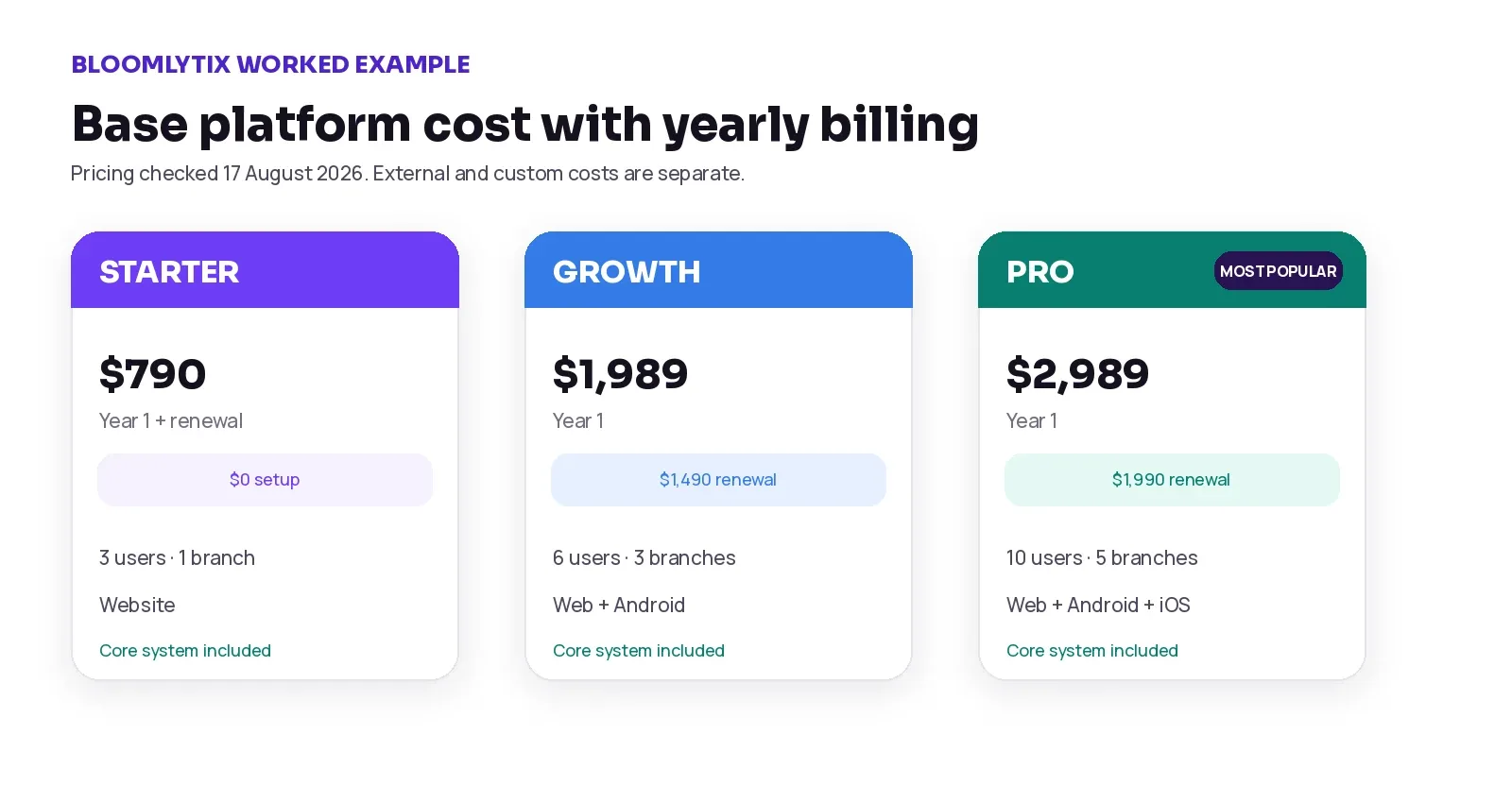
Figure 3. Base first-year platform cost using yearly billing and the current app-launch promotion.
PLAN | USD MONTHLY / YEARLY | AED MONTHLY / YEARLY | CURRENT ONE-TIME LAUNCH FEE | INCLUDED CAPACITY | CUSTOMER CHANNELS |
|---|---|---|---|---|---|
Starter | $79 / $790 | AED 289 / AED 2,890 | $0 / AED 0 | 3 users · 1 branch | Website |
Growth | $149 / $1,490 | AED 549 / AED 5,490 | $499 / AED 1,829 | 6 users · 3 branches | Website + Android |
Pro | $199 / $1,990 | AED 729 / AED 7,290 | $999 / AED 3,669 | 10 users · 5 branches | Website + Android + iOS |
Using yearly billing and the current promotional launch fee, the base first-year platform totals are:
PLAN | USD FIRST YEAR | AED FIRST YEAR | BASE RENEWAL AFTER LAUNCH |
|---|---|---|---|
Starter | $790 | AED 2,890 | $790 / AED 2,890 |
Growth | $1,490 + $499 = $1,989 | AED 5,490 + AED 1,829 = AED 7,319 | $1,490 / AED 5,490 |
Pro | $1,990 + $999 = $2,989 | AED 7,290 + AED 3,669 = AED 10,959 | $1,990 / AED 7,290 |
WHAT IS NOT INCLUDED IN THOSE TOTALS
Hardware, payment-gateway charges, messaging usage, Apple or Google developer accounts, complex migration, custom integrations, custom legal documents and other third-party fees remain separate unless a written proposal says otherwise.
Three practical launch scenarios
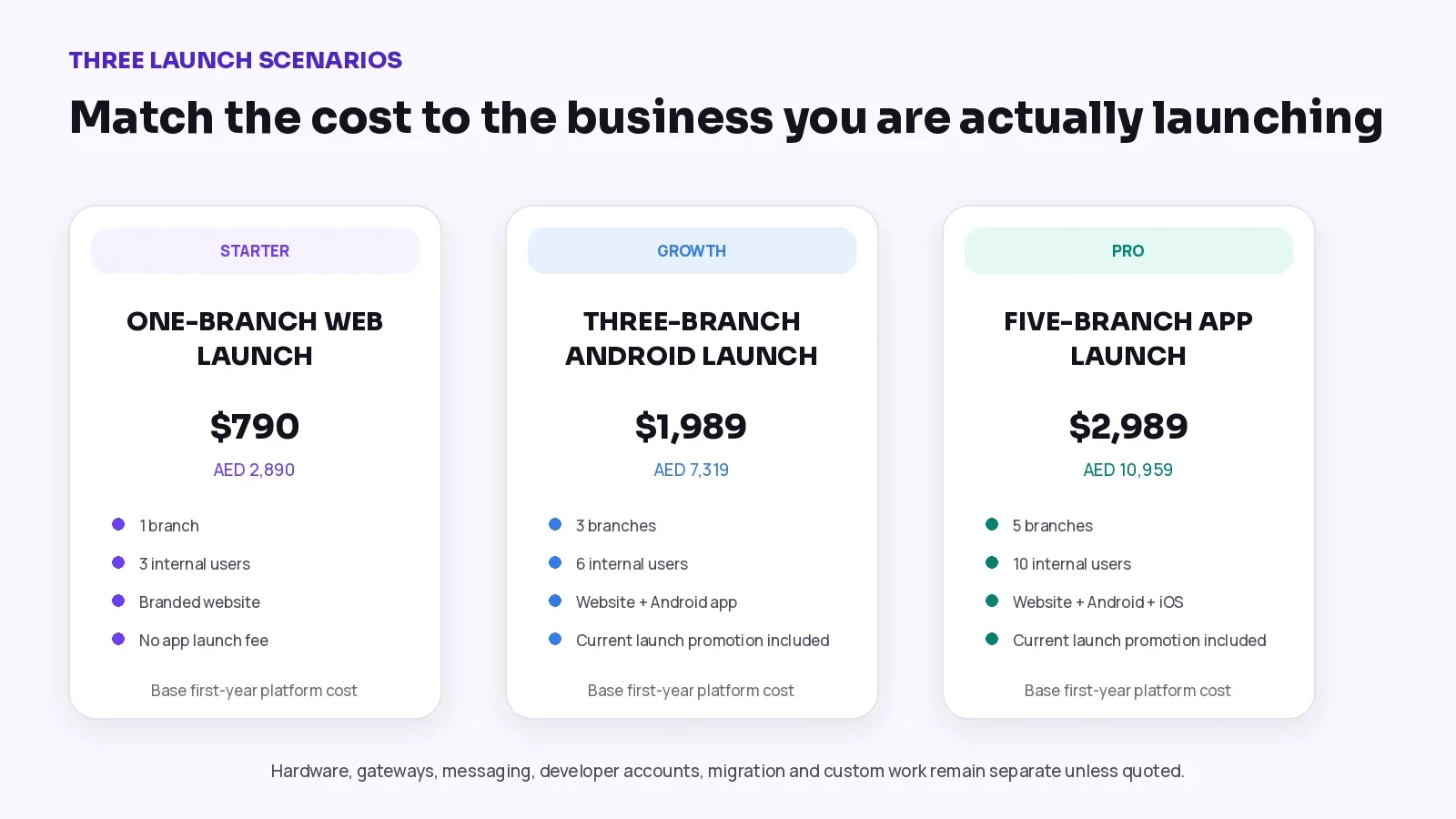
Figure 4. The plan should match the branch capacity and customer channels the business will actually use.
SCENARIO | BASE SELECTION | INCLUDED OPERATING SCOPE | BASE FIRST-YEAR PLATFORM COST | STILL BUDGET SEPARATELY |
|---|---|---|---|---|
1. One-branch web launch | Starter yearly plan | Website, core system, 3 users, 1 branch | $790 / AED 2,890 | Hardware, payment fees, migration or custom work if needed |
2. Three-branch Android launch | Growth yearly plan + current launch fee | Website, Android customer app, 6 users, 3 branches | $1,989 / AED 7,319 | Developer account, gateway, messaging, hardware, migration and custom work |
3. Five-branch app launch | Pro yearly plan + current launch fee | Website, Android and iOS customer apps, 10 users, 5 branches | $2,989 / AED 10,959 | Developer accounts, gateway, messaging, hardware, migration and custom work |
How extra users and branches change the total
Bloomlytix currently lists extra internal users at $10 or AED 39 per month, and extra branches at $39 or AED 149 per month. A business should calculate required capacity for normal operations and for peak periods.
WORKED CAPACITY EXAMPLE
Two extra users plus one extra branch = $59 per month or AED 227 per month. Over 12 months, that is $708 or AED 2,724 before any other usage or third-party fees.
Do not add permanent capacity for temporary staff without checking whether the provider supports short-term changes, plan upgrades or a more suitable package. Also confirm whether drivers, support users and inactive accounts count toward the limit.
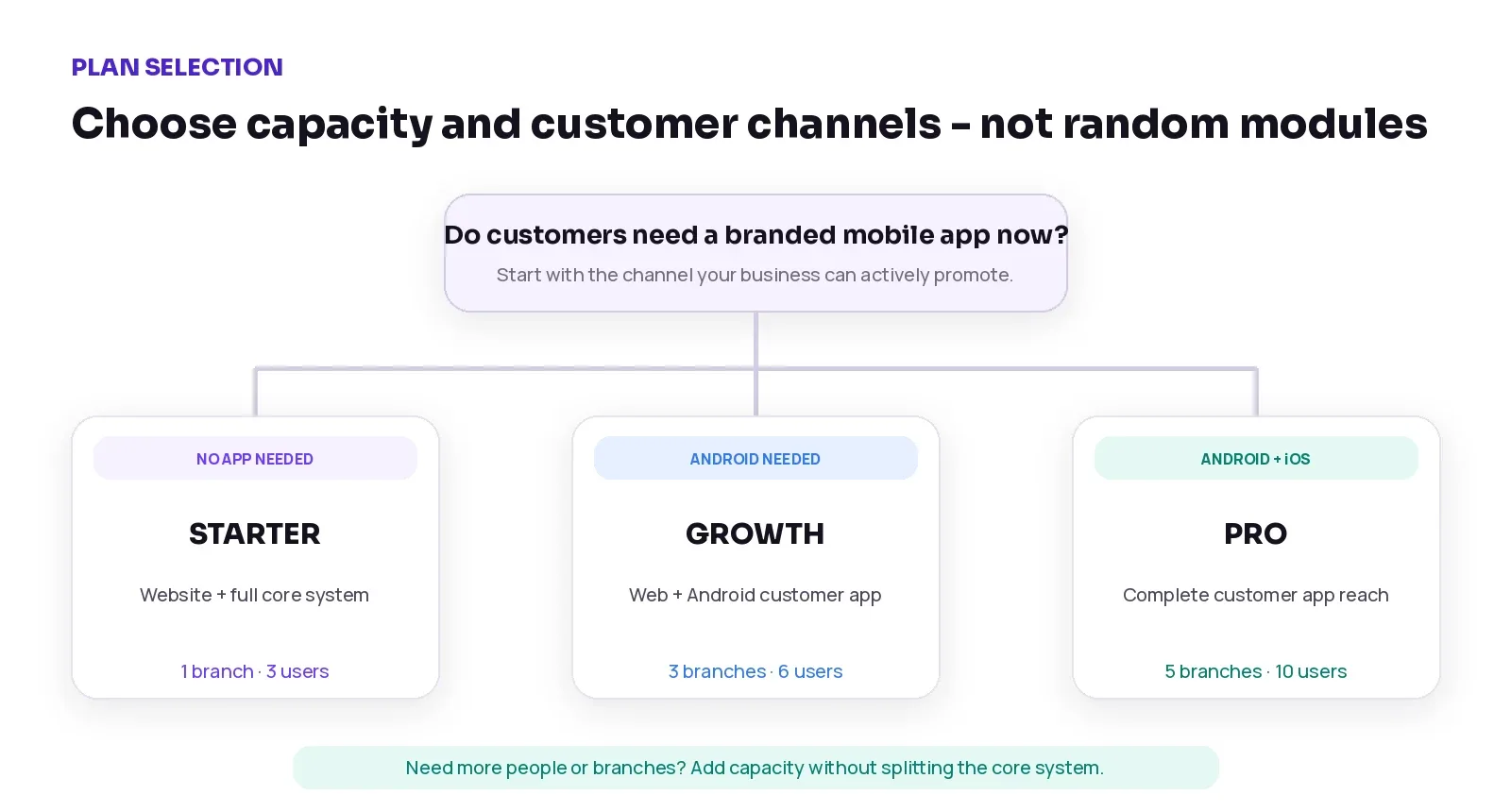
Figure 5. Choose the plan by customer channels and operational capacity, not by a random list of modules.
How to compare any retail software quote
CHECK | QUESTION |
|---|---|
1. Required workflow | Does the quote cover ecommerce, POS, orders, stock, staff, payment and delivery needs? |
2. First-year total | Are subscription, launch, migration, hardware, external accounts and custom work all visible? |
3. Renewal cost | What remains after one-time launch work is removed? |
4. Users and branches | Who counts, what is included and what does extra capacity cost? |
5. Customer apps | Are Android and iOS apps included, optional or a separate project? |
6. Data ownership | Can the business export products, customers, orders and reports? In what format? |
7. Third-party ownership | Who owns the gateway, app-store, messaging and API accounts? |
8. Support scope | What support is included, during which hours and through which channel? |
9. Custom work | What is standard, what is custom and how are changes priced? |
10. Exit and upgrade rules | How does cancellation, renewal, plan change and data export work? |
A simple cost worksheet
Use this worksheet for every provider. Fill in the same period and currency so the comparison remains fair.
COST ITEM | YOUR AMOUNT |
|---|---|
Annual subscription | |
One-time onboarding / setup | |
Data migration / bulk upload | |
POS and fulfilment hardware | |
Payment and messaging setup | |
Developer accounts | |
Integrations or custom reports | |
Internal launch time | |
Extra users or branches | |
Other recurring usage | |
FIRST-YEAR TOTAL | |
ONGOING ANNUAL TOTAL |
How to control total cost without choosing the wrong system
Write the complete workflow before comparing prices. A missing requirement usually becomes a later cost.
Separate must-have launch items from improvements that can wait until phase two.
Clean products, customers and stock before migration. Do not pay a software team to discover avoidable data problems.
Reuse tested hardware where possible, but do not assume every printer or terminal is compatible.
Start with the customer channels the business can actively promote. An unused app still has launch and account costs.
Use standard workflows before requesting custom development. Custom work should solve a real business need, not copy an old inefficient process.
Train managers and staff using real orders, refunds, delivery exceptions and cash scenarios.
Review the first-year total, renewal cost and next-stage capacity together before signing.
COST CONTROL IS NOT PRICE CUTTING
The goal is not to choose the cheapest line item. It is to avoid paying twice, reduce unnecessary custom work and launch a workflow the team can actually use.
Frequently asked questions
What is the biggest hidden cost in retail software?
There is no single answer. For one business it may be data cleanup; for another it may be hardware, payment usage, mobile-app accounts or a custom integration. The hidden cost is usually the item that was not written into the original scope.
Should I compare monthly or yearly pricing?
Compare both, but calculate the full first-year total and the normal annual renewal cost. A monthly price alone does not show one-time launch work or external fees.
Is onboarding the same as data migration?
Not always. Onboarding usually covers configuration, training, testing and launch support. Migration covers moving and validating existing products, customers, orders or stock. Ask the provider to separate them.
Do I need new POS hardware?
Not necessarily. Some cloud systems work on existing computers or tablets. Printers, scanners, cash drawers and terminals still need model-level compatibility checks.
Are payment gateway fees included in software pricing?
Usually not. Gateway setup, transaction charges, refunds and settlements are controlled by the payment provider unless the contract says otherwise.
Why do mobile apps create additional costs?
A branded app needs preparation, testing, store listing, developer accounts, review and future maintenance. The exact scope depends on the provider and the app stores.
Is one connected platform always cheaper than separate tools?
No. It may reduce duplicated subscriptions, connectors and manual reconciliation, but the right answer depends on the workflow, technical team and required specialist features.
How often should I review software cost?
Review the cost before renewal, before adding a branch or app, and whenever transaction, messaging or staff volume changes significantly.
Final cost checklist
The complete first-year total is written in one currency.
The normal annual renewal cost is shown separately.
Included modules, users, branches and customer channels are clear.
Onboarding and migration have separate scope and acceptance rules.
Hardware models and compatibility have been checked.
Gateway, messaging, app-store and API accounts have named owners.
Custom integrations and reports have written acceptance tests.
Internal data, testing, training and approval work has an owner.
Extra-user, branch and usage costs have been calculated for the next stage.
Cancellation, upgrade, data export and support rules are understood.
Bring your real cost model to the conversation. Share your branches, users, channels, migration needs and current tools when you book a live demo.
Sources and pricing notes
Bloomlytix pricing page — Plan prices, capacity, app channels, add-ons and fee scope. Checked 17 August 2026.
Bloomlytix platform page — Core platform modules and operating scope.
Apple Developer Program enrollment — Apple lists US$99 per membership year; local prices may vary.
Google Play Console registration — Google lists a US$25 one-time developer registration fee.
Pricing is time-sensitive. Verify every Bloomlytix amount, promotion and third-party fee on the actual publication date. This article is educational and does not replace a written proposal, gateway agreement, accounting advice or legal review.