Your online store and your physical counter should not create two versions of the same business. A product should not have one name online, another SKU in the POS, and a third stock quantity in a spreadsheet. When that happens, staff spend time checking which record is correct, customers may see products that are no longer available, and reports become harder to trust.
The solution is not simply to “sync everything.” A reliable ecommerce POS integration needs clear ownership for product data, stable identifiers, location-based inventory rules, and a tested process for sales, cancellations, refunds, returns, transfers and temporary connection problems.
Direct answer: Connect ecommerce and POS around one approved product catalog and one inventory model. Give every sellable product or variant a stable internal ID and, where useful, a unique SKU or barcode. Decide which system owns each field, track stock by location, define exactly when orders reserve or deduct stock, and test the complete sale and return lifecycle before launch. No integration removes the need for monitoring and regular stock checks.
This guide explains the business rules in easy English. It is useful whether you choose one connected platform, a native ecommerce-POS integration, or several tools connected through an integration layer.
In this guide
What a connected ecommerce and POS setup actually means
Why duplicate products and wrong inventory numbers appear
How to choose a source of truth for each record
How to use product IDs, SKUs, variants and barcodes correctly
The main integration models and their trade-offs
How stock should react to sales, cancellations, refunds, returns and transfers
What to test before launch and what to monitor after launch
What does it mean to connect ecommerce and POS?
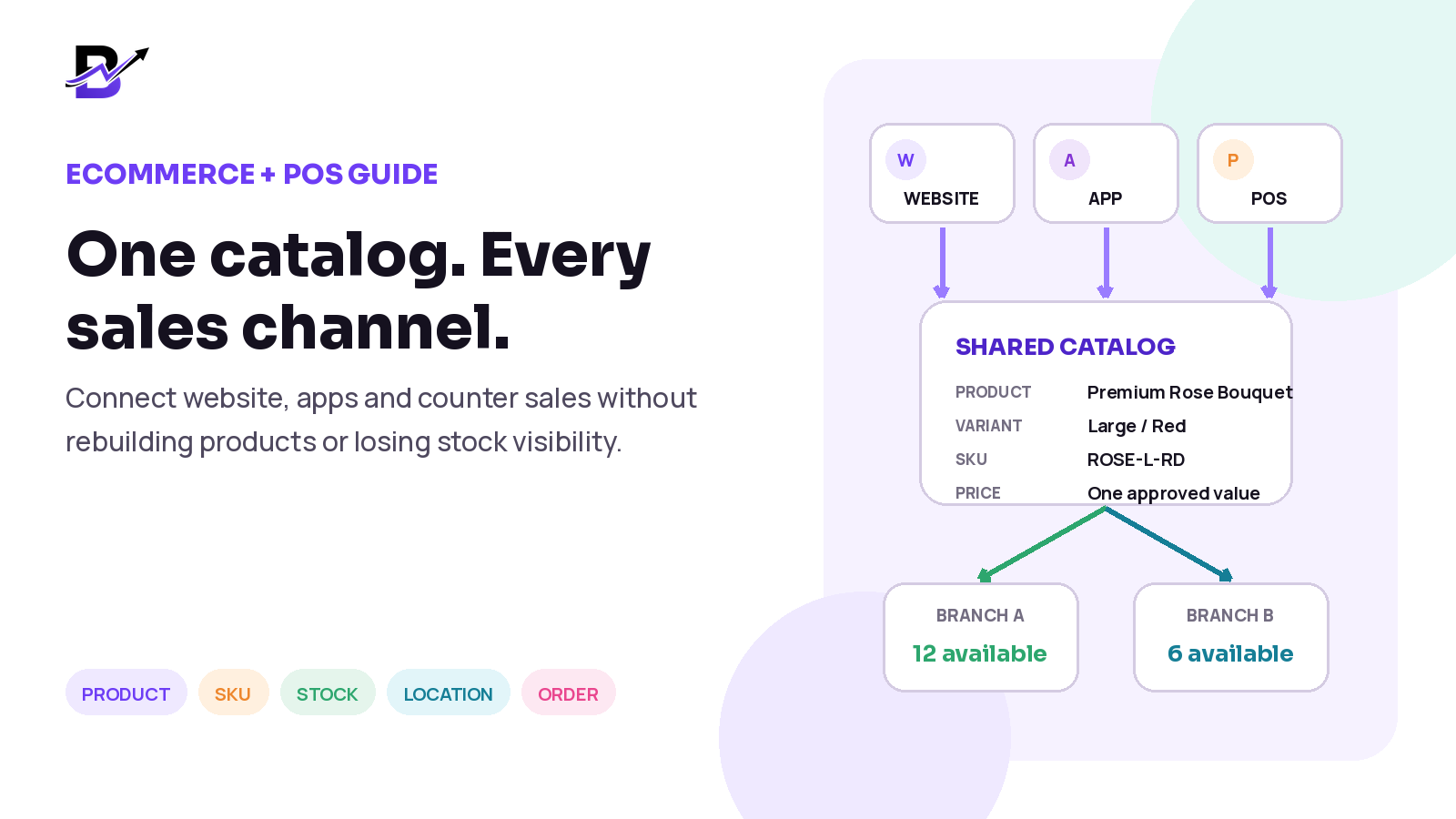
A connected setup lets the online store, customer apps, POS and permitted staff work with the same approved business records. It does not necessarily mean that every field lives in one database. It means the systems agree about which record is the master, how changes move, and what happens when a change fails.
The most important records are usually products, variants, prices, stock by location, customers, orders, payments, fulfilment status, refunds and returns. If one of these records is copied without clear ownership, the copies can slowly become different.
Record | What should stay connected |
|---|---|
Products | Name, category, description, active status, images and the channels where the product can be sold. |
Variants | Each sellable size, colour, style or option combination and its own price, identifier and stock rule. |
Prices and offers | Approved selling price, tax treatment, discounts and channel-specific rules where the business intentionally uses them. |
Location stock | What is on hand, reserved, unavailable, incoming and available to sell at each branch or fulfilment location. |
Orders and payments | The products sold, quantity, location, customer, payment state, status, cancellation, refund and return history. |
Customers | Customer identity, contact details, consent, addresses and order history for permitted users. |
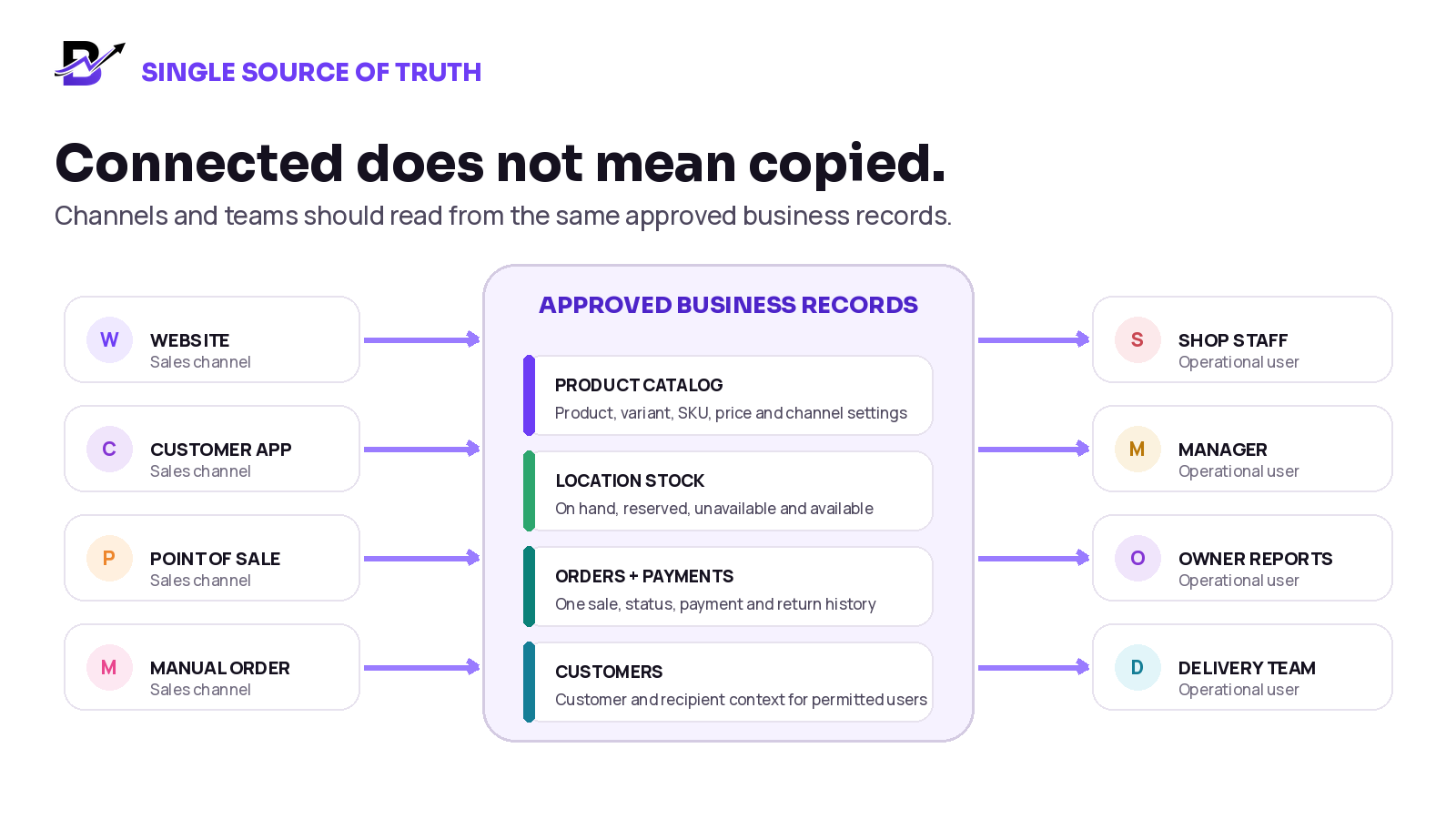
Figure 1. A connected system uses approved records across channels and teams instead of rebuilding the same information in every tool.
Simple definition: A source of truth is the approved record that wins when two systems disagree. It may be one platform, or a clearly named master system for each type of data.
Why duplicate products and inventory errors happen
Duplicates often begin during setup. A team imports the online catalog into a new POS, then continues editing both systems separately. Another common problem appears when product names are used as the match key. Names are written for people and can change. Systems need stable identifiers.
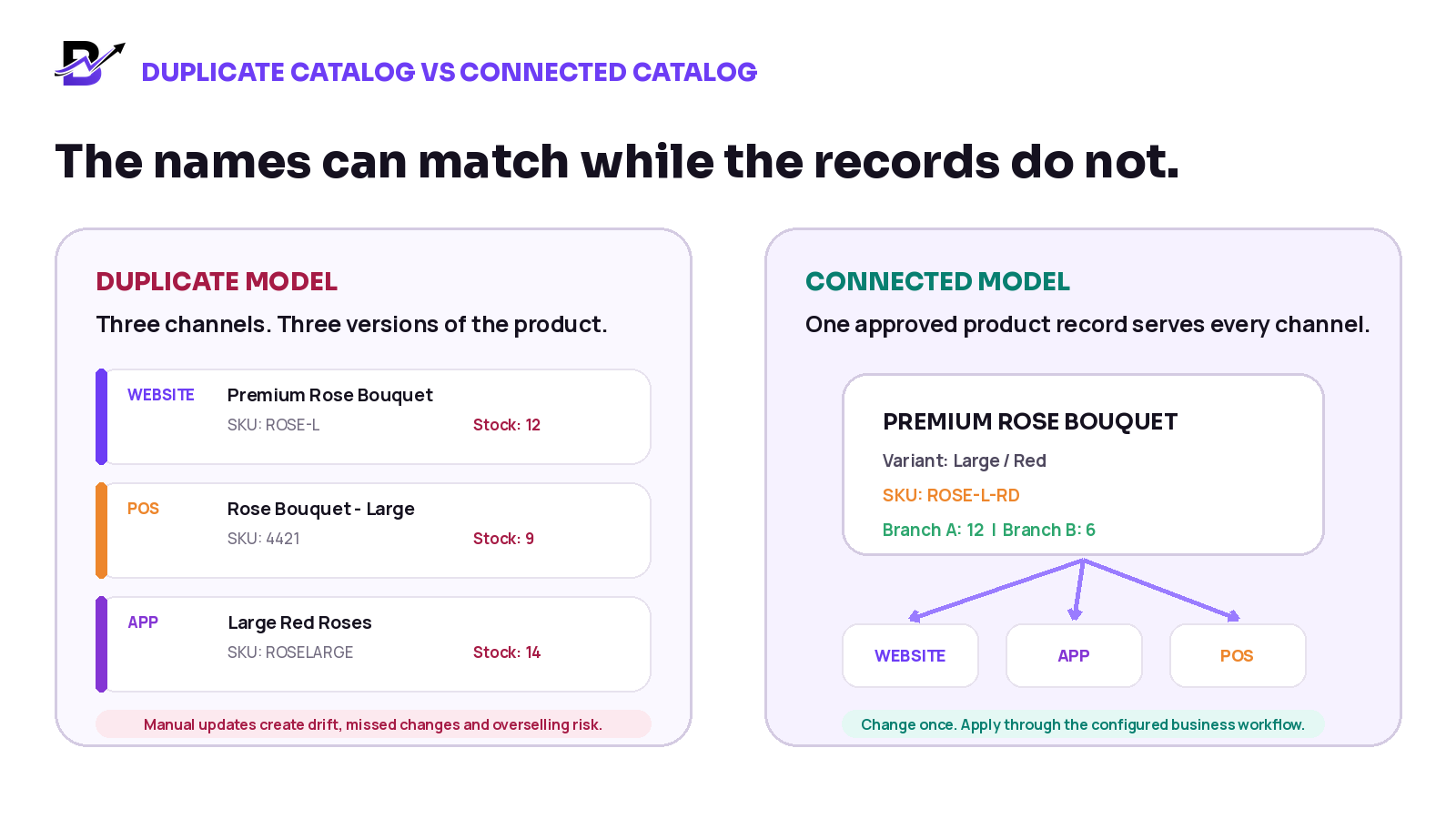
Figure 2. Matching names do not prove that two records are the same product or variant.
Symptom | Common cause | Business result |
|---|---|---|
The same item appears twice in the POS | The import created a new record instead of matching a stable product or variant ID. | Staff choose the wrong line and reports split one product across two records. |
Online stock says 12, POS stock says 9 | Each system reduced its own quantity or a sync event failed. | The business may oversell or hide stock that is actually available. |
Size or colour prices do not match | Variants were mapped by name rather than by a stable variant record. | Customers and staff see different prices for the same option. |
A cancelled order still holds stock | The cancellation status did not release the reservation. | Available stock stays lower than the physical count. |
A refund increases stock even when nothing returned | Payment and inventory actions were treated as the same event. | Stock is added back without a physical item returning. |
A branch transfer doubles stock | The source was reduced and the destination was added before the transfer was received, or the event was processed twice. | Total business stock becomes unreliable. |
Important: “Real-time sync” is not a complete answer. Ask what is synced, in which direction, how quickly, what happens during a failure, and how the team can see and correct an exception.
Build one source of truth
Before selecting an integration, decide which system is allowed to create and edit each important field. A single platform may own everything. In a multi-system setup, product content may be mastered in ecommerce while the POS or inventory platform owns location stock. The rule can differ by field, but it must be written down.
Field | Possible master | Rule to define |
|---|---|---|
Product ID and variant ID | Core commerce or ERP platform | Never change or reuse the identifier after launch. |
SKU and barcode | Catalog master | Keep each sellable variant unique; decide whether staff can edit it. |
Title, description and images | Ecommerce or product information system | Define whether the POS receives the same content or a shorter display name. |
Selling price | Catalog master or pricing system | Decide whether channel-specific prices are allowed and how discounts are handled. |
Stock by location | Inventory or connected commerce platform | Use one official quantity model and one adjustment history. |
Order status | Order management layer | Map status names and decide which system can change them. |
Payment status | Payment or order system | Do not mark an order paid only because a receipt was manually viewed elsewhere. |
Refund and return | Order or payment workflow | Separate money returned from physical stock returned. |
The master system should also publish a change history: who changed the record, when it changed, why it changed, and which channel received the update. Without this history, teams often fix numbers without understanding the original cause.
Use stable IDs, SKUs and variants
A product is the main item. A variant is a sellable version of that product, such as a size or colour. A SKU is a business identifier that helps staff, imports and reports recognise a sellable line. A barcode can speed up scanning, but it is not a replacement for a clear product and variant model.
Level | Example | Good practice |
|---|---|---|
Product | Premium Rose Bouquet | One main product record with the approved content and category. |
Variant | Large / Red | A separate sellable variant with its own price and stock rule. |
SKU | ROSE-L-RD | Unique, stable and never reused for a different item. |
Barcode | A scannable code assigned to the variant | Use when it helps counter speed; keep it unique and mapped to the same variant. |
Add-on | Chocolate box or greeting card | Decide whether it is a separate stock item, an option without stock, or a bundled component. |
Do not rely on the visible name alone. “Large Red Roses,” “Rose Bouquet - Large,” and “Premium Rose Bouquet / Large / Red” may look similar to a person but still be three different records to software. Match by stable product and variant identifiers.
Assign identifiers before importing products into the second system.
Keep a mapping table when systems use different internal IDs.
Do not reuse an old SKU for a new product after the original item is discontinued.
Treat each inventory-tracked variant as its own sellable line.
Decide how bundles, add-ons, custom items and manual prices affect stock before launch.
Choose the right integration model
There are four common ways to connect ecommerce and POS. The best choice depends on the number of channels, locations, products, custom workflows and people available to maintain the setup.
Model | Best fit | Strengths | Main risks |
|---|---|---|---|
One connected platform | Businesses that want ecommerce, POS, orders, stock and reporting in one operating layer. | Shared data model, fewer handoffs, simpler training and one support relationship. | May require configuration changes or specialist integrations for unusual requirements. |
Native integration | Two products with an official, supported connection. | Faster setup and clearer vendor support than a custom build. | The connector may sync only selected fields or have direction, timing and plan limits. |
Middleware or custom API | Businesses needing specialist tools or complex rules. | Flexible mapping, transformations and workflow control. | Needs technical ownership, monitoring, retries, version updates and security review. |
Manual import or export | Temporary migration, very small catalogs or controlled batch updates. | Low initial technical cost and useful for one-time data cleanup. | High risk of stale stock, duplicate records, human error and unclear ownership if used daily. |
Balanced rule: One platform is not automatically better, and integrations are not automatically more flexible. Compare the real workflow, support responsibility, failure handling and total maintenance effort.
Decide exactly how inventory should move
Inventory errors often come from unclear event rules. The business must decide what each quantity means and when each event changes it. Platforms use different names, but the logic normally includes some version of the quantities below.
Term | Easy meaning |
|---|---|
On hand | The physical quantity believed to be at a location, including stock that may already be committed or temporarily unavailable. |
Reserved or committed | Stock linked to an order or task and not meant to be sold to another customer. |
Unavailable | Stock that exists physically but should not be sold, such as damage, quality check or a safety hold. |
Available to sell | The quantity the channel is allowed to offer after reservations and unavailable stock are considered. |
Incoming | Stock expected from a supplier or another location but not yet available for sale. |
Working formula: Available to sell = on hand - reserved - unavailable - safety buffer, when the business uses one. The exact labels and calculation may differ by platform.
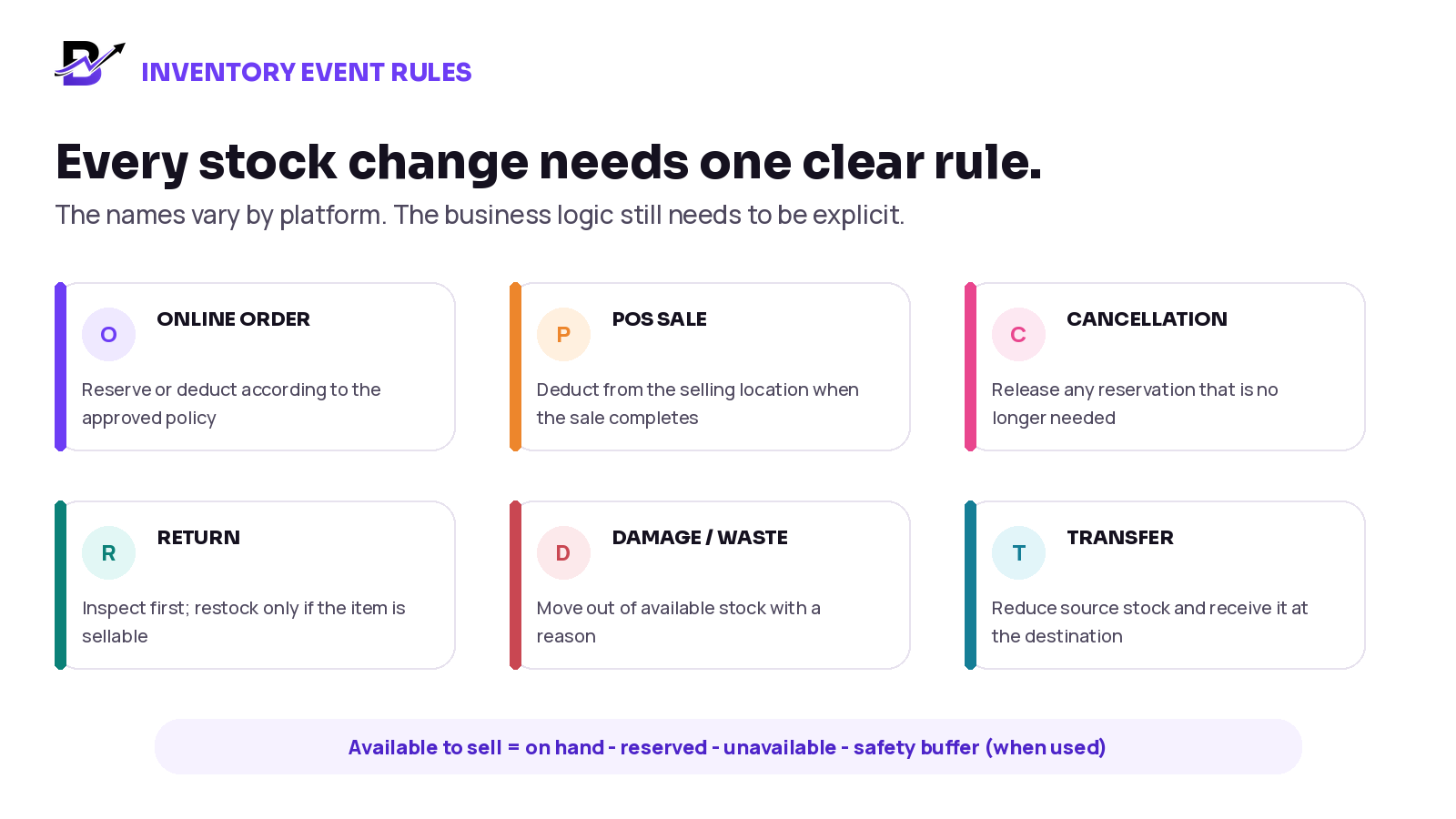
Figure 3. Payment, order and stock events are connected, but they are not always the same event.
Event | Inventory action to define | Question to test |
|---|---|---|
Online order created | Reserve, deduct, or do nothing until payment according to the approved policy. | Can an unpaid order block sellable stock, and for how long? |
Online payment succeeds | Confirm the reservation or deduct from the chosen fulfilment location. | What happens if payment succeeds but the inventory update is delayed? |
POS sale completes | Deduct from the POS location and create one order or transaction record. | Can the same item still be sold online before the update arrives? |
Payment fails or order expires | Release any temporary hold that should no longer remain. | Is release automatic, and can staff see failures? |
Order cancelled | Release reserved stock; do not add physical stock twice. | Was the item already prepared, consumed or transferred? |
Refund issued | Change the money record. Do not automatically restock unless a physical return is confirmed. | Was the item returned, and is it sellable? |
Return received | Inspect, then restock, mark unavailable, or write off with a reason. | Who decides the condition and location? |
Damage or wastage | Remove from available stock and save the reason, user and time. | Can managers review repeated adjustments? |
Branch transfer | Move stock from source to in-transit and then to the receiving location when confirmed. | Can the same transfer be processed twice? |
A refund and a return must remain separate. You can refund a customer without receiving an item back, and you can receive a return that should not go back into sellable stock. Combining these actions is a common cause of false inventory increases.
Handle locations, channels and offline sales
A multi-location setup needs more than one total stock number. Each branch, warehouse, kiosk or fulfilment point should have its own location record, and every sale should be attached to the location that owns the stock movement.
Area | Rule to define |
|---|---|
Channel availability | Decide which products and variants are visible on the website, apps and POS. A product can exist in the catalog without being sold everywhere. |
Fulfilment location | Decide whether the customer chooses a branch, the system assigns one, or staff select it after the order arrives. |
Safety stock | Consider keeping a small channel buffer when fast-selling items, manual adjustments or temporary connection delays create risk. |
Transfers | Use a traceable source, destination, sent quantity, received quantity and status. Do not edit both branches manually. |
Offline POS | Confirm whether sales can continue without internet, what data is stored locally, when it syncs, and how conflicts are resolved. |
Manual or custom sale | Bring telephone, WhatsApp, quotation or payment-link sales into the same order and stock workflow when possible. |
Offline warning: If the POS can sell while disconnected, central online stock may not know about the sale until the device reconnects. Ask how the system queues events, prevents duplicate processing and reports conflicts.
A practical 10-step setup plan
Map every sales channel and location. List the website, apps, POS devices, marketplaces, manual-order channels, branches, warehouses and fulfilment points that create or change product, order or stock data.
Clean the catalog before connecting it. Find duplicates, inactive items, inconsistent names, missing variants, reused SKUs, wrong prices and products that should not be sold on every channel.
Choose the master for each field. Write down which system owns product identity, content, price, tax, stock, order status, payment state, customer data and returns.
Assign stable identifiers. Create or confirm product IDs, variant IDs, SKUs and barcodes. Keep a mapping table when connected systems use different internal IDs.
Define the sync direction. For each field, decide whether changes move one way or both ways. Avoid two systems editing the same field without a conflict rule.
Write the inventory event rules. Decide what happens for order creation, payment, POS completion, cancellation, refund, return, damage, transfer and manual adjustment.
Configure locations and channel visibility. Assign products, stock and sales to the correct branches. Decide how online fulfilment, pickup and unavailable locations work.
Test normal sales and exceptions. Use real products and run paid, failed, cancelled, refunded, returned, transferred, discounted and offline scenarios before launch.
Launch in a controlled phase. Start with a small catalog, one location or a limited team. Reconcile physical stock and system stock before expanding.
Monitor and reconcile. Review failed syncs, duplicate records, negative stock, unexpected adjustments and physical count differences. Fix the root cause, not only the number.
Test these scenarios before launch
A successful demo is not enough. The implementation should be tested with the situations that normally create wrong stock or duplicate records.
Test scenario | Expected result | Risk caught |
|---|---|---|
A paid online order for the last available unit | The correct location reserves or deducts the unit and the other channels stop offering it according to policy. | Overselling and location mismatch |
A failed payment | The order remains unpaid and any temporary hold is released at the defined time. | Stock held by unsuccessful checkout |
A POS sale at the same time as an online order | Both events are processed once, with a visible exception if available stock is not enough. | Race condition and double selling |
A cancelled order before preparation | The reservation is released once and the order history remains visible. | Stock not released or released twice |
A refund without a returned item | Money changes; stock does not automatically increase. | False restocking |
A returned item in sellable condition | The item is received, inspected and added to the correct location once. | Wrong location or duplicate stock |
A damaged return | The item is recorded as unavailable or written off with a reason. | Unsellable stock offered again |
A variant price change | The correct variant updates in allowed channels without creating a new product. | Duplicate variant and wrong price |
A product unpublished online but still sold at POS | The channel setting changes without deleting the shared product record. | Accidental loss of POS product |
A branch transfer | The source, transit and receiving states remain traceable and total stock stays correct. | Double counting between branches |
An offline POS sale, where supported | The sale is queued, syncs once after reconnection and creates a visible conflict if needed. | Duplicate event and delayed stock |
A manual custom order or payment link | The order uses approved product or custom lines and enters the same payment, fulfilment and reporting workflow. | Sales outside the official records |
What to monitor after launch
Even a well-designed connection needs operational monitoring. The first weeks should include frequent checks, followed by a regular reconciliation routine.
Metric or check | Why it matters |
|---|---|
Duplicate product or SKU count | Shows whether imports or staff actions are creating new records instead of updating existing ones. |
Negative stock and oversold orders | Reveals timing, location or reservation problems. |
Failed or delayed sync events | Shows where data did not reach the destination or needs a retry. |
Unmatched product or variant IDs | Identifies records that cannot be mapped safely across systems. |
Manual stock adjustments by reason | Helps separate normal corrections from repeated process problems. |
Physical count variance by location | Confirms whether the system still matches the stock staff can actually count. |
Refunds without returns and returns without restock decisions | Prevents payment events from silently changing inventory. |
Do not measure only whether the integration is “up.” A connection can be technically active while sending incomplete, delayed or incorrectly mapped data. The business result is accurate records and clear exceptions.
How Bloomlytix connects ecommerce and POS
Bloomlytix is designed as one connected ecommerce and retail operating platform. Its website, configured customer apps, POS, order workflow, inventory, staff tools, payments, delivery and reporting use shared business data rather than a separate counter-only catalog.
Bloomlytix capability | Practical role |
|---|---|
Shared catalog | Products, prices, options and add-ons can support online, app and POS sales from the same platform context. |
POS on mobile, tablet and desktop | Staff can process walk-in, custom and assisted sales on the device that suits the branch. |
Branch context | Sales, staff activity and configured stock actions can be recorded against the relevant branch. |
Optional stock deduction | Eligible POS and online activity can connect to practical product, add-on, packaging and branch stock rules when enabled. |
Connected order workflow | Custom or delivery orders can continue into staff preparation, payment status, greeting-card and delivery steps. |
Owner reporting | Online and counter activity can be reviewed with product, branch, staff, stock, cash and delivery context. |
The exact setup should be confirmed during onboarding. Bring your catalog, variants, branches, payment methods, stock rules, devices, custom-order process and any third-party integration requirements so the workflow can be mapped before launch.
Product scope: Bloomlytix supports practical product, variant, add-on, packaging and branch inventory workflows. Confirm advanced warehouse, manufacturing, recipe-level ingredient, marketplace, offline-mode or custom integration requirements separately.
Frequently asked questions
Can ecommerce and POS use the same inventory?
Yes. They can share one inventory model or keep separate systems connected through a reliable integration. The important requirements are stable product and variant identifiers, stock by location, clear event rules and visible error handling.
Does every product need a SKU?
A platform may use its own internal IDs, so a visible SKU is not always technically required. However, unique and stable SKUs are very useful for imports, staff search, reports, barcodes, suppliers and integrations. Each inventory-tracked variant should have its own identifier.
What is the source of truth in an ecommerce POS integration?
It is the approved system or record that wins when two systems disagree. A business may use one platform for everything or choose different masters for catalog content, prices, stock, payment status and accounting. The ownership must be documented.
When should online inventory be deducted?
There is no single rule for every business. Some setups reserve stock when an order is created, others deduct after payment, and some use temporary checkout holds. The chosen rule should match payment risk, fulfilment speed, stock scarcity and the platform’s supported workflow.
Should a refund automatically add stock back?
Not always. A refund changes the money record. Stock should increase only after the business confirms that a physical item returned and is sellable. Damaged, used, customised or perishable items may need a different adjustment.
How can a multi-branch business prevent overselling?
Track stock by location, attach each sale to a location, define online fulfilment rules, use reservations or safety stock where appropriate, and make transfers traceable. Test what happens when two channels sell the last unit at nearly the same time.
What happens if the POS loses internet?
That depends on the product. Confirm whether offline sales are supported, which data is stored on the device, when events sync, how duplicate processing is prevented, and how stock conflicts are shown after reconnection.
Can separate ecommerce and POS systems work well?
Yes, when the integration covers the required records, the business has clear data ownership, failures are monitored, and someone is responsible for updates and vendor coordination. Separate tools become risky when the source of truth is unclear.
One catalog is a business rule, not only a software feature
Connecting ecommerce and POS is successful when the business can identify one approved product, sell it through the right channels, update the correct location, and follow the full order and return history without rebuilding the record by hand.
Start with clean data and written rules. Choose stable identifiers. Separate payments from physical stock events. Test the difficult cases before launch. Then monitor the exceptions and reconcile the system with real stock. This is how a connected setup becomes reliable enough for daily work and future growth.
Quick implementation summary
Do this | Avoid this |
|---|---|
Use one catalog or a clearly defined master for every field. | Letting two systems edit the same record without a conflict rule. |
Give every sellable variant a stable ID and unique SKU where useful. | Matching products only by visible name. |
Track stock by location and define reservations, cancellations, refunds and returns. | Using one total quantity without understanding where stock belongs. |
Test normal sales, failures, transfers, offline activity and returns. | Launching after only a simple successful checkout demo. |
Monitor failed events, duplicates, adjustments and physical variance. | Assuming that an active connector guarantees accurate data. |
Related Bloomlytix guides and pages: What is a retail operating system? · Ecommerce website vs retail operating system · Complete platform · Florist POS software · Gift shop POS software · Pricing