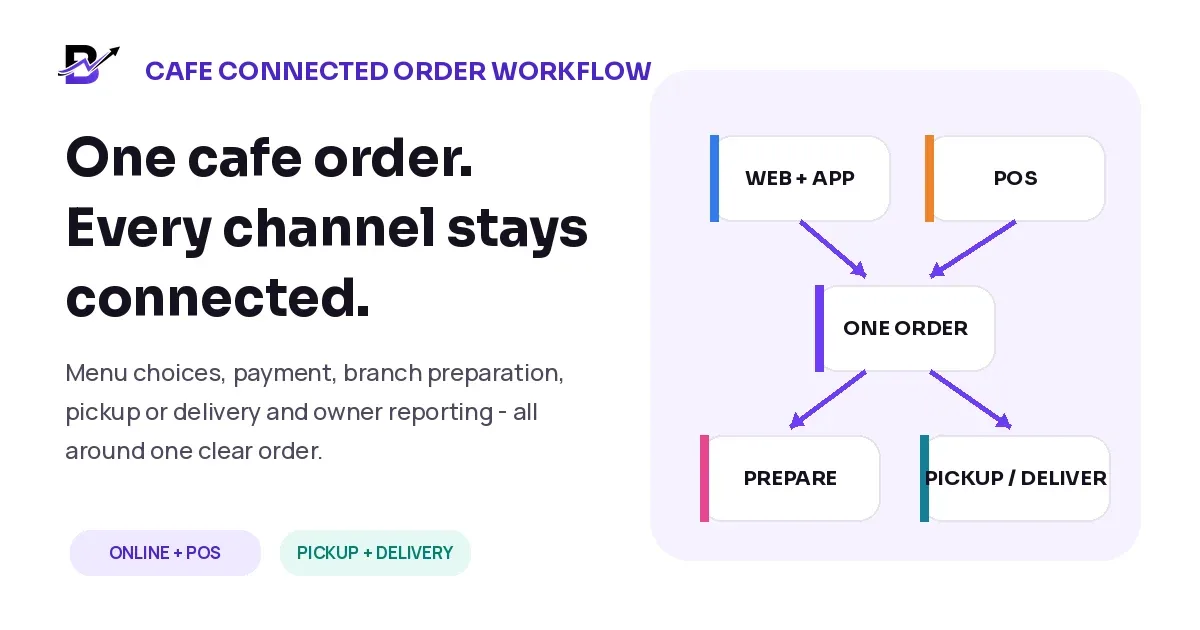
A customer orders a large iced latte online for pickup. Another customer walks to the counter and orders the same drink. Both choose oat milk, vanilla and an extra shot. To the customer, these are simple purchases. To the cafe, each order must keep the item, modifiers, price, payment, branch, preparation note and handoff promise clear.
The problem begins when online orders appear in one screen, counter sales live in another, staff receive screenshots or verbal summaries, and the owner reviews separate totals later. Speed at the counter does not help if the order detail is lost before preparation.
Direct Answer — Connect cafe sales around one shared menu, one order structure and one branch workflow. Keep the product, size, modifiers, add-ons, preparation note, payment, branch and pickup or delivery promise together. Let online and POS orders enter the same staff queue, move through clear statuses, and close only when the handoff and final result are recorded.
This guide is for cafes, coffee shops, dessert cafes and quick-service food-and-beverage businesses that sell through a website, customer app, counter POS, manual order or payment link. It focuses on practical order connection. Table service, reservations, kitchen display systems, recipe costing, ingredient-level depletion, tip distribution and complex kitchen production require separate discovery.
In this guide
Why cafe orders become difficult when sales channels do not share the same data
How to structure products, sizes, modifiers, extras and preparation notes
What every complete cafe order should contain
A ten-stage workflow from sale capture to pickup or delivery
How to manage payments, cash, branch stock and common exceptions
Which metrics help owners understand preparation and handoff performance
How Bloomlytix connects cafe ecommerce, POS, staff work, stock, pickup, delivery and reports
Why cafe orders become difficult
Cafe work combines speed with detail. A busy counter order may take seconds to capture, but the preparation team still needs the right size, milk, flavour, temperature, extras and timing. Online orders add a second source of demand, while pickup and delivery create separate handoff promises.
The operational risk is not that a cafe has several sales channels. The risk is that every channel creates a different version of the menu, order, payment or branch truth.
ORDER SOURCE | WHAT THE CUSTOMER EXPECTS | COMMON RISK WHEN DISCONNECTED |
|---|---|---|
Counter POS | Fast ordering and immediate payment. | The sale closes at the till but the preparation detail is passed verbally. |
Website or app | Accurate choices, payment and a reliable pickup or delivery promise. | Modifiers or branch availability differ from the counter menu. |
Manual or phone order | A staff member turns a conversation into the correct order. | The final item, amount or time remains in chat or memory. |
Pickup order | The complete order is ready at the promised branch and time. | The customer arrives before the order is actually ready. |
Delivery order | The right products travel safely to the right address and time window. | The driver receives an incomplete brief or the product is dispatched late. |
Core Principle — The customer can order in different ways. The cafe should still create one consistent operating record.
1. Start with one shared menu and catalogue
A connected workflow starts before the first order. The website, customer app, POS and permitted manual-order tools should work from the same approved product structure or from clearly controlled master data. Staff should not maintain one latte online and another unrelated latte at the counter.
The menu becomes easier to operate when every detail has the right place. A size is not the same as a modifier. A paid extra should not disappear inside a free-text note. A preparation note should not be used to create an item the cafe does not actually offer.
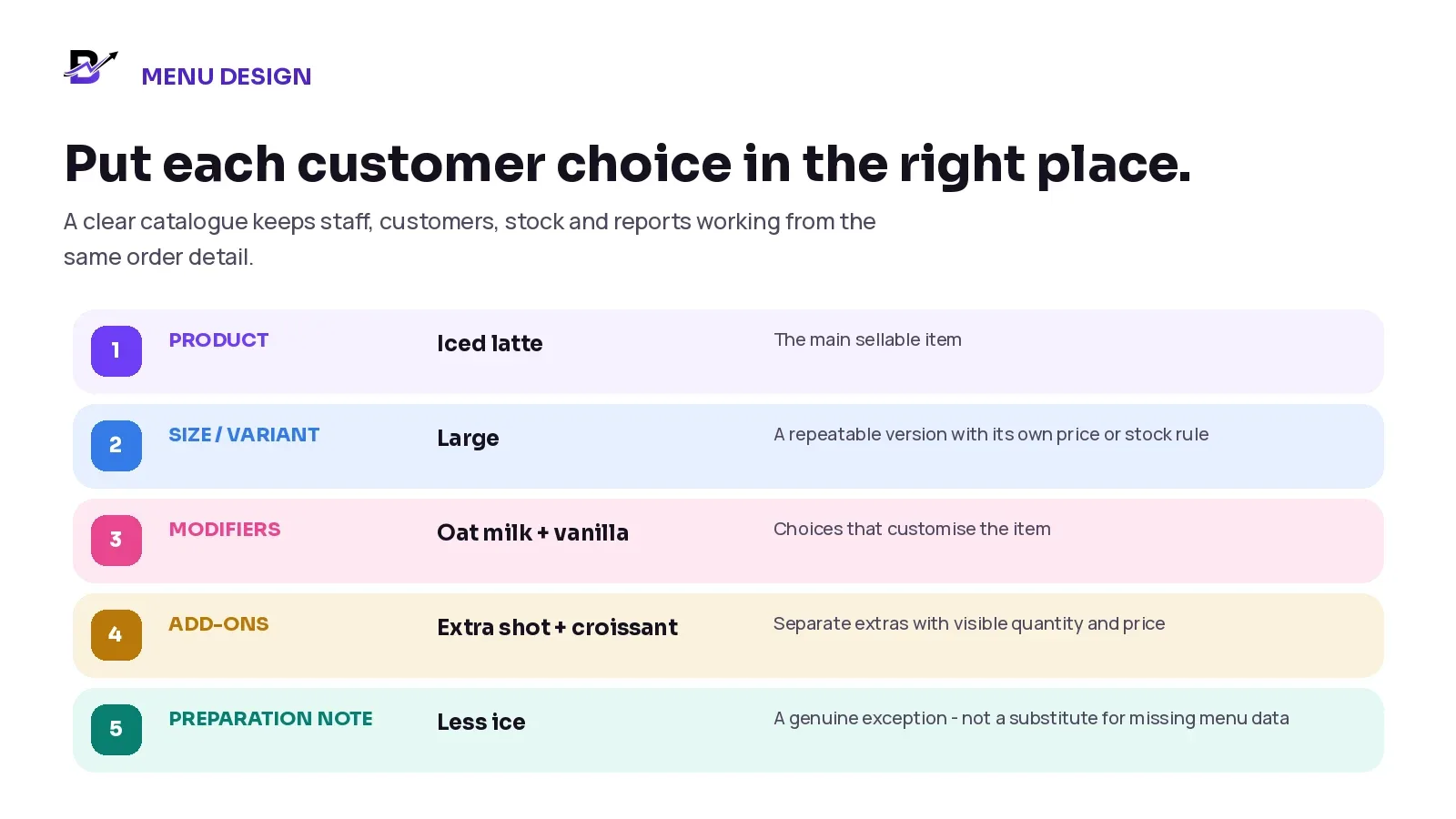
Figure 1. Products, variants, modifiers, add-ons and notes serve different jobs in a cafe order.
RECORD TYPE | USE IT FOR | CAFE EXAMPLE | CONTROL |
|---|---|---|---|
Product | The main item being sold. | Iced latte. | Keep one approved product record across configured channels. |
Size or variant | A repeatable version that can change price, availability or reporting. | Small, medium or large. | Give the variant a stable identifier and clear branch availability. |
Modifier | A customer choice that customises the item. | Oat milk, vanilla, decaf, no sugar. | Use required or limited choices where the workflow supports them. |
Add-on | A separate extra with its own visible quantity and price. | Extra shot, pastry, bottled water. | Do not hide paid extras in a note. |
Preparation note | A genuine instruction that does not need a permanent sellable line. | Less ice or serve the pastry warm. | Keep it short and visible; do not let notes override safety or unavailable menu rules. |
Internal note | Operational context not intended as customer-facing copy. | Manager approved substitution. | Limit access and keep it separate from the customer instruction. |
Food-Safety Note — A free-text instruction is not an allergen-control system. Ingredient, allergen, preparation and cross-contact information should come from verified cafe records and staff procedures that meet the rules of the market where the business operates.
U.S. reference checked 17 September 2026: FDA food-allergy guidance. Definitions and legal duties vary by market.
Official references checked 17 September 2026: Square item-modifier guidance · Square online-ordering profile guidance.
2. Control menu availability by branch and channel
A product can exist in the catalogue without being sellable everywhere. One branch may offer breakfast until 11:00 a.m. Another may not carry a seasonal dessert. Delivery may need a smaller range than pickup because some items do not travel well.
SETTING | DECISION TO MAKE | WHY IT MATTERS |
|---|---|---|
Branch availability | Which locations can sell and prepare the item or modifier? | Prevents the wrong branch from accepting an order it cannot complete. |
Channel availability | Is the item available at POS, online, in the app, for pickup or for delivery? | Keeps customer promises aligned with the operating channel. |
Menu hours | When is breakfast, lunch, dessert or a seasonal menu visible? | Stops customers ordering outside real preparation hours. |
Sold-out control | Who may make an item temporarily unavailable, and on which channels? | Reduces avoidable refunds and staff calls. |
Preparation lead time | Does the item need more time than a standard drink? | Protects pickup and delivery promises. |
Branch price or offer | Are prices or promotions intentionally different by location or channel? | Keeps differences deliberate instead of accidental. |
Where the software supports location and channel rules, the cafe should test them with a real item. Change one branch, modifier or menu period and confirm that POS and online ordering show the intended result without creating duplicate products.
3. Create one complete cafe order record
The order record should answer the questions that the cashier, barista, preparation staff, pickup counter, dispatcher, customer service team and owner will ask later. Each role may see only the information it needs, but the business should not rebuild the order at every handoff.
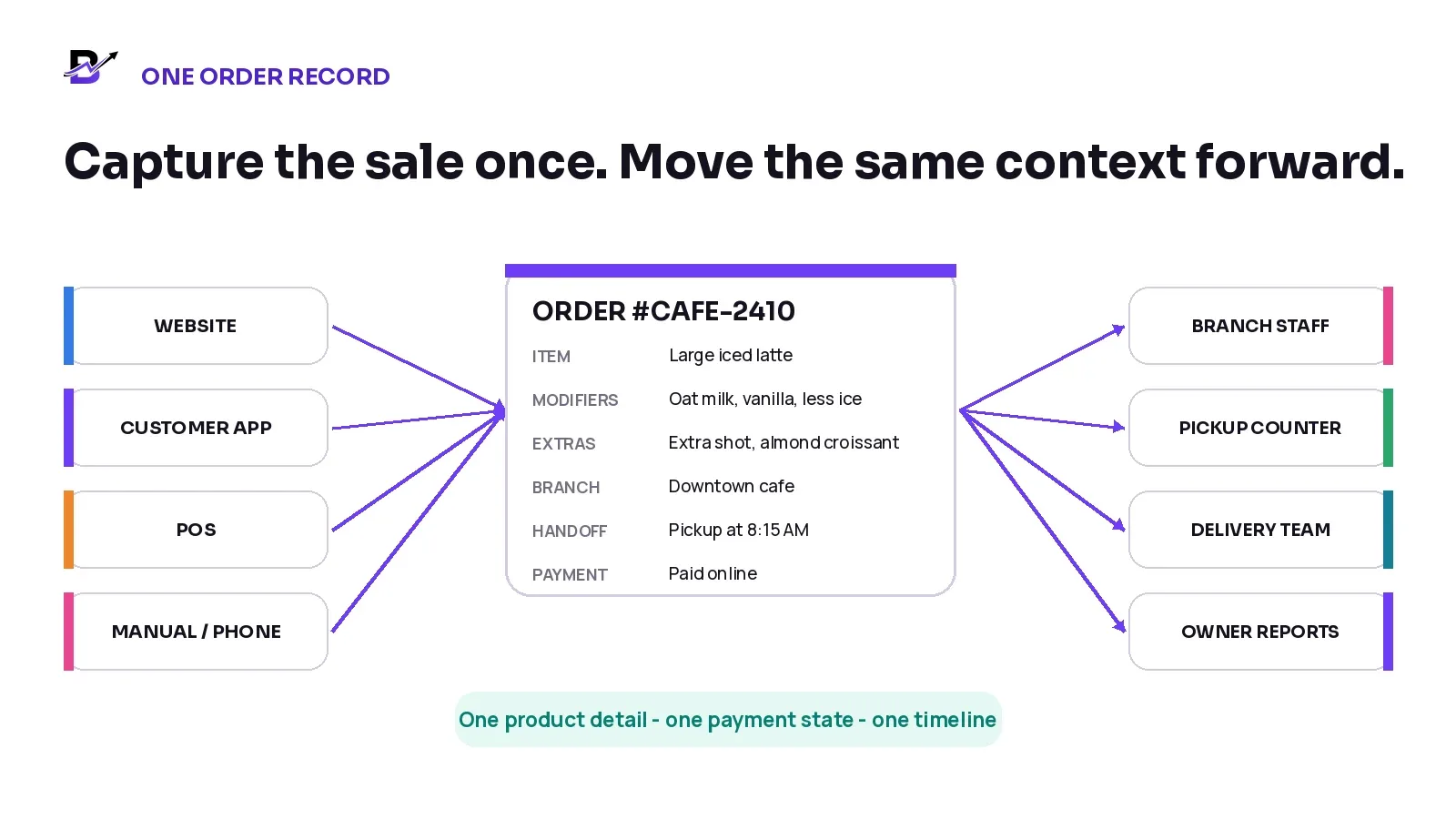
Figure 2. Website, app, POS and assisted sales can create one consistent order record.
ORDER SECTION | WHAT TO CAPTURE | WHY IT MATTERS |
|---|---|---|
Order identity | Order number, channel, date, time, branch, owner and current status. | Makes the order searchable and shows responsibility. |
Items | Product, variant, quantity and any bundle components. | Defines what must be prepared or handed over. |
Modifiers + extras | Every approved modifier, add-on and price effect. | Protects the exact customer choice. |
Preparation | Customer note, internal note, due time and staff owner. | Turns the sale into clear branch work. |
Customer | Name and permitted contact details where collected. | Supports confirmation, pickup and customer service. |
Handoff | Counter, pickup or delivery, promised time, address and recipient context where relevant. | Keeps the final promise attached to the same order. |
Payment | Method, amount and paid, pending, failed, refunded or manual state. | Separates money from preparation status. |
Timeline | Created, accepted, preparing, ready, handed off, cancelled or refunded events. | Gives staff and owners one traceable history. |
4. Use a clear status workflow
A status is useful only when it changes responsibility. “Preparing” should mean a team member has started the work. “Ready” should mean the item, extras, packaging and handoff details have passed the cafe quality check. “Completed” should mean the pickup or delivery result is known.
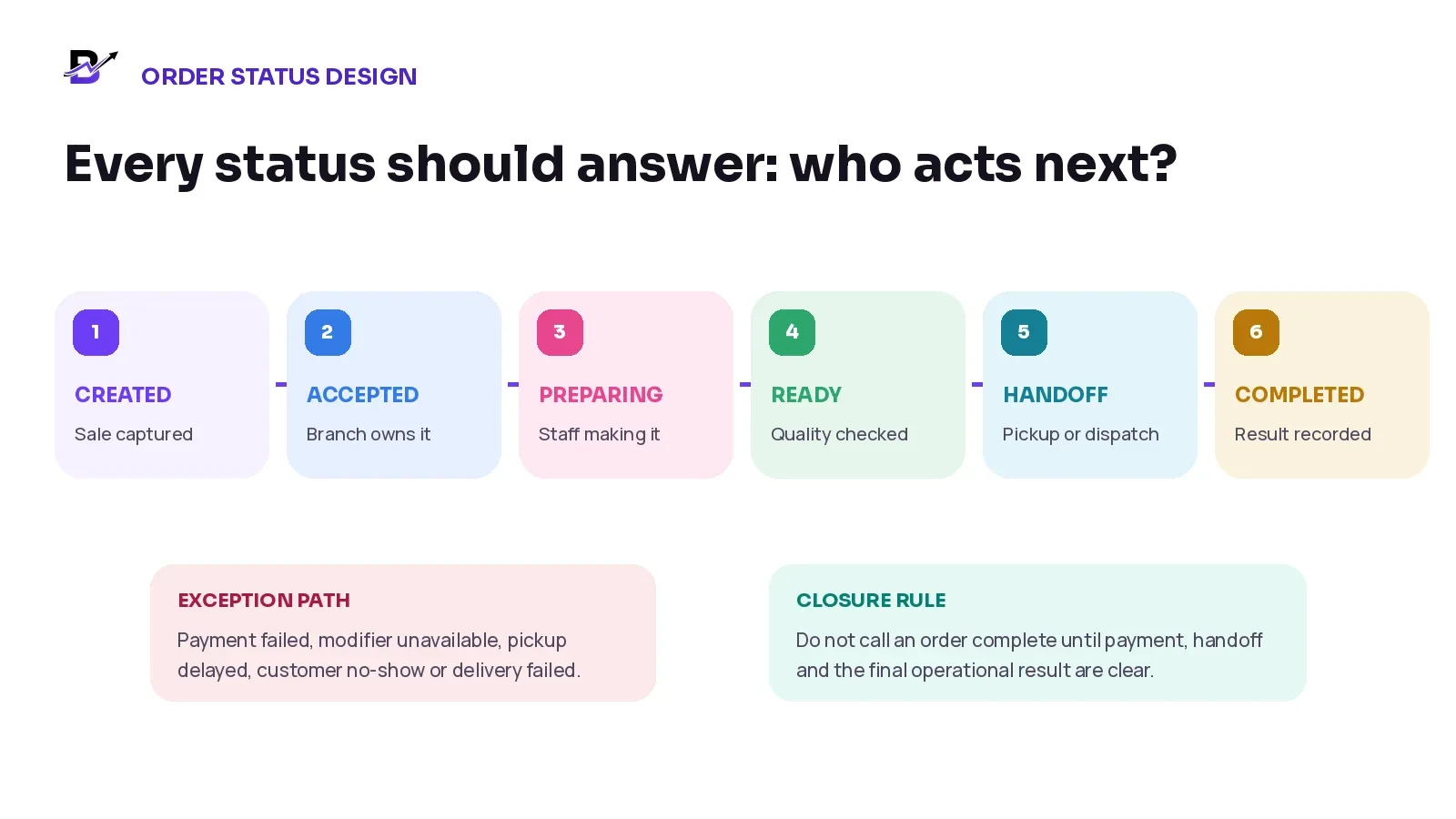
Figure 3. Each order status should have a clear owner and next action.
STATUS | WHAT IT SHOULD MEAN | NEXT OWNER OR ACTION |
|---|---|---|
Created / new | The sale has entered the official queue but has not yet been operationally accepted. | Validate payment, branch, menu detail and promise. |
Accepted | The branch has taken responsibility for the order. | Assign or begin preparation. |
Preparing | Staff are making or assembling the order. | Complete the item and resolve shortages early. |
Ready | Product, modifiers, extras, packaging and handoff details are complete. | Notify pickup or assign dispatch. |
Out for delivery / awaiting pickup | The order has left preparation and is in the final handoff stage. | Record collection, delivery or exception. |
Completed | The final handoff and operational result are recorded. | Close reporting and any cash or support follow-up. |
Cancelled / refunded | The operational and financial outcome are clear. | Release stock or capacity only according to the real physical result. |
5. Follow one ten-stage workflow from sale to closure
STEP | CONTROL |
|---|---|
1. Capture | the sale Create the order from the website, customer app, POS, manual order or payment-link flow without re-entering the same detail elsewhere. |
2. Validate | the order Check the item, branch, modifier availability, price, payment state and pickup or delivery promise. |
3. Accept | responsibility Let the correct branch or manager confirm that the cafe can keep the promise. |
4. Send | it to preparation Show permitted staff the items, modifiers, extras, notes and due time in one readable queue. |
5. Prepare | the order Make the complete order against the approved detail, not against memory or a screenshot. |
6. Complete | the quality check Confirm the drink or food item, extras, packaging, label or customer name and handoff route. |
7. Mark | ready Use ready only when the order can genuinely leave the preparation area. |
8. Complete | pickup or dispatch Notify the customer, hand the order to the pickup point or assign delivery from the same record. |
9. Record | the outcome Mark collected, delivered, failed, cancelled, refunded or another approved result with the required note or proof. |
10. Close | the reporting loop Keep channel, branch, staff, product, payment, cash, stock and exception context available for owner review. |
Worked example: one online pickup order
A customer orders a large iced latte with oat milk, vanilla, an extra shot and less ice. They add an almond croissant and choose pickup at the Downtown branch for 8:15 a.m. The payment succeeds online.
STAGE | WHAT THE CONNECTED WORKFLOW SHOULD SHOW |
|---|---|
Checkout | Large iced latte, oat milk, vanilla, extra shot, less ice, almond croissant, customer, branch, 8:15 a.m. pickup and paid status. |
Acceptance | Downtown branch confirms that the products, modifiers and pickup time are available. |
Preparation | Staff see the exact modifiers and extras without reading a payment email or customer chat. |
Ready | The drink and croissant are complete, labelled if required and placed in the correct pickup area. |
Handoff | The customer or authorised person collects the order and the final result is recorded. |
Owner view | The sale remains connected to channel, branch, products, modifiers, staff, payment, stock and pickup timing. |
Practical Test — Create the same order at the counter and online. The product, modifier, price, branch and report should still describe one consistent business rule.
6. Treat pickup as a complete workflow
Pickup is not simply “delivery without a driver.” The cafe still needs a branch, promised time, preparation queue, ready milestone, customer notification and a clear collection outcome. Marking an order ready too early creates queues and damages trust. Marking it ready too late leaves finished products waiting without a customer update.
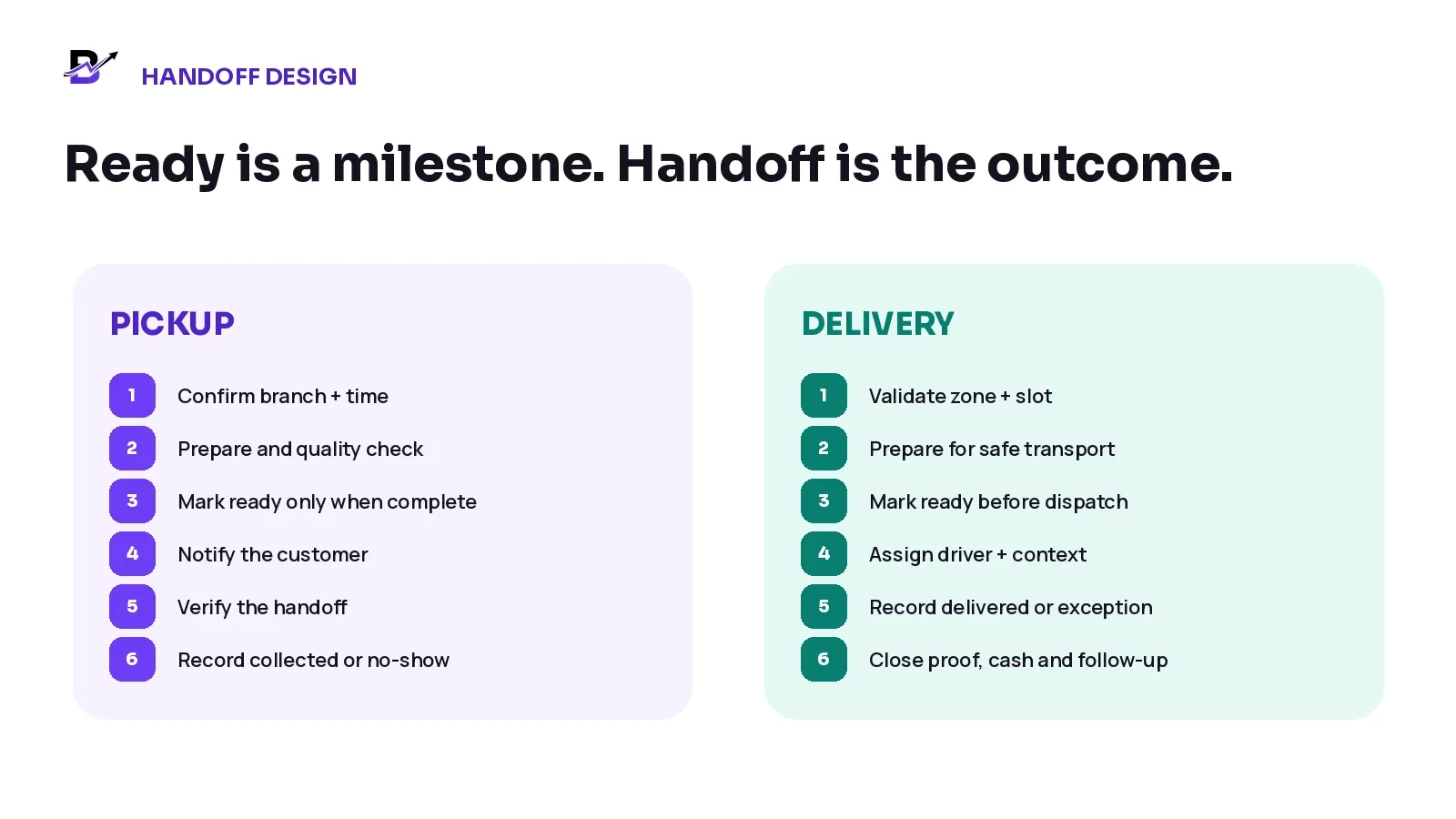
Figure 4. Pickup and delivery share one order, but their final handoff steps are different.
PICKUP CONTROL | GOOD OPERATING RULE |
|---|---|
Promised time | Offer a time the branch can realistically prepare, not only the earliest attractive time. |
Ready status | Use it after the complete order has passed the final check. |
Notification | Tell the customer when the order is actually ready and which branch or collection point to use. |
Handoff check | Use the order number, name or another appropriate identifier without exposing unnecessary customer data. |
No-show process | Define how long the order remains available, who contacts the customer and how quality or refund decisions are handled. |
Completion | Record collected, cancelled, refunded or another real outcome instead of leaving the order in ready forever. |
7. Keep delivery connected to preparation
A delivery order should not enter dispatch until the branch has completed preparation and the product can travel safely. The order should carry the delivery zone, charge, address, recipient, time window, contact rules, packaging needs and final status. The driver should not rebuild the brief from a location pin and a phone call.
For cafes, delivery range may need to be smaller than pickup range. Drinks can spill, frozen products can lose quality and hot items can cool during long travel. Configure the promise around real product and branch capability.
DELIVERY STAGE | OPERATIONAL QUESTION |
|---|---|
Checkout | Is the address inside a supported zone, and is the selected item eligible for delivery? |
Acceptance | Can the branch prepare the full order and meet the chosen time window? |
Ready | Are all items, extras, packaging and labels complete before driver assignment? |
Dispatch | Does the driver receive the approved address, recipient, timing and contact context? |
Doorstep | What counts as delivered, failed, returned or rescheduled? |
Closure | Are proof, cash collection, refund or customer-service actions connected to the same order? |
Related guide: How to build a same-day delivery workflow.
8. Keep payment, preparation and handoff statuses separate
A paid order is not automatically accepted. An accepted order is not automatically ready. A ready order is not automatically collected or delivered. Keeping these states separate helps staff see what is true and prevents one action from hiding another.
STATUS GROUP | EXAMPLES | WHY IT MUST STAY SEPARATE |
|---|---|---|
Payment | Pending, paid, failed, partially paid, refunded, cash due. | Describes money, not whether the item has been prepared. |
Order | New, accepted, cancelled, completed. | Shows the cafe commitment and final business outcome. |
Preparation | Queued, preparing, ready. | Shows the physical work. |
Handoff | Awaiting pickup, collected, assigned, out for delivery, delivered, failed. | Shows where the completed order is and what happened next. |
Cash | Expected, received, handed over, reconciled. | Shows staff or driver cash responsibility. |
Counter cash, card payments, online checkout, payment links and manual settlements can all be valid, but each method should remain tied to the correct order, branch and staff context. Do not treat a payment screenshot or terminal total as the complete order history.
9. Use practical inventory rules
A cafe may sell prepared drinks and food while also holding packaged retail products, coffee beans, bottled drinks, merchandise, pastries, cups, lids, bags and delivery packaging. These items do not all need the same stock method.
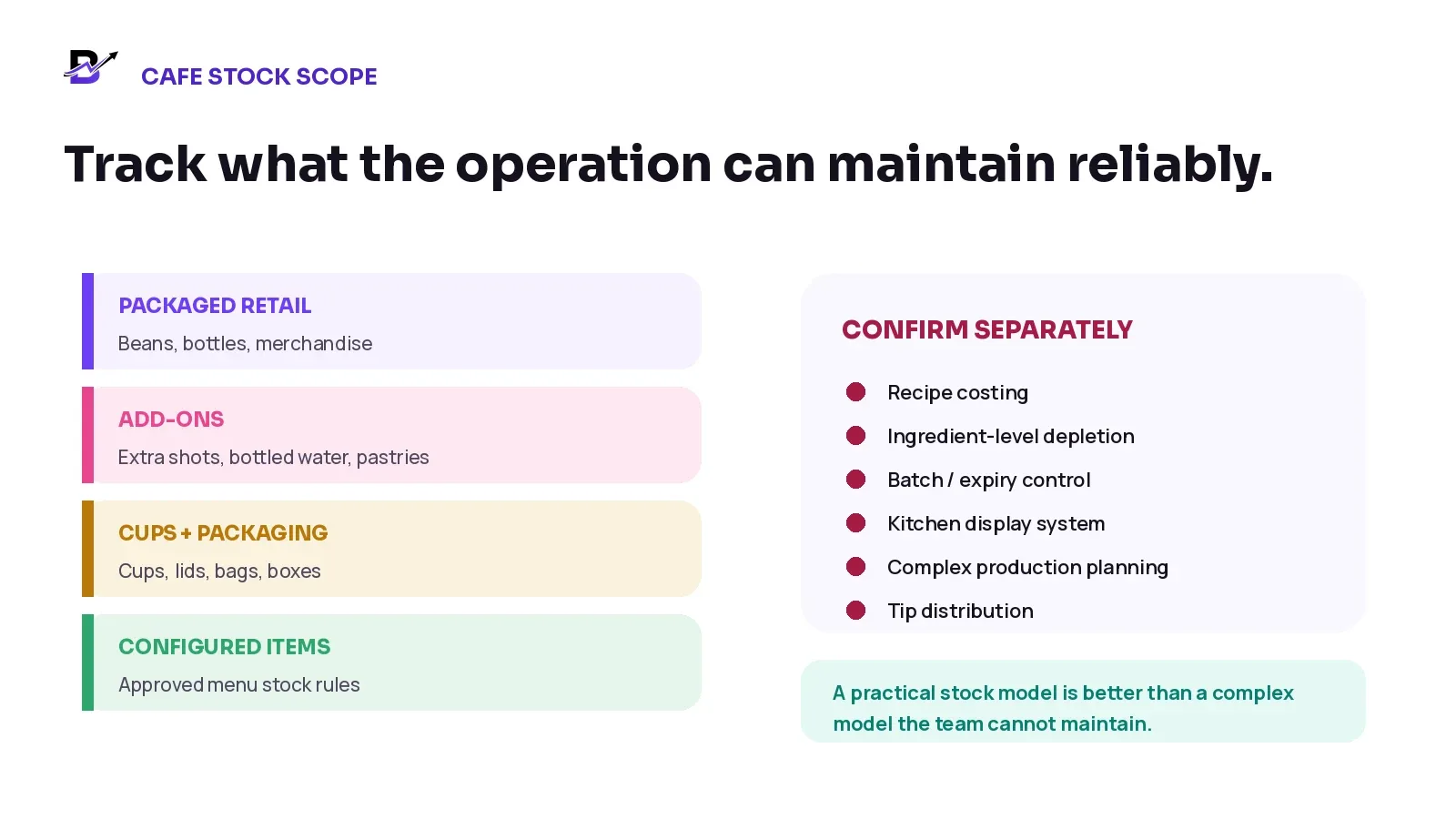
Figure 5. Track practical cafe stock while confirming specialist hospitality requirements separately.
STOCK GROUP | EXAMPLES | PRACTICAL STARTING CONTROL |
|---|---|---|
Packaged retail | Coffee beans, bottled drinks, merchandise and gift cards where applicable. | Track sellable item or variant quantity by branch. |
Sellable add-ons | Pastries, bottled water, packaged snacks or extras. | Use a separate line and quantity when the item is sold independently. |
Cups + packaging | Cups, lids, sleeves, bags, boxes and delivery packaging. | Track critical or costly materials through purchases, low-stock levels and counts. |
Configured menu items | Products or add-ons with an approved stock movement rule. | Deduct only where the system and business process can maintain the quantity reliably. |
Ingredients | Milk, syrups, beans, fillings and recipe inputs. | Confirm recipe, yield, waste, batch and ingredient-depletion requirements separately. |
The aim is not to force a full manufacturing model into a cafe that only needs practical retail control. The aim is to make important availability, purchases, adjustments and branch movements visible enough for staff to maintain and owners to review.
10. Design for multiple branches
A multi-branch cafe needs more than a company-wide menu and one stock total. Each order should have a fulfilment branch, and every branch should have clear product availability, staff access, payment context, stock rules, pickup instructions and delivery areas.
MULTI-BRANCH QUESTION | DECISION TO DEFINE |
|---|---|
Which branch owns online pickup? | Let the customer choose, assign from the selected location, or use an approved routing rule. |
Can every branch sell every item? | Control menu and modifier availability by branch. |
What happens when one branch sells out? | Pause the item for that location, offer an approved alternative or route only if the promise remains valid. |
How are branch transfers handled? | Use a traceable source, destination, sent quantity and received quantity for retail stock. |
Who can see and change another branch? | Use role-based access and a clear manager escalation rule. |
How does the owner compare performance? | Review sales, preparation, pickup, delivery, cash, stock and exception data by branch and channel. |
11. Handle common cafe exceptions without losing the order history
Exceptions are normal. The useful workflow records the reason, the immediate action, any customer approval, the financial effect and the next owner. Do not silently edit the order until the original promise disappears.
EXCEPTION | SAFE OPERATING RESPONSE | RECORD IN THE ORDER |
|---|---|---|
Modifier unavailable | Pause acceptance, offer approved choices and confirm any price or timing change. | Original choice, alternatives, customer decision and staff owner. |
Item sold out after payment | Escalate quickly; offer substitute, partial fulfilment, refund or cancellation according to policy. | Unavailable item, decision, payment result and stock action. |
Preparation delay | Update the ready time before the promise is missed and tell the permitted customer contact. | Cause, revised time, communication and owner. |
Customer arrives early | Show the real status and a realistic wait rather than marking ready prematurely. | Arrival time and final collection outcome if needed. |
Pickup no-show | Follow the holding, contact, product-quality and refund policy. | Contact attempts, time, condition and final decision. |
Payment failed | Keep the order visible but unpaid; release any capacity or stock hold according to policy. | Failure state, follow-up and expiry or cancellation. |
Delivery failed | Record recipient, address or access reason, then return, retry, reschedule or refund under policy. | Driver status, evidence, next action and financial result. |
Duplicate order | Stop one copy before preparation and trace how the duplicate was created. | Kept order, cancelled order, payment and root cause. |
Related guide: Retail cancellations, refunds and returns workflow.
12. Send customer updates that match reality
Customers need a small number of useful updates, not every internal movement. The cafe should choose statuses that explain the promise without creating false precision.
CUSTOMER UPDATE | SEND WHEN | WHAT IT SHOULD CLARIFY |
|---|---|---|
Order confirmed | Payment and operational acceptance are complete. | Order number, branch, items and pickup or delivery promise. |
Important change | An approved item, modifier, branch, time or payment detail changes. | The new detail and any effect on price or timing. |
Ready for pickup | The complete order has passed the final check. | Collection point, branch and any safe identification instruction. |
Out for delivery | The ready order has been dispatched. | That the order is on the way and how support can be reached. |
Completed | Pickup or delivery is recorded. | The final outcome and support path if something is wrong. |
Exception | The promise is at risk or cannot be completed. | What happened, what information is needed and the next agreed action. |
Communication Rule — Never send “ready” while the order is still being prepared. Never send a precise arrival promise unless the operating system and delivery process can support it.
13. Measure the workflow with useful cafe metrics
Total sales are important, but they do not explain whether the cafe is accepting orders quickly, preparing them accurately or keeping pickup and delivery promises. Start with a baseline and review the causes behind the number instead of copying a target from another business.
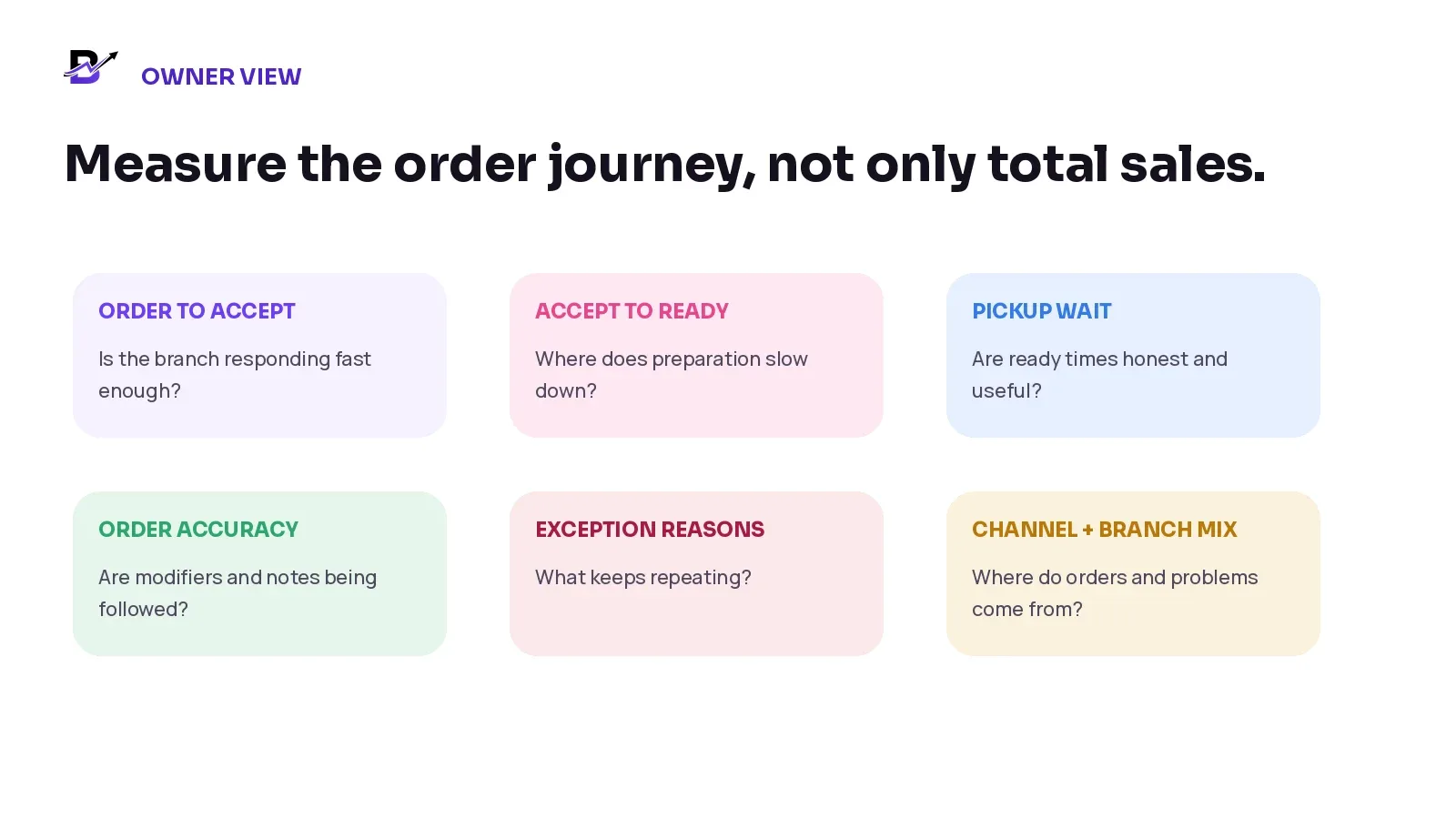
Figure 6. Cafe metrics should reveal where the order journey needs attention.
METRIC | SIMPLE DEFINITION | WHAT IT CAN REVEAL |
|---|---|---|
Order-to-accept time | Time from order creation to branch acceptance. | Whether payment, branch or availability checks are slow. |
Accept-to-ready time | Time from acceptance to a quality-checked ready order. | Preparation capacity by product, branch and period. |
Pickup wait | Difference between the promised or notified ready time and the actual handoff. | Whether ready statuses and promises are reliable. |
Order accuracy issue rate | Orders with a confirmed item, modifier, extra or handoff error. | Where menu design, intake or preparation is failing. |
Cancellation / refund reasons | Count and value by controlled reason. | Products, channels or promises creating avoidable loss. |
Add-on attachment | Orders that include approved extras. | Whether menu choices are clear and useful. |
Channel mix | Orders and revenue by counter, website, app and assisted sale. | How customers buy and where operations need support. |
Branch performance | Sales, ready time, exceptions, stock and cash by location. | Which branch process needs attention. |
How Bloomlytix supports the connected cafe workflow
Bloomlytix is designed as a connected cafe ecommerce and operations platform rather than a separate website, POS and staff tool. The cafe website, eligible customer apps, POS, manual orders and payment-link orders can use shared product, customer, order, branch, payment and reporting context. Permitted staff can receive items, configured modifiers, preparation notes, pickup time or delivery detail in one operational queue.
BLOOMLYTIX AREA | ROLE IN THE CAFE WORKFLOW |
|---|---|
Shared catalogue | Use configured products, sizes, modifiers, extras, prices and branch availability across direct customer channels and POS. |
Ecommerce + apps | Let customers browse, choose, pay and select pickup or delivery through branded direct channels. |
POS | Process walk-in and assisted sales on mobile, tablet or desktop while retaining branch, payment and reporting context. |
Staff workflow | Receive complete orders, assign the branch, use preparation statuses and keep one timeline. |
Pickup + delivery | Continue ready orders into customer collection or configured delivery without re-entering the sale. |
Inventory + purchases | Track practical retail products, packaged goods, cups, packaging, configured items, approved add-ons, purchases and adjustments. |
Cash + reports | Connect counter cash, expenses and owner visibility to sales, branches, staff, products and delivery outcomes. |
Product Scope — Bloomlytix supports ecommerce, POS on mobile, tablet and desktop, configured modifiers, staff order statuses, pickup and delivery, practical retail stock, purchases, cash and reports. Confirm table service, reservations, kitchen display systems, recipe costing, ingredient depletion, tip distribution, complex kitchen production, marketplace synchronisation and specialist delivery integrations separately.
Explore connected cafe capabilities: Cafe software · Cafe ecommerce · Cafe POS · Cafe order management · Cafe inventory · Cafe customer apps.
Questions to ask during a cafe software demo
Can the website, customer apps, POS and manual orders use the same product and modifier structure?
Can branch and channel availability be controlled without duplicating the menu?
Can required modifier choices and paid extras remain visible on staff preparation records?
Can one order keep payment, preparation, pickup and delivery statuses separate?
Can counter orders that require preparation continue into the same staff queue?
Can online pickup orders show the promised branch and ready time clearly?
Can ready orders continue into delivery assignment and final outcome without re-entry?
What practical stock, purchasing and adjustment workflows are included?
How are multiple branches, users and role permissions handled?
What happens when an item or modifier becomes unavailable after an order is placed?
Which reports connect channel, branch, staff, product, payment, cash, pickup and delivery data?
Which hospitality requirements are standard, configurable, custom or outside the current product scope?
Frequently asked questions
Can cafes use the same menu online and at the counter?
Yes, when the platform uses a shared catalogue or a clearly controlled master record. The important test is whether products, variants, modifiers, prices, branch availability and reporting stay consistent across the configured channels.
What is the difference between a variant and a modifier?
A variant is a repeatable sellable version, such as a small or large drink. A modifier customises that item, such as oat milk, vanilla or an extra shot. The exact implementation can vary, but the customer choice should remain structured and visible to staff.
Should a paid online order start preparation automatically?
Not always. The cafe may still need to validate the branch, item availability, modifier, time promise or delivery eligibility. Payment status and operational acceptance should remain separate.
When should an order be marked ready?
Only after the complete order, extras, packaging and handoff details have passed the cafe final check. “Ready” should be meaningful to the customer and the next team.
Does Bloomlytix include recipe costing and ingredient depletion?
Bloomlytix supports practical cafe ecommerce, POS, configured inventory, purchases and fulfilment. Recipe costing, ingredient-level depletion, production planning and other specialist hospitality functions require separate confirmation.
Can a multi-branch cafe use this workflow?
Yes. The order should have one fulfilment branch, and products, users, stock, pickup, delivery and reporting should remain branch-aware. Included branch and user capacity depends on the selected plan.
How should cafes handle allergen requests?
Use verified ingredient and allergen information, trained staff procedures and the legal requirements of the market where the cafe operates. Do not treat a free-text customer note as a complete safety control.
Can one connected platform replace every restaurant system?
Not necessarily. A connected platform can simplify direct ordering, POS, staff workflow, pickup, delivery, stock, cash and reporting. Specialist table service, reservations, kitchen production or integrations may still require separate tools or scoped work.
Cafe Connected Order Checklist
Use this checklist before launching or reviewing a cafe ordering workflow. It can also guide a live software demonstration.
One approved product and modifier structure supports the configured sales channels.
Every sellable size or variant has a clear price, identifier and branch rule.
Required modifiers, paid extras and preparation notes are stored separately.
Branch and channel availability match real menu and preparation capability.
Menu hours, sold-out control and preparation lead times are defined.
Every order has a channel, branch, owner, payment state and handoff promise.
Counter orders requiring preparation enter the same staff workflow as online orders.
Accepted, preparing, ready and completed have clear meanings and owners.
Pickup notifications are sent only after the complete order is ready.
Delivery begins only after the order is prepared and quality checked.
Payments, order status, preparation status, cash and handoff outcomes remain separate.
Practical stock rules cover packaged products, approved add-ons and critical packaging.
Ingredient-level, recipe, kitchen-display and production requirements are scoped separately.
Common exceptions have controlled reasons, actions and escalation owners.
Owner reports can compare sales, products, branches, staff, cash, pickup and delivery.
One counter order and one online pickup order have been tested from sale to final report.
Connect the customer order to the branch doing the work
A cafe can sell through several channels without running several versions of the business. The key is to keep the menu choice, payment, branch, preparation and handoff attached to one order from the first click or counter sale to the final report.
Start with one real counter order and one real online pickup order. Test the product, modifiers, branch, payment, staff status, ready time and owner report. Then test one failure. A workflow is only connected when the normal order and the exception both remain clear.
Primary Action — Bring one counter order and one online pickup order to a tailored Bloomlytix cafe workflow demo. We will map the menu, modifiers, branch, payment, preparation, pickup or delivery, stock and reporting requirements around the way your cafe actually works. Book a tailored cafe workflow demo.
Book a tailored cafe workflow demo
Related Bloomlytix guides: Ecommerce website vs retail operating system · Connect ecommerce and POS · Retail refunds and returns · Holiday retail operations · Retail loyalty program.