Cafe order management

Turn every sale into a clear staff workflow.

Bring ecommerce, customer-app, POS, manual, and payment-link orders into one operational queue with items, configured modifiers, preparation notes, branch, payment, pickup time, or delivery details, payment, branch, preparation, pickup, and delivery context.

Unified order queue Branch assignment Staff statuses Notes + photos Timeline
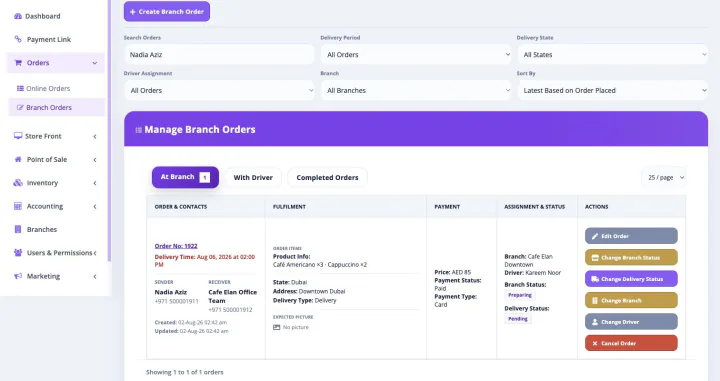
Bloomlytix cafes staff app and order fulfilment queue
One platform, one subscription

Order Management Software works inside the complete Bloomlytix platform.

This is not a separately purchased order management software product. When a paid Bloomlytix subscription is active, the core ecommerce and operating modules work together around the same catalog, customers, orders, branches, staff, payments, stock, fulfilment, delivery, cash, and reporting data for your cafe.

Plans differ by included users, branches, drivers, support, and customer-app entitlement. Starter includes the branded website without a customer app, Growth adds Android, and Pro includes Android and iOS customer apps.

From sale to handoff

Give cafes teams the full order, not a screenshot or verbal summary

Bloomlytix keeps the customer promise attached to the work. Permitted staff receive the details they need and update one timeline as the order progresses.

Receive complete order context

  • Combine online, app, POS, manual, and payment-link orders
  • Show items, configured modifiers, preparation notes, branch, payment, pickup time, or delivery details to permitted staff
  • Retain customer, payment, pickup, and delivery context
  • Route the order to the appropriate branch

Make preparation accountable

  • Use new, accepted, preparing, ready, dispatched, and completion statuses
  • Assign permitted preparation work to staff or a branch
  • Highlight special instructions instead of burying them in chat
  • Add internal notes or preparation and dispatch photos where needed

Keep one operational timeline

  • See who changed the order and when
  • Continue ready orders into pickup or driver assignment
  • Give customer service a consistent status reference
  • Connect fulfilment results to staff, branch, product, and sales reports
Designed around cafe buying journeys

Keep modifiers, timing, and preparation status out of scattered screens

Items, configured modifiers, preparation notes, branch, payment, pickup time, or delivery details remain attached to one order. Staff can accept and progress the work while customer service and owners use the same status reference.

What this workflow keeps clear

  • Combine direct web, app, POS, and manual orders
  • Keep configured preparation detail visible
  • Use one timeline through pickup or dispatch

Connect direct customer channels to the branch doing the work

Cafe speed depends on clear product options, branch context, payment, preparation, and pickup or delivery timing. Bloomlytix keeps those details attached from the sale to the staff handoff.

See the complete cafe platform
Connected by design

Use one business record across the wider cafe operation

The detailed workflow on this page remains connected to the other core Bloomlytix capabilities.

Sales channels

Website, apps, POS, manual orders + payment links

Use shared product, price, customer, order, branch, payment, and offer data across configured direct channels.

Staff operations

Branch assignment, preparation + status

Keep items, configured modifiers, preparation notes, branch, payment, pickup time, or delivery details visible to permitted staff through one fulfilment timeline.

Stock + purchasing

Inventory movement with supplier evidence

Track configured retail products, packaged goods, merchandise, cups, packaging, configured menu items, and approved add-ons with sales, adjustments, purchases, invoice attachments, and branch context.

Completion + reporting

Pickup, delivery, cash + owner visibility

Connect the finished order to payment, cash, customer handoff, delivery outcome, staff, branch, product, and business reports.

A traceable workflow

Move the work forward without re-entering the order

  1. The sale enters once. A website, app, POS, manual, or payment-link order creates one operating record.
  2. The right team receives it. Branch and permitted staff see items, configured modifiers, preparation notes, branch, payment, pickup time, or delivery details, payment, timing, and instructions.
  3. Preparation becomes visible. Staff accept, prepare, add notes or photos, and move the order through configured statuses.
  4. The handoff stays attached. Pickup, dispatch, driver assignment, delivery status, or another agreed completion path continues from the record.
  5. The history remains reportable. Owners and permitted support teams can review the timeline with branch, staff, product, and sales context.
The connected difference

Compare a standalone tool with Bloomlytix order management software

Need Standalone approach Bloomlytix
Order sources Separate queues for web, counter, and chat Configured sales channels feed one operational workflow
Order detail Instructions copied between messages items, configured modifiers, preparation notes, branch, payment, pickup time, or delivery details remain attached to the record
Preparation Verbal assignments and status chasing Branch, staff, status, notes, photos, and timeline
Handoff Pickup or delivery arranged in another conversation The ready order continues into its configured completion flow
Owner visibility Sales known but operational progress unclear Order status connects to branch, staff, products, cash, and delivery reporting
Implementation fit

Map this capability to the way your cafe works

Share your products, branches, users, order sources, payment methods, stock behavior, preparation steps, pickup, delivery, devices, and reporting needs during discovery.

  • Confirm standard features and required configuration
  • Identify data migration and integration dependencies
  • Set roles and permissions for owners, managers, staff, and drivers
  • Keep customer-app eligibility tied to the selected plan
Scope clarity

Confirm hospitality-specific service requirements

Bloomlytix supports ecommerce, tablet POS, configured modifiers, staff order statuses, pickup and delivery, retail stock, purchases, cash, and reports. Table service, reservations, kitchen display systems, recipe costing, ingredient depletion, tip distribution, and complex kitchen production require separate confirmation.
Continue exploring

See the other connected cafe capabilities

Cafe Order Management Software FAQs

Questions about this capability and the complete platform

Is Bloomlytix Cafe Order Management Software sold separately?

No. This page explains one capability in detail for searchers evaluating that workflow. In the product, it remains connected to the complete Bloomlytix platform. Core ecommerce and operating modules open together with a paid subscription.

Can the Order Management Software connect with other Cafe sales channels?

Yes. Bloomlytix is designed around shared product, customer, order, branch, staff, payment, inventory, delivery, and reporting data across configured ecommerce, app, POS, manual, and payment-link workflows.

Can multi-branch cafes use this workflow?

Yes. Bloomlytix supports branch-aware users, orders, sales, configured stock, purchases, cash, fulfilment, delivery, and reporting. Included users, branches, and drivers depend on the selected plan and add-ons.

Which Bloomlytix plan includes customer mobile apps?

Starter includes the website without a customer app. Growth includes a white-label Android customer app, while Pro includes Android and iOS customer apps. Growth and Pro include a separate app launch and onboarding fee as listed on the pricing page.

Are there Cafe workflows that need confirmation?

Bloomlytix supports ecommerce, tablet POS, configured modifiers, staff order statuses, pickup and delivery, retail stock, purchases, cash, and reports. Table service, reservations, kitchen display systems, recipe costing, ingredient depletion, tip distribution, and complex kitchen production require separate confirmation.

See order management software inside the complete cafe workflow

We will demonstrate the relevant sales, branch, staff, stock, payment, fulfilment, pickup, delivery, customer, and reporting connections around your business requirements.