A new product arrives. The photo is ready, but the product page is still empty.
Someone must name the item, write the description, choose a category, add tags, prepare the search metadata and make sure the page matches the real product. For a busy florist, gifting brand, bakery, perfume shop, jewellery store or specialty retailer, that repeated work can slow every launch.
Direct Answer
AI can use a clear product photo to prepare a draft title, short and long description, category, tags, SEO title, meta description, URL slug and image alt text. A human must still verify every fact that the image cannot prove - such as materials, ingredients, size, quantity, price, availability, variants, brand, certifications, delivery conditions and translated wording - before the listing is published.
This guide is for ecommerce owners, catalogue teams and retail staff who want to create product pages faster without publishing guesses, unsafe claims or inaccurate information.
In this guide
What image-to-product AI can prepare as a first draft
Why one photo is useful but never a complete product specification
Which fields AI can suggest with relatively low risk
Which facts must come from the business, supplier or product database
How to photograph products for a stronger draft
A practical review-before-publish workflow
A worked example showing an AI draft and a human-approved listing
How the review changes for flowers, gifts, cakes, perfume and jewellery
How to use AI-generated product content without weakening SEO quality
How Bloomlytix connects the approved listing to the wider retail operation
What an AI product-listing workflow actually does
An image-to-product workflow does not replace the product owner. It reduces blank-page work. The system studies the visible image, combines it with any title or facts you provide, and prepares editable suggestions for the product form.
The safest model separates three things: the input, the AI suggestion and the human decision.
LAYER | WHAT IT CONTAINS | WHO CONTROLS IT |
|---|---|---|
Input | Product photo, working title and any verified facts already available. | The business supplies the source material. |
AI draft | Suggested name, summary, description, category, tags and SEO fields. | AI prepares an editable starting point. |
Human approval | Corrections, missing specifications, claims, price, stock, variants and final wording. | An authorised person decides what can be published. |
Core Principle
Treat generated product content as a draft, not as evidence. The photo gives context. The business remains the source of truth.
A product photo is useful, but it is not a product specification
A clear image may show that an item looks like a bouquet, cake, gift box, ring, perfume bottle or vase arrangement. It may also show visible colour, shape, decoration, style and packaging. That is useful context for a first draft.
However, the image normally cannot prove what the product is made from, what is inside it, how large it is, how many items are included, which variants exist, whether the item is authentic, whether it is in stock or what the business promises for delivery.
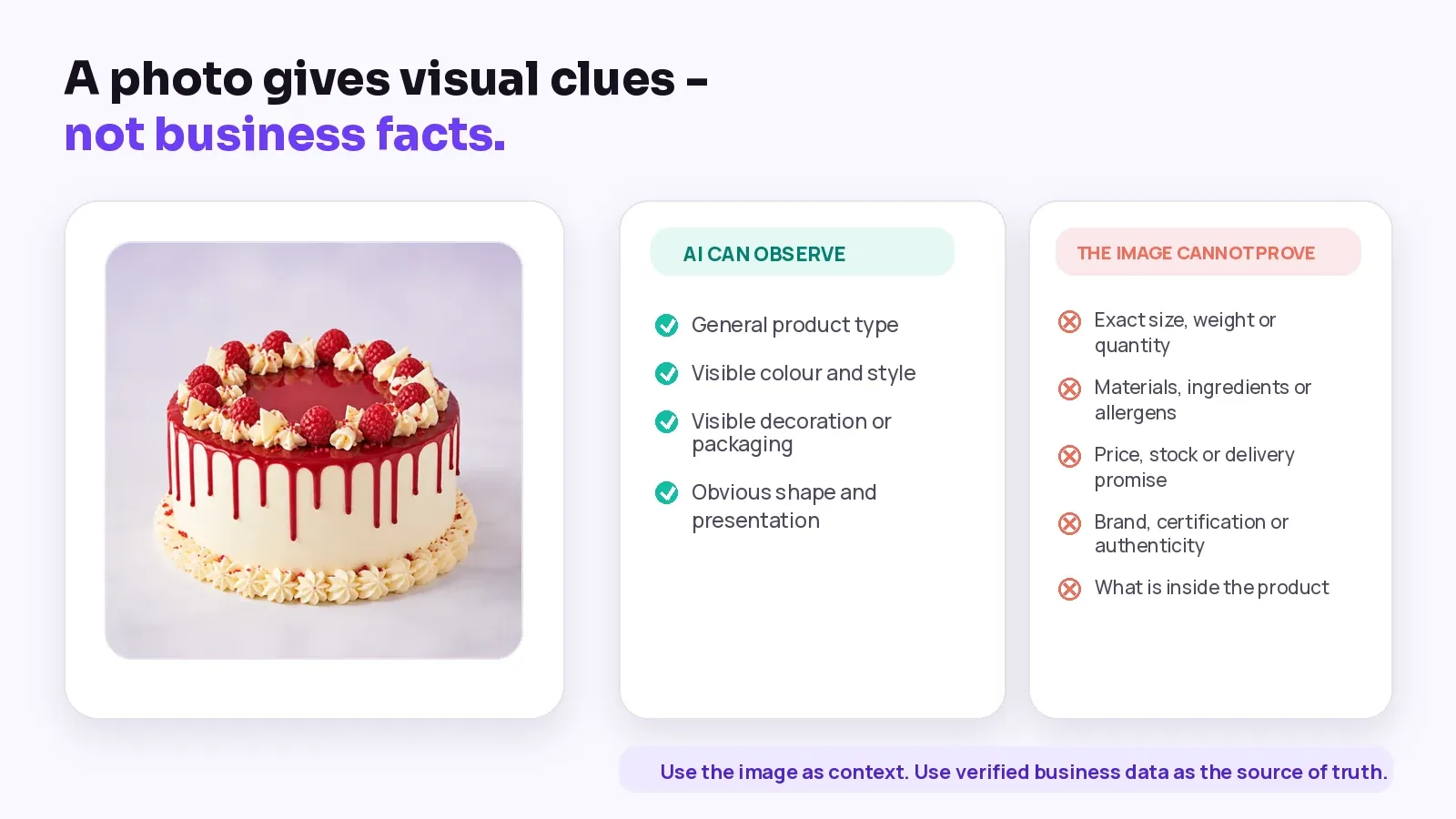
Figure 1. Use visual clues for the draft and verified records for product facts.
VISIBLE CLUE | POSSIBLE DRAFT USE | HUMAN CHECK |
|---|---|---|
General product type | Suggest a broad product name or category. | Confirm the exact item and correct catalogue path. |
Visible colour and style | Suggest descriptive style or colour tags. | Check colour naming, variants and whether lighting changed the appearance. |
Decoration or packaging | Mention visible presentation details. | Confirm what is included and what is only a photo prop. |
Visible text on packaging | Use it as a clue for brand or variant. | Read the original label or supplier record; small text may be misread. |
Apparent quantity | Suggest that the product is a set or bundle. | Confirm the exact count, pack size and included items. |
What AI can prepare safely as a first draft
The following fields are well suited to AI assistance when every suggestion remains editable and the team reviews it before use.
PRODUCT FIELD | AI CAN HELP WITH | REVIEW QUESTION |
|---|---|---|
Product title | Create a clear, customer-friendly name from the image and working title. | Does the name identify the exact product and distinguish its real variant? |
Short summary | Prepare one or two useful sentences for catalogue cards or the top of the page. | Does every sentence describe the item being sold, not a general category? |
Detailed description | Organise visible features, intended use and business-supplied facts into readable copy. | Did the draft invent material, ingredients, quality, origin or performance? |
Category | Suggest the most likely catalogue location. | Is the category correct for reporting, navigation, stock and ads? |
Tags | Suggest visible style, colour, occasion or product-type tags. | Are the tags useful, consistent and supported by the real product? |
SEO title | Create a concise search-facing title based on the approved product name. | Is it accurate, specific and free from keyword stuffing? |
Meta description | Prepare a unique summary that explains the product page. | Does it match the visible page and avoid unsupported promises? |
URL slug | Turn the approved name into readable URL text. | Is it short, stable and free from temporary price or campaign wording? |
Image alt text | Describe the important visible subject in context. | Is it useful for accessibility and free from promotional keyword stuffing? |
Search guidance: Google advises website owners to focus on accuracy, quality and relevance when AI helps create page text, metadata, structured data and image alt text.
What humans must verify before publishing
The most important review work covers facts that are hidden, commercial, regulated, time-sensitive or connected to another business system.
FACT GROUP | HUMAN-SUPPLIED INFORMATION | WHY THE IMAGE IS NOT ENOUGH |
|---|---|---|
Identity | Exact product name, brand, model, collection, SKU, GTIN or supplier code. | Different products can look similar, and the image may not show a readable identifier. |
Specifications | Dimensions, weight, volume, quantity, material, metal, stone, flower varieties or stem count. | Scale and internal composition are rarely reliable from one image. |
Food and consumables | Ingredients, allergens, flavour, filling, servings, storage and shelf life. | Appearance cannot prove ingredients or food-safety information. |
Commercial data | Price, tax treatment, cost, discount rules and margin. | These values belong in the product and accounting records. |
Availability | Stock, branch quantity, made-to-order status, seasonal substitution and lead time. | Availability changes and must come from the operational system. |
Variants | Size, colour, scent, flavour, finish, bundle or personalisation choices. | One photo normally shows only one visible configuration. |
Claims | Authenticity, certification, organic, handmade, hypoallergenic, waterproof, medical or performance statements. | Claims require evidence and may have legal or platform requirements. |
Delivery and returns | Eligible areas, cut-off time, delivery slot, pickup, return and cancellation conditions. | These are business policies and may change by market. |
Language | Translated product name, culturally appropriate wording and local measurement terms. | A direct translation may be technically correct but commercially wrong. |
Approval Rule
If a detail can affect price, safety, compliance, customer expectations, stock or delivery, it should come from a verified business source - not from visual inference alone.
Better input creates a better draft
AI can work from one image, but the quality of the starting material still matters. A clear main product photo helps the system identify the visible subject. A short fact brief helps it avoid filling gaps with guesses.
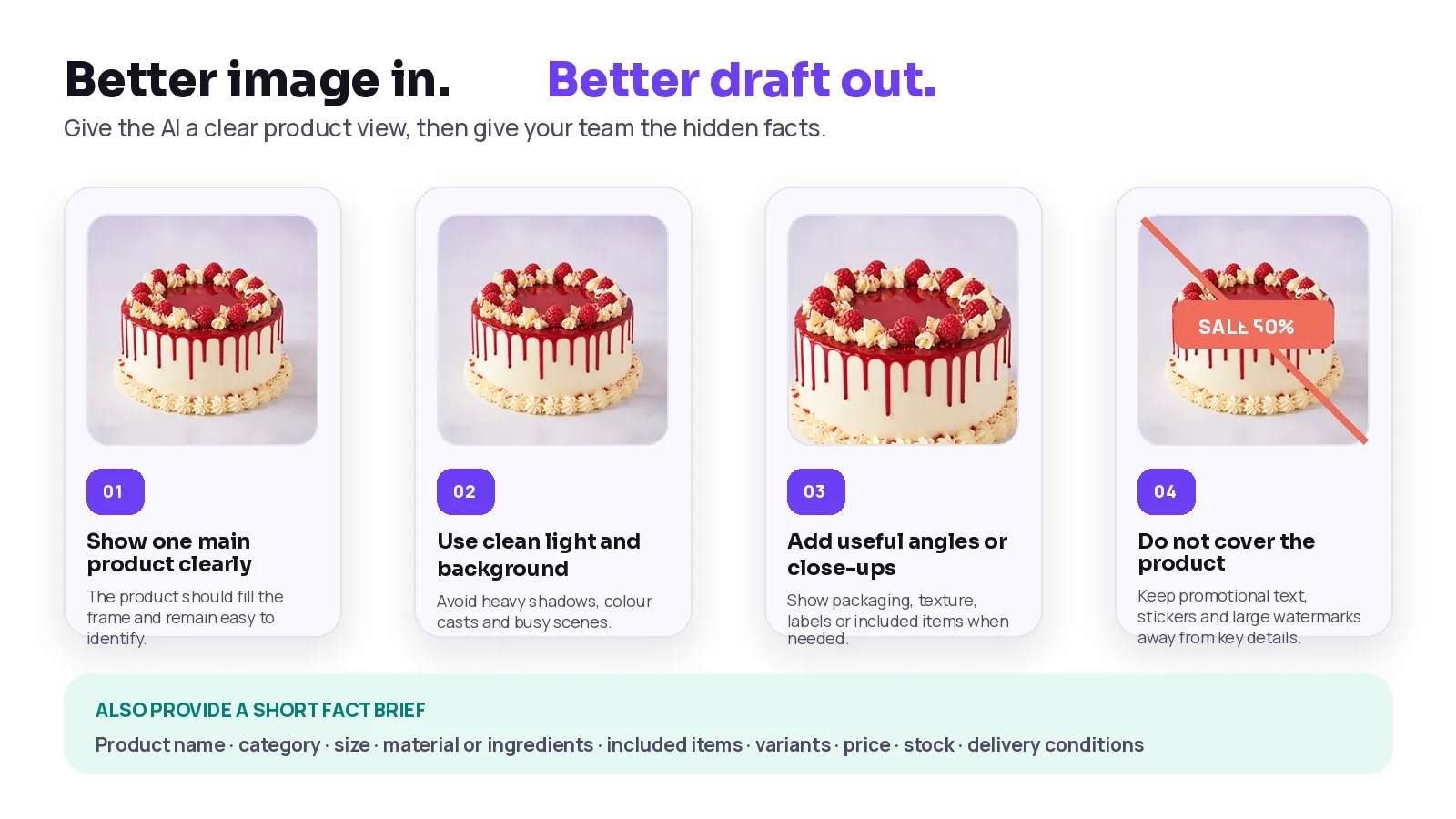
Figure 2. Clear images improve visual context; a fact brief supplies the details the camera cannot show.
Minimum fact brief
FACT TO PROVIDE | EXAMPLE | SOURCE OF TRUTH |
|---|---|---|
Approved product name | Raspberry Drip Celebration Cake | Catalogue owner or product manager |
Category and product type | Cakes > Celebration Cakes | Approved catalogue structure |
Included items | Cake only; topper sold separately | Product specification or bundle record |
Size or quantity | 1 kg; serves 8-10 | Production or supplier specification |
Material or ingredients | Verified material, ingredient and allergen information | Supplier, production or compliance record |
Variants | Size, flavour, colour, finish or personalisation options | Variant matrix in the product system |
Price and tax | Current selling price and configured tax treatment | POS/ecommerce catalogue |
Stock and lead time | Available now, branch quantity or made-to-order time | Inventory and fulfilment system |
Delivery conditions | Zones, dates, slots, minimum order and cut-off | Delivery configuration |
A practical review-before-publish workflow
The exact screen may vary, but a safe operating process should always make the draft editable and leave publication under human control.
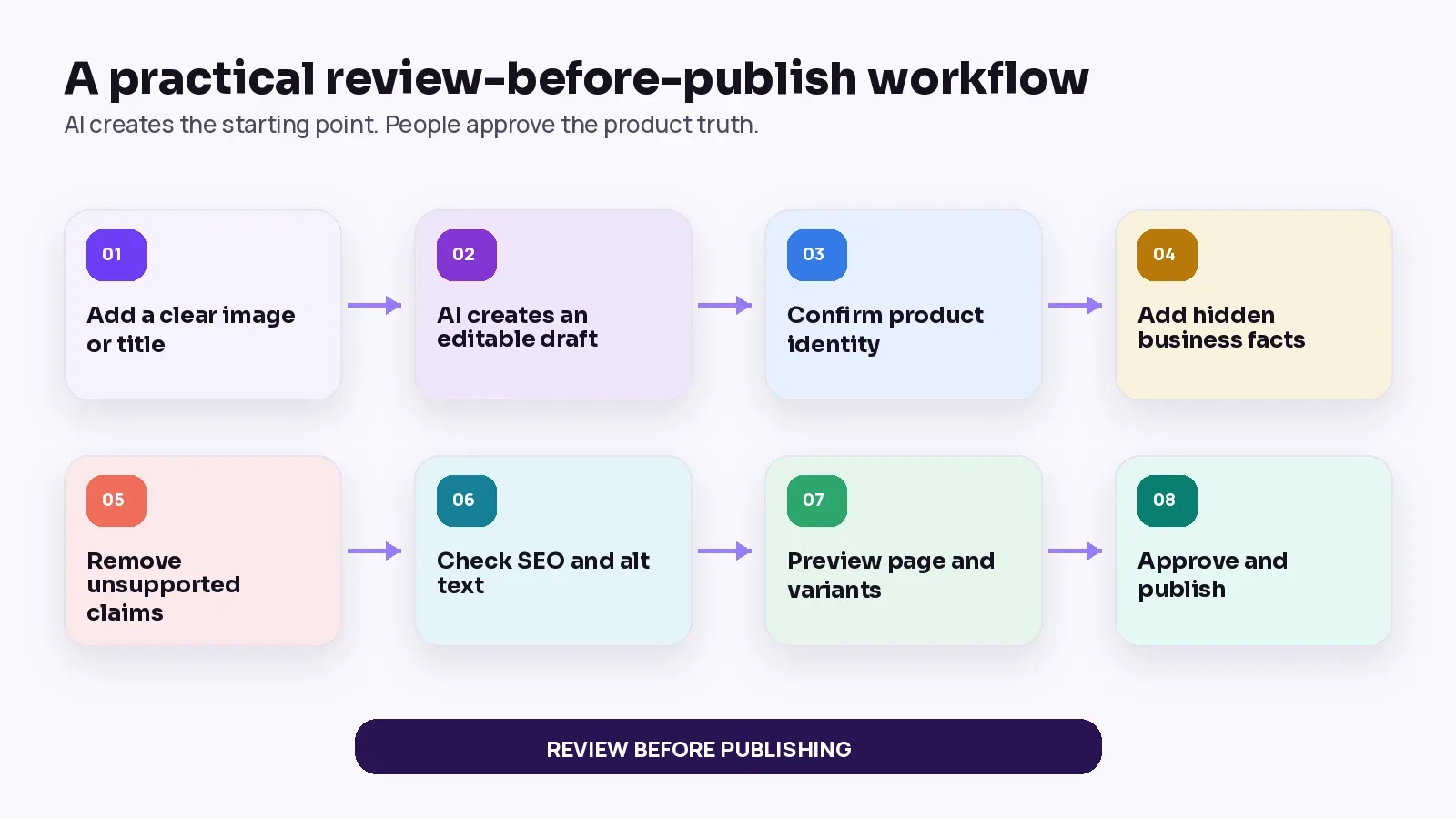
Figure 3. The system prepares, the business verifies and an authorised person publishes.
STEP | ACTION | APPROVAL QUESTION |
|---|---|---|
01 | Add a clear image or working title | Can the system identify the main product without relying on a busy scene? |
02 | Generate the editable draft | Which fields were created, and which remain intentionally blank? |
03 | Confirm product identity | Is the title tied to the exact item, SKU and correct category? |
04 | Add hidden business facts | Have size, materials or ingredients, included items, variants, price and stock been supplied? |
05 | Remove unsupported claims | Does any sentence claim quality, origin, safety, authenticity or performance without evidence? |
06 | Check SEO and accessibility | Is the title specific, the description useful, the URL stable and the alt text descriptive? |
07 | Preview the customer page | Do images, options, price, availability, delivery and related products agree? |
08 | Approve and publish | Is a named person responsible for the final decision and future updates? |
Worked example: one cake photo, one reviewed product page
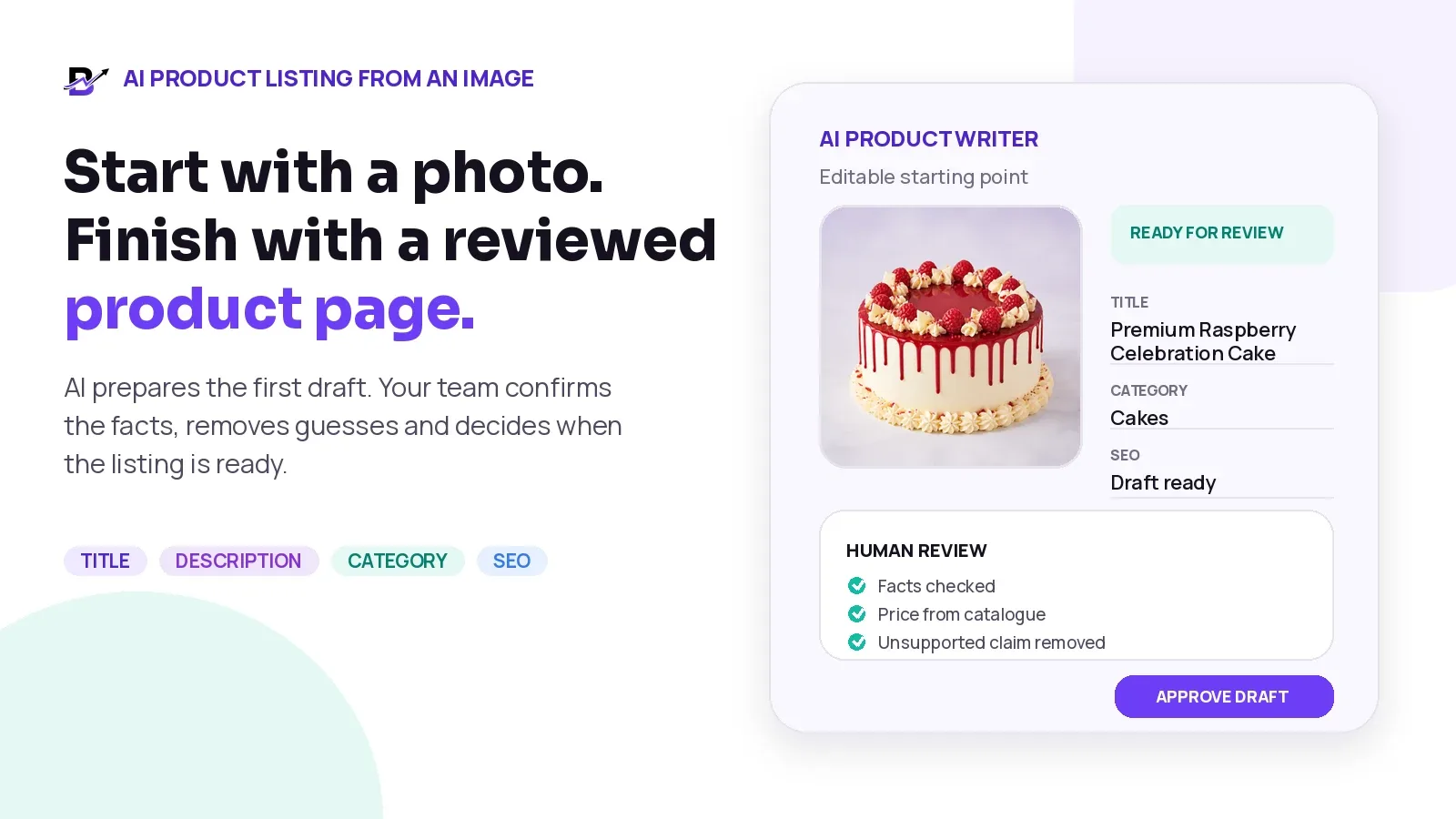
The photo below clearly shows a round cake with a light finish, red drip, raspberry decoration and piped cream. It does not prove the sponge flavour, filling, weight, serving size, allergen profile, price or availability.
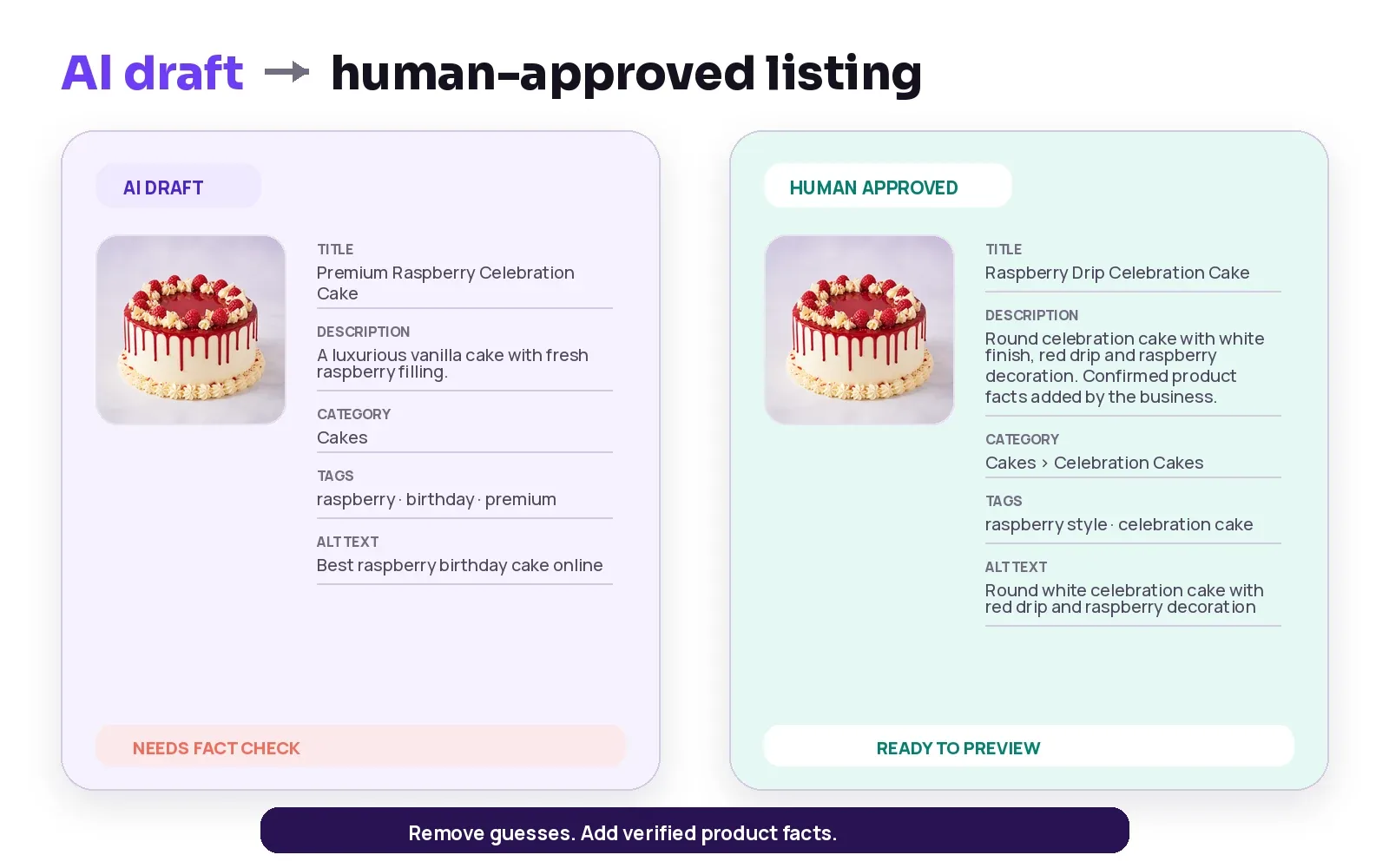
Figure 4. A useful review removes visual guesses and adds verified business data.
FIELD | AI DRAFT | HUMAN-APPROVED APPROACH |
|---|---|---|
Title | Premium Raspberry Celebration Cake | Confirm the catalogue name. A precise option could be “Raspberry Drip Celebration Cake.” |
Description | May infer vanilla sponge, fresh filling or luxury quality. | Describe only visible presentation, then add confirmed flavour, filling, weight, servings and ingredients from the business. |
Category | Cakes | Confirm the correct path, such as Cakes > Celebration Cakes. |
Tags | Raspberry, birthday, premium, vanilla | Keep supported visual or catalogue tags. Remove “vanilla” unless supplied as a verified variant. |
Alt text | Best raspberry birthday cake online | Use a factual visual description: “Round white celebration cake with red drip and raspberry decoration.” |
Price | May guess or copy a value from unrelated context. | Pull the current price from the approved catalogue or leave it blank for a person to enter. |
Availability | May assume the product is ready to order. | Use live stock, branch availability or the made-to-order lead time. |
Example Note
The worked example explains the review method. It does not create a real product specification for the pictured cake. Exact flavour, weight, servings, ingredients, allergens, price and availability must be supplied by the business.
Different industries need different human checks
The same AI workflow can support many visual product categories, but the human review must match the product risk and operational reality.
INDUSTRY | AI MAY HELP DESCRIBE | HUMAN MUST CONFIRM |
|---|---|---|
Florists | Visible arrangement type, colour family, container and general style. | Flower varieties, stem count, size, seasonal substitution, vase inclusion, freshness policy and branch availability. |
Gifting brands | Visible box style, colour, occasion and apparent product mix. | Exact brands, quantities, sizes, personalisation, included items, substitutions and delivery timing. |
Bakeries and cake shops | Visible shape, finish, decoration and presentation style. | Flavour, filling, weight, servings, ingredients, allergens, storage, lead time and design limits. |
Perfume shops | Visible bottle, packaging, colour and presentation. | Brand, fragrance name, concentration, volume, notes, batch, authenticity and availability. |
Jewellery shops | Visible item type, colour, shape and design style. | Metal, purity, stone, carat, dimensions, weight, certification, size and authenticity. |
Specialty retail | Visible form, use context, colour and packaging. | Technical specifications, compatibility, warranty, safety and regulatory claims. |
Use AI-generated product content without weakening SEO
Search visibility does not come from generating more words. It comes from publishing accurate, useful product pages that match what the customer can actually buy.
A strong AI-assisted page should follow these rules:
Keep the product title specific and consistent with the landing page, catalogue and variant.
Write unique descriptions that explain the real item instead of repeating generic category text.
Use natural keywords only where they help customers understand the product.
Use accurate image alt text that describes the visible subject in context; do not treat it as a keyword list.
Keep price, availability, shipping and return information current.
Add Product structured data to sellable product pages when the visible page and system data support it.
Keep structured data, the product page and any Merchant Center feed consistent.
Avoid publishing large numbers of low-value AI pages without original product knowledge or review.
Official reference: Google Merchant Center requires product titles, descriptions and images to accurately match the product and landing page. Google also recommends useful, information-rich alt text rather than keyword stuffing.
Advanced Merchant Center Note
Google currently documents structured_title and structured_description fields for generative-AI-created product-feed text, including a digital source type that identifies trained algorithmic media. This is an implementation detail for product data feeds, not a reason to publish inaccurate copy. Check the latest Merchant Center specification before deployment.
Product structured data
AI may help prepare readable copy, but commercial properties such as price, availability, shipping and return information should come from the actual ecommerce and operations data. Google explains that Product structured data can make product information eligible for richer appearances in Search, Images and Lens, but the enhancements are not guaranteed.
Read the current Google Product structured data documentation before implementation.
Review multilingual product content separately
AI translation can reduce repeated writing, but the translated product page still needs a language review. Product names, measurements, ingredients, occasion terms, delivery conditions and legal claims may not transfer cleanly from one market to another.
CHECK | WHAT TO REVIEW | COMMON RISK |
|---|---|---|
Product name | Natural wording in the target market. | A literal translation may sound unusual or change the product meaning. |
Measurements | Local units, decimal format and size conventions. | Customers may misread weight, volume or dimensions. |
Ingredients and claims | Exact approved wording and required local information. | A translated claim may become broader or less accurate. |
Occasions and tone | Culturally appropriate gifting or seasonal language. | The same phrase may not fit the intended customer or event. |
Delivery and returns | Market-specific areas, timing, exclusions and policy text. | A global draft may promise conditions that do not apply locally. |
Metrics that improve the AI product workflow
Measure the quality of the process, not only how many words the system generates.
METRIC | SIMPLE DEFINITION | WHAT IT CAN REVEAL |
|---|---|---|
Draft time | Time from image upload to first editable content. | Whether AI reduces blank-page work. |
Review time | Time from draft to approval. | Whether staff receive enough source information. |
Correction rate | Share of generated fields changed before publishing. | Which fields need stronger prompts, rules or source data. |
Unsupported-claim rate | Drafts containing claims removed during review. | Where the model is guessing beyond the evidence. |
Publish completion | Products that move from draft to live listing. | Whether the workflow is practical for staff. |
Product-page quality | Missing images, variants, price, stock, alt text or structured data. | Whether speed is creating incomplete pages. |
Search performance | Product impressions, clicks and useful search queries. | Whether approved content matches customer intent. |
Customer correction issues | Questions, complaints, refunds or returns linked to inaccurate information. | Where content quality is affecting trust and operations. |
Measurement Note
A faster draft is valuable only when the final listing remains accurate, complete and useful to the customer.
When AI should not make the final decision
Some product details deserve stricter controls. AI may still organise approved information, but it should not invent or independently approve the following:
Ingredient, allergen, nutrition, medical, safety or regulated claims
Jewellery purity, gemstone, carat, certification or authenticity
Perfume authenticity, concentration, volume or official brand claims
Exact compatibility, warranty or technical specifications
Country-specific legal, tax, delivery or return promises
Any price, stock or branch availability that is already managed in another system
Custom products where the final design, included items or price depend on customer approval
Stop Condition
When the source information is missing, leave the field blank or send it back for review. A visible blank is safer than a confident false fact.
How Bloomlytix supports AI Product Launch
Bloomlytix AI Product Launch is designed to let a business start with a product photo or title, prepare an editable product draft and keep the final publication decision with the team. The AI-assisted workflow can suggest the product title, summary, description, category, tags and SEO details for review.
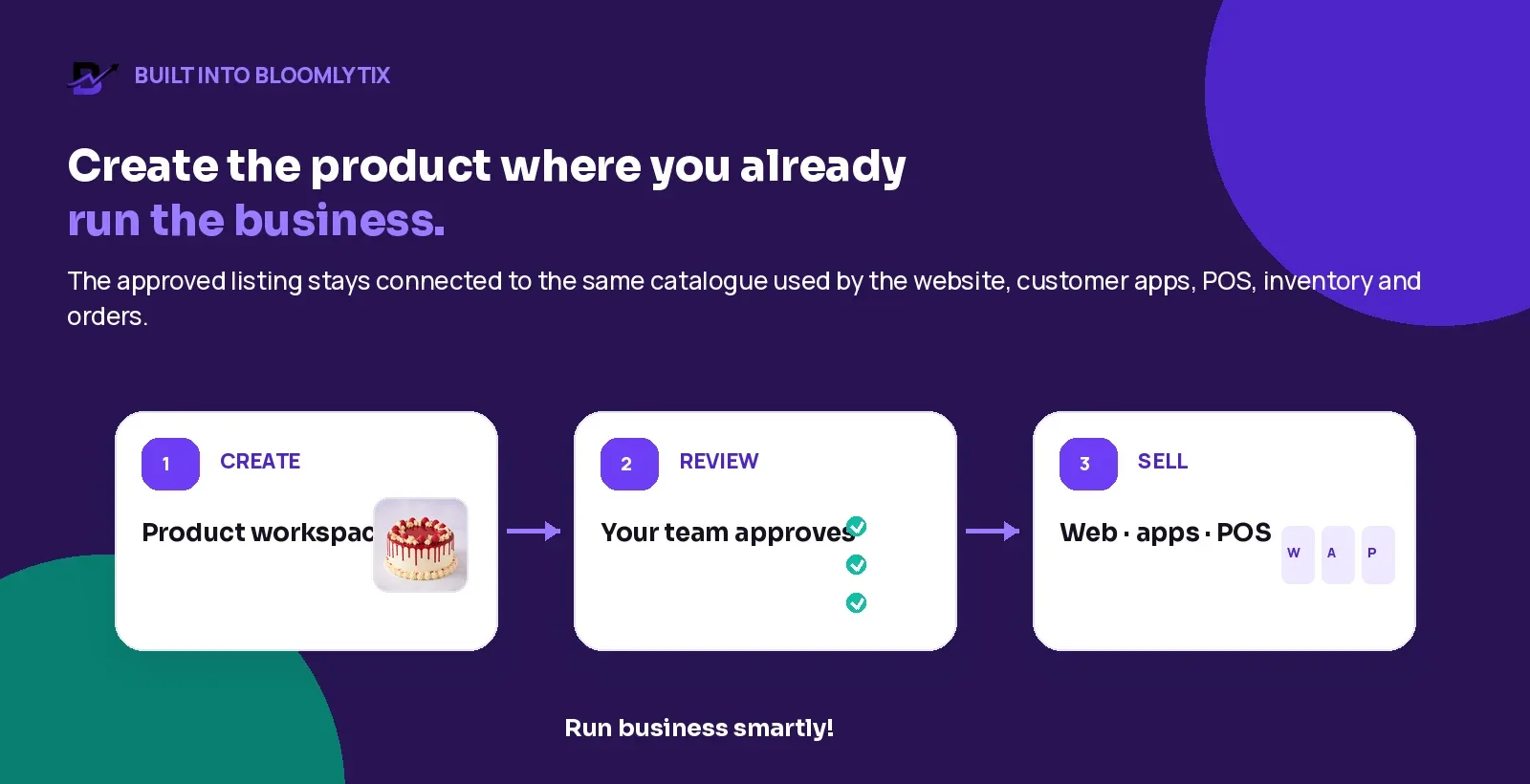
Figure 5. The approved product stays connected to the same catalogue used across the wider business.
BLOOMLYTIX AREA | ROLE IN THE WORKFLOW |
|---|---|
Start with a photo or title | Use the information already available instead of writing a complete page from zero. |
AI product writer | Prepare an editable title, product copy, category, tags and SEO starting point. |
Review before publishing | Let the team check facts, wording, product structure and final presentation. |
Connected catalogue | Use the approved product across the website, customer apps and POS. |
Operational connection | Keep the product connected to inventory, orders, fulfilment and reporting inside the wider Bloomlytix ecosystem. |
Human control | Nothing needs to go live until an authorised user decides the product is ready. |
Product Scope
Bloomlytix provides AI-assisted suggestions and review-before-publish controls. It does not guarantee flawless image recognition, automatic factual accuracy, search rankings or automatic publication without human approval.
Questions to ask during an AI product-listing demo
Can the user start with either a product image or a working title?
Which fields can the AI prepare, and which fields remain intentionally manual?
Can every generated field be edited before publishing?
Can the system separate visual suggestions from verified price, stock and variant data?
Can the team see which fields are incomplete or still awaiting review?
Can categories and tags follow the business’s existing catalogue structure?
Can image alt text, SEO title, meta description and URL text be reviewed separately?
Can users preview the customer-facing product page before it goes live?
Can permissions control who may generate, edit, approve and publish?
Can approved products remain connected to website, apps, POS, stock and orders?
How are AI-generated fields handled in Merchant Center feeds or other sales channels?
What usage limits, credits, language support and human support are included in the plan?
Frequently asked questions
Can AI create a product listing from one photo?
Yes. A clear photo can provide enough visual context for a useful first draft of the title, description, category, tags and SEO fields. The result still needs verified business facts and human approval.
Should AI-generated product descriptions be published automatically?
No. A review step should confirm identity, specifications, price, stock, variants, claims, delivery information and final wording before publication.
Can AI know the exact material, ingredients or size from an image?
Usually not with sufficient reliability. Those details should come from a supplier specification, production record, product database or authorised team member.
Can AI write image alt text?
Yes, as a starting point. The final alt text should describe the important visible subject in the page context and avoid promotional language or keyword stuffing.
Will AI-generated product content rank on Google?
There is no ranking guarantee. Search performance depends on accuracy, usefulness, competition, technical implementation, product data, internal linking, authority and customer demand. AI is only one production tool.
How many product images should I use?
Use one clear main image and add useful alternative views when they help the customer understand scale, packaging, texture, included items or variants. The right number depends on the product.
Can Bloomlytix publish the AI draft automatically?
The Bloomlytix workflow is designed for human review. The team can edit the generated fields and decide when the product is ready to publish.
Does Bloomlytix connect the approved product to POS and inventory?
The approved listing belongs to the same Bloomlytix catalogue used by the website, customer apps, POS, inventory and orders, subject to the business configuration.
Final pre-publish checklist
Main product image is clear, accurate and not covered by promotional text
Product identity, brand, SKU and category are confirmed
Title describes the exact product and variant
Description contains only visible or verified facts
Materials, ingredients, allergens, dimensions, weight and quantity are confirmed where relevant
Included items and photo props are clearly separated
Variants, personalisation choices and substitutions are correct
Price, tax, stock, branch availability and lead time come from the operational system
Delivery, pickup, return and cancellation information matches current policy
Unsupported quality, safety, authenticity or performance claims are removed
SEO title, meta description, URL slug and alt text are accurate and natural
Product page, structured data and any Merchant Center feed agree
Mobile preview, images, options and checkout path have been tested
An authorised person has approved the listing
Bring One Real Product
The strongest AI product demonstration starts with one real image and the facts your team already knows. Compare the draft, the corrections and the final approved page.