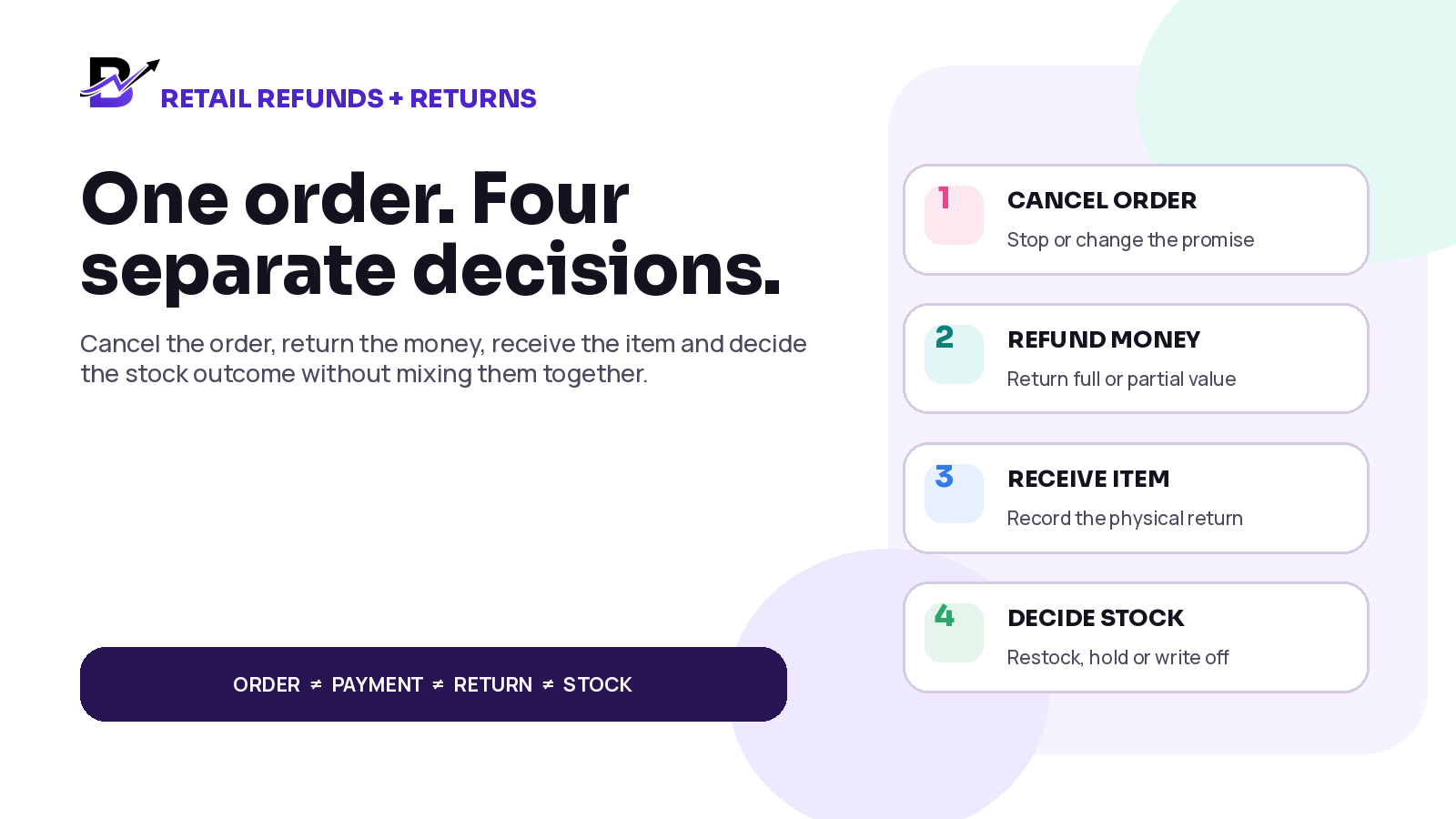
One order can create four different decisions: cancel the promise, refund the money, receive the item and decide the stock outcome.
A customer asks to cancel an order. Another customer has already received the product and wants to send it back. A third customer keeps the item but receives a partial refund because one add-on was missing. These cases may all be described as “a refund,” but they do not create the same work.
When the order, money, physical item and stock quantity are changed as one action, the business can refund twice, restock something that never came back, leave reserved stock blocked, or lose the reason behind the exception. A clear workflow separates the decisions, then keeps them connected to the original sale.
DIRECT ANSWER A cancellation changes the order, a refund changes the money, and a return changes the physical item. An exchange adds a replacement or new sale. Keep each event linked to the original order, record the request, reason, approval, amount, receiving location and outcome, and move an item back into sellable stock only after it has been received and checked.
This guide is for ecommerce and retail businesses that sell online, at the counter or through assisted channels. It is especially useful for florists, gifting brands, bakeries, perfume shops, jewellery shops and other specialty retailers where products may be custom, perishable, fragile or branch-specific.
In this guide
The difference between a cancellation, refund, return, exchange, customer credit and stock write-off
How to keep order, payment, fulfilment and inventory statuses separate
A practical decision tree from the customer request to the final stock outcome
How to handle full and partial refunds, returned items, exchanges and different branches
What to do with custom, perishable, damaged or non-resellable products
Which roles, evidence and metrics help the owner stay in control
Which Bloomlytix controls can support the review, and which refund or return actions need a live demo
IMPORTANT This article provides operational guidance, not legal, tax, accounting or consumer-rights advice. Cancellation and return rights vary by country, product, sales channel and customer contract. Publish a clear policy and have qualified local advisers review any legal or tax requirements.
Cancellation, refund, return and exchange are not the same
The first control is language. Every team member should use the same word for the same event. This prevents a customer-service message from becoming an incorrect payment action or stock adjustment.
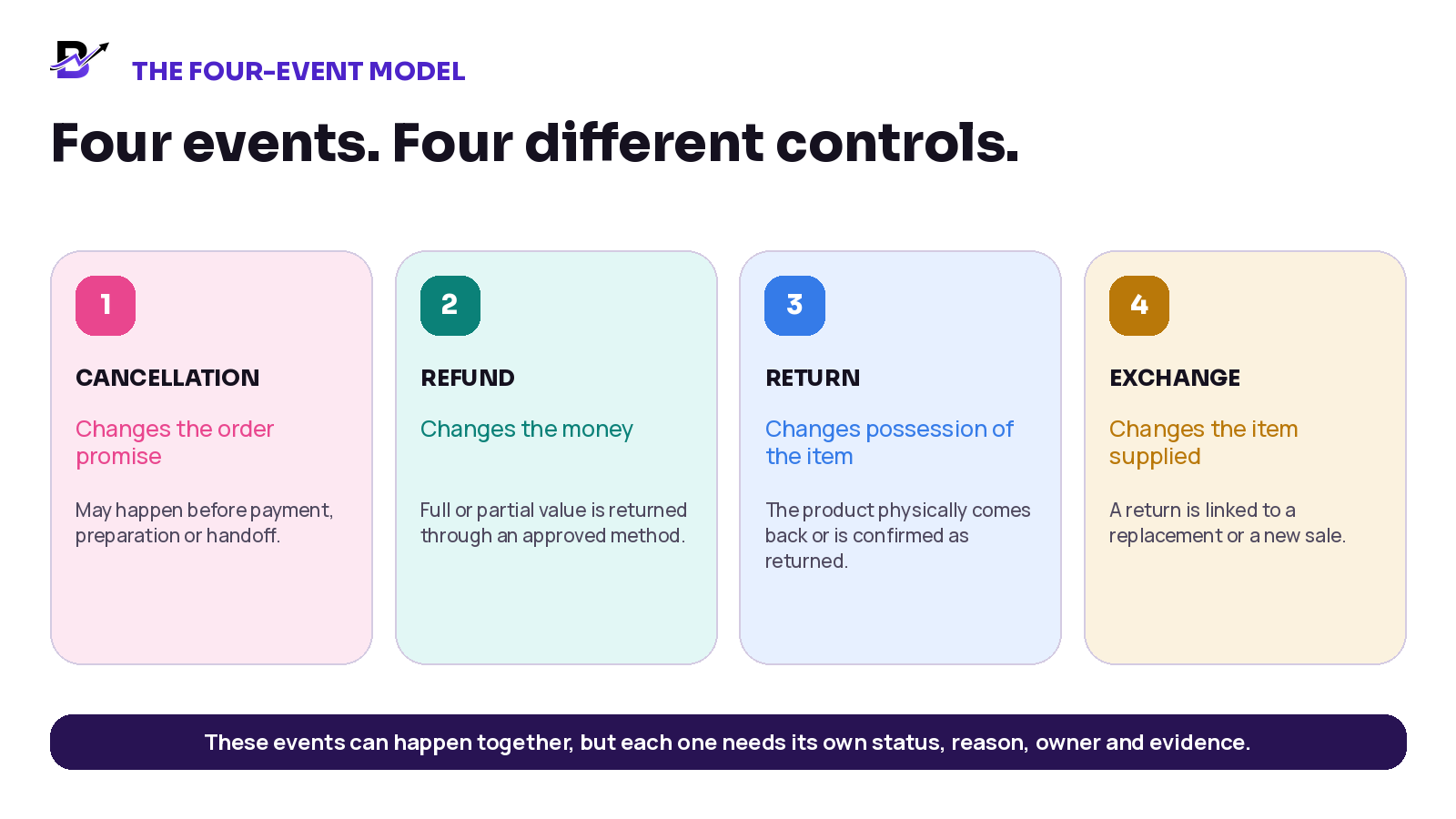
Figure 1. Four related events answer four different business questions.
EVENT | PLAIN-ENGLISH MEANING | WHAT IT CHANGES | WHAT IT DOES NOT PROVE |
|---|---|---|---|
Cancellation | Stops or changes an order that has not reached its final outcome. | Order status, reservation, staff work and customer promise. | May require no refund, a partial refund or a full refund. |
Refund | Returns some or all money through an approved method. | Payment balance, cash or gateway record and customer communication. | Does not prove that a physical item came back. |
Return | Records the physical product coming back or being received by an approved location. | Possession, item condition, branch ownership and inspection. | May lead to a refund, exchange, credit or no money change, depending on policy and law. |
Exchange | Replaces the returned item with another product or variant. | Return record plus replacement/new sale and price difference. | May create an extra payment, refund or zero balance. |
Customer credit | Creates value for later use instead of, or in addition to, another refund method. | Customer balance, expiry or usage rules where configured. | Must follow the business policy and local requirements. |
Write-off | Removes an item from sellable stock because it cannot be sold again. | Inventory value, reason, evidence and approval. | It is an inventory decision, not a customer refund by itself. |
SIMPLE RULE Do not use “refunded” as the final status for everything. It tells you what happened to the money, not whether fulfilment stopped, the product came back or the stock became sellable again.
Keep four status tracks on the same order
One order can hold several true statements at the same time. For example, an order can be cancelled, a card refund can still be pending, the prepared product can remain at the branch, and the stock can be waiting for a manager decision. One status cannot describe all four facts.
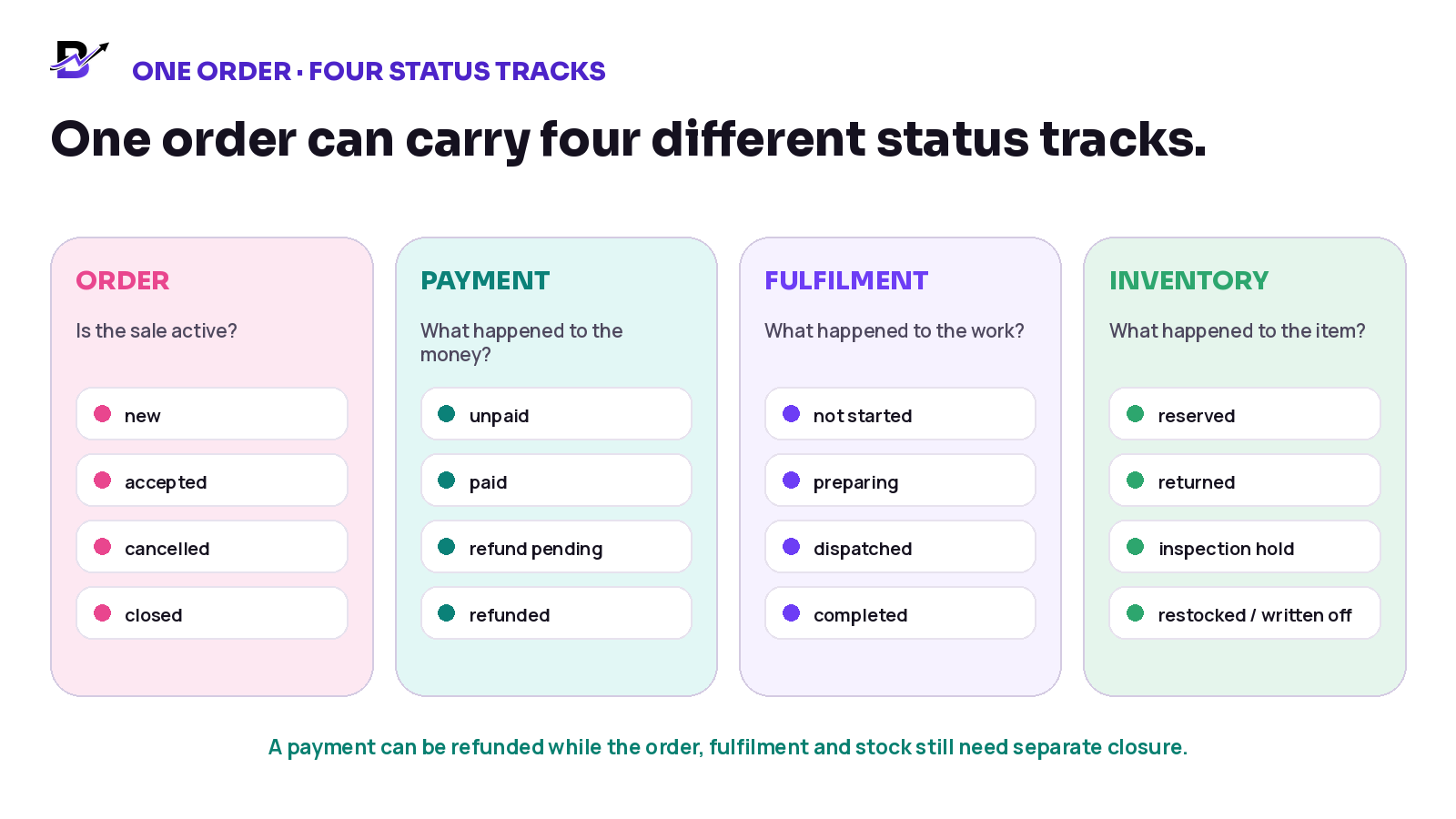
Figure 2. The order, payment, fulfilment and inventory tracks answer different questions.
STATUS TRACK | QUESTION IT ANSWERS | EXAMPLE STATES |
|---|---|---|
Order status | Is the sale active, changed, cancelled or closed? | New, accepted, cancelled, completed |
Payment status | What happened to the money? | Unpaid, paid, refund requested, refund pending, partially refunded, refunded, failed |
Fulfilment status | What happened to the work or delivery? | Not started, preparing, ready, dispatched, delivered, stopped, returned |
Return / item status | Where is the physical item and what condition is it in? | Return requested, authorised, in transit, received, inspected, restocked, held, written off |
Use the labels that fit your system, but keep the business meaning clear. The payment team should not need to guess whether the item returned. Inventory staff should not increase stock only because a refund was approved. Customer service should be able to explain the complete outcome from one timeline.
Start with one complete exception record
Every cancellation, refund or return should begin from the original order. Avoid creating an unlinked cash entry, separate spreadsheet row or general stock adjustment when the source sale is known. The original order provides the product, branch, customer, payment and fulfilment context needed to make the next decision.
RECORD AREA | WHAT TO CAPTURE | WHY IT MATTERS |
|---|---|---|
Original sale | Order number, date, channel, branch, product, quantity and staff owner. | Connects the exception to the real transaction. |
Customer request | Request date, contact channel, requested outcome and the customer’s reason in factual language. | Separates the request from the approved result. |
Order stage | Payment, preparation, dispatch, delivery and any custom work already completed. | Shows what can still be stopped and what cost or stock impact already exists. |
Policy / eligibility | Relevant policy rule, manager decision or legal escalation where required. | Prevents inconsistent promises by different staff members. |
Approval | Approver, date, amount, item quantity, method and any exception reason. | Creates accountability for money and stock changes. |
Payment outcome | No refund, partial refund, full refund, customer credit, extra payment, pending or failed status. | Keeps the financial result visible. |
Physical outcome | No item expected, item in transit, received branch, condition, inspection and evidence. | Shows whether stock may change. |
Final stock action | Release reservation, restock, hold, rework, supplier return, transfer or write-off. | Prevents false availability. |
Customer communication | What was confirmed, when it was sent and the next expected step. | Keeps the promise clear without relying on memory. |
Timeline | Every request, approval, refund, receipt, inspection and closure event. | Makes the case reviewable later. |
Use a decision tree before changing money or stock
The safest workflow starts with questions, not buttons. First check what stage the order has reached. Then decide whether the order should change, whether money should move, whether a physical item is expected, and what should happen after inspection.
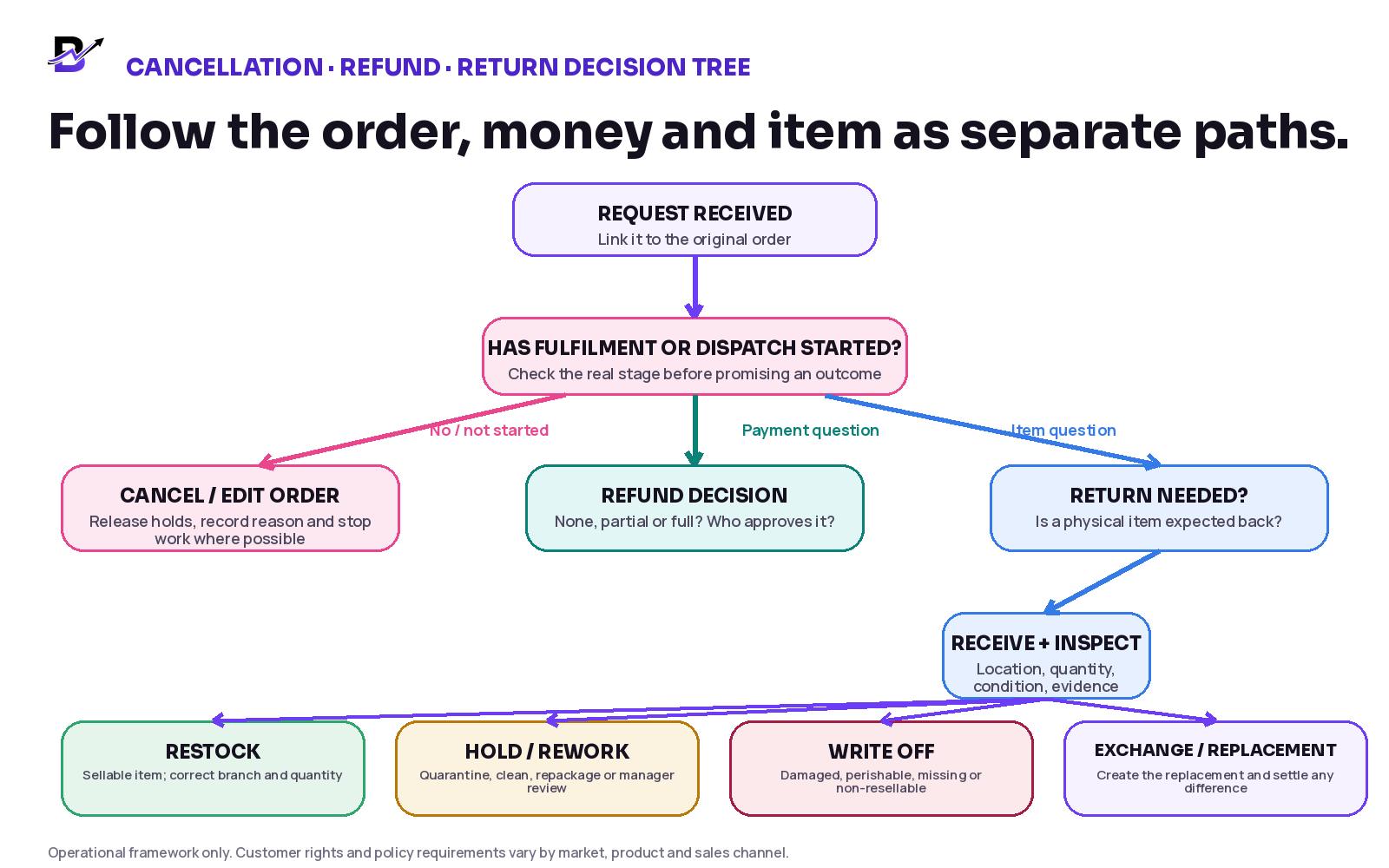
Figure 3. The same request can create different order, payment, return and stock outcomes.
CONTROL POINT Do not promise “refunded and restocked” in one click unless the workflow has separately confirmed both actions. Money can move before an item returns. An item can return without being sellable.
A practical ten-step workflow
Find the original order. Search the order number, customer, payment or receipt. Confirm the exact item, quantity, branch, channel and payment method before taking action.
Record the request. Save what the customer is asking for, the reason, the requested items and the date. A request is not yet an approved outcome.
Check the real order stage. Confirm whether payment succeeded, preparation started, the item was customised, dispatch occurred or delivery completed. Stop preventable work where the policy allows.
Check policy and authority. Apply the approved business policy and escalate any legal, safety, fraud, tax or high-value question to the correct reviewer. Make clear who may approve the result.
Choose the order action. Cancel, edit, keep active, mark an exception or close the sale. Release reservations or tasks only when the order decision supports it.
Choose the payment action. No money movement, partial refund, full refund, customer credit, extra collection or manual follow-up. Record the approved amount and method.
Receive the item when required. Give the return a reference and receiving location. Record quantity, date, staff member, condition and any permitted photos or documents.
Inspect and decide inventory. Restock only sellable items at the correct branch. Hold, rework, return to supplier, transfer or write off other items with a reason.
Communicate the confirmed outcome. Tell the customer what has been approved, the amount or replacement, the current status and the next realistic step. Do not promise provider timing you cannot control.
Close and report the case. Confirm that order, payment, return and stock statuses agree. Leave the full timeline available for owner, finance, customer-service and inventory review.
Match the workflow to the real scenario
SCENARIO | ORDER / FULFILMENT | STOCK | PAYMENT | MAIN CONTROL |
|---|---|---|---|---|
Unpaid, unfulfilled order | Cancel or expire the order according to policy. | Release any temporary stock hold. | No refund if no money was collected. | Record reason and customer confirmation. |
Paid, not yet prepared | Cancel if approved and stop tasks. | Release reserved stock once. | Full or partial refund depending on approved charges and rules. | Keep gateway or cash status visible until complete. |
Preparation started | Decide whether work can stop or the order needs a special exception. | Do not automatically restore consumed or customised materials. | Refund decision may differ from cancellation decision. | Record labour, custom work and item outcome factually. |
Dispatched or delivered | Do not treat it as a simple pre-fulfilment cancellation. | Wait for a return or confirmed disposal decision where relevant. | Refund may occur before or after receipt according to policy. | Keep delivery and return evidence connected. |
Refund without return | Keep the item outcome explicit: customer keeps it, item missing or no physical return required. | Do not increase stock. | Process approved full or partial refund. | Useful for missing add-ons, service recovery or low-value cases. |
Return received | Inspect quantity and condition at the receiving location. | Restock, hold, rework or write off. | Refund, credit or exchange can be completed separately. | Record receiving staff and final disposition. |
Exchange | Receive/approve returned item and create replacement line or new sale. | Return item follows inspection; replacement reduces its own stock. | Collect or refund the price difference where applicable. | Keep both item movements and financial balance visible. |
Return to another branch | Receiving branch records the physical receipt. | Move stock to the correct location or inspection hold; do not silently add it to the original branch. | Finance follows the original payment context. | Record source sale, receiving branch and transfer if needed. |
Control refunds as a payment workflow
A refund is not complete only because a staff member clicked a button or paid cash. The business needs the approved amount, method, reference, status and final result. Card, wallet, bank-transfer, buy-now-pay-later and cash workflows can behave differently, so the operating system should show what is confirmed and what still depends on the payment provider.
PAYMENT STATUS | WHAT IT MEANS | CONTROL |
|---|---|---|
Requested | Customer or staff asked for money to be returned. | Do not tell the customer it is processed yet. |
Approved | An authorised person confirmed amount and method. | Keep the approver and reason. |
Submitted / processing | The request was sent to the gateway, bank process or cash owner. | Show the real status and submission reference. |
Partially refunded | Part of the paid amount was returned. | Keep the remaining refundable balance visible. |
Refunded / completed | The business has provider or cash evidence that the refund completed. | Close only the money track, not automatically the return or stock track. |
Failed / reversed | The provider or bank did not complete the refund, or the money returned to the business. | Assign follow-up and agree an approved alternative. |
Manual cash refund | Cash was physically given back by an authorised branch or staff member. | Record the cash movement against the order and daily closing. |
Stripe's refund documentation describes refunds to the original payment method, pending card refunds and failures that need follow-up. This is a provider-specific example; confirm the payment methods and refund rules configured for your business before promising a destination or timing.
DUPLICATE-REFUND WARNING A payment dispute or chargeback can overlap with a refund request. Do not reimburse the same transaction twice. Keep disputes, refunds, cash payouts and customer credits visible to the authorised finance reviewer.
Receive and inspect before restocking
A return changes stock only after the business knows what came back, where it was received and whether it can be sold again. This is especially important for flowers, food, cakes, personalised gifts, opened perfume, fragile items and products with certificates or serial details.
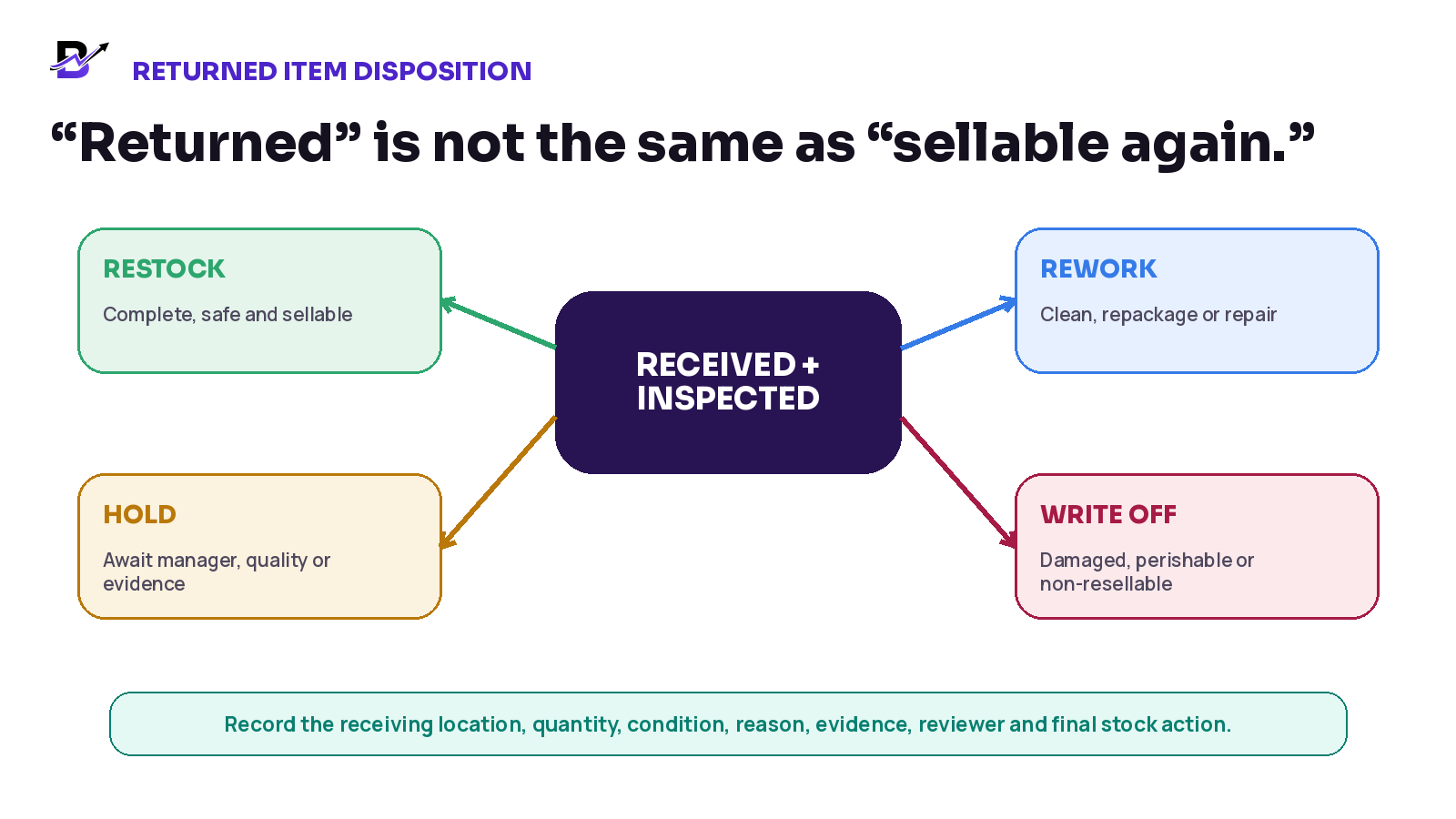
Figure 4. Returned items need an inspection outcome before sellable stock changes.
DISPOSITION | WHEN IT FITS | INVENTORY ACTION |
|---|---|---|
Restock as sellable | Correct item and quantity; complete; safe; usable; packaging and policy conditions met. | Increase the receiving location once, with the return reference and reviewer. |
Hold / quarantine | Condition, authenticity, hygiene, certificate, packaging or quantity is unclear. | Keep unavailable while a manager or qualified person decides. |
Rework / repackage | Item can become sellable after cleaning, repacking, repair or another approved action. | Move through a controlled unavailable state; record labour or parts where needed. |
Return to supplier | Supplier responsibility or agreed vendor-return process applies. | Keep supplier return and stock movement traceable. |
Write off / wastage | Perishable, customised, damaged, unsafe, incomplete, missing or commercially non-resellable. | Remove from sellable stock with reason, evidence and approval. |
Transfer to correct branch | Returned item was received at a different branch from the original sale or intended stock owner. | Record receipt first, then use a traceable transfer or location adjustment. |
CUSTOM + PERISHABLE PRODUCTS A refund or customer remedy may still be required under policy or law, but the item should not be returned to sellable stock simply because the customer received money. Record the commercial outcome and the physical stock outcome separately.
Treat an exchange as a return plus a replacement
An exchange is not only a refund with a different name. The original item must have its own return and condition outcome. The replacement item must have its own product, price, branch, stock and fulfilment movement. The difference between the two values can create an extra customer payment, a refund or a zero balance.
EXCHANGE CHECK | QUESTION |
|---|---|
Original item | Which product and quantity are coming back? Is the return confirmed or only requested? |
Receiving location | Which branch or warehouse receives and inspects it? |
Condition | Can it be restocked, held, reworked or written off? |
Replacement item | Which product, variant, quantity and branch will supply the replacement? |
Price difference | Does the customer owe more, receive money back or have an even exchange? |
Fulfilment | Is the replacement handed over now, prepared later, picked up or delivered? |
Timeline | Can the owner see both the original item outcome and the replacement sale? |
Shopify's returns and exchanges guidance models a returned item and replacement together, while its refund guidance treats payment and restocking as distinct actions. Use this as an operating principle, not a promise that every platform has the same feature.
Give each role clear authority
ROLE | MAIN RESPONSIBILITY | SHOULD ESCALATE |
|---|---|---|
Customer service | Record request, explain the approved next step, update the customer. | Large refunds, policy exceptions, inventory decisions. |
Cashier / POS staff | Find original sale, receive permitted returns, record normal branch actions. | Refunds beyond limit, cross-branch or high-risk exceptions. |
Branch manager | Approve operational exceptions, inspect or assign inspection, close branch-level cases. | Legal disputes, fraud, large-value or finance exceptions. |
Inventory / fulfilment | Receive quantity, record condition, move stock to the approved disposition. | Change money or customer promise without authority. |
Finance / owner | Approve high-value refunds, review gateway/cash status, investigate duplicates and aged exceptions. | Assume the item restocked because money moved. |
Driver / delivery staff | Return assigned goods, record failed handoff and permitted evidence. | Promise refund amount or restock outcome. |
PERMISSION RULE Limit who can approve, submit and mark a refund complete. Limit who can restock, write off or change a branch quantity. The same person may hold several roles in a small business, but the timeline should still show which decision was made.
Use clear customer-service language
Good communication separates what the business has received, what it has approved and what still depends on an inspection or payment provider. It should sound helpful without promising a result before the team has checked the facts.
MOMENT | CLEAR, NEUTRAL EXAMPLE |
|---|---|
Request received | “We have received your cancellation or return request for order [number]. We are checking the order stage and the next available action. We will update you by [realistic time].” |
Approved refund submitted | “A refund of [amount] was submitted on [date] to the approved payment method. Its current status is [processing / completed]. Provider timing can vary.” |
Item received | “We received [item / quantity] at [location] on [date]. The item is now being checked before we confirm the final stock, exchange or refund step.” |
More information needed | “We need [specific information or item] to continue. Your request remains open, and the next review will happen after we receive it.” |
Exchange difference | “The replacement is [amount] higher / lower than the returned item. The confirmed balance is [amount], subject to the approved return condition.” |
Request declined or changed | “After reviewing [the order stage / item condition / policy], we cannot approve the original request as submitted. The available next option is [clear alternative].” |
COMMUNICATION BOUNDARY Templates should be reviewed against the business policy and local law. Do not describe a refund as completed while it is only requested or submitted. Do not use vague phrases such as “soon” when the provider controls the timing.
Measure the reasons and unresolved cases
METRIC | SIMPLE DEFINITION | WHAT IT REVEALS |
|---|---|---|
Cancellation rate by stage | Where orders are being cancelled: before payment, after payment, during preparation or after dispatch. | Reveals product, payment, capacity or promise problems. |
Refund request-to-submission time | Time from approved request to the refund being submitted. | Shows internal approval or staff delays. |
Refund pending / failed age | How long provider or manual refunds remain unresolved. | Prevents cases from disappearing after submission. |
Return receipt time | Time from authorisation to physical receipt. | Shows courier, customer or branch delays. |
Restock rate | Returned units restored to sellable stock after inspection. | Separates reusable goods from write-offs. |
Write-off rate + reason | Returned quantity or value removed from sellable stock. | Highlights quality, packaging or policy costs. |
Exchange balance errors | Exchanges with unpaid or over-refunded differences. | Shows price and payment-control weakness. |
Unresolved exceptions | Cases where order, payment, return or stock statuses do not agree. | Gives the owner a daily action queue. |
Repeat issue by product / branch / channel | Repeated reasons such as wrong item, damaged delivery or late preparation. | Turns return data into operational improvement. |
Do not chase a generic “low return rate” without context. A business with custom and perishable products may have different risks from a fashion or electronics retailer. Start with accurate reasons and complete outcomes. Improve the causes the team can control.
Where Bloomlytix fits and what to confirm
Bloomlytix brings order details, branch-aware POS, inventory movements and cash reporting into one operating environment. Its published platform feature list describes order context and timeline, branch stock, adjustments for damage, wastage, transfers and corrections, staff roles, cash receipts and expenses, and owner reports. These controls help a team trace an exception back to the original sale.
Refund execution, return receiving, exchanges and customer credit need separate confirmation for the payment provider and configured workflow. A cancelled order, cash expense or stock correction does not by itself prove that a gateway refund completed, an item returned or an inspected item became sellable.
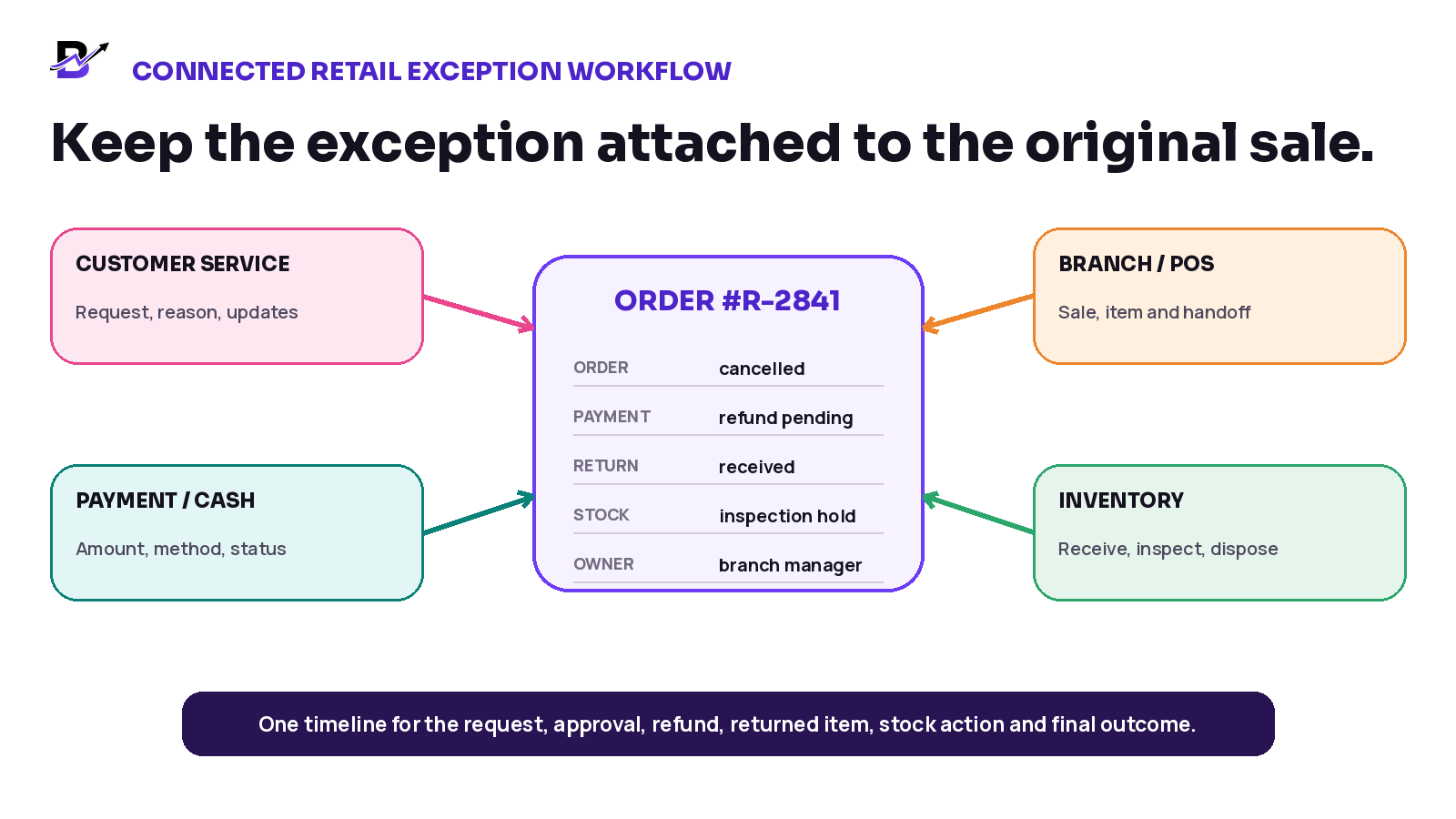
Figure 5. An illustrative way to keep order, payment, return and stock decisions visible together; confirm which fields and actions are supported in the live Bloomlytix setup.
BLOOMLYTIX AREA | PRACTICAL ROLE |
|---|---|
Original order and timeline | Use the order details, branch, payment context, notes and history to understand what actually happened. Confirm the exact cancellation and exception statuses in a live demo. |
POS and branch context | Locate the counter sale and branch involved before any manual payment or stock action. |
Inventory movement | Use verified branch visibility and adjustments for damage, wastage, transfers and corrections. Confirm how a returned item is received, inspected and restocked for the chosen setup. |
Cash tracking | Review cash receipts, expenses, staff cash in hand and supporting notes or attachments. Confirm whether a cash refund can be linked to the original order and closing report. |
Roles and access | Limit cash and stock actions to permitted staff; demonstrate who can approve each exception. |
Owner reports | Use sales, product, branch, stock and cash reports as a foundation. Ask how refund age, return reasons and unresolved cases will be reported. |
PRODUCT SCOPE Ask for a live demonstration of the exact refund methods, provider confirmations, return receiving, exchanges, customer credit and cross-branch stock treatment needed for your business. Do not infer those workflows from general order or inventory controls.
Questions to ask during a software demonstration
Can staff find the original online, app, POS, manual or payment-link order before starting the case?
Can order, payment, fulfilment and inventory statuses remain separate but visible together?
Can permissions control who requests, approves, submits and completes refunds?
Can the system process and report full and partial refunds without exceeding the original paid amount?
Can a refund remain pending or failed until provider confirmation is received?
Can returned items be received at a different branch and held for inspection?
Can staff choose restock, hold, rework, supplier return, transfer or write-off with reasons?
Can an exchange create the replacement item and settle the price difference clearly?
Can cash refunds and gateway refunds both appear in owner and daily closing reports?
Can managers report reasons, aged exceptions, restock outcomes and repeat product or branch issues?
What is standard, what is configuration, and what requires an integration or custom scope?
Frequently asked questions
What is the difference between a refund and a return?
A refund changes the money. A return records the physical item coming back. They may happen together, but a business can refund without receiving an item, or receive an item before deciding the final refund.
Should a refund automatically add stock back?
No. For a physical return, increase sellable stock only after the correct item is received, identified and checked at the right branch. A cancellation before fulfilment may release a reservation for stock that never left; that is different from restocking a returned item.
What happens when an order is cancelled before payment?
Close or expire the order according to policy and release any temporary reservation. There is normally no money to refund, but the order reason and customer communication should still be recorded.
How should a custom or perishable product be handled?
Record the customer outcome separately from the stock outcome. The business may approve a refund, replacement or other remedy while writing off, holding or disposing of the item instead of restocking it.
Who should approve refunds?
Use permission limits based on amount, reason, channel and risk. Normal small refunds may be handled by authorised staff; larger, unusual, cash, fraud, legal or cross-branch cases should escalate to a manager, finance or owner.
What should be recorded when an item returns to another branch?
Record the original order, received item and quantity, receiving branch, staff member, date, condition, evidence and final stock action. If the item belongs elsewhere, use a traceable transfer rather than silently changing the original branch quantity.
Can a refund fail after it is submitted?
Yes, depending on the provider and payment method. Keep a processing or failed state visible, monitor the result and use an approved alternative only after confirming that the original refund did not complete.
Is an exchange the same as a refund?
No. An exchange combines a returned item with a replacement item or new sale. The business must track both stock movements and settle any price difference.
Final cancellation, refund and return checklist
The original order, product, branch, payment and customer are confirmed.
The customer request is recorded separately from the approved decision.
The real order and fulfilment stage is checked before a promise is made.
Order, payment, return and inventory statuses are tracked separately.
The approver, reason, amount, method and reference are visible.
Full and partial refunds cannot exceed the original paid balance.
Cash refunds are connected to staff cash and daily closing.
The return has a receiving location, quantity, condition and evidence.
Sellable stock increases only after inspection and at the correct branch.
Custom, perishable, damaged and non-resellable items use hold or write-off rules.
Exchanges track the returned item, replacement item and price difference.
Pending, failed and unresolved cases appear in a manager action queue.
Customer communication states the confirmed status and realistic next step.
Reports can show reason, product, branch, refund age and final stock outcome.
BRING ONE REAL EXCEPTION TO THE DEMO Choose one recent cancellation, partial refund, returned item or exchange. Bring the original order, payment method, branch, item condition and desired outcome. We will map how the order, money, stock and team responsibilities can stay connected in Bloomlytix.