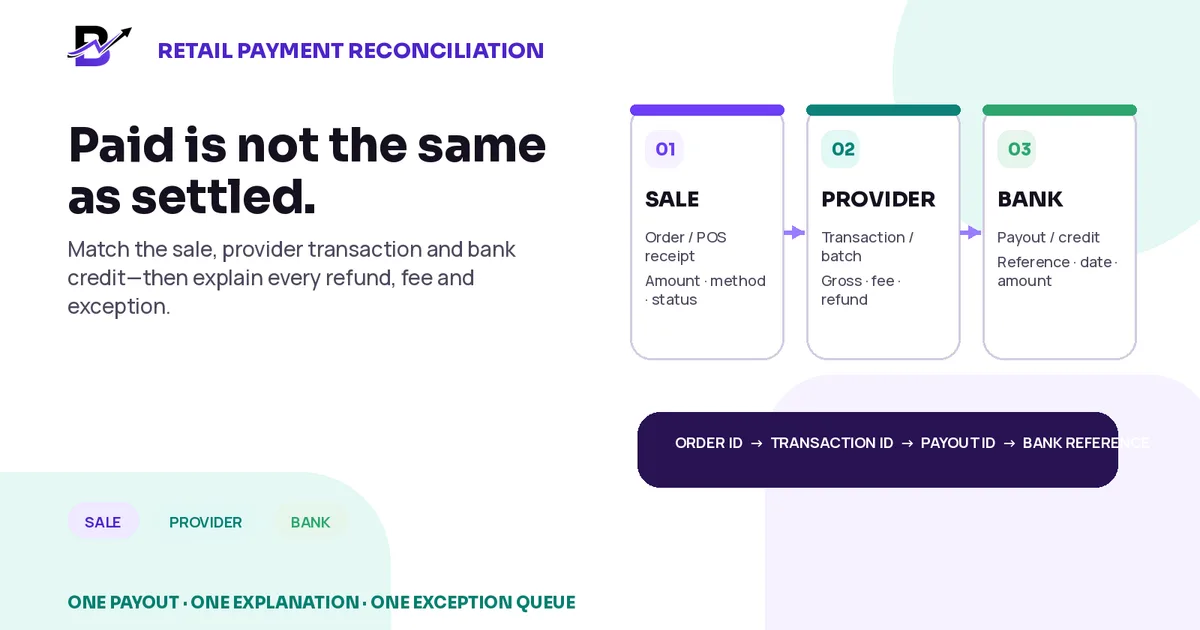
A retail payment is fully reconciled when the sale, provider activity and bank credit explain the same money.
An order can show “paid” while the money is still pending with the payment provider. A card terminal can close successfully while the bank deposit arrives later. A customer refund can reduce a different payout from the original sale. Processing fees, disputes, reserves and timing can make a bank credit look smaller than the day’s sales even when every transaction is valid.
The purpose of payment reconciliation is to explain those differences clearly. It is not to force the sales report, provider report and bank statement to show the same date or the same gross amount.
Direct answer. Reconcile retail payments in three layers: the order or POS sale, the payment-provider or terminal transaction, and the bank payout. Match each captured payment to the correct order, group provider transactions by payout, bridge gross payments to the net payout using refunds, disputes, fees and adjustments, then match the payout to the bank credit. Keep cash closing separate and investigate every unexplained difference.
This guide is for owners, finance teams, branch managers and operations leads that accept online cards, POS cards, payment links, cash, bank transfers or other configured payment methods. It explains the operational controls in plain language. It is not accounting, tax, legal or banking advice; provider and bank rules vary by country and contract.
In this guide
Why “paid,” “settled” and “deposited” are different states
The three-way match between sales, provider activity and the bank
How to reconcile one payout from gross payments to net bank credit
How to handle mixed tenders, partial refunds, fees and chargebacks
How to create an exception queue instead of hiding differences
A daily, per-payout, weekly and monthly control routine
How Bloomlytix records can support the workflow without replacing bank reconciliation
Paid, settled and deposited are different states
The customer experience may end at the payment confirmation screen. The finance and operations process continues after that moment. Use separate words for separate events so the team does not make assumptions.
TERM | EASY MEANING | QUESTION IT ANSWERS |
|---|---|---|
Order amount | The value recorded on the order or POS receipt, including products, discounts, delivery and configured tax. | What did the customer buy? |
Authorised | The provider or issuer approved the payment attempt, but the funds may not yet be captured. | May the payment proceed? |
Captured / paid | The successful provider transaction that records the money collected from the customer. | Was money collected through this provider? |
Provider balance transaction | The provider’s money-movement row showing gross amount, fee, net amount, currency and status. | How did this transaction affect the provider balance? |
Payout / settlement | A group of provider balance movements sent toward the business bank account. | Which transactions make up this net transfer? |
Bank credit | The deposit posted by the bank, with its own date and reference. | Did the payout reach the correct account? |
Refund | Money returned after a successful payment; it can be full or partial. | What amount was sent back to the customer? |
Dispute / chargeback | A cardholder challenge that can reverse funds and add a provider or network fee. | Why was money removed outside the normal refund process? |
Fee / adjustment | Processing, currency, reserve, correction or other provider movement under the contract. | What explains the difference between gross and net? |
Core principle. A sale report shows business activity. A provider report shows payment-balance activity. A bank statement shows deposits and withdrawals. They are connected, but they do not answer the same question.
Why the bank credit does not equal the day’s sales
A difference is not automatically an error. It becomes an error when the team cannot explain it. Common reasons include:
Cash, bank transfer, store credit or another method appears in sales but not in the card-provider payout.
Payments accepted after a provider cut-off move into a later payout.
The provider deducts processing fees, refund debits, disputes, reserves or other adjustments.
A refund is created after the original sale and reduces a later payout.
A card payment is authorised but not captured, or remains pending before becoming available.
Different locations, terminals, provider accounts or currencies settle in separate groups.
The provider sent the payout, but the bank has not posted it yet or the payout failed.
The sales and provider reports use different time zones, statuses or date ranges.
Do not fix timing. If a valid transaction belongs to the next payout, record it as a timing difference. Do not change the sale date or invent a manual adjustment merely to make today’s totals match.
Use a three-way match
A reliable process follows the same money through three records. Each layer should keep enough identifiers to connect to the next one.
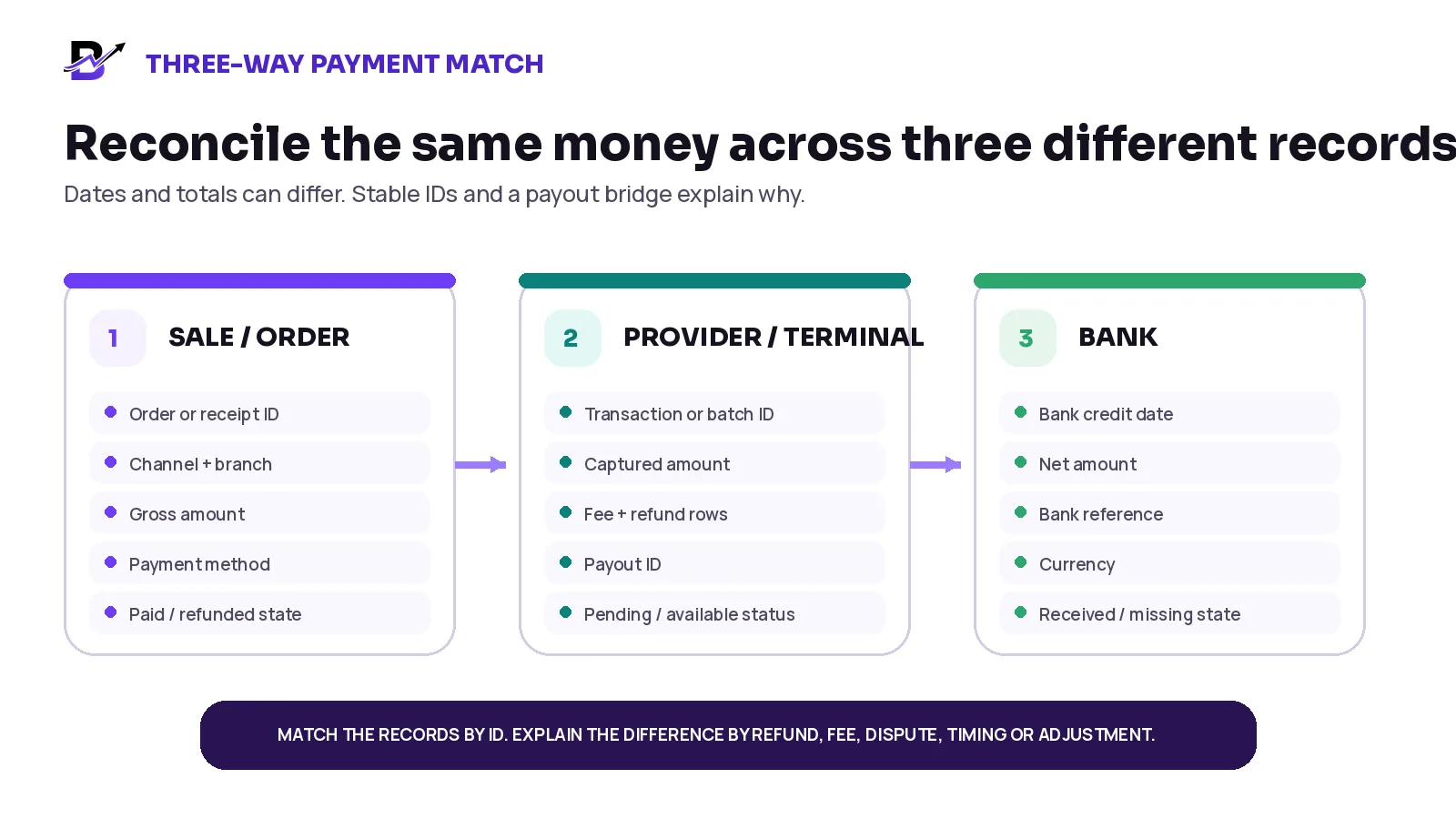
Figure 1. Reconciliation is a chain of evidence: sale or order, provider or terminal, then bank.
LAYER | PRIMARY RECORD | KEY FIELDS | MAIN PURPOSE |
|---|---|---|---|
1. Sale / order | Order, POS receipt or manual-order record | Order or receipt ID, branch, channel, gross amount, payment method, paid/refunded state | Confirms what the business recorded as sold. |
2. Provider / terminal | Gateway transaction, terminal batch, provider balance row and payout | Transaction ID, batch ID, gross, fee, refund/dispute, currency, payout ID | Explains how the provider grouped and netted the money. |
3. Bank | Bank statement or bank feed | Credit date, amount, bank reference, currency, destination account | Confirms whether the net payout arrived. |
Matching rule. Use stable IDs first and dates second. The strongest chain is order or receipt ID → provider transaction ID → payout ID → bank reference.
Keep the identifiers that make matching possible
A payment can become difficult to trace when the order has only a screenshot, the terminal has only an amount, and the bank has only a net deposit. Store or export the identifiers available at each stage.
IDENTIFIER | WHAT IT IS | CONTROL RULE |
|---|---|---|
Order / receipt ID | The internal business record for the sale or refund. | Keep it on the payment, refund and customer-service history. |
Provider transaction ID | The gateway or terminal reference for the captured payment. | Use it to find the provider row and any refund or dispute. |
Terminal batch / settlement ID | The group created by a standalone card terminal or acquirer. | Use it when POS and terminal are separate systems. |
Payout ID | The provider’s grouped transfer record. | Use it to export the transactions included in the net amount. |
Refund / dispute ID | The separate provider record for a refund or cardholder dispute. | Use it to explain debits and future reversals. |
Bank reference / trace | The reference attached to the bank credit or failed transfer. | Use it to locate the deposit with the bank. |
Currency + account | The settlement currency and destination bank account. | Prevents matching across the wrong account or currency. |
Branch / location | The branch, terminal or provider account that processed the payment. | Helps multi-location businesses avoid combining the wrong settlement groups. |
Close each payment method in the correct way
The daily sales report can include several payment methods. Each method needs its own evidence. Do not expect one provider payout to explain methods that provider did not process.
PAYMENT METHOD | RECONCILIATION PATH | IMPORTANT NOTE |
|---|---|---|
Cash | POS cash tender → cash drawer or staff cash record → branch cash close | Never include cash in the card payout match. |
POS card | POS card tender → terminal or gateway transaction / batch → payout → bank credit | Check that the tender type and terminal payment both exist. |
Online card | Order → online transaction → provider balance / payout → bank credit | Keep order and transaction IDs connected. |
Payment link | Manual or custom order → payment-link transaction → payout → bank credit | A paid link needs the related order and amount. |
Bank transfer | Order or invoice → customer transfer → bank credit / reference | Confirm payer, amount, date and order allocation. |
BNPL / marketplace / wallet | Order → partner statement → partner payout → bank credit | Use that partner’s settlement report and current contract terms. |
Store credit / gift credit | Order → internal credit ledger | It may reduce the customer balance without creating a new bank deposit. |
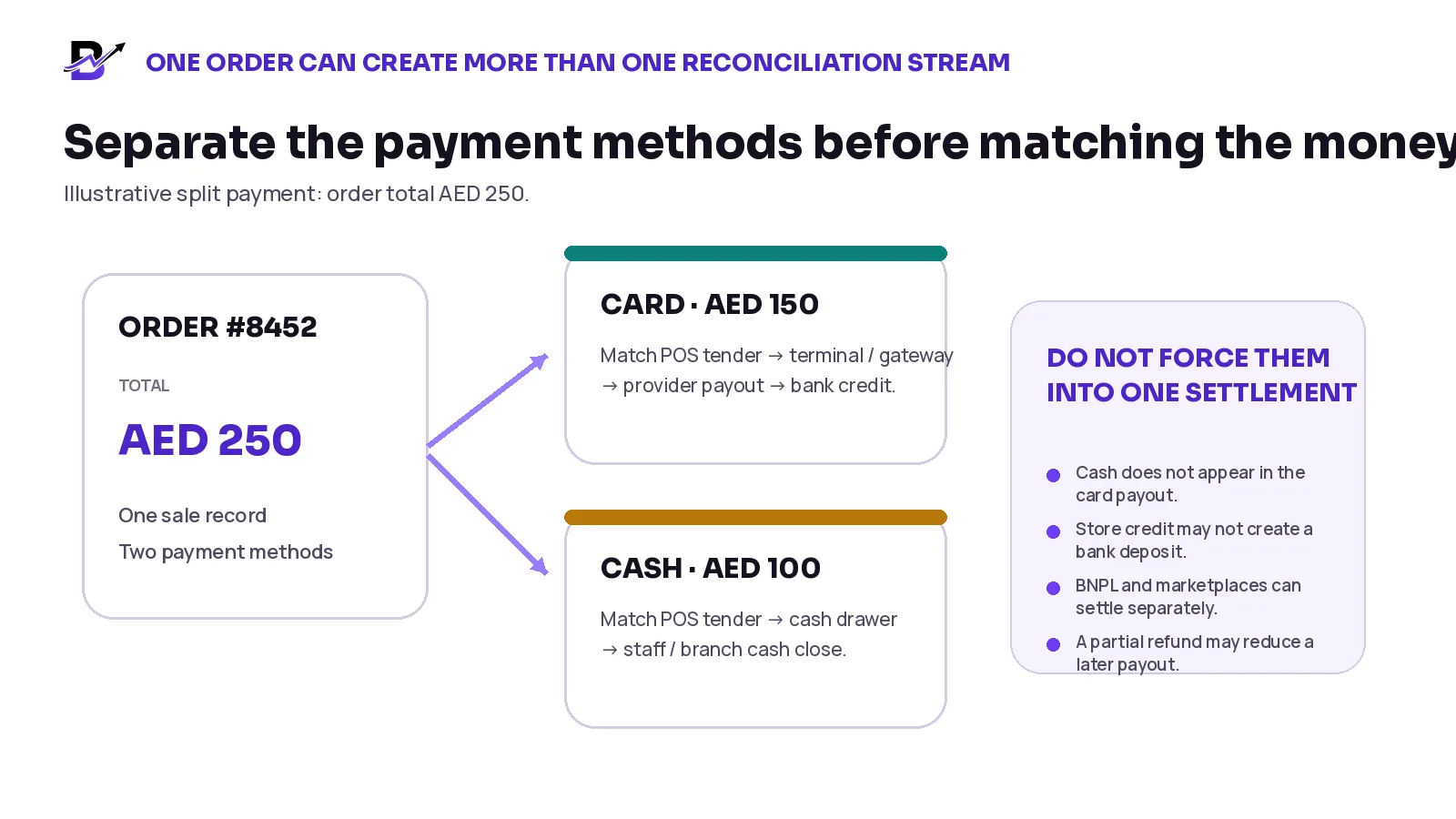
Figure 2. One order can contain several tenders, but each tender reconciles through its own control path.
A practical daily payment close
Daily control is designed to catch wrong tender types, missing transactions and incomplete refunds before they become month-end investigations. It does not need to wait for the bank deposit.
Complete the sales day. Confirm the correct business date, branches, POS shifts, online channels and currencies included in the close.
Review the payment-method summary. Check cash, POS card, online card, payment links, bank transfer, credit and other methods separately.
Compare POS card to the terminal or provider. Match the POS card tender total to successful terminal transactions for the same branch and cut-off window.
Review online payments. Confirm successful, pending, failed, cancelled and duplicated attempts against the related orders.
Check refunds and voids. Make sure the order outcome and provider refund or cancellation record agree. Record partial amounts clearly.
Open exceptions. Do not force a difference into “other.” Give it an ID, owner, evidence, next action and due date.
Close cash separately. Use the cash reconciliation process for drawers, staff cash, expenses and deposits.
Save the evidence. Retain or export the daily tender report, provider or terminal summary and exception list under the business retention policy.
Daily close outcome. The daily close should end with three results: matched, valid timing difference, or open exception. “Unknown” is not a final status.
Reconcile one payout from gross to net
Start with the provider payout ID or transfer record rather than the day’s sales total. Open or export the transactions included in that payout, then build a bridge to the net amount. Stripe and Shopify both document payout records that group the transactions and adjustments behind a bank transfer.
Choose the payout. Use the provider payout ID, currency, status, destination account and expected or actual arrival date.
List included captures. Sum the successful provider payments included in the payout—not every sale from the same calendar day.
Subtract refunds and disputes. Include the refund, chargeback or dispute rows that the provider assigned to this payout.
Subtract fees and reserve movements. Use the actual provider fee and adjustment rows instead of estimating from the pricing page.
Add credits or reversals. Include any provider credit, dispute reversal, refund failure or correction that increases the payout.
Calculate expected net. The bridge should equal the provider payout amount before the bank match.
Match the bank credit. Use amount, currency, bank account and reference. Record a timing difference if the provider sent it but the bank has not posted it.
Close or escalate. Close matched payouts. Move unexplained rows into the exception queue.
Formula. Captured payments - refunds - disputes - provider fees - reserve debits + credits ± adjustments = expected net payout.
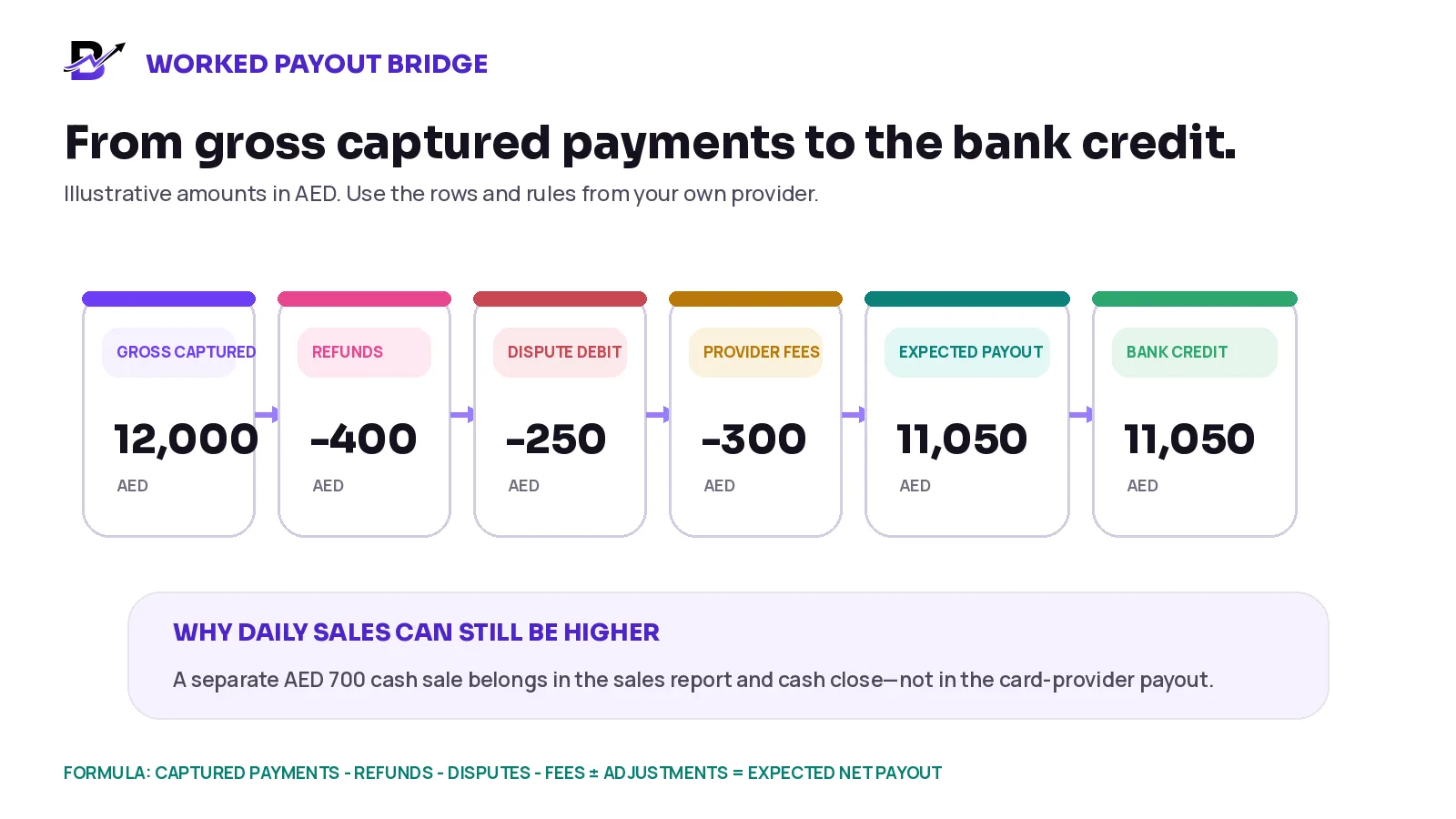
Figure 3. The payout bridge explains why a net bank credit is lower than the gross card payments.
BRIDGE ROW | AMOUNT | EXPLANATION |
|---|---|---|
Gross captured card payments | AED 12,000 | Successful transactions included in this payout |
Less: customer refunds | AED 400 | Full or partial refunds included by the provider |
Less: dispute debit | AED 250 | Illustrative chargeback or dispute debit |
Less: provider fees | AED 300 | Actual fee rows from the payout export |
Expected net payout | AED 11,050 | 12,000 - 400 - 250 - 300 |
Bank credit | AED 11,050 | Matched amount and reference |
The sales report can still show AED 12,700 if the business also accepted AED 700 in cash. That cash belongs in the sales total and cash close, not in this card-provider payout.
Handle split payments and partial refunds carefully
The order is one business sale, but its payment can be divided across methods or changed later. Keep both the order-level total and the tender-level movements.
SITUATION | EXAMPLE | CORRECT CONTROL |
|---|---|---|
Split tender | AED 250 order: AED 150 card + AED 100 cash | Order total remains AED 250. Reconcile AED 150 through the provider and AED 100 through cash closing. |
Partial refund | AED 500 card payment; AED 120 refunded later | Keep the sale, refund amount and remaining net payment visible. The refund may reduce a later payout. |
Additional payment | Customer adds AED 60 after the original order | Create a separate linked transaction or approved payment movement. Do not overwrite the first payment. |
Payment-method change | Failed card attempt followed by cash payment | Keep the failed attempt for troubleshooting, but close the order under the successful cash method. |
Gift or store credit | Part of the order uses internal credit | Reconcile only the externally processed amount to the provider and bank. |
Multiple providers | Online gateway and separate POS terminal | Reconcile each provider account and payout independently before combining management reporting. |
Separate refunds, reversals and chargebacks
These events can all reduce or change money, but they are not the same process. They may also affect stock and customer service differently.
EVENT | WHAT HAPPENED | OPERATIONAL ACTION | SETTLEMENT EFFECT |
|---|---|---|---|
Cancel before completion / void | The payment is stopped before it fully completes. | Confirm the provider state and release any order or stock hold under policy. | May create no payout movement, or a reversal depending on the provider. |
Full or partial refund | The business intentionally returns money after a successful payment. | Record the reason, amount, related order and customer outcome. | Creates a provider debit now or in a future payout. |
Dispute / chargeback | The cardholder questions the payment through the issuer. | Assign an owner, preserve order and fulfilment evidence, and follow the provider deadline. | Can reverse the payment and add one or more dispute fees. |
Dispute reversal / win | The provider credits money back after the dispute outcome. | Link the credit to the original dispute. | Can increase a later payout. |
Failed refund | The provider does not complete the refund. | Keep the order from showing a completed financial outcome until resolved. | May return funds to the provider balance or require another action. |
Return without refund | A product comes back but money has not been returned yet. | Inspect stock separately and follow the refund decision process. | No provider movement until a financial action occurs. |
Stock reminder. A refund changes money. A return changes physical stock. Do not increase sellable inventory merely because the customer was refunded.
Expect timing differences
Treat timing as a normal part of reconciliation. Provider availability rules, payout schedules, daily cut-offs, weekends, holidays, bank processing and time zones can place valid transactions on different dates. Square notes that payments accepted after a daily transfer cut-off may appear in the next transfer.
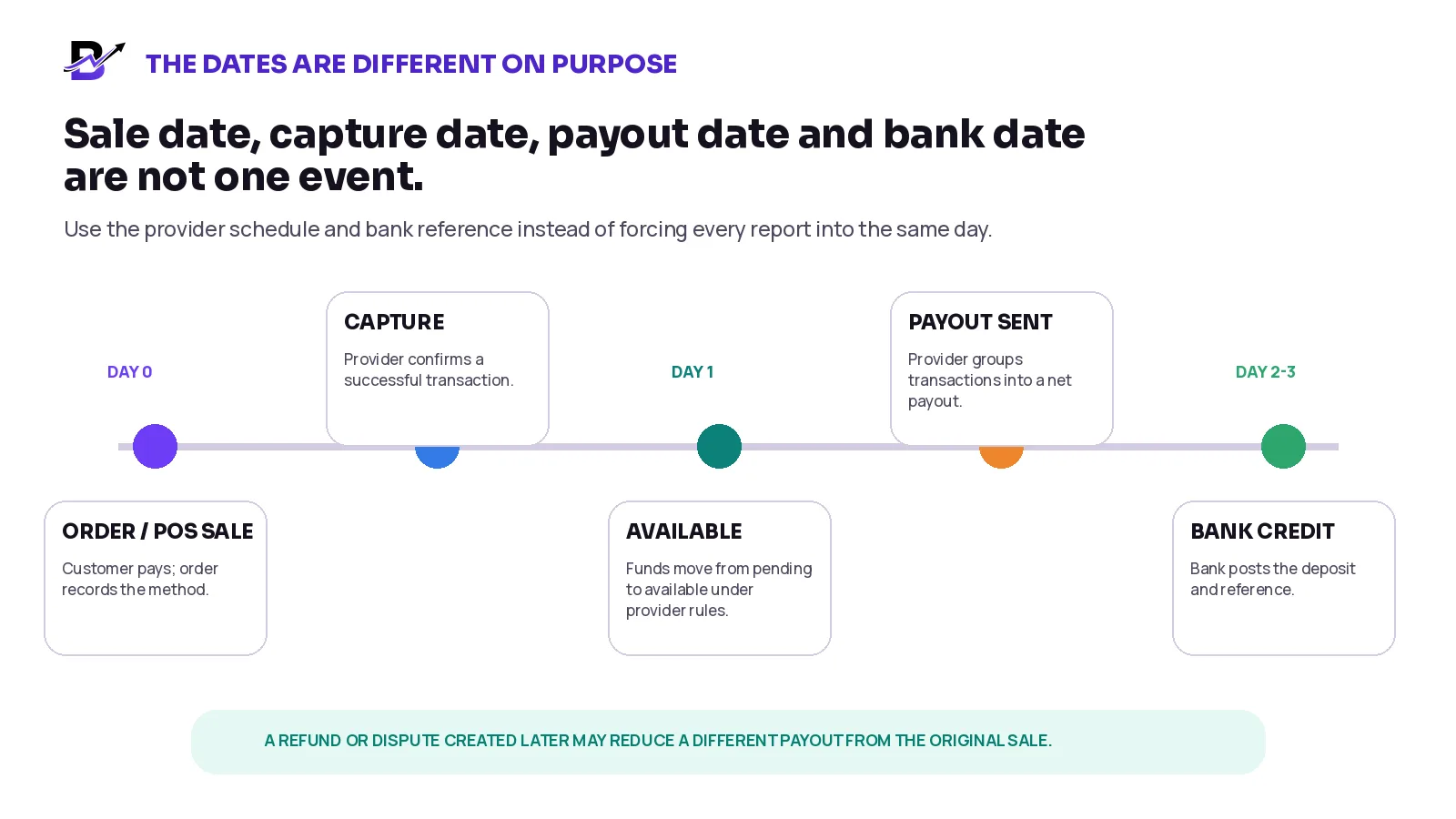
Figure 4. The sale, provider availability, payout and bank credit can appear on different dates.
TIMING ISSUE | WHAT IT MEANS | CONTROL RESPONSE |
|---|---|---|
After cut-off | A valid card payment moves into the next provider batch or payout. | Tag it as a timing difference and verify the next payout. |
Weekend / holiday | Provider or bank processing takes longer than a normal business day. | Use the provider’s expected date and the bank reference. |
Pending balance | The payment is captured but not yet available for payout. | Do not count it as missing until the provider’s availability rule has passed. |
Multi-currency | Transactions and payouts are grouped by settlement currency or converted under provider rules. | Reconcile each currency separately and retain the exchange-rate or FX-fee evidence. |
Reserve / hold | Part of the provider balance is held outside the current payout. | Use the reserve or hold row; do not label it as a fee without evidence. |
Failed payout | The provider attempted a payout but the bank did not accept it. | Follow the provider prompts, correct the bank issue and track the retry. |
Create an exception queue
Use an exception queue as the working list for unresolved differences. It separates genuine problems from normal timing and prevents staff from making silent adjustments merely to force totals to agree.
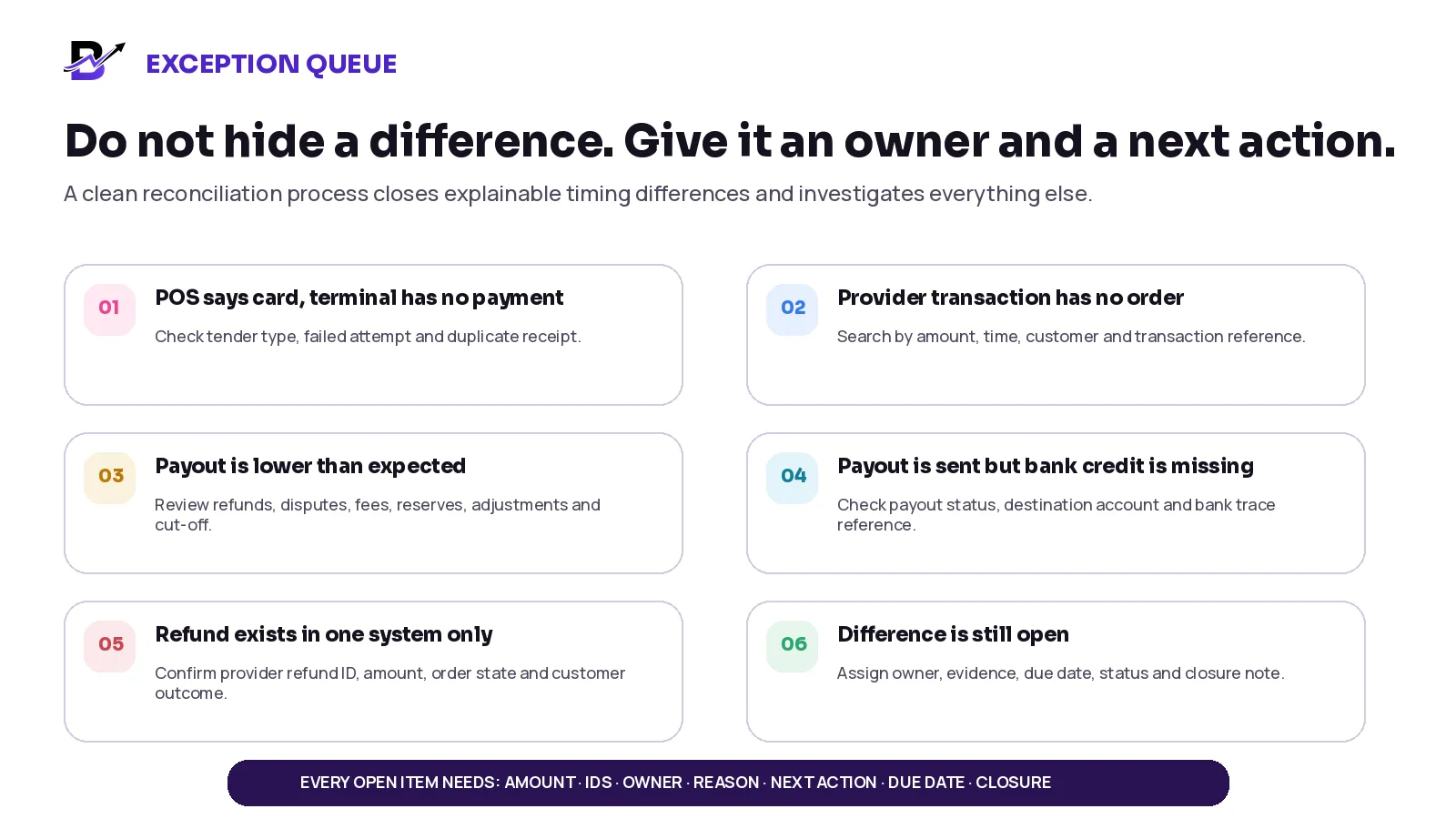
Figure 5. Every difference should have an owner, evidence, next action and closure note.
EXCEPTION | LIKELY CAUSE | FIRST ACTION | OWNER |
|---|---|---|---|
POS says card; terminal has no successful payment | Wrong tender, failed attempt, manual card entry or missing terminal record | Check receipt, staff user, time, amount and terminal status | Branch manager |
Provider transaction has no order | Orphan payment, duplicate order, wrong reference or payment-link mismatch | Search customer, time, amount and transaction ID; link or refund under policy | Payments / customer service |
Payout is lower or higher than bridge | Missing fee, refund, dispute, reserve, FX or adjustment row | Export all payout transactions and rebuild the bridge | Finance |
Provider says paid; bank credit missing | Bank processing delay, failed payout, wrong account or unclear reference | Check payout status, destination, expected date and bank trace | Finance / bank owner |
Order says refunded; provider has no refund | Order status changed without the financial action | Confirm refund ID and provider status before closing | Manager / finance |
Provider refund exists; order not updated | Refund issued outside the normal order workflow | Update the order and customer-service history with evidence | Customer service / finance |
Duplicate charge | Repeated terminal or online payment | Identify the correct order, customer outcome and refund decision | Payments owner |
Wrong currency or location | Mixed provider account, branch or settlement currency | Separate the records and use the correct account / currency | Finance / operations |
Exception record. Store the exception ID, business date, order or receipt ID, provider transaction ID, payout ID, bank reference, currency, amount, reason, evidence, owner, next action, due date, status and closure note.
Use a daily, per-payout, weekly and monthly rhythm
Different checks solve different problems. The daily close protects operations. The payout match explains the bank deposit. Weekly and monthly review show whether the control process itself is improving.
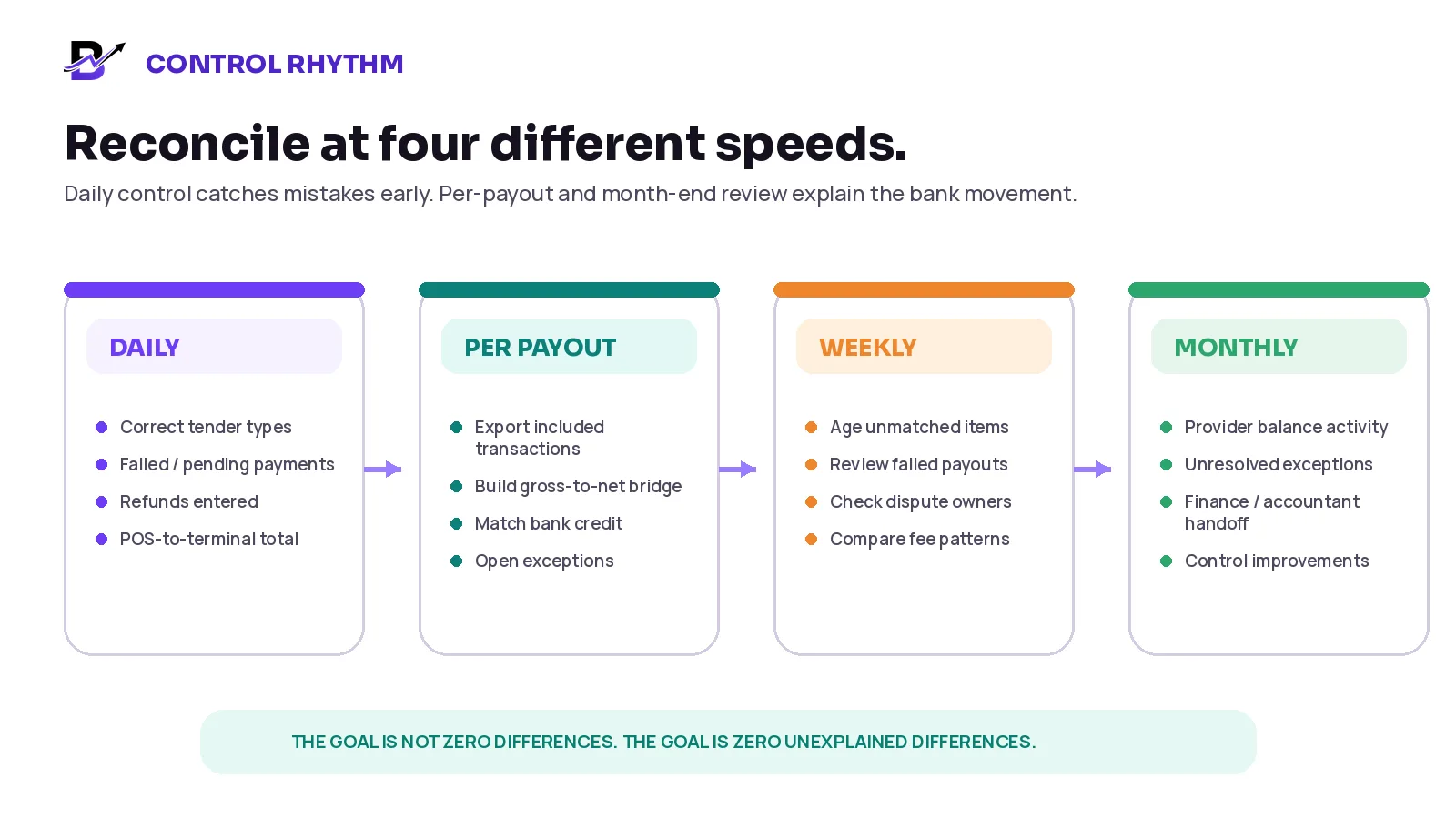
Figure 6. Payment control works best as a repeated routine, not a month-end emergency.
RHYTHM | REVIEW | PRIMARY OWNER |
|---|---|---|
Daily operational close | Payment-method totals, failed and pending payments, refunds, terminal or gateway match, cash close, new exceptions | Branch manager / operations |
Per payout | Included provider transactions, gross-to-net bridge, fees, refunds, disputes, bank credit and reference | Finance / payments owner |
Weekly | Aged exceptions, failed payouts, unresolved refunds, disputes, duplicate transactions, fee or tender patterns | Finance + operations |
Monthly handoff | Provider opening balance, period activity, payouts, closing balance where available, unresolved items and supporting exports | Finance / accountant |
Important distinction. Provider balance activity is not automatically the same as revenue. Sales reports and provider activity can use different dates, currencies and transaction types. The accountant should decide the formal accounting treatment.
Define responsibilities and approval limits
ROLE | MAIN RESPONSIBILITY |
|---|---|
POS / counter staff | Select the correct tender, complete the terminal payment, avoid manual “card” entries without evidence, report duplicate or failed attempts. |
Branch manager | Complete the daily close, review tender differences, confirm refunds or voids within authority, assign local exceptions. |
Customer service | Keep the order, customer outcome and refund reason accurate; do not mark a refund completed without provider evidence. |
Finance / payment owner | Match provider payouts to the bank, review fees and disputes, maintain the exception queue and month-end handoff. |
Owner / operations lead | Approve policy, thresholds and access; review repeated errors, fee trends, dispute exposure and unresolved items. |
Technical / implementation owner | Keep order, transaction and payout references available where integrations support them; monitor failed data connections. |
Where practical, the person who creates a manual adjustment or refund should not be the only person who approves and closes the exception. The exact separation depends on team size and risk.
Measure the quality of the reconciliation process
METRIC | SIMPLE DEFINITION | WHAT IT CAN REVEAL |
|---|---|---|
Unmatched amount | Total value not yet explained between sales, provider and bank. | Shows financial exposure and control backlog. |
Open exception count + age | Number of open items and days since creation. | Shows whether differences are being resolved or simply carried forward. |
Tender correction count | Sales whose payment method needed correction after close. | Reveals training or interface problems at POS. |
Refund reconciliation lag | Time from approved refund to provider confirmation and order update. | Shows whether customer and finance records stay aligned. |
Dispute amount + status | Open, won, lost or accepted disputes and related fees. | Shows dispute exposure without implying a universal target. |
Effective provider cost | Provider fees divided by eligible processed volume, using consistent definitions. | Helps explain cost changes by method or provider. |
Payout arrival variance | Difference between expected and actual bank posting date. | Shows failed payouts or repeated bank delays. |
Duplicate / orphan transaction count | Provider rows without one correct order, or repeated charges for one sale. | Reveals integration, process or staff issues. |
Measurement rule. Do not copy a universal “good” percentage from another retailer. Build a baseline, investigate causes and improve the parts your team can control.
How Bloomlytix can support the workflow
Bloomlytix connects orders, POS sales, configured payment methods, cash tracking, branch activity and reports. Its current platform overview also describes payment links that can connect successful payments to related orders where supported. These operational records give the team a stronger starting point for reconciliation, while the payment provider and bank remain the sources for settlement and deposit evidence.
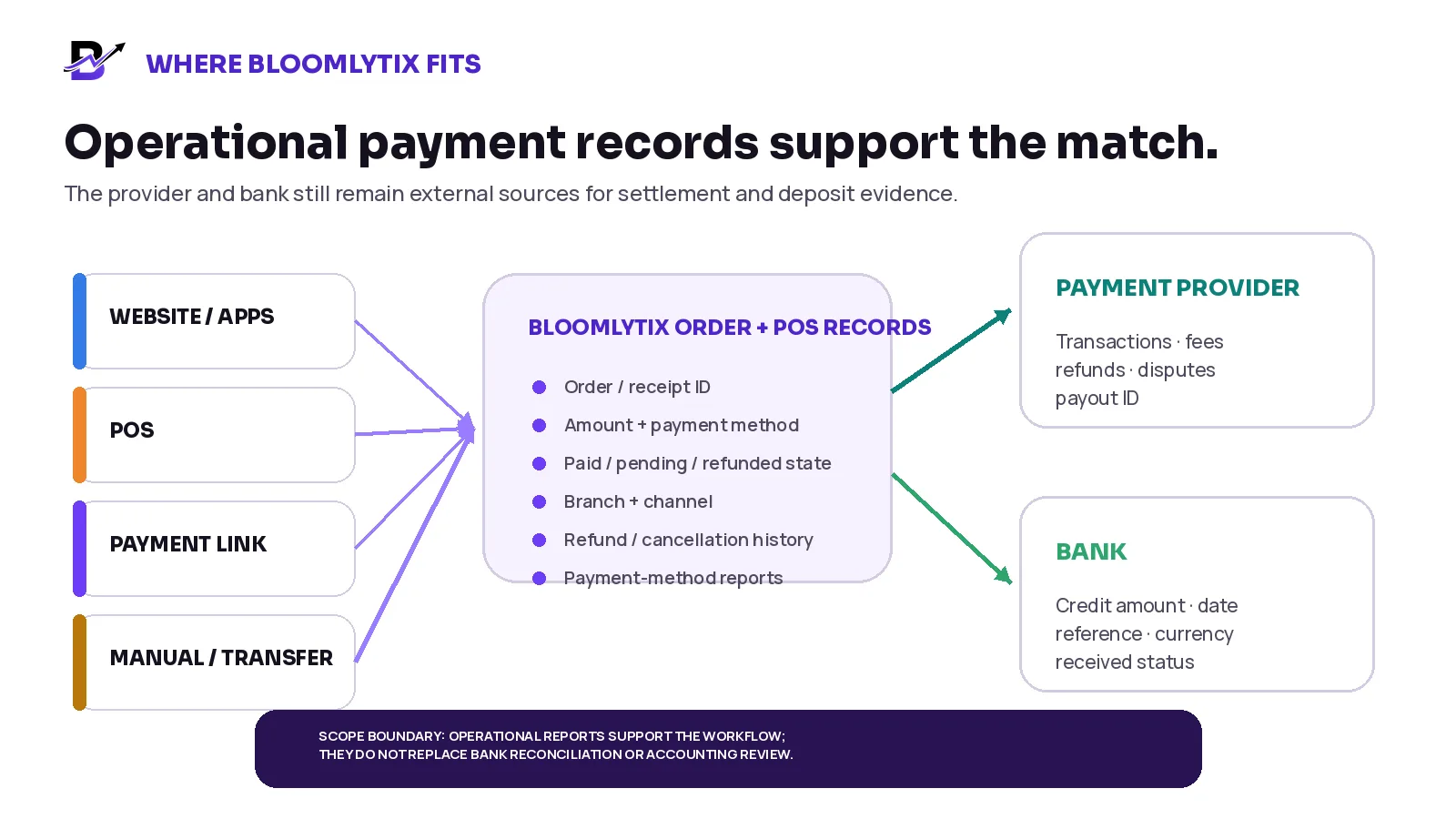
Figure 7. Bloomlytix can support the operational side of the match; provider and bank records complete the settlement evidence.
BLOOMLYTIX AREA | ROLE IN RECONCILIATION |
|---|---|
Orders + POS sales | Keep the order or receipt, amount, branch, channel and configured payment method in the same operating system. |
Payment status | Show paid, pending, failed, refunded or other configured states against the related order where supported. |
Payment links | Generate or track a payment link for manual or custom orders and connect the result to the related record where the gateway integration supports it. |
Refunds + cancellations | Keep the operational outcome, status history and related payment action visible for customer service and owner review. |
Payment-method reporting | Review revenue, order count and payment-method breakdown using the configured sales records. |
Cash tracking | Keep cash received, staff cash in hand and expenses separate from card-provider payout reconciliation. |
Branch + staff context | Review sales and payment activity by branch and permitted user where configured. |
Product scope. Bloomlytix operational records can support order-to-payment matching and payment-method reporting. Do not present the platform as automated bank reconciliation, statutory accounting, provider-fee accounting or chargeback management unless the exact integration and live scope are confirmed.
Questions to ask during a payment-workflow demo
Can every POS and online payment keep the related order or receipt ID?
Which payment methods and statuses appear in the order and reporting views?
Can staff see provider transaction or payment-link references where supported?
How are failed, pending, duplicated, cancelled and partially refunded payments represented?
Can cash, POS card, online card, bank transfer and other methods be reviewed separately?
Can the system show payment-method totals by branch, channel and user?
How are full and partial refunds linked to the original order?
Which actions require manager approval or leave an activity history?
Can sales and payment reports be exported with stable order and transaction references?
What provider or terminal integrations are standard, optional or custom?
What happens when the provider sends a payout, refund or dispute that is not yet in the order record?
Which reconciliation steps remain in the provider dashboard, bank, accounting system or manual worksheet?
Frequently asked questions
Why does a bank payout not equal the day’s sales?
The payout normally includes only transactions processed by that provider and may deduct refunds, disputes, fees, reserves or adjustments. It can also follow a different cut-off and date from the sales report. Cash and other payment methods do not belong in that provider payout.
What is the difference between a refund and a chargeback?
A refund is normally initiated by the business after a successful payment. A chargeback or dispute begins when the cardholder questions the payment through the issuer. The provider can reverse funds and add dispute fees under its rules.
How should payment fees be recorded?
Use the actual fee rows from the provider report or payout export. Do not estimate the fee from a public pricing page when reconciling a real payout. The accountant should decide the formal account mapping.
Should card settlements be reconciled daily?
Review card totals and obvious exceptions daily. Match each provider payout to the bank when it is sent or received. Use weekly and monthly review for aged exceptions, provider balances and finance handoff.
Can cash and card closing use the same report?
The sales report can show both, but the evidence is different. Cash is matched to the drawer, staff or branch cash close. Card payments are matched to terminal or gateway transactions, provider payouts and the bank.
Should a partial refund reduce the original sale?
Keep the original sale and the refund as connected but separate movements. This preserves the customer, provider and reporting history. The final net amount can be reported without deleting the original transaction.
What if the provider says the payout was sent but the bank cannot find it?
Check the payout status, destination account, expected date and bank reference or trace. Record it as pending or missing, contact the provider or bank through the approved process and keep the item open until evidence confirms the result.
Does Bloomlytix replace accounting or bank reconciliation software?
No. Bloomlytix provides operational records for orders, POS, configured payment methods, payment links, cash, branches and reports. Formal bank reconciliation and accounting treatment remain separate unless a confirmed integration or implementation scope states otherwise.
Retail payment reconciliation checklist
Every sale has one order or receipt ID and the correct payment method.
Every successful provider payment has a transaction or terminal reference.
Cash, card, bank transfer, store credit and partner payments are reconciled separately.
POS card totals match the relevant terminal or provider transactions by branch and cut-off.
Online payments show successful, pending, failed and duplicate attempts clearly.
Full and partial refunds remain linked to the original order and provider refund record.
Disputes or chargebacks have an owner, deadline, evidence and status.
Each payout has a gross-to-net bridge using the provider’s actual rows.
The payout amount, currency, destination account and bank reference are matched.
Timing differences are documented instead of being forced into manual adjustments.
Every unexplained difference enters the exception queue with an owner and due date.
Cash closing remains separate from provider settlement reconciliation.
Weekly review covers aged exceptions, failed payouts and unresolved refunds.
Month-end handoff includes provider activity, payouts, unresolved items and source exports.
Sources and further reading
Provider documentation, timing and fees can change. Check the current provider pages and your merchant contract before applying this process.