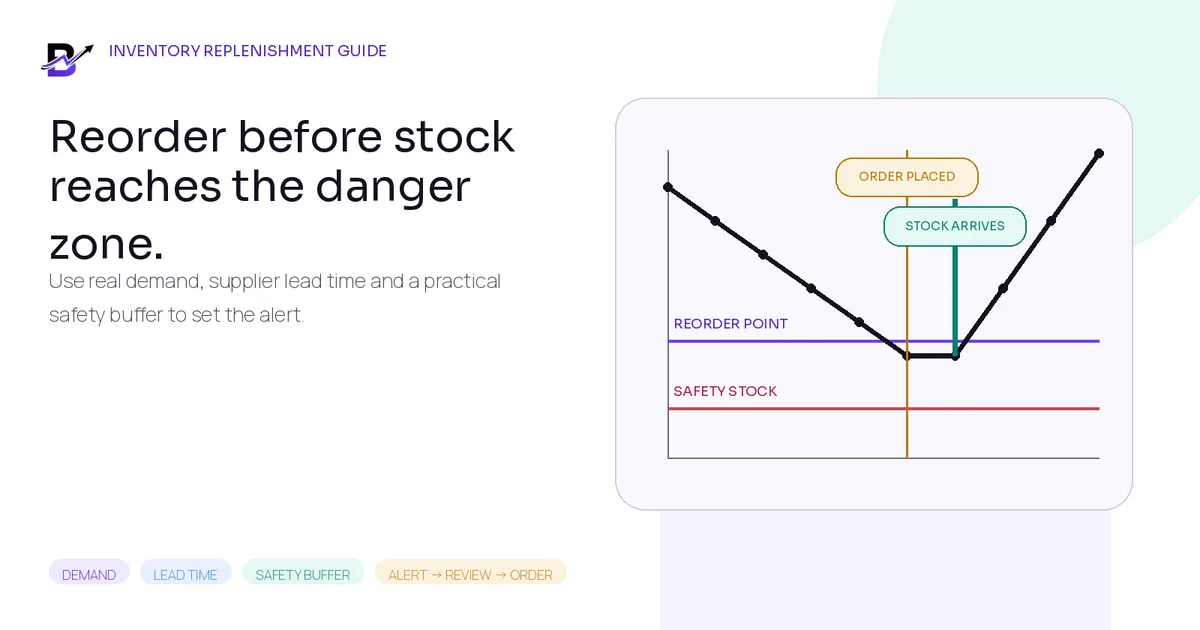
A reorder point should trigger action before normal demand reaches the safety buffer.
Running out of a fast-moving item can stop sales or fulfilment. Ordering too early can tie up cash, use storage space and increase damage, expiry or waste. The difficult part is not noticing that stock is low. The difficult part is deciding what “low” should mean for each item and branch.
A practical replenishment system uses recent demand, supplier lead time and a safety buffer to create a reorder point. It then connects the alert to a human review: check actual stock, confirmed incoming supply, reserved orders, branch transfers, supplier conditions and upcoming demand before deciding what to do.
Direct answer. A simple retail reorder point is average daily demand × supplier lead time + safety stock. Use the same time basis for demand and lead time, calculate by item and location when branches behave differently, and review seasonal or perishable products separately. When inventory position reaches the reorder point, the team should review a transfer or purchase—not buy automatically without checking current orders and incoming stock.
This guide is for specialty retailers that manage products, packaging, add-ons or operating supplies across one or more locations. It explains the calculations in easy English and includes an editable worksheet.
In this guide
Reorder point, safety stock, low-stock alert and reorder quantity—what each one means
The simple reorder point formula and one worked retail example
How to calculate average demand and real supplier lead time
Three practical ways to choose a safety-stock buffer
Why available stock, incoming supply and branch context matter
How to decide how much to reorder after the alert appears
Special rules for seasonal, perishable, slow-moving and new products
A ten-step low-stock alert and replenishment workflow
An editable Reorder Point and Safety Stock Worksheet
How Bloomlytix supports stock visibility and purchasing without claiming automatic forecasting
Start with the right inventory language
Reorder calculations become confusing when one number is expected to describe everything. A branch can physically hold stock that is already reserved, damaged or waiting for a quality check. It can also have confirmed incoming supply that has not arrived yet. Before setting an alert, decide which quantity the system will compare with the threshold.
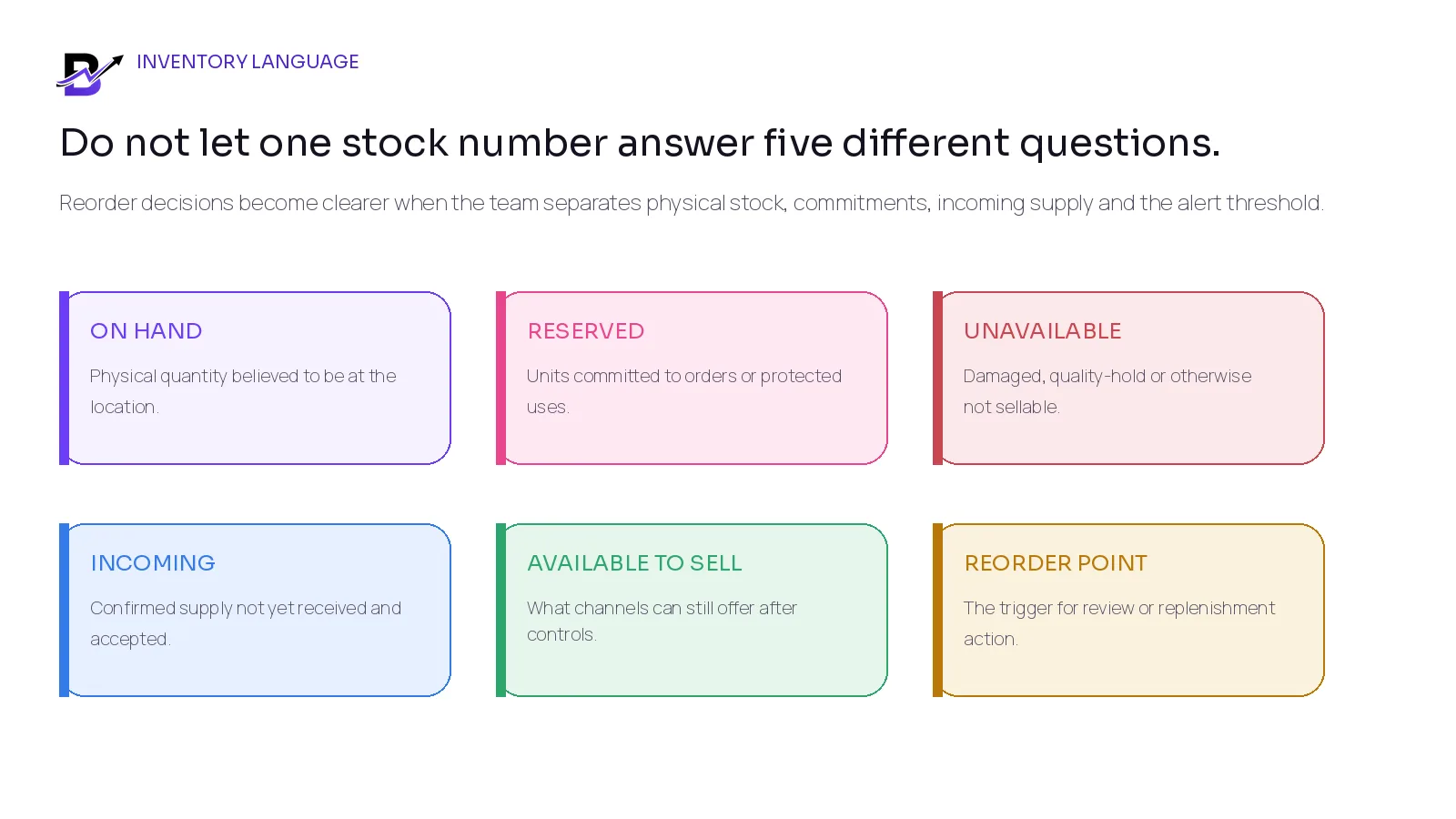
Figure 1. Reorder decisions are clearer when physical stock, commitments, incoming supply and the trigger are kept separate.
TERM | EASY MEANING |
|---|---|
On hand | The physical quantity believed to be at a location. It can still include units that should not be sold. |
Reserved / committed | Units connected to customer orders, internal jobs or another approved use. |
Unavailable | Stock that exists physically but is damaged, on hold, in quality review or otherwise not sellable. |
Incoming | Confirmed supply that has been ordered or transferred but not yet received and accepted. |
Available to sell | The quantity the business or sales channel can still offer after reservations and unavailable stock are considered. |
Inventory position | A planning view: on hand + reliable incoming − committed/reserved − unavailable. |
Reorder point | The trigger at which the team should review or place replenishment. |
Safety stock | A buffer held for demand or lead-time uncertainty. |
Low-stock alert | A system notification created when a monitored quantity crosses a configured threshold. |
Reorder quantity | The amount to buy or transfer after the decision is made. It is not the same as the reorder point. |
Important. Ask which quantity actually triggers the alert. A threshold based only on raw on-hand stock can be late when many units are reserved, or early when a reliable purchase is already arriving.
The simple retail reorder point formula
The core idea is straightforward: order before the stock needed during supplier lead time is consumed, while keeping a buffer for uncertainty.
Starting formula. Reorder point = average daily demand × supplier lead time + safety stock
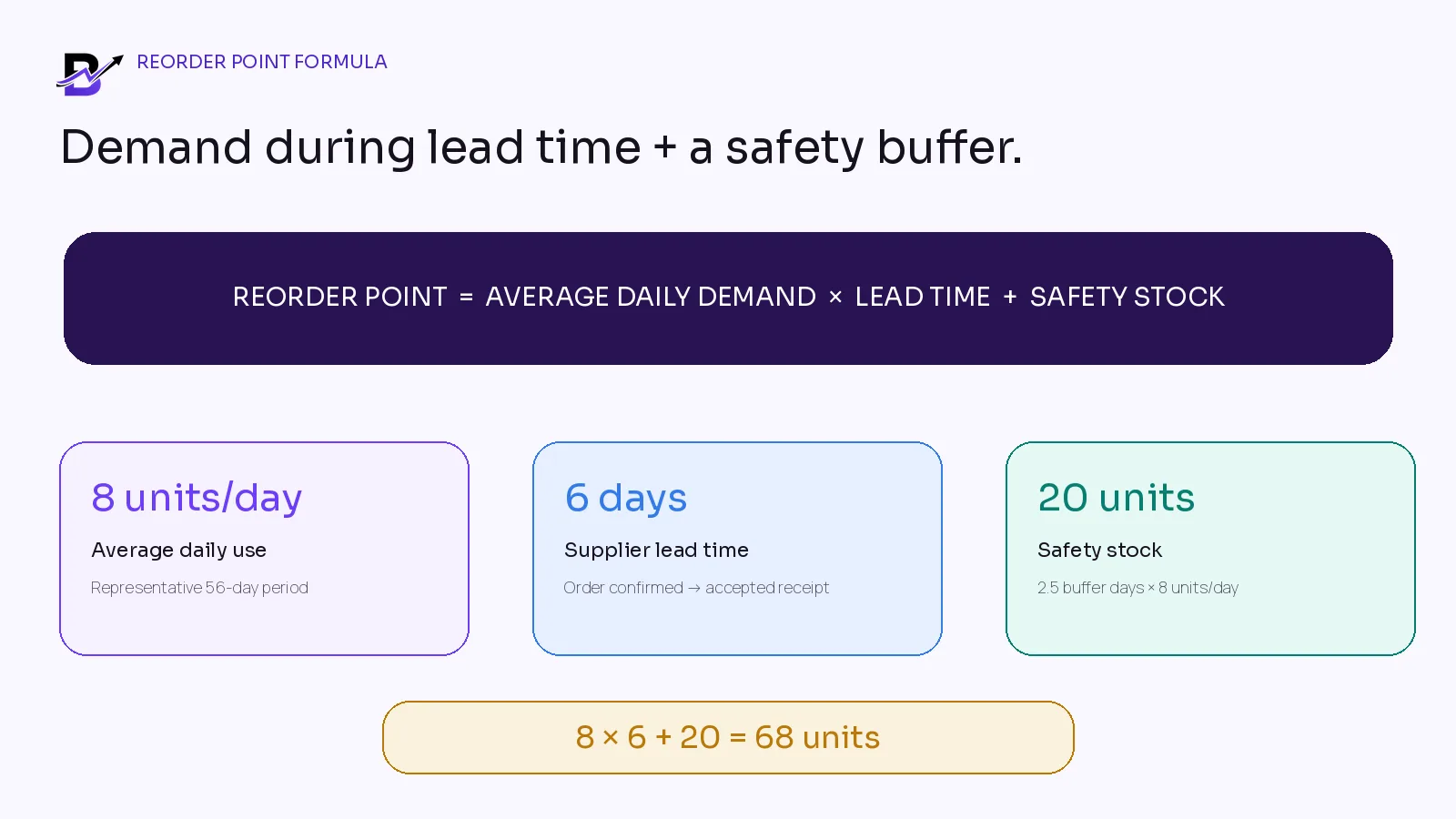
Figure 2. The example uses 8 units per day, a 6-day lead time and 20 units of safety stock, producing a starting reorder point of 68.
Worked example: medium gift boxes
A two-branch gifting retailer uses an average of 8 medium rigid gift boxes per day at its downtown branch. The usual supplier lead time—from confirmed order to accepted receipt—is 6 days. The team wants a 20-unit buffer because a delivery delay would stop several products from being packed.
INPUT | EXAMPLE | CONTROL |
|---|---|---|
Average daily demand | 8 boxes per day | Use a representative period; do not rely on one busy week. |
Supplier lead time | 6 days | Measure until the stock is received, checked and available. |
Safety stock | 20 boxes | A practical buffer based on risk, reliability and storage. |
Reorder point | 8 × 6 + 20 = 68 boxes | Review replenishment when the planning quantity reaches 68. |
The result does not mean “buy 68 boxes.” It means 68 is the trigger. The purchase quantity still depends on current inventory position, the target stock level, supplier pack size, minimum order, storage, cash, shelf life and other branch stock.
1. Calculate average demand from a representative period
Basic calculation. Average daily demand = units sold or used during a representative period ÷ active days in that period
Choose a period that reflects normal business. Twenty-eight, fifty-six or ninety days can be useful starting windows, but the right period depends on how often the item moves and how seasonal the business is. Use the same time basis as the lead time. If lead time is measured in calendar days, calculate demand per calendar day. If both are measured in business days, keep both in business days.
DATA ISSUE | HOW TO HANDLE IT |
|---|---|
Out-of-stock days | Recorded sales can be lower than true demand because the item was unavailable. Mark those days instead of treating zero sales as zero interest. |
One-off bulk orders | A corporate or event order can distort the normal average. Keep it visible, but decide whether it belongs in the baseline or in a separate planned-demand layer. |
Promotions | A discount or campaign can temporarily lift sales. Do not make the campaign peak the permanent year-round average. |
Returns and cancellations | Use fulfilled or genuinely consumed quantity where possible. Avoid counting cancelled demand as normal usage. |
Substitutions | If customers bought another item only because the preferred one was unavailable, both product histories need interpretation. |
New products | Use a comparable item, supplier minimum and small initial order, then review frequently until enough history exists. |
Operational insight. Sales history is not always the same as demand. An item that was out of stock for five days may look slow because the system could not record the sales that never happened.
2. Measure supplier lead time to accepted, usable stock
Lead time should match the real replenishment journey. For a purchased item, measure from the point the order is confirmed with the supplier until the receiving location has accepted the quantity and can use or sell it. A supplier dispatch message is not the end of lead time if the shipment still needs transport, customs, receiving, counting or quality review.
LEAD-TIME PART | WHAT TO MEASURE |
|---|---|
Order preparation | Time to approve the requirement, meet the supplier order day and place a complete purchase order. |
Supplier processing | Time the supplier needs to confirm, pick, produce or pack the item. |
Transport | Shipping or local delivery time, including normal weekly schedules. |
Receiving | Time to count, inspect and record accepted quantity at the correct branch. |
Exception delay | Shortages, damage, missing documents or supplier clarification before stock is usable. |
Use actual purchase history where it exists. Microsoft Learn describes a reorder point as expected demand during lead time, while Oracle NetSuite documents calculations that combine demand per day, lead time and safety-stock days or units. New suppliers or unreliable routes normally deserve a larger buffer until the business has enough accepted-receipt history.
Do not mix suppliers. The same item can have a 3-day lead time from one local supplier and a 14-day lead time from another. Use the supplier that the business is realistically likely to order from, or keep separate planning rules.
3. Choose a practical safety-stock method
Safety stock is not “extra stock just in case” without a reason. It is a controlled buffer for uncertainty. The buffer should reflect demand variability, supplier reliability, product criticality, storage, shelf life, substitution options and the cost of a stockout.
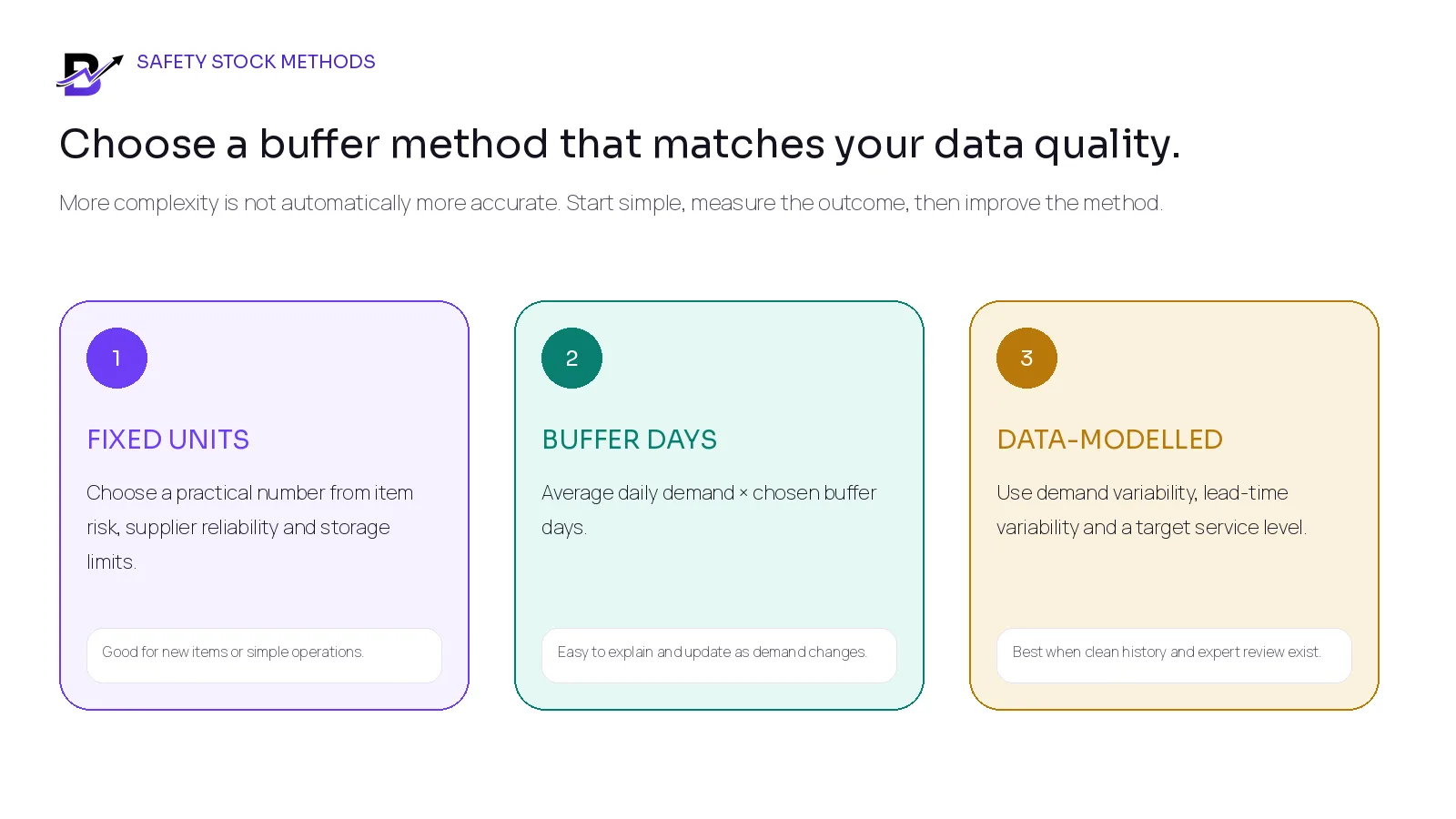
Figure 3. Start with a method the team can explain and maintain; increase sophistication only when the data supports it.
METHOD | HOW IT WORKS | BEST FIT | MAIN RISK |
|---|---|---|---|
Fixed units | Choose a specific buffer from known risk. | Useful for new items, simple operations or products with a clear minimum display or operating quantity. | Can stay unchanged while demand changes. |
Buffer days | Average daily demand × chosen buffer days. | Easy to explain and update. The worked example uses 2.5 days × 8 units = 20. | Still needs review when demand or lead time becomes more volatile. |
Data-modelled buffer | Use clean history, demand variation, lead-time variation and a target service level. | Useful for mature, high-volume inventory planning. | Requires reliable data and specialist assumptions; do not copy a formula blindly. |
Factors that justify a larger buffer
Demand changes sharply from day to day or is highly event-driven.
Supplier delivery dates vary or shortages are common.
Running out stops many sales or prevents fulfilment of other products.
The item has few substitutes and cannot be transferred quickly from another branch.
The item is inexpensive and compact compared with the operational cost of running out.
Factors that justify a smaller buffer
The item is perishable, fragile, seasonal or expensive to hold.
Demand is slow or irregular and the item can be ordered against confirmed demand.
Suppliers deliver frequently and reliably.
Another branch, warehouse or approved substitute can cover the shortage.
Storage, cash or expiry risk is more serious than a short delay.
4. Set the low-stock alert at the right planning level
A low-stock alert is the visible trigger. In a simple setup, the alert threshold can equal the reorder point. Some businesses place the alert slightly above the reorder point so the team has time to review the item before the true ordering trigger is reached. The important part is knowing what the alert watches and how often it is checked.
ALERT DESIGN | QUESTION TO DEFINE |
|---|---|
Item or variant level | A small, large or scented variant can move at a different rate and may need its own threshold. |
Location level | Different branches can have different demand, lead time, storage and transfer options. |
Monitored quantity | Confirm whether the system compares on-hand, available, available-to-sell or another planning quantity. |
Alert timing | Know whether the alert is immediate, daily, after closing or part of a report. |
Ownership | Name the purchaser, branch manager or other role responsible for reviewing the alert. |
Alert state | Avoid repeated duplicate notifications. The item should remain open until the decision is recorded or the stock position changes. |
Square documents location-level low-stock thresholds that generate an alert when the in-stock count falls below the configured amount. That is useful, but the business still needs its own method for choosing the amount and deciding what to do next.
5. Use inventory position—not only the shelf count
Planning formula. Inventory position = on hand + reliable confirmed incoming − committed/reserved − unavailable
The formula is a planning view, not necessarily the exact label used by your software. It prevents two common mistakes: buying again when a reliable purchase is already arriving, and waiting too long because the on-hand count includes stock that is already committed or unusable.
COMPONENT | EXAMPLE UNITS |
|---|---|
On hand | 72 |
Confirmed incoming within lead time | +24 |
Reserved for paid orders | −18 |
Damaged / quality hold | −6 |
Inventory position | 72 + 24 − 18 − 6 = 72 |
In this example, raw on-hand is 72 and the reorder point is 68. A simple shelf-count alert might look safe. After considering the incoming, reserved and unavailable quantities, the inventory position is also 72. No purchase may be needed yet, but the item is close enough to require review. If the incoming supply is uncertain, exclude it or apply a stricter reliability rule.
6. Calculate the reorder point by branch when locations behave differently
A company total can look healthy while one branch is about to run out. A busy city branch, a mall kiosk and a central warehouse can have different sales rates, receiving schedules and transfer options. Calculate at item-location level when the business needs local control.
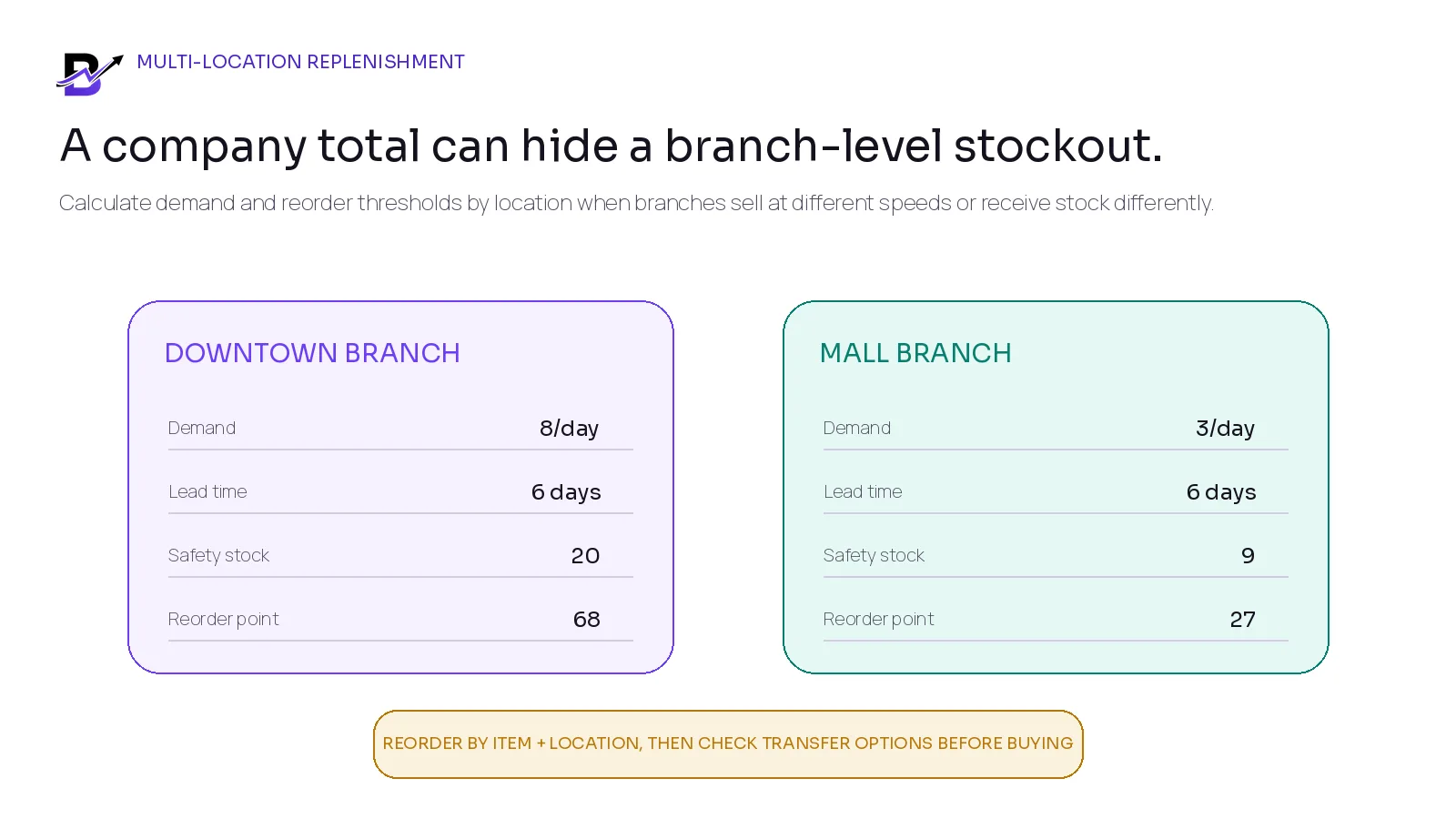
Figure 4. The same item can need different reorder points at different branches.
Before buying, check whether another branch can transfer stock without creating a shortage there. A transfer can be faster and cheaper than a supplier order, but it should use one traceable record with source, destination, sent quantity, received quantity and exception notes.
7. Reorder point tells you when; target stock tells you how much
The reorder point is a trigger. It does not automatically tell the team how many units to buy. The order quantity should move the item toward a chosen target while respecting supplier and business limits.
Simple quantity rule. Suggested order quantity = target stock level − inventory position
Suppose the retailer wants a target of 120 medium gift boxes. The current inventory position is 61. The starting order quantity is 59. If the supplier sells cartons of 12, the business might round to 60. It should still check minimum order value, storage, cash, expiry, incoming campaigns and other items needed from the same supplier.
QUANTITY CONTROL | WHY IT MATTERS |
|---|---|
Supplier minimum / pack size | Round to a valid quantity without creating unnecessary excess. |
Next review date | If purchasing is reviewed only weekly, target stock may need to cover the time until the next review as well as lead time. |
Storage and shelf life | A mathematically correct order can still be operationally wrong when stock cannot be stored or will expire. |
Cash and margin | Prioritise critical or fast-moving items when the purchase budget is limited. |
Transfers and substitutes | Use available branch stock or approved alternatives before buying more where practical. |
Open purchase orders | Prevent duplicate orders for the same requirement. |
8. Adjust the method for different item types
ITEM TYPE | PRACTICAL APPROACH |
|---|---|
Fast-moving sellable products | Use recent demand and frequent review. Watch out-of-stock days and simultaneous sales across channels. |
Packaging and operating supplies | A slightly larger buffer can be sensible when the item is low-cost but running out stops fulfilment. |
Perishable goods | Use smaller order quantities, shorter review cycles and waste/expiry limits. A large safety stock can become waste. |
High-value slow movers | A reorder point may be less useful. Consider manual review, order-to-order purchasing or a very small buffer. |
Seasonal products | Use an event forecast or temporary threshold. Do not let Valentine’s Day, Ramadan, Eid or Black Friday permanently distort the normal average. |
New products | Start from a comparable item, supplier minimum and controlled opening quantity. Review weekly until enough history exists. |
Custom or made-to-order items | Replenish components or buy against confirmed demand rather than treating every finished item like normal shelf stock. |
Seasonal rule. Keep baseline demand and event demand separate. A temporary peak threshold should have a start date, end date and post-event review.
9. Use a controlled low-stock alert workflow
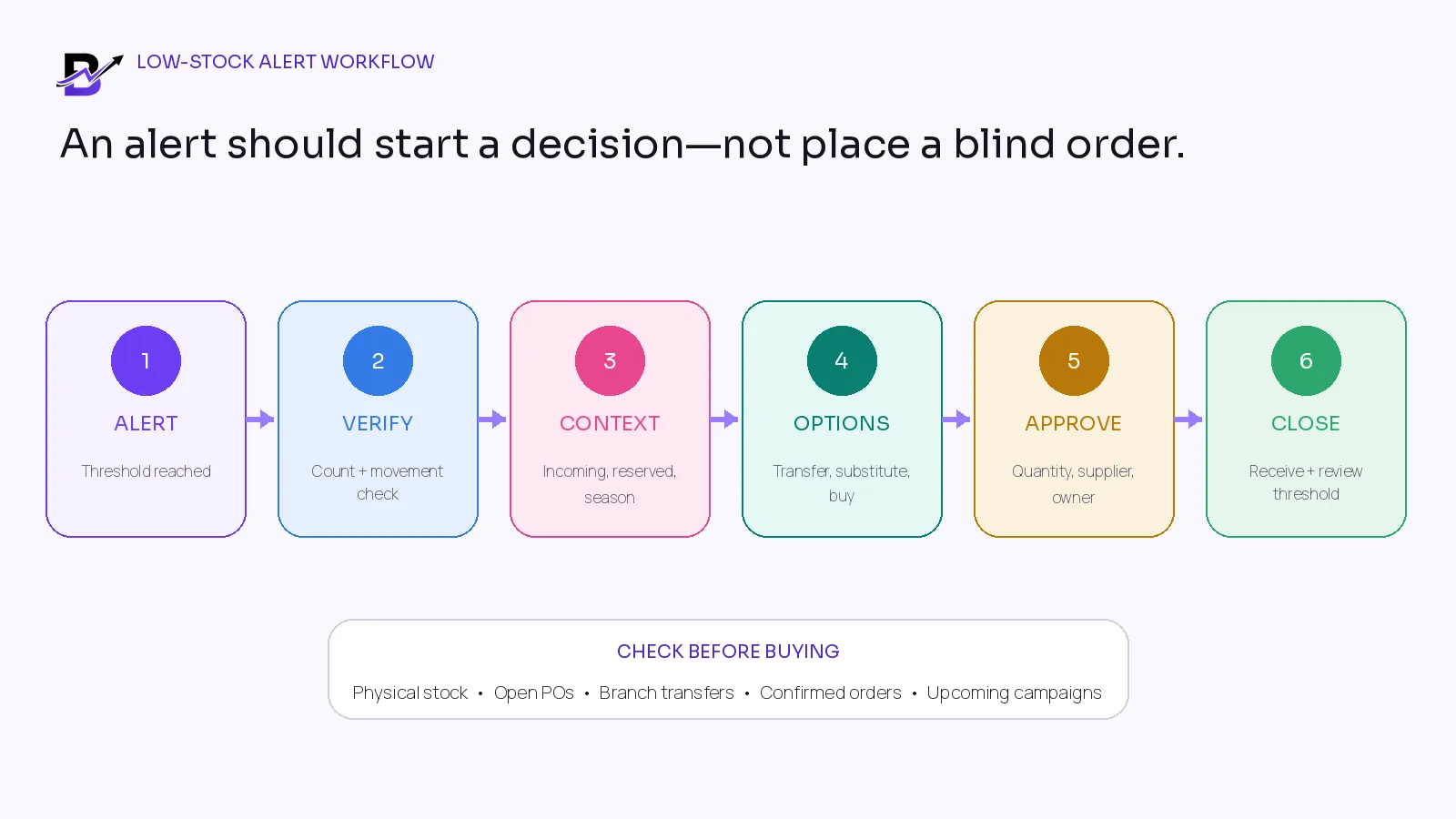
Figure 5. A low-stock alert should lead to verification, context, options, approval and a closed result.
Receive the alert: The threshold is reached for a specific item or variant and location. Assign an owner.
Verify the record: Check recent movements and, when the difference matters, perform a physical spot count.
Review demand context: Check confirmed orders, upcoming campaigns, seasonality, lost-sales risk and substitution options.
Review supply context: Check open purchase orders, expected receipt dates, supplier reliability, branch transfers and warehouse stock.
Choose the action: Transfer, purchase, use a substitute, change the threshold, or record no action with a reason.
Approve the quantity: Confirm supplier, pack size, minimum order, target stock, branch and budget.
Create the purchase or transfer record: Keep item, location, quantity, supplier/source, expected date and owner together.
Receive actual stock: Record accepted quantity, shortage, damage and the date the stock became usable.
Close the alert: Make the outcome visible and avoid duplicate purchasing.
Review the threshold: Compare stockouts, emergency buys, excess stock and lead-time performance; adjust only with evidence.
10. Reorder Point and Safety Stock Worksheet
Use one row per item, variant and location. The worksheet is intentionally simple. It creates a documented starting point that the team can review after real purchases and stock outcomes.
ITEM / VARIANT | LOCATION | AVG DAILY DEMAND | LEAD TIME DAYS | SAFETY STOCK | REORDER POINT | INVENTORY POSITION | ACTION / OWNER |
|---|---|---|---|---|---|---|---|
Medium rigid gift box | Downtown | 8 | 6 | 20 | 68 | 72 | Monitor; purchaser |
Worksheet formulas. Reorder point = average daily demand × lead time + safety stock. Inventory position = on hand + reliable incoming − committed/reserved − unavailable.
Review questions for every worksheet row
Is the demand period representative, or was the item out of stock or promoted?
Does lead time end at accepted receipt, and is it based on the likely supplier?
Why was this safety-stock method chosen?
Is the threshold specific to the item, variant and location?
Are open purchases, reservations, unavailable stock and branch transfers visible?
Who owns the alert, decision and receipt review?
When will the threshold be reviewed again?
Metrics that improve replenishment decisions
METRIC | SIMPLE MEANING | WHAT IT CAN REVEAL |
|---|---|---|
Stockout incidents | How often the item becomes unavailable before replenishment arrives. | Reorder point, lead time or safety buffer may be too low. |
Emergency purchase rate | Purchases placed outside the normal process because stock is urgent. | Planning, supplier reliability or approval speed needs review. |
Days below threshold | How long the item stays under the alert level before action or receipt. | Alert ownership or supplier timing may be weak. |
Lead-time average + range | Accepted receipt time across recent purchases. | The planning input may be outdated or too optimistic. |
Excess days of supply | Current stock divided by recent daily demand. | The buffer or order quantity may be too high. |
Waste / expiry / damage | Units or value lost before sale or use. | Perishable or fragile items may be overstocked. |
Transfer-before-purchase rate | How often another branch covers the need. | Central purchasing and branch allocation may need improvement. |
Alert outcome | Purchase, transfer, substitute, threshold update or no action. | Shows whether alerts are useful or noisy. |
How Bloomlytix supports the replenishment workflow
Bloomlytix keeps practical inventory and purchase context connected to the wider retail operation. Its current public documentation covers product and branch stock visibility, adjustments, low-stock alerts, supplier purchases, invoice attachments and operational reports. Exact behaviour depends on the products, branches, users and implemented workflow.
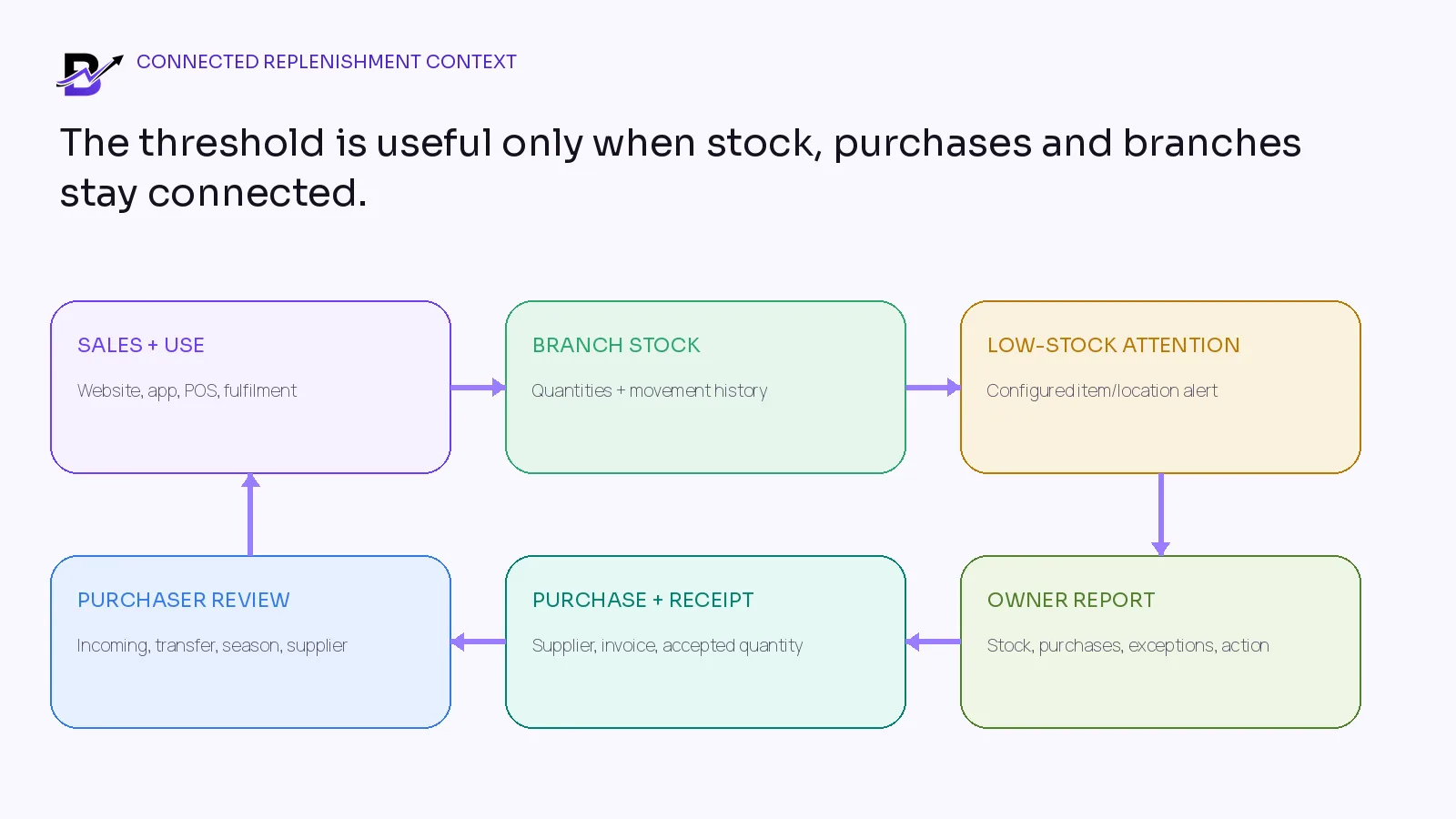
Figure 6. The useful workflow connects sales and stock movements to branch quantities, low-stock attention, purchasing, receiving and owner review.
BLOOMLYTIX AREA | ROLE IN THE WORKFLOW |
|---|---|
Product and branch stock | Keep configured quantities and movement history by item and operational location. |
Low-stock visibility | Highlight configured items and branches that need staff or manager attention. |
Sales and fulfilment context | Connect eligible ecommerce, app, POS or fulfilment activity to stock movement rules where configured. |
Purchases and suppliers | Record supplier, branch, category, values, invoice evidence and accepted quantities according to the implemented workflow. |
Transfers and adjustments | Keep damage, wastage, transfer and correction reasons visible instead of editing totals without context. |
Reports and owner review | Review stock and purchasing alongside products, branches, sales, staff, cash and wider operations. |
Product scope. Bloomlytix has documented branch stock, movement, low-stock, supplier-purchase, invoice-evidence and reporting tools. Automatic demand forecasting, statistical safety-stock calculation, supplier EDI, automated purchase orders, advanced warehouse planning and optimized replenishment are not represented here as confirmed standard capabilities. Confirm exact alert and calculation behaviour during onboarding.
Questions to ask during an inventory demonstration
Can the threshold be set for each product variant and branch?
Which quantity triggers the alert: on hand, available, available to sell or another planning field?
Can the system show reserved, unavailable and incoming stock beside the alert?
Can supplier lead time be stored by item, supplier or location?
Can thresholds be imported or updated in bulk?
Can a manager see who changed the threshold and why?
Can an alert lead to a purchase draft or transfer without placing it automatically?
How does the system prevent duplicate purchase decisions for the same shortage?
Can pack sizes, minimum order quantities and supplier minimum values be recorded?
Can thresholds be changed temporarily for a campaign or season?
Can the team compare expected and actual supplier lead time?
Which reports show stockouts, low-stock items, open purchases, transfers and purchase history?
What automatic forecasting or replenishment features are standard, and what requires custom work or another system?
Frequently asked questions
What is the basic reorder point formula?
Average daily demand × supplier lead time + safety stock. Use consistent time units and review the result with real stock, supplier and branch conditions.
Is a low-stock alert the same as a reorder point?
It can use the same number, but the concepts are different. The reorder point is the planning trigger. The low-stock alert is the notification created when the monitored quantity crosses a configured threshold.
How much safety stock should a retailer keep?
There is no universal amount. Start from item risk, demand variation, supplier reliability, storage, shelf life, substitutes and the cost of running out. Review the buffer using actual outcomes.
Should each branch have a different reorder point?
Yes, when branches sell at different speeds, receive stock differently or have different transfer options. A company total can hide a local shortage.
How often should reorder points be reviewed?
Review fast-moving and critical items regularly, and recalculate after supplier changes, major campaigns, new branches or repeated stockouts or excess stock. Stable items may need less frequent review.
Does the reorder point tell me how much to order?
No. It tells you when to review replenishment. The quantity depends on the target stock level, inventory position, supplier pack size, minimum order, storage, cash, shelf life and branch options.
How should seasonal products be handled?
Use a separate event forecast or temporary threshold with start and end dates. Do not permanently mix a peak event into the normal baseline.
Can Bloomlytix calculate reorder points automatically?
Bloomlytix supports configured low-stock visibility, branch stock, purchases, supplier context and reports. Exact automatic calculation or forecasting behaviour must be confirmed for the implemented setup; it should not be assumed from this article.
Final reorder-point checklist
Each item or variant has a clear unit, SKU or stable identity and branch.
Demand uses a representative period and marks out-of-stock, promotion and one-off bulk-order effects.
Lead time runs from confirmed order to accepted, usable stock.
Safety stock has a written reason and review date.
The alert watches a clearly defined quantity.
Reorder points are location-specific where branch demand differs.
Incoming, reserved, unavailable and transfer stock are visible before purchasing.
Reorder quantity is calculated separately from the reorder point.
Supplier packs, minimums, storage, shelf life and cash are checked.
Every alert ends with a purchase, transfer, substitute, threshold change or documented no-action result.
Actual receipt time and stock outcomes are used to improve the next calculation.
Use the worksheet. Start with one fast-moving item. Fill in its recent demand, accepted-receipt lead time, safety buffer, reorder point and current inventory position. Then test the decision with the person who buys and the person who receives stock.
Sources and further reading
The formulas and examples are educational starting points, not accounting, financial or supply-chain consulting. Adapt them to your products, country, suppliers, storage, service targets and internal approval process.
Related Bloomlytix guides: Flower-shop inventory · Retail purchasing and supplier records · Multi-location inventory · Holiday retail operations · Perfume inventory · Cafe ordering and stock workflow.