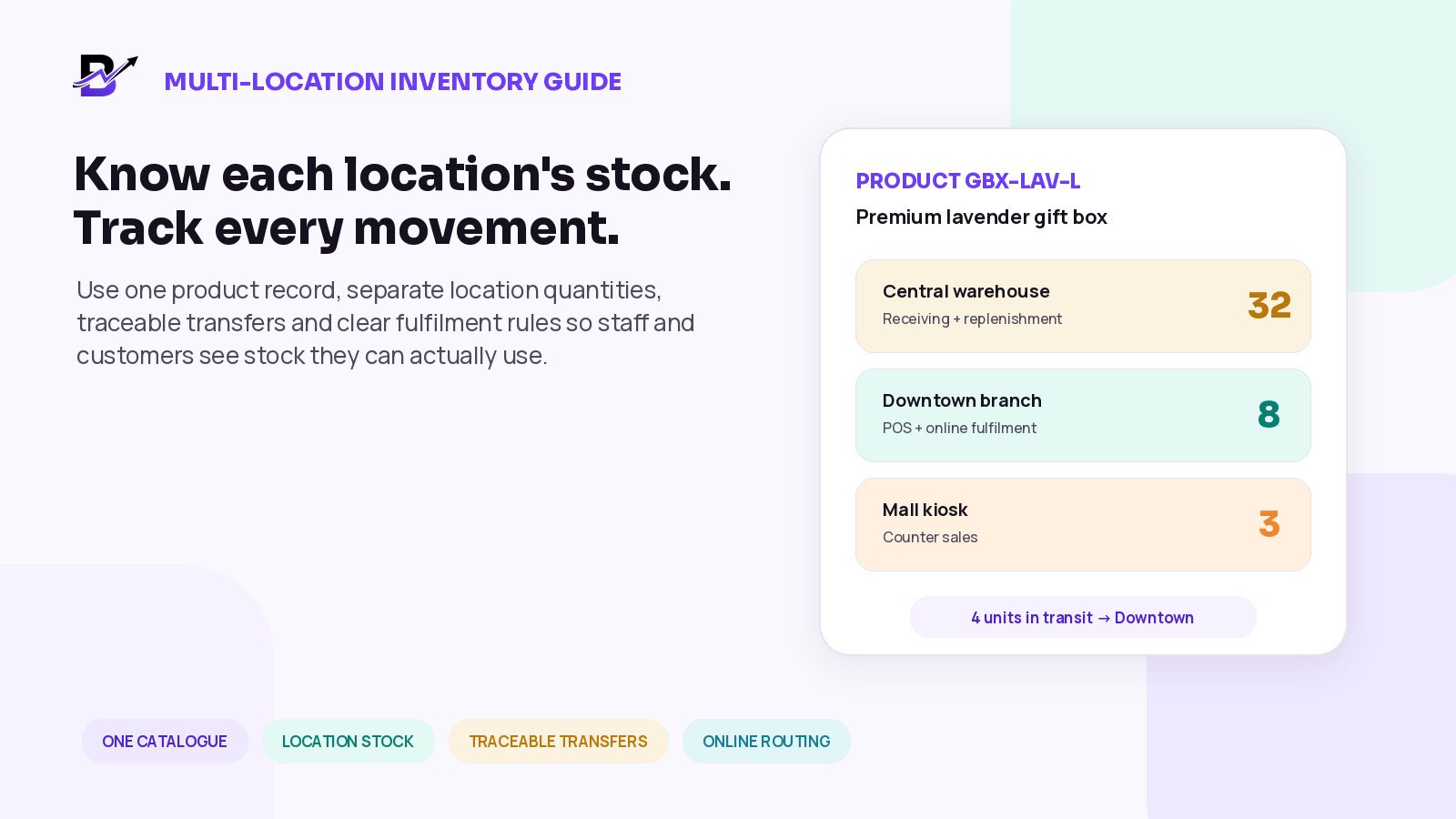
One product can exist in several places, but every location needs its own usable stock position.
A second branch changes the meaning of “we have it in stock.” The business may own twenty units in total, but that does not tell a customer whether the product is available at the branch they will visit, the location serving their address or the pickup point they selected.
The problem becomes harder when inventory moves between a warehouse, shop, kiosk, preparation hub or third-party fulfilment location. A transfer can be sent but not received. An online order can reserve units at one branch while staff are looking at a company total. A count correction can hide the real cause of a repeated error.
DIRECT ANSWER
Manage multi-location inventory by giving every physical quantity a named location. Keep one approved product or variant identity, then track on-hand stock and the reservations, unavailable units and incoming movements your process actually supports. Record sales, receipts, transfers, returns, damage and count corrections against the correct branch. Route online orders against an eligible location’s real ability to fulfil the promise.
This guide is for retail businesses with two or more stores, kiosks, warehouses, pickup points or fulfilment locations. It is especially useful for florists, gifting brands, bakeries, perfume shops, jewellery shops, cafés and other specialty retailers that sell online and at physical counters.
What you will learn
Why a company-wide stock total is not enough
How to use one catalogue with separate location quantities
Which stock states every branch should understand
How to transfer inventory without double-counting it
How online orders should choose a fulfilment location
How purchases, counts, corrections and returns affect branch stock
Which roles and metrics help owners keep control
How Bloomlytix supports practical multi-branch inventory workflows
Why multi-location inventory becomes difficult
In a single shop, the person looking at the shelf may also be the person completing the sale. In a multi-location business, several teams can change the same product quantity for different reasons. A warehouse receives a supplier delivery. Branch A completes a POS sale. Branch B reserves units for an online order. A driver returns a failed delivery to the preparation location. A manager moves stock between branches before a peak weekend.
A single total hides those differences. It can make the business look well stocked while the location facing customer demand has none available. It can also hide stock that is physically present but already reserved, damaged, waiting for inspection or travelling between locations.
QUESTION | COMPANY TOTAL ANSWERS | LOCATION INVENTORY MUST ANSWER |
|---|---|---|
Do we own the item? | Yes, somewhere in the business. | Which location physically holds it? |
Can a customer buy it now? | Not reliably. | How much is available to sell at the selected location or channel? |
Can this branch fulfil the order? | The total may look sufficient. | Does one eligible location have the complete basket and time to prepare it? |
Where did the quantity change? | The total moved. | Which sale, receipt, transfer, damage or correction changed which location? |
What needs action? | The company still has stock. | Which location is low, overstocked, inaccurate or waiting for a transfer? |
CORE PRINCIPLE
The business can share one product catalogue. It should not share one unexplained stock number across every location.
Use one catalogue, then separate inventory by location
A product record describes what the business sells. A location inventory record describes where that product is held and what quantity can be used there. Mixing those two layers causes duplicate products, inconsistent prices and unreliable stock.
SHARED PRODUCT INFORMATION | LOCATION-SPECIFIC INFORMATION |
|---|---|
Product name, category and description | On-hand quantity at the named location |
Stable product and variant ID | Reserved or committed quantity |
SKU or barcode where used | Unavailable, damaged or quality-hold quantity |
Approved price and configured channel rules | Incoming and in-transit quantity |
Size, colour, scent, flavour or other variant | Available-to-sell quantity and low-stock level |
Images and approved product content | Last count, last movement and responsible user |
Do not create “Lavender Gift Box - Downtown” and “Lavender Gift Box - Mall” as separate products only because the item sits in different branches. Use one stable product or variant, then assign quantities and selling permissions by location. A duplicate product should exist only when the business is truly selling a different item, bundle, specification or price structure that needs its own record. See Shopify’s location setup for one platform’s approach to storing and fulfilling from multiple locations.
Define each location before entering quantities
A “location” is not only a traditional shop. It is any named place that sells, stores, receives, prepares, ships or controls inventory. Write down the operational role of every location before assigning stock.
LOCATION TYPE | TYPICAL ROLE | KEY CONFIGURATION QUESTION |
|---|---|---|
Retail store | POS sales, pickup and local fulfilment | Can it sell, receive purchases, transfer stock and fulfil online orders? |
Kiosk or pop-up | Counter sales with limited storage | Which products can be sold here, and where does replenishment come from? |
Warehouse | Receiving, storage and branch replenishment | Can it fulfil customers directly, or only supply other locations? |
Preparation hub | Order preparation without normal walk-in sales | Which online orders and branches can it support? |
Returns / quarantine area | Holds items awaiting inspection or write-off | Should this stock remain unavailable until reviewed? |
Third-party fulfilment point | External party stores or ships stock | Which records, timings and exceptions are visible to your system? |
Give every location a stable internal code and a clear name that staff will recognise. For example, “DXB-DWT-01” is safer in imports and integrations than using a name that changes whenever the shop is rebranded. Larger supply chains may use standard identifiers such as a GS1 Global Location Number, but many small and mid-sized retailers can begin with consistent internal location codes. See the GS1 GLN standard for the optional industry identifier.
Understand the stock states at each location
A branch quantity becomes more useful when the team understands what the number means. Software platforms use different labels, but the operating ideas below are common.
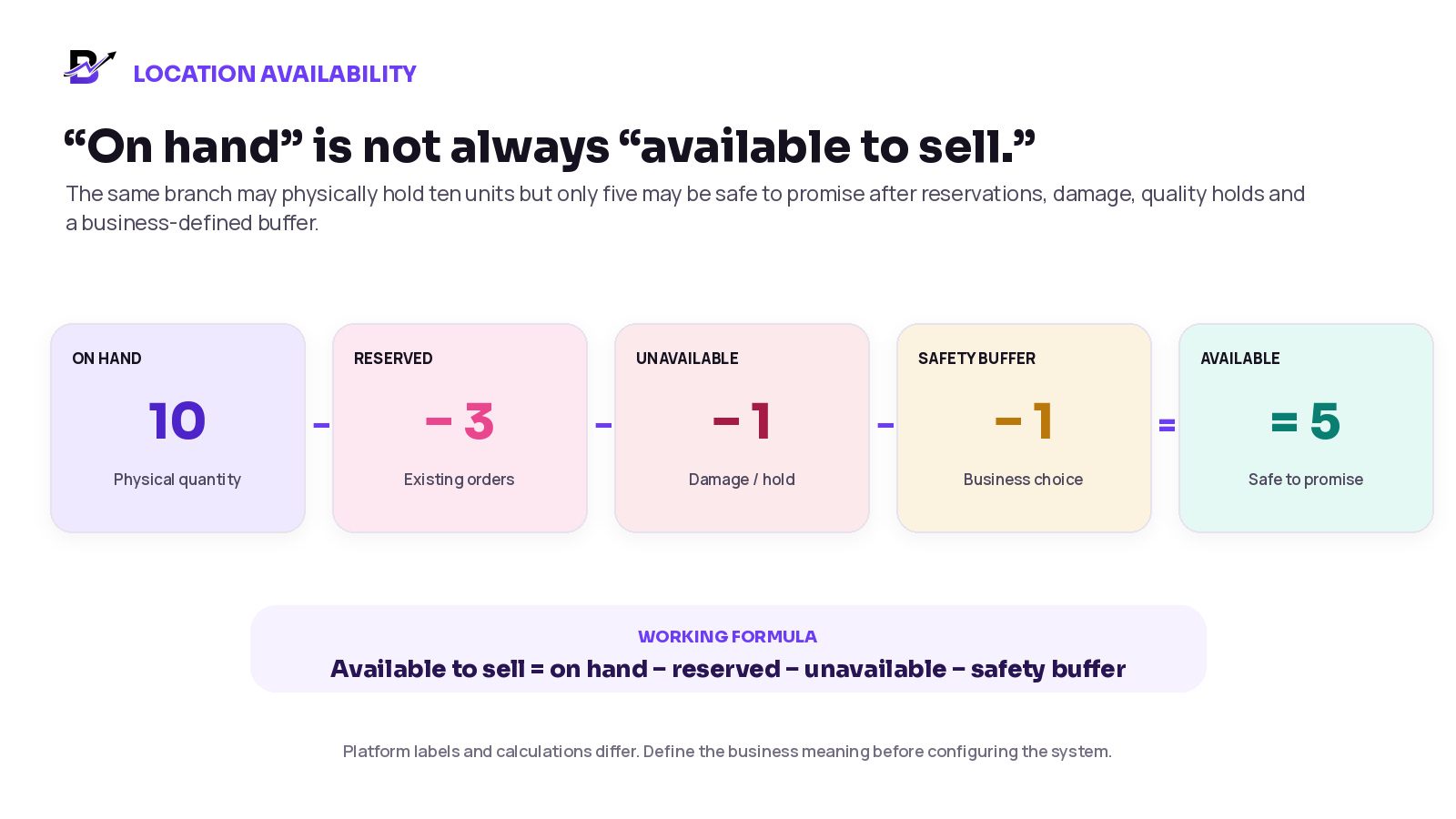
Figure 1. Illustrative available-to-sell calculation: 10 on hand minus 3 reserved, 1 unavailable and 1 safety buffer equals 5 available.
STOCK STATE | EASY MEANING | EXAMPLE |
|---|---|---|
On hand | The physical quantity believed to be at the location. | A branch has 10 gift boxes in the shop. |
Reserved / committed | Quantity already linked to an order or approved task. | Three boxes are held for paid orders. |
Unavailable | Quantity physically present but not sellable. | One box is damaged or waiting for inspection. |
In transit | Quantity sent from one location but not yet received by another. | Four boxes left the warehouse this morning. |
Incoming purchase | Quantity expected from a supplier but not yet received. | Twenty units are due next Tuesday. |
Available to sell | The quantity the branch or channel may safely offer now. | On hand minus reservations, holds and any chosen buffer. |
WORKING FORMULA
Available to sell = on hand − reserved − unavailable − safety buffer, when the business uses one. Do not copy the formula blindly: confirm how your platform handles reservations, pending orders, returns, transfers and overselling.
Record every reason location stock changes
A reliable quantity is supported by a movement history. The history should explain which location changed, which item changed, how much it changed, why it changed and who recorded the event.
MOVEMENT | LOCATION EFFECT | IMPORTANT CONTROL |
|---|---|---|
Supplier receipt | Increase the receiving location after goods are checked. | Do not increase a branch that did not physically receive the items. |
POS sale | Reduce or reserve eligible stock at the POS location. | The device or staff sale must use the correct branch. |
Online order | Reserve or deduct stock at the assigned fulfilment location. | Do not reserve company-wide stock with no location owner. |
Cancellation | Release any reservation that should no longer remain. | Confirm the item was not already prepared, consumed or transferred. |
Return | Receive into the actual return location, then inspect. | Money refunded does not automatically mean sellable stock returned. |
Damage / wastage | Move quantity out of sellable stock at the affected location. | Use a controlled reason and evidence where needed. |
Transfer | Reduce the source when stock leaves; increase the destination after receipt in a staged process. | A seven-stage transfer is recommended operational control, not a claim about current Bloomlytix statuses. |
Count correction | Adjust the named location after investigation and approval. | Record the cause rather than silently overwriting the total. |
The location must be part of the event, not an optional note. “Sold 2” is incomplete. “Sold 2 from Downtown Branch through POS by staff member A” gives the owner a usable audit trail. Shopify documents separate inventory states for its own platform; configure your definitions to match the system you use.
Build a transfer workflow that cannot count stock twice
For a business that dispatches stock before the destination receives it, a transfer needs a controlled record between locations. The recommended seven stages below distinguish requested, sent, in-transit, received and unresolved quantities. Bloomlytix’s documented quantity-transfer action updates the source and destination together; confirm staged transit or partial-receipt support before treating this diagram as a product workflow.
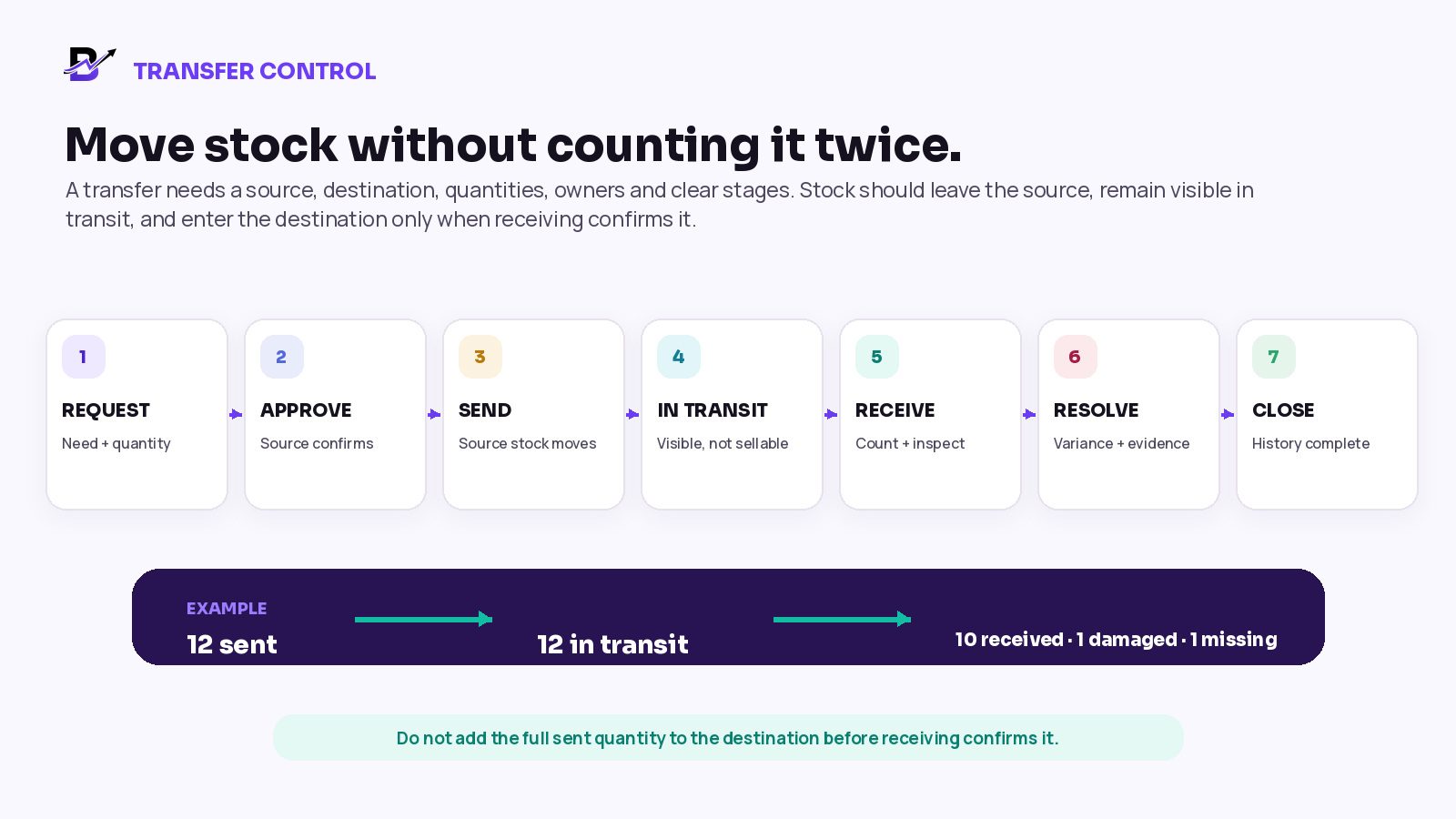
Figure 2. Recommended transfer control: 12 sent, 10 received in good condition, 1 damaged and 1 missing.
Request the transfer. Record the source, destination, required date, product or variant, requested quantity and reason.
Approve availability. The source confirms the item and quantity can be moved without breaking existing orders or local demand.
Pick and send. Record the quantity actually packed, the staff owner, send time and any tracking or evidence. Move it out of source availability according to the approved rule.
Show the stock in transit. Keep the quantity visible to owners, but do not let the destination sell it before receipt unless the system and business deliberately support that risk.
Receive and inspect. The destination counts the units, checks condition and records the quantity actually accepted.
Resolve differences. Record damage, shortage, overage, wrong items or rejected units with an owner and next action.
Close the transfer. The sent, received and variance quantities agree. The movement history remains available for review.
Worked example: a partial transfer
The central warehouse sends 12 medium gift boxes to Branch B. Branch B receives 10 in good condition, finds one damaged and cannot find one unit.
TRANSFER VALUE | RECORDED RESULT |
|---|---|
Requested | 12 units |
Sent | 12 units leave the warehouse and become in transit |
Received as sellable | 10 units increase Branch B sellable stock |
Damaged | 1 unit enters an unavailable or damage record at Branch B |
Missing / unresolved | 1 unit remains a transfer variance until investigated |
Closed | Only after the discrepancy has an approved outcome |
DO NOT HIDE THE VARIANCE
Do not add all 12 units to Branch B and quietly correct the number later. The received, damaged and missing quantities should remain explainable in the transfer history.
For an example of an explicitly staged transfer in another retail system, see Square transfer orders.
Decide how online orders choose a fulfilment location
An online store can display a product as available because stock exists somewhere in the business. That does not mean every location can fulfil the order. The routing rule should consider the complete customer promise, not only the nearest branch or the largest quantity.
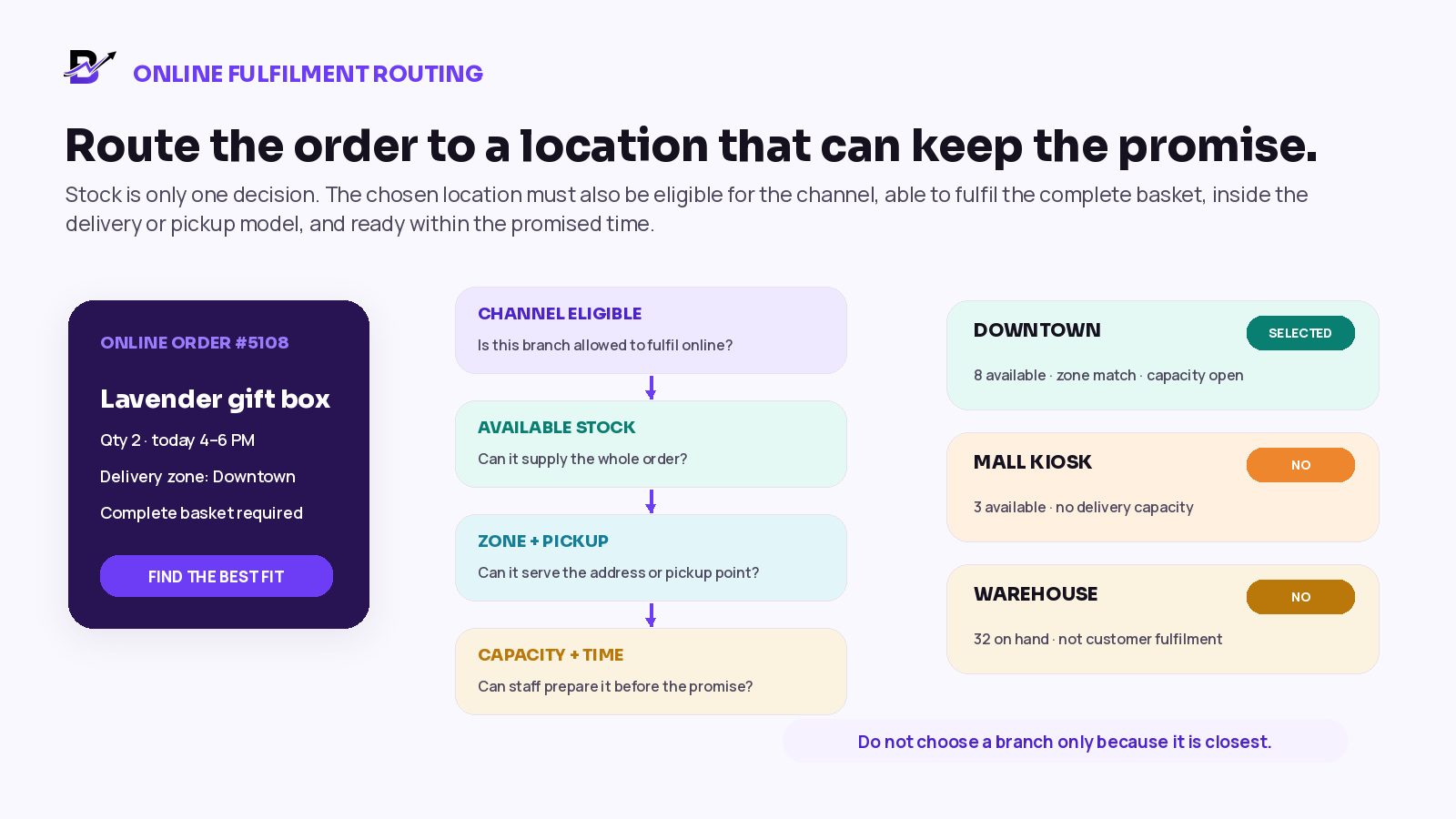
Figure 3. An online order should go to an eligible location with enough stock, service coverage and preparation capacity.
ROUTING QUESTION | WHY IT MATTERS |
|---|---|
Is the location eligible for online fulfilment? | A warehouse, kiosk or pop-up may hold stock without serving website orders. |
Does it have available-to-sell stock for the complete basket? | Two branches may each hold part of the order while neither can fulfil it alone. |
Does it serve the delivery zone or selected pickup point? | Inventory availability is not the same as service-area eligibility. |
Can the team prepare the order before the promised time? | A branch with stock may already be full or lack the required skill, packaging or equipment. |
What happens if the first location rejects or cannot complete the order? | Reassignment should update reservation, responsibility, stock and customer timing clearly. |
Will the order be split? | Split fulfilment can create extra delivery cost and complexity and should be explicitly supported. |
Common routing models include customer-selected pickup, a fixed branch for each delivery area, a location-priority list, manual assignment after validation, or a more advanced allocation engine. The best model depends on the catalogue, branch capacity and delivery operation. Automated allocation and split-order optimisation should be confirmed rather than assumed. For examples in another platform, see Shopify location fulfilment and order routing. Bloomlytix routing behavior should be tested in your demo.
Keep purchases tied to the receiving location
A purchase invoice describes what the business bought. The inventory receipt describes what a location physically accepted. They are connected, but they are not always the same event.
REPLENISHMENT MODEL | HOW STOCK SHOULD ENTER THE LOCATIONS |
|---|---|
Supplier delivers directly to each branch | Record the purchase and receipt against the branch that physically accepted the goods. |
Supplier delivers to a central warehouse | Increase warehouse stock first, then use controlled transfers to replenish branches. |
One branch buys for another branch | Record the actual receiving location or complete a transfer after the buying branch receives it. |
Emergency cross-branch balancing | Use a transfer reason and approval instead of manually reducing one branch and increasing another. |
Incoming purchase not yet delivered | Keep the quantity expected or incoming; do not offer it as available before receipt unless the business deliberately supports pre-orders. |
The branch quantity should change when the location physically receives or sends stock, not merely when an invoice is uploaded. For supplier and invoice controls, see our retail purchase management guide.
Count every location separately
Software quantities become trustworthy only when they are compared with physical stock. A count should not end with someone replacing the old number. The team should investigate the difference, approve the reason and record a correction that remains visible.
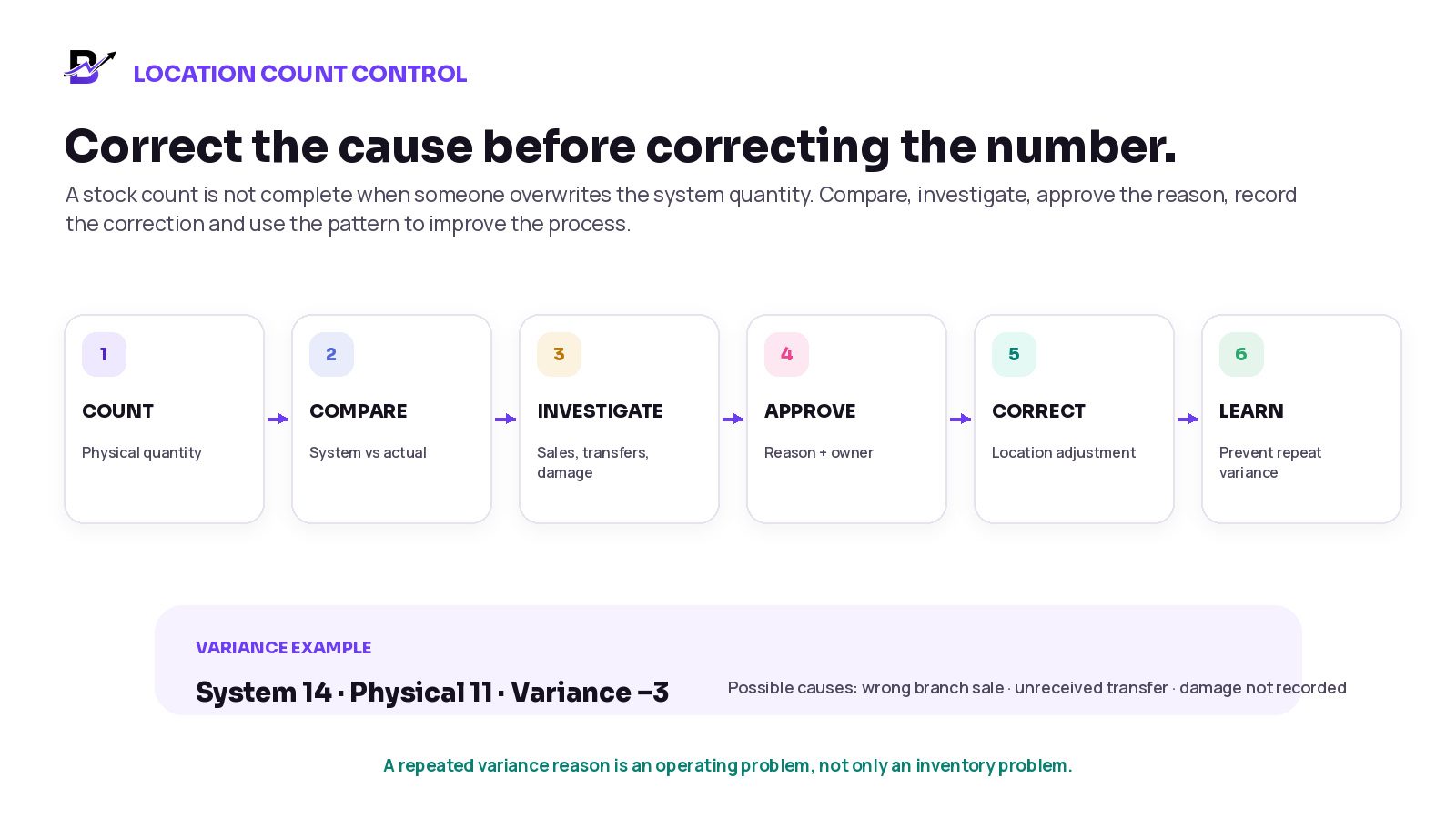
Figure 4. A location count finds 11 physical units against 14 recorded, so the team investigates the three-unit difference.
COUNT GROUP | SUGGESTED STARTING RHYTHM | EXAMPLES |
|---|---|---|
Critical / high-risk items | Daily visibility or frequent cycle counts | High-value pieces, fast-moving products, key packaging or items that can stop fulfilment. |
Important regular stock | Weekly or scheduled rotation | Common add-ons, gift boxes, retail fragrance sizes or standard finished products. |
Lower-risk supplies | Monthly or periodic review | Low-value consumables that do not justify constant transaction-level control. |
Full location count | At defined closing periods or before major changes | Quarter-end, year-end, branch move, new system launch or major catalogue cleanup. |
Investigate common causes before correcting the quantity: a sale recorded against the wrong branch, a transfer sent but not received, a duplicate purchase receipt, damage not recorded, an incorrect unit, a return placed on the shelf without a decision or a manual adjustment with no reason.
Use permissions and ownership, not shared passwords
Multi-location inventory becomes harder to trust when every user can change every branch. Give each role the access needed for its job and keep wider controls with managers or owners.
ROLE | TYPICAL RESPONSIBILITY | CONTROL BOUNDARY |
|---|---|---|
Owner / operations lead | See all locations, approve policies, review exceptions and reports. | Should not rely on branch totals prepared manually. |
Inventory manager | Maintain catalogue mapping, transfers, counts and replenishment rules. | Needs company-wide visibility but controlled adjustment rights. |
Branch manager | Receive purchases and transfers, approve local corrections and protect count accuracy. | Should normally act only for the assigned branch. |
Counter / fulfilment staff | Complete sales, reservations, preparation and permitted stock actions. | Limit direct quantity editing; use defined movement reasons. |
Warehouse / transfer staff | Pick, send and receive transfers with evidence. | Cannot close a discrepancy without the approved reviewer where required. |
Ecommerce / customer service | View availability and order assignment for customer promises. | Should not manually move physical stock to solve an order problem. |
Review location patterns, not only the company total
A single accuracy percentage can hide the exact location that needs attention. Review important measures by product, location, movement reason and period.
METRIC | SIMPLE DEFINITION | WHAT IT MAY REVEAL |
|---|---|---|
Location stock accuracy | How closely system quantity matches the physical count at each location. | Repeated process or training problems. |
Transfer completion time | Time from sent to received and closed. | Stock sitting unavailable between locations. |
Transfer variance rate | Sent quantity not received as expected. | Packing, transport, receiving or recording issues. |
Stock-outs by location | Times an item is unavailable where demand occurs. | Poor replenishment or routing rules. |
Stranded stock | Stock with low demand in one location while another location is short. | A balancing or assortment opportunity. |
Emergency transfers | Unplanned transfers made to rescue an order or branch shortage. | Weak reorder levels or demand planning. |
Order reassignment rate | Orders moved after the first location was selected. | Routing, stock accuracy or capacity problems. |
Negative stock / unexpected adjustments | Locations showing impossible or repeatedly corrected quantities. | Missed movements, timing problems or misuse of manual edits. |
A practical ten-step setup plan
Map every location. List stores, kiosks, warehouses, preparation points, return areas and third-party locations. Define what each place may sell, receive, store, transfer and fulfil.
Clean the product catalogue. Remove duplicates, confirm variants and assign stable internal IDs, SKUs or barcodes where useful.
Assign products to locations. Decide which products and variants each location can stock, sell or use for fulfilment.
Define stock states. Write the meaning of on hand, reserved, unavailable, in transit, incoming and available to sell for your business.
Write movement rules. Define what a POS sale, online order, cancellation, return, damage, receipt and correction does to the correct location.
Build the transfer workflow. Name the transfer stages, required fields, owners, evidence and discrepancy process.
Choose online routing rules. Decide how pickup, delivery, branch eligibility, basket completeness, capacity and reassignment work.
Set count frequencies. Count high-risk items more often and rotate through the rest of the catalogue by location.
Test difficult scenarios. Run last-unit sales, simultaneous online and POS orders, partial transfers, damaged receipts, returns and wrong-branch transactions.
Review exceptions every week. Track stock-outs, transfer age, variances, emergency moves and repeated correction reasons, then fix the root cause.
How Bloomlytix supports multi-location inventory
Bloomlytix connects configured products, branches, purchases, sales, staff and reports in one retail platform. Its documented stock controls include branch quantities, adjustment history, low-stock attention and quantity transfers. The table below describes verified controls and where your team should test its own workflow. See the platform feature list for current scope.
BLOOMLYTIX AREA | DOCUMENTED WORKFLOW AND SCOPE |
|---|---|
Shared catalogue | Products and variants provide a common identity across configured retail and ecommerce workflows. |
Branch stock | View and maintain quantities for configured branches; branch capacity depends on the plan. |
Quantity transfer | Move quantity from one configured branch to another with source and destination movements recorded together. For dispatch, transit and partial receipt controls, confirm the workflow separately. |
Adjustments and history | Use permitted stock add, drop, discard and correction actions with movement history. Keep reason and approval evidence in your operating process where the software does not require it. |
Purchases and suppliers | Record supplier purchase invoices with branch, category, totals, VAT fields where relevant and attachments. Confirm how receipt and invoice steps connect for your setup. |
Low-stock attention | Use configured branch stock and low-stock alerts to review replenishment needs. |
Roles and reports | Review configured staff permissions and branch sales, stock and purchase reports. Test your exact role boundaries in a demo. |
PRODUCT SCOPE
Bloomlytix has documented branch stock, quantity transfer, purchase invoice, adjustment, low-stock and reporting tools. Its documented quantity transfer changes source and destination branch balances together. Confirm staged transit, partial receiving, automated allocation, split fulfilment, advanced warehouse functions, serial or lot tracking and third-party fulfilment separately during a demo.
Questions to ask during a multi-location inventory demo
Can one product and variant use the same stable identity across all branches and sales channels?
Can we see on-hand, reserved, unavailable, in-transit and available quantities by location?
Which event reserves or deducts stock for online orders and POS sales?
Can a user accidentally sell or adjust stock against the wrong branch, and how is that prevented?
What transfer statuses exist, and when does stock leave the source and enter the destination?
How are partial receipts, damaged units, shortages and overages recorded?
Can incoming purchases be assigned to the correct receiving branch?
How does the system choose a fulfilment location for online delivery or pickup?
Can one order be split across locations, and what extra delivery or reporting complexity does that create?
How are physical counts, approvals and correction reasons controlled?
Which reports show stock-outs, transfer age, location variances and repeated adjustments?
What is standard, and what requires an integration, custom development or a higher plan capacity?
Frequently asked questions
Should every branch have a separate product record?
No. Use one approved product or variant record when the item is genuinely the same. Track its quantity, availability and permissions separately by location. Duplicate product records usually create inconsistent prices, reporting and stock.
When should transferred stock reduce at the source?
The exact timing depends on the platform and business rule. A common model removes it from source availability when the transfer is sent, keeps it visible as in transit and adds it to the destination only after receiving confirms the quantity and condition.
Can the online store show the total quantity from all branches?
It can, but that may create a promise no single location can keep. Online availability should reflect the routing, pickup, delivery and split-fulfilment rules the business can actually support.
Does a refund automatically add stock back to a branch?
No. A refund changes the money record. Stock should increase only when a physical item returns to a named location and the team decides it is sellable.
How often should each branch count inventory?
Count critical, high-value, fast-moving or fulfilment-blocking items more frequently. Use weekly or rotating counts for regular items and periodic full counts when required by the business.
What if a location holds stock but should not fulfil online orders?
Keep the stock assigned to the location, but disable that location for the relevant online fulfilment rule. A warehouse, kiosk or quarantine area may hold inventory without serving customers directly.
Can one order be fulfilled from several branches?
Some platforms support split fulfilment, but it adds reservation, delivery, cost and customer-communication complexity. Confirm the exact workflow before using a company-wide total to promise availability.
Does Bloomlytix support multiple branches?
Yes. Bloomlytix supports configured branch inventory, purchases, POS and reporting. Branch capacity depends on the selected plan. Ask the team to demonstrate the exact sales, fulfilment, cash and access rules needed by your business.
Final multi-location inventory checklist
Every product and sellable variant has one stable identity.
Every physical or fulfilment location has a clear name, code and role.
Quantities are visible by location, not only as a company total.
On hand, reserved, unavailable, in transit and available to sell have written meanings.
POS, online, purchase, return, damage and correction events use the correct location.
Transfers have source, destination, sent, received and variance quantities.
In-transit stock is visible without being counted twice.
Online fulfilment checks stock, channel eligibility, zone or pickup, capacity and timing.
Physical counts are scheduled by item risk and location.
Corrections include a reason, owner and approval where required.
Owner reports are reviewed by product, branch, movement reason and period.
Advanced warehouse, allocation, manufacturing and integration requirements are confirmed separately.
Retail Operations Control Pack
Use these compact templates as a starting point for a spreadsheet, printed form or software configuration. The count-sheet row is illustrative. Adapt fields and approval steps to your own process.
Branch transfer record
FIELD | COMPLETE BEFORE SENDING | COMPLETE WHEN RECEIVING |
|---|---|---|
Transfer identity | Transfer number, source, destination, reason and expected date | Receipt date, receiving user and final status |
Item details | Product or variant, SKU, unit and sent quantity | Received, damaged, missing or rejected quantity |
Ownership | Requested by, approved by and sending staff | Receiving staff and discrepancy reviewer |
Evidence | Packing note, tracking number or dispatch photo where required | Receiving note, damage evidence or variance explanation |
Closure | Source movement and in-transit quantity recorded | Destination movement, variance outcome and approval recorded |
Location count sheet
LOCATION + DATE | ITEM / SKU | SYSTEM QTY | PHYSICAL QTY | VARIANCE + REASON | APPROVED ACTION |
|---|---|---|---|---|---|
Downtown / example day | Lavender Gift Box / GBOX-LAV-M | 14 | 11 | −3; investigate wrong-branch sale, unreceived transfer or damage | Manager checks evidence before recording a −3 correction |
CONTROL-PACK RULE
A transfer form proves where stock moved. A count sheet proves what staff physically found. Neither should be used to hide an unexplained variance.