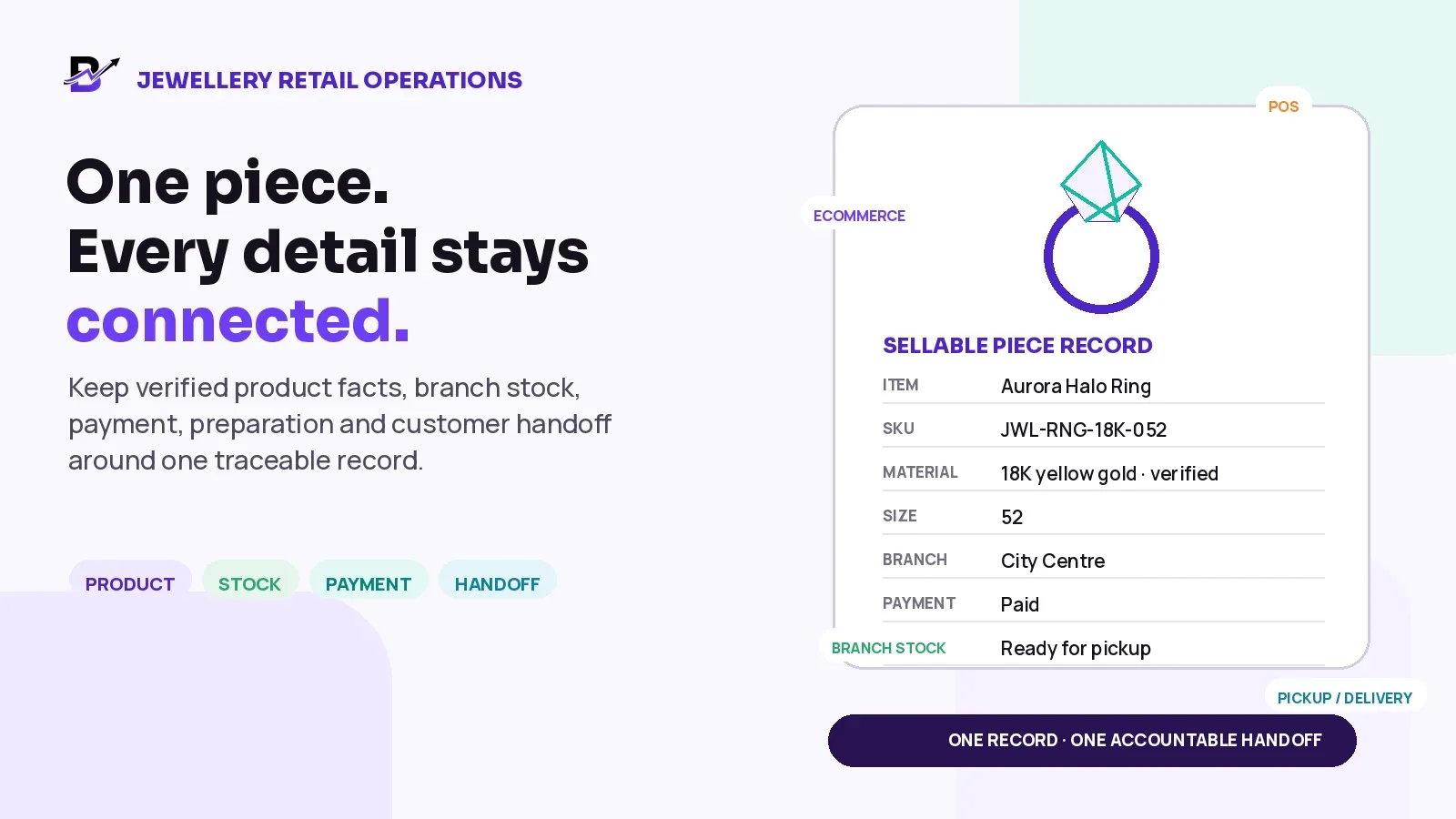
A jewellery sale stays clear when the exact piece, branch, payment and final handoff remain connected.
A customer may see one ring, necklace, bracelet, watch or gift set. The business sees much more: material, size, finish, stone details, supplier evidence, price, branch, stock state, customer approval, payment and a final pickup or delivery promise.
When those facts are split across a product page, spreadsheet, certificate folder, POS note and staff chat, similar pieces can be confused, branch availability becomes hard to trust and the final handoff depends too heavily on memory.
Direct Answer — Manage each sellable jewellery piece or variant through one traceable record. Use only verified product facts, give the piece a stable internal identity, show its branch and stock state, keep payment and customisation approval attached to the order, limit access by role and record the pickup or delivery outcome before closing the sale. Specialist controls such as certificate custody, repairs, consignment, valuation and workshop production should be confirmed separately.
This guide is for jewellery boutiques, multi-branch retailers, ecommerce teams and operations staff selling rings, necklaces, bracelets, earrings, watches, accessories, gift sets and selected custom pieces through websites, apps, POS, manual orders, pickup or delivery.
In this guide
Why jewellery inventory needs more detail than a normal product row
How to choose between a unique-piece, repeatable-variant and custom-order record
Which verified facts belong in a jewellery product record
How to organise sizes, materials, colours, finishes and stone details
How branch stock, purchases, transfers, counts, returns and adjustments should move
How ecommerce, apps, POS, manual orders and payment links can use one catalogue
How to keep payment, customisation, preparation and handoff states clear
What to record at pickup or delivery without collecting unnecessary personal data
Which metrics and review routines help owners control ageing, variance and exceptions
Where Bloomlytix fits and which specialist jewellery workflows need separate confirmation
Why jewellery inventory is different from normal retail stock
A basic retail inventory row may need a product name, price and quantity. Jewellery often needs a more exact identity. Two rings can look similar while differing in size, material, purity, finish, stone, weight, supplier, report reference or value. A business may also hold one physical piece rather than many identical units.
BUSINESS QUESTION | WEAK RECORD | USEFUL RECORD |
|---|---|---|
Which piece is this? | “Diamond ring” with no unique identity. | Photo, category, stable code and verified specifications. |
Where is it now? | One company-wide quantity. | Branch, permitted sub-location and current stock state. |
Can it be sold? | Quantity shows 1, even when it is reserved or on hold. | Available, reserved, in transfer, quality hold or returned for inspection. |
What did the customer approve? | Custom details remain in messages. | Selected size, finish, engraving or other approved note attached to the order. |
What happened at handoff? | Staff mark “collected” with no context. | Receiver, time, staff member and configured evidence in the order timeline. |
Core Principle — High-value retail needs better records, not only a prettier catalogue. The record must help staff identify the exact piece, explain every movement and close the customer promise.
Choose the right record model before creating stock
The first catalogue decision is whether the business is tracking one unique physical piece, a repeatable design with variants, or a customer-specific order. Forcing all three into the same structure creates duplicate products, wrong quantities and unclear handoffs.
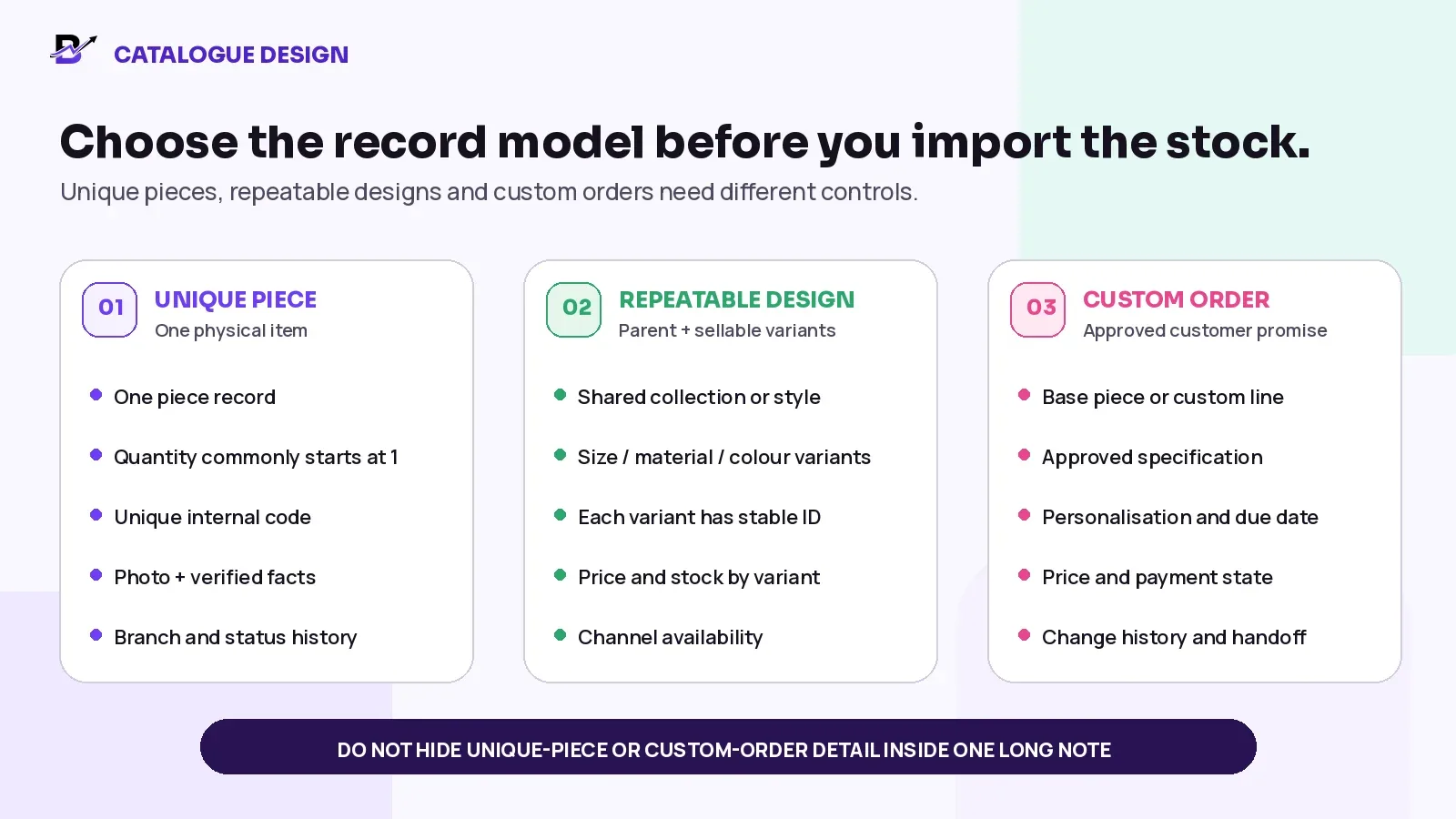
Figure 1. The stock and order model should match what the business actually sells and controls.
MODEL | BEST FIT | MAIN CONTROL |
|---|---|---|
Unique physical piece | A one-off ring, watch, pendant or stone-set item with its own identity. | One piece record, stable internal code, verified facts, branch, state and movement history. Quantity commonly begins at one. |
Repeatable design | The same approved style is sold in several sizes, materials, colours or finishes. | One parent product with separate sellable variants. Each variant has its own ID, price and stock rule. |
Customer-specific order | A design, engraving, resizing or special request is approved for one customer. | Use an order or quotation record with the approved specification, amount, due date, payment state and change history. |
Do Not Use A Note As The Whole System — A note can explain an exception. It should not be the only place where the product identity, customer approval, price, branch and handoff live.
Build every jewellery record from verified product facts
The minimum record should help a customer understand the item and help staff identify, sell, move and count it. The exact fields vary by product type and country, but the facts should come from an approved business, supplier or laboratory source - not from visual guesswork.
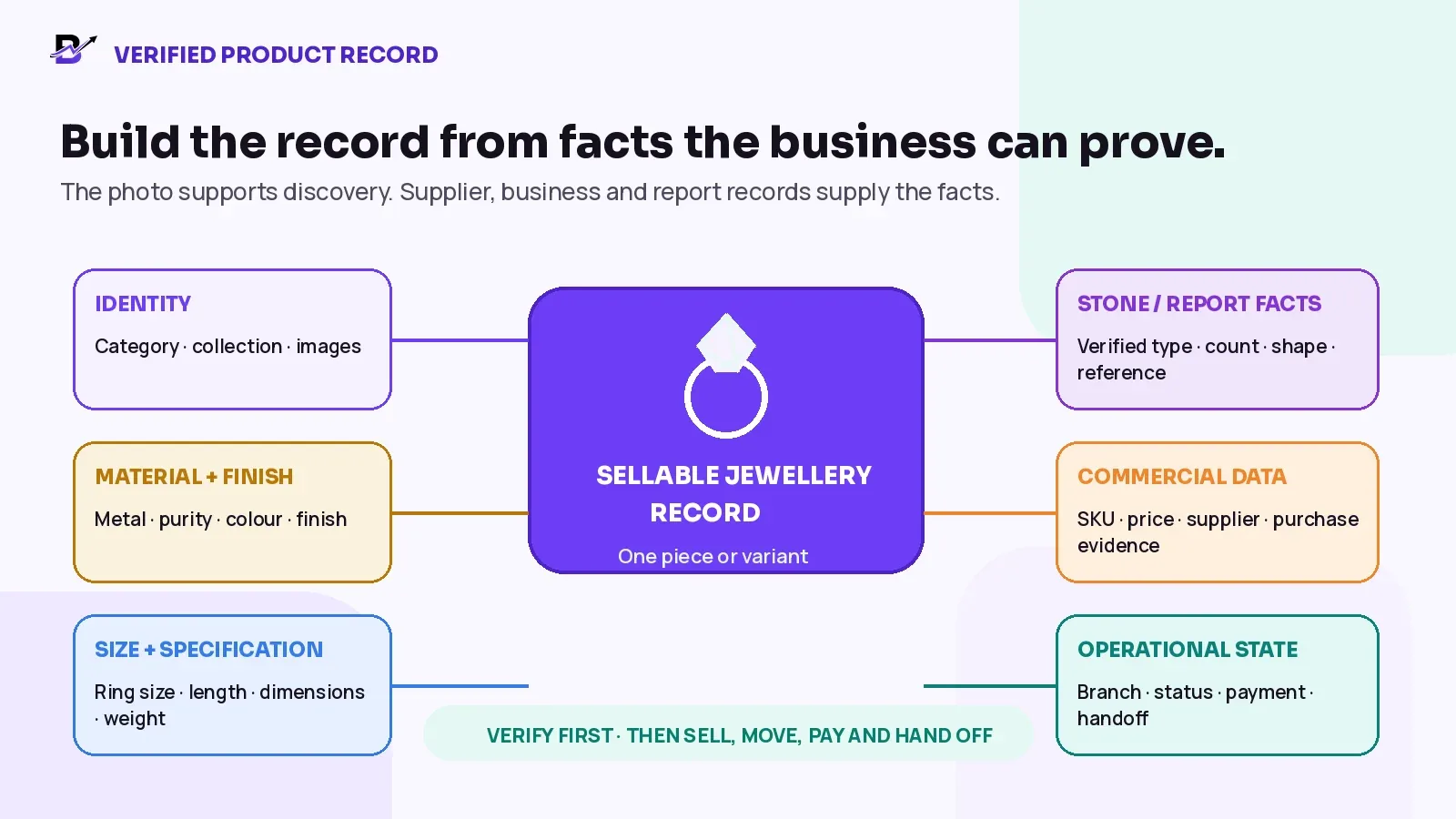
Figure 2. The product record connects verified facts to the commercial and operational workflow.
RECORD AREA | WHAT TO KEEP | WHY IT MATTERS |
|---|---|---|
Identity | Product name, category, collection, brand where applicable and clear images. | Helps customers and staff find the correct piece. |
Material + finish | Verified metal, purity or grade, colour, plating or finish where relevant. | Prevents a visual description from becoming an unsupported specification. |
Stone or component details | Verified stone type, count, shape, setting or approved report details where applicable. | Keeps important value-driving information structured. |
Size + dimensions | Ring size, chain length, bracelet length, case size or other sellable dimensions. | Distinguishes the variant the customer is buying. |
Weight | Verified item or component weight only when the business records and uses it. | Supports identification, product information and specialist workflows when correctly sourced. |
Identifiers | Internal product ID, variant ID, SKU, barcode or GTIN where used. | Keeps imports, POS, reports and channel records aligned. |
Supplier + purchase evidence | Supplier, purchase date, invoice or receipt reference, accepted quantity and branch. | Explains how the piece entered the operation. |
Commercial data | Selling price, configured tax treatment, discount permissions and channel availability. | Keeps ecommerce, POS and staff pricing consistent. |
Operational state | Branch, stock status, reservation, transfer, order and handoff state. | Shows what the business can promise now. |
Report / certificate reference | Issuer, report number, link or document reference where the business uses one. | Connects the sale to supporting evidence without inventing a certificate. |
GIA jewellery reports may include a photo, metal-testing results, total item weight, markings and an overall description, together with stone information within the report's scope. This shows why jewellery facts should be copied from the real report or another verified source instead of being inferred from an image.
Official reference checked 17 September 2026: GIA Jewelry Reports & Services.
Stop Condition — When a material, purity, stone, weight, report or authenticity detail is not supported by the source records, leave it unconfirmed and send it for review. A blank field is safer than a confident false claim.
Organise sizes, materials and finishes as real sellable variants
A parent product can carry the shared collection story, images and description. Each combination that changes what the customer receives, what the business charges or what the branch counts should have its own sellable variant record.
PRODUCT TYPE | POSSIBLE VARIATION | OPERATING RULE |
|---|---|---|
Ring | Size, material, metal colour, finish or stone configuration. | Each stocked or priced combination needs a stable variant identity. |
Necklace / chain | Length, material, colour, pendant or clasp variation. | Do not combine several lengths under one quantity. |
Bracelet | Length, size, material, colour and closure style where relevant. | The branch must know which version is available. |
Earrings | Pair or single unit, material, finish and stone configuration. | Make the sale unit explicit so quantity is understandable. |
Watch / accessory | Model, colour, strap or bracelet, size and included accessories. | Keep the exact commercial unit clear. |
Gift set | Fixed bundle or staff-assembled set. | Choose one bundle stock rule before selling it. |
If a business uses GS1 identifiers, GS1 states that each product variation, such as each size or colour, needs its own unique GTIN. An internal SKU can also remain useful for staff, imports and reporting. Not every custom or one-off piece needs a GS1 identifier, but every sellable record needs a stable internal identity.
Official reference checked 17 September 2026: GS1 guidance on product variations.
Keep product pages, variants and structured data consistent
For ecommerce SEO, the selected variant should show the correct image, price and availability. Google documents ProductGroup and Product variant markup and expects each variant to have a unique identifier in structured data. The visible page, structured data and inventory source should agree; markup should never claim a price or availability that the customer cannot see.
Official reference checked 17 September 2026: Google product variant structured data.
Control branch stock by location and state
A company total does not answer the customer question: “Can I collect this exact piece from this branch?” Track the piece or variant at the location that physically owns it, and keep the sale state separate from the location.
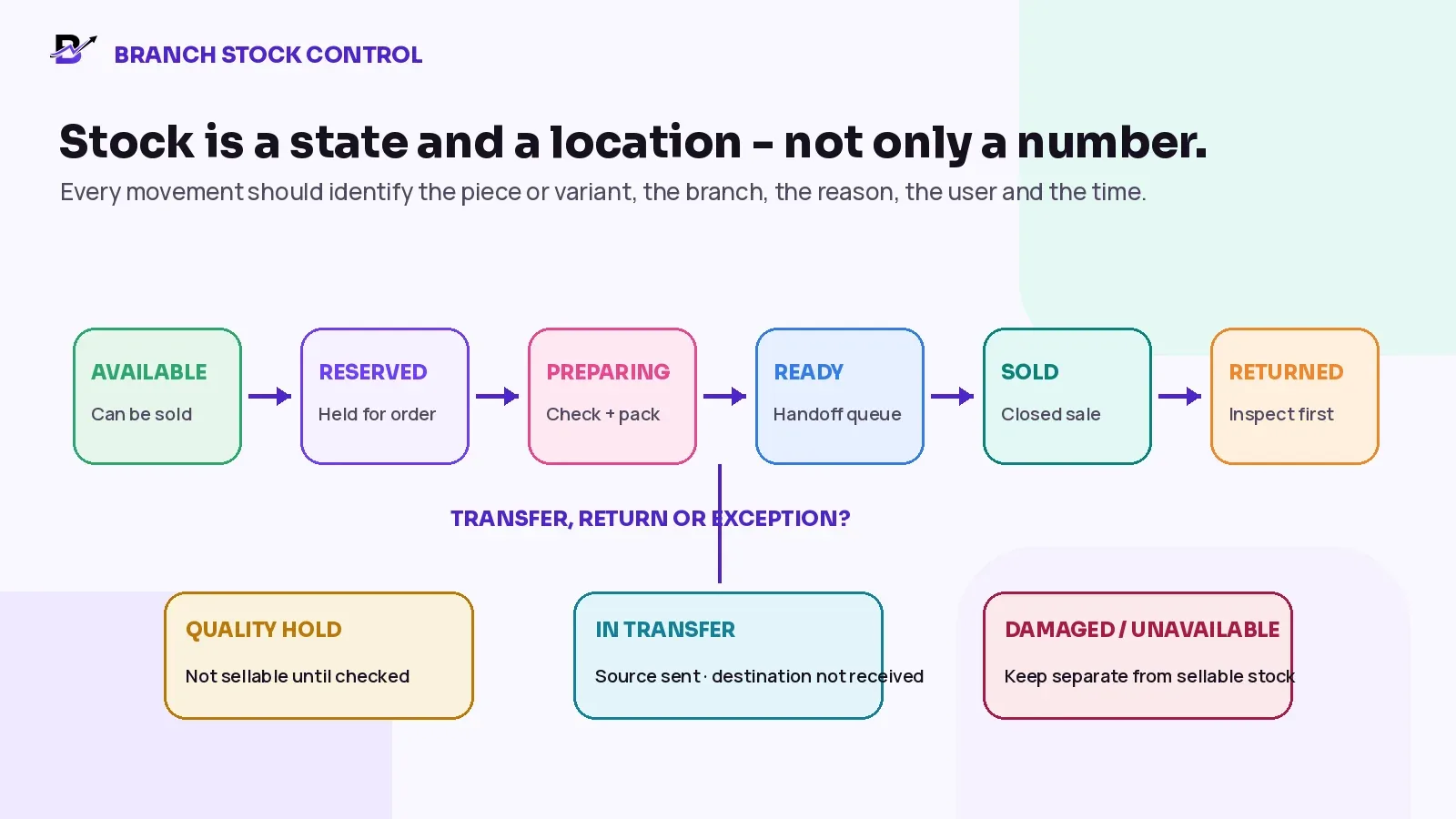
Figure 3. Stock remains useful when the branch, status and movement reason are visible.
STATE | EASY MEANING |
|---|---|
Available | The piece is physically present and permitted for sale at the branch. |
Reserved | The piece is held for a named order or approved customer process. |
Quality hold | The item exists but should not be sold until a check is complete. |
In transfer | The source has dispatched it and the destination has not yet accepted it. |
Preparing / ready | The item is attached to a confirmed order and moving toward handoff. |
Sold | The sale and final handoff have closed according to the business process. |
Returned - inspect first | The item came back from a customer and needs a condition and inclusion check. |
Damaged / unavailable | The physical item exists but should not appear as sellable stock. |
Working Rule — Available to sell should not include stock that is reserved, in transfer, on quality hold or otherwise unavailable. Use the exact formula and labels supported by the chosen system.
Connect purchases and receiving to the exact piece or variant
Purchasing should explain how stock entered the business. Record the supplier, branch, purchase category, accepted item, quantity, cost or invoice amount where required, and the invoice or receipt evidence. For unique pieces, verify that the received item matches the product record before making it available.
CHECK | WHAT TO RECORD |
|---|---|
Expected item | SKU or identifier, product facts, quantity and destination branch. |
Received item | What physically arrived, including accepted, damaged, missing or different units. |
Evidence | Supplier invoice, receipt or approved purchase attachment. |
Stock action | Increase only the accepted item at the correct branch. |
Exception | Keep a reason and owner for any difference before approval or payment. |
For the complete process, see how to manage retail purchases, suppliers and invoice records.
Move jewellery between branches through a traceable transfer
Do not reduce one branch and manually add another without a shared transfer record. A transfer should show the source, destination, item, requested quantity, sent quantity, received quantity, users, dates and any difference.
STEP | CONTROL |
|---|---|
1. Request | Name the exact piece or variant, source, destination and business reason. |
2. Approve | Confirm that the item is available and the authorised person accepts the movement. |
3. Dispatch | Move the source quantity to an in-transfer state and retain the sender and time. |
4. Receive | The destination checks the item, identifiers, condition and included documents before accepting it. |
5. Resolve | Record missing, damaged or wrong-item differences instead of changing the numbers silently. |
6. Close | Only the accepted quantity becomes available at the destination; the full transfer history remains visible. |
Official multi-location inventory systems follow the same general principle: a transfer remains separate from normal stock until the destination receives and accepts it. The exact controls, permissions and statuses depend on the platform.
Operational reference checked 17 September 2026: Shopify inventory-transfer receiving guidance.
Count by risk, investigate differences and keep the correction visible
The count frequency should match the value, uniqueness, movement volume and business risk. A high-value unique piece may need tighter checks than low-value packaging. The correct schedule is a management decision; the important rule is that the recorded quantity is compared with the physical item and any difference is investigated before correction.
COUNT STEP | CONTROL |
|---|---|
Prepare the count | Freeze or control movements for the selected area and define who counts. |
Identify the item | Use the piece, SKU, barcode, photo or approved identifier - not a vague name. |
Compare | Check system state, branch and physical result. |
Investigate | Review recent sales, transfers, reservations, returns, adjustments and handoffs. |
Approve the correction | Use a reason, authorised user and note or evidence where required. |
Review the pattern | Repeated differences need a process fix, not only another quantity edit. |
Use one jewellery record across ecommerce, apps, POS and assisted sales
Customers may discover jewellery through a website or customer app and complete the purchase in a branch. Staff may use POS, create a manual order after a consultation or send a payment link for an approved custom request. Those channels should use the same approved catalogue, product identity, branch context and customer order history.
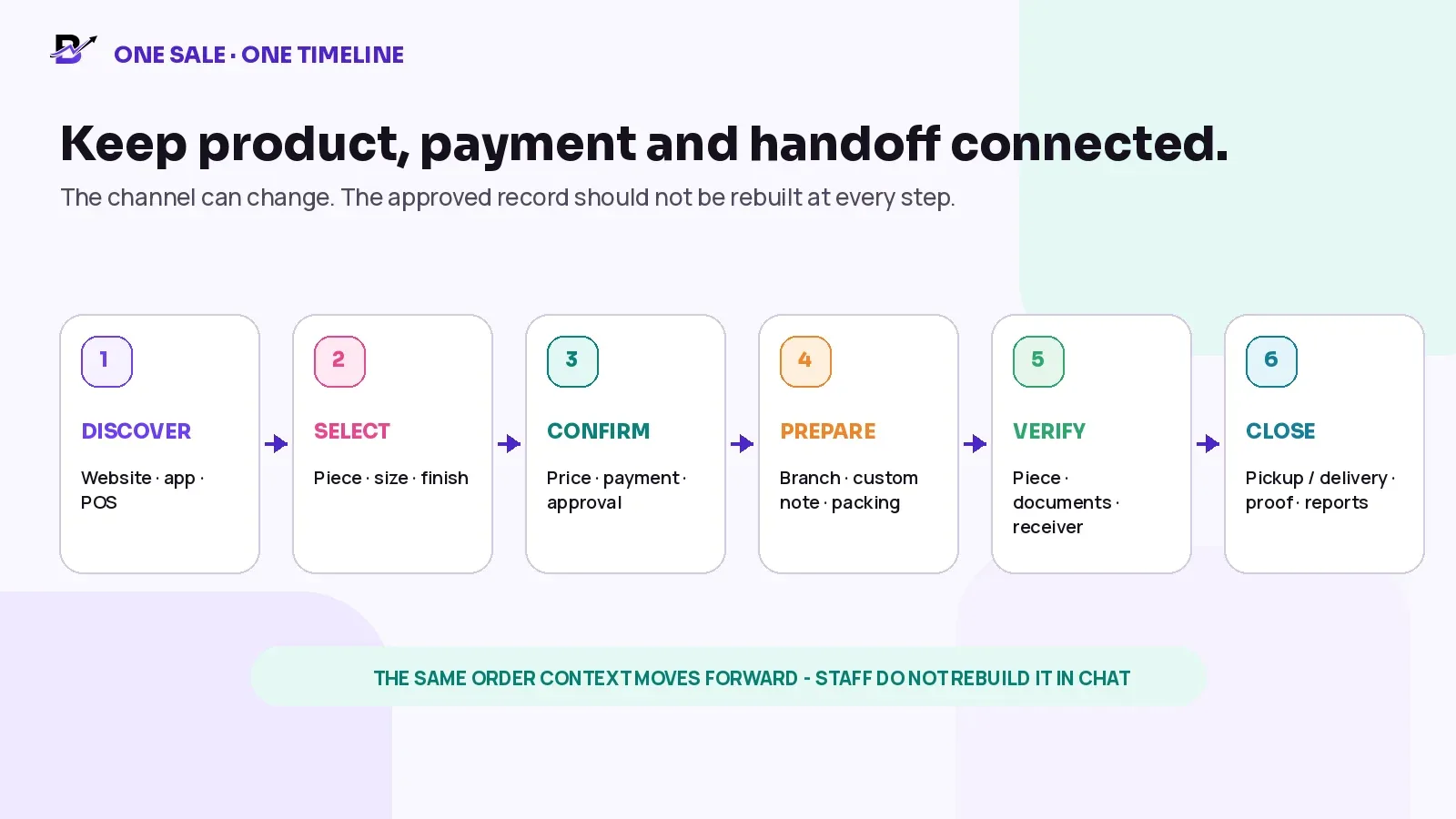
Figure 4. The sales channel can change while the product and order record remain connected.
ORDER SOURCE | CONNECTED RULE |
|---|---|
Website / customer app | Customer chooses the visible piece or variant, price, permitted options, pickup or delivery and payment. |
POS | Staff sell the same approved record at the correct branch and payment method. |
Manual / WhatsApp-assisted order | Conversation clarifies the request; staff create one official order instead of fulfilling from chat. |
Payment link | The link or provider result stays connected to the related order and amount where supported. |
Branch transfer for sale | The movement remains traceable before the destination promises pickup. |
Keep payment, order, stock and customisation as separate states
A payment can succeed while the piece is still being prepared. A piece can be reserved while the payment is pending. A refund can occur without a sellable item returning. Keeping the states separate prevents one action from creating the wrong stock or fulfilment result.
TRACK | EXAMPLE STATES | QUESTION IT ANSWERS |
|---|---|---|
Payment | Pending, partially paid where supported, paid, failed, refunded or manually recorded according to policy. | Does the business have permission to prepare or hand over the order? |
Order | Draft, confirmed, accepted, preparing, ready, completed, cancelled or refunded. | Who owns the next action? |
Inventory | Available, reserved, in transfer, hold, sold, returned or unavailable. | Can this exact piece be promised again? |
Customisation | Requested, priced, approved, in progress, checked or changed. | Which version did the customer approve? |
Handoff | Not ready, ready for pickup, assigned, delivered, failed, returned or collected. | Has the customer promise been closed with the required evidence? |
Payment Is Not The Order — A payment link or card receipt proves a money event. It does not replace the product record, customer approval, branch, preparation status or handoff history.
Control engraving, sizing and other customer-approved changes
A personalised note can affect price, timing and return eligibility. Keep the latest approved wording or specification attached to the order, show who approved it and prevent staff from working from an older message or screenshot.
CONTROL | WHAT TO KEEP |
|---|---|
Requested change | Engraving text, size change, finish, gift wrapping or another permitted service. |
Approved version | Exact wording or specification, reference image where relevant and approval time. |
Commercial impact | Custom line, price difference, deposit or additional payment according to policy. |
Operational impact | Responsible branch or specialist, due time, quality check and handoff promise. |
Change history | What changed, who requested it, who approved it and which version is current. |
Scope Boundary — Repair intake, workshop production, complex bespoke manufacturing and service-job tracking are specialist workflows. Confirm them separately instead of assuming a normal retail order covers them.
Prepare and verify the complete order before handoff
The ready status should mean more than “the box is packed.” A named person should compare the physical item and the customer promise before the order moves into pickup or delivery.
FINAL CHECK | PASS CONDITION |
|---|---|
Piece | Correct item, variant, size, material, finish and approved customisation. |
Condition | Visible quality and any required internal check completed. |
Payment | Paid or otherwise approved for handoff according to business policy. |
Inclusions | Packaging, accessories, warranty material, receipt or approved supporting documents. |
Customer promise | Pickup person or delivery recipient, branch, date, time and permitted notes. |
Owner | The staff member who completed the final check is visible. |
Build a controlled pickup or delivery handoff
Secure handoff does not mean promising that software alone can prevent loss. It means using a deliberate process that confirms the product, payment, receiver and outcome, then closes the record once.
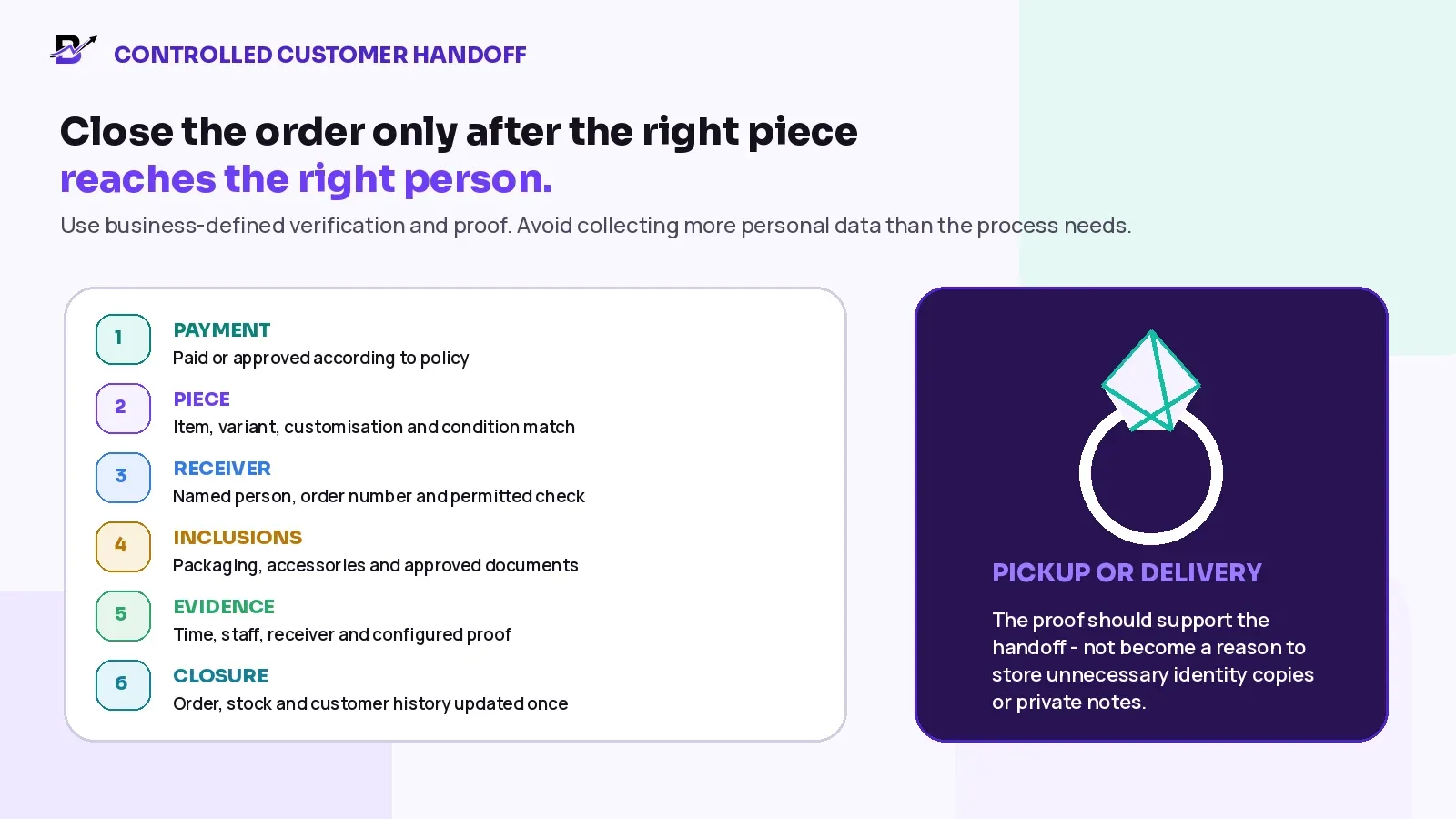
Figure 5. Handoff evidence should support the order outcome without collecting unnecessary personal data.
HANDOFF TYPE | CONTROLLED APPROACH |
|---|---|
Customer pickup | Mark ready, notify the permitted customer, match the order and named receiver, complete the business-defined verification, review included items and record the time, staff and configured proof. |
Authorised third-party pickup | Record the authorised receiver before arrival where policy permits, confirm the approval and use only the identity or collection check the business is allowed to use. |
Local delivery | Give the assigned driver or provider only the permitted order, recipient, address, timing and proof requirements. Record delivered, failed, returned or rescheduled. |
High-value or specialist delivery | Confirm insurer, courier, packaging, declared-value, signature and country-specific requirements separately. Do not assume a standard local-delivery workflow is sufficient. |
Privacy Rule — Verify according to the business policy and local requirements, but do not store unnecessary identity copies, private messages or sensitive notes merely because the order is high value.
Handle returns, refunds and exchanges without creating false stock
A refund changes the payment record. A return changes the physical custody of the item. They can be connected, but they are not the same event. Inspect the piece, variant, condition, customisation, included documents and accessories before deciding whether it can return to sellable stock.
SCENARIO | SAFE RECORDING RULE |
|---|---|
Refund without physical return | Update the payment and order record. Do not add stock automatically. |
Returned item in sellable condition | Receive to the correct branch, inspect, confirm inclusions and restock once. |
Returned item needing review | Place on hold until a permitted person decides the outcome. |
Damaged, altered or personalised item | Follow the business policy and record the stock and financial decision separately. |
Exchange | Close the returned-piece decision and create the new sale or replacement clearly, including any price difference. |
For a detailed decision tree, see the Bloomlytix guide to retail cancellations, refunds and returns.
Use role permissions and one complete timeline
Not every employee needs every field or action. The owner may see value, purchase and reports. A sales associate may need product, customer, payment and handoff detail. A stock controller may need receiving, transfers and counts. The system should show who changed the record and when.
ROLE | TYPICAL ACCESS |
|---|---|
Owner / operations lead | Settings, reports, users, stock, purchases, payments and exception review. |
Manager | Branch orders, transfers, adjustments, discounts or approvals within the business policy. |
Sales associate | Search products, create permitted sales, capture customer choices and update assigned order steps. |
Stock controller | Receive purchases, run counts, prepare or receive transfers and record variance reasons. |
Fulfilment / handoff staff | Prepare, quality-check, mark ready and record pickup or delivery outcome. |
Driver | See assigned deliveries, permitted recipient and address details, status actions and configured proof. |
Control Rule — Use the least access each role needs, then require additional review for high-risk actions such as major stock corrections, unusual discounts or specialist custody changes. The exact approval model is a business decision.
Measure the workflow with practical jewellery metrics
Revenue alone does not show whether product records and stock controls are reliable. Review the measures that explain data quality, ageing, branch movement and handoff exceptions.
METRIC | SIMPLE DEFINITION | WHAT IT CAN REVEAL |
|---|---|---|
Product-record completeness | Share of active pieces or variants with the required verified fields. | Shows where catalogue gaps can affect sales or identification. |
Stock variance by branch | Difference between recorded and physically confirmed pieces or value. | Highlights count, transfer, reservation or handoff problems. |
Ageing / days in stock | Time since accepted receipt for each piece or variant. | Reveals slow-moving inventory and branch imbalance. |
Reservation age | How long a piece remains held without a completed sale or release. | Identifies stock blocked by incomplete customer processes. |
Transfer exception rate | Transfers with missing, damaged, wrong or unaccepted items. | Shows movement-control weaknesses. |
Refund and return reasons | Reason by piece, branch, channel and staff workflow. | Separates product, customer, payment and fulfilment issues. |
Handoff completion | Ready orders closed with the configured pickup or delivery result. | Shows whether the final promise is being recorded. |
Report / reference completeness | Applicable pieces with the approved reference and source. | Shows whether supporting information follows the sale. |
Measure Count And Value Separately — One missing high-value piece and ten missing low-value accessories are both stock differences, but they do not carry the same business impact. Review quantity, value and reason together.
How Bloomlytix supports the connected jewellery workflow
Bloomlytix is designed as a connected jewellery ecommerce and retail operations platform that keeps the customer channel and shop operation around the same product, order, branch, payment and handoff context. The exact setup should be mapped during onboarding against the jewellery business's product model and specialist requirements.
BLOOMLYTIX AREA | PRACTICAL ROLE |
|---|---|
Shared catalogue | Use products, configured variants, prices, images and options across the website, eligible customer apps, POS and assisted sales. |
Ecommerce + POS | Connect online, app, counter, manual and payment-link orders to one operating context. |
Branch stock + purchases | Track configured finished pieces, variants, packaging and approved accessories by branch with purchases, adjustments and transfers. |
Order fulfilment | Keep selected piece, size, material, finish, approved personalisation, payment and handoff details visible to permitted staff. |
Payments + cash | Use configured online, POS, payment-link or manual methods and retain the payment context with the order. |
Pickup + delivery | Move the ready order into pickup or delivery, status updates and configured proof. |
Roles + reporting | Use branch-aware permissions and review sales, products, branches, staff, stock, purchases, cash and delivery reports. |
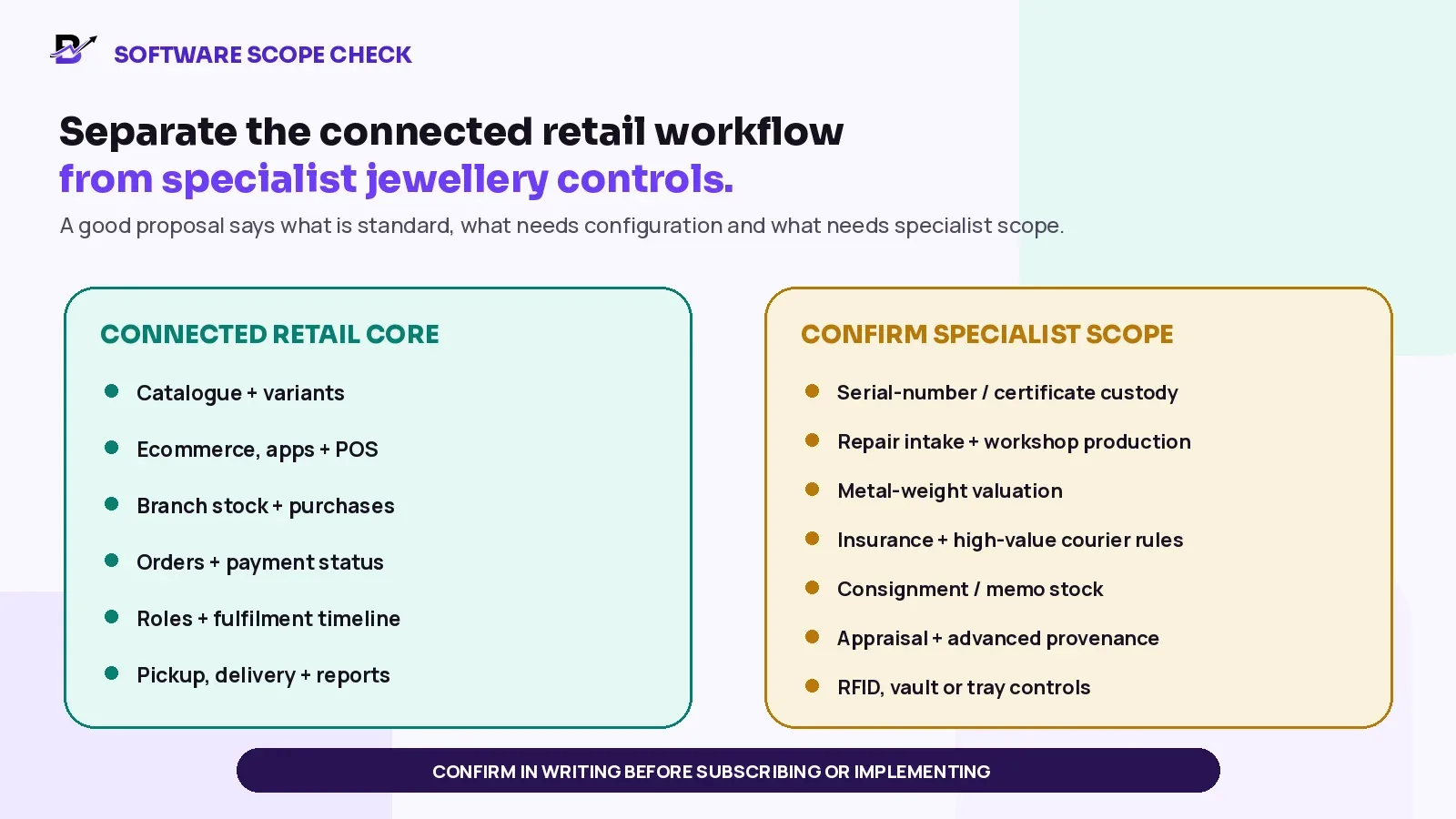
Figure 6. Confirm specialist jewellery requirements in writing before implementation.
Product Scope — Bloomlytix supports catalogue variants, custom notes, payments, product and branch stock, purchases, fulfilment, customer records, pickup, delivery and reporting. Confirm serial-number or certificate custody, repair intake, workshop production, metal-weight valuation, insurance, consignment, appraisal, RFID, vault or advanced provenance requirements separately.
Questions to ask during a jewellery software demonstration
Can the system show one unique piece and one repeatable design with several size or material variants?
Which product details are structured fields, and which would remain notes or attachments?
Can staff search by product name, SKU, barcode or another approved identifier?
Can the website, customer app and POS use the same piece or variant record?
How does the system show branch, available, reserved, hold, transfer and returned states?
Can a purchase receipt and supplier invoice be connected to the exact piece or variant and branch?
How are transfer requests, dispatch, receiving and quantity differences recorded?
Can customisation approval, price changes and payment status stay with the order timeline?
What happens when a refund occurs without a physical return?
What does staff record at customer pickup or delivery, and how is personal data limited?
Which roles may edit product facts, adjust stock, approve discounts and close handoffs?
Can the business export product, customer, order, stock, purchase and reporting data?
Which certificate, serial, repair, consignment, valuation, insurance or workshop needs require specialist scope?
What migration, training, testing and support are included before go-live?
Frequently asked questions
What details should a jewellery product record contain?
At minimum, keep a clear identity, images, verified material and relevant specifications, size or dimensions, stable identifier, price, supplier or purchase evidence, branch and stock state. Add stone, weight, report or certificate references only when the business has a verified source and a real operational need.
Should each ring size or material be a separate variant?
Usually yes when the combination changes what the customer receives, the price, the barcode or the stock quantity. Each sellable variant should have its own stable ID, SKU and location quantity. A unique physical piece may instead remain one piece record.
Can one unique jewellery piece simply have quantity one?
Yes. A one-of-a-kind piece can be represented by one record with quantity one, a branch, a status and movement history. Confirm whether the business also needs serial-number, certificate-custody or specialist valuation controls.
How should certificate or grading-report information be managed?
Store the approved issuer, report number, link or attachment according to the business policy and system scope. Do not invent a certificate or treat software as the grading authority. Physical or digital custody, verification and transfer controls may require specialist implementation.
How can branch transfers remain accountable?
Use one transfer record with source, destination, exact item, sender, sent time, receiving user, accepted result and difference reason. Keep the item in transfer until the destination confirms receipt.
What should be recorded at customer pickup or delivery?
Record the order, exact piece, payment readiness, named receiver or permitted verification, included documents or accessories, time, staff member and the configured handoff result. Avoid storing unnecessary identity copies or private notes.
Does Bloomlytix manage jewellery repairs, consignment or appraisals?
Those are specialist workflows and should be confirmed separately. Bloomlytix’s confirmed retail scope covers catalogue variants, custom notes, payments, branch stock, purchases, fulfilment, customer records, pickup, delivery and reporting.
Jewellery product and handoff checklist
The catalogue distinguishes unique pieces, repeatable variants and custom orders.
Every sellable piece or variant has a stable internal identity.
Materials, purity, stones, weight, reports and authenticity claims come from verified sources.
Product images, titles, descriptions, prices and availability match the real item.
Each size, material, colour or finish combination has the correct variant and stock rule.
The item is attached to the branch and current stock state that physically owns it.
Purchases and supplier evidence identify the exact accepted piece or variant.
Transfers keep source, in-transit, receiving and difference history.
Counts investigate differences before an approved correction is posted.
Website, apps, POS, manual orders and payment links use the same approved record where configured.
Payment, order, inventory, customisation and handoff statuses remain separate.
Engraving, sizing or other customer-approved changes keep one current version and change history.
The ready check covers piece, condition, payment, packaging, documents and receiver details.
Pickup or delivery follows the business-defined verification and proof process.
Returns are inspected before stock becomes available again.
Permissions limit who can change product facts, stock, discounts and final handoffs.
Metrics review record completeness, ageing, variance, transfers, refunds and handoff completion.
Specialist certificate custody, repairs, workshop, valuation, insurance, consignment and appraisal needs are confirmed in writing.
Bring One Real Piece To The Demo — Choose one detailed jewellery item, one branch movement and one pickup or delivery scenario. Bloomlytix will map the product, stock, payment, staff and handoff workflow around your real business requirements. Book a tailored jewellery workflow demo.
Book a tailored jewellery workflow demo
Related Bloomlytix guides: AI product listing from an image · Multi-location inventory · Retail refunds and returns · Retail software cost.
Explore the connected jewellery workflow: Jewellery ecommerce website · Jewellery POS · Jewellery inventory · Jewellery order management · Jewellery customer apps · Book a demo.