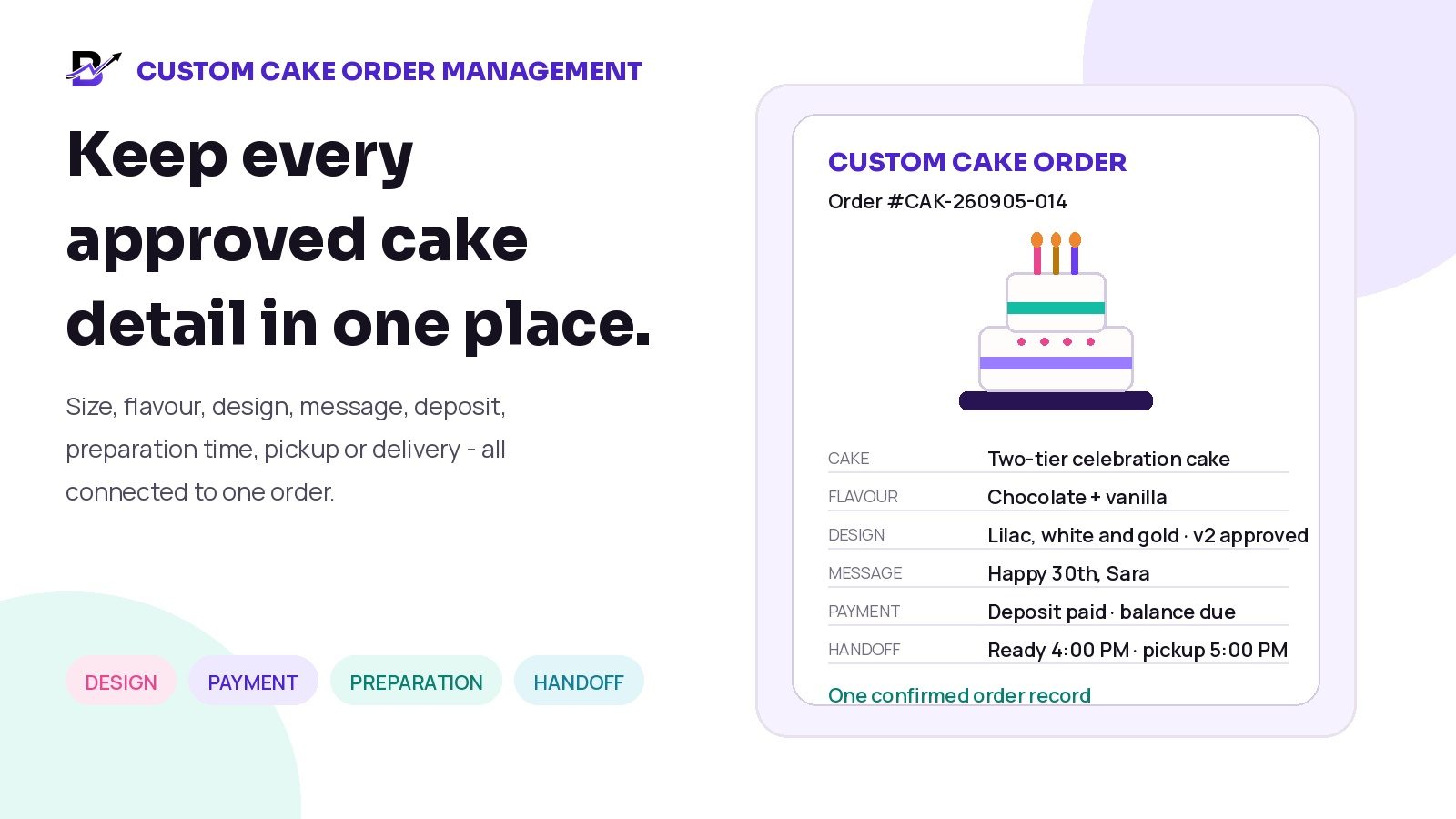
A custom cake can feel unique to the customer and still move through one clear operating record.
A custom cake is more than a product. It is a promise tied to a date, an event and a set of details that may not exist anywhere else in the bakery catalogue.
The customer may request a specific size, flavour, filling, colour, shape, theme, decoration, message, pickup time, delivery address and payment arrangement. When those details stay inside separate chats, notes and screenshots, the team can easily prepare the wrong cake, miss a deadline or hand the order to the wrong person.
DIRECT ANSWER: Manage every confirmed custom cake order as one structured record. Capture the approved cake specification, reference image or design note, exact message, event date, preparation deadline, pickup or delivery plan, total price, deposit, remaining balance and change history. Keep payment status separate from production status, assign clear responsibility, and complete a final quality and handoff check before the order leaves the bakery.
This guide is for cake shops, bakeries, celebration-cake businesses and delivery-first food brands that accept standard cakes, configured celebration cakes or fully custom requests through a website, app, POS, phone, WhatsApp or the counter.
In this guide
Why custom cake orders become difficult to manage
How to separate standard, configured and fully custom orders
Which details every confirmed cake order should contain
How to organise products, options, add-ons, custom lines and notes
How to record a design approval without relying on chat history
How to keep deposits, balances and production stages separate
How to hand the order to bakers, decorators, pickup staff or drivers
How to control customer changes after confirmation
Which metrics help owners improve the custom-order process
How Bloomlytix connects bakery sales, staff work, payments and handoff
Why custom cake orders become difficult
A standard cake order can often be completed by selecting a product, size and pickup time. A custom cake adds more decisions, more approvals and more chances for one detail to be misunderstood.
CUSTOMER DECISION | WHAT THE TEAM MUST KNOW | WHAT CAN GO WRONG |
|---|---|---|
Size or serving target | The customer may use informal terms such as “small” or “for 30 people.” | The team prepares the wrong size or makes an assumption the customer did not approve. |
Flavour and filling | Sponge, filling, finish and dietary requests may be discussed in different messages. | A decorator sees the design but misses the flavour or food-safety note. |
Design and colours | The customer may send several reference images and revise the theme. | Staff work from an old screenshot instead of the approved version. |
Message or name | Exact spelling, punctuation and placement matter. | A personal message is copied incorrectly or written from memory. |
Price and deposit | The quote, deposit and balance may be tracked separately. | The bakery starts work before the business-defined payment condition is met. |
Preparation and handoff | Ready time, pickup person, address and delivery window all matter. | The cake is finished late, collected by the wrong person or sent to incomplete delivery details. |
CORE PRINCIPLE: A custom cake order should become more structured as it moves toward confirmation. Conversation is flexible. Fulfilment needs one approved version of the truth.
First decide which type of cake order you are handling
Not every request needs the same sales process. A fixed catalogue cake should remain quick to buy. A fully custom cake may need a consultation, a quote, design confirmation and a deposit. The workflow should match the complexity of the order.
ORDER TYPE | BEST FIT | WORKFLOW | MAIN CONTROL |
|---|---|---|---|
Standard catalogue cake | Fixed product with configured size, flavour or message options. | Customer completes the order through website, app or POS. | Keep the path fast. Do not add unnecessary approval steps. |
Configured celebration cake | A base cake with permitted sizes, colours, flavours, finishes and add-ons. | Customer or staff selects the allowed options and confirms the final combination. | Make each selected option visible to the preparation team. |
Fully custom cake | A one-off request that may include reference images, special decoration or a custom price. | Use an enquiry or assisted order, then record the approved design, price and timing. | Do not start from a vague chat message or an unapproved image. |
Event or corporate order | One or more cakes with event timing, branding, approvals or multiple handoff requirements. | Define scope, authorised approver, quantities, payment and delivery plan. | Confirm whether advanced quotation, capacity or project workflows are needed. |
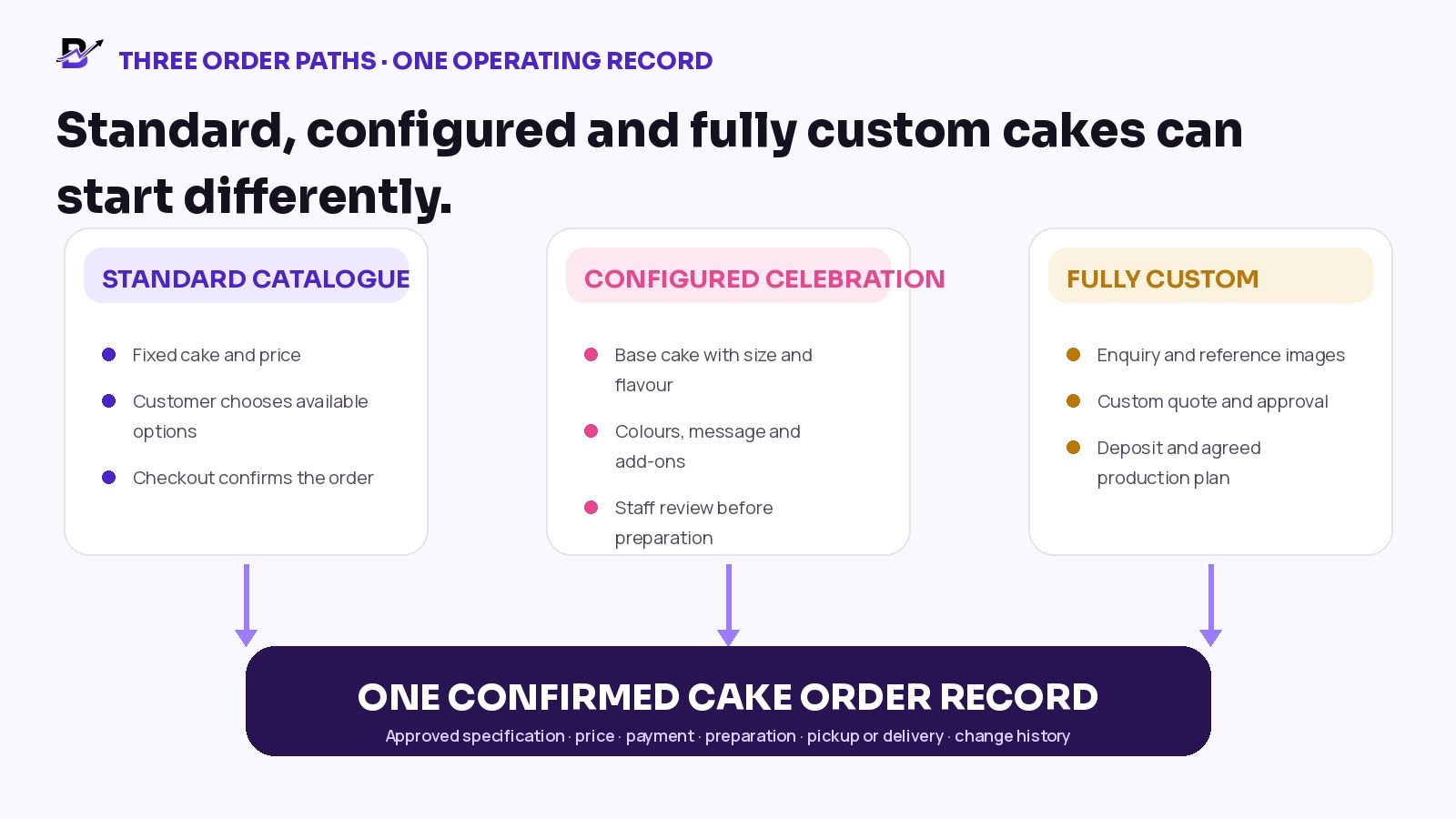
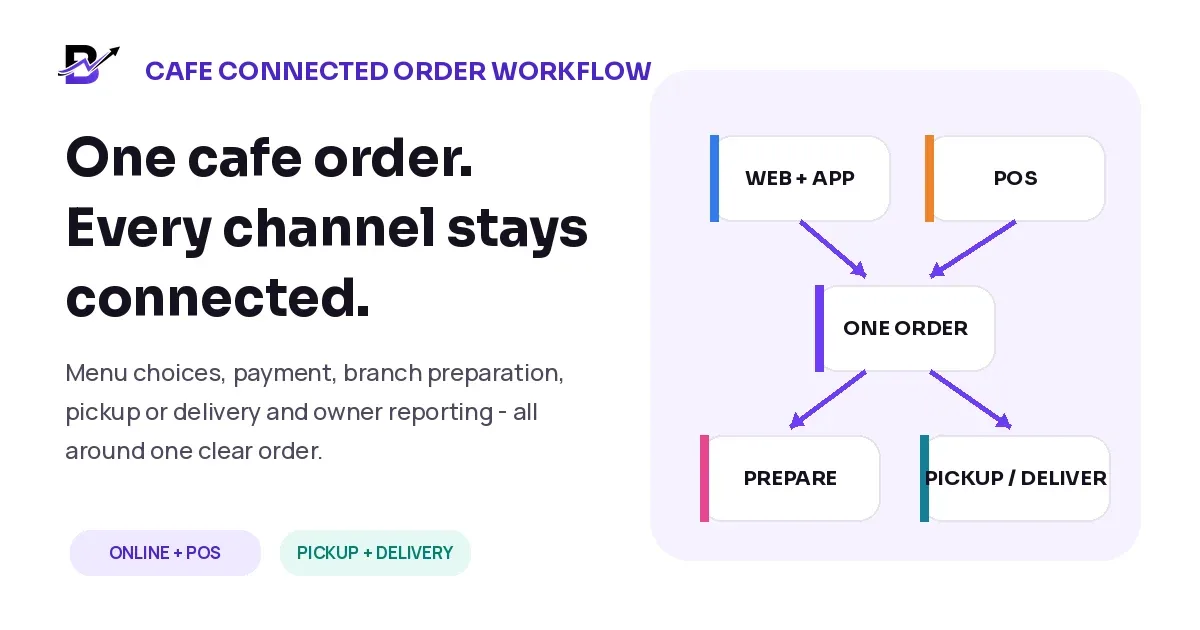
Figure 1. Different sales paths can still create one consistent confirmed order record.
What every confirmed custom cake order should contain
A complete order record should answer the questions that customer service, managers, bakers, decorators, pickup staff and drivers will ask later. The exact fields can vary by bakery, but the following structure covers most practical needs.
ORDER SECTION | WHAT TO RECORD | WHY IT MATTERS |
|---|---|---|
Order identity | Order number, source, branch, order owner and current status. | Creates one reference for every conversation and staff action. |
Customer | Name, phone, email and preferred contact method. | Keeps approval, payment and change communication attached to the correct person. |
Event | Occasion, event date, required handoff time and any stated serving target. | Lets the team work backwards from the customer promise. |
Cake base | Product or custom line, size, shape, layers and quantity. | Defines the physical order at a level the team can prepare. |
Flavour and finish | Sponge, filling, frosting, coating, colours and finish. | Prevents the design from hiding important product details. |
Design | Theme, reference image, approved version, decorations and placement notes. | Gives decorators one current instruction instead of several screenshots. |
Message | Exact wording, name spelling, punctuation and where the message belongs. | Protects a highly visible personal detail. |
Add-ons | Topper, candles, greeting card, knife, balloons or other configured items. | Keeps extras connected to the order and price. |
Food-safety or dietary request | Customer request, bakery response, approved handling note and any limitations. | Treats the request as an operational safety matter rather than a casual comment. |
Price | Base price, custom work, add-ons, delivery, discounts, taxes or configured fees. | Shows what the customer approved and what the team may charge. |
Payment | Total, deposit, amount paid, balance, due date, method and payment status. | Stops “paid” and “confirmed” from becoming vague assumptions. |
Preparation | Preparation date, ready-by time, branch, assigned roles and quality-check owner. | Turns the order into clear internal work. |
Pickup or delivery | Method, address or pickup person, slot, contact, driver and proof requirement. | Keeps the final handoff connected to the original promise. |
Change history | What changed, who requested it, price or timing impact, approval and latest version. | Prevents the team from using an earlier instruction. |
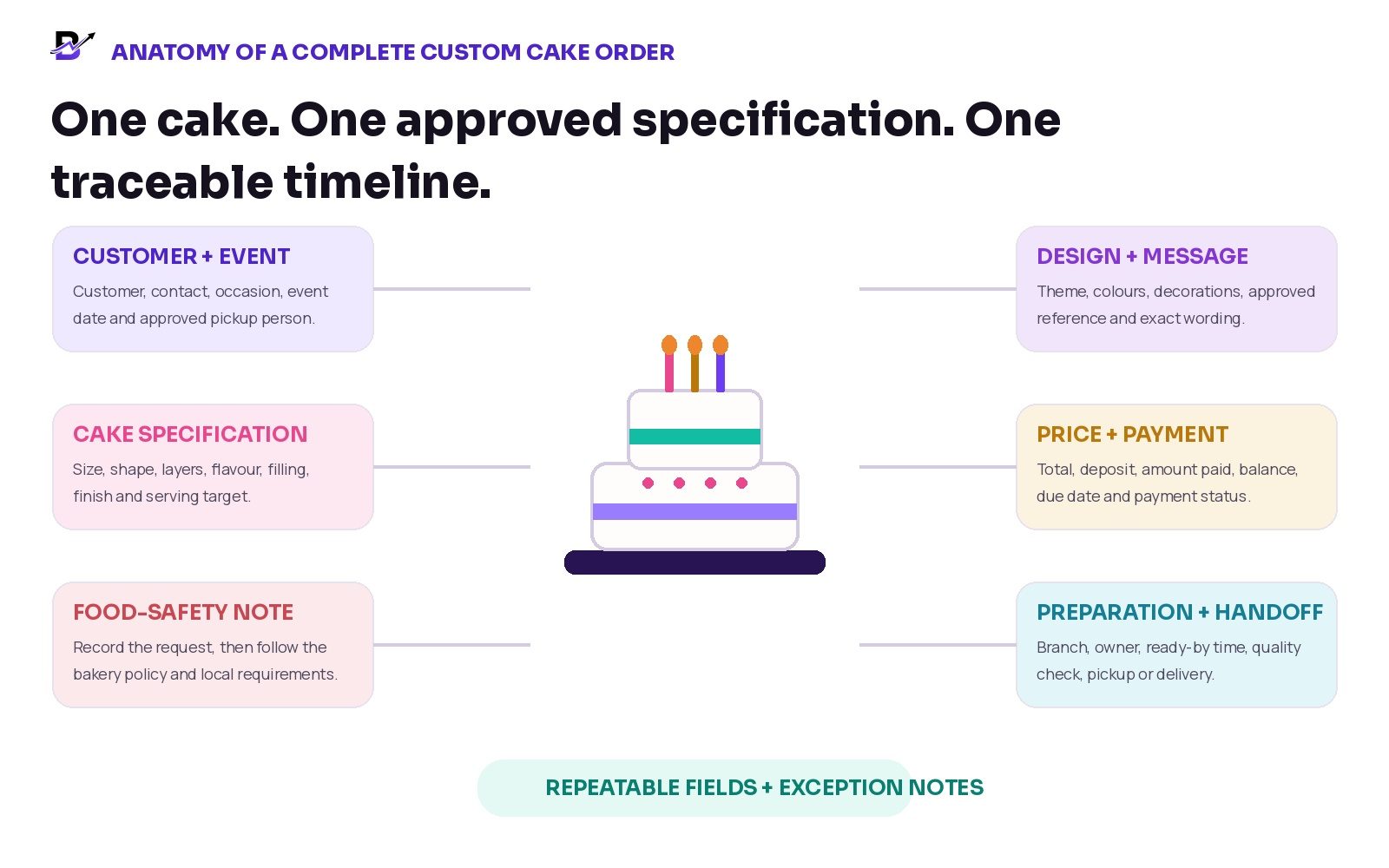
Figure 2. Repeatable fields carry the common details. Notes should carry genuine exceptions, not the whole order.
Use products, options, add-ons, custom lines and notes correctly
One common mistake is placing the entire cake request inside one long note. Another is creating a new product record for every small variation. A cleaner approach is to separate repeatable choices from true exceptions.
RECORD TYPE | USE IT FOR | EXAMPLE |
|---|---|---|
Base product | The main item in the catalogue. | Chocolate celebration cake. |
Option or variant | A controlled version of the product. | 1 kg, round, vanilla sponge, chocolate filling. |
Add-on | A separate item that adds value or cost. | Acrylic topper, candles or greeting card. |
Custom line | A one-off item or service that needs its own description and price. | Handmade sugar figure or a special corporate logo decoration. |
Customer-approved text | Exact wording that will appear on the cake, card or topper. | “Happy 30th, Sara” with confirmed spelling. |
Internal note | Operational information that the customer does not need to see. | Use tall box; keep chilled; decorator A owns the final check. |
Ecommerce reference: Shopify order notes and product-level custom information · Shopify draft orders and custom items
Record one approved design, not a pile of screenshots
Reference images are useful during the conversation, but the preparation team needs to know which version is approved. A clear design record reduces the risk of someone opening the wrong image or working from an early idea.
CONTROL | WHAT TO RECORD | BUSINESS BENEFIT |
|---|---|---|
Approved version | Label the chosen design or reference as the current approved version. | Staff can identify the correct instruction immediately. |
Approval date and person | Record when it was approved and who had authority to approve it. | Useful when several family members or corporate contacts are involved. |
Exact message | Keep names, spelling, punctuation and line breaks separate from general notes. | The decorator does not need to retype from a chat screenshot. |
Colours and finish | Write the agreed colour family, finish and important placement details. | Sets a clear expectation without relying only on image appearance. |
Allowed variation | Record what must match and what is an interpretation. | Protects both the customer expectation and realistic handmade production. |
Change version | When the customer changes the design, create a new approved version and close the old one. | Prevents parallel instructions from remaining active. |
IMPORTANT EXPECTATION: A reference picture should guide the agreed result, but handmade work can vary. Record what the bakery promises exactly and what remains an interpretation. Do not let an image carry details that should be written clearly.
Treat allergy and dietary requests as a separate control
An allergy or dietary request is not just another decoration note. Record the customer request clearly, then follow the bakery’s approved process and the requirements that apply in its country. Do not promise that a cake is allergen-free unless the business can support that statement.
A software field or order note does not replace ingredient controls, staff training, labelling, cross-contact procedures or professional food-safety advice. The order record should make the request visible and show the approved business response; it should not create a promise the bakery cannot safely fulfil.
Price the custom cake before production begins
The confirmed price should be as clear as the confirmed design. The team should not start from a message that says “around 600” while the customer expects a fully fixed amount.
PRICE PART | WHAT TO RECORD | CONTROL |
|---|---|---|
Base cake | Configured product or starting price. | Use the approved catalogue or price rule. |
Size and flavour | Any configured change in size, layers, filling or finish. | Keep each priced choice visible. |
Custom decoration | Labour or special design work that is outside the normal product. | Use a clear custom line or approved adjustment. |
Add-ons | Topper, candles, card, balloons or other extras. | Do not hide paid extras inside a note. |
Pickup or delivery | Configured delivery charge or pickup method. | Keep the handoff cost linked to the order. |
Discount or adjustment | Approved discount, manual price change or correction. | Record who approved it and why. |
Final total | Amount the customer approved. | Do not let later staff edits change the agreement silently. |
Keep payment status separate from production status
A payment link, deposit or balance is part of the order, but payment does not describe the production stage. A cake can be paid but still awaiting design approval. It can be approved but not yet scheduled. Separate status lanes prevent false assumptions.
PAYMENT STATUS | MEANING | TEAM ACTION |
|---|---|---|
Not requested | No deposit or payment has been requested yet. | Do not confuse an enquiry with a confirmed production commitment. |
Link or invoice sent | The customer has received a payment request. | The team can follow up without marking the order paid. |
Deposit paid | The agreed deposit is received. | Check whether the bakery policy also requires final design approval before scheduling. |
Partially paid | Some money is received and a balance remains. | Show the exact amount remaining and the due date. |
Paid | The full recorded amount is received. | Payment completion still does not mean the cake is ready. |
Failed, cancelled or refunded | The payment did not complete or was reversed. | Update the order and production decision according to the bakery policy. |
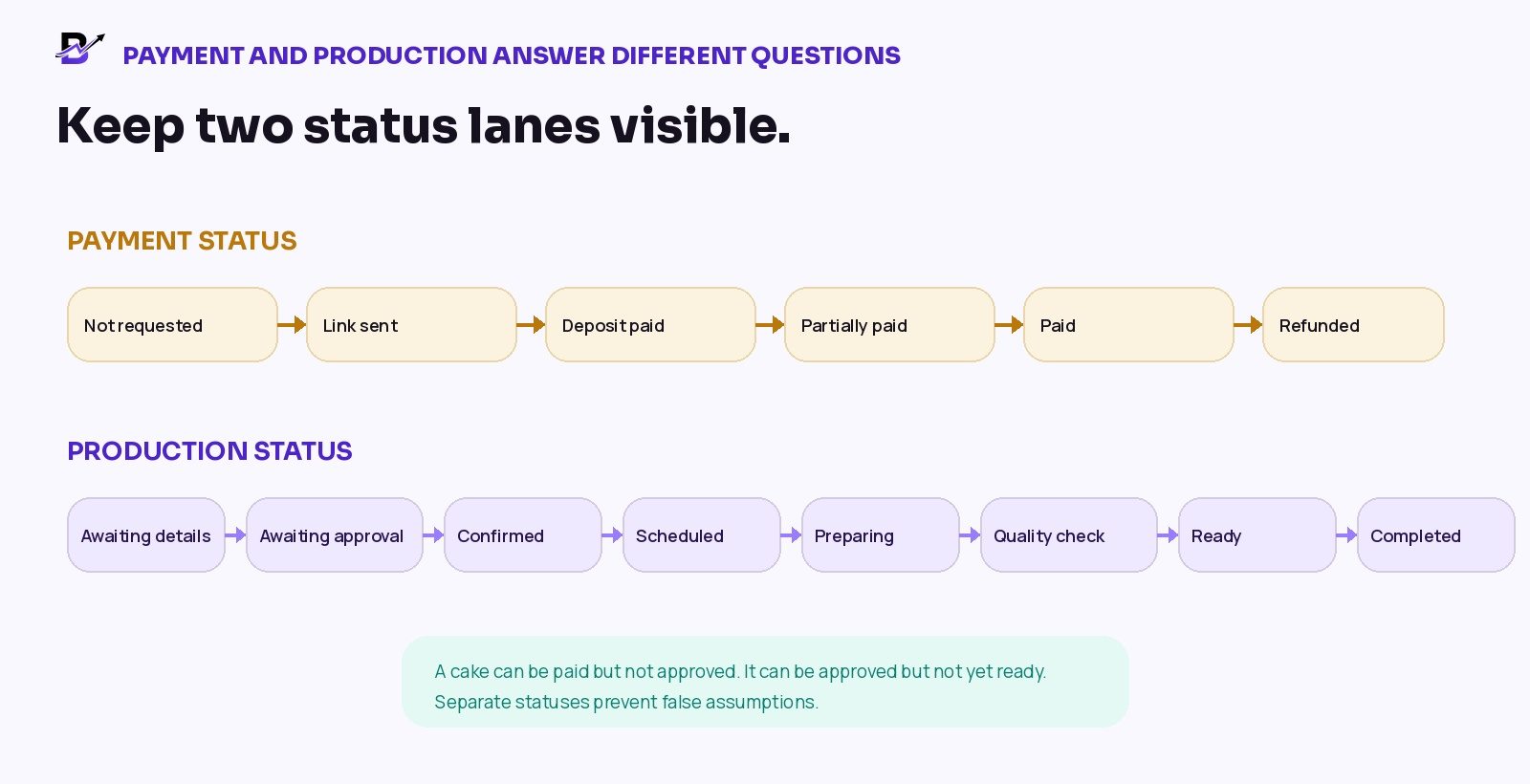
Figure 3. “Paid” and “prepared” answer different questions. Keep both visible.
Payment reference: Stripe partial payments · Stripe invoice payment plans
A practical custom cake order workflow
The exact process will vary by bakery, but the following ten stages create a strong operational baseline. Each stage should have an owner, a visible status and a clear condition for moving forward.
STAGE | WHAT HAPPENS | OWNER | EXIT CONDITION |
|---|---|---|---|
1. Capture the request | Record customer, occasion, date, requested cake and source of enquiry. | Customer service or order taker | A named record exists; the request is no longer only in chat. |
2. Check timing and branch | Confirm lead time, branch, pickup or delivery availability and any internal capacity check. | Manager or authorised staff | The business can realistically accept the date. |
3. Build the specification | Record size, flavour, filling, finish, colours, design, message, add-ons and food-safety request. | Order taker with customer | The order is specific enough to price and review. |
4. Price the order | Add base product, custom lines, add-ons, delivery and approved adjustments. | Authorised sales staff | The total is clear and reviewable. |
5. Confirm approval | Store the approved design version, wording, timing and authorised approver. | Customer + authorised staff | One current approved version exists. |
6. Record payment | Send payment link or invoice and record deposit, balance and due date. | Sales or accounts | The business-defined payment condition is visible. |
7. Schedule and assign | Set preparation date, ready-by time, branch, baker/decorator and quality-check owner. | Manager | The order becomes clear internal work. |
8. Prepare and update | Move through preparation and decoration statuses; record approved exceptions. | Baker and decorator | The team can see progress without repeated calls. |
9. Quality and handoff check | Verify cake, design, message, add-ons, packaging, payment and pickup/delivery details. | Quality-check owner | The order is ready for the promised handoff. |
10. Complete and retain history | Record pickup or delivery outcome, proof if used, final payment and relevant notes. | Counter staff or driver | The bakery has a complete timeline for service and reporting. |
Hand the customer promise to the preparation team
Once the order is confirmed, the preparation team should not need to reconstruct it from messages. The handoff should show what was approved, what time it must be ready, who owns each part and what must be checked before release.
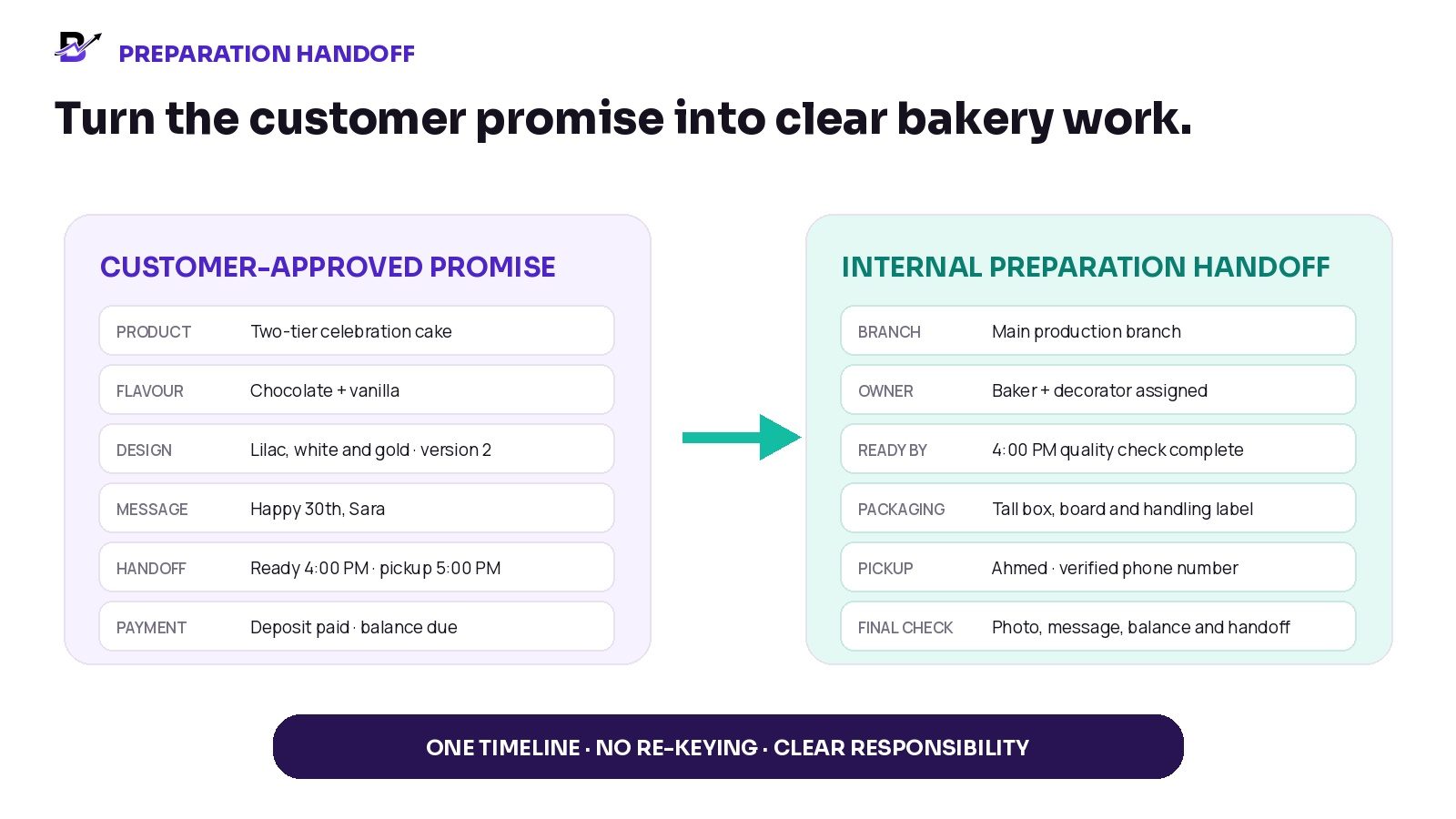
Figure 4. The confirmed customer promise should become a practical preparation checklist.
ROLE | NEEDS TO SEE | MAIN CONTROL |
|---|---|---|
Baker | Base, size, flavour, filling and preparation timing. | Correct cake structure and base preparation. |
Decorator | Approved design, colours, finish, exact message and decorations. | One current approved design version. |
Manager | Branch, staffing, ready-by time, exceptions and final responsibility. | The order fits the accepted plan. |
Counter or pickup staff | Pickup name, time, balance due, order number and handling note. | Correct person receives the correct order. |
Driver | Address, recipient contact, slot, handling instruction and proof requirement. | The delivery closes against the original order. |
Plan pickup and delivery as part of the order
A cake is not complete when decoration ends. It is complete when the correct order reaches the correct person at the agreed time and in the expected condition. Pickup and delivery details should be confirmed early enough to influence the preparation plan.
HANDOFF DETAIL | WHAT TO CONFIRM | WHY IT MATTERS |
|---|---|---|
Pickup method | Collection branch, date, time window and order reference. | Avoid vague instructions such as “evening.” |
Pickup person | Name, phone and any verification rule used by the bakery. | Prevents release to the wrong person. |
Balance due | Amount and accepted payment method at handoff. | Keeps the counter team informed. |
Delivery address | Complete address, access details, recipient and contact rules. | Reduces last-minute calls and failed handoffs. |
Delivery slot | Promised date and time window. | Lets the team work backwards from dispatch. |
Handling note | Configured instruction for transport, box orientation or temperature handling. | Keeps fragile cake requirements visible. |
Proof or completion | Pickup confirmation, recipient name, photo, signature or note where configured. | Closes the order with an operational record. |
Fulfilment reference: Shopify fulfilment time and delivery dates · Shopify order status guidance
Control changes after the order is confirmed
Custom cake orders often change. A customer may add a topper, change a colour, update a name, move the pickup time or request a different flavour. The safe response is not to rely on memory. Record the change, check whether it is still possible, confirm any price or timing impact, and create a new approved version.
CHANGE | SAFE OPERATING RESPONSE | RECORD TO KEEP |
|---|---|---|
Design change | Record the new request, feasibility, price or timing impact and new approved version. | Do not leave the earlier design active. |
Message or spelling change | Copy the exact corrected wording into the approved message field. | Do not rely on the latest chat bubble. |
Flavour or filling change | Recheck production feasibility and food-safety implications. | Treat it as a product change, not a cosmetic note. |
Pickup or delivery change | Update slot, branch, address, staff/driver plan and any charge. | Make sure the preparation deadline changes with the handoff. |
Add-on change | Add or remove the item, update price and confirm stock. | Keep order, payment and preparation aligned. |
Late change after cutoff | Record the request and authorised decision: accept, refuse or offer an alternative. | Protect the current work and avoid informal promises. |
CHANGE-CONTROL RULE: Do not delete the original approved version silently. Record what changed, who requested it, whether price or timing changed, and which version is now current.
Use customer history carefully
Past orders can reduce repeat work. A returning customer may reorder the same flavour, size or style, but the new order should still confirm the current event date, message, design, food-safety request, price, payment and handoff plan. “Same as last time” should be a starting point, not the final specification.
USEFUL HISTORY | HOW IT HELPS | CONTROL |
|---|---|---|
Previous product | Offer quick reorder or a starting template. | Confirm current size, flavour, design and price. |
Saved customer details | Reuse permitted contact information and addresses. | Verify the correct recipient and handoff details. |
Past message or occasion | Use only as a reference. | Never copy a personal message without approval. |
Previous issue | Make relevant service history visible to authorised staff. | Do not expose sensitive notes more widely than needed. |
Metrics that help improve custom cake orders
Do not measure only revenue. A custom-order process should also show whether the team is collecting complete information, receiving approvals on time and completing the promised handoff without preventable correction.
METRIC | SIMPLE DEFINITION | WHAT IT CAN REVEAL |
|---|---|---|
Complete-order rate | Confirmed orders containing every required field. | Shows whether the intake process is becoming reliable. |
Approval lead time | Time from complete specification to customer approval. | Reveals delays that reduce production time. |
Deposit outstanding | Confirmed or tentatively held orders still missing the required deposit. | Supports timely follow-up and capacity decisions. |
Change-after-confirmation rate | Orders changed after the approved version was recorded. | Shows where expectations or intake questions need improvement. |
Ready-on-time rate | Orders completing quality check by the internal ready-by time. | Measures preparation reliability. |
Correction or remake count | Orders requiring preventable correction or remake. | Helps identify training, specification or quality-control gaps. |
Pickup or delivery issue rate | Late collections, wrong recipient, incomplete address or failed handoff. | Connects production quality to the final customer experience. |
Average custom order value | Custom cake revenue divided by completed custom orders. | Supports pricing and product-mix decisions without relying on external benchmarks. |
MEASUREMENT NOTE: These are management measures, not universal benchmarks. Set targets only after the bakery has enough reliable data to establish a realistic baseline.
A practical 30-day implementation plan
PERIOD | MAIN WORK | OUTPUT |
|---|---|---|
Days 1-5 | Map the current journey from enquiry to pickup or delivery. List where details are stored and where mistakes occur. | One honest view of the current workflow. |
Days 6-10 | Define required fields, order types, status lanes, approval rule and change-control rule. | A simple operating standard. |
Days 11-15 | Create product options, custom-line rules, intake template and final quality checklist. | Repeatable order setup. |
Days 16-20 | Train customer service, managers, bakers, decorators, counter staff and drivers on their responsibilities. | Shared ownership and fewer assumptions. |
Days 21-25 | Pilot the workflow on a small set of real orders and record every exception. | Proof of what works in normal operations. |
Days 26-30 | Review incomplete fields, late approvals, payment gaps, changes, readiness and handoff issues. Update the process. | A stronger version for the next month. |
How Bloomlytix supports the connected bakery workflow
Bloomlytix is designed as one ecommerce and operations ecosystem for bakery businesses. The customer-facing website and configured customer apps can share products, options, prices, offers, customer accounts and order history. POS, manual orders and payment-link workflows can bring assisted sales into the same wider operating system.
BLOOMLYTIX AREA | ROLE IN THE CUSTOM CAKE WORKFLOW |
|---|---|
Website and customer apps | Present standard products, configured options, custom-order notes, payments, pickup or delivery choices and customer history. |
POS and manual orders | Create walk-in, phone, WhatsApp, assisted or custom sales using configured products, custom lines, notes and permitted price changes. |
Payment links | Create a remote payment request for a related manual or custom order and track the configured payment result. |
Staff fulfilment | Keep product, size, flavour, approved design note, message, preparation timing, payment status and fulfilment stages visible to permitted staff. |
Branch and roles | Assign branch-aware users and keep owners, managers, staff and drivers within their permitted views. |
Inventory and purchases | Connect finished-product or configured stock, adjustments, supplier purchases and reports where relevant to the bakery setup. |
Pickup and delivery | Connect configured dates, slots, zones, charges, driver assignment, delivery status and proof to the order journey. |
Reports | Review orders, sales, products, branches, payments, delivery and relevant operational activity from the wider platform. |
PRODUCT SCOPE: Bloomlytix supports product variants, custom-order notes, preparation statuses, pickup and delivery timing, finished-product stock, purchases, sales and reporting. Recipe costing, ingredient-level depletion, allergen-production controls, batch planning, kitchen capacity, manufacturing workflows and specialised design-approval or quotation processes require separate confirmation during scoping.
Questions to ask during a bakery software demo
Can online, app, POS, phone and WhatsApp-assisted orders create one order record?
Can staff record size, flavour, filling, finish, colours, message and add-ons separately instead of one long note?
Can a one-off custom line and approved manual price be added with permissions?
Can the approved design note or reference remain visible to permitted preparation staff?
Can payment status remain separate from production status?
Can a deposit, amount paid, balance and due date be recorded or linked to the order?
Can the order be assigned to a branch, baker, decorator, counter team or driver?
Can pickup and delivery date, slot, address, recipient and proof remain connected to the order?
Can changes be recorded without deleting the earlier approved information?
What is included for recipe costing, ingredient inventory, allergens, batch planning and kitchen capacity?
Can permissions stop unauthorised price, refund or status changes?
Can reports show incomplete orders, payment gaps, readiness and handoff outcomes?
Frequently asked questions
What information should a custom cake order form include?
At minimum, collect customer contact details, event date, cake size or serving target, shape, flavour, filling, finish, design or reference, colours, exact message, add-ons, food-safety or dietary request, price, deposit, balance, preparation timing and pickup or delivery details. The form should match the bakery’s real workflow rather than collecting fields no one uses.
Should a bakery take a deposit for custom cakes?
That depends on the bakery policy, order value, lead time and production risk. The important operational rule is to define the requirement clearly and show the deposit, amount paid, remaining balance and due date inside the order record.
How should design approval be recorded?
Keep one current approved version with the approval date, authorised person, exact message, colours, key decorations and any allowed variation. When the customer changes the design, close the old version and record a new approval.
How should allergy or dietary requests be handled?
Record the request clearly, then follow the bakery’s approved food-safety process and local requirements. Do not make an allergen-free or dietary claim unless the business can support it. A software note cannot replace ingredient controls, training or professional guidance.
Can WhatsApp still be used for custom cake enquiries?
Yes. WhatsApp can remain a useful conversation channel. Once the price, design, message, payment and timing are confirmed, move those approved details into a structured order so the bakery team does not need to search the chat.
What statuses should a custom cake order use?
A practical production flow may include awaiting details, awaiting approval, confirmed, scheduled, preparing, decorating, quality check, ready, picked up or out for delivery, completed and cancelled. Payment should use a separate status such as link sent, deposit paid, partially paid, paid, failed or refunded.
Can Bloomlytix manage custom cake orders?
Bloomlytix supports ecommerce, POS, manual and payment-link order paths with product options, custom-order notes, permitted pricing, payment status, branch fulfilment, preparation timing, pickup, delivery and reporting. Specialised design-approval, quotation, production-planning or manufacturing requirements should be confirmed during the workflow review.
Does Bloomlytix include recipe costing and ingredient-level stock?
Bloomlytix supports configured product and finished-product stock, purchases, adjustments and reporting. Recipe costing, ingredient-level depletion, allergen-production controls, batch planning and kitchen-capacity workflows require separate confirmation and should not be assumed from the standard bakery pages.
Final checklist for every confirmed custom cake order
One order number and one current owner
Customer and event details confirmed
Cake size, shape, flavour, filling and finish recorded
One current approved design or reference version
Exact message and spelling confirmed
Add-ons and custom lines priced separately
Food-safety or dietary request handled through the bakery policy
Total, deposit, amount paid, balance and due date visible
Preparation date, ready-by time, branch and staff responsibilities assigned
Pickup person or delivery address, slot and proof requirement confirmed
Every later change recorded with approval, price and timing impact
Final quality, packaging, payment and handoff check completed
BRING ONE REAL ORDER: The best software demonstration is not a generic tour. Bring one recent custom cake order - including the enquiry, approved design, payment and handoff - and ask the provider to show how the complete workflow would be recorded.