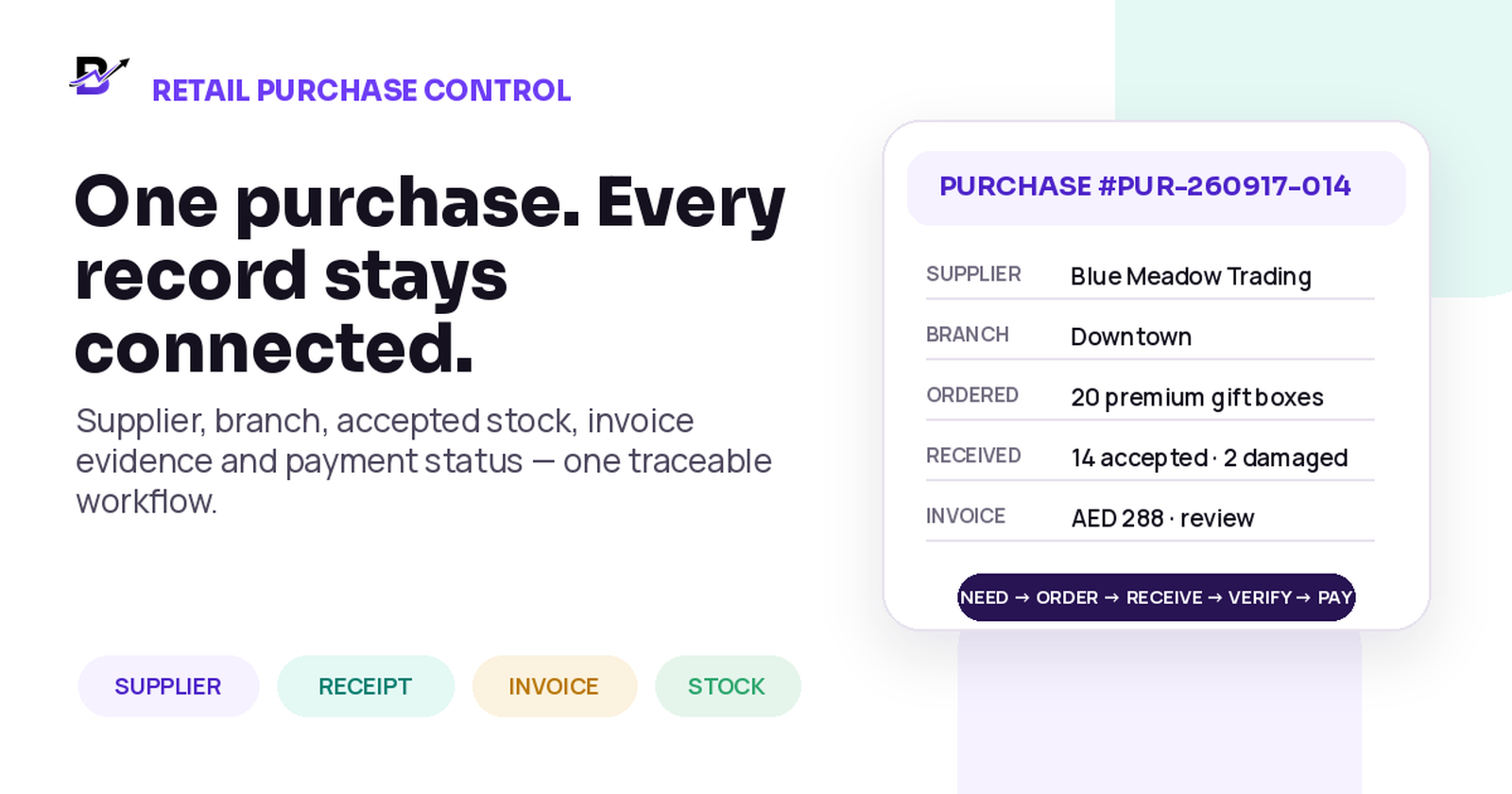
A purchase should carry the supplier, branch, received quantity, invoice evidence and payment context into one traceable record.
A supplier invoice can look complete while the purchase behind it is still unclear. The goods may not have arrived. They may have reached the wrong branch. Part of the delivery may be damaged. The invoice quantity may not match the accepted quantity, and the payment may still be pending.
Good retail purchase management keeps those facts separate but connected. The owner should be able to answer four questions without searching through chats, spreadsheets and paper files: What did we decide to buy? What physically arrived? What did the supplier charge? What has the business paid?
DIRECT ANSWER
Manage every retail purchase through one traceable workflow. Record the supplier, branch, items, quantities, agreed costs, invoice details, payment status and supporting evidence. Keep buying, receiving, invoicing and paying as separate events. Increase stock only for items that were actually received and accepted at the correct location, then investigate any quantity, price, damage or invoice difference before the purchase is closed.
This guide is for florists, gifting brands, bakeries, cafés, perfume shops, jewellery retailers and other specialty retailers that buy products, add-ons, packaging or materials from suppliers. It explains a practical operating method, not country-specific accounting, tax or legal advice.
Do not treat purchasing as one event
A purchase is a small chain of events. Problems begin when the business uses one status—such as “purchased”—for everything. An order to a supplier does not prove that the goods arrived. An invoice does not prove that every item was accepted. A payment does not explain which branch received the stock.
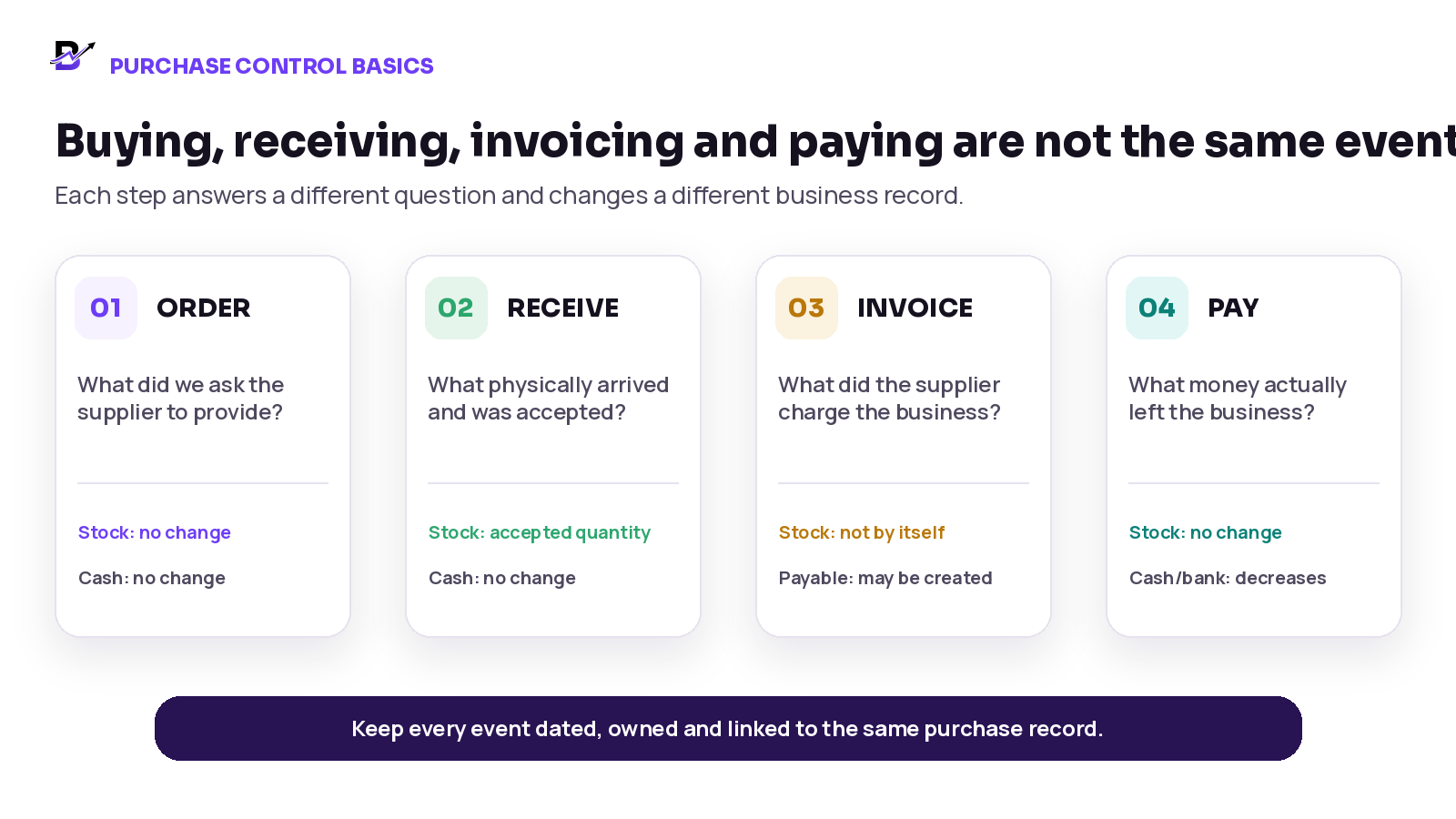
Figure 1. Buying, receiving, invoicing and paying answer different questions and affect different records.
EVENT | MAIN QUESTION | STOCK EFFECT | MONEY EFFECT |
|---|---|---|---|
Order or purchase request | What did we ask the supplier to provide? | No sellable stock yet. Quantity may be shown as expected or incoming. | Creating an order does not move cash by itself. |
Goods receipt | What physically arrived, where, and in what condition? | Accepted quantity can increase the receiving branch stock. | No payment is proved by the receipt alone. |
Supplier invoice | What quantity, price, tax and total did the supplier bill? | An invoice should not add stock by itself when receipt is still unconfirmed. | May create an amount due or an expense record, depending on the accounting process. |
Payment | What amount actually left cash, bank or another payment method? | No inventory change by itself. | Reduces the paying balance and updates settlement status. |
CORE PRINCIPLE
One purchase can have several dates and statuses: ordered, expected, partially received, received, disputed, invoiced, partially paid, paid or closed. Keep those statuses clear instead of forcing the purchase into one vague label.
Build one useful supplier record
The supplier record should help the team buy, receive, review and report—not merely store a phone number. The exact fields vary by country and business, but the operational record should identify the supplier clearly and preserve the terms that affect day-to-day work.
SUPPLIER FIELD | WHAT TO RECORD | WHY IT MATTERS |
|---|---|---|
Supplier identity | Trading name, legal name where required, supplier code and active status. | Prevents duplicate supplier records and keeps purchase history together. |
Contacts | Primary contact, phone, email and order or accounts contact where useful. | Helps staff follow up on deliveries, invoices and credits. |
Supply scope | Products or categories normally supplied, approved brands or item groups. | Makes sourcing and reporting easier. |
Currency + terms | Buying currency, agreed payment terms, minimum order or delivery terms. | Reduces price and due-date misunderstandings. |
Lead time | Typical order-to-delivery time and important cut-off days. | Supports reorder planning and supplier comparison. |
Tax / business details | Tax registration or legal identifiers where the business is required to keep them. | Supports correct invoice review and accounting handoff. |
Branch relationship | Locations normally supplied or any branch-specific terms. | Keeps receiving responsibility clear. |
Documents + notes | Approved agreements, catalogues, certificates or factual operating notes. | Keeps evidence close without relying on one employee’s memory. |
Keep sensitive bank or payment details under appropriate access controls. Do not place confidential information in a general note that every staff member can see.
Create one complete purchase record
A formal purchase order can be useful, but not every small retailer needs complex procurement software. Whatever tools you use, keep one shared reference across the supplier order, receipt, invoice, branch and payment review. The fields below are a recommended control record; confirm which are available in your software.
PURCHASE SECTION | MINIMUM INFORMATION | CONTROL QUESTION |
|---|---|---|
Identity | Purchase number, status, purchase date, creator and approver. | Can every later receipt, invoice and payment point back to this record? |
Supplier | Supplier record and contact. | Is the purchase history grouped under the correct supplier? |
Branch / destination | Receiving branch, store, kiosk or approved location. | Which location should own the accepted stock? |
Items | Product or material, SKU/code, unit, ordered quantity and agreed unit cost. | Does quantity 1 mean the same thing to supplier and staff? |
Timing | Expected date, actual receipt date and any backorder date. | Can the team see what is still incoming? |
Receipt | Received, accepted, damaged, rejected and remaining quantity. | What can become available stock? |
Invoice | Supplier invoice number, date, subtotal, discount, tax/VAT, total and currency. | Does the charge match the agreement and receipt? |
Payment | Due date, method or linked accounting status, amount paid and balance where used. | Is the supplier charge unpaid, partly paid, paid, credited or disputed? |
Evidence | Invoice, receipt, delivery note, damage photo or approval attachment. | Can a manager understand the decision later? |
History | Who changed quantities, costs, branch, status or approval, and why. | Can corrections be reviewed without erasing the original record? |
UNIT WARNING
Do not order in cartons and receive in pieces unless the conversion rule is clear. “Ten boxes” can mean ten individual boxes or ten cartons. A good purchase record makes the unit explicit.
Follow a ten-stage purchase workflow
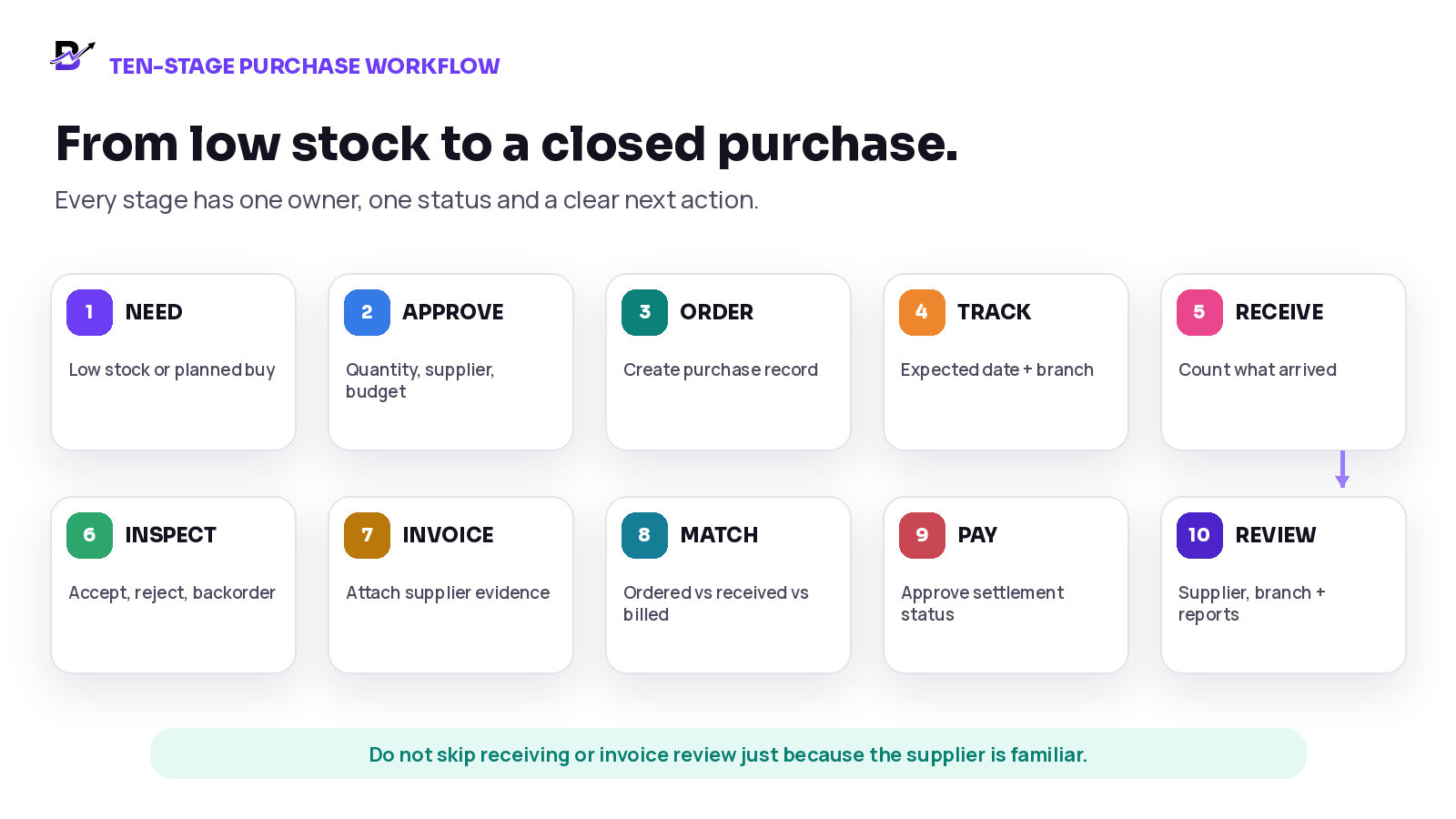
Figure 2. A controlled retail purchase moves from need to closed report without skipping receipt or invoice review.
Identify the need. Use low-stock visibility, planned launches, seasonal demand or a manager request. Confirm the item, branch and quantity before contacting the supplier.
Choose the supplier and terms. Confirm the item, unit, agreed cost, expected date, currency, delivery condition and any approved substitute.
Approve the purchase. Apply the business approval rule for value, category, branch or requester before the commitment is sent.
Create the purchase record. Give the purchase a unique reference and enter the supplier, branch, lines, quantities, costs and expected date.
Track the incoming quantity. Keep ordered but unreceived goods visible as expected or incoming instead of treating them as sellable stock.
Receive at the correct location. Count what physically reached the branch or location. Record the receipt date and person responsible.
Inspect and classify. Separate accepted, damaged, rejected, missing and backordered quantities. Add notes or photos when needed.
Record the supplier invoice. Enter the invoice number, date, totals, tax or VAT fields, currency and attachment. Do not rely only on the image.
Match and resolve differences. Compare the ordered quantity and cost with the accepted receipt and invoice. Hold or explain differences before payment approval.
Pay, close and report. Update the payment status through the approved accounting or cash process, close only when open issues are resolved, and include the purchase in owner reports.
Increase stock only when goods are received and accepted
The safest operational rule is simple: ordering creates an expectation; receiving creates the stock movement. Accepted items should increase the quantity at the location that physically received them. Items that are still in transit, backordered, damaged or rejected should remain separate from sellable stock. If your software has no separate accepted and rejected statuses, enter only the accepted usable quantity into sellable stock and keep damage or backorders in the purchase evidence and follow-up log.
PURCHASE EVENT | RECOMMENDED STOCK TREATMENT | REASON |
|---|---|---|
Purchase approved or sent | No on-hand increase. Show as ordered or incoming if the system supports it. | The supplier commitment is not physical stock. |
Goods arrive and pass inspection | Increase accepted quantity at the receiving branch. | The business now controls usable items at that location. |
Partial receipt | Increase only the accepted portion. Leave the balance open or incoming. | The remaining quantity may still arrive later. |
Damaged or rejected goods | Do not add to sellable stock. Record rejected or unavailable quantity and evidence. | The items cannot fulfil a customer order. |
Invoice arrives before goods | Record the invoice or pending liability according to policy, but keep stock unchanged. | A charge is not proof of receipt. |
Goods arrive before invoice | Receive and update accepted stock; keep invoice/payment status pending. | Physical receipt and supplier billing can occur on different dates. |
Wrong branch receives the delivery | Use the actual receiving location, then correct or transfer with history. | Adding stock to the intended branch creates a false location balance. |
For a current example of separate order and receipt records, see Shopify purchase orders and receiving inventory from a purchase order. For a specialty-retail example, see our flower shop inventory guide.
Worked example: a partial and damaged delivery
A gift shop orders 20 premium boxes at AED 18 each for its Downtown branch. The supplier sends 16. Staff accept 14, reject 2 because they are damaged and leave 4 as backordered. The supplier invoice shows 16 units at the agreed price.
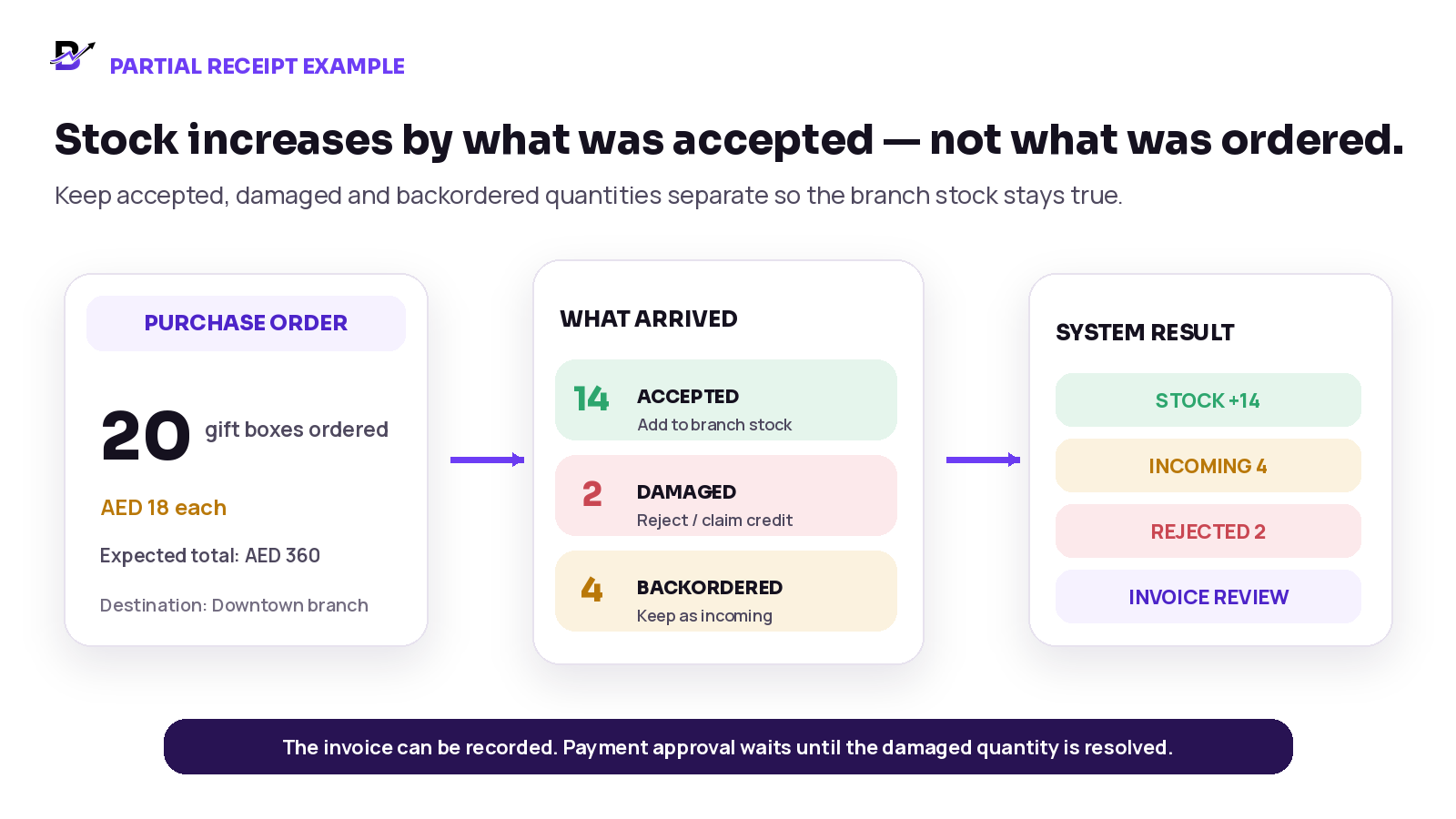
Figure 3. Only accepted stock becomes available; damaged and backordered quantities remain separate.
RECORD | QUANTITY / AMOUNT | WHAT THE BUSINESS SHOULD SHOW |
|---|---|---|
Ordered | 20 boxes · AED 360 expected | One open purchase with 20 ordered. |
Accepted receipt | 14 boxes | Downtown branch stock increases by 14. |
Damaged receipt | 2 boxes | Rejected or unavailable; attach evidence and request replacement or credit. |
Backorder | 4 boxes | Still incoming; do not add to stock. |
Supplier invoice | 16 boxes · AED 288 | Record the charge, then resolve the 2 damaged units according to the supplier agreement before final payment approval. |
The exact financial entry depends on the business accounting policy and supplier response. The operational record should keep the difference visible until the supplier issues a replacement, revised invoice, credit or other agreed outcome.
Handle exceptions without overwriting the history
EXCEPTION | SAFE OPERATING RESPONSE | KEEP IN THE RECORD |
|---|---|---|
Partial delivery | Receive the accepted quantity, leave the remaining quantity open and confirm the next date. | Ordered, received, remaining, branch, receipt date and supplier update. |
Price mismatch | Compare the agreed cost with the invoice, request clarification and approve only after resolution. | Agreed price, invoice price, variance, reason and approver. |
Damaged items | Separate from sellable stock, photograph where appropriate and request replacement or credit. | Condition, quantity, evidence, supplier response and stock outcome. |
Wrong branch | Post to the actual location or correct before receipt. Use a documented transfer if stock moves later. | Actual branch, correction or transfer and responsible users. |
Duplicate invoice | Check supplier + invoice number + date + amount before creating a second record. | Duplicate warning, decision and related purchase reference. |
Missing invoice evidence | Keep the purchase open for review instead of inventing details. | Missing document flag, owner and follow-up date. |
Unit mismatch | Convert cartons, packs or pieces using one approved rule before updating quantities. | Supplier unit, internal unit, conversion and approved quantity. |
Return to supplier | Record the quantity leaving, branch, reason and expected credit or replacement. | Return evidence, stock reduction and supplier settlement status. |
CHANGE-CONTROL RULE
Do not delete the original quantity or cost and silently replace it. Preserve what was ordered, what arrived, what was billed, what changed and who approved the final outcome.
Use a simple ordered-received-invoiced check before payment
Before approving the supplier charge, compare three records: the purchase record, the goods receipt and the supplier invoice. Large systems often call this three-way matching. A small retailer can use the same idea without enterprise complexity: every difference must have a reason and an owner.
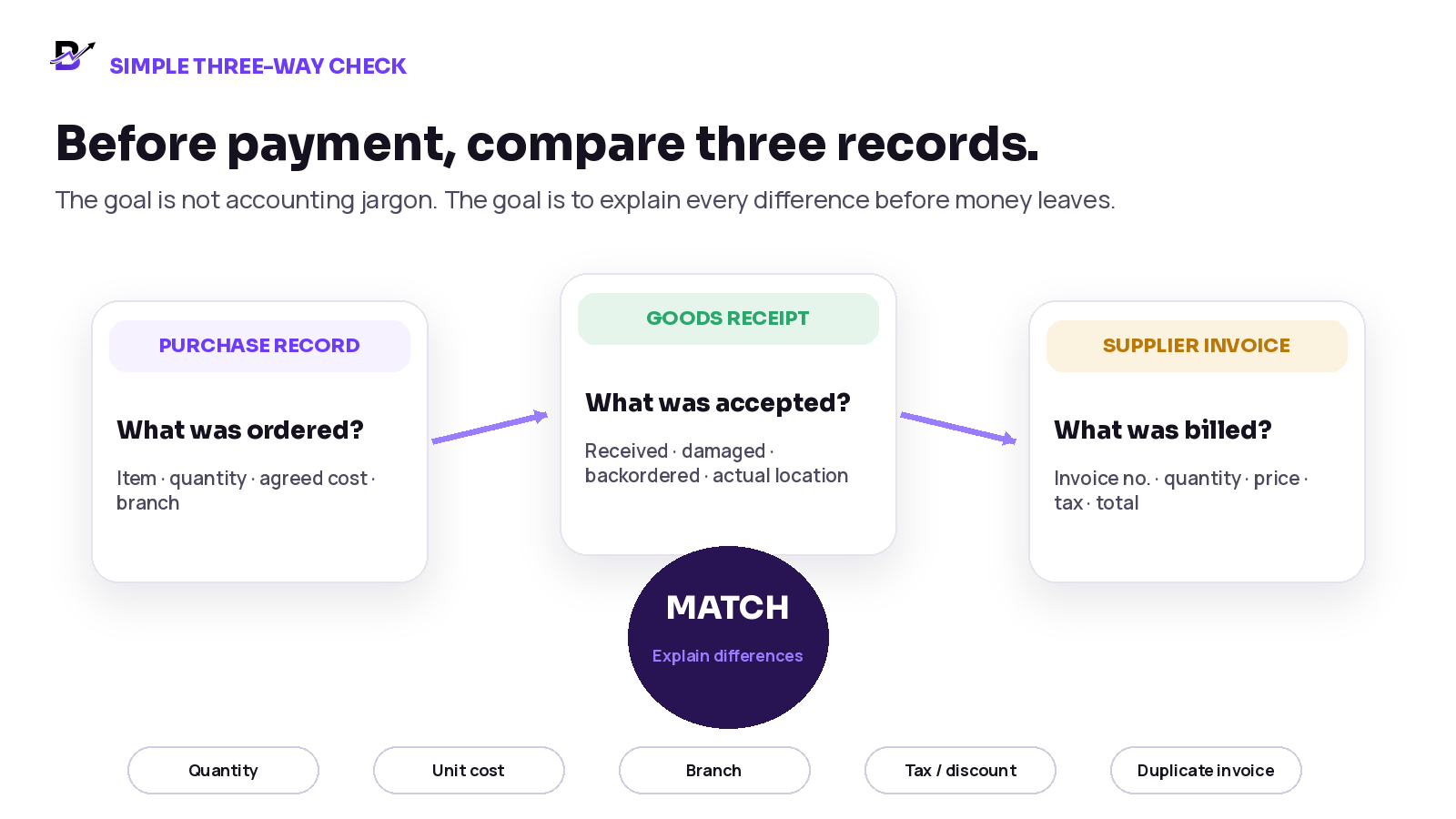
Figure 4. A simple three-way check compares the purchase record, the actual receipt and the supplier invoice before payment.
CHECK | COMPARE | QUESTIONS TO RESOLVE |
|---|---|---|
Quantity | Ordered vs accepted vs invoiced | Did the supplier bill more than the business accepted? Is any quantity backordered? |
Unit cost | Agreed cost vs invoice cost | Was the price changed, was a discount missed, or was a different unit used? |
Location | Purchase destination vs actual receipt | Did the correct branch receive and own the stock? |
Charges | Freight, discount, tax/VAT and other approved lines | Are the extra amounts expected, supported and assigned correctly? |
Identity | Supplier, invoice number, date and purchase reference | Is the invoice genuine, unique and linked to the right purchase? |
Condition | Accepted vs damaged or returned quantity | Does the invoice need a credit, replacement or dispute before payment? |
This is a manual three-record check, not a claim that Bloomlytix runs an automated match. Oracle’s match-level guidance distinguishes order, receipt and invoice matching from an additional inspection-acceptance check. QuickBooks receiving guidance also separates the receipt from the bill when they arrive at different times.
Keep invoice attachments as evidence—not as the only data
A clear invoice image or PDF is valuable, but the attachment should support structured fields rather than replace them. A manager cannot reliably search, group or compare purchases when the supplier, branch, invoice number and total exist only inside a photo.
CONTROL | GOOD PRACTICE | WHY IT HELPS |
|---|---|---|
Structured fields | Enter supplier, branch, invoice number, date, category, subtotal, tax/VAT, total and currency. | Enables search, duplicate checks, reporting and accounting handoff. |
Readable attachment | Upload the complete invoice or receipt, not a cropped total or blurred screenshot. | Supports review and supplier disputes. |
Purchase link | Attach the evidence to the related purchase or receipt. | Keeps physical and financial context together. |
File access | Limit financial documents to authorised roles. | Protects supplier and business information. |
Correction history | Add a revised invoice or credit without erasing the earlier document. | Preserves the explanation for the final total. |
Connect purchases to stock, cash and accounting
Purchasing sits between inventory and finance. The same supplier delivery can update branch stock today, create an amount due, and be paid later from cash or bank. Keep those outcomes connected, but do not force one event to do the job of all three. Keep physical supplier payments aligned with the daily retail cash reconciliation process.
BUSINESS RECORD | WHAT THE PURCHASE CONTRIBUTES | IMPORTANT BOUNDARY |
|---|---|---|
Branch inventory | Accepted quantities, costs and purchase source for configured items. | Stock should follow the actual receipt and location. |
Supplier history | Items, totals, frequency, delivery issues and open purchases. | History supports decisions but does not replace supplier contracts. |
Cash / bank | Payment amount, method, date and responsible account or holder. | Payment belongs to the approved finance or cash process. |
Expense / purchase category | Operational category for reporting and accounting handoff. | Category mapping is not a substitute for professional tax treatment. |
Owner reporting | Purchases by supplier, branch, category, product and month. | Reports are useful only when received quantities and invoice totals are complete. |
Accounting system | Bills, payables, tax treatment, credits and financial statements where applicable. | Confirm integration, export and final accounting ownership separately. |
IMPORTANT
This article explains operational purchase control. Tax, VAT, accounts payable, document retention and supplier-payment rules vary by country. Confirm legal and accounting obligations with qualified advisers and the software provider.
Measure purchasing with useful owner metrics
Do not measure only total spend. A useful purchasing review shows where the money went, whether the expected stock arrived and which supplier differences repeat.
METRIC | SIMPLE DEFINITION | WHAT IT CAN REVEAL |
|---|---|---|
Purchase spend | Total by month, category, supplier, branch and product. | Where buying value is concentrated. |
Accepted receipt rate | Accepted quantity divided by delivered quantity. | Damage, quality or supplier consistency problems. |
Receipt variance | Ordered quantity minus accepted quantity. | Short deliveries, backorders and receiving mistakes. |
Price variance | Invoice unit cost minus agreed unit cost. | Unexpected price changes or unit mismatches. |
Open purchase age | Time since order or expected date for purchases not fully closed. | Late suppliers and forgotten backorders. |
Invoice evidence completion | Purchases with the required invoice or receipt attached. | Whether owner review and accounting handoff are supported. |
Supplier lead time | Time from approved order to accepted receipt. | Reorder timing and supplier reliability. |
Unresolved mismatch age | Time a quantity, price, damage or invoice issue remains open. | Where purchasing problems are being hidden rather than resolved. |
Set a baseline from your own operation. Do not copy a generic “good” damage rate or lead-time target from another retailer. Compare the same supplier, item group, branch and season over time.
How Bloomlytix supports purchase and supplier control
Bloomlytix provides supplier records, purchase invoice evidence, configured branch inventory movements, cash activity and operational reports inside the wider retail platform. The table below distinguishes documented tools from receiving, settlement and matching steps to verify in a demo. See the Bloomlytix features for the documented scope.
BLOOMLYTIX AREA | PRACTICAL ROLE IN THE WORKFLOW |
|---|---|
Supplier records and history | Group purchase invoices by supplier and review purchase history and monthly totals. |
Branch context | Assign purchase invoices to a branch and record stock movements at the correct configured location. |
Purchase invoice details | Record supplier, branch, category, payment mode or reference, subtotal, VAT where required, total, notes and attachments. |
Configured stock | Add the accepted quantity to branch inventory and review stock movements; keep rejected and backordered amounts visible in the appropriate evidence or process. |
Category mapping | Use configured purchase and expense categories for operational reports and accounting handoff. |
Cash and payment context | Review recorded payment mode and related cash activity; confirm how unpaid, partial or disputed supplier charges are handled. |
Owner reports | Review supplier and monthly purchase totals alongside branch stock, sales and cash reports. |
PRODUCT SCOPE
Bloomlytix offers supplier records, purchase invoices with branch, category, totals and attachment evidence, branch inventory movements, and related reports. Confirm the exact links between these records, partial-receipt statuses, payment handling, permissions and accounting integrations during a demo. Do not assume automatic three-way matching, duplicate-invoice detection, supplier credits or a full accounts-payable system.
Questions to ask during a purchase-workflow demo
Can the system keep ordered, received, accepted, damaged, rejected and remaining quantities separate?
Can every purchase show the supplier, branch, category, line items, unit, cost and expected date?
When does accepted stock increase, and which branch receives it?
How are partial deliveries and backorders kept open?
Can invoice number, date, subtotal, tax/VAT, total, currency and attachments be stored as structured data?
Can the system detect or help review duplicate supplier invoices?
How are price, quantity, damage and wrong-branch differences recorded without overwriting the original record?
Can roles control who creates, receives, changes, approves, pays and reports on purchases?
Can owners review purchases by supplier, category, product, branch and month?
How does purchase payment status connect to cash or an external accounting process?
Can purchase and supplier data be exported, and what integrations are standard versus custom?
Which advanced procurement, warehouse, recipe, manufacturing or compliance needs require separate scope?
Frequently asked questions
What details should a retail purchase record include?
At minimum, keep a unique purchase number, supplier, receiving branch, item or material, unit, ordered quantity, agreed cost, expected date, received and accepted quantity, invoice number and date, subtotal, tax or VAT, total, currency, payment status, attachments and change history.
When should received stock increase inventory?
Increase stock when the items physically arrive, pass the business inspection and are accepted at the correct branch or location. Creating an order or uploading an invoice should not automatically make the quantity available for sale.
How should a partial supplier delivery be recorded?
Record the accepted quantity as received, keep missing or backordered quantity open, separate damaged or rejected items, and preserve the remaining expected quantity and new delivery date. Do not close the full purchase simply because one shipment arrived.
Why should the supplier invoice be attached to the purchase?
The attachment gives the owner, manager or bookkeeper evidence for the structured supplier, branch, quantity, cost and total fields. It supports review, duplicate checks, disputes and accounting handoff without forcing the team to search email or paper files.
What is the difference between a purchase order and a supplier invoice?
A purchase order or purchase record shows what the business intends to buy at agreed terms. A supplier invoice shows what the supplier is charging. The goods receipt shows what actually arrived. These records should be linked but should not be treated as the same event.
Does recording a supplier invoice mean it has been paid?
No. The invoice records the supplier charge. Payment is a separate event that shows when and how money left the business. Keep unpaid, partially paid, paid, credited and disputed statuses clear where the workflow uses them.
Can purchases be reviewed by branch and supplier?
Yes, when the supplier and receiving branch are structured fields on every purchase. This lets owners compare buying value, received stock, supplier history, recurring issues and monthly totals by location and supplier.
How should a return to a supplier be handled?
Record the item, quantity, branch, reason and date leaving the business. Reduce the appropriate stock only once, attach supporting evidence and keep the expected replacement, refund or supplier credit visible until the issue is closed.
Final retail purchase checklist
☐ Every supplier has one clear record and duplicate suppliers are controlled.
☐ Every purchase has a unique reference, supplier and receiving branch.
☐ Items use clear names, SKUs or codes, units, quantities and agreed costs.
☐ Ordered, incoming, received, accepted, rejected and remaining quantities stay separate.
☐ Stock increases only for accepted items at the actual receiving location.
☐ Partial deliveries, damage, backorders and wrong-branch receipts remain visible.
☐ Invoice number, date, subtotal, tax/VAT, total and currency are entered as structured fields.
☐ The complete supplier invoice or receipt is attached and readable.
☐ Ordered, received and invoiced quantities and costs are compared before payment approval.
☐ Duplicate invoices and unit mismatches have a defined review step.
☐ Purchase payment status is separate from stock receipt status.
☐ Owners can review purchases by supplier, category, product, branch and month.
☐ Accounting, tax, enterprise procurement and integration responsibilities are documented separately.
Close each purchase with one clear history
A good purchase process does not end when someone uploads an invoice. It ends when the accepted stock, supplier charge, payment status, branch history and supporting evidence tell the same story.